

Most B2B software vendors discover accessibility requirements at the worst possible moment: during procurement negotiations with an enterprise client or federal agency. By that point, retrofitting an entire platform to meet accessibility standards typically derails sales cycles for 4-6 months and requires engineering resources equivalent to rebuilding core features. Section 508 of the Rehabilitation Act requires access to information and communication technology (ICT) developed, procured, maintained, or used by federal agencies—covering computers, telecommunications equipment, software, websites, information kiosks, transaction machines, and electronic documents. That mandate extends to private companies selling to government agencies and increasingly to enterprise buyers who embed these standards into vendor contracts.
Organizations treating accessibility as an optional feature face a fundamental challenge: accessibility has become a procurement gatekeeper. Enterprise buyers now routinely require documented Section 508 compliance before evaluating technical capabilities, pricing, or implementation timelines. Without conformance documentation in place, vendors cannot participate in RFP processes regardless of product superiority. This represents a shift from accessibility as a regulatory compliance issue to accessibility as a prerequisite for market access.
This analysis examines Section 508 requirements, their technical scope, compliance methodology, and strategic implications for businesses selling to federal agencies and enterprise clients. Organizations will understand what conformance entails, who bears compliance obligations, how requirements are tested and documented, and why accessibility gaps block revenue opportunities before technical evaluations begin.
What Section 508 Is
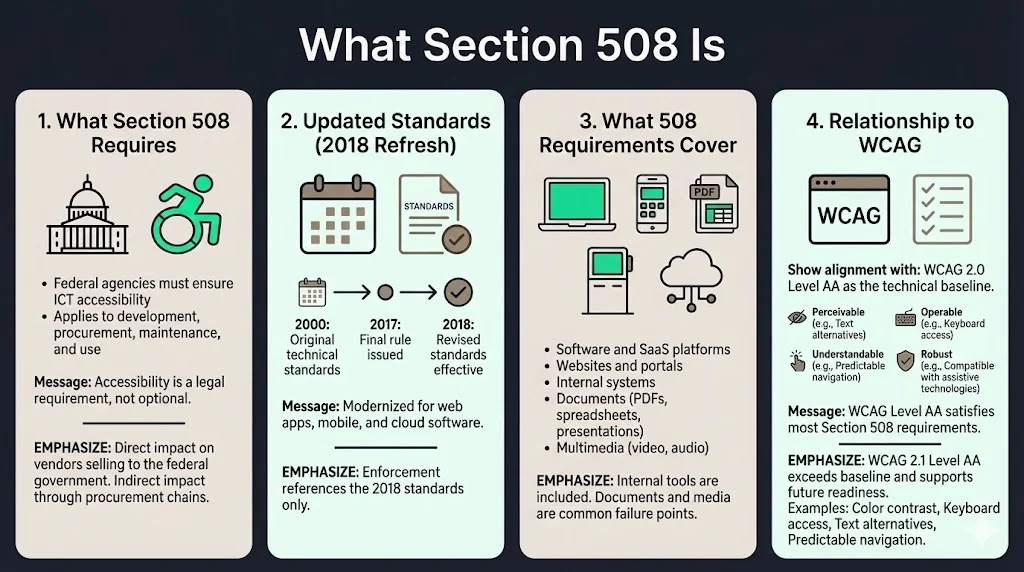
Section 508 of the Rehabilitation Act requires federal agencies to ensure accessibility for people with disabilities when they develop, procure, maintain, or use information and communication technology. The Section 508 Standards, which are part of the Federal Acquisition Regulation, ensure access for people with physical, sensory, or cognitive disabilities. This establishes a legal framework that governs how federal agencies make purchasing decisions—creating direct compliance obligations for any vendor seeking federal contracts and indirect requirements for companies in procurement chains serving government customers.
On January 18, 2017, the Access Board issued a final rule that updated accessibility requirements covered by Section 508, updating and reorganizing the standards in response to market trends and innovations in technology. The revised standards became effective January 18, 2018, replacing technical specifications created in 2000 that predated modern web applications, mobile platforms, and cloud-based software. Organizations relying on outdated guidance face audit failures because current enforcement references the 2018 standards exclusively.
What "508 Requirements" Cover
Section 508 examples include computers, telecommunications equipment, multifunction office machines such as copiers that also operate as printers, software, websites, information kiosks and transaction machines, and electronic documents. This scope extends beyond public-facing websites to encompass internal systems, customer portals, administrative tools, mobile applications, and any digital interface used by federal employees or citizens accessing government services. Software-as-a-Service platforms present particular complexity because accessibility obligations extend to configuration interfaces, administrative dashboards, API documentation, and customer support systems—not merely end-user features.
Documents represent a frequently overlooked compliance area. PDFs, presentations, spreadsheets, knowledge base articles, help documentation, and training materials all fall within Section 508 scope when used in government contexts. Organizations that maintain accessible web applications while distributing inaccessible PDF contracts, product guides, or technical specifications remain non-compliant. Multimedia content including video, audio, and interactive elements requires captions, transcripts, audio descriptions, and keyboard-accessible controls. Internal systems used exclusively by federal employees carry identical obligations to public-facing applications—a distinction that surprises vendors who assume only customer-facing interfaces require accessibility.
Relationship to WCAG
The refresh harmonized Section 508 requirements with other guidelines and standards both in the U.S. and abroad, including standards issued by the European Commission, and with the World Wide Web Consortium (W3C) Web Content Accessibility Guidelines (WCAG 2.0), a globally recognized voluntary consensus standard for web content and ICT. This alignment means organizations meeting WCAG 2.0 Level AA standards substantially satisfy Section 508 technical requirements for web content. WCAG establishes specific success criteria across four principles: perceivable, operable, understandable, and robust. Level AA represents the middle tier of conformance—stricter than Level A minimum requirements but less stringent than Level AAA, which addresses specialized accessibility needs.
For product teams and designers, WCAG 2.0 Level AA functions as the implementation benchmark. This includes ensuring sufficient color contrast (4.5:1 ratio for normal text), providing text alternatives for non-text content, ensuring full keyboard operability without time-dependent navigation, and creating consistent, predictable interfaces. Organizations building to WCAG 2.1 Level AA standards exceed Section 508 baseline requirements while addressing mobile accessibility and cognitive disabilities more comprehensively. This approach future-proofs compliance efforts as regulatory standards continue converging toward WCAG 2.1 and the forthcoming WCAG 2.2 specifications.
Building toward SOC 2, ISO 27001, or another framework?
Drop your work email and we'll help you turn security work into audit-ready evidence automatically.
Who Must Comply With Section 508
1) Federal Agencies and Public Sector Bodies
When federal agencies buy, build, maintain, or use Information and Communication Technology (ICT), Section 508 of the Rehabilitation Act of 1973 requires that agencies must provide people with disabilities access to information comparable to the access available to others—applying to both federal employees and members of the public. This creates direct legal obligations for every federal department, agency, and office. Compliance failures expose agencies to complaints filed with their Section 508 coordinator, investigations by the Access Board, and potential lawsuits under the Rehabilitation Act. Federal procurement officers bear responsibility for ensuring purchased technology meets accessibility standards before contract execution.
2) Private Companies and Vendors
Section 508 of the Rehabilitation Act applies to federal departments and the contractors providing support on behalf of such federal departments, requiring contractors to provide Section 508 compliant systems and components of ICT when federal agencies develop, procure, maintain, or use ICT. Private businesses enter Section 508 compliance obligations through contractual relationships with federal agencies. Software vendors, IT services providers, consulting firms, systems integrators, and technology manufacturers selling to government customers must deliver products and services meeting Section 508 standards. This extends beyond prime contractors to subcontractors and suppliers in procurement chains—a SaaS platform embedded in a larger government system carries identical accessibility requirements regardless of contractual tier.
Federal contracts explicitly incorporate accessibility requirements into terms and conditions. Contractors shall ensure that systems and components allow federal employees and members of the public with disabilities access to, and use of, information and data that is comparable to access afforded those without disabilities, with products, platforms, and services delivered conforming to the Revised Section 508 Standards located at 36 CFR part 1194. Non-compliance constitutes breach of contract, exposing vendors to remediation costs, contract termination, and exclusion from future procurement opportunities.
3) Why Enterprise Buyers Care
Enterprise clients increasingly embed Section 508 requirements into vendor contracts even when not selling directly to government agencies. This stems from three converging factors: enterprise buyers often serve government clients themselves and pass accessibility obligations downstream; corporate accessibility policies mandate WCAG 2.0 Level AA compliance across vendor ecosystems; and legal departments seek to limit organizational liability by requiring vendors to warrant accessibility conformance. Large enterprises conducting vendor risk assessments now routinely request accessibility documentation during procurement, treating Section 508 conformance as a risk mitigation requirement rather than a government-specific regulation.
Accessibility clauses in enterprise contracts typically require vendors to maintain Section 508 compliance throughout the contract term, provide updated conformance documentation upon request, immediately identify accessibility issues within specified timeframes, and indemnify the enterprise client against accessibility-related claims. Organizations lacking documented accessibility programs face contract exclusions during initial vendor selection regardless of technical capabilities or competitive pricing. This transforms Section 508 from a government regulation into a broader enterprise procurement standard affecting market access across industries.
How Section 508 Impacts Businesses Selling to Enterprise Clients
1) Sales and Procurement Impact
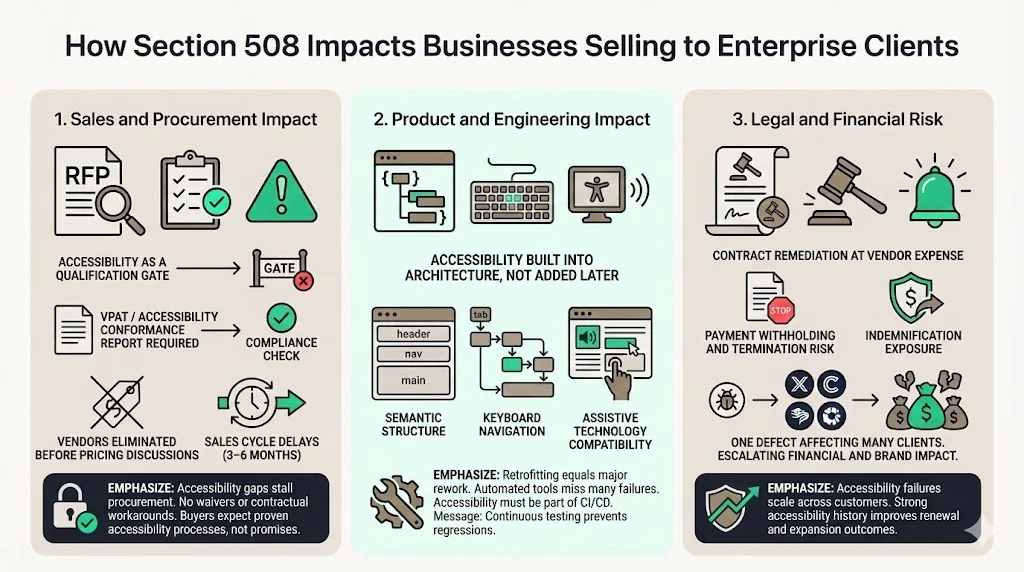
Accessibility functions as a qualification threshold in federal procurement and increasingly in enterprise RFPs. Procurement documents include accessibility requirements in technical specifications, require vendors to submit Voluntary Product Accessibility Templates (VPATs) or Accessibility Conformance Reports alongside proposals, and eliminate vendors from consideration when accessibility documentation is incomplete or demonstrates significant non-conformance. Organizations discover too late that accessibility gaps identified during procurement cannot be addressed through price concessions, feature additions, or contractual workarounds—federal procurement officers lack discretion to waive statutory accessibility requirements.
Sales cycles extend by 3-6 months when accessibility issues surface during procurement. Engineering teams must conduct accessibility audits, remediate identified failures, retest for conformance, and produce updated documentation before procurement can advance. During remediation periods, competitors with existing accessibility programs capture market opportunities. Organizations treating accessibility as a late-stage compliance exercise sacrifice first-mover advantages and revenue predictability. Enterprise buyers assessing government compliance expect vendors to demonstrate accessibility maturity through established testing protocols, documented remediation workflows, and evidence of continuous monitoring—not promises of future compliance.
2) Product and Engineering Impact
Building for Section 508 compliance requires design decisions integrated into product architecture rather than accessibility features added post-development. Accessible web design begins with semantic HTML structure, proper heading hierarchies, landmark regions, and meaningful link text. These foundational elements enable assistive technology users to navigate efficiently, understand page structure, and access functionality without visual reference. Retrofitting accessibility into applications built without semantic structure requires refactoring core components—work equivalent to rebuilding navigation systems, form controls, and interactive elements.
Assistive technology compatibility demands ongoing engineering attention. Screen readers, voice input tools, screen magnification software, and alternative input devices interpret applications through accessibility APIs. Features that appear functional in visual testing frequently fail when accessed through assistive technology due to missing ARIA labels, improper focus management, insufficient keyboard support, or dynamic content that doesn't announce changes. Engineering teams require accessibility expertise to identify these gaps—visual inspection and automated testing tools miss the majority of accessibility failures that block disabled users.
Ongoing maintenance distinguishes genuine accessibility from performative compliance. Web applications undergo continuous updates introducing new features, redesigned interfaces, and modified workflows. Each change creates accessibility regression risk. Organizations lacking accessibility integration in development workflows inadvertently introduce failures through routine updates—a previously accessible checkout flow becomes keyboard-inaccessible after a payment processing update, or a dashboard redesign eliminates screen reader support. Accessibility requires continuous testing integrated into CI/CD pipelines, not annual audits conducted before procurement events.
3) Legal and Financial Risk
Federal contractors face legal exposure through multiple channels. Compliance with Section 508 standards is mandatory for federal agencies. Contract non-compliance enables agencies to demand remediation at contractor expense, withhold payment pending accessibility corrections, terminate contracts for material breach, and pursue damages for deployment delays. Organizations delivering non-compliant systems face costs exceeding original contract value when forced to rebuild applications under compressed timelines while facing potential contract termination. Federal contractors may also face suspension or debarment from future federal procurement opportunities following significant compliance failures.
Contractual penalties extend beyond remediation costs. Enterprise contracts incorporating accessibility warranties expose vendors to indemnification obligations when clients face accessibility complaints or lawsuits. An enterprise client sued over inaccessible vendor software can seek indemnification under contract terms, transferring legal defense costs and potential damages to the vendor. These risks compound when accessibility failures affect multiple enterprise clients—a single architectural accessibility flaw can trigger indemnification claims across a vendor's customer base. Brand trust issues with large buyers create additional financial impact. Enterprise clients evaluating vendors for expanded deployment or renewed contracts prioritize vendors demonstrating accessibility maturity. Organizations with accessibility compliance histories gain preferential consideration; those with documented failures face heightened scrutiny or elimination from consideration.
Core Accessibility Standards Within 508 Requirements
1) Usability for Disabled Users
Keyboard access represents the foundational accessibility requirement. All functionality must be operable through keyboard alone without requiring specific timings for individual keystrokes. This enables users who cannot operate pointing devices to navigate interfaces, activate controls, submit forms, and access all features available to mouse users. Proper keyboard support includes visible focus indicators showing current keyboard position, logical tab order following visual layout, and keyboard shortcuts for frequently used actions. Applications trapping keyboard focus within modal dialogs without providing escape mechanisms or creating keyboard navigation loops that prevent progression violate fundamental accessibility requirements.
Screen reader support requires applications to expose interface structure, content, and state changes through accessibility APIs. Screen reader users rely on semantic markup to understand page structure, navigate between sections, and locate specific content efficiently. Properly labeled form controls, descriptive button text, meaningful link text, and appropriate heading levels enable screen reader users to complete tasks without sighted assistance. Dynamic content updates must announce changes through ARIA live regions—otherwise screen reader users remain unaware of loading indicators, error messages, success confirmations, or content modifications triggered by their actions. Color contrast and text readability ensure users with low vision, color blindness, or age-related vision changes can perceive text content. WCAG 2.0 Level AA requires a 4.5:1 contrast ratio for normal text and 3:1 for large text measured against background colors. Interfaces relying exclusively on color to convey information—red text indicating required fields, color-coded status indicators, or color-distinguished chart elements—fail accessibility requirements when color remains the sole differentiator.
2) Digital Content Accessibility
Accessible documents require structured markup, alternative text for images, properly tagged tables, and logical reading order. PDF documents generated from word processors without accessibility features produce files that screen readers cannot navigate meaningfully. Users encounter undifferentiated text blocks lacking headings, tables without header associations, images without descriptions, and reading orders that don't match visual layout. Organizations distributing contracts, technical specifications, user guides, and marketing materials as inaccessible PDFs remain non-compliant regardless of website accessibility. Creating accessible PDFs requires using structured authoring tools, adding alternative text and descriptions, tagging document structure properly, and testing with screen readers before distribution.
Captioning and transcripts for media ensure deaf and hard-of-hearing users access audio content. Video content requires synchronized captions describing spoken dialogue, speaker identification, and relevant sound effects. Pre-recorded video requires descriptive audio or text descriptions conveying visual information essential to understanding content. Podcasts, recorded webinars, instructional videos, and product demonstrations all require transcripts providing complete text equivalents. Auto-generated captions require editing for accuracy—machine-generated captions frequently contain errors rendering technical terminology incomprehensible. Organizations publishing multimedia content without captions and transcripts exclude disabled users from accessing information regardless of website accessibility.
Consistent navigation and structure enable users to learn interface patterns and predict element locations. Navigation menus maintaining consistent position and organization across pages allow users to locate functions without re-learning each page. Consistent labeling for repeated elements—search buttons, navigation links, form controls—reduces cognitive load and supports users with cognitive disabilities. Unpredictable interface behaviors such as automatic page redirects, focus changes triggered without user action, or context changes triggered by form input violate accessibility requirements by disorienting users and disrupting assistive technology functionality.
3) Assistive Technology Compatibility
Screen readers including JAWS, NVDA, VoiceOver, and TalkBack represent the primary assistive technology category for blind and low-vision users. These applications read interface elements aloud, provide navigation shortcuts, and convey page structure through audio feedback. Screen reader compatibility requires semantic HTML, proper ARIA implementation, logical focus management, and comprehensive keyboard support. Organizations testing exclusively with JAWS on Windows miss compatibility issues affecting NVDA, VoiceOver on Mac and iOS, TalkBack on Android, and emerging screen readers. Comprehensive testing covers multiple screen readers across platforms since compatibility varies significantly.
Voice input tools including Dragon NaturallySpeaking and voice control features in operating systems enable users with motor disabilities to navigate interfaces and enter content through speech commands. Voice input compatibility requires visible, descriptive labels for interactive elements enabling users to issue commands like "click submit button" or "click download PDF." Unlabeled icon buttons, generic labels like "click here," and interactive elements lacking accessible names prevent voice input users from activating controls. Form controls require associated visible labels rather than placeholder text—voice input users cannot target controls when labels disappear on focus.
Refreshable Braille displays provide tactile output for deaf-blind users who cannot access visual or audio interfaces. These hardware devices connect to screen readers and render on-screen content in Braille. Braille display compatibility requires the same technical implementation as screen reader support—semantic markup, descriptive labels, logical structure, and proper ARIA usage. Organizations testing with screen readers substantially validate Braille display compatibility, though testing with actual Braille displays during audits confirms compatibility with this specialized assistive technology category.
Section 508 Compliance Guidelines for Businesses
1) Design and UX Guidelines
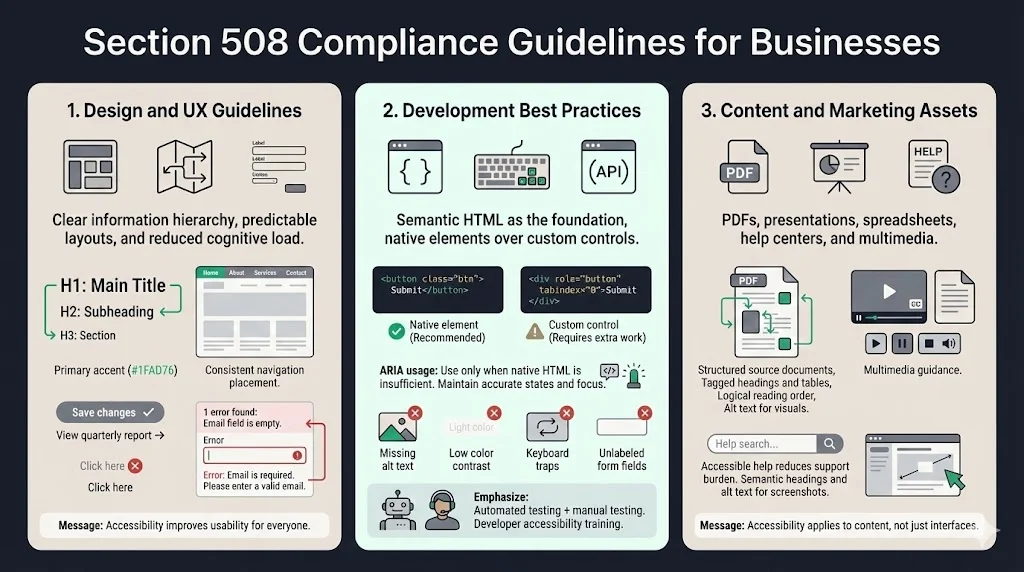
Accessible layouts and navigation prioritize clarity over visual complexity. Information hierarchies communicated through heading structure enable screen reader users to navigate efficiently between sections. Visual hierarchy reinforced through proper HTML heading tags (H1, H2, H3) creates navigation landmarks rather than relying exclusively on font size and styling. Consistent page layouts with predictable element positioning reduce cognitive load for all users while particularly benefiting users with cognitive disabilities who struggle with unpredictable interfaces. Navigation mechanisms maintaining consistent position and organization across pages allow users to develop mental models of site structure.
Clear headings and labels reduce ambiguity and support multiple user groups. Form labels explicitly describing required information enable screen reader users to complete forms without visual reference while reducing errors for all users. Button labels describing actions ("Save changes," "Delete account") prove more accessible than generic labels ("OK," "Submit"). Link text describing destination content ("View quarterly financial report") provides more information than generic phrases ("Click here," "Read more"). Descriptive headings summarizing section content enable users to determine relevance without reading complete sections.
Error handling that supports all users requires clear identification of errors, specific descriptions of problems, and actionable suggestions for correction. Error messages appearing only through visual styling—red border around invalid form fields—fail to reach screen reader users. Effective error handling moves focus to error summaries, provides text descriptions of each error, associates error messages with specific form fields, and offers correction suggestions. Preventing errors through clear instructions, input format examples, and confirmation steps for destructive actions reduces frustration across user populations while proving essential for users with cognitive disabilities who may struggle to diagnose and correct errors.
2) Development Best Practices
Semantic HTML provides the foundation for accessibility. Using HTML elements according to their semantic meaning—<button> for buttons, <a> for links, <nav> for navigation, <main> for primary content—enables assistive technology to interpret interface structure and functionality correctly. Developers creating button functionality through <div> elements with click handlers produce interfaces that appear functional visually but lack keyboard support, focus management, and assistive technology compatibility. Semantic HTML provides these features automatically while custom implementations require extensive JavaScript and ARIA to replicate built-in functionality.
ARIA usage supplements semantic HTML when native elements prove insufficient for complex interfaces. ARIA attributes communicate roles, states, and properties to assistive technology—identifying custom widgets, indicating expanded/collapsed states, marking required form fields, and announcing dynamic content changes. Improper ARIA usage creates more accessibility problems than omitting ARIA entirely. Common ARIA mistakes include overriding semantic HTML with incorrect roles, failing to maintain state attributes as interfaces change, creating keyboard traps through improper focus management, and using ARIA labels that conflict with visible text. ARIA requires careful implementation following established patterns documented in the ARIA Authoring Practices Guide.
Avoiding common accessibility failures prevents the majority of Section 508 violations. Missing alternative text for informative images, insufficient color contrast, keyboard-inaccessible interactive elements, forms with unlabeled controls, and dynamic content failing to announce changes represent failures appearing across organizations. Automated testing tools identify many common failures, though manual testing remains essential for confirming actual accessibility. Development teams require accessibility training covering semantic HTML, ARIA implementation, keyboard interaction patterns, and testing methodology to avoid introducing accessibility failures during routine development.
3) Content and Marketing Assets
PDFs, slide decks, and knowledge bases require accessibility consideration equal to web applications. PDF accessibility requires creating structured source documents in word processors or design tools, adding alternative text to images and charts, tagging complex tables with header associations, ensuring logical reading order, and validating accessibility using PDF accessibility checkers before distribution. Slide presentations require descriptive slide titles, alternative text for graphics, sufficient color contrast, and meaningful text rather than relying on visual design to convey information. Organizations distributing thousands of PDF documents accumulated over years face substantial remediation efforts when accessibility requirements surface during procurement.
Product documentation and help centers represent high-value accessibility targets. Users with disabilities encounter accessibility questions, configuration issues, and troubleshooting needs equivalent to other users. Help documentation that remains inaccessible prevents disabled users from self-service support, increasing support costs while degrading user experience. Accessible documentation requires semantic heading structure enabling navigation between topics, alternative text for screenshots and diagrams, code examples with proper semantic markup, and video tutorials with captions and transcripts. Knowledge bases built on modern content management systems can implement accessibility systematically, while legacy documentation systems may require migration to accessible platforms.
How Section 508 Compliance Is Tested
1) Automated Testing
Automated accessibility testing tools identify approximately 30-40% of WCAG 2.0 Level AA failures. Tools detect missing alternative text, insufficient color contrast, empty links and buttons, duplicate IDs, missing form labels, and improper heading hierarchies. These checks execute quickly, integrate into development workflows, and provide immediate feedback on common failures. Popular automated testing tools include Axe, WAVE, Lighthouse, and Pa11y. Development teams can integrate automated accessibility testing into continuous integration pipelines, catching regressions before deployment.
Automated tools miss critical accessibility failures requiring human judgment. Tools cannot evaluate whether alternative text meaningfully describes image content, whether page structure creates logical navigation, whether keyboard focus order matches visual layout, or whether dynamic content changes are announced appropriately. An automated tool confirms alternative text exists but cannot determine whether "image.jpg" provides meaningful description compared to "bar chart showing Q4 revenue increased 23% compared to Q3." Organizations relying exclusively on automated testing produce false confidence in accessibility conformance while significant failures remain undetected.
2) Manual Reviews
Keyboard testing validates that all functionality operates through keyboard alone. Testers navigate interfaces using Tab, Shift+Tab, Enter, Space, Arrow keys, and Escape without touching pointing devices. This reveals keyboard traps where focus becomes stuck, interactive elements lacking keyboard support, invisible focus indicators, illogical tab order, and functionality requiring mouse interaction. Comprehensive keyboard testing covers all user workflows including form completion, navigation menu operation, modal dialog interaction, custom widget operation, and dynamic content manipulation. Keyboard testing identifies failures automation cannot detect and proves essential for Section 508 conformance.
Screen reader checks confirm that assistive technology users can access equivalent information and functionality. Testers navigate interfaces using actual screen readers—JAWS, NVDA, VoiceOver, TalkBack—to experience applications as blind users would. This reveals unlabeled interactive elements, improper heading structures that prevent efficient navigation, tables without proper markup, dynamic content failing to announce, and visual information conveyed without text equivalents. Screen reader testing requires expertise with assistive technology operation—superficial testing by users unfamiliar with screen readers misses problems experienced users would immediately identify. Organizations conducting accessibility testing should include disabled users with assistive technology expertise or employ accessibility specialists experienced in screen reader operation.
Visual and interaction review examines color contrast, text sizing, layout at high zoom levels, error identification, and clarity of instructions. Testers use contrast analyzers to measure text against backgrounds, zoom interfaces to 200% to verify layout remains functional, attempt to complete tasks using color-blind simulation tools, and evaluate whether error messages provide sufficient information for correction. Visual review identifies failures automation partially detects but requires human judgment to evaluate comprehensively.
3) Conformance Testing and Reporting
VPATs and accessibility conformance reports document product accessibility against Section 508 standards or WCAG 2.0/2.1 Level AA success criteria. The Voluntary Product Accessibility Template (VPAT) provides a standardized format for reporting conformance levels across technical requirements. VPATs rate each requirement as Supports (fully conformant), Partially Supports (some conformance issues exist), Does Not Support (significant failures), or Not Applicable. Organizations provide explanatory remarks detailing conformance status, identifying known issues, and describing planned remediation.
Enterprise buyers expect to see VPATs during procurement evaluation. A VPAT claiming full conformance while manual testing reveals significant failures damages vendor credibility and may constitute contract misrepresentation. Accurate VPATs acknowledge known limitations while demonstrating substantial conformance and commitment to ongoing improvement. Organizations should update VPATs following major releases, as accessibility status changes, and when buyers request current documentation. Outdated VPATs referencing product versions from multiple releases prior lack credibility during procurement.
Keeping reports up to date requires integrating accessibility testing into release cycles. Organizations conducting annual accessibility audits before procurement events cannot maintain accurate conformance documentation as products evolve. Continuous accessibility testing integrated into development workflows enables organizations to identify regressions immediately, maintain current understanding of accessibility status, and update conformance documentation efficiently. This approach transforms accessibility from an annual compliance event into an ongoing operational discipline producing accurate conformance documentation as a natural outcome.
Building a Section 508 Compliance Strategy
1) Assessing Current Risk
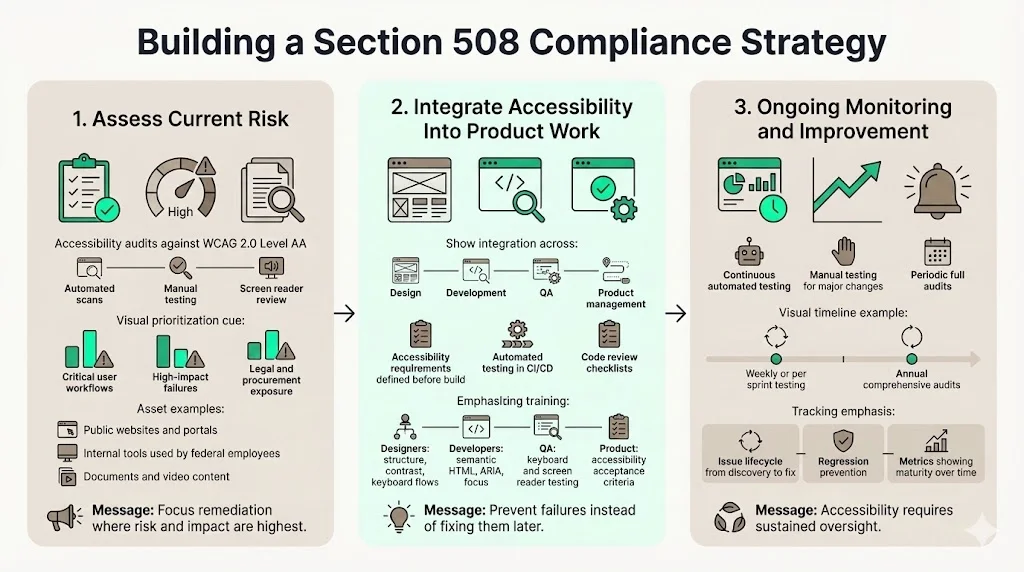
Accessibility audits establish baseline conformance and identify remediation priorities. Comprehensive audits evaluate representative pages and workflows against WCAG 2.0 Level AA success criteria through automated scanning, manual testing, keyboard evaluation, and screen reader review. Audit reports document identified failures, assess severity based on impact to disabled users, and estimate remediation effort. Organizations discovering hundreds of accessibility failures during initial audits should prioritize issues blocking critical user workflows, failures affecting the largest user populations, and violations creating legal exposure.
Identifying high-risk areas focuses remediation resources on maximum impact. Public-facing websites, customer portals, and procurement-critical workflows represent high-priority remediation targets. Internal tools used by federal employees carry equal Section 508 obligations but may receive lower prioritization when resources constrain simultaneous remediation. Document libraries containing contracts, technical specifications, and customer-facing materials require accessibility remediation before distribution to government clients. Video content lacking captions requires remediation before use in government contexts. Organizations should inventory ICT assets subject to Section 508 requirements and prioritize remediation based on government sales exposure, user impact, and remediation complexity.
2) Integrating Accessibility Into Product Work
Design, development, and QA workflows require accessibility integration to prevent introducing failures during routine product work. Design processes should incorporate accessibility requirements into wireframes and mockups—specifying heading structure, keyboard interaction patterns, focus management, and ARIA requirements before development begins. Development workflows should include accessibility linting, automated testing in CI/CD pipelines, and code review checklists covering semantic HTML and ARIA usage. QA workflows should incorporate keyboard testing, screen reader verification, and contrast checking for all new features and significant updates.
Training teams on accessibility standards transforms accessibility from specialized knowledge held by a few experts into shared competency across product teams. Designers require training on accessible design patterns, color contrast requirements, and designing for keyboard navigation. Developers require training on semantic HTML, ARIA implementation, focus management, and accessibility testing tools. QA professionals require training on manual accessibility testing including keyboard testing and screen reader operation. Product managers require training on accessibility requirements in user stories and acceptance criteria. Organizations investing in accessibility training reduce the need for external audits identifying failures internal teams should have prevented.
3) Ongoing Monitoring
Regular testing maintains accessibility as products evolve. Organizations should establish testing frequencies based on release cadence—weekly for continuous deployment environments, per sprint for agile teams, and per release for traditional release cycles. Automated testing integrated into deployment pipelines catches regressions immediately. Manual testing for significant feature additions and interface redesigns validates that new functionality meets accessibility requirements. Annual comprehensive audits establish conformance baselines and identify systematic issues requiring architectural changes.
Tracking changes and regressions requires tooling that monitors accessibility over time. Accessibility management platforms track issues from identification through remediation, prevent regression of previously fixed issues, and provide metrics demonstrating accessibility program maturity. Organizations lacking accessibility tracking struggle to demonstrate continuous improvement during procurement evaluations. Tracking also identifies teams or product areas repeatedly introducing accessibility failures, enabling targeted training and process improvements.
Common Mistakes Businesses Make With 508 Requirements
Treating accessibility as a checkbox exercise produces superficial conformance failing under scrutiny. Organizations conducting accessibility audits immediately before government procurement without implementing continuous accessibility practices produce audit reports documenting current state while lacking processes preventing immediate regression. Buyers recognize performative accessibility—vendors cannot demonstrate accessibility maturity through documentation alone without corresponding processes, training, and organizational commitment. Accessibility programs must extend beyond audit-and-remediate cycles to encompass design standards, development practices, testing protocols, and ongoing monitoring.
Relying only on overlays or automation creates compliance theater while leaving fundamental accessibility problems unaddressed. Browser overlays claiming to make websites accessible through JavaScript modifications provide limited benefit to disabled users while creating new problems—additional interface complexity, conflicts with existing assistive technology, and privacy concerns from tracking user interactions. Automated testing tools identify only a fraction of accessibility failures. Organizations claiming Section 508 compliance based exclusively on overlay deployment and automated scanning face significant conformance gaps when buyers conduct manual testing or engage disabled users for evaluation.
Ignoring documents and internal tools represents a common oversight. Organizations investing substantial resources in website accessibility while distributing inaccessible PDF contracts, product specifications, and user documentation remain non-compliant in government contexts. Internal tools used by federal employees—administrative interfaces, configuration dashboards, reporting systems—carry identical Section 508 obligations as public-facing applications. Vendors cannot exclude internal tools from accessibility scope when those tools will be used by federal employees with disabilities. Comprehensive Section 508 compliance encompasses all ICT delivered to or used by federal agencies regardless of intended user population.
Waiting until procurement raises the issue creates compressed timelines and lost opportunities. Retrofitting accessibility into products built without accessibility consideration requires substantial engineering effort equivalent to rebuilding core features. Organizations discovering accessibility requirements during active procurement negotiations cannot remediate significant failures within procurement timelines, resulting in eliminated bids or extended sales cycles while competitors with existing accessibility programs capture opportunities. Proactive accessibility implementation during product development proves dramatically more efficient than reactive remediation under procurement pressure.
Benefits of Meeting Section 508 Requirements
Faster enterprise procurement cycles result from having accessibility documentation prepared before buyers request it. Organizations maintaining current VPATs, conducting regular accessibility testing, and demonstrating accessibility program maturity progress through procurement evaluation efficiently. Buyers confident in vendor accessibility conformance eliminate this evaluation dimension, enabling procurement to focus on technical capabilities, pricing, and implementation planning. Vendors providing incomplete or outdated accessibility documentation extend procurement by 4-8 weeks while buyers wait for updated conformance reports or conduct their own accessibility evaluations.
Stronger trust with large clients emerges from demonstrated accessibility commitment. Enterprise buyers evaluating vendors for expanded deployment or long-term partnerships prioritize vendors showing operational maturity across dimensions including security, compliance, and accessibility. Organizations treating accessibility as an afterthought signal broader operational immaturity—if accessibility receives inadequate attention, what other critical requirements does the vendor overlook? Vendors demonstrating accessibility program maturity through documented processes, trained teams, and continuous monitoring build trust extending beyond accessibility to encompass overall operational excellence.
Better usability for all users represents a tangible product benefit beyond compliance. Accessible interfaces with clear navigation, logical structure, descriptive labels, and robust keyboard support improve usability for users without disabilities. Captions benefit users in sound-sensitive environments, users whose first language differs from audio language, and users preferring to read rather than watch video. Clear error messages reduce frustration universally. Sufficient color contrast improves readability for users in bright environments or using lower-quality displays. Accessibility improvements systematically enhance overall user experience rather than benefiting only disabled users.
Reduced legal exposure protects organizations from accessibility lawsuits and contract disputes. Federal contractors delivering non-compliant systems face contract termination and potential legal action. Organizations delivering vendor software to enterprise clients face indemnification claims when accessibility failures generate complaints or lawsuits. Companies with public-facing websites face increasing litigation under the Americans with Disabilities Act. Systematic accessibility programs reduce exposure across these legal theories while demonstrating good-faith compliance efforts that influence legal outcomes when disputes occur.
Clear the security half of the procurement review too
Book a demo and we'll show how Konfirmity keeps the security questionnaires and SOC 2 or ISO 27001 evidence that sit beside your accessibility conformance report ready before an RFP lands.
Book a demo
Conclusion
Section 508 requirements function as a market access prerequisite for organizations selling to federal agencies and increasingly to enterprise clients embedding accessibility standards in procurement. Organizations treating accessibility as an annual compliance exercise before government bids discover that retrofitting accessibility into products built without accessibility consideration produces costs, timeline delays, and capability limitations equivalent to rebuilding applications. The Revised Section 508 Standards contain scoping and technical requirements for ICT to ensure accessibility and usability by individuals with disabilities, with compliance mandatory for federal agencies. These mandatory standards extend to contractors and vendors through federal procurement regulations and increasingly to broader markets through enterprise procurement policies.
Accessibility functions as a sales enabler for organizations implementing accessibility proactively rather than reactively. Vendors maintaining current accessibility conformance documentation, demonstrating accessibility program maturity, and building products meeting WCAG 2.0 Level AA standards progress through procurement efficiently while competitors scramble to produce documentation and remediate failures. Enterprise buyers recognize operational maturity through accessibility programs encompassing design standards, development practices, testing protocols, and continuous monitoring—not through audit reports alone. Organizations viewing accessibility as a competitive differentiator rather than a compliance burden capture market opportunities while building products serving broader user populations more effectively.
The cost of delay exceeds the investment in early action by orders of magnitude. Building accessibility into products from inception through semantic HTML, accessible design patterns, and integrated testing requires marginally more effort than building inaccessible products—perhaps 10-15% additional development time for teams trained in accessibility. Retrofitting accessibility into products built without accessibility consideration requires rebuilding navigation systems, remediating thousands of pages of content, refactoring interactive components, and addressing architectural decisions that fundamentally conflict with accessibility requirements. Organizations deferring accessibility until procurement pressure creates urgency face remediation costs 5-10 times the investment required for proactive accessibility implementation.
Section 508 Requirements FAQ
Section 508 requirements are the accessibility rules that apply to information and communication technology (ICT) developed, procured, maintained, or used by federal agencies — computers, telecommunications equipment, software, websites, information kiosks, transaction machines, and electronic documents. The Revised Section 508 Standards set out both scoping and technical requirements so that ICT is accessible to and usable by people with disabilities.
Yes, indirectly but unavoidably. The mandate binds federal agencies, and it reaches private companies through federal procurement regulations whenever they sell ICT to those agencies. Enterprise buyers increasingly embed the same standards in vendor contracts, so accessibility conformance has become a procurement gatekeeper well outside the public sector.
WCAG is the technical specification; Section 508 is the legal obligation that points at it. Section 508 conformance is assessed against WCAG 2.0 Level AA success criteria, so the testing work is WCAG work. The difference is scope and consequence: Section 508 also covers hardware, electronic documents, and support documentation delivered to a federal agency, and non-conformance carries contractual rather than purely technical consequences.
Compliance is documented in a conformance report — commonly a VPAT — and established through a combination of automated testing, manual review, and assistive-technology testing. Automated tools integrated into deployment pipelines catch regressions immediately but identify only a fraction of accessibility failures; manual review and testing with screen readers and keyboard-only navigation cover the rest. Annual comprehensive audits establish a conformance baseline and surface systematic issues requiring architectural change.
Non-conformance usually costs the deal before it costs anything else. Vendors without current conformance documentation cannot participate in RFP processes regardless of product strength, and incomplete or outdated documentation extends procurement by 4-8 weeks while buyers wait for updated reports or run their own evaluations. Federal contractors delivering non-compliant systems also face contract termination and potential legal action, and vendors selling into enterprises face indemnification claims when accessibility failures generate complaints.

