

Most enterprise software deals encounter the same critical decision point: where will the system actually run? When enterprise buyers specify "on-premise deployment," they're making a fundamental architectural choice about control, infrastructure ownership, and operational responsibility—a choice that directly impacts vendor proposals, implementation timelines, and total cost of ownership calculations. Understanding what "on-premise" actually means requires moving beyond simple definitions to examine the technical, operational, and strategic implications of hosting software within an organization's controlled environment rather than in public cloud infrastructure.
This terminology matters because deployment architecture shapes everything from licensing models to security posture to compliance attestations. An enterprise requesting on-premise deployment isn't simply expressing a preference—they're signaling specific requirements around data sovereignty, network control, regulatory constraints, or integration with existing internal systems.
What Does "On-Premise" Mean?
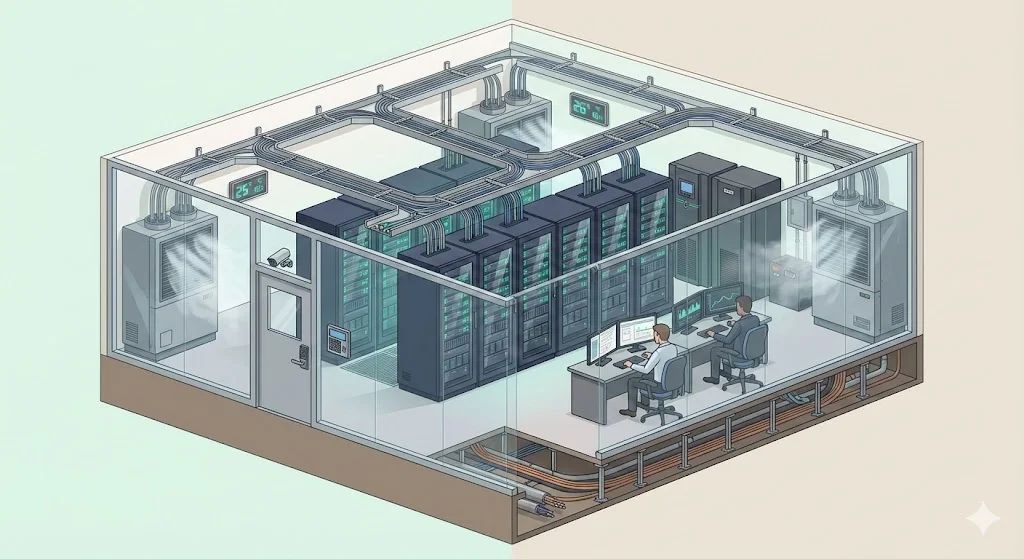
On-premise (also written as "on-premises" or abbreviated "on-prem") refers to hosting software applications, data storage, network infrastructure, and computing resources within an organization's own controlled environment rather than in third-party cloud infrastructure. This means the enterprise owns, operates, or directly controls the physical hardware, network equipment, and software stack running their systems.
The critical distinction centers on control and management responsibility. On-premise deployments place the burden of infrastructure provision, security implementation, maintenance, and capacity planning on the enterprise's internal IT resources. The organization makes capital investments in physical servers, storage systems, network hardware, and facility requirements (power, cooling, physical security), then manages these assets throughout their operational lifecycle.
Nuance in Modern Contexts
On-premise doesn't necessarily mean hardware physically located in corporate office buildings. An enterprise may lease space in a third-party colocation facility or managed data center while maintaining complete control over their own hardware, software configuration, and operational management. If the organization owns or controls the servers, manages the operating systems and applications, and determines network access policies—even in a rented facility—this qualifies as on-premise deployment. The defining characteristic is operational control, not physical location within company-owned buildings.
Building toward SOC 2, ISO 27001, or another framework?
Drop your work email and we'll help you turn security work into audit-ready evidence automatically.
Related Terms and Distinctions
1) On-Site Hosting
On-site hosting typically refers to infrastructure physically located within an organization's facilities—corporate headquarters, regional offices, or company-owned data centers. While closely related to on-premise, on-site specifically emphasizes physical location rather than operational control. An organization might have on-site servers for some workloads while maintaining on-premise infrastructure in colocation facilities for others.
2) Local Infrastructure
Local infrastructure describes computing and networking resources deployed within an organization's operational environment rather than accessed through public internet connections to external providers. This encompasses physical servers, storage arrays, network switches, firewalls, and other hardware components under direct enterprise management. Local infrastructure forms the foundation of on-premise deployments.
3) Internal Deployment
Internal deployment refers to installing and configuring software applications within an enterprise's own computing environment rather than accessing vendor-hosted services. Internal deployment models require the organization to manage application lifecycle activities: installation, configuration, patching, version upgrades, and integration with existing systems using internal IT resources.
4) Self-Managed Hardware
Self-managed hardware means the enterprise assumes complete responsibility for physical infrastructure: procurement, installation, configuration, monitoring, maintenance, repair, and eventual replacement. Unlike managed service models where providers handle infrastructure operations, self-managed deployments require dedicated internal staff with expertise in systems administration, network engineering, and hardware lifecycle management.
5) Private Network
A private network provides controlled connectivity isolated from public internet traffic. On-premise deployments typically operate on private networks where the enterprise determines access policies, implements segmentation controls, and manages all network traffic flows. This network isolation supports stricter security requirements and enables organizations to implement custom network architectures aligned with specific operational or compliance needs.
6) Corporate Environment
Corporate environment describes the complete technology ecosystem within an enterprise: servers, workstations, network infrastructure, security controls, and operational policies. On-premise deployments integrate directly into this environment, requiring compatibility with existing systems, adherence to enterprise security standards, and coordination with internal IT resources managing the broader technology landscape.
7) Physical Servers and Local Data Storage
Physical servers are dedicated hardware systems running operating systems and applications under direct enterprise control. Local data storage refers to databases, file systems, and storage arrays physically residing within enterprise-controlled facilities or data centers. Together, these components form the hardware foundation supporting on-premise application deployments, with all data residing on enterprise-owned or enterprise-controlled storage infrastructure.
Contrasting Cloud and Off-Premise Models
Area
Cloud (Public Cloud Models)
Off-Premise (General)
On-Premise
Infrastructure ownership
Provider owns and operates all physical hardware and networking.
Usually provider-owned. Could be a hosting vendor, colocation site, or managed service facility.
The organization owns and maintains all servers, storage, and networking gear.
Location
Runs in the provider’s data centers with no physical access for the customer.
Runs outside the organization’s buildings. May be in a vendor’s data center or a dedicated hosting site.
Runs inside the organization’s physical facilities. Full walk-up access to equipment.
Control over hardware and environment
Very limited. The provider controls hardware, power, cooling, and most lower-level functions.
Limited to moderate. Depends on the hosting model. Less control than on-premise.
Full control. The organization configures, maintains, and replaces equipment.
Management responsibility
The provider handles hardware, scaling, physical security, and often parts of the software stack depending on the service model (IaaS, PaaS, SaaS).
The provider handles physical operations, though the customer may manage OS and apps.
Internal teams handle everything. Hardware, OS, apps, patches, power, cooling, backups.
Cost structure
Operational-expense based. Pay for consumption. No upfront purchase.
Usually subscription or rental. Lower upfront costs than on-premise.
Capital-expense is heavy. Large upfront purchase plus ongoing maintenance.
Scalability
Very high. Resources expand or shrink quickly.
Moderate. Scaling may need vendor involvement or new contracts.
Limited by physical hardware on site. Scaling requires new equipment.
Security responsibility
Shared model. Provider secures the infrastructure; customer secures workloads, identities, and data.
Split depends on vendor agreement. Less standardized than cloud shared models.
Entire responsibility falls on the organization.
Speed of deployment
Fast. Resources can appear in minutes.
Varies. Usually slower than cloud but faster than acquiring new on-premise hardware.
Slow. New capacity requires procurement, racking, cabling, and configuration.
Network access
Usually dependent on stable internet connectivity or dedicated links.
Also reliant on external connections.
Local networks control access with fewer external dependencies.
Software delivery (e.g., SaaS)
Vendor hosts the full stack. Customers access it through a browser or API. No system-level control.
Similar to cloud SaaS when delivered by a hosting provider.
Organization runs the entire application stack onsite and maintains it.
Customization limits
Tight constraints on low-level configuration and hardware choices.
More flexibility than cloud in some cases, but still limited by vendor offerings.
Full freedom to configure hardware, OS, and application environment.
Compliance considerations
Strong provider certifications but some data residency rules may impose limits.
Depends heavily on vendor capabilities.
Full control, but compliance must be built and maintained internally.
Why This Terminology Exists
Before cloud computing became widespread, nearly all enterprise software ran on-premise by default. Organizations purchased servers, installed them in data centers or computer rooms, and deployed applications on this infrastructure. The term "on-premises" gained prominence as a distinction once cloud alternatives emerged and enterprises needed language to differentiate deployment models.
The terminology evolved alongside fundamental shifts in enterprise IT procurement. During the 1990s and early 2000s, "buying software" meant purchasing perpetual licenses and deploying applications on internal infrastructure. As SaaS models gained traction in the mid-2000s and Infrastructure-as-a-Service (IaaS) matured, enterprises suddenly faced genuine architectural choices requiring clear terminology to specify deployment requirements in RFPs, vendor contracts, and internal IT planning.
Modern Usage Evolution
Contemporary usage has introduced complexity. An enterprise might control dedicated hardware in a third-party colocation facility, creating a scenario that's technically "off-site" but operationally on-premise. Hybrid models combine on-premise infrastructure for sensitive workloads with cloud services for variable-demand applications. The term "on-premise" now primarily signals operational control and management responsibility rather than strictly denoting physical location within company-owned facilities.
Core Features of On-Premise Deployments
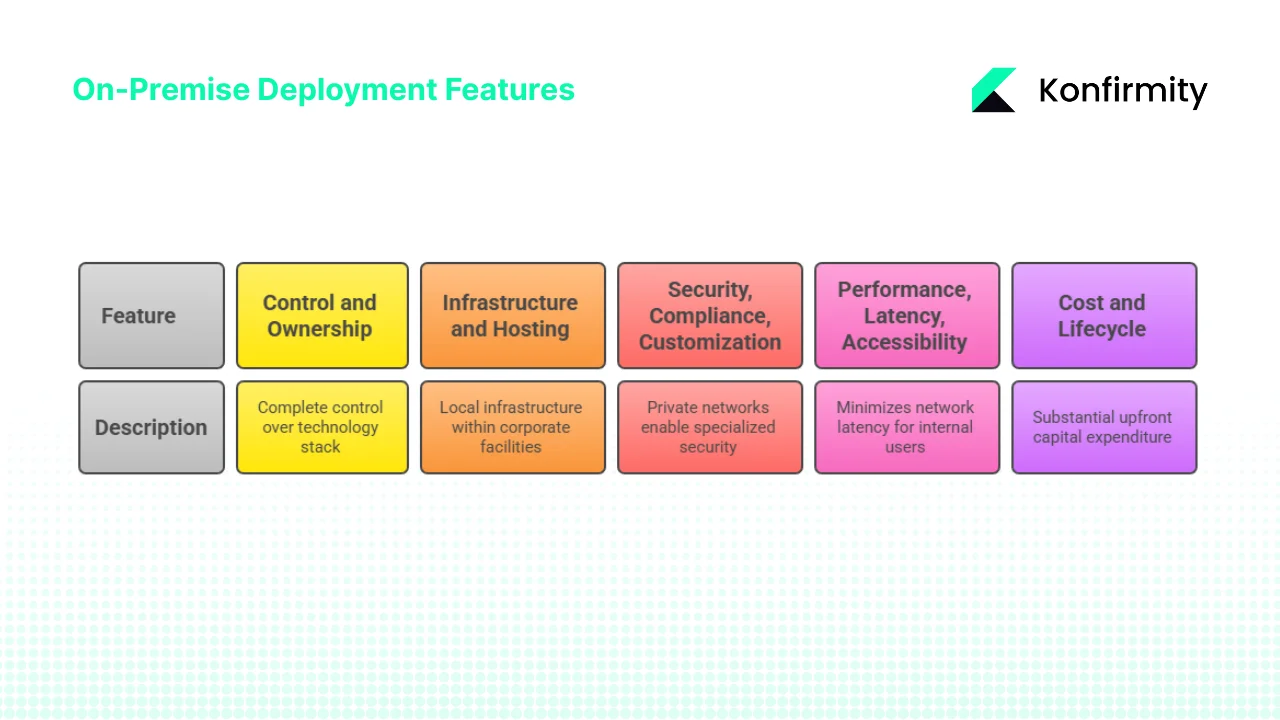
1) Control and Ownership
On-premise architectures provide complete control over every layer of the technology stack. The enterprise determines which hardware to purchase, which operating systems to deploy, how to configure network security, who can access systems, and when to perform maintenance activities. This extends to granular decisions about patch management timing, security tool selection, monitoring approaches, and incident response procedures.
Full ownership of infrastructure means the organization controls data access at the physical layer. Internal IT resources manage user authentication systems, implement authorization policies, configure audit logging, and establish data retention practices. For enterprises with strict data governance requirements or regulatory obligations requiring demonstrated physical control over information assets, this complete ownership represents a fundamental architectural requirement rather than a preference.
Self-managed hardware enables deep customization. Organizations can select specific processor architectures, memory configurations, storage performance characteristics, and network designs optimized for their particular workload requirements. Enterprise software can be tuned and configured to exploit specific hardware capabilities, with internal deployment allowing modifications that would be impossible or prohibited in shared cloud environments.
2) Infrastructure and Hosting Environment
Local infrastructure in on-premise deployments encompasses servers, storage systems, network equipment, security appliances, backup systems, and all supporting facility requirements. Organizations must provision data center space, ensure adequate power capacity with redundancy, implement cooling systems to manage heat loads, and establish physical security controls restricting access to hardware.
On-site hosting places this infrastructure within corporate facilities—dedicated data center rooms in office buildings or purpose-built data center structures on company property. This provides maximum control but requires significant facility investment and ongoing operational overhead. Organizations must manage relationships with utility providers, implement fire suppression systems, and maintain facility certifications.
Alternatively, enterprises may lease space in colocation facilities or managed data centers where providers supply power, cooling, physical security, and network connectivity while the enterprise owns and operates the hardware installed in these facilities. This reduces facility management burden while maintaining operational control over systems. The enterprise's internal IT resources still manage server configuration, application deployment, and all software-layer responsibilities.
Physical servers represent capital investments with multi-year operational lifespans. A typical enterprise server might remain in production for three to five years before replacement, requiring upfront procurement costs and ongoing maintenance throughout the hardware lifecycle. Local data storage follows similar patterns—storage arrays represent significant capital expenditure, with capacity planning requiring projection of growth needs years in advance.
3) Security, Compliance and Customization
Private network architectures enable security implementations impossible in shared cloud environments. Organizations can implement network segmentation strategies, deploy specialized security appliances, enforce custom firewall rules, and establish dedicated network paths for sensitive data flows. Air-gapped networks—completely isolated from internet connectivity—remain feasible only with on-premise infrastructure, meeting requirements in high-security environments.
Custom enterprise software deployments can deeply integrate with on-premise infrastructure. Organizations can implement specialized authentication mechanisms, deploy proprietary encryption systems, integrate with legacy applications that cannot migrate to cloud platforms, and establish data flow patterns reflecting specific business processes. This customization extends to performance tuning, where applications can be optimized for known hardware configurations and network characteristics.
Compliance frameworks in regulated industries frequently require demonstrated physical control over data and systems. Financial services firms subject to GLBA requirements, healthcare organizations bound by HIPAA regulations, and government agencies operating under FedRAMP or FISMA mandates often find that on-premise deployments simplify attestation and audit processes. While cloud providers offer compliance certifications, some regulations or organizational risk tolerances demand the control level that only on-premise infrastructure provides.
4) Performance, Latency and Accessibility
Because infrastructure resides within the corporate environment, on-premise deployments minimize network latency for internal users. Applications hosted on local infrastructure respond over internal networks with latencies measured in microseconds or single-digit milliseconds rather than the tens or hundreds of milliseconds typical of internet-based cloud access. For latency-sensitive applications—trading systems, manufacturing control systems, real-time data processing—this performance advantage proves decisive.
On-premise systems eliminate dependency on internet connectivity for accessing critical applications. During internet service disruptions, internal users accessing local infrastructure maintain full functionality. Organizations operating in regions with unreliable connectivity or requiring guaranteed availability independent of external network providers find this autonomy essential.
Internal IT resources directly managing the complete stack can optimize performance end-to-end. Unlike cloud environments where the provider controls infrastructure layers, on-premise deployments allow tuning operating systems, configuring storage I/O characteristics, optimizing database parameters, and implementing caching strategies specifically matched to application requirements and usage patterns.
5) Cost and Lifecycle Considerations
On-premise deployments require substantial upfront capital expenditure. Organizations must budget for server hardware, storage systems, network equipment, software licenses (often perpetual rather than subscription-based), facility improvements, and initial implementation services. A typical on-premise deployment might require $500,000 to several million dollars in capital investment before any operational value is realized.
Ongoing operational expenditure encompasses power consumption, cooling costs, facility maintenance, hardware warranty and support contracts, software maintenance agreements, and staffing costs for internal IT resources managing the environment. Organizations typically allocate 15-20% of initial hardware costs annually for maintenance and support, with staffing representing the largest ongoing expense.
This contrasts sharply with cloud subscription models where organizations pay predictable monthly or annual fees with no capital investment. Cloud eliminates upfront hardware procurement but creates permanent operational expenses. The financial analysis requires comparing capital expenditure plus multi-year operational costs against equivalent cloud subscription fees—calculations that depend heavily on utilization rates, capacity requirements, and operational lifecycle duration.
Benefits and Challenges of On-Premise for Enterprises
Benefits
-
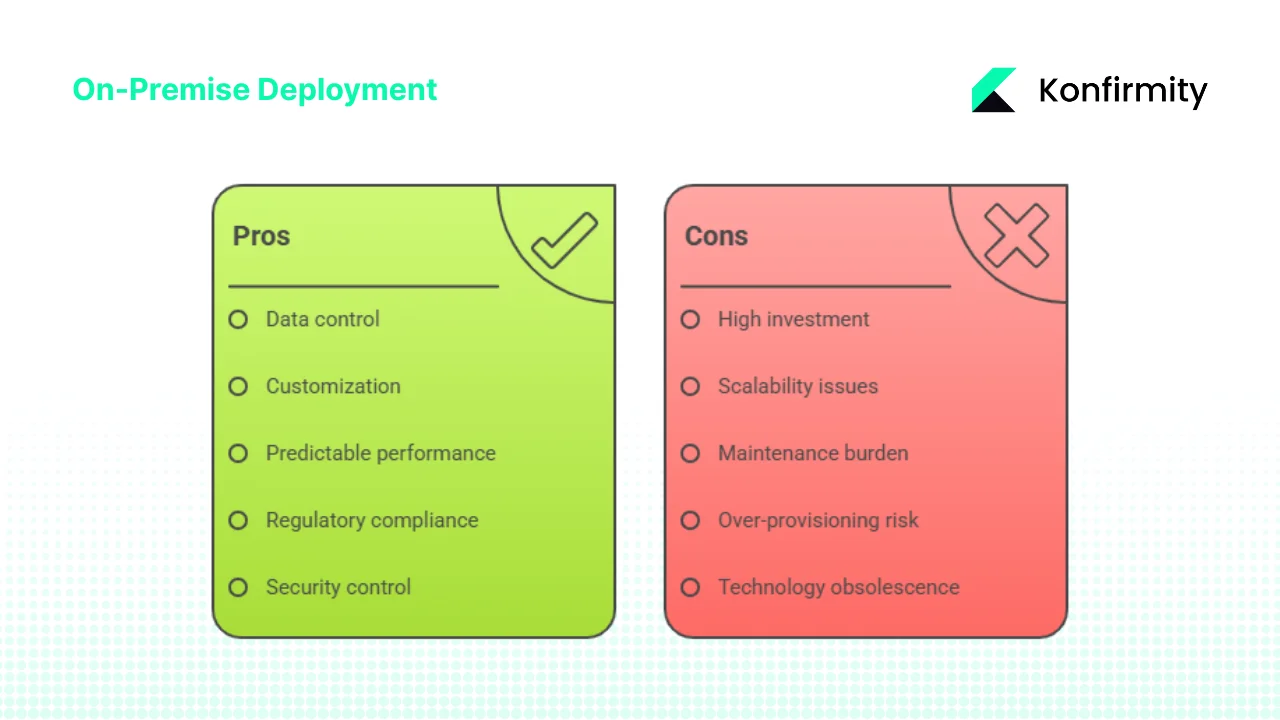
Data control and sovereignty form the primary driver for many on-premise deployments. Because the enterprise owns or controls hardware and network infrastructure, data physically resides within boundaries the organization establishes. For enterprises operating under regulations requiring data to remain within specific geographic jurisdictions, on-premise deployments in facilities within those jurisdictions provide straightforward compliance. Organizations can implement physical access controls, establish chain-of-custody procedures, and maintain complete visibility into who accesses data at all system layers.
-
Customization and legacy integration capabilities exceed cloud alternatives. On-premise environments allow deep modifications to system configurations, implementation of custom security controls, deployment of specialized hardware accelerators, and integration with legacy applications that cannot be migrated or exposed to external networks. Organizations with decades-old systems requiring integration with modern applications often find on-premise deployments necessary simply because these legacy systems cannot connect to cloud infrastructure.
-
Predictable performance and direct access eliminate variables introduced by shared cloud infrastructure and internet connectivity. Organizations can architect systems with known performance characteristics, implement quality-of-service guarantees across internal networks, and provision capacity specifically matched to peak demand without competing with other cloud tenants for resources.
-
Suitability for highly regulated industries makes on-premise deployments standard in certain sectors. Financial services firms managing trading systems and customer financial data, healthcare organizations handling protected health information, government agencies processing classified information, and defense contractors working with controlled unclassified information frequently default to on-premise deployments because regulatory requirements and risk tolerance levels demand the control these architectures provide.
Challenges
-
High upfront investment creates budget barriers, particularly for growing organizations. Capital expenditure for hardware, software licenses, facility preparation, and implementation can reach millions of dollars before systems become operational. This capital intensity favors larger enterprises with established budgets and can disadvantage smaller organizations or those experiencing rapid growth requiring frequent capacity additions.
-
Scalability limitations stem from physical constraints. Adding capacity requires hardware procurement (weeks to months for specialized equipment), facility space availability, power and cooling capacity, and installation time. Organizations cannot scale infrastructure on-demand as with cloud services—they must forecast capacity needs, over-provision to accommodate growth, or accept that expansion requires lead time measured in months rather than minutes.
-
Maintenance and operations burden falls entirely on internal IT resources. Organizations must staff teams with expertise in hardware management, operating system administration, network engineering, security operations, and application support. During hardware failures, internal teams must diagnose issues, coordinate vendor support, and perform repairs or replacements. Software patching, version upgrades, and security remediation all require internal effort.
-
Risk of over-provisioning or under-utilization creates inefficiency. Because capacity cannot scale dynamically, organizations must purchase hardware for peak demand even if that capacity sits idle most of the time. A system architected for maximum load might operate at 20-30% average utilization, representing significant wasted capital investment in unused capacity.
-
Technology obsolescence threatens on-premise deployments. Hardware purchased today incorporates current technology but becomes dated as processor architectures advance, storage capabilities improve, and network speeds increase. Organizations locked into multi-year hardware lifecycles may find themselves running increasingly outdated infrastructure while cloud providers continuously refresh underlying systems.
Trade-offs and Hybrid Options
Most enterprises adopt hybrid models combining on-premise infrastructure for specific workloads with cloud services for others. Sensitive data and applications subject to strict compliance requirements might run on-premise while variable-demand workloads, development environments, and less-sensitive systems leverage cloud elasticity and reduced operational overhead.
The decision framework isn't binary "cloud versus on-premise" but rather "which workloads require on-premise characteristics and which can benefit from cloud deployment?" Organizations increasingly evaluate decisions per application or data classification level rather than adopting organization-wide mandates.
How "On-Premise" Impacts Enterprise Software Vendors
1) Sales and Licensing Models
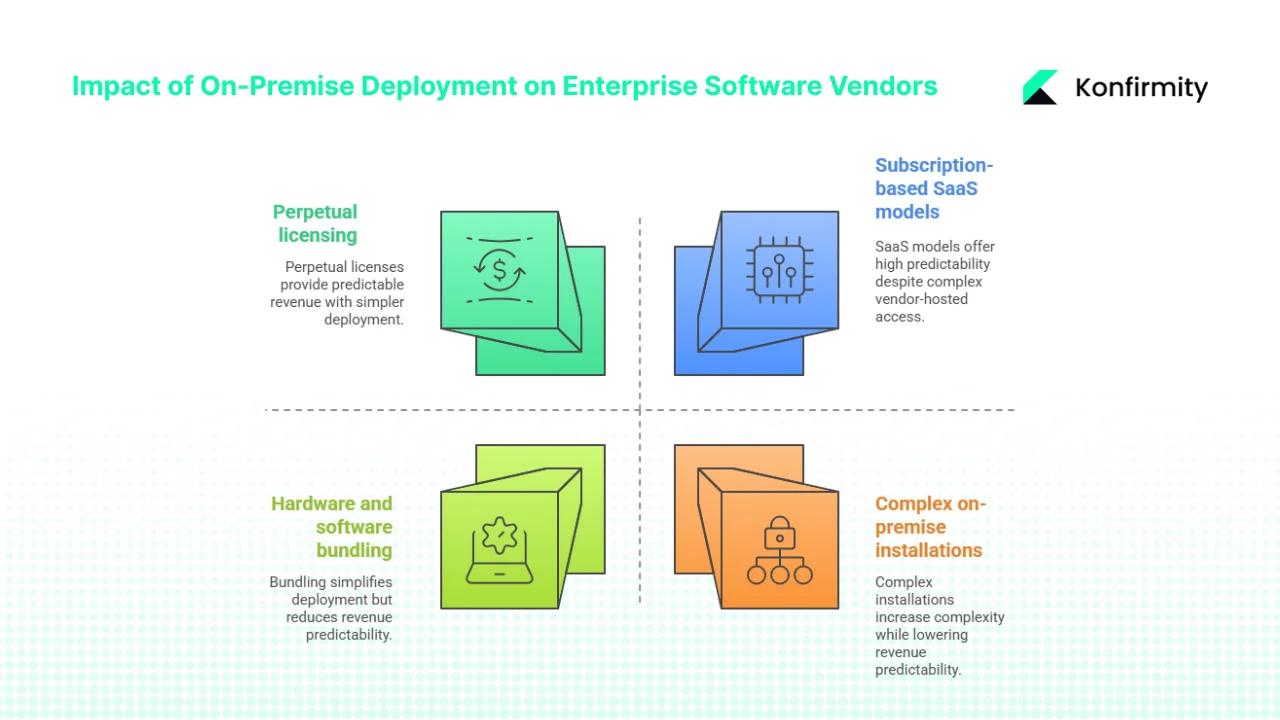
When enterprise clients specify on-premise deployment requirements, vendors must adjust their commercial models fundamentally. On-premise sales typically involve perpetual licensing (customers purchase permanent rights to use software versions) or term licenses with on-premise deployment rights, contrasting with subscription-based SaaS models where customers pay ongoing fees for vendor-hosted access.
Perpetual licenses require substantial upfront payments, creating larger initial deal sizes but reducing predictable recurring revenue. Vendors must account for longer sales cycles as enterprises evaluate total cost of ownership, assess infrastructure requirements, and budget for capital expenditure. The average on-premise enterprise software sale involves 6-12 month sales cycles compared to 1-3 months for equivalent SaaS offerings.
Hardware and software bundling becomes relevant for integrated solutions. Some vendors offer appliances—pre-configured hardware with software pre-installed—simplifying deployment but requiring vendor expertise in hardware selection, configuration, and support. This transforms software companies into partial infrastructure providers.
2) Implementation, Support and Services
On-premise deployments require substantially deeper implementation services. Vendors must understand customer infrastructure environments, coordinate with internal IT resources, configure software to integrate with existing systems running on private networks, and validate performance on customer-controlled hardware. Implementation timelines extend from weeks for SaaS deployments to months for complex on-premise installations.
Support models must address the complete stack. While SaaS vendors control their hosting environment and can rapidly diagnose issues, on-premise vendors must support software running on varied hardware configurations, diverse operating system versions, and customer-specific network architectures. Support engineers require expertise in troubleshooting issues that might stem from infrastructure problems outside the vendor's direct control.
Professional services revenue often exceeds software license revenue in on-premise models. Enterprises require assistance with installation, configuration, integration, training, and ongoing optimization. Vendors build service organizations capable of working within corporate environments, understanding private network constraints, and collaborating with internal deployment teams.
3) Differentiation in Enterprise Deals
Some enterprises establish on-premise deployment as a mandatory requirement, immediately disqualifying SaaS-only vendors. Organizations in regulated industries, those with strict data sovereignty requirements, or enterprises with significant investments in existing data center infrastructure often won't consider cloud alternatives for certain application categories.
Vendors supporting both on-premise and cloud deployment models gain competitive advantage in mixed-requirement environments. Offering deployment flexibility allows vendors to meet immediate on-premise requirements while positioning for potential future cloud migration, creating upgrade revenue opportunities as customer architectures evolve.
For enterprise-to-enterprise sales, emphasizing on-premise readiness signals vendor understanding of complex operational requirements. Demonstrating experience with private network integration, self-managed hardware environments, and internal IT resource collaboration builds credibility with enterprise buyers managing complex infrastructure landscapes.
4) Marketing and Messaging Considerations
Vendor messaging for on-premise-capable solutions must address specific buyer concerns: total cost of ownership analysis, infrastructure requirements documentation, security architecture details, compliance framework mapping, and integration capabilities. Generic "deploy anywhere" claims lack credibility—enterprises evaluating on-premise deployments require detailed technical architecture documentation, reference implementations, and proof points from similar deployments.
Using precise terminology matters. References to "local infrastructure support," "private network compatibility," "internal deployment options," and "self-managed hardware flexibility" signal vendor understanding of on-premise operational reality. Vague mentions of "flexible deployment" without specifics suggest vendors lack genuine on-premise implementation experience.
Addressing buyer concerns proactively builds trust. Acknowledging that on-premise deployments involve higher upfront costs but may provide long-term cost advantages for stable workloads, or that security responsibility shifts to the customer while control increases, demonstrates vendor maturity and consultative approach rather than pushing customers toward vendor-preferred models.
Decision Framework: When Enterprise Clients Should Consider On-Premise
Key Questions for Enterprise Buyers
-
Regulatory and compliance requirements: Do data residency regulations require information to remain within specific geographic boundaries or under direct physical control? Do compliance frameworks require attestation of physical infrastructure control? Can auditors and regulators accept cloud provider compliance certifications, or must the organization demonstrate direct control?
-
Existing infrastructure investments: Does the organization already operate data centers with available capacity? Are there existing physical servers and local infrastructure with remaining useful life? Do internal IT resources have deep expertise in specific infrastructure platforms that would be abandoned with cloud migration?
-
Growth and scalability projections: What are expected capacity growth rates over the next 3-5 years? Do workloads demonstrate predictable, steady demand or highly variable, unpredictable patterns? Can capacity requirements be forecast accurately, or do business models create uncertainty requiring elastic scaling?
-
Total cost of ownership analysis: What's the complete cost including capital expenditure (hardware, software, facility), operational expenditure (power, maintenance, support), and internal labor costs over 3-5 year periods? How do these compare to equivalent cloud subscription fees? At what utilization levels and timeframes do cost curves intersect?
-
Performance and availability requirements: Are applications latency-sensitive requiring single-digit millisecond response times? Must systems remain operational during internet connectivity disruptions? Do user concentrations in specific locations benefit from local infrastructure proximity?
-
Customization and integration needs: Do requirements include deep integration with legacy systems that cannot migrate to cloud platforms? Are specialized security controls or custom configurations necessary that cloud platforms cannot support? Does the organization operate proprietary systems requiring integration on private networks?
On-Premise vs Off-Premise Comparison
-
Local infrastructure and internal deployment (on-premise) provides complete control over hardware, software, and configuration, enabling deep customization and regulatory compliance but requiring significant capital investment and operational expertise. Public cloud and third-party hosting (off-premise) eliminates infrastructure ownership, provides elastic scalability, and converts capital expenditure to operational expenditure but reduces control and may complicate compliance attestation.
-
On-site hosting maximizes control and minimizes network latency but requires facility investments and operational overhead. Remote hosting in provider data centers reduces facility burden but introduces internet dependency and may increase latency.
-
Self-managed hardware enables optimization for specific workloads and eliminates dependency on provider infrastructure decisions but requires hardware lifecycle management expertise and creates obsolescence risk. Vendor-managed infrastructure provides continuously refreshed technology and eliminates hardware management but limits customization and creates vendor dependency.
-
Private network control allows custom security implementations, network segmentation, and guaranteed performance characteristics but requires network engineering expertise and limits flexibility. Shared network and cloud provider networks simplify connectivity and provide global reach but reduce control over network paths and introduce potential performance variability.
-
Internal IT resources provide deep organizational knowledge and direct accountability but represent fixed costs regardless of demand fluctuation. Reliance on provider support offers specialized expertise and scalable support models but creates dependency on external organizations with competing priorities.
-
Cost structures fundamentally differ: on-premise front-loads capital expenditure with lower ongoing costs for stable workloads, while cloud distributes costs across operational lifetime with higher flexibility but permanent operational expense. Scalability, control, and compliance characteristics vary inversely—gains in one dimension typically involve trade-offs in others.
Hybrid and Transitional Models
Most large enterprises maintain on-premise infrastructure for core systems, data warehouses, and applications with strict compliance requirements while shifting development environments, variable-demand workloads, and less-sensitive applications to cloud platforms. This hybrid approach optimizes for requirements diversity rather than forcing all workloads into a single architectural pattern.
Gradual migration strategies allow organizations to move applications systematically, reducing risk and allowing internal IT resources to develop cloud expertise while maintaining operational continuity. Some enterprises adopt "cloud-first" policies for new applications while acknowledging that certain workloads will remain on-premise indefinitely due to regulatory, technical, or economic constraints.
Vendors should position solutions supporting both deployment models with migration paths between them. Enterprises evaluating on-premise deployments today may plan cloud migration within 3-5 years; vendors offering deployment flexibility create upgrade opportunities rather than forcing customers to change vendors when architectural strategies evolve.
Implications for Enterprise Sales Strategy
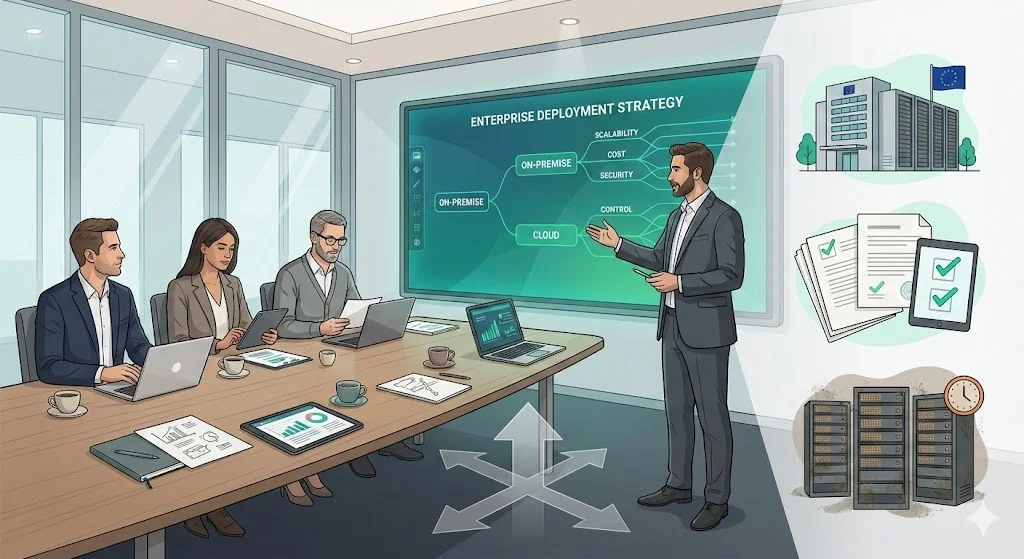
When enterprise clients specify "we need on-premise deployment," effective sales teams probe underlying requirements rather than accepting the statement at face value. "On-premise" might actually mean "we need data to remain in EU data centers" (addressable with EU-region cloud), "we have compliance requirements we believe require on-premise" (may accept cloud with proper attestation), or "we have significant data center investments we must utilize" (genuine on-premise requirement).
Understanding the true drivers behind on-premise requirements allows vendors to position solutions appropriately. If concerns center on data sovereignty, demonstrate how cloud regions address requirements. If compliance drives the decision, provide audit reports and certification documentation. If existing infrastructure investments motivate the preference, acknowledge the economic logic and position for long-term flexibility as infrastructure ages.
Positioning products for on-premise environments requires demonstrating specific capabilities: Does the solution support internal deployment behind private networks? Can it integrate with existing authentication systems and security infrastructure? Does it provide deployment documentation for common enterprise platforms? Are reference architectures available for typical hardware configurations?
The value proposition should acknowledge trade-offs honestly. On-premise deployments enable compliance, control, and customization but involve higher upfront investment and operational burden. Cloud alternatives reduce capital expenditure and operational overhead but may complicate regulatory attestation and limit customization. Positioning as a consultative partner helping enterprises evaluate trade-offs builds credibility versus pushing preferred models regardless of customer requirements.
Future Trends and Considerations
Cloud adoption continues expanding, yet on-premise infrastructure remains relevant for specific enterprise segments. Financial services firms managing trading platforms, healthcare organizations operating clinical systems, manufacturers running industrial control systems, and government agencies processing sensitive information will maintain on-premise infrastructure for the foreseeable future. Regulatory requirements and risk tolerance levels in these sectors create persistent demand for deployment models providing maximum control.
Edge computing introduces new variants of on-premise architecture. Organizations deploy computing resources at distributed locations—retail stores, manufacturing facilities, remote offices—creating many small-scale on-premise environments rather than centralized data centers. These edge deployments combine on-premise characteristics (local infrastructure, private networks, internal management) with distributed architecture patterns traditionally associated with cloud computing.
Hybrid cloud architectures continue maturing, with organizations treating on-premise infrastructure as one region within a multi-region deployment topology. Applications span on-premise and cloud environments, with data and workloads moving between deployment models based on performance, cost, and regulatory requirements. Vendors supporting these hybrid patterns with unified management, consistent security models, and flexible deployment options align with enterprise architectural directions.
Cost structures, hardware lifecycles, security requirements, and regulatory frameworks will continue shaping on-premise adoption. Organizations evaluating deployment models in 2026 must consider not just current requirements but how their infrastructure strategies will evolve as business models change, regulatory landscapes shift, and technology capabilities advance. Vendor readiness to support flexible deployment approaches—on-premise, cloud, hybrid, and emerging edge patterns—positions solutions for long-term enterprise relationships rather than forcing architectural decisions that may become constraints as strategies evolve.
Conclusion
Understanding "on-premise meaning" requires moving beyond simple definitions to grasp the architectural, operational, and strategic implications. On-premise deployments involve hosting software and data on local infrastructure—whether on-site in corporate facilities or in enterprise-controlled data center space—using self-managed hardware, operating on private networks, with local data storage all under direct organizational control.
For enterprise software vendors, this matters because deployment architecture shapes licensing models, implementation approaches, support requirements, and competitive positioning. Control, compliance, and customization drive on-premise decisions, while cost complexity and operational burden create challenges. Enterprises don't choose on-premise deployments casually—these decisions reflect specific requirements around regulatory compliance, data sovereignty, legacy integration, or risk tolerance that cloud alternatives cannot adequately address.
Effective vendors adopt flexible mindsets, recognizing that "on-premise" signals underlying requirements rather than simply expressing technological preference. Understanding whether concerns center on regulatory compliance, data control, performance characteristics, or infrastructure economics allows positioning solutions that address actual needs rather than predetermined architectural patterns.
As enterprises navigate deployment models, clarity about what "on-premise" means in their specific context—which workloads genuinely require on-premise characteristics versus which might benefit from cloud deployment—will shape better architectural decisions, more accurate vendor evaluations, and smoother implementations aligned with both current requirements and future strategic flexibility.
FAQ Section
1) Why do people say "on premise"?
The terms "on-premise" and "on-premises" are used interchangeably, though "on-premises" is technically more grammatically correct (referring to "premises" as property or facilities). Common usage has shortened this to "on-premise" in many contexts, and "on-prem" as shorthand. The terminology emerged to distinguish local infrastructure deployments from cloud computing models as enterprises gained genuine architectural choices about where to host systems. Industry usage accepts all three variants—"on-premises," "on-premise," and "on-prem"—with meaning clearly understood from context.
2) Does "on premise" mean "on-site"?
Often yes, but with nuance. "On-site" typically refers to infrastructure physically located within an organization's facilities—corporate offices, company-owned data centers, or facilities on company property. "On-premise" encompasses on-site scenarios but extends to situations where an enterprise controls hardware in third-party colocation facilities or leased data center space. If the organization owns the servers, manages the software, and controls access even though hardware resides in a facility operated by another company, this qualifies as on-premise deployment. The defining characteristic is operational control and management responsibility rather than strictly requiring physical location on company-owned property.
3) What is off-premise vs on-premise?
"Off-premise" refers to infrastructure and applications hosted outside the organization's controlled environment—typically in public cloud platforms (AWS, Azure, Google Cloud) or in vendor-operated data centers. In off-premise deployments, third-party providers own the infrastructure, manage hardware and network layers, and deliver computing resources or application access as services. The enterprise accesses these systems over internet connections without directly controlling underlying physical infrastructure. On-premise deployments place infrastructure under enterprise control—the organization owns or manages hardware, controls network architecture, and assumes operational responsibility for systems. Off-premise trades control for reduced capital investment and operational burden, while on-premise prioritizes control at the cost of higher upfront investment and ongoing management responsibility.
4) What does on-premise mean in the office?
In a corporate environment, on-premise means hosting systems within the company's facilities—typically in dedicated server rooms, data center spaces within office buildings, or purpose-built data centers on company property. This involves installing physical servers, storage systems, and network equipment in spaces the company controls, operated by internal IT resources using private networks isolated from public internet traffic. Employees access these systems over internal corporate networks rather than through internet connections to external providers. On-premise office deployments provide maximum control over data and systems but require the company to manage facility requirements (space, power, cooling), hardware lifecycle management, and all operational aspects of maintaining technology infrastructure within their physical corporate environment.

