

Most organizations treat multi-factor authentication as a checkbox item on a compliance audit—a control to enable, document, and forget. This approach misunderstands MFA's fundamental role: it is both a defensive control against credential-based attacks and a foundational requirement across nearly every major compliance framework. More than 99.9% of compromised accounts do not have MFA enabled, a statistic that reflects the gap between awareness and implementation. Enterprise clients purchasing B2B software now expect MFA enforcement on administrative access as a baseline security posture, not an optional feature. MFA supports both compliance requirements and practical security goals—stopping attackers who obtain passwords through phishing, credential stuffing, or social engineering.
What Does MFA Stand For?
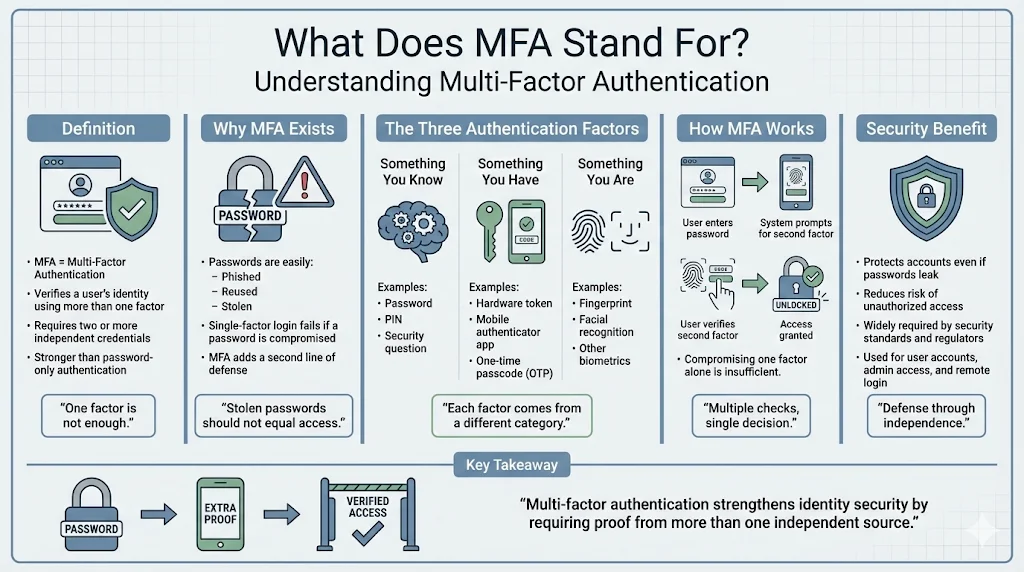
MFA stands for multi-factor authentication. It is an identity verification method that requires users to present two or more distinct factors before granting access to a system or application. Unlike single-factor authentication, which relies solely on a password, MFA combines credentials from separate categories: something you know (password or PIN), something you have (hardware token or one-time code), and something you are (biometric identifier such as fingerprint or facial recognition). Each factor operates independently, ensuring that compromise of one credential does not grant full access.
Building toward SOC 2, ISO 27001, or another framework?
Drop your work email and we'll help you turn security work into audit-ready evidence automatically.
Why Enterprises Rely on MFA Today
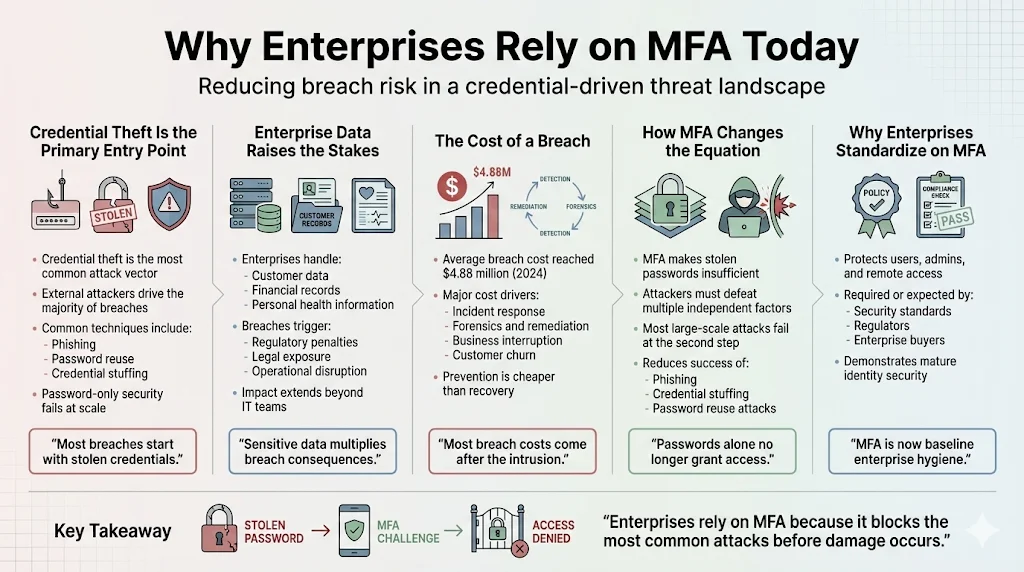
Credential theft remains the most common entry point for attackers targeting enterprise environments. External threat actors account for 65% of breaches, with phishing, password reuse, and credential stuffing serving as primary attack vectors. Organizations handling customer data, financial records, or personal health information face heightened risk—both from regulatory penalties and from operational disruption. The average cost of a data breach reached $4.88 million in 2024, a figure driven largely by post-breach response activities and lost business. MFA mitigates this risk by making stolen passwords insufficient for access, forcing attackers to obtain additional factors they typically cannot replicate or intercept at scale.
What Is MFA?
Multi-factor authentication verifies identity by requiring evidence from at least two of three factor categories. The first category—something you know—includes passwords, PINs, and security questions. The second category—something you have—comprises hardware security keys, authenticator applications generating time-based one-time passcodes (TOTP), and SMS codes. The third category—something you are—covers biometric factors such as fingerprints, facial recognition, and iris scans. When implemented correctly, MFA introduces additional verification steps without creating friction that degrades user experience. Systems prompt for the second factor only after validating the first, maintaining workflow efficiency while blocking unauthorized access attempts.
How Does MFA Improve Security?
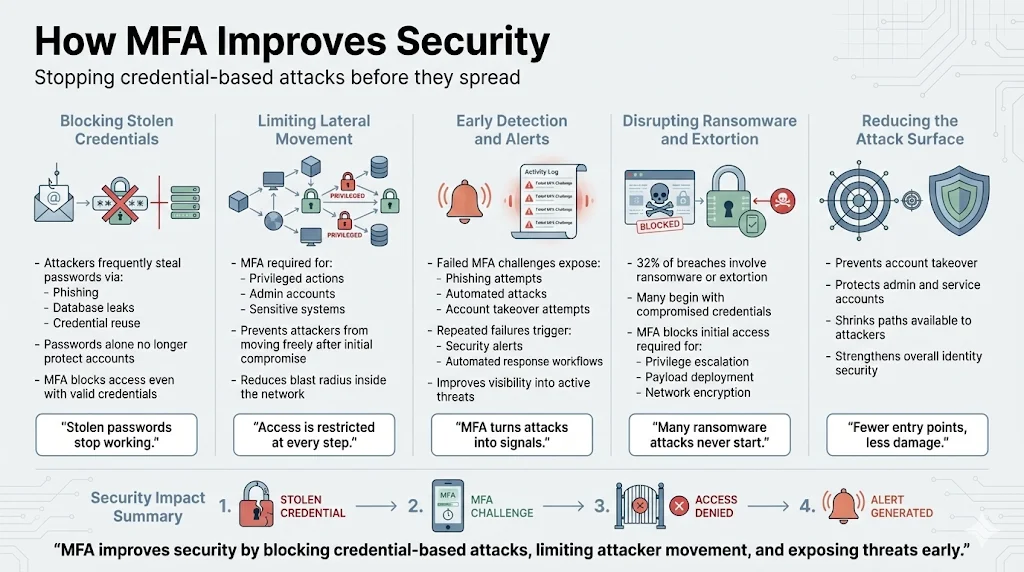
MFA prevents attackers from gaining access even when they possess valid credentials. Passwords obtained through phishing campaigns, database breaches, or credential-reuse attacks become insufficient when MFA is enforced. This control limits lateral movement within networks by requiring additional authentication for privileged operations and sensitive systems. MFA also aids detection: repeated failed authentication attempts signal potential compromise, triggering alerts and automated response workflows. 32% of all breaches involve ransomware or extortion techniques, many of which begin with compromised credentials. MFA disrupts these attack chains by denying initial access, reducing the attack surface available to adversaries attempting account takeover or privilege escalation.
Why MFA Matters for Compliance
MFA appears as a required or recommended control across major compliance frameworks. SOC 2 requires organizations to implement logical access controls that restrict system access to authorized users; MFA satisfies Trust Services Criteria CC6.1 and CC6.2 by adding verification beyond static passwords. ISO 27001:2022 addresses access control in Annex A.9, where MFA strengthens compliance with control objectives 9.2.1 (user registration and de-registration) and 9.4.2 (secure log-on procedures). PCI DSS 4.0 mandates MFA for all personnel with administrative access to cardholder data environments, codified in requirement 8.4.2. HIPAA's Security Rule requires covered entities to implement procedures for verifying that persons seeking access to electronic protected health information are authorized; MFA provides documented evidence of technical safeguards under 45 CFR § 164.312(d). GDPR does not prescribe specific technical measures but requires appropriate security for personal data processing; MFA demonstrates implementation of Article 32's security requirements during regulatory assessments and data protection impact assessments.
Auditors evaluate MFA implementation by reviewing enforcement policies, examining authentication logs, and testing access controls during observation periods. Organizations must provide evidence that MFA is enabled for privileged accounts, that backup authentication methods are documented, and that access attempts are logged and monitored. This documentation forms part of the continuous compliance posture required for maintaining certifications and passing surveillance audits.
Authentication Methods Used in MFA
Something You Know
Passwords and PINs serve as the first authentication factor in most implementations. These credentials are memorized by users and validated by comparing input against stored values. Password policies should enforce complexity requirements, minimum length standards, and regular rotation schedules to maintain effectiveness.
Something You Have
Hardware security keys—physical devices using protocols such as FIDO2 and WebAuthn—generate cryptographic proofs of possession. One-time passcode applications, including Google Authenticator and Authy, produce time-based codes that expire after 30 seconds. SMS codes deliver numeric passcodes to registered mobile numbers, though this method faces interception risks from SIM-swapping attacks and SS7 vulnerabilities. Push notifications represent the most popular authentication factor at 29% usage, followed by SMS at 17%, reflecting the balance organizations strike between security and user convenience.
Something You Are
Biometric authentication verifies identity using physical characteristics. Fingerprint scanning, facial recognition, and iris scanning provide factors that cannot be easily transferred or replicated. Biometric data is typically stored as mathematical representations (templates) rather than images, reducing privacy risk while enabling rapid verification.
Which MFA Methods Are Strongest for Enterprise?
Hardware security keys and authenticator applications provide stronger security than SMS-based codes. Hardware keys resist phishing attempts because they validate the destination domain before releasing credentials, preventing adversary-in-the-middle attacks. Authenticator apps eliminate SMS interception risks and function without cellular connectivity. SMS codes, while widely deployed, face known vulnerabilities: attackers can intercept messages through SIM swapping, exploit telecommunications protocols, or use social engineering to redirect codes. Organizations should reserve hardware keys for administrators and privileged accounts, deploy authenticator apps for general user populations, and phase out SMS codes where stronger alternatives are feasible. This risk-based approach balances security requirements with user experience expectations, reducing authentication friction for low-risk operations while enforcing rigorous verification for sensitive access.
MFA and Zero Trust
Multi-factor authentication forms a core component of Zero Trust architecture. Zero Trust models assume no implicit trust based on network location, requiring continuous verification of identity and device posture before granting access. MFA provides the identity verification layer, confirming user credentials at each access request rather than relying on session persistence. Context-based access checks evaluate additional signals—device compliance status, geographic location, time of access, and behavioral analytics—to determine whether authentication should succeed or trigger step-up verification. This continuous authentication model replaces perimeter-based security with identity-centric controls that adapt to risk signals in real time.
Implementing MFA Inside an Organization
1) Assess Current Authentication
Identify systems handling sensitive data, privileged accounts with administrative access, and applications lacking native MFA support. Map authentication methods currently in use and document systems requiring remediation. Prioritize high-risk accounts—domain administrators, cloud infrastructure managers, financial system users—for immediate MFA enforcement.
2) Choose MFA Methods
Select hardware keys for roles with elevated privileges: system administrators, security operations teams, and personnel accessing production environments. Deploy authenticator applications for general user populations to balance security with usability. Evaluate legacy systems that cannot support modern authentication protocols; these may require proxy solutions or compensating controls.
3) Rollout Steps
Enforce MFA on critical systems first—identity providers, cloud platforms, VPNs, and remote access tools. Phase in enforcement for remaining systems according to risk assessment results. Provide user instructions, support channels, and enrollment assistance to minimize disruption. Communicate implementation schedules and rationale to stakeholders, emphasizing both security benefits and compliance requirements.
4) Monitor and Improve
Track failed authentication attempts to detect credential compromise or targeted attacks. Review authentication logs regularly to identify anomalous patterns—unusual access times, unexpected geographic locations, repeated failures. Adjust policies based on observed risk: increase authentication frequency for sensitive operations, implement step-up authentication for administrative actions, and refine context-based rules to reduce false positives.
Common Challenges
User resistance occurs when authentication steps appear cumbersome or when enrollment processes create friction. Clear communication about security rationale and streamlined enrollment workflows reduce pushback. Legacy applications lacking MFA support require workarounds: single sign-on proxies, application modernization projects, or compensating controls such as network segmentation. Mixed device environments—corporate-managed endpoints, bring-your-own-device programs, contractor systems—complicate MFA deployment. Organizations address this by implementing device management policies, conditional access rules, and risk-based authentication that adjusts verification requirements based on device trust level.
Practical Tips for Companies Selling to Enterprise Clients
Enterprise buyers evaluate vendor security during procurement cycles, often requiring documented evidence of MFA enforcement. Security questionnaires specifically ask whether administrative access requires multi-factor authentication and how MFA policies are monitored. Organizations should prepare documentation demonstrating MFA implementation, including enforcement policies, authentication logs, and incident response procedures. Product security documentation should explicitly state which roles require MFA, which authentication methods are supported, and how MFA integrates with customer identity providers. During security reviews, demonstrate MFA enforcement in product architecture diagrams and provide evidence of control effectiveness through audit reports or penetration test results. These materials satisfy vendor risk assessment requirements and signal mature security practices.
Short Comparison With 2FA
Two-factor authentication (2FA) specifically requires exactly two authentication factors, while multi-factor authentication (MFA) encompasses any implementation using two or more factors. In practice, most 2FA implementations also qualify as MFA. Enterprise buyers increasingly use MFA terminology in contracts and security requirements because it signals broader authentication flexibility—allowing organizations to add factors as risk increases without renegotiating technical specifications. The distinction matters primarily in regulatory contexts where frameworks specify "multi-factor" language to permit risk-based authentication decisions.
Prove MFA coverage across every system, not just the obvious one
Book a demo and we'll show how Konfirmity tracks which accounts and systems actually enforce multi-factor authentication, and turns that into the evidence auditors and buyers ask for.
Book a demo
Final Thoughts
83% of organizations require MFA for accessing resources, reflecting MFA's transition from advanced security measure to baseline control. Organizations that treat MFA as optional or delay implementation face increased breach risk, compliance gaps, and friction during enterprise sales cycles. MFA implementation requires planning—assessing current authentication, selecting appropriate methods, and phasing in enforcement—but delivers measurable risk reduction. It prevents the most common attack vectors, satisfies auditor requirements across multiple frameworks, and demonstrates security maturity to enterprise buyers conducting vendor assessments.
FAQs
MFA stands for multi-factor authentication. It verifies identity by requiring two or more factors from separate categories: something you know (password), something you have (hardware key or one-time code), and something you are (biometric identifier).
MFA prevents unauthorized access even when passwords are compromised. Attackers who obtain credentials through phishing or data breaches cannot complete authentication without the additional factors, which they typically cannot replicate or intercept.
MFA is required or recommended in SOC 2, ISO 27001, PCI DSS, HIPAA, and GDPR frameworks. It satisfies access control requirements, provides documented evidence of technical safeguards, and demonstrates implementation of appropriate security measures during audits.
MFA methods include passwords and PINs (something you know), hardware security keys and authenticator applications (something you have), and biometric verification such as fingerprints and facial recognition (something you are). Hardware keys and authenticator apps provide stronger security than SMS codes.
Begin by identifying high-risk systems and privileged accounts. Select appropriate MFA methods—hardware keys for administrators, authenticator apps for general users. Enforce MFA on critical systems first, provide user support during rollout, and monitor authentication logs to detect suspicious activity and refine policies.

