

Most organizations treat patch management as a reactive administrative task—applying updates when prompted or during annual audit preparation. This approach leaves a critical gap between vendor patch releases and actual deployment, creating an exploitable window that becomes apparent when breaches occur. A Ponemon Institute study shows that 60% of breach victims say they were compromised due to an unpatched known vulnerability where the patch had not been applied.
Patch management is the systematic process of identifying, testing, prioritizing, and deploying software updates across an organization's IT infrastructure. These vendor-provided updates—commonly called patches—address security vulnerabilities, fix software bugs, improve system stability, and occasionally add functionality. Unlike ad hoc software updates, formal patch management establishes repeatable workflows for scanning assets, assessing risk, testing compatibility, and verifying successful deployment across thousands of endpoints.
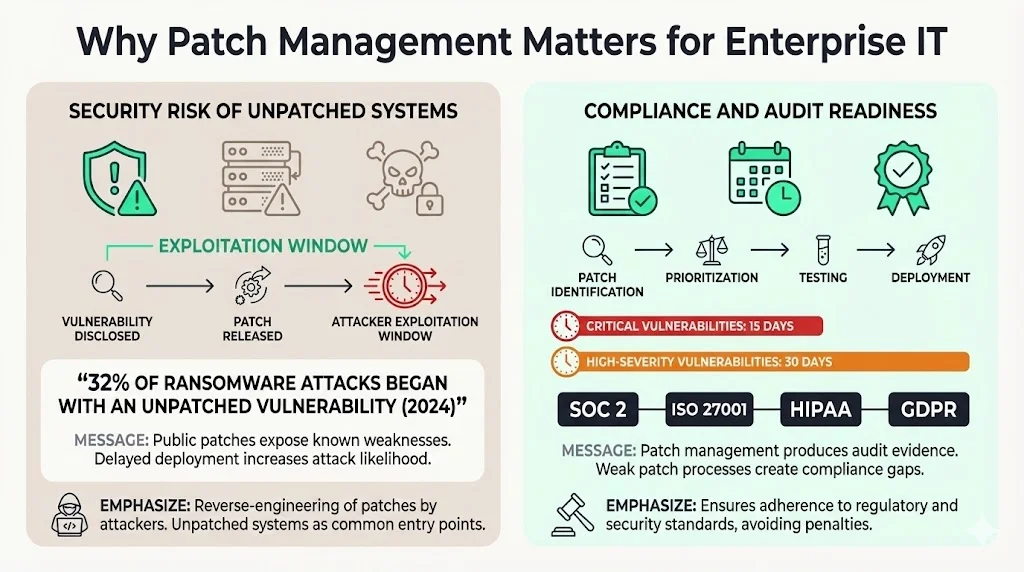
Why Patch Management Matters for Enterprise IT
According to Sophos' 2024 State of Ransomware report, 32% of ransomware attacks in 2024 alone started with an unpatched vulnerability. Unpatched systems represent one of the most common attack vectors because vulnerabilities become public knowledge the moment vendors release patches. Attackers reverse-engineer these patches to exploit organizations that delay deployment.
Beyond immediate security risk, patch management directly impacts compliance posture. Regulatory frameworks including SOC 2, ISO 27001, HIPAA, and GDPR require documented evidence of vulnerability remediation and continuous security monitoring. Audit readiness depends on demonstrating that critical patches were identified, prioritized, tested, and deployed within appropriate timeframes—typically 15 days for critical vulnerabilities and 30 days for high-severity issues.
Building toward SOC 2, ISO 27001, or another framework?
Drop your work email and we'll help you turn security work into audit-ready evidence automatically.
Core Goals of Patch Management
Effective patch management serves four strategic objectives:
Mitigate known vulnerabilities before exploitation. 75% of cyberattacks exploit known vulnerabilities for which patches are available, making timely deployment a fundamental security control. The window between patch release and deployment represents your organization's highest-risk period.
Maintain system security and infrastructure stability. Patches address both security flaws and operational bugs that cause system crashes, performance degradation, or incompatibilities. Regular patching reduces unplanned downtime and improves overall system reliability.
Improve performance and reduce operational risk. Beyond security, patches optimize software performance, resolve memory leaks, and enhance compatibility with other systems. Organizations with mature patch management programs experience fewer system failures and shorter mean-time-to-recovery.
Enable compliance and audit readiness. Regulators and auditors require documented proof that your organization identifies vulnerabilities, assesses risk, and deploys patches systematically. Patch management provides the evidence trail demonstrating continuous security operations rather than point-in-time preparations.
Key Steps in the Patch Management Process
Patch management functions as a continuous cycle, not a project with a defined endpoint. Organizations that treat patching as reactive firefighting inevitably face rushed deployments, inadequate testing, and incomplete coverage.
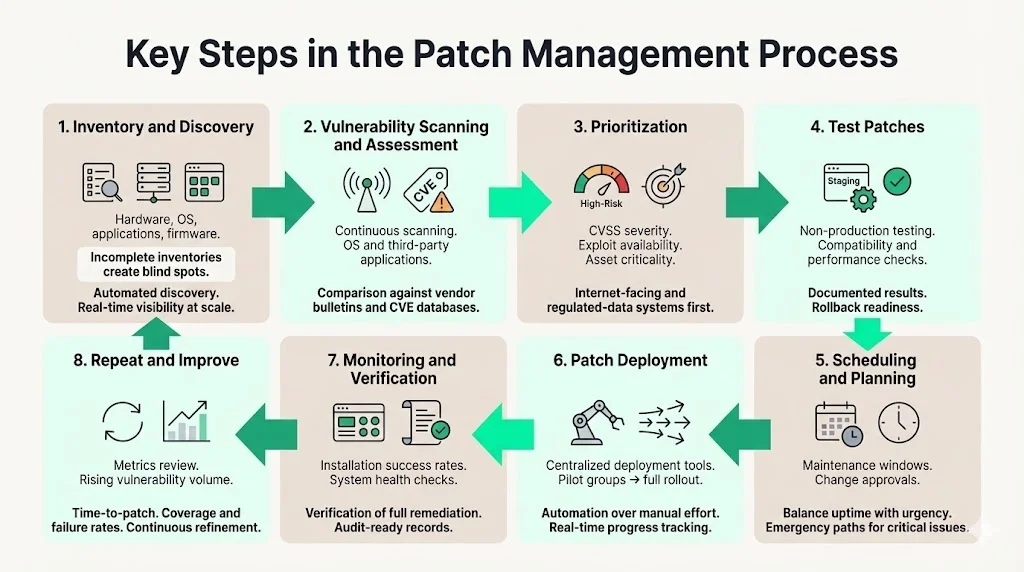
1) Inventory & Discovery
Establish a complete, current asset inventory cataloging all hardware, operating systems, applications, and firmware across your environment. 58% of organizations report that they do not have a complete inventory of all software for effective patching, creating blind spots where critical vulnerabilities persist undetected.
Use automated discovery tools to maintain real-time visibility into your environment. Large enterprises manage thousands of endpoints and over 1,061 applications on average. Manual inventory management becomes impractical at scale and introduces dangerous gaps as new systems deploy or shadow IT proliferates.
2) Vulnerability Scanning & Assessment
Scan systems continuously to detect missing patches, misconfigurations, and known vulnerabilities. Vulnerability scanners compare installed software versions against vendor security bulletins and CVE databases, identifying specific gaps in your security posture.
This scanning must extend beyond operating systems to cover third-party applications, firmware, and embedded systems. Many breaches exploit vulnerabilities in widely deployed applications—browsers, productivity tools, content management systems—that receive less attention than OS patches.
3) Prioritization
Not all patches carry equal risk. Prioritize based on severity scores (CVSS), exploitability, asset criticality, and potential business impact. A critical vulnerability in an internet-facing authentication server demands immediate attention; a low-severity bug in an isolated internal tool can wait for the next maintenance window.
Map vulnerabilities to your specific environment's risk profile. A publicly disclosed exploit elevates priority dramatically. Assets processing regulated data (PHI, PII, financial records) require accelerated patch schedules to maintain compliance.
4) Test Patches
Test patches in non-production environments before deploying to production systems. Compatibility issues, unexpected interactions with custom applications, or poorly coded patches occasionally cause system failures. The failure rate of manual patching processes is approximately 30%, leading to incomplete vulnerability mitigation.
Establish staging environments that mirror production configurations. Run functional tests, performance benchmarks, and integration checks. Document test results and maintain rollback procedures for every deployment.
5) Scheduling & Planning
Schedule patch deployment during maintenance windows that minimize business disruption. Software patches are most often scanned for and applied after typical working hours, between 5:00pm and 11:59pm. The most common day of the week to scan for new patches is Friday, and the most common day to apply patches is Sunday.
Balance uptime requirements against security urgency. Critical zero-day vulnerabilities may justify emergency maintenance windows; routine patches typically deploy during pre-scheduled maintenance cycles. Document approval workflows, change management procedures, and rollback plans.
6) Patch Deployment
Deploy patches using centralized management platforms that automate distribution, installation, and verification across your environment. Manual deployment introduces errors, creates inconsistent coverage, and consumes staff resources that should focus on strategic security initiatives.
Automated deployment ensures patches reach all affected systems consistently and rapidly. Stagger rollouts for large environments—deploy to pilot groups first, verify success, then expand to broader populations. Monitor deployment progress in real-time and address failures immediately.
7) Monitoring & Verification
Verify that patches installed successfully and systems function as expected post-deployment. Track compliance rates across your environment and maintain audit logs documenting what was patched, when, and by whom.
Monitor for unexpected system behavior, performance degradation, or application failures following deployment. Some vulnerabilities require patches plus configuration changes or compensating controls to fully remediate—verification confirms complete resolution, not just patch installation.
8) Repeat & Improve
Treat patch management as continuous operations, not discrete projects. Vendors release patches constantly; new vulnerabilities emerge daily. Vulnerabilities are increasing each year: Qualys reports a 13% rise in the total number of CVEs from 2022 to 2023.
Review metrics regularly: time-to-patch, coverage rates, deployment failures, and security incidents related to unpatched systems. Refine prioritization criteria, improve testing procedures, and optimize deployment schedules based on operational experience.
Tools & Automation
Almost 49% of US-based MSPs say patch management automation is very important to their service delivery. Another 48% describe it as extremely important, reflecting industry recognition that manual processes cannot scale effectively.
Modern patch management platforms integrate with existing IT infrastructure, security orchestration tools, and vulnerability scanners. These systems automate scanning, prioritize based on risk algorithms, test in controlled environments, deploy across heterogeneous systems, and generate compliance reports. Automation reduces deployment time by 50%, eliminates human error, and frees security teams to focus on threat hunting, incident response, and strategic initiatives rather than routine update deployment.
How Patch Management Reduces Risk
Unpatched vulnerabilities provide attackers with documented instructions for compromise. When vendors release patches, they simultaneously publicize vulnerability details. Attackers reverse-engineer patches within hours, then scan the internet for organizations running vulnerable versions.
The 2025 Verizon DBIR shows that exploitation of known vulnerabilities now accounts for 20% of breaches, up 34% year-over-year. This acceleration reflects attackers' sophisticated automation—they identify, weaponize, and exploit vulnerabilities faster than many organizations deploy patches.
Regular patching shrinks the attack surface by closing known vulnerabilities before exploitation. While patch management addresses specific software updates, it functions as one component of broader vulnerability management programs that include threat intelligence, penetration testing, configuration management, and continuous monitoring. Patching remediates known vulnerabilities; vulnerability management encompasses proactive identification, risk assessment, and strategic remediation across your entire security infrastructure.
Best Practices for Enterprises
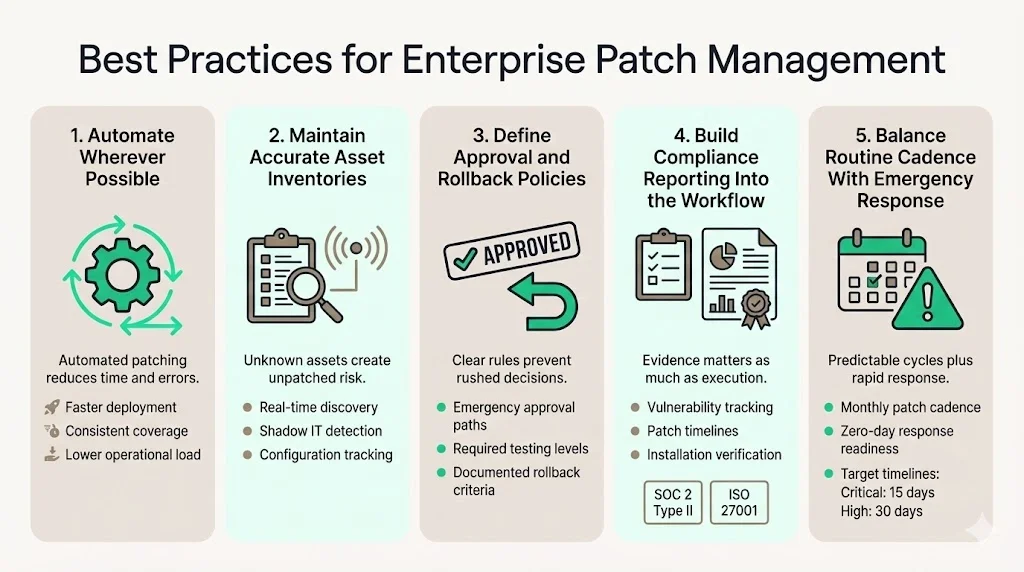
Automate wherever possible. Automating patch management can reduce patching time by 50%, while manual processes remain error-prone and resource-intensive. Automation ensures consistent coverage, accelerates deployment, and reduces operational burden.
Maintain current, accurate asset inventories. You cannot patch what you don't know exists. Automated discovery tools identify shadow IT, detect unauthorized installations, and track configuration changes in real-time.
Establish clear approval and rollback policies. Document who approves emergency patches, what testing is required before production deployment, and under what circumstances patches get rolled back. These policies prevent rushed decisions during crisis response.
Include compliance reporting in your workflow. Generate audit-ready documentation showing what vulnerabilities were identified, how they were prioritized, when patches deployed, and verification of successful installation. SOC 2 Type II and ISO 27001 auditors require evidence of continuous patch management, not point-in-time snapshots.
Plan regular cadence with emergency response capability. Most organizations establish monthly patch cycles for routine updates while maintaining procedures for emergency zero-day responses. Ideally, "critical" vulnerabilities should be remediated within 15 calendar days of initial detection; "high" severity vulnerabilities should be remediated within 30 calendar days.
Common Challenges
Legacy systems incompatible with automated patching. Older operating systems, end-of-life applications, and specialized industrial control systems often lack vendor support or cannot accept patches without operational disruption. These assets require compensating controls, network segmentation, or replacement planning.
Balancing uptime requirements with patch windows. High-availability systems, 24/7 operations, and global deployments complicate maintenance scheduling. Organizations implement rolling updates, failover architectures, and load balancing to maintain availability during patching.
Resource constraints within IT teams. According to NinjaOne, 71% of IT and cybersecurity professionals believe that patching is too complex and time-consuming. Internal teams managing patch deployment manually invest 550-600 hours annually on compliance-related tasks—time diverted from strategic security initiatives.
Compatibility issues during deployment. Patches occasionally conflict with custom applications, third-party integrations, or specific configurations. Testing catches most issues, but some only surface in production environments with unique characteristics.
Real-World Considerations for Enterprise Buyers
Organizations evaluating patch management solutions should assess several capabilities:
Scalability across heterogeneous environments. Solutions must handle diverse operating systems, thousands of applications, remote endpoints, cloud infrastructure, and IoT devices from a unified platform.
Risk-based prioritization and automation. Effective platforms integrate threat intelligence, CVSS scoring, asset criticality, and exploitability data to automatically prioritize patches requiring immediate attention versus routine deployment.
Comprehensive reporting and audit trails. Generate compliance documentation showing vulnerability identification, risk assessment, patch deployment, and verification—meeting SOC 2, ISO 27001, HIPAA, and GDPR evidence requirements.
Integration with existing security infrastructure. Patch management platforms should integrate with vulnerability scanners, SIEM systems, endpoint detection and response tools, and configuration management databases.
Managed security service providers deliver end-to-end patch management as part of comprehensive security operations. Rather than investing 550-600 internal hours annually managing patches, organizations using managed services typically invest under 70 hours on oversight and approval—an almost 90% reduction in internal resource consumption while improving coverage, reducing time-to-patch, and maintaining continuous audit readiness.
Make patching produce the evidence an auditor wants
Book a demo and we'll show how Konfirmity tracks discovery, prioritization and deployment across your estate, so your patch timelines are provable rather than a best guess.
Book a demo
Conclusion
The patch management process represents a fundamental security control that addresses known vulnerabilities before attackers exploit them. Organizations treating patching as reactive maintenance inevitably face rushed deployments, incomplete coverage, and preventable breaches. Effective patch management establishes continuous cycles of discovery, assessment, prioritization, testing, deployment, and verification.
This systematic approach—inventory systems, scan for vulnerabilities, prioritize by risk, test in staging, schedule deployment, apply patches across your environment, verify installation, and continuously improve—transforms patch management from administrative burden into strategic security capability. With vulnerabilities increasing 13% annually and exploitation accelerating, formal patch management processes backed by automation and integrated with broader vulnerability management programs are no longer optional for enterprises managing regulated data or maintaining customer trust.
FAQs
Patch management is the systematic process of identifying, testing, prioritizing, and deploying vendor-provided software updates across an organization's IT infrastructure. It addresses security vulnerabilities, software bugs, performance issues, and compatibility problems through structured workflows that ensure patches deploy consistently, completely, and with minimal operational disruption.
Patch management directly reduces breach risk by closing known vulnerabilities before attackers exploit them. Sixty percent of breaches involve unpatched vulnerabilities where patches existed but weren't applied. Beyond security, effective patch management maintains system stability, improves performance, reduces downtime, and provides documented evidence of continuous security operations required for SOC 2, ISO 27001, HIPAA, and GDPR compliance.
The patch management process follows eight continuous steps: (1) inventory and discover all assets, (2) scan systems to identify missing patches and vulnerabilities, (3) prioritize patches based on severity and business impact, (4) test patches in staging environments, (5) schedule deployment during appropriate maintenance windows, (6) deploy patches using automated tools, (7) monitor and verify successful installation, and (8) repeat the cycle while continuously improving based on metrics and operational experience.
Most enterprises establish monthly patch cycles for routine updates while maintaining emergency procedures for critical zero-day vulnerabilities. Industry standards recommend remediating critical vulnerabilities within 15 calendar days of detection and high-severity vulnerabilities within 30 days. Organizations handling regulated data often implement more aggressive schedules. The specific cadence depends on risk tolerance, operational requirements, and regulatory obligations, but patch management must function as continuous operations rather than periodic projects.
Delayed patching increases exposure to exploitation—attackers reverse-engineer patches within hours of release and scan for vulnerable systems. Consequences include data breaches, ransomware infections, compliance violations, regulatory fines, operational disruptions, and reputational damage. Organizations delaying patches beyond 30 days face three times higher breach likelihood compared to those patching within recommended timeframes. Beyond security, unpatched systems experience higher failure rates, compatibility issues, and performance degradation.

