In the current enterprise market, security is no longer just an IT concern—it is a procurement gatekeeper. When you sell to enterprise clients, particularly in the EU or UK, your ability to prove strict data governance determines whether a deal closes or stalls indefinitely.
Most leadership teams misunderstand the scope of the General Data Protection Regulation (GDPR). They assume compliance is achieved through cookie banners and privacy policies. However, for B2B SaaS and enterprise vendors, the real scrutiny falls on Article 32: the security of processing. Specifically, auditors and buyers want to know exactly who has access to data, why they have it, and how you revoke it.
If you are unable to demonstrate GDPR Access Control Best Practices with granular evidence, you present a liability to your customers. The stakes are financial as well as legal: the IBM Cost of a Data Breach Report 2024 reveals the global average cost of a breach has reached $4.88 million, a 10% increase from the previous year. Furthermore, European regulators issued €1.2 billion in fines in 2024 alone, with authorities receiving over 363 data breach notifications per day.
At Konfirmity, having supported over 6,000 security audits across SOC 2, ISO 27001, and GDPR, we see a recurring pattern: organizations fail not because they lack tools, but because they lack operational discipline. Security that looks acceptable in a static document often breaks under the pressure of a live audit or a breach.
This guide outlines the specific technical and organizational measures required to build a durable access control program—one that satisfies regulators, passes audits, and accelerates enterprise sales cycles.
Understanding GDPR Access Control
Access control is the mechanism that restricts availability to data and resources. Under GDPR, it is not an optional add-on; it is a fundamental requirement for ensuring the confidentiality and integrity of personal data.
What GDPR Requires
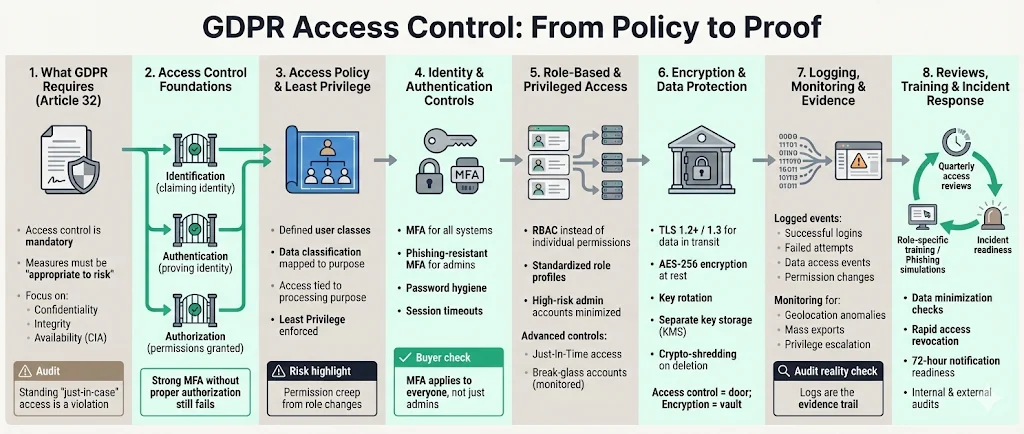
Article 32 of the GDPR mandates that controllers and processors implement "appropriate technical and organizational measures" to ensure a level of security appropriate to the risk. While the regulation is technology-neutral, it explicitly suggests measures such as encryption and the ability to restore availability.
In practice, this means you must limit access to personal data to only those employees, contractors, or systems that strictly require it for their specific tasks. This concept is often verified during ISO 27001 surveillance audits or SOC 2 Type II observation periods. If your developer has production database access "just in case," you are likely violating Article 32.
Core Concepts
Three core concepts anchor every access control program. To implement effective GDPR Access Control Best Practices, you must map your operations to the CIA triad, which GDPR principles mirror directly:
- Confidentiality: Preventing unauthorized disclosure. Only the right people see the data.
- Integrity: Preventing unauthorized modification. The data remains accurate and unaltered.
- Availability: Ensuring authorized users have access when needed.
Access control is the gatekeeper for all three. It relies on three distinct phases:
- Identification: Who are you? (Claiming an identity).
- Authentication: Prove it. (Verifying the identity).
- Authorization: What are you allowed to do? (Permissions).
Distinguishing these is vital. You can have strong authentication (MFA) but weak authorization (everyone is an Admin). Both must work in tandem.
Step 1: Define Your Access Policies
Before implementing software restrictions, you must define the business rules that govern your data. We often see companies rushing to buy Identity and Access Management (IAM) tools without a clear definition of what they are trying to restrict.
Establish Clear Access Rules
Your Access Control Policy acts as the blueprint for your compliance program. It must document:
- User Classes: Who accesses your systems (e.g., Administrators, Support, Developers, Customers).
- Data Classification: What types of data do you hold? (e.g., Public, Internal, Confidential, Restricted/PII).
- Processing Purpose: Why is access needed?
Under GDPR, you must tie every access right to a specific processing purpose. If a marketing manager has access to raw user database logs "for analytics," but their job description does not require querying SQL databases, that gap will trigger a finding in an audit.
Enforce Least Privilege Principle
The Principle of Least Privilege (PoLP) dictates that a user should only have the bare minimum privileges necessary to perform their job function. This is the single most effective way to reduce your attack surface.
In our work delivering managed security for high-growth companies, we frequently encounter "permission creep." An employee starts in support, moves to sales, then to product management, retaining access from every previous role. This accumulation creates a massive compliance risk. Your policy must explicitly state that access is granted on a "need-to-know" basis and revoked immediately upon role change.
Step 2: Strong Identity and Authentication Controls
Once you define who should have access, identity and authentication controls prove that users are who they say they are. In 2025, with the rise of automated social engineering, basic password protection is insufficient.
Identity Verification
Strong identity proofing is required before issuing credentials. For employees, this involves background checks and HR verification. For systems, it involves certificate-based authentication.
The NIST SP 800-63 Digital Identity Guidelines (updated to version 4 in 2025) provides the gold standard here. Following these standards satisfies the "state of the art" requirement mentioned in GDPR.
User Authentication Processes
Implementing GDPR Access Control Best Practices requires stringent authentication protocols. The 2024 Verizon Data Breach Investigations Report (DBIR) notes that 31% of all breaches involved stolen credentials, making this a primary attack vector.
- Multi-Factor Authentication (MFA): This is non-negotiable. MFA should be enforced on all systems accessing personal data, including email, cloud infrastructure (AWS/Azure/GCP), and HR platforms. We advise using phishing-resistant MFA (like FIDO2/WebAuthn hardware keys) for administrative accounts.
- Password Complexity: If passwords are used, enforce complexity and check against known compromised lists (e.g., Have I Been Pwned).
- Session Management: Sessions must time out after a period of inactivity to prevent unauthorized access via an unlocked workstation.
Enterprise buyers will check your specific configuration settings during due diligence. They will ask: "Is MFA enforced on all users, or just admins?" The answer must be "all users."
Step 3: Privilege Management and Role-Based Access
Managing individual user permissions becomes impossible at scale. If you have 50 employees and 20 SaaS tools, managing 1,000 individual permission links is a recipe for failure.
Role-Based Access Control (RBAC)
RBAC simplifies compliance by assigning permissions to roles rather than individuals.
- Role Definition: Create standard profiles (e.g., "L1 Support," "Senior DevOps," "HR Manager").
- Permission Mapping: Map specific system permissions to these roles.
- Assignment: Assign users to roles.
When a new engineer joins, you simply assign them the "Junior Developer" role. This ensures they get exactly the access they need—no more, no less. From an audit perspective, RBAC provides clean evidence. Instead of auditing every user, we audit the role definition and the user list.
Privilege Reviews
High-privilege accounts (Administrators, Superusers) carry the highest risk. GDPR requires stricter controls for these accounts.
- Just-In-Time (JIT) Access: Instead of standing admin access, developers should request temporary elevation for a specific task.
- Break-Glass Accounts: Secure emergency accounts that are monitored and only used during critical incidents.
At Konfirmity, we automate the review of these high-risk roles. We ensure that admin privileges are not treated as status symbols but as operational liabilities that must be minimized.
Access control that holds up under audit takes more than a policy doc.
Share your work email and we'll help you build controls that satisfy ISO 27001, SOC 2, and GDPR reviewers.
Step 4: Encryption Standards and Data Protection
Access control is your front door; encryption is the safe inside the house. If an attacker bypasses your authentication (e.g., through a zero-day vulnerability), encryption ensures the data remains unintelligible.
Protect Data in Transit and at Rest
Article 32 explicitly lists encryption as a measure to mitigate risk.
- Data in Transit: All data moving between your servers and clients must use TLS 1.2 or higher (TLS 1.3 is preferred). Internal traffic between microservices should also be encrypted (mTLS).
- Data at Rest: Databases, object storage (S3 buckets), and backups must be encrypted using strong standards like AES-256.
Cryptographic Key Management
Encryption is only as effective as your management of cryptographic keys.
- Rotation: Cryptographic keys should be rotated regularly (at least annually).
- Separation: Store keys separately from the data they encrypt. Use a dedicated Key Management Service (KMS).
- Retirement: When data is deleted, the associated keys should be destroyed (crypto-shredding), ensuring the data is irretrievable.
Step 5: Continuous Logging and Audit Trails
You can not improve what you do not measure, and you can not prove compliance without evidence. Logs are the "black box" recorder of your infrastructure.
Audit Logging
To follow GDPR Access Control Best Practices, you must log:
- Successful logins.
- Failed login attempts (indicator of brute force).
- Access to sensitive data records.
- Changes to access policies (e.g., someone granting themselves admin rights).
These logs must be immutable and stored securely. During a forensic investigation after a breach, these logs are the primary evidence used to determine the scope of the impact. Without them, you can not fulfill the GDPR requirement to notify authorities within 72 hours with accurate details.
Monitoring and Alerts
Logs are useless if nobody looks at them until after a disaster. Implement automated monitoring to detect anomalies:
- Login attempts from unusual locations (Geofencing).
- Mass export of data.
- Privilege escalation attempts.
We implement Security Information and Event Management (SIEM) logic for our clients to surface these signals instantly, allowing for rapid response.
Step 6: Data Minimization and Access Review
The most secure data is the data you do not have. Data minimization is a core GDPR principle that directly impacts access control.
Data Minimization
Review your data ingestion pipelines. Are you collecting PII that serves no business purpose? If you collect dates of birth but never use them, you are increasing your liability without adding value. Stop collecting it, or delete it. Less data means fewer access control risks.
Regular Access Reviews
This is where most organizations fail. You must conduct periodic User Access Reviews (UAR).
- Frequency: Quarterly for critical systems; biannually for others.
- Process: Managers review the list of users and their permissions for each system. They must confirm whether access is still required.
- Outcome: Revoke access for employees who have changed roles or left the company.
This process is often tedious, which is why "compliance manufacturing" tools often gloss over it. However, at Konfirmity, our fully-managed service treats this as a hands-on process. We facilitate these reviews to ensure they are accurate, preventing the "rubber stamping" that auditors hate.
Free playbook
The Access Review Playbook
A repeatable user access review process that satisfies ISO 27001 and SOC 2 auditors, with the evidence to capture at each step. Enter your work email and we'll send the PDF.
Step 7: Training and Awareness
Training and awareness close the gap technical controls can't: human error. Your team is part of your access control perimeter.
Security Training
GDPR requires staff training. This should not be a generic video once a year. Training must cover:
- How to handle access requests.
- The dangers of password sharing.
- Clean desk/clear screen policies.
- How to classify data correctly.
Phishing and Social Engineering
Attackers target humans to steal credentials. The 2024 Verizon DBIR highlights that 68% of breaches involve a non-malicious human element, such as a person falling victim to a social engineering attack or making an error. Regular phishing simulations are critical. If an employee hands over their MFA token because they were tricked, your technical firewalls become irrelevant.
Step 8: Incident Response and Compliance Audits
Despite your best efforts, incidents may occur. GDPR Access Control Best Practices include having a plan for failure.
Incident Response Planning
Your Incident Response Plan (IRP) must specifically address access breaches.
- Detection: How do you know an unauthorized user is in the system?
- Containment: Can you revoke access globally for a compromised user in minutes?
- Notification: Do you have the legal templates ready to notify the ICO or other Supervisory Authorities within 72 hours?
Compliance Auditing
Internal and external audits verify that your controls work.
- Internal Audit: Run your own checks before the regulator or customer does.
- External Audit: Engage third parties for penetration testing and certification (ISO 27001, SOC 2).
Enterprise buyers rely on these audit reports (like a SOC 2 Type II report) as a proxy for trust. They want to see that an independent CPA has verified your access controls over a 6-12 month observation period.
Putting It All Together: Implementation Checklist
Building a program that stands up to scrutiny requires a methodical approach. Use this checklist to operationalize your strategy.
Phase 1: Foundation (Weeks 1-4)
This foundation phase lays the groundwork before you touch any software:
- Data Inventory: Map all personal data flows.
- Policy Creation: Draft and sign Access Control and Password policies.
- Role Definition: Define RBAC roles for your application and infrastructure.
Phase 2: Implementation (Weeks 5-12)
This implementation phase rolls the controls out across your stack:
- MFA Rollout: Enforce MFA across Google Workspace, O365, AWS, and production apps.
- SSO Integration: Centralize identity management (e.g., Okta, JumpCloud) to simplify provisioning.
- Encryption: Verify TLS settings and database encryption at rest.
Phase 3: Operations (Ongoing)
The final phase never ends: it's the operating cadence that keeps access control evidence current.
- Quarterly Access Reviews: Validate user permissions.
- Log Monitoring: Review alerts for anomalous access.
- Offboarding Drills: Test how fast you can remove a terminated user.
- Vendor Risk Management: Ensure your sub-processors also have strict access controls.
The Role of Automation
While checklists are great, manual execution breaks at scale. However, relying solely on automated GRC software often leads to a false sense of security. The software might show "green," but if the underlying configuration is wrong, you remain exposed.
This is where the fully-managed service distinguishes itself. We do not just give you a checklist; we implement the controls inside your cloud stack (AWS, Azure, GCP) and manage the evidence collection year-round.
FAQs
It refers to the technical and organizational measures used to restrict access to personal data to only authorized individuals. This is a core requirement of Article 32 to ensure the security of processing.
Role-Based Access Control (RBAC) enforces the Principle of Least Privilege by assigning permissions based on job function rather than individual requests. This simplifies evidence collection for audits and ensures users only have the access strictly necessary for their work.
Best practice suggests conducting User Access Reviews (UAR) quarterly for critical systems containing sensitive data or PII, and biannually for lower-risk internal tools.
Yes, Article 32 explicitly mentions encryption as an appropriate technical measure. It is expected for data both in transit and at rest to mitigate the risks of a data breach.
Authentication verifies who you are (e.g., logging in with a password and MFA). Authorization determines what you can do once you are in (e.g., viewing a file vs. deleting it). You need both for effective security.
Turn access control into audit evidence
Book a demo and we'll show how Konfirmity implements and evidences access control inside your stack, self-serve or with our team running it for you.
Book a demo
Conclusion
Implementing GDPR Access Control Best Practices is not a one-time project; it is an operational standard. For enterprise-focused companies, it is the difference between being viewed as a risky vendor or a trusted partner.
The legal risks of GDPR—fines up to €20 million or 4% of global turnover—are significant, but the commercial risk is often immediate. Without demonstrable, strong access controls, you will fail security questionnaires, delay procurement cycles, and lose revenue.
Building this capability requires more than software; it demands human expertise and continuous discipline. Konfirmity is a security-driven compliance platform backed by 25+ years of combined technical expertise: run it self-serve, or have our team build, run, and maintain these programs for you. We move beyond "advising" to "executing," ensuring your controls are audit-ready every single day.
Start with security, and compliance will follow naturally. Build controls that protect your data, and you will build the trust required to win enterprise business.