

Most enterprise buyers now request assurance artifacts before procurement begins. Without operational security and continuous evidence, deals stall—even when teams believe they possess strong technical defenses. Backup And Recovery For SOC 2 is not merely an IT checkbox; it is the primary evidence your enterprise clients require to trust you with their data resilience.
In my experience overseeing 6,000+ security audits, I have seen hundreds of technically proficient companies fail not because they lacked backups, but because they lacked the proof of recovery capabilities required by the American Institute of CPAs (AICPA). When a Fortune 500 buyer asks for your SOC 2 Type II report, they are verifying that you can survive a ransomware attack or a region outage without taking their business down with you.
This article details the operational demands of SOC 2 availability and confidentiality criteria. We will examine how to build a durable backup strategy, what auditors actually scrutinize during the observation window, and how to maintain compliance without dedicating 550+ engineering hours a year to manual evidence collection.
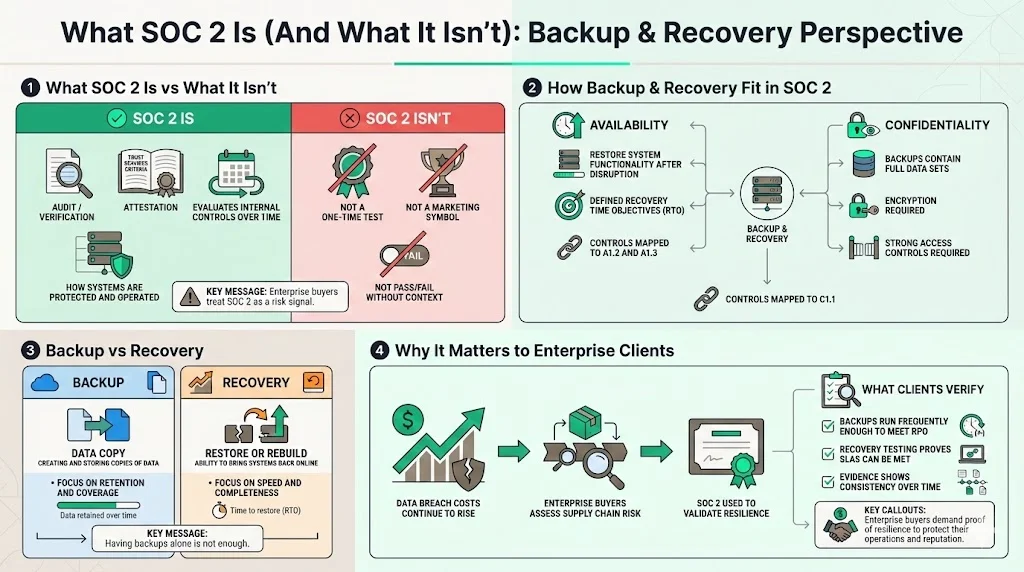
What SOC 2 Is (And What It Isn’t)
SOC 2 is an attestation framework based on the AICPA’s Trust Services Criteria (TSC). Unlike a simple pass/fail exam, it functions as a detailed audit of your internal controls over a specific period (typically 6 to 12 months for Type II). It assesses whether your system is protected against unauthorized access (Security), remains available for operation (Availability), and keeps confidential information private (Confidentiality).
Many founders view SOC 2 as a marketing badge. However, enterprise procurement teams view it as a risk assessment tool. If your Backup And Recovery For SOC 2 controls are weak, you represent a supply chain risk.
How Backup & Recovery Fit in SOC 2
Backup and recovery controls map directly to the Availability (A1.2, A1.3) and Confidentiality (C1.1) criteria.
- Availability: You must demonstrate the capacity to restore system functionality and data availability after a disruption. This requires defined recovery time objectives (RTO).
- Confidentiality: Backups contain your most sensitive data. If an attacker exfiltrates a backup snapshot, they possess everything. Therefore, encryption and access controls on backups are mandatory.
Distinction:
- Backup: The process of creating copies of data for safekeeping.
- Recovery: The ability to restore that data and the underlying infrastructure to a functional state.
Why It Matters for Enterprise Clients
According to the IBM Cost of a Data Breach Report 2024, the global average cost of a data breach has reached $4.88 million, a 10% increase from the previous year. Enterprise clients demand proof that your service will not contribute to that statistic. They utilize your SOC 2 report to verify that:
- You perform backups frequently enough to minimize data loss (RPO).
- You have tested your ability to restore that data within a timeframe that meets their Service Level Agreements (SLAs).
Core Concepts: Data Protection and Business Continuity
To implement Backup And Recovery For SOC 2 effectively, you must define the metrics that drive your architecture.
Backup Essentials
Auditors expect automation. Manual backups performed by an engineer "when they remember" will result in a qualified opinion (a failure) on your report.
- RPO (Recovery Point Objective): The maximum age of files recovered from backup storage for normal operations to resume. If your RPO is 4 hours, you essentially agree that losing 3 hours and 59 minutes of data is acceptable.
- RTO (Recovery Time Objective): The targeted duration of time and a service level within which a business process must be restored after a disaster.
Security Requirements: Backups must be encrypted both in transit (while moving to the storage bucket) and at rest (while sitting in the bucket). We see many teams encrypt production databases but leave the S3 backup bucket unencrypted. This is a critical failure.
Disaster Recovery (DR) 101
Disaster Recovery is a subset of business continuity planning. It focuses specifically on the technical aspects of restoring IT infrastructure and data. The NIST SP 800-34 Guide to Contingency Planning for Federal Information Systems provides the gold standard here: a DR plan must contain specific instructions for restoring systems, not just vague policy statements.
Business Continuity vs. Disaster Recovery
While often used interchangeably, these terms possess distinct meanings in an audit context:
- Business Continuity (BC): Ensures the business keeps running during a disruption (e.g., using manual workarounds, communication plans).
- Disaster Recovery (DR): The technical process of getting the servers, databases, and applications back online.
For SOC 2, your auditor will ask for evidence of both, but the technical weight lies heavily on DR.
SOC 2 Backup Requirements (What Auditors Look For)
When Konfirmity manages a program, we prepare our clients for the specific evidence requests auditors will make. Here is what you must produce to satisfy the requirements for Backup And Recovery For SOC 2.
1) Data Retention Policies
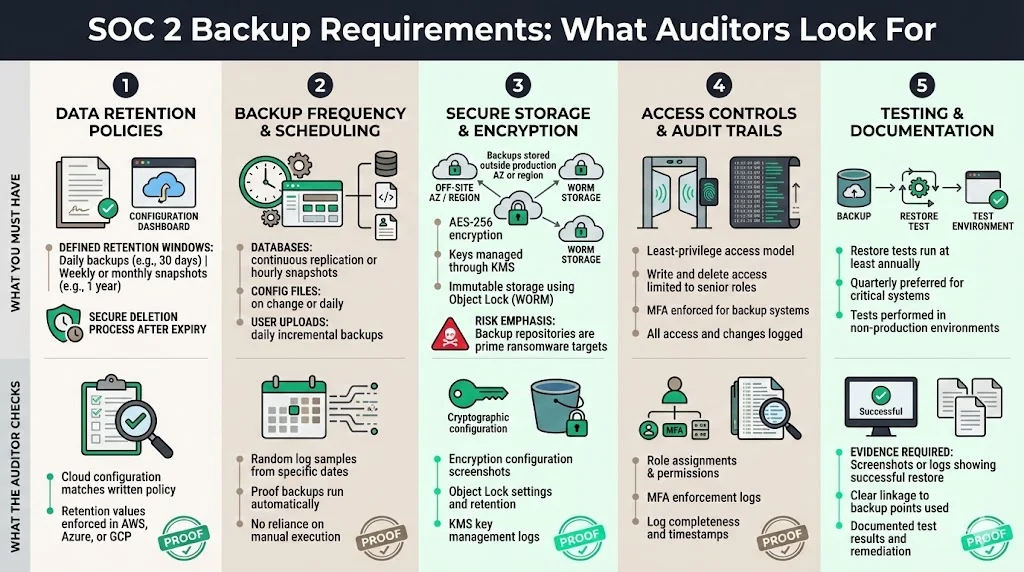
You cannot keep data forever (GDPR minimization principles) nor delete it immediately (tax/compliance obligations). You must document a policy stating:
- Daily Backups: Retained for X days (e.g., 30 days).
- Weekly/Monthly Snapshots: Retained for Y months (e.g., 1 year).
- Deletion: How data is securely purged once the retention period expires.
Auditor Check: They will ask to see the configuration settings in AWS/Azure/GCP that match the numbers written in your policy.
2 )Backup Frequency & Scheduling
The frequency must align with the criticality of the data.
- Databases: Often require continuous replication (Point-in-Time Recovery) or hourly snapshots.
- Configuration Files: Backup upon change or daily.
- User Uploads: Daily incremental backups.
Auditor Check: They will sample logs from random dates (e.g., "Show me the backup success log for March 14th and August 22nd") to ensure the schedule runs without human intervention.
3) Secure Storage & Encryption
Off-site storage is a requirement. In the cloud era, this implies your backups should reside in a different availability zone (AZ) or region than your production data to survive a regional outage.
- Encryption: Use AES-256 encryption. Manage keys via a KMS (Key Management Service).
- Immutability: We strongly advise using Object Lock (WORM - Write Once Read Many) on backup buckets. Veeam's 2024 Trends Report reveals that 96% of ransomware attacks explicitly target backup repositories to force payment.
4) Access Controls & Audit Trails
Access to backup repositories must be restricted to the absolute minimum number of personnel (Least Privilege).
- Role-Based Access (RBAC): Only Senior DevOps or the CTO should have write/delete access.
- MFA: Multi-Factor Authentication is mandatory for accessing the backup console.
- Logging: Every access attempt or configuration change to the backup system must generate a log entry.
5) Testing & Documentation
This is where most companies fail. You must prove the backups actually work.
- Frequency: At least annually, ideally quarterly.
- Evidence: A screenshot or log showing a successful restore of data from a backup point to a test environment.
Building a Practical SOC 2 Backup & Recovery Strategy
Implementing these controls within your stack takes time. A typical self-managed readiness phase lasts 9–12 months. With Konfirmity's fully-managed service, we compress this to 4-5 months by handling the mapping and implementation for you.
Here is the step-by-step workflow we utilize.
Step 1: Define Your Backup Objectives
Do not guess your RPO/RTO. Consult your Master Service Agreements (MSAs) with clients. If you promised a bank 99.99% uptime, your RTO cannot be 24 hours. Map your data types (Customer PII, System Logs, Code Repositories) to specific recovery goals.
Step 2: Choose the Right Tools
Avoid building custom scripts if possible. Use cloud-native tools that generate their own audit trails:
- AWS: AWS Backup (centralized view), RDS automated backups, S3 Versioning.
- Azure: Azure Backup, Geo-redundant storage (GRS).
- GCP: Google Cloud Backup and DR Service.
Step 3: Implement and Configure Backups
Configure the automated schedules. Ensure that:
- Failures trigger alerts: If a backup fails, it must page the on-call engineer (PagerDuty/OpsGenie).
- Encryption is default: Ensure new volumes are backed up encrypted automatically.
Backup controls that protect data are the ones auditors want documented.
Share your work email and make recovery procedures audit-ready and genuinely resilient.
Step 4: Document the Process
Write a clear "Backup and Recovery Policy." This document is not for you; it is for the auditor and your customers. It must state what you do, how you do it, and who is responsible.
Step 5: Set Up Recovery Procedures
Documentation must include a "Restoration Procedure." Imagine your lead engineer is unavailable during an outage. Can a junior engineer restore the database using only this document? If not, the document is insufficient.
Step 6: Test & Improve
Schedule a "Tabletop Exercise" or a functional restore test. Restore a production snapshot to a staging environment. Verify data integrity. Record the time it took. If it took 6 hours and your RTO is 4 hours, you have a finding to remediate.
Disaster Recovery in Practice
Backup And Recovery For SOC 2 extends beyond files; it encompasses the survival of the application.
Creating a DR Plan That Meets SOC 2
The AICPA requires a plan that addresses "environmental protections, software, data backup processes, and recovery logic." Your plan must identify critical systems. For a SaaS platform, the "Critical Path" usually involves:
- DNS / Load Balancer.
- Web/App Servers (Compute).
- Database (Storage).
- Authentication Provider (Auth0/Cognito).
Assign Clear Roles & Responsibilities
During an outage, chaos ensues. Your plan must designate:
- Incident Commander: Leads the response.
- Tech Lead: Executes the restore.
- Comms Lead: Updates the status page and notifies customers.
Example Scenarios
Scenario A: Database Corruption
- Trigger: Bad migration script corrupts customer tables.
- Response: Identify the corruption timestamp. Restore RDS from the Point-in-Time snapshot taken 5 minutes prior to the script run. Verify integrity. Switch traffic.
- SOC 2 Evidence: Ticket showing the incident, timestamp of restore, and post-mortem report.
Scenario B: Cloud Region Outage (us-east-1 goes down)
- Trigger: AWS region failure.
- Response: Activate DR plan. Spin up infrastructure in us-west-2 using Terraform/IaC. Promote Read-Replica database in the secondary region to Primary. Update DNS.
- SOC 2 Evidence: Result of the annual failover test proving this capability.
Integrating DR with Incident Response
Your Disaster Recovery Plan (DRP) should be triggered by your Incident Response Plan (IRP). When an incident is classified as "High Severity - Availability Loss," the DRP activates. This linkage is crucial for ISO 27001 and SOC 2 alignment.
Examples and Templates
To help you visualize the artifacts, here are simplified versions of what we implement for Konfirmity clients.
Backup Schedule Template
| Data Asset | Backup Type | Frequency | Retention | Encryption | Owner |
|---|---|---|---|---|---|
| Production DB (RDS) | Snapshot | Daily | 30 Days | AES-256 | Cloud Ops |
| Production DB (RDS) | Transaction Logs | Every 5 min | 7 Days | AES-256 | Cloud Ops |
| Object Storage (S3) | Versioning | Real-time | 1 Year | SSE-S3 | Engineering |
| Code Repositories | Mirroring | Daily | 90 Days | TLS/SSH | DevOps |
Recovery Playbook Snippet (PostgreSQL)
Objective: Restore Main App Database from Snapshot. Prerequisites: AWS Console Access, MFA Token.
- Identify Snapshot: Go to RDS > Snapshots. Locate latest automated-backup-production-db.
- Initiate Restore: Click Actions > Restore Snapshot.
- Configure Instance:
- Instance Identifier: production-db-recovery-[date]
- Instance Class: Match production size (e.g., db.r6g.large).
- VPC/Subnet: Ensure isolation from the public internet.
- Verify: Connect via Bastion Host. Run SELECT count(*) FROM users;.
- Swap: Rename old DB to -legacy. Rename new DB to production-db.
- Update Config: If the endpoint changed, update Secrets Manager.
Documentation Checklist for Audit
Auditors will request a zipped folder containing:
- Backup & Recovery Policy (Signed/Approved).
- Evidence of Backup Configuration (Screenshots of AWS Backup plan).
- Evidence of Backup Success (Logs from sampled dates).
- Evidence of Restoration Test (Ticket/Screenshot of successful test restore).
- List of individuals with access to modify backups.
Common Pitfalls and How to Avoid Them
Even with good intentions, companies fall into traps that delay certification or lead to "Qualified" (bad) reports.
1) Poor Documentation or Outdated Policies
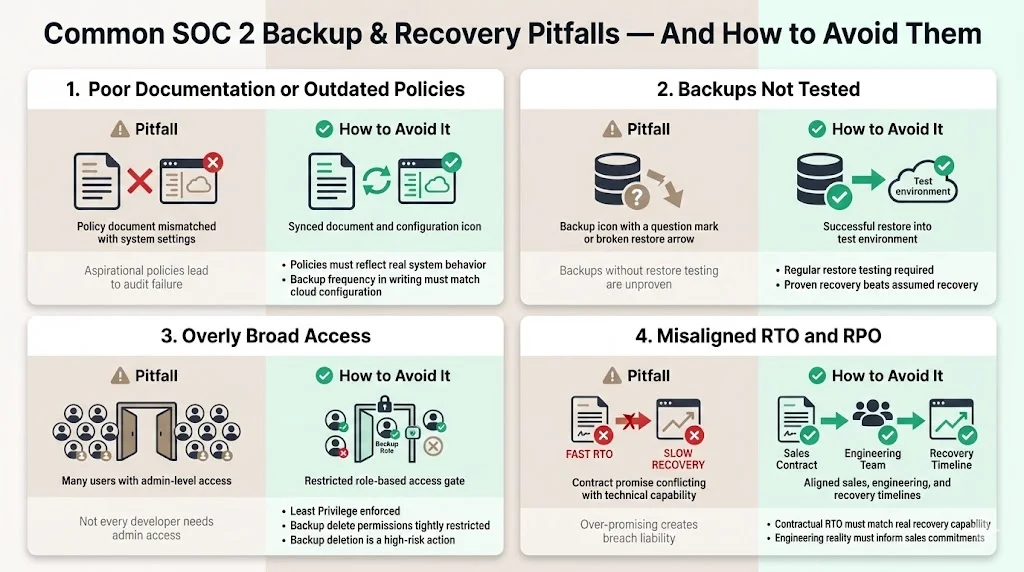
Auditors read your policy first, then check your system. If your policy says "We backup every hour" but your system is configured for "Daily," you fail. Ensure your Backup And Recovery For SOC 2 documentation reflects reality, not aspirations.
2) Backups Not Tested
We see this constantly. "We have backups." "Have you ever restored one?" "No." This is a critical risk. According to Veeam, organizations only recover 57% of their data on average during an attack. Without testing, you are likely part of that statistic.
3) Overly Broad Access
Granting every developer full AdministratorAccess in AWS means everyone can delete the backups. This violates the principle of Least Privilege. Restrict backup:DeleteRecoveryPoint permissions strictly.
4) Misalignment of RTO/RPO
Setting an RTO of "1 hour" in a contract to close a deal, while having a technical recovery capability of 24 hours, creates a contractual breach liability. Align sales promises with engineering reality.
Conclusion
Security that appears strong in documents but fails under incident pressure is a liability. Backup And Recovery For SOC 2 is not about generating paper; it is about building a resilience engine that withstands scrutiny from auditors and enterprise buyers alike. Sophos reports that the average cost to recover from a ransomware attack (excluding the ransom itself) hit $2.73 million in 2024. Can your business absorb that hit?
At Konfirmity, we are a security-driven compliance platform. Run it self-serve, or add the fully-managed service and our experts operate as an extension of your security team. We don't just advise you on what the RPO should be; we help implement the controls inside your stack, run the restore tests, and gather the evidence. By shifting from "compliance manufacturing" to true operational security, you reduce risk and accelerate sales cycles.
Build the program once, operate it daily, and let compliance follow as a natural output of good engineering.
Frequently Asked Questions
1) What’s the difference between backup and disaster recovery?
Backup is the act of copying data to a safe location. Disaster Recovery is the strategy and set of procedures to restore that data and the associated infrastructure to full functionality after a disruption.
2) How often should backups be tested?
For SOC 2, we recommend a formal restoration test at least annually. However, high-growth enterprises should test critical database restores quarterly or after significant infrastructure changes.
3) Do cloud backups meet SOC 2 requirements?
Yes, but simply "being in the cloud" is not enough. You must configure the retention, enable encryption, restrict access, and monitor for failures. The shared responsibility model means you are responsible for the configuration of the backups provided by AWS/Azure/GCP.
4) What documentation do auditors want to see for backup & recovery?
They require a formal Backup Policy, a Disaster Recovery Plan, evidence of backup configurations (screenshots/configs), logs showing successful backups over the audit period, and proof of a successful restoration test.
5) Can backups alone satisfy SOC 2 compliance?
No. Backup And Recovery For SOC 2 requires both the data copies (backups) and the proven capability to use them (recovery procedures and testing), along with the governance wrapping (policies and access control).







