Most enterprise and healthcare buyers now demand proof of operational security before procurement. Deals stall when teams claim compliance but lack durable evidence. For organisations handling electronic protected health information (ePHI), simply copying files at night is not enough. HIPAA Backup Testing—the systematic verification of backup systems—bridges the gap between paperwork and resilience. Ransomware, system failures, and natural disasters remind us that backups are only useful if they can be restored. When the ransomware group Clop exploited a MOVEit vulnerability in 2023, more than 600 organisations were affected. Many struggled because their backups were incomplete or untested, leading to prolonged downtime and regulatory risk.
This guide explains why HIPAA Backup Testing matters, outlines the regulatory requirements, and provides concrete steps and templates to build a repeatable process. It connects data recovery, disaster recovery, regulatory standards, and data integrity, showing that backup is a discipline, not a box to tick. As a practitioner who has implemented hundreds of programs and supported more than 6,000 security audits, I draw on real field experience and align guidance with SOC 2, ISO 27001 and NIST frameworks. By the end, you will know how to build a resilient backup program that stands up to auditors, buyers, and attackers.
Understanding HIPAA & Its Backup / Contingency Requirements
The Health Insurance Portability and Accountability Act (HIPAA) Security Rule mandates administrative, physical, and technical safeguards to protect the confidentiality, integrity and availability of ePHI. Covered entities—health plans, providers and clearinghouses—and their business associates must implement a risk‑based program tailored to their size and complexity. Central to the Security Rule is the contingency plan standard (§164.308(a)(7)), which requires a data backup plan, disaster recovery plan, emergency mode operations plan, testing and revision procedures and applications/data criticality analysis. The U.S. Department of Health and Human Services (HHS) explains that contingency planning ensures that organisations can recover from emergencies that damage systems containing ePHI. Each element has an implementation specification:
-
Data Backup Plan – create and maintain retrievable exact copies of ePHI; backups should be stored off‑site or in redundant locations to avoid single points of failure. Encryption, access controls and audit logs must preserve confidentiality and integrity.
-
Disaster Recovery Plan – establish policies and procedures to restore any data lost; consider hardware failure, software corruption, or natural disasters. HHS urges organisations to balance data protection with operational needs and to plan for resource requirements.
-
Emergency Mode Operations Plan – ensure continuation of critical business processes while operating in emergency mode (e.g., providing care without access to electronic systems). This includes manual fallback procedures and communication protocols.
-
Testing and Revision Procedures – verify contingency plans periodically and document results. Testing ensures that backups can actually be restored and that procedures still meet evolving needs.
-
Applications and Data Criticality Analysis – identify which systems are most critical to operations, so recovery can be prioritised.
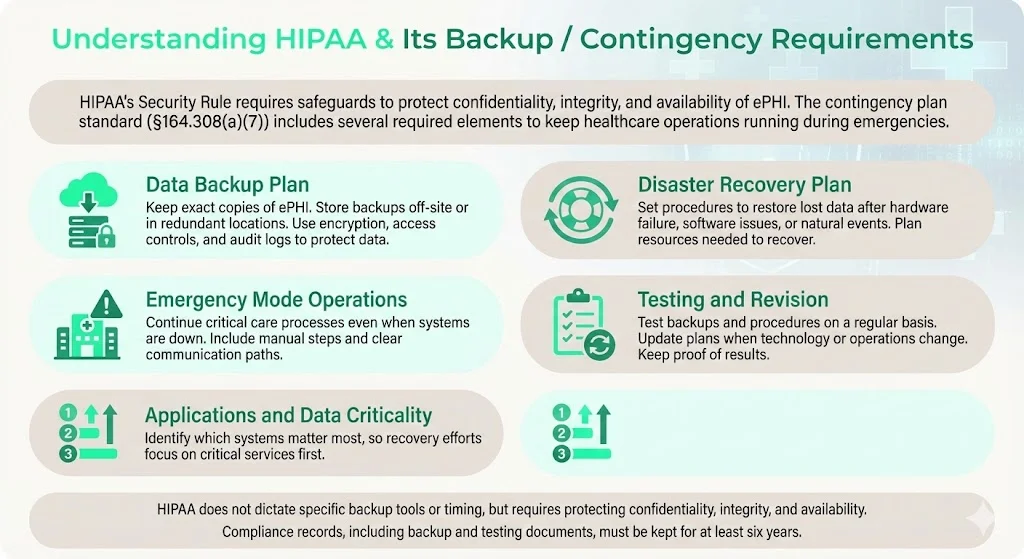
While HIPAA does not mandate specific backup frequencies or technologies, it requires that backup and recovery processes maintain the confidentiality, integrity and availability of ePHI; our HIPAA backup and recovery guide covers the full set of controls that make backups themselves compliant. Documentation related to HIPAA compliance—policies, risk assessments, audit logs, backup plans—must be retained for at least six years from creation or last effective date. That retention period applies to backup testing records as well.
Where “backup” sits under HIPAA, the Contingency Plan standard
In practice, many organisations assume that storing copies in cloud storage satisfies the contingency requirement. The Security Rule is clear: backups must be retrievable exact copies, and the organisation must have a disaster recovery plan, emergency mode operations plan, and testing & revision procedures. HHS notes that contingency plans are “addressable” specifications, meaning entities must implement them if reasonable and appropriate, or document why an alternative measure achieves the same purpose. An addressable specification is not optional; it requires documented rationale.
What “backup compliance” really means, not just storage
Backup compliance under HIPAA is about maintaining the confidentiality, integrity and availability of ePHI. That means:
-
Encryption – protect data at rest and in transit. Encryption keys must be managed securely and rotated.
-
Access Controls – restrict who can create, modify or restore backups; implement role‑based access and multi‑factor authentication. Audit logs should record who accessed backup media and when.
-
Secure Storage – store backups in physically secure locations with environmental controls. Off‑site storage should be geographically separated to mitigate regional disasters.
-
Audit Logging – maintain logs of backup creation, replication, deletion and restore activities. Logs must be tamper‑evident and retained for six years.
Backups should follow the 3‑2‑1 rule: keep at least three copies of your data on two different types of media, with one copy stored off‑site. This guideline, endorsed by NIST and ISO 27001, minimises the likelihood that a single failure mode will destroy all copies. Off‑site copies must be accessible yet secure; NIST recommends ensuring geographic separation, climate control and security at the storage facility.
Document retention rules under HIPAA
HIPAA does not dictate a fixed retention period for medical records (state laws typically govern medical record retention), but it does require that documentation related to compliance—policies, procedures, backup logs, risk assessments—be retained for six years. This includes evidence of backup and restore tests, updates to disaster recovery plans, and any revisions to contingency procedures. Keeping meticulous records helps demonstrate due diligence during audits.
Why Backup Testing Is Crucial: Beyond Just Having Backups
Many organisations run nightly or weekly backups yet rarely test them. I’ve seen clients discover during an incident that their backups were corrupt or incomplete. A backup strategy without testing creates a false sense of security.
Risks of untested backups
-
Corruption and Incomplete Backups – Hardware faults, media degradation or misconfigured backup jobs can silently corrupt archives. Without test restores, corruption may remain undetected until a disaster, at which point data is lost.
-
Misconfiguration – Backups may exclude certain directories or databases. In a recent audit, we found a radiology system whose imaging files were omitted from the backup because the storage path changed and scripts were not updated.
-
Obsolete Storage Media – Tape drives or outdated hardware can fail. NIST recommends periodic testing of backup tapes to ensure data can be retrieved without errors.
-
Ransomware & Malware – Modern ransomware not only encrypts production systems but also targets backup repositories. Immutable backups and multi‑factor authentication are essential, but they only work if regularly verified, ideally in step with the escalation procedures in our HIPAA incident response plan.
-
Compliance & Business Continuity Risk – Failure to restore ePHI in a disaster can lead to regulatory fines and notification obligations like those detailed in our HIPAA breach notification guide, plus lawsuits and damage to patient trust. In 2024, the HHS recorded 720 healthcare data breaches involving 186 million records. Malware and system outages were leading causes of data loss, and 2.5% of incidents were attributed to inadequate backups. The 2025 IBM Cost of a Data Breach report found that U.S. breaches cost an average of $10.22 million and healthcare breaches cost $7.42 million. Untested backups prolong downtime and amplify costs.
Benefits of structured testing
Systematic testing provides assurance that backups can be restored quickly and accurately. It allows teams to measure recovery time objective (RTO) and recovery point objective (RPO) against business needs, uncovering bottlenecks before an incident. It also generates documentation for HIPAA and SOC 2 audits and demonstrates to enterprise buyers that your organisation is mature. In our managed service practice at Konfirmity, we see that continuous testing reduces findings by 60–70% and helps clients secure procurement deals faster.
Practical Steps for HIPAA‑Compliant Backup Testing
Busy IT teams need a practical process. Below is a seven‑step approach based on our delivery work with healthcare clients and aligned with NIST, ISO 27001 and HIPAA guidelines.
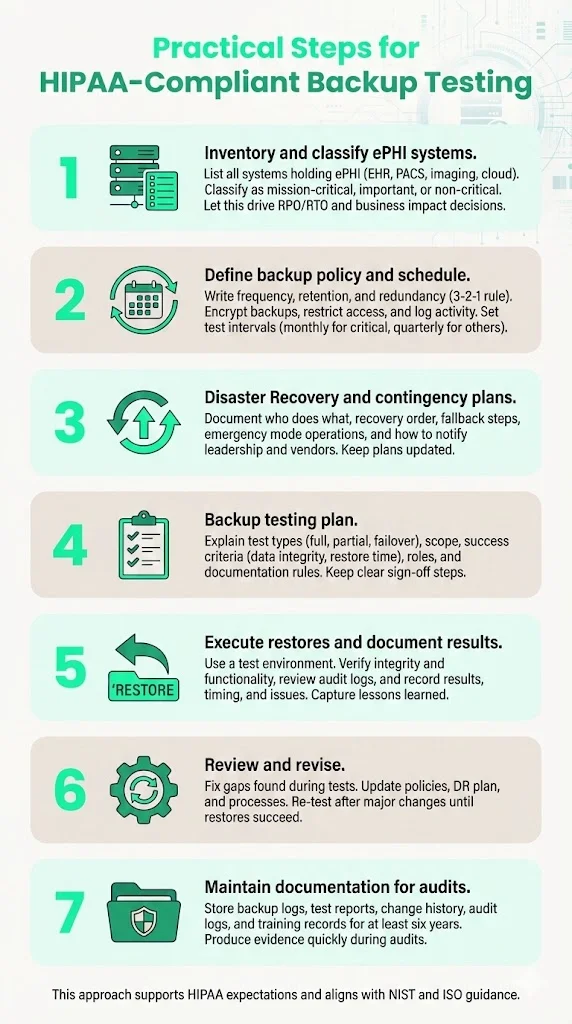
Step 1: Inventory & classification of ePHI systems/data
Begin by cataloguing all systems that store, process or transmit ePHI. Common sources include electronic health record (EHR) databases, picture archiving and communication systems (PACS), imaging devices, file servers, log archives and cloud services. Classify systems by criticality:
| Classification | Examples | Backup Priority |
|---|---|---|
| Mission-critical | EHR databases, medication ordering systems, emergency department dashboards | Highest – requires real-time or hourly backups and rapid restoration |
| Important | PACS, document management, lab information systems | High – daily or hourly backups with moderate RTO |
| Non-critical | Historical archives, research datasets | Moderate – weekly backups, longer RTO acceptable |
The classification informs your RPO and RTO: how much data you can afford to lose and how quickly systems must be restored. Conduct a business impact analysis (BIA) to understand dependencies and quantify downtime costs.
Step 2: Define backup policy & schedule
Create a written backup policy that specifies:
-
Frequency – Determine backup intervals based on criticality. Mission‑critical systems may require continuous replication or hourly snapshots; less critical systems may be backed up nightly or weekly. HIPAA does not mandate a specific frequency; choose based on risk and operational needs.
-
Retention – Define how long backups are kept. Align with state medical record laws and retention policies. Keep at least one complete backup set off‑site for the retention period.
-
Redundancy – Follow the 3‑2‑1 rule: three copies, two different media types, one off‑site. Use a combination of on‑premises storage (e.g., local NAS or tape) and off‑site/cloud storage (e.g., immutable object storage). See the table below for a quick reference:
| Element | Description |
|---|---|
| 3 copies | Production data plus two backups |
| 2 media types | Disk and tape, or local storage and cloud |
| 1 off-site | One copy stored at a geographically separate site |
-
Encryption and Access Controls – Encrypt backups at rest and in transit using strong ciphers (e.g., AES‑256). Restrict access using role‑based permissions and multi‑factor authentication. Maintain audit logs.
-
Testing Frequency – Define how often restores will be tested. We suggest monthly full restores for mission‑critical systems and quarterly for less critical systems. Partial or file‑level tests can be run weekly. Document the schedule.
Step 3: Document a Disaster Recovery Plan (DRP) + Contingency Plan
Draft a clear disaster recovery plan and contingency procedures, following the structure in our HIPAA business continuity and disaster recovery guide. The plan should specify:
-
Roles and Responsibilities – Identify the incident response team: system owners, IT administrators, compliance officers, clinical leads.
-
Recovery Sequence – Outline the order in which systems are restored. Prioritise critical applications per your BIA.
-
Fallback Measures – Define manual workarounds (e.g., paper documentation) and communication protocols during outages.
-
Emergency Mode Operations – Provide procedures to continue essential services when electronic systems are down. HHS emphasises this as part of the contingency plan.
-
Escalation and Communication – Detail how to notify leadership, patients, and regulators. Include contact information for vendors and off‑site storage providers.
Keep the plan version‑controlled. When changes occur (e.g., new system, vendor migration), update the document and test accordingly.
Step 4: Develop a Backup Testing Plan (with schedule)
Testing is not ad hoc; it needs its own plan. The backup testing plan should specify:
-
Test Types – Full restore (entire system), partial restore (selected files/databases), and failover simulation (switching to off‑site or secondary data centre). Consider testing immutable backups and version recovery as part of ransomware readiness.
-
Scope – Which systems and data sets will be tested; which backup copies (daily, weekly, monthly). Rotating through different copies reduces the risk of hidden corruption.
-
Success Criteria – Define measurable outcomes: data integrity (checksums match), completeness (all critical files restored), time to restore (within RTO), application functionality (systems start and operate), and log verification (audit logs exist and show no unauthorised access).
-
Responsibilities – Assign roles: backup administrator executes the test, application owner validates data, compliance officer reviews results. Clarify escalation when tests fail.
-
Documentation – Specify how results are recorded: test date, backup version, systems restored, issues found, corrective actions, sign‑off. Retain test reports for at least six years.
Step 5: Execute test restores and document results
Carry out restores according to the schedule. Use a test environment or sandbox that mirrors production but avoids disrupting live systems. Steps include:
-
Initiate Restore – From off‑site and on‑site backups, restore the selected system or data set.
-
Verify Integrity – Use checksums or hash comparisons to confirm that restored data matches the source. Validate file counts and database sizes.
-
Functional Testing – Launch applications and confirm they operate normally. For example, validate that the EHR can retrieve patient charts and imaging files displayed correctly. Check access control settings after restoration.
-
Review Audit Logs – Ensure that logs document who initiated the restore, when it occurred, and any anomalies.
-
Record Results – Document success, failures, time taken, and lessons learned. If issues arise, record corrective actions.
Tested backups are HIPAA evidence. Untested backups are a liability waiting to surface.
Share your work email and build backup testing that truly protects ePHI.
Step 6: Review and revise backup and DR plan based on test outcomes
Testing reveals gaps: corrupted archives, misconfigured retention policies, missing systems. Use results to improve. If a backup fails to restore, investigate root causes (e.g., network bandwidth, encryption keys, storage configuration), update processes and re‑test until successful. Revise policies, update the DR plan, and communicate changes to stakeholders. Repeat tests after major upgrades or when significant changes occur.
Step 7: Maintain documentation for compliance and audits
Proper documentation is evidence that you performed tests and resolved issues. Maintain:
-
Backup Logs – Automatic logs from backup software showing backup completion, success/failure, size and duration. Retain logs for at least six years.
-
Test Reports – Completed test plan templates, including test dates, systems tested, results, issues and corrective actions. Retain for six years.
-
Change History – Version control for backup scripts, policies and DR plans.
-
Audit Logs – Access logs from backup and restoration activities. Use tools that provide tamper‑evident logging.
-
Training Records – Documentation of training provided to staff responsible for backups and restores. Address training gaps flagged during tests.
These records not only satisfy HIPAA retention requirements but also support SOC 2 and ISO 27001 audits. During an audit, being able to produce test reports and logs quickly demonstrates control maturity.
Free template
The Backup & Disaster Recovery Policy Template
A ready-to-adapt policy, an RPO/RTO worksheet, the 3-2-1 storage checklist, and a worked restore-test log — skip building your test report format from scratch. Enter your work email and we'll send the PDF.
Examples & Templates (to make it easy for busy teams)
To accelerate implementation, here are templates you can adopt. Tailor them to your environment and include them in your compliance repository.
Backup Policy Summary Template
| Section | Description |
|---|---|
| Purpose | State that the policy ensures availability of ePHI and compliance with HIPAA, SOC 2 and ISO 27001. |
| Scope | List systems and data subject to backup such as EHR, PACS, file servers and cloud storage. |
| Frequency & Retention | Define backup intervals such as hourly, daily and weekly, along with retention periods aligned with business and state-specific requirements. |
| Storage & Redundancy | Describe the 3-2-1 approach, including on-premise and off-site locations, media types and geographic separation. |
| Security Controls | Encryption methods, access controls, audit logging and key management procedures. |
| Testing | Reference the backup testing plan and schedule. |
| Roles & Responsibilities | Identify who manages backups, who reviews test results and who approves changes. |
Disaster Recovery Plan Outline
A disaster recovery plan outline gives busy teams a starting structure to adapt:
-
Introduction – Objectives and scope.
-
Roles & Contacts – Names, roles, and contact information for incident response team members and vendors.
-
System Inventory & Criticality – Table of systems, classification, RTO/RPO.
-
Backup Locations & Paths – Locations of on‑site and off‑site backups, including credentials and vendor contact details.
-
Restoration Procedures – Step‑by‑step instructions for each system: how to retrieve backup media, decrypt, restore and validate data.
-
Fallback & Manual Procedures – How to operate manually during system outages (e.g., paper prescriptions, offline registries). Align with emergency mode operations.
-
Communication Plan – Notification procedures for executives, staff, patients and regulators.
-
Testing & Maintenance – Reference the backup testing plan; specify review and update cycles.
Backup Testing Plan Template
| Field | Description |
|---|---|
| Test Date & Version | When the test occurs and which backup version is used. |
| Systems/Data Under Test | List the systems, databases or files being restored. |
| Test Type | Full restore, partial restore, or failover simulation. |
| Environment | Identify the sandbox or staging environment used. |
| Procedures | Step-by-step actions performed during the test. |
| Expected Outcomes | Data integrity checks, application functionality and RTO attainment. |
| Results & Findings | Document success, issues and time to restore. |
| Corrective Actions | Actions taken to remedy failures or gaps. |
| Sign-off | Names and signatures of responsible parties. |
Incident / Test Report Log Template
| Date | Backup Version | System Restored | Issues Discovered | Corrective Actions | Reviewer |
|---|---|---|---|---|---|
| 2025-11-15 | Weekly Full | EHR database | Corrupt index file restored; delay of 2 hr to rebuild | Updated backup script to include index rebuild; scheduled extra verification | CISO |
Example: Small Clinic Test Scenario
Suppose a small clinic uses an EHR system and a PACS for imaging. The clinic’s DR plan specifies daily incremental backups and weekly full backups. During a scheduled monthly test, the IT manager restores the EHR database from the off‑site cloud backup into a test environment. The restore completes within 30 minutes, meeting the RTO. A sample of patient records is opened to verify data integrity; all entries match. Audit logs show proper authentication and encryption. However, the clinic discovers that imaging files from the PACS are missing due to a new imaging modality introduced last month. The team updates the backup configuration to include the new directory and tests again. This cycle demonstrates how testing uncovers hidden gaps and prevents future incidents.
Common Challenges & How to Handle Them
1) Limited IT resources / staff time
Smaller healthcare entities often have lean IT teams. Allocate time for testing by integrating it into routine maintenance windows. Automate as much as possible: schedule scripted restores to a sandbox and send reports to staff for review. Consider partnering with a managed service provider to offload day‑to‑day operations. In our delivery work, we reduce internal effort from 550–600 hours per year to under 70 hours by handling backup management and evidence collection for clients.
2) Risk of disrupting live systems
The risk of disrupting live systems during a test is real, so use test environments and sandboxed virtual machines for restores. If your infrastructure lacks dedicated test capacity, schedule tests during off‑peak hours or replicate small subsets of data. Always validate that network isolation prevents test restores from altering production.
3) Backup media degradation or obsolescence
Tapes, optical media and USB drives degrade over time or become obsolete. NIST advises specifying rotation frequency and testing tapes regularly to ensure data can be retrieved. Migrate to modern storage (e.g., cloud object storage with versioning) and refresh media periodically. Use immutable or worm (write‑once, read‑many) storage to guard against ransomware.
4) Compliance vs operational burden
Weighing compliance against operational burden, some teams view backup testing as overhead. Emphasise the benefits: it reduces downtime, protects patient safety, and prevents fines. HHS’s proposed 2025 updates may require restoration within 72 hours, vulnerability scans, multi‑factor authentication and annual testing of security measures. Meeting these requirements early improves readiness and reduces regulatory risk.
5) State‑level retention rules vs HIPAA retention
States often require retention of medical records for longer than six years (e.g., seven years in New York, ten in Texas). Integrate state laws into your retention schedule. Keep backups and testing documentation accordingly.
Best Practices & Security Protocols to Ensure Data Integrity and Compliance
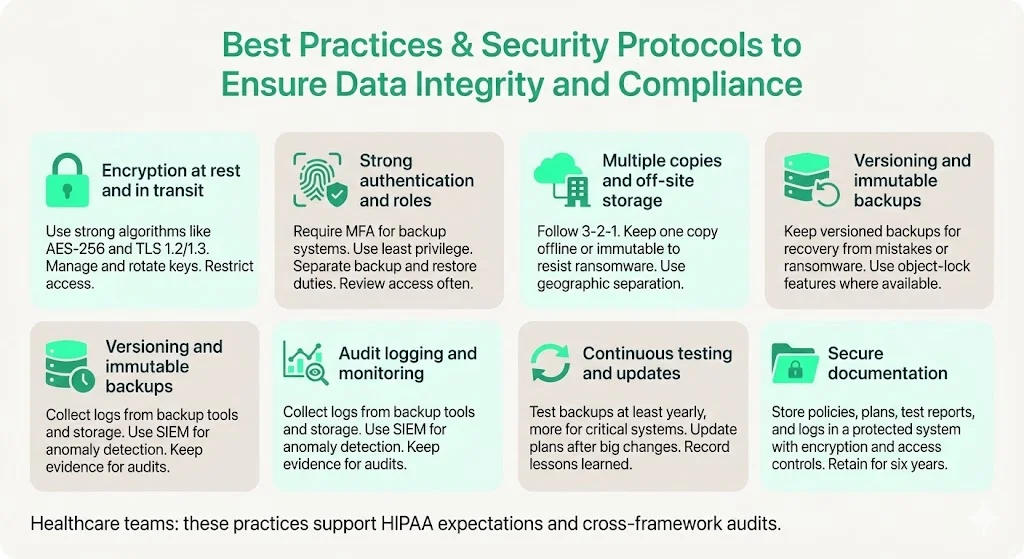
The following best practices and security protocols protect data integrity and support compliance across HIPAA, SOC 2 and ISO 27001.
-
Encryption at Rest and in Transit – Use strong algorithms (e.g., AES‑256, TLS 1.2/1.3). Manage keys in a dedicated key management service. Regularly rotate keys and restrict access.
-
Strong Authentication and Role‑Based Access – Require multi‑factor authentication for backup systems. Align roles with least privilege; separate duties between those who administer backups and those who approve restores. Perform regular access reviews.
-
Multiple Copies and Off‑Site Storage – Follow the 3‑2‑1 rule. Use a combination of on‑premise storage, cloud services, and offline copies. Store at least one copy offline or in an immutable format to defend against ransomware. NIST emphasises geographic separation and climate controls for off‑site storage.
-
Versioning and Immutable Backups – Maintain versioned backups to recover from accidental deletion or ransomware. Some cloud providers offer object‑lock features that prevent deletion or modification for a defined period.
-
Audit Logging and Monitoring – Collect logs from backup software, storage devices, and restoration processes. Use security information and event management (SIEM) solutions to monitor anomalies. SOC 2 and ISO 27001 audits require evidence of logging and monitoring.
-
Continuous Testing and Plan Updates – Update your DR and backup testing plans whenever new systems are introduced, or significant changes occur. Conduct tests at least annually for all systems and more frequently for critical applications. Document lessons learned and improve procedures.
-
Secure Documentation – Store policies, DR plans, testing reports and audit logs in a secure document management system. Use encryption and access controls. Retain for at least six years to satisfy HIPAA and cross‑framework audits.
How Backup Testing Supports Risk Management & Regulatory Compliance
Regular testing reduces risk by ensuring that backups will work when needed. It demonstrates that the organisation can maintain the availability and integrity of ePHI, meeting HIPAA’s core objectives. Testing also supports compliance with other frameworks:
-
SOC 2 – Availability controls require redundant backups and disaster recovery strategies; auditors evaluate whether RTOs align with business needs.
-
ISO 27001 – Annex A.8.13 states that backup copies of information, software and systems should be maintained and regularly tested. The standard emphasises classification, encryption and retention schedules; testing ensures that data can be recovered.
-
NIST SP 800‑34 – Recommends specifying backup frequencies, storage locations, rotation methods, and off‑site criteria. It stresses that backup tapes should be tested to ensure data can be retrieved.
By aligning HIPAA backup testing with SOC 2 and ISO 27001, organisations can leverage cross‑framework controls, reducing duplication and audit fatigue. For example, a single restore test can generate evidence for HIPAA’s testing and revision requirement, SOC 2’s availability criterion, and ISO 27001’s A.8.13 control. In our practice, this cross‑framework reuse reduces control implementation effort by 40–50%.
Moreover, robust testing supports risk management. It helps quantify downtime costs and informs business continuity investment. The 2025 IBM report noted that healthcare breaches have a 279‑day lifecycle (time to identify and contain). Shortening recovery time through tested backups reduces this window and the associated impact. Testing also builds confidence with customers and regulators; when procurement questionnaires ask for evidence of backup and recovery, you can provide reports demonstrating recent successful tests.
Illustrating the Impact: Data Breach Costs and Causes
To contextualise the importance of HIPAA Backup Testing, consider the following charts. The first visual summarises the 2025 average cost of a data breach globally, in the U.S. and specifically within healthcare. The second highlights common causes of data loss incidents.
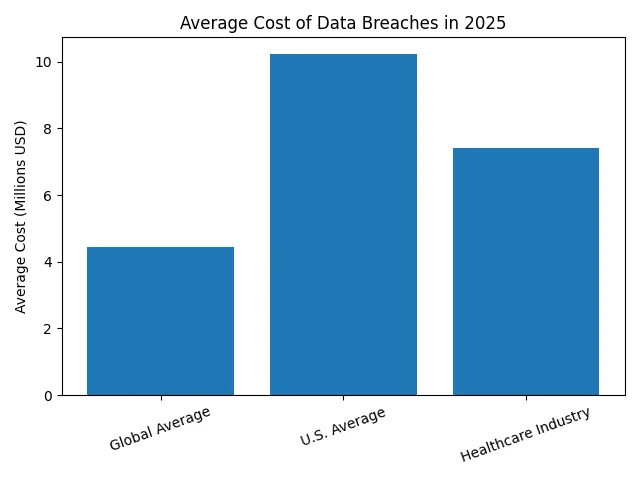
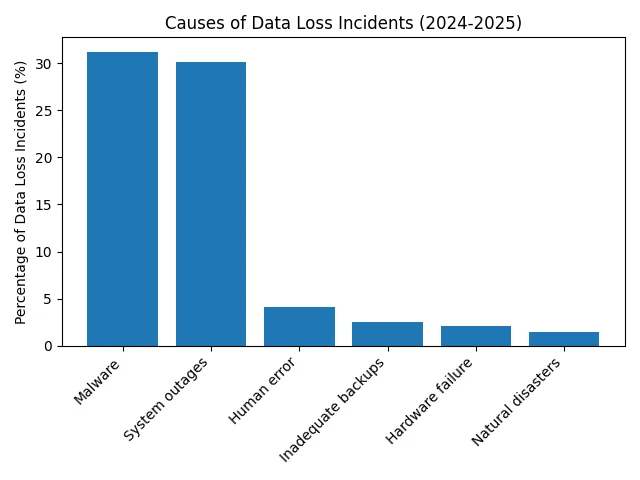
The costs illustrate why proactive planning and testing matter. Malware and system outages—both mitigated by reliable backups—are the dominant causes of data loss. Inadequate backups, though seemingly small (2.5% of incidents), can amplify the impact of other causes. Ransomware actors increasingly target backup repositories; therefore, immutable backups and regular testing are essential.
FAQs
1. What are the HIPAA requirements for data backup?
HIPAA requires entities to implement a contingency plan that includes a data backup plan, disaster recovery plan, emergency mode operations plan, testing and revision procedures, and criticality analysis. Backups must be retrievable exact copies of ePHI, stored securely with encryption and access controls, and accompanied by audit logs. HIPAA does not dictate specific technologies or frequencies; rather, it mandates that backups preserve confidentiality, integrity and availability of data.
2. What is the 3‑2‑1 rule for backing up data?
The 3‑2‑1 rule recommends maintaining at least three total copies of data, stored on two different media types, with at least one copy off‑site. This approach provides redundancy and reduces the risk that a single failure—such as hardware failure, ransomware or local disaster—will destroy all copies. NIST and ISO 27001 endorse this practice.
3. How often should backup systems in data centres be tested?
HIPAA does not prescribe a fixed testing interval. Organisations should base testing frequency on system criticality, RPO/RTO objectives and risk appetite. We recommend monthly full restores for mission‑critical systems and quarterly for less critical systems, with weekly partial restores to verify specific datasets. The upcoming HIPAA revisions propose annual testing of certain security measures. Document your schedule and adjust after major changes.
4. What are the five main rules of HIPAA?
The five core HIPAA rules are: (1) Privacy Rule – protects the privacy of individually identifiable health information; (2) Security Rule – safeguards the confidentiality, integrity and availability of ePHI through administrative, physical and technical measures; (3) Breach Notification Rule – mandates notifications to individuals, HHS, and sometimes the media when a breach occurs; (4) Enforcement Rule – outlines investigations, penalties and compliance procedures; and (5) Administrative Simplification/Transaction Rule – sets standards for electronic transactions and code sets. Backup and recovery measures fall under the Security Rule’s contingency plan.
5. What happens if a backup fails during a real disaster?
If a backup fails and the organisation cannot restore ePHI, it may be deemed non‑compliant with HIPAA’s contingency plan requirements, resulting in fines, corrective action plans and reputational damage. Beyond penalties, patient care could be compromised. In 2024, 85.6% of data loss incidents occurred in cloud storage and 2.5% were due to inadequate backups. Failing to restore data extends downtime, increases breach costs (averaging $7.42 million for healthcare in 2025), and erodes patient trust. Regular testing and redundant, immutable backups mitigate this risk.
See your real HIPAA backup testing gap, not a guess
Book a demo and we'll map your restore testing program against the Security Rule requirements, self-serve or with our CISO-led team running it for you.
Book a demo
Conclusion
For healthcare organisations handling ePHI, HIPAA Backup Testing is not optional. Backups are only as good as your ability to restore them. The HIPAA Security Rule’s contingency plan standard requires more than creating copies; it demands a structured approach encompassing backup, disaster recovery, emergency operations, and testing. By following the seven steps outlined—inventory, policy, documentation, testing, execution, review and recordkeeping—you build readiness, resilience and compliance. Implement the 3‑2‑1 rule, encrypt and protect backups, classify systems, run regular restore drills, and maintain documentation for six years. Align your program with SOC 2, ISO 27001 and NIST to maximise efficiency and meet buyer expectations.
In my experience, organisations that treat backup testing as a continuous discipline avoid costly outages and streamline audits. Healthcare is a high‑stakes sector: lives depend on data availability. Build controls that stand up to buyers, auditors and attackers. Do not settle for paper promises; operate your backup program daily, and compliance will follow.