Modern healthcare depends on connected systems. Electronic health records (EHRs), telehealth platforms, and remote patient monitoring run on cloud infrastructure to gain scale, resilience, and accessibility. When patient data moves to the cloud, it triggers stringent legal obligations. The Health Insurance Portability and Accountability Act of 1996 (HIPAA) lays out administrative, physical and technical safeguards for electronic protected health information (ePHI). Failing to meet these requirements can be costly. The U.S. Department of Health & Human Services (HHS) notes that the HIPAA Security Rule mandates covered entities to ensure confidentiality, integrity and availability of ePHI, protect against anticipated threats, and ensure workforce compliance. In 2024, more than 700 healthcare breaches exposed 186 million records. The 2025 IBM Cost of a Data Breach report found healthcare breaches cost an average of $7.42 million and take 279 days to identify and contain. Protecting ePHI isn’t optional; it preserves trust, avoids penalties, and allows organizations to grow.
This article is a detailed how‑to for healthcare teams building on Amazon Web Services (AWS). It shows how to design secure architectures, apply encryption and access controls, set up monitoring, and maintain year‑round compliance. You’ll see real AWS examples, a ready‑to‑use checklist, and a hypothetical use case. The guidance reflects Konfirmity’s experience delivering more than 6,000 security audits as a team with 25+ years of combined expertise and draws on trusted standards from HHS, NIST, and industry auditors. The aim is to help CISOs, CTOs, and compliance officers who handle ePHI build programmes that stand up to buyers, auditors and attackers.
HIPAA: Scope and Rules
HIPAA applies to “covered entities” (healthcare providers, plans and clearinghouses) and “business associates” (service providers with access to PHI). The Privacy Rule governs how PHI is used and disclosed. The Security Rule is technology neutral; it requires administrative, physical and technical safeguards. HHS explains that covered entities must protect ePHI’s confidentiality, integrity and availability; identify and protect against threats; guard against unauthorized use or disclosure; and ensure workforce compliance. The Breach Notification Rule mandates reporting when PHI is compromised.
Within the Security Rule, encryption is an addressable safeguard. Entities must assess whether encryption is reasonable and document their decision. Current best practice is to use strong algorithms such as AES‑256 and TLS 1.2+ for data in transit. HIPAA enforcement actions show that encryption failures, weak access controls, and missing audit trails are common causes of fines.
Can AWS Be Used for HIPAA Compliance?
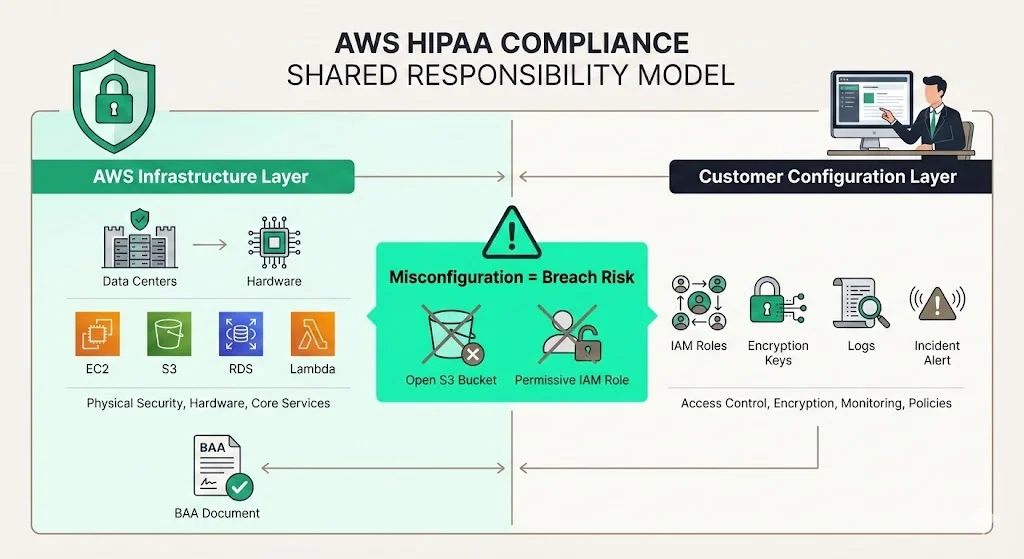
AWS offers a secure infrastructure and many HIPAA‑eligible services (e.g., EC2, S3, RDS, Lambda). Signing a Business Associate Agreement (BAA) via AWS Artifact defines AWS as a business associate. However, compliance does not come out of the box. AWS operates under a shared responsibility model: the provider secures the physical facilities, hardware, and core services, while customers configure and operate those services. Customers must handle access management, encryption, key rotation, logging, incident response and overall policies. If your workloads also run on Google Cloud, our companion guide to HIPAA cloud compliance on GCP maps the equivalent controls there. Cloudtech’s analysis emphasises that misconfigured services, such as public S3 buckets or permissive IAM roles, have led to breaches. Using AWS without sound controls is a liability.
Why Healthcare Teams Need Discipline
Cloud storage and analytics improve care coordination and lower infrastructure costs. Yet misconfigurations can expose millions of records and trigger audits. HHS investigations often reveal that teams either assumed AWS guaranteed compliance or that encryption and logging were only optional. Because ePHI remains sensitive long after creation, security must be continuous.
Konfirmity’s experience shows that enterprise buyers now demand proof of compliance before procurement. Procurement questionnaires ask for BAAs, Data Processing Agreements (DPAs), and evidence of encryption, access reviews, and continuous monitoring. Deals stall when teams cannot produce these artefacts. Moreover, the market is unforgiving: more than 31 million individuals had PHI exposed in the first half of 2025 alone. A disciplined programme is not just a legal necessity; it’s a prerequisite for growth.
Key Components of HIPAA Cloud Compliance on AWS
To build HIPAA Cloud Compliance On AWS, you need a structured approach. This guide organizes the controls into five pillars: encryption, access control, secure architecture, auditing and monitoring, and administrative safeguards. Each pillar maps directly to HIPAA requirements and aligns with SOC 2 and ISO 27001 frameworks.
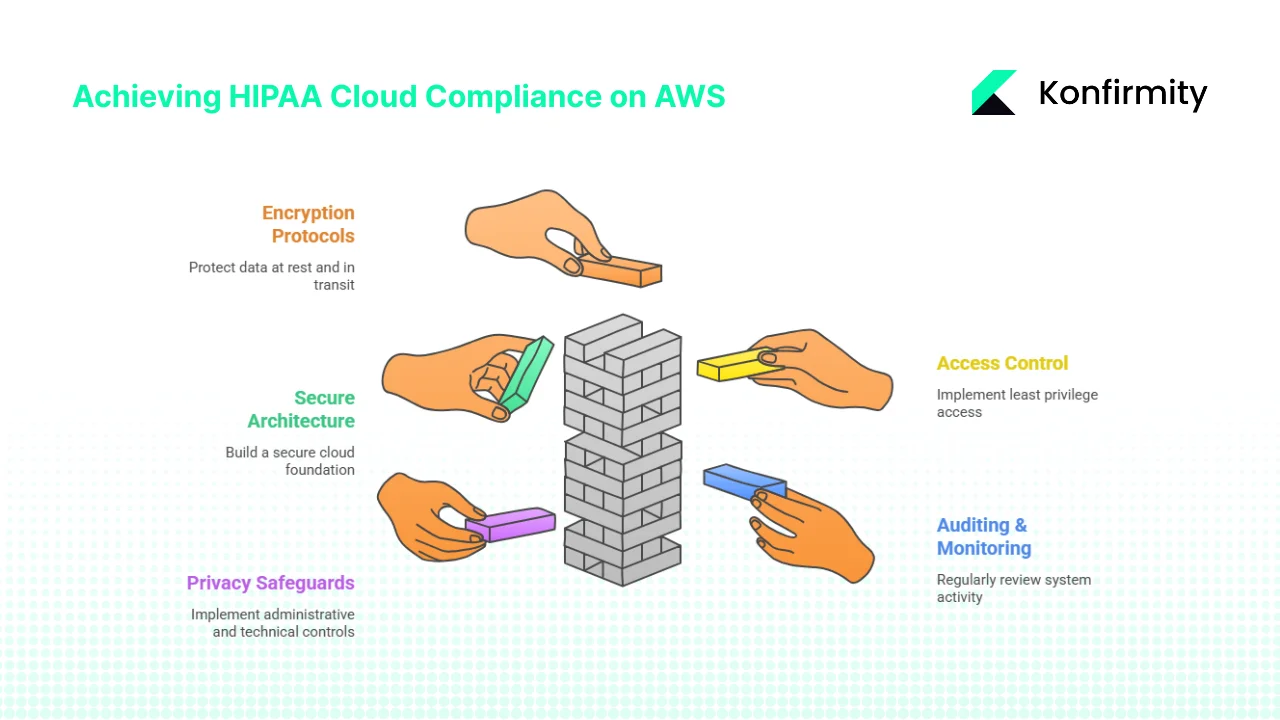
1) Encryption Protocols: Protect Data at Rest and in Transit
Encryption is essential for ePHI. NIST guidelines advise using AES‑128 at minimum but favour AES‑192 or AES‑256 for higher security. NIST SP 800‑111 further recommends AES as a strong and fast algorithm and urges agencies to use FIPS‑approved modules and plan for algorithm updates. For data in transit, NIST SP 800‑52 Rev. 2 requires support for TLS 1.2 with FIPS‑based cipher suites and mandates TLS 1.3 for government systems by 2024. HIPAA’s encryption safeguard is “addressable,” but regulators expect encryption unless a documented risk analysis shows it isn’t reasonable. Given the prevalence of breaches, encryption is practically mandatory.
On AWS, use Key Management Service (KMS) to create and manage cryptographic keys. Enable server‑side encryption for S3 (SSE‑S3 or SSE‑KMS), enforce encryption at rest for EBS volumes and RDS databases, and configure client‑side encryption if you control your own keys. For data in transit, require HTTPS (TLS 1.2 or higher) on all endpoints, use AWS Certificate Manager to manage certificates, and ensure AWS services like API Gateway or Load Balancer enforce TLS. Rotate KMS keys regularly and restrict key access to designated roles. For the broader pattern behind these controls, see our guides to encryption at rest and in transit for HIPAA and key management best practices.
2) Access Control & Identity Management
The principle of least privilege is a core security tenet. Only authorized users should access ePHI, and they should have the minimal rights needed to perform their functions. Use AWS Identity and Access Management (IAM) to define roles and policies. Implement role‑based access controls, unique user IDs, multi‑factor authentication (MFA), session timeouts, and password complexity requirements. Grounding this in a formal role-based access control for HIPAA model keeps permissions tied to job function rather than to individuals. Ensure each access event is logged via CloudTrail. Periodic access reviews—quarterly at minimum—help catch privilege creep. Access control management also includes ensuring that system administrators do not share generic accounts, and that vendor access is limited and monitored.
3) Secure Cloud Architecture & Network Segmentation
Build a secure foundation before deploying applications. Create a dedicated AWS account for HIPAA workloads. Implement a Virtual Private Cloud (VPC) with private subnets. Avoid public endpoints for resources handling ePHI; use security groups and network ACLs to restrict traffic. For hybrid architectures, use VPN or AWS Direct Connect for private connectivity. Keep metadata and management networks separate to avoid lateral movement in case of compromise. Use infrastructure‑as‑code (IaC) tools like AWS CloudFormation or Terraform to version and review your environment. This ensures reproducible deployments and helps auditors verify that controls are enforced consistently.
4) Auditing, Monitoring & Logging
HIPAA requires organizations to “regularly review records of information system activity, such as audit logs, access reports, and security incident tracking reports”. AWS provides tools to achieve this. Enable AWS CloudTrail to log API calls across your account. Use AWS CloudWatch for metrics and alarms. Deploy AWS Config rules or Conformance Packs to continuously evaluate resource configurations against best practices. For example, you can implement rules to ensure S3 buckets are not public, encryption is enabled, and IAM policies do not allow wildcard access. If anomalies occur—like a sudden spike in failed login attempts—trigger alerts via AWS SNS or Systems Manager. Maintain logs in immutable storage for at least six years to satisfy HIPAA retention expectations. Our guide to HIPAA logging and monitoring covers the retention and alerting patterns in more detail.
5) Privacy Safeguards & Administrative Controls
Technical controls alone are insufficient. HIPAA demands administrative safeguards, such as a formal security management process, assigned security responsibility, and workforce training. Sign a BAA with AWS through AWS Artifact, which clarifies AWS’s obligations as a business associate. Document internal policies covering data classification, access approvals, password management, incident response, and vendor management. Provide training on handling ePHI and phishing awareness. Create an incident response plan: define escalation paths, communication templates, and breach notification timelines. Maintain a vendor risk programme to ensure third parties with PHI access meet the same standards.
Implementation: Step‑by‑Step Plan with Templates
Konfirmity advocates a phased approach: preparation, secure design, monitoring, administrative policies, and ongoing compliance. Each phase aligns with HIPAA requirements and leverages AWS features.
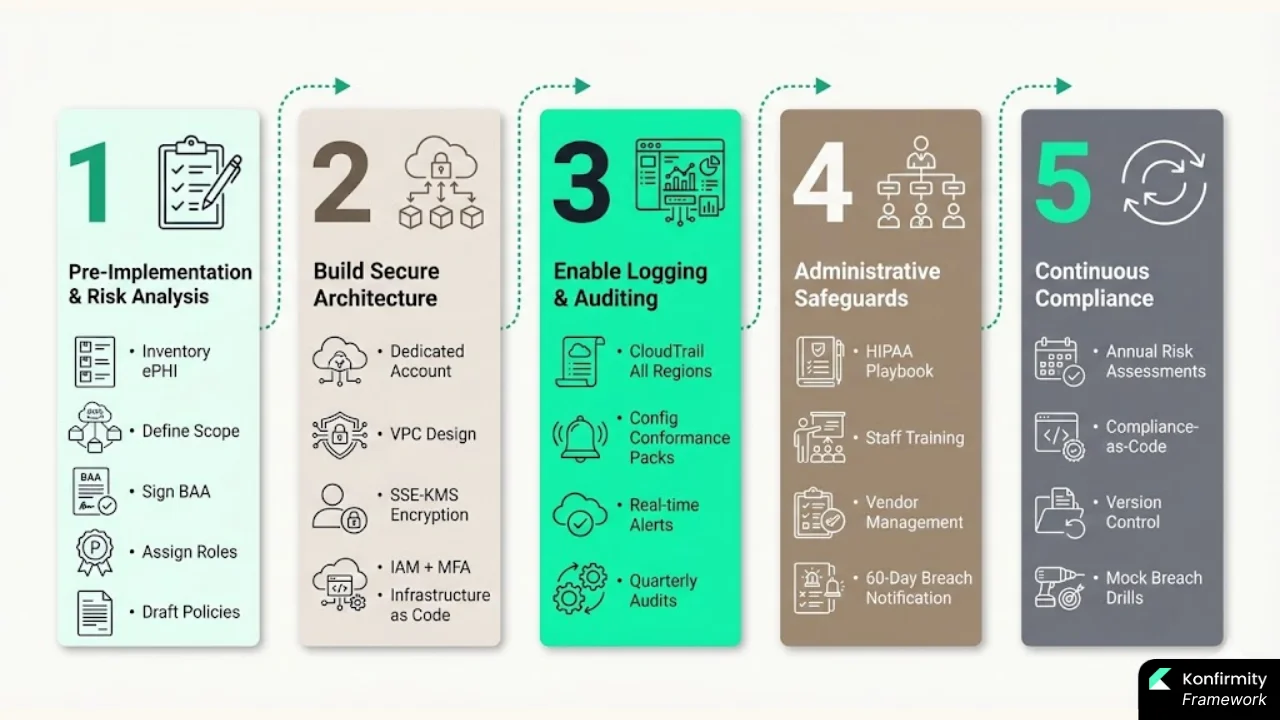
1) Pre‑Implementation: Prep Work & Risk Analysis
-
Inventory ePHI systems: Identify all applications, databases, storage and interfaces that process or store ePHI.
-
Define scope: Decide which AWS accounts will handle ePHI. Use separate accounts for production versus development.
-
Sign the BAA: Use AWS Artifact to execute a BAA covering all HIPAA‑eligible services. Without a BAA, AWS is not authorized to handle ePHI.
-
Assign ownership: Appoint a security officer. Define roles for compliance, security and IT. This satisfies HIPAA’s administrative safeguards.
-
Draft policies: Create a HIPAA compliance playbook. Include acceptable use, access control, encryption, logging, incident response, and vendor oversight.
2) Build Secure Architecture (Template & Example)
-
Dedicated account: Create an AWS account labelled “HIPAA‑Prod.”
-
VPC design: Use a private VPC with multiple subnets (e.g., public, application, database). Only the public subnet has inbound internet access via an Application Load Balancer; internal services remain private.
-
Encryption: Enable SSE‑KMS on all S3 buckets, encryption at rest for RDS and EBS. Use KMS with key rotation.
-
Identity: Use IAM roles with least privilege. Enforce MFA on the root account and on privileged users. Use AWS Organizations Service Control Policies (SCPs) to prevent disabling logging or encryption.
-
Logging: Enable CloudTrail in all regions and send logs to a secure S3 bucket with MFA delete enabled. Enable AWS Config and deploy HIPAA Conformance Packs.
-
IaC example: Below is a simplified CloudFormation template snippet illustrating part of this setup. In practice, you’d expand it to include networking, storage, and logging components.
templateVersion: '2025-01-01' Resources: EncryptedS3Bucket: Type: 'AWS::S3::Bucket' Properties: BucketName: 'hipaa-phidata' BucketEncryption: ServerSideEncryptionConfiguration: - ServerSideEncryptionByDefault: SSEAlgorithm: 'aws:kms' KMSMasterKeyID: !Ref KmsKey VersioningConfiguration: Status: Enabled KmsKey: Type: 'AWS::KMS::Key' Properties: Description: 'KMS key for ePHI' EnableKeyRotation: true
3) Enable Logging, Monitoring & Auditing
-
CloudTrail & CloudWatch: Turn on CloudTrail in all regions. Configure CloudWatch Alarms for unusual patterns (e.g., multiple failed logins, deactivated MFA).
-
AWS Config: Deploy the HIPAA Security Rule Conformance Pack. This includes AWS‑managed rules that check encryption, logging, and network configurations. You can add custom rules to cover organizational policies.
-
Alerting & automation: Use SNS or Systems Manager to send alerts to security teams. Integrate with incident management tools (e.g., Slack, PagerDuty). Create runbooks for automated remediation—such as enabling encryption if a bucket is found unencrypted.
-
Audit schedule: Plan formal reviews at least quarterly. Use evidence from logs, IAM reports, and Config snapshots. Maintain records to support SOC 2 and ISO 27001 audits.
4) Administrative & Organizational Safeguards
-
HIPAA playbook: Document roles, responsibilities, access procedures, encryption requirements, logging expectations, incident response flows and vendor management.
-
Training: Schedule quarterly training for all staff handling ePHI. Keep a training log with dates and topics.
-
Vendor management: Develop a vendor assessment checklist. Confirm vendors sign BAAs or equivalent agreements. Limit third‑party access to PHI to necessary functions.
-
Incident response: Define detection, triage, containment, eradication and recovery steps. Map out who contacts HHS, affected patients, and business partners. Time requirements: HIPAA requires notification within 60 days of discovering a breach.
5) Maintenance & Continuous Compliance
-
Risk assessments: Conduct annual risk analyses and whenever significant changes occur. Align with ISO 27001’s risk assessment clause 6.1.2, which emphasises a structured process that isn’t one‑off.
-
Compliance‑as‑code: Use AWS Config, Conformance Packs, and custom Lambda functions to enforce controls. Integrate with CI/CD pipelines so infrastructure changes are reviewed for compliance.
-
Documentation: Keep versioned records of architecture diagrams, policies, BAAs, audits, and incident reports. Evidence quality is critical during audits.
-
Incident drills: Conduct mock breach drills annually to test detection and response. Adjust policies based on lessons learned.
Common Pitfalls (and How to Avoid Them)
Many healthcare teams stumble on the same obstacles. Here are the most frequent mistakes and remediation suggestions:
| Pitfall | Consequence | Corrective Action |
|---|---|---|
| Assuming AWS automatically provides HIPAA compliance | Misconfigured services expose PHI; regulators hold customers liable | Understand the shared responsibility model; sign a BAA; implement encryption, IAM, logging, and policies yourself |
| Leaving S3 buckets or databases public | Data breaches; reputational damage | Implement least privilege, restrict bucket policies, use AWS Config rules to detect public access |
| Neglecting logging and monitoring | Undetected breaches; inability to show evidence | Enable CloudTrail, CloudWatch, and AWS Config; set up alerting and retention policies |
| Not signing the BAA or misunderstanding account scope | AWS isn’t obligated to follow HIPAA; compliance gaps | Execute a BAA via AWS Artifact; identify which accounts hold PHI |
| Treating compliance as a one-time setup | Controls drift over time; new services create gaps | Perform continuous monitoring, periodic risk assessments, and regular audits |
Harden AWS controls for real security, not just the HIPAA audit.
Drop your work email and turn AWS hardening into audit-ready HIPAA evidence.
Example Checklist & Templates
Below is an actionable checklist to ensure readiness, followed by template snippets for IAM policies, architecture diagrams, logging and monitoring, and internal policies.
HIPAA‑on‑AWS Readiness Checklist
Pre‑deployment
-
Identify ePHI systems and define scope
-
Sign AWS BAA via Artifact
-
Assign security officer and team roles
-
Draft HIPAA policies (encryption, access, logging, incident response)
-
Create separate AWS accounts for HIPAA workloads
Deployment
-
Build secure VPC with private subnets and restricted security groups
-
Enable server‑side encryption (SSE‑KMS) on S3, EBS, RDS
-
Use IAM roles and policies with least privilege; enforce MFA
-
Enable CloudTrail, CloudWatch, and AWS Config; store logs securely
-
Implement TLS 1.2 or higher for all endpoints
Ongoing
-
Conduct quarterly access reviews and log reviews
-
Rotate KMS keys and credentials regularly
-
Run annual risk assessments and policy reviews
-
Train staff quarterly; document training
-
Test incident response annually; update plans
IAM Policy Template Snippet
{
  "Version": "2012-10-17",
  "Statement": \[
    {
      "Effect": "Allow",
      "Action": \["s3:GetObject", "s3:PutObject"\],
      "Resource": \["arn:aws:s3:::hipaa-phidata/\*"\],
      "Condition": {
        "Bool": {
          "aws:SecureTransport": "true"
        }
      }
    },
    {
      "Effect": "Deny",
      "Action": "s3:\*",
      "Resource": \["arn:aws:s3:::hipaa-phidata/\*"\],
      "Condition": {
        "Bool": {
          "aws:SecureTransport": "false"
        }
      }
    }
  \]
}
This policy grants read/write access to the S3 bucket only over HTTPS, ensuring TLS encryption in transit.
Logging & Monitoring Configuration Checklist
-
Enable CloudTrail with data events for S3 and Lambda.
-
Use AWS Config Conformance Packs (HIPAA Security Rule). Customize rules as needed.
-
Enable CloudWatch metrics and alarms for CPU, memory, and error rates.
-
Route alarms to an SNS topic subscribed by the security team.
-
Store logs in a dedicated S3 bucket with versioning and MFA delete.
-
Set log retention periods to meet regulatory requirements (minimum six years for PHI).
Internal Compliance Policy Structure
-
**Scope & Purpose
**
-
**Roles & Responsibilities
**
-
**Data Classification & Handling
**
-
**Access Control Procedures
**
-
**Encryption Requirements
**
-
**Logging & Monitoring
**
-
**Incident Response & Breach Notification
**
-
**Vendor Management & BAA Documentation
**
-
**Training & Awareness
**
-
Audit & Review Schedule
Incident Response Workflow (Simplified)
-
Detection: Receive alert from monitoring system.
-
Triage: Assess severity and identify affected systems.
-
Containment: Isolate compromised resources; disable compromised credentials.
-
Investigation: Collect logs, timeline, and context; determine scope of ePHI exposure.
-
Notification: If breach is confirmed, notify the HHS and affected individuals within 60 days.
-
Eradication & Recovery: Remove malware, patch vulnerabilities, restore from backups.
-
Post‑Incident Review: Document the incident, update policies, and train staff on findings.
Hypothetical Use Case: Telehealth Startup on AWS
Imagine “MedConnect,” a telehealth startup delivering virtual consultations and remote patient monitoring. They decided to migrate their Electronic Health Record (EHR) backend to AWS to scale quickly. Here’s how they applied the steps:
Step 1: Preparation
MedConnect inventoried its databases, file storage, and communication channels. It signed a BAA with AWS and appointed a security officer. The team drafted policies addressing encryption, access, logging, and incident response. They scoped their HIPAA environment to a dedicated AWS account.
Step 2: Architecture
MedConnect built a VPC with public, application and database subnets. S3 buckets storing patient documents were encrypted with SSE‑KMS. EC2 instances hosting the application used EBS encryption. RDS handled patient records with at‑rest encryption. IAM policies enforced least privilege; developers accessed the environment via bastion hosts with MFA.
Step 3: Monitoring
They enabled CloudTrail and CloudWatch across all regions. AWS Config with HIPAA Conformance Packs monitored bucket policies and security group configurations. Alerts were sent to Slack channels via SNS for investigation.
Step 4: Administrative Controls
The security officer trained staff quarterly. The company used Confluence to document policies, audit logs, and incident procedures. Vendors providing telehealth platforms signed BAAs, and each was assessed using a vendor checklist. The team built an incident response plan that included scripts for notifying regulators and customers.
Step 5: Maintenance
Every quarter, MedConnect reviewed IAM roles and removed unused privileges. They rotated KMS keys, patched systems, and ran disaster recovery drills. Annual risk assessments identified new threats, prompting them to implement AWS GuardDuty for intrusion detection. When a developer inadvertently misconfigured an S3 bucket, AWS Config alerted the team, and an automated Lambda function corrected the policy within minutes.
Lessons Learned
MedConnect discovered that compliance is not a one‑off project. They initially underestimated the time required for evidence collection; SOC 2 Type II audits needed 3–12 months of observation. They realized that mapping controls between HIPAA and SOC 2 reduced duplication. Using IaC helped them reproduce the environment and satisfy auditors. Most importantly, they learned to treat security as an operational practice, not an artifact‑producing exercise.
Ongoing Responsibilities: Compliance Is Continuous
Compliance does not end once the architecture is deployed. Technologies evolve; staff turnover occurs; new vendors are onboarded. HHS investigators often find that the root cause of breaches is control drift—logging disabled, encryption turned off, or access reviews skipped. ISO 27001’s 2022 update introduced new controls like threat intelligence, secure coding, data masking, and cloud services management. The update emphasises that risk assessment isn’t a one‑time activity; controls must adapt.
In the HIPAA context, that means:
-
Periodic risk assessments: Evaluate how new technologies, services or business processes might expose ePHI. Document risks and mitigation plans.
-
Observation windows: Prepare for SOC 2 Type II audits with observation periods of at least 3–6 months for first‑time audits and 9–12 months for mature programmes. Ensure logs and evidence cover the full period.
-
Vendor oversight: Confirm third‑party tools and partners maintain HIPAA‑grade security. Review BAAs annually.
-
Policy maintenance: Update policies to reflect new regulations or operational changes. Version control your documentation.
-
Staff training: Keep the workforce informed about phishing, social engineering, and data handling. A single lapse can cause a breach.
FAQs
1) How to be HIPAA compliant in AWS?
Sign a BAA through AWS Artifact; use only HIPAA‑eligible services; encrypt data at rest and in transit with AES‑256 and TLS 1.2+; manage access via IAM; enable logging and monitoring; draft and enforce administrative policies; conduct risk assessments and audits.
2) Is Amazon Connect HIPAA compliant?
Amazon Connect can be used in a HIPAA‑compliant manner when deployed within a HIPAA‑eligible AWS account. You must configure encryption at rest and in transit, secure call recordings and DTMF data, limit access via IAM, and ensure vendor agreements and policies reflect HIPAA requirements. Compliance remains a shared responsibility.
3) Does HIPAA apply to Amazon / AWS?
HIPAA applies to covered entities and business associates. AWS becomes a business associate when you sign a BAA. AWS provides secure infrastructure but does not guarantee compliance. Customers must implement required safeguards.
4) Is AWS CloudWatch HIPAA compliant?
CloudWatch is a monitoring service. Whether its use is HIPAA‑compliant depends on your configuration. Use CloudWatch within a HIPAA‑eligible account; ensure logs containing ePHI are encrypted at rest and in transit; restrict access via IAM; and integrate CloudWatch with other logging and monitoring controls. The responsibility for compliance remains shared.
See your real AWS HIPAA gap, not a guess
Book a demo and we'll map your AWS environment against the Security Rule's technical safeguards, self-serve or with our CISO-led team running it for you.
Book a demo
Conclusion
HIPAA Cloud Compliance On AWS requires more than checking boxes. It demands a structured, disciplined programme that combines secure architecture, encryption, access controls, continuous monitoring, and administrative policies. AWS provides a robust foundation with HIPAA‑eligible services, but customers must implement and operate controls themselves. Ignoring the shared responsibility model or treating compliance as a one‑time event invites risk.
Konfirmity’s experience across 6,000+ security audits shows that lasting success comes from building controls that stand up under incident pressure. Human‑led, managed security and compliance programmes let teams focus on care while experts handle implementation, evidence collection, and continuous monitoring. When implemented correctly, these controls not only meet HIPAA, SOC 2, and ISO 27001 requirements but also accelerate enterprise deals and reduce breach exposure.
Security that reads well in documents but fails in practice is a liability. Start with security—design encryption, access controls, and monitoring into your AWS stack. Maintain documentation, run audits, and train your people. Treat compliance as a continuous journey anchored in real controls, not paper promises. Then, whether you face an auditor, a customer procurement questionnaire, or a real incident, you’ll be ready.