Microsoft Azure holds ISO/IEC 27001 certification for its own infrastructure and select services, but that certification does not extend to your configurations, data, or workloads. Under the shared-responsibility model, you're still responsible for your own risk assessment, access controls, and documented evidence. This distinction is where most teams get the compliance story wrong — and where enterprise buyers, who now demand proof before signing anything, expect you to already have it right.
This guide is a practical roadmap for ISO 27001 compliance on Azure, drawing on Konfirmity's experience delivering 6,000+ security audits. It explains why ISO 27001 matters in the cloud, exactly what Azure's certification covers and doesn't, and the steps your team needs to take to become audit-ready — with examples and templates to turn theory into action.
Key Takeaways: ISO 27001 Cloud Compliance on Azure
Microsoft Azure holds ISO/IEC 27001 certification for its own infrastructure and select services, but that certification does not extend to your configurations, data, or workloads. Under the shared-responsibility model, you're still responsible for your own risk assessment, access controls, and documented evidence. ISO 27017 adds cloud-specific controls and ISO 27018 adds cloud-specific privacy controls on top of the base ISO 27001 standard.
Understanding ISO 27001 and Its Relevance to Cloud Services
ISO 27001 is an international standard for creating and maintaining an information security management system (ISMS): policies, risk assessment, applied controls, and effectiveness monitoring, aimed at confidentiality, integrity, and availability. Unlike prescriptive frameworks, it lets organizations adapt controls to their own risk environment, which is why it applies regardless of sector or size.
Core Principles and Scope
ISO 27001's structure starts with clauses on context, leadership, and planning, then lists Annex A controls spanning organizational, people, physical, and technological areas — mapped, since the 2022 revision, to ISO 27002:2022. Organizations define their own scope (specific business units, data sets, or cloud subscriptions) and document a Statement of Applicability explaining which controls are in scope and why, with internal audits and management review driving continual improvement.
Relevance to Cloud Context
Cloud computing introduces shared infrastructure, multi-tenancy, and flexible provisioning — and organizations routinely assume the provider manages all of the security. The U.S. National Security Agency warns that customers often incorrectly assume the provider safeguards resources outside its remit. Microsoft's own guidance is explicit: in any cloud deployment, you always own your data and identities and are responsible for protecting them, and exactly how those responsibilities split depends on whether you're running IaaS, PaaS, or SaaS.
ISO 27001 extends naturally into this model. Control A 5.23, added in the 2022 revision, requires structured processes for acquiring, managing, and exiting cloud services — clear policies, risk assessments, defined roles, and secure exit strategies, alongside encryption, access controls, and incident response planning.
Complementary Standards for Cloud: ISO 27017 and ISO 27018
ISO 27001 alone doesn't cover everything cloud-specific. ISO 27017 adds controls for cloud service providers and customers, covering multi-tenancy, data isolation, and monitoring. ISO 27018 adds controls for personal data protection in public clouds, complementing GDPR obligations. Azure holds certifications against all three — but as with the base standard, your own controls still need to align with each one's requirements for your specific workloads.
Azure's ISO 27001 Compliance: What It Means (and Doesn't)
Azure's certification is a starting point, not a finish line. Microsoft Azure has achieved ISO/IEC 27001 certification for its core infrastructure and many services — a third-party auditor has verified Microsoft's own ISMS and controls, and you inherit that baseline the moment you deploy on Azure. But Microsoft is explicit that you always retain responsibility for protecting your data, identities, accounts, and access management. Compliance is shared: the provider secures the physical infrastructure and platform; you configure your own resources correctly, or you don't.
What Azure Covers
Azure's certification covers data centers, networks, hardware, and core services — Virtual Machines, storage, databases, and Kubernetes — plus policies for physical security, environmental controls, change management, and incident response. Microsoft publishes audit reports customers can request under NDA, and Azure also supports SOC 1/2/3, CSA STAR, FedRAMP, and HIPAA/HITRUST, giving you a shared baseline across several frameworks at once.
What You Must Cover
What you must cover is everything ISO 27001 actually calls for: your organization still has to design and implement it, not Azure: defining the ISMS scope, running risk assessments, writing policies, and applying technical controls — identity and access management, encryption, monitoring, incident response, business continuity. Azure's compliance does not make your workloads compliant by inheritance. You have to use Azure's own features correctly — RBAC, MFA, Azure Policy, Key Vault, Monitor, Backup — to implement your controls, and verify that implementation through your own audits. Azure provides templates and blueprints; aligning them with your policies is still your job.
Why Cloud Compliance Matters
Cloud compliance matters more every year: enterprise buyers and regulators increasingly require evidence of security and privacy controls, driven by a few converging factors:
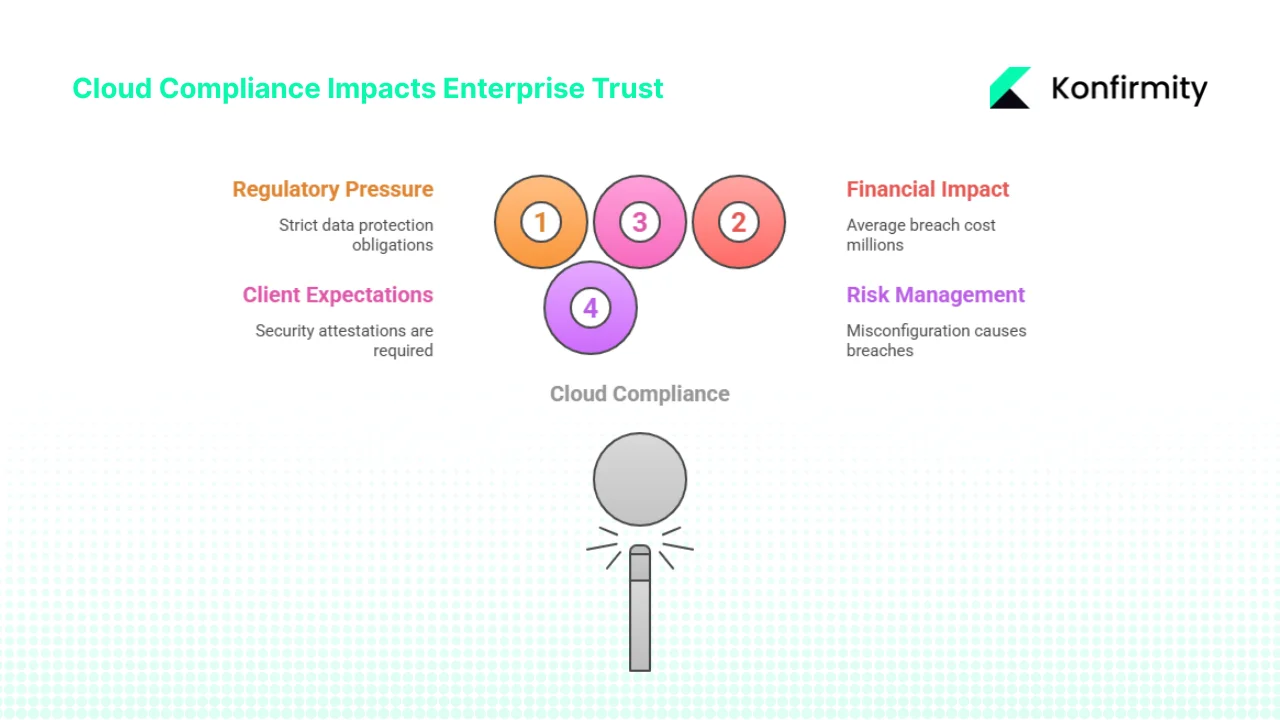
- Regulatory pressure. Data-protection laws (GDPR, HIPAA, CCPA/CPRA) impose strict obligations on controllers and processors, and healthcare breach volumes keep climbing year over year.
- Financial impact. The global average cost of a data breach reached a record $4.99 million in 2026, up 12% year over year according to IBM's 2026 Cost of a Data Breach Report — and the mean time to identify and contain a breach rose to 247 days, reversing five years of improvement.
- Client expectations. Enterprise procurement teams ask for SOC 2 Type II reports, ISO 27001 certificates, and HIPAA compliance evidence before onboarding a vendor. Without it, deals slow down and renewals become uncertain.
- Risk management. Misconfiguration and weak access control remain the leading causes of cloud breaches. Good security, per the NSA's own framing, comes from understanding and actually upholding the shared responsibility model across IaaS, PaaS, and SaaS.
Compliance isn't a checkbox — it's a fundamental component of trust. Evidence of real controls builds credibility with buyers and reduces the odds of a costly incident.
Steps to Achieve ISO 27001 Cloud Compliance on Azure
Achieving ISO 27001 cloud compliance on Azure follows a structured program that helps your organization demonstrate control effectiveness and reduce audit friction.
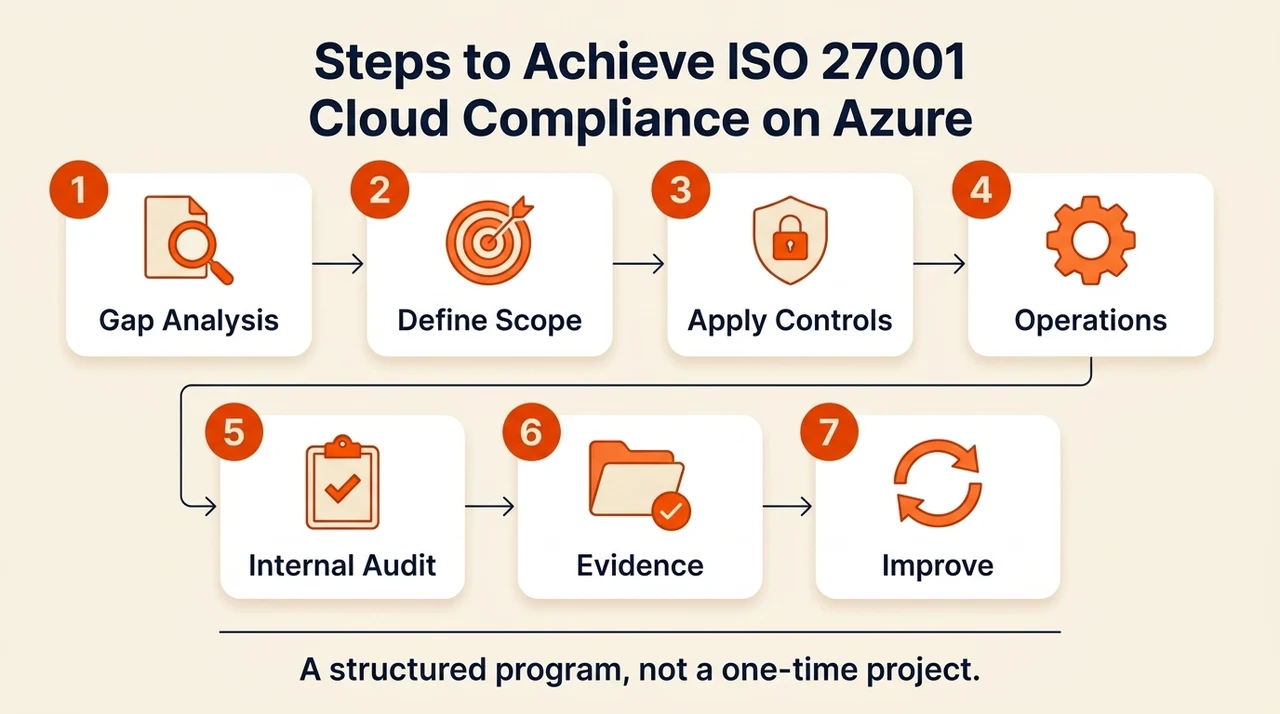
1. Perform a Gap Analysis and Risk Assessment
Inventory the data sets, applications, and infrastructure inside your Azure subscriptions, and identify sensitive data (ePHI, PII, financial records) and where it actually resides. Evaluate threats — unauthorized access, data loss, ransomware, misconfiguration, legal violation, operational disruption — with a risk matrix ranking impact and likelihood. Then compare existing controls against Annex A: Control A 5.23 specifically requires structured processes for cloud services, so document gaps across access management, encryption, monitoring, incident response, vendor management, and business continuity.
2. Define the ISMS Scope and Security Policies
Decide which Azure subscriptions, environments, and applications fall under your ISMS — for a SaaS vendor, that's typically every production subscription plus supporting identity providers and logging pipelines. Draft policies covering access management, data classification, encryption, logging, incident response, change management, and asset lifecycle, specifying responsibilities across your team and Microsoft's. Control A 5.23 specifically calls for defined roles, robust service agreements with CIA and incident-management provisions, and a documented secure-exit strategy.
3. Apply Security Controls Using Azure Features
Use Azure Active Directory (Entra ID), RBAC, and Privileged Identity Management to enforce least privilege, require MFA for every administrator and high-impact role, and apply Conditional Access based on device state, location, or user risk. Enable encryption at rest for storage accounts, databases, and managed disks, manage secrets through Key Vault, and enforce TLS everywhere. Turn on Azure Monitor, Activity Logs, and Diagnostic Logs across resources, forward them to Sentinel or another SIEM, and alert on anomalies — failed logins, privilege escalation, configuration changes. Use Azure Policy and Blueprints to enforce configuration baselines, auditing or denying non-compliant deployments outright.
4. Establish Operational Procedures
Operational procedures turn policy into daily practice: define an incident response process covering detection, triage, containment, eradication, and post-incident review, including how to raise a support ticket with Microsoft and collect forensic evidence. Use Azure Backup and Site Recovery to meet your RTO/RPO targets, and actually test the restores. Run infrastructure changes through a change-control process — pull requests, peer review, automated testing — and track asset lifecycle with tags for owner, classification, and environment, removing access the moment someone leaves.
5. Perform Regular Internal Audits and Reviews
Review logs, alerts, and compliance dashboards for control effectiveness, and use Microsoft Defender for Cloud to catch misconfigurations and vulnerabilities. Patch promptly, aligning timelines with CVSS severity and any regulatory obligation for sensitive workloads. Re-assess risk whenever business processes, architecture, or the threat landscape shifts, and keep an evidence trail — policy documents, risk assessments, access reviews, incident reports, backup records, system logs — organized well enough that an audit doesn't require reconstruction.
6. Prepare Documentation and Evidence for External Audit
Certification bodies will ask for your Statement of Applicability, risk assessments, policies, procedures, and evidence of controls actually operating. Build a compliance evidence tracker mapping each ISO 27001 control to specific Azure settings, policies, and documents — the encryption policy to Key Vault configuration, the access management policy to RBAC/PIM assignments, the incident response plan to runbooks and ticket logs — with at least one incident or test per control as proof of operating effectiveness.
7. Continuous Improvement
Continuous improvement is what keeps the program alive after certification: security is a moving target, so review and update policies as threats, business needs, or Azure itself changes. Track Microsoft's feature releases and service retirements, run quarterly tabletop drills and awareness training, and treat compliance as an outcome of good engineering rather than a scramble before the next audit.
Examples and Templates
These templates are starting points — customize every one for your actual environment.
ISMS Scope Document should cover: organizational context and stakeholders; the specific Azure subscriptions, resource groups, and services in scope; explicit exclusions and why; dependencies on third-party services like identity providers or payment gateways; and a data classification section identifying PHI, PII, and public data.
Azure compliance features help, but you own the security decisions.
Share your work email and we'll help you scope your Azure ISMS for real audit readiness.
Risk Assessment Matrix (sample):
| Asset | Threat | Vulnerability | Impact | Likelihood | Risk Rating | Mitigation | Owner |
|---|---|---|---|---|---|---|---|
| Database with PHI | Ransomware | Outdated patches | High | Medium | High | Regular patching, backup, network segmentation | CISO |
| Azure Storage account | Misconfiguration | Lack of encryption | Medium | Medium | Medium | Enforce encryption via Azure Policy, enable logging | Cloud engineer |
| API endpoint | Credential stuffing | Weak password policy | High | Low | Medium | MFA, password rotation, anomalous-login detection | Security team |
Access Control Policy should define roles (System Owner, Administrator, Developer, Support, Auditor), map each to Azure RBAC permissions (built-in roles first, custom only when needed), document the access-request approval workflow, require MFA for all privileged and remote access, and run quarterly access reviews that remove unnecessary privilege immediately.
Incident Response Plan Outline: detection and reporting criteria; triage and severity classification with a named coordinator; containment and eradication steps (isolate systems, revoke credentials, block traffic); internal and external communication protocols, including regulatory notification for personal-data breaches; recovery and integrity verification; and a lessons-learned step documenting root cause and control improvements.
Backup and Disaster Recovery Plan should specify: backup frequency by data type (daily for databases, weekly for file shares, monthly for full images); geo-redundant storage with offline or immutable copies where regulation requires it; documented, tested restore procedures; and explicit RTO/RPO targets per system.
Audit Checklist / Evidence Tracker:
| Control | Evidence Item | Azure Feature | Status |
|---|---|---|---|
| Access management | RBAC assignments, PIM logs | Azure AD, RBAC | In place |
| Encryption at rest | Storage account settings, SQL TDE | Key Vault, Storage | In place |
| Logging and monitoring | Activity logs, SIEM alerts, retention policy | Azure Monitor, Sentinel | In place |
| Backup and DR | Backup policy, restore test report | Azure Backup, Site Recovery | Scheduled |
| Patch management | Patch schedule, update logs, scan results | Azure Update Manager | In progress |
Hypothetical case study: a SaaS provider handling clinic appointment scheduling hosts its app on Azure Kubernetes Service with a PostgreSQL database, processing PHI under HIPAA and ISO 27001. They scope the ISMS to production and staging subscriptions, and their risk assessment flags ransomware and AKS misconfiguration as the top risks. They mitigate with Defender for Kubernetes, RBAC and network policies, and daily database backups, enforce MFA and least-privilege roles for engineers, and during internal audit catch an outdated container image missing security patches — fixed, with a vulnerability-scanning pipeline added afterward. Logs and incident records carry them into the external audit with evidence of continuous control operation, not a point-in-time snapshot.
Mapping Controls to Azure Features and Cloud Security Practices
Use this as a quick reference when designing your ISMS around Azure:
| ISO 27001 Control Area | Azure or Cloud Implementation |
|---|---|
| Access management | Azure AD roles, RBAC, Conditional Access, PIM, MFA |
| Cryptography | Encryption at rest and in transit, customer-managed keys via Key Vault, TLS enforcement |
| Asset management | Resource tagging, asset inventory, lifecycle tracking from creation to deletion |
| Logging and monitoring | Azure Monitor, Activity Logs, Log Analytics, Sentinel alerts, retention policies |
| Vulnerability and patch management | Azure Update Manager, Defender for Cloud recommendations, vulnerability scanning |
| Incident response | Incident response plan, runbooks, SIEM integration, Defender for Cloud alerts |
| Business continuity | Azure Backup, Site Recovery, geo-redundancy, auto-scaling, high-availability architecture |
| Data protection and privacy | Data classification labels, encryption, access controls, retention policies, privacy impact assessments, ISO 27018 and GDPR alignment |
For workloads processing personal data, ISO 27018 and privacy regulation add specific obligations around data minimization, purpose limitation, and data subject rights — map these to Azure Purview for data cataloging and Compliance Manager for assessment tracking.
Free checklist
The ISO 27001 Cloud Compliance Checklist for Azure
A shared-responsibility breakdown, a control-to-Azure-feature matrix, and a worked evidence tracker showing exactly what auditors expect for cloud workloads. Enter your work email and we'll send the PDF.
Common Pitfalls and How Busy Teams Can Avoid Them
- Assuming Azure's certification covers everything. Many teams believe deploying on a certified cloud automatically makes them compliant. In reality, both the customer and the provider are accountable, per the NSA's own framing — you still have to implement and operate your own controls.
- Poor documentation. Without a defined ISMS scope, policies, and an evidence-collection process, audits become painful. Confluence or Notion are not a substitute for a systematic evidence repository, and version-controlled policies and risk assessments matter more than the tool they live in.
- Configuration drift. Manually applied settings drift over time. Infrastructure-as-code (Terraform, Bicep) plus policy enforcement keeps environments consistent, and regular Defender for Cloud scans catch deviations before an auditor does.
- Neglecting operations. Backups, incident response drills, patching, and access reviews get treated as afterthoughts, but they're the evidence points a SOC 2 Type II or ISO 27001 audit actually samples. Untested backups or unrehearsed incident response can turn a minor event into an extended outage.
- Ignoring privacy and data-specific requirements. Processing PHI or personal data pulls in HIPAA and GDPR obligations on top of ISO 27001 — encryption, auditing, strict access control, and data processing agreements with every vendor touching that data.
- Underestimating human factors. Insider threats and sloppy offboarding cause real breaches. Training, separation of duties, and timely access revocation need to be enforced and evidenced, not assumed.
Practical Tips
These practical tips keep the program running without a dedicated compliance headcount:
- Automate where possible — Azure Policy and Blueprints for consistent deployment, automated evidence collection over manual screenshotting.
- Schedule regular reviews — quarterly risk assessments, monthly access reviews, dashboards that track control effectiveness over time.
- Assign clear responsibilities — a compliance owner, a security champion, and an audit coordinator, kept separate to avoid conflicts of interest.
- Start small — a single critical application first, expanding scope as controls mature. Managed programs typically reach SOC 2 Type II readiness in 4–5 months versus 9–12 months self-managed, cutting internal effort from 550–600 hours a year to around 75.
- Treat compliance as continuous — certification isn't an end state; monitor framework and platform changes and track adjustments in an improvement log.
See where your Azure workloads actually stand
Book a demo and we'll map your current Azure configuration against what ISO 27001 auditors and enterprise buyers actually check.
Book a demo
Frequently Asked Questions
Yes. ISO 27001 is an information security management standard that applies to cloud environments. The 2022 update introduced Control A 5.23, which requires policies and procedures for acquiring, using, managing, and retiring cloud services. Additional guidance comes from ISO 27017 for cloud services and ISO 27018 for privacy.
Yes. Microsoft Azure is certified against ISO/IEC 27001, meaning an independent auditor has assessed its information security management system. Azure's compliance covers infrastructure and many services, but you retain responsibility for your data and configurations.
Yes. Microsoft has ISO 27001 certification for its cloud services, including Azure. You can request audit reports through the Service Trust Portal. However, certification does not automatically extend to your workloads — you still have to implement your own controls.
Azure supports PCI DSS compliance through features like dedicated infrastructure, encryption, and logging, and provides attestation of compliance plus guidance for building PCI-compliant systems. Achieving PCI compliance still requires proper configuration, segmentation, and continuous monitoring by your organization.
ISO 27001 is the base information security management standard. ISO 27017 adds cloud-specific controls covering shared responsibilities between cloud providers and customers, multi-tenancy, and cloud service monitoring. ISO 27018 adds controls specifically for protecting personal data in public clouds. Azure holds certifications against all three; your organization's own controls still need to align with each standard's requirements for your workloads.
Conclusion
ISO 27001 is a powerful framework for building a repeatable security program, and Azure's certification gives you a genuinely strong foundation. But the shared responsibility model means you still design, implement, and operate your own controls — Control A 5.23's 2022 addition underscores exactly why structured processes for acquiring, managing, and retiring cloud services matter. With breach costs now averaging nearly $5 million globally, the stakes for getting this wrong keep rising.
ISO 27001 cloud compliance on Azure is a continuous effort, not a one-time project. Konfirmity's human-led, managed service helps companies build these programs correctly, implementing controls inside your stack and keeping you audit-ready year-round. Security that looks good on paper but fails under pressure is a liability — build the program once, operate it daily, and let compliance follow.