Remote working has moved from an exception to a norm across industries, including healthcare. Upwork projects that by 2025 more than 32 million Americans (around 22% of the workforce) will work remotely. HIPAA For Remote Teams is no longer just a compliance afterthought—it’s a pre‑condition for patient care, enterprise sales and telehealth adoption. Healthcare companies handle sensitive protected health information (PHI) across distributed devices, home offices and cloud platforms. This shift opens new vectors for attackers and creates regulatory risk that extends far beyond a single clinic’s walls. The U.S. Department of Health and Human Services (HHS) has recorded a 93% increase in large healthcare breaches and a 234% increase in ransomware attacks between 2018 and 2022. Breach costs are punishing: in 2025 the average healthcare breach cost sits at roughly $398 per record and more than $7.42 million per incident, the highest across all industries.
This article is written for chief technology officers, chief information security officers and compliance leaders who run remote or hybrid teams. As Amit Gupta, founder of Konfirmity, I have spent decades implementing security and privacy programs across thousands of audits. I will explain how HIPAA’s administrative, technical and physical safeguards apply when staff work outside a traditional office, why PHI definitions matter, and how to build a resilient program that stands up in audits and due diligence. Throughout the piece I will share patterns from 6,000+ security audits and more than 25 years of combined experience at Konfirmity. I will also show how we differentiate from generic governance, risk and compliance (GRC) tools by delivering human‑led managed services that integrate compliance into daily operations. Let’s start with the fundamentals.
Understanding HIPAA in Remote Work Settings
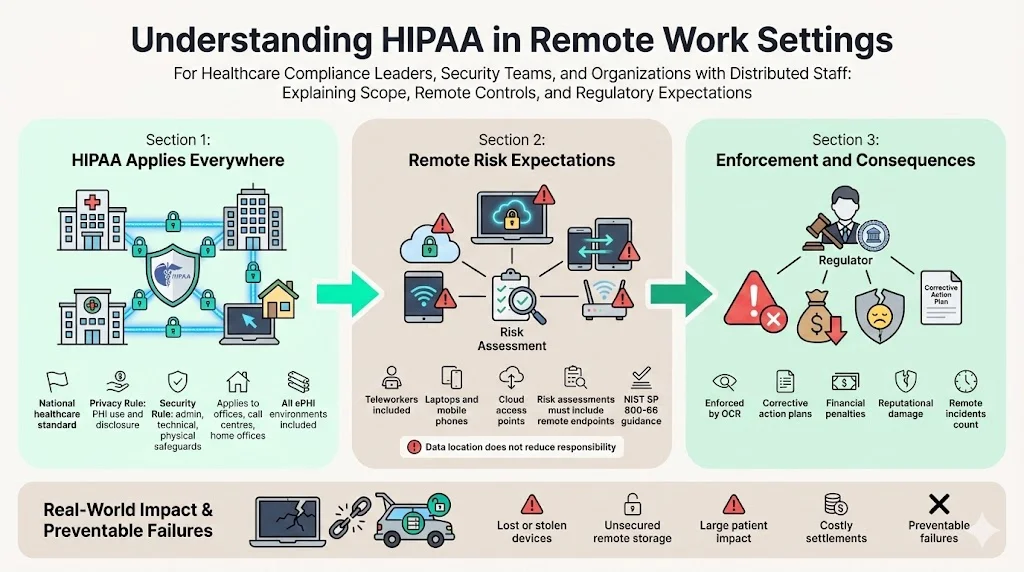
The Health Insurance Portability and Accountability Act (HIPAA) sets national standards to protect medical information. HIPAA’s Privacy Rule restricts how covered entities and their business associates use and disclose PHI. The Security Rule sets administrative, technical and physical safeguards for electronic PHI (ePHI). These requirements apply to all environments—whether staff work in a hospital, a call centre or a home office. NIST’s February 2024 update to Special Publication 800‑66 (Rev. 2) clarifies that risk assessments must account for teleworkers and remote workforce devices such as laptops and mobile phones. In other words, you must evaluate every endpoint that creates, stores or transmits ePHI.
HIPAA is enforced by the HHS Office for Civil Rights (OCR). Violations can lead to corrective action plans, settlements, monetary penalties and reputational damage. For example, Cancer Care Group paid $750,000 after a laptop and backup drive were stolen from an employee’s car, exposing PHI for more than 50,000 patients. Another provider, Lincare, paid nearly $240,000 when a remote employee stored PHI in an unsecured vehicle. These cases show that remote mismanagement is not theoretical; it has real consequences.
What Counts as PHI?
PHI refers to individually identifiable health information related to a person’s past, present or future health condition or payment for healthcare services. In remote settings this can include patient names, medical record numbers, billing information, appointment schedules, telehealth session recordings and any data transmitted via email or messaging tools. Even IP addresses and device identifiers may be considered PHI when tied to health information. Understanding what constitutes PHI helps teams design appropriate controls and avoid unintentional exposure. For example, storing telehealth session logs on a personal laptop or printing lab results on a home printer can create risk if those items are not secured. NIST’s guidance emphasises that risk assessments must evaluate all devices and apps used by teleworkers, underscoring that remote equipment is part of the PHI environment.
Why Does This Matter for Compliance?
HIPAA compliance is not just a legal obligation. It is also required to maintain patient trust and support procurement. Enterprise buyers now include security addenda, business associate agreements (BAAs) and privacy questionnaires in every contract. Any gaps in your remote security posture can slow deals or lead to disqualification. Moreover, the cost of remediation after an incident is much higher than the cost of prevention: detection and escalation often exceed $1.47 million and lost business averages $1.38 million. Effective HIPAA programs align remote operations with business objectives, ensuring that telehealth and distributed work are enablers—not obstacles—to growth.
Unique Challenges With Remote Teams
Remote working widens the attack surface in multiple ways:
-
Varied networks and devices: Employees use home Wi‑Fi, personal laptops, mobile phones and IoT devices that may not be hardened. NIST warns that mobile devices and IoT introduce higher risk because they can be lost, stolen or compromised. Remote networks rarely have the same intrusion detection, segmentation or logging as enterprise environments.
-
Human factors: Distractions in home settings can lead to mistakes, such as sharing credentials, reusing passwords or leaving screens unlocked. Phishing attacks, QR‑code scams and deepfake audio have become more targeted.
-
Lack of physical oversight: Without onsite supervision, physical safeguards like locked cabinets and device tracking may be forgotten. Printed medical notes might be left on a kitchen table or in a shared study, creating HIPAA violations.
-
Cloud dependency: Collaboration requires SaaS platforms for video conferencing, file sharing and instant messaging. If those platforms are not configured correctly or do not have BAAs, they may expose PHI — see our HIPAA for SaaS guide for how those platforms themselves need to handle ePHI.
When remote conditions are layered on top of complex regulatory obligations such as SOC 2, ISO 27001 or GDPR, the challenge multiplies. Each framework has unique control requirements and evidence expectations, yet they overlap around access control, encryption and continuous monitoring. These issues highlight why HIPAA For Remote Teams needs more than simple IT tools; remote-specific risks require clear policies and technical safeguards. The next sections break down HIPAA safeguards and map them to remote operations.
Core HIPAA Requirements for Remote Teams
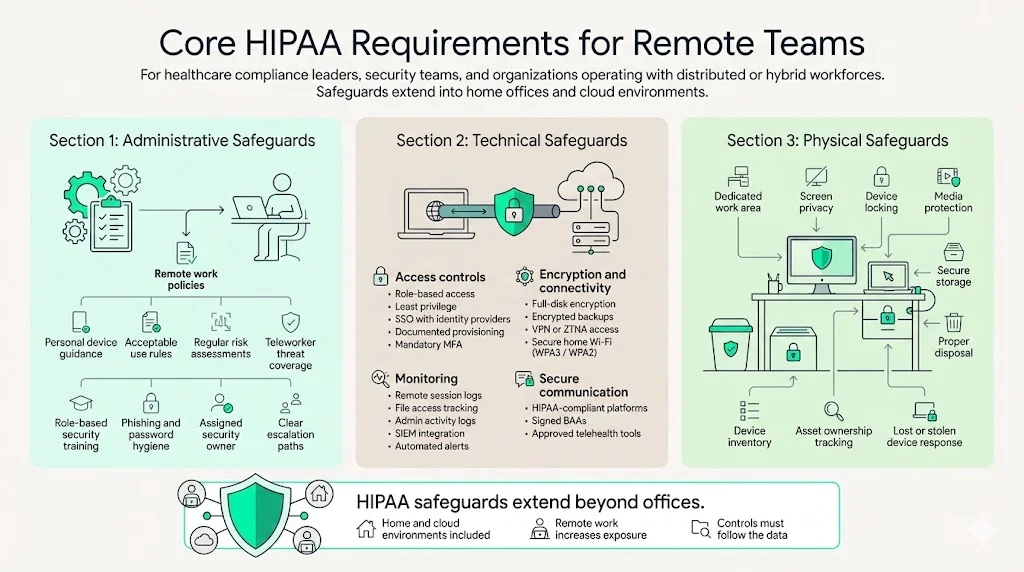
HIPAA’s Security Rule divides safeguards into administrative, technical and physical categories. To achieve HIPAA For Remote Teams compliance, these safeguards must extend into home offices and cloud infrastructure. When applied to remote settings, these safeguards form the foundation of a secure program.
1. Administrative Safeguards
Administrative measures revolve around policies, procedures, workforce training and risk management. For remote teams, you must:
-
Define and document remote work policies. These include acceptable use of personal devices, data handling procedures and consequences for policy violations. NIST emphasises that risk assessments should be regularly updated and include teleworkers.
-
Conduct regular risk assessments. Identify threats to remote devices and networks and evaluate the likelihood and impact of those threats. According to NIST guidance, teleworkers and mobile devices must be explicitly considered in these assessments.
-
Train employees. NIST’s Security Rule guidance calls for security awareness and training programs that cover remote and mobile computing. This includes topics such as phishing, password hygiene, secure file sharing and encryption. Training must be continuous and role‑specific.
-
Assign responsibility. A security officer or compliance lead should oversee remote operations, including policy enforcement, incident response, and vendor management. Delegating accountability ensures that issues are escalated quickly.
2. Technical Safeguards
Technical measures protect ePHI through access controls, encryption, auditing and transmission security. For remote teams:
-
Access controls: Implement role‑based access and least‑privilege. Use single sign‑on (SSO) integrated with identity providers and ensure account provisioning and de‑provisioning are documented. Multi‑factor authentication (MFA) is non‑negotiable for remote logins, as recommended by NIST.
-
Encryption: Encrypt data at rest and in transit. Laptops, smartphones and removable media should use full‑disk encryption. VPN tunnels or zero‑trust network access (ZTNA) should be mandated for connecting to internal systems. Home routers should be configured to use WPA3 or at least WPA2 encryption.
-
Audit logs: Collect and store logs for remote sessions, file accesses and administrative actions. Audit trails enable detection of anomalous behaviour and provide evidence during audits or investigations. Tools should integrate with a SIEM to automate alerts.
-
Secure communication: Telehealth and chat platforms must be HIPAA compliant. HHS advises that covered providers use technology vendors that will sign a BAA and comply with HIPAA requirements.
3. Physical Safeguards
Physical protections address the equipment and workspaces used by employees. In remote environments:
-
Secure home offices: Staff should designate a private area for work. Devices should be locked when unattended and screens protected from family or roommates. NIST recommends limiting device capabilities, enabling screen locks and training staff on mobile computing risks.
-
Protect media: Hard drives, USB sticks and printed documents must be secured. When no longer needed, they should be destroyed or returned to the office. Lincare’s settlement shows how storing PHI in an unsecured vehicle leads to penalties.
-
Inventory tracking: Keep an accurate inventory of devices used to access PHI, including laptops, tablets and phones. Document serial numbers, asset owners and last known location. Lost or stolen devices must trigger incident response procedures. Teams that still run some infrastructure in-house should also read our HIPAA for on-prem guide for how physical facility controls extend to a hybrid setup.
Step‑by‑Step Guide to HIPAA Compliance for Remote Teams
The following process outlines how to build a compliant remote program. Each step dovetails with Konfirmity’s managed services that reduce internal burden and accelerate audit readiness.
Step 1: Policies & Documentation
Draft a remote work policy that addresses device usage, home network requirements, PHI handling, and sanctions for policy breaches. A well-defined policy is the first building block for HIPAA For Remote Teams because it sets expectations for staff and auditors. Consider using a baseline template, then customise it to your environment. Include:
-
Clear roles and responsibilities for remote staff.
-
Requirements for secure home networks (password complexity, encryption standards, router firmware updates).
-
Procedures for reporting lost devices or suspected breaches.
-
Restrictions on printing PHI or using personal email and messaging services.
Update standard operating procedures (SOPs) to reflect remote workflows. Align them with SOC 2 and ISO 27001 controls. For example, ISO 27001’s Statement of Applicability (SoA) lists all annex controls and indicates whether each is applied or not. Align your remote policy with the SoA so auditors can see how controls are implemented or justified when excluded.
Step 2: Secure Infrastructure
A secure technical foundation is essential for HIPAA For Remote Teams. This involves:
-
Encrypted networks: Provide staff with VPN clients or ZTNA solutions. Configure VPN profiles to require strong encryption (AES‑256), MFA and certificate validation. Enforce always‑on VPN or require access via secure gateway to ensure all ePHI traffic is encrypted.
-
Endpoint protection: Install endpoint detection and response (EDR) agents on all devices. Keep operating systems and applications patched. Use mobile device management (MDM) to enforce screen lock timeouts, remote wipe and encryption.
-
Configuration management: Establish baselines for remote devices. Use configuration management tools to enforce settings (firewall rules, disk encryption, disabled USB ports). Document configuration standards in your asset inventory.
-
Secure home routers: Provide instructions or technical support to configure home routers. Require strong Wi‑Fi passwords, disable default credentials and update firmware. When possible, supply company‑issued routers preconfigured with secure settings.
Step 3: Implement Secure Communication Channels
Communication tools are the lifeblood of remote teams and are central to HIPAA For Remote Teams. Choose platforms that meet HIPAA requirements and sign BAAs. Secure channels should include:
-
Encrypted email. Configure end‑to‑end encryption for sensitive emails. Provide training on when encryption is necessary.
-
Instant messaging. Use chat applications with administrative controls, encryption, and audit trails. Slack Enterprise Grid, Microsoft Teams (with appropriate compliance add‑ons) and similar solutions can be configured for HIPAA compliance when accompanied by BAAs.
-
Video conferencing. Select platforms that support HIPAA compliance (e.g., Zoom for Healthcare or Doxy.me). Ensure meeting recordings, chat transcripts and screen shares are stored securely.
-
File storage and sharing. Enforce restrictions on file storage services. Use HIPAA‑compliant cloud storage with encryption at rest and in transit. Require MFA and do not allow personal storage accounts. Set retention policies and version control to prevent data sprawl.
Remote work expands the attack surface. Shrink it before a breach.
Drop your work email and we'll harden remote PHI access, not just the checklist.
Step 4: Access Control & Authentication
Remote environments demand rigorous access management:
-
Role‑based access: Map roles to systems and restrict access to only what is needed. For example, a billing clerk does not need access to clinical notes; clinicians should not access billing systems unless necessary for treatment. Document access approval and review processes.
-
MFA policies: Mandate MFA for all remote logins, including VPN, email and SaaS platforms. Where possible, use FIDO2 or hardware tokens. Avoid SMS‑based MFA due to SIM swapping risks.
-
Periodic reviews: Conduct quarterly access reviews. Validate that accounts still exist, roles remain correct and inactive accounts are disabled. Maintain evidence to satisfy auditors.
-
Session timeouts: Configure systems to log out users after periods of inactivity. Apply restrictions on concurrent sessions and monitor for suspicious login patterns.
Step 5: Employee Training Protocols
Continuous education is one of the most effective safeguards for HIPAA For Remote Teams. NIST’s guidance encourages tailored training for teleworkers — our HIPAA training requirements guide covers what to include and how often to deliver it. A robust program should include:
-
Onboarding training: Introduce HIPAA basics, PHI handling, remote policies and security best practices. Provide practical scenarios and emphasise individual accountability.
-
Phishing awareness: Use simulated phishing campaigns and follow‑up coaching. Teach staff to spot QR‑code scams, deepfake audio and vendor impersonation. After all, phishing remains a leading cause of breaches.
-
Annual refreshers: Cover new threats, policy updates and lessons learned from incidents. Encourage staff to ask questions and provide feedback. Retain attendance records to show due diligence.
-
Role‑specific training: Technical staff should understand encryption, patch management and network segmentation. Clinicians should learn about telehealth platform settings and patient consent. Administrative personnel should focus on record retention and disposal.
Step 6: Ongoing Monitoring & Risk Management Strategies
Compliance is not a one‑time exercise. You need to maintain vigilance:
-
Security audits and testing: Conduct periodic security audits, vulnerability scans and penetration tests. Include remote work scenarios (home routers, VPN bypass attempts). Document findings, remediation steps and verification. Use risk‑based prioritisation to focus on high‑impact issues.
-
Continuous monitoring: Implement security information and event management (SIEM) systems that collect logs from endpoints, networks, and applications. Use threat intelligence to identify suspicious behaviour. Automate alerts for unusual logins, privilege escalations and data exfiltration attempts.
-
Incident response: Develop a remote‑specific incident response plan. Define escalation paths, communication channels and documentation requirements. Test the plan through tabletop exercises that involve remote team members.
-
Breach notification procedures: In the event of a breach, HIPAA requires timely notification to affected individuals, HHS and sometimes the media. Outline timelines (within 60 days for breaches affecting 500 or more individuals) and responsibilities. Practice this process ahead of time.
-
Vendor management: Maintain an inventory of business associates and third‑party vendors. Require BAAs when vendors handle PHI. HHS reminds that covered entities must have written BA agreements and that business associates are directly liable for compliance. Perform due diligence on vendor security controls and monitor for sub‑processor changes, following the same third-party risk process you'd use for any other vendor.
Templates and Tools You Can Use
1. Remote Work Policy Template
A remote work policy should include sections for eligibility, approved devices, network requirements, security controls and PHI handling procedures. The template should instruct staff to:
-
Use company‑issued devices when possible; otherwise ensure personal devices meet MDM standards.
-
Keep routers patched, use strong Wi‑Fi encryption and disable default credentials.
-
Prohibit storage of PHI on personal drives; require encryption and secure backups.
-
Report lost or stolen devices immediately.
-
Use secure disposal methods for printed PHI and storage media.
At Konfirmity we provide a starting template derived from 6,000+ security audits. We customise it to each client’s risk profile and integrate it into SOPs, SoA documents and SOC 2 control narratives. This saves weeks of drafting and ensures consistency across frameworks.
2. Business Associate Agreement (BAA) Template
BAAs are mandatory when vendors access PHI. The agreement should define permitted uses of PHI, outline safeguards (administrative, technical and physical), and require vendors to report breaches. It must also give you the right to audit their compliance. HHS stresses that covered entities cannot rely on the BAA alone; they must verify that vendors implement appropriate controls. Konfirmity’s BAA template covers obligations, breach notification timelines and subcontractor provisions. We include cross‑references to SOC 2’s vendor management criteria and ISO 27001’s supplier control (Annex A 5.1). By standardising BAAs, we reduce negotiation time and make vendor onboarding smoother.
3. Employee Training Schedule
To maintain awareness, create a training schedule that includes:
-
Quarterly phishing drills with follow‑up sessions.
-
Annual HIPAA refreshers covering updates and case studies.
-
Role‑specific workshops for technical, clinical and administrative staff.
-
On‑demand micro‑learning modules accessible through your LMS. These modules should be updated as new threats arise.
We see that organisations that maintain a structured training calendar cut phishing click‑through rates by up to 50% within six months. Our managed service includes content creation, session delivery and attendance tracking to reduce internal workload.
4. Risk Assessment Checklist
A remote‑focused risk assessment should address:
-
Asset inventory: What devices, networks and applications process PHI? Include personal devices if they connect to corporate resources.
-
Threat modelling: Identify risks such as stolen laptops, unsecured Wi‑Fi, phishing, malware, and vendor breaches.
-
Control evaluation: Assess the effectiveness of existing controls (MFA, encryption, logging). Use CVSS scores and risk matrices to prioritise remediation.
-
Documentation: Capture your methodology, findings and action plans. NIST advises that risk assessments must be well‑documented to satisfy OCR audits.
At Konfirmity we run these assessments every year, or sooner when clients significantly change their remote workforce. We map findings to ISO 27001 and SOC 2 controls to maintain cross‑framework alignment and reuse evidence wherever possible.
Common Mistakes and Compliance Pitfalls
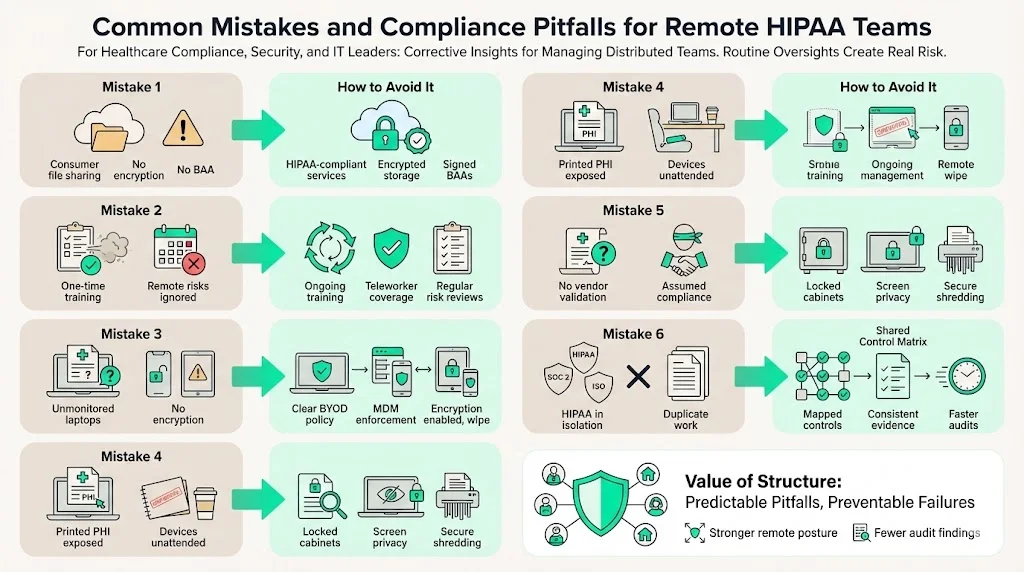
Without a structured program, HIPAA For Remote Teams can falter in routine tasks such as vendor management, access reviews and incident response.
Despite best intentions, organisations still stumble. Common pitfalls include:
-
Using unsecured cloud services: Storing PHI in consumer versions of Google Drive or Dropbox without encryption can expose data. Always select services that provide HIPAA compliance and sign BAAs.
-
Skipping regular training or risk reviews: NIST emphasises ongoing training. Neglecting this leaves employees ill‑prepared for new threats. Risk assessments that exclude remote devices or do not consider new telehealth tools are incomplete.
-
Allowing personal device sprawl: Without clear policies, staff may use unmonitored devices. This increases the risk of stolen laptops (as in the Cancer Care Group case). Implement MDM and enforce encryption and remote wipe capabilities.
-
Poor physical security: Leaving printed PHI in cars or common areas can trigger breaches (as in the Lincare case). Require locked cabinets and secure shredding.
-
Trusting the BAA alone: A signed BAA does not guarantee that vendors protect PHI. Conduct due diligence, request SOC 2 Type II reports and regularly review their security posture. HHS reminds that vendors are directly liable for certain HIPAA violations.
-
Not aligning frameworks: Organisations often treat HIPAA, SOC 2 and ISO 27001 as separate projects. This leads to duplicate work and inconsistent controls. By creating a shared control matrix and SoA you can show how each control maps to multiple frameworks. This consolidation saves time during audits and reduces oversight gaps.
How Konfirmity Helps
Konfirmity provides human‑led, managed security and compliance for healthcare and technology companies. Our experts implement controls inside your environment and run them day‑to‑day. We do not just deliver checklists; we operate the entire program. Key advantages include:
-
End‑to‑end managed service: We plan, build and operate your compliance program. This includes writing policies, configuring infrastructure, delivering training, performing risk assessments, and supporting audits. You spend under 70 hours per year** on compliance instead of 550–600 hours typical for self‑managed programs, based on our field experience. We support HIPAA, SOC 2, ISO 27001 and GDPR concurrently, saving months in readiness timelines.
-
Continuous evidence collection: Our platform integrates with your systems to collect logs, screenshots and configuration proofs. Evidence is continuously updated to meet auditors’ requirements, avoiding the scramble during audit windows. For SOC 2 Type II, we cover an observation period of at least three months and maintain logs for all control events.
-
Expert leadership: Each client gets a dedicated CISO or security lead with 25+ years of combined expertise. We advise on architecture, vendor selection and remediation. During incidents we guide triage, containment and reporting.
-
Outcome metrics: On average, clients see 75% effort reduction, pass audits two to three months earlier, and reduce findings by 30%. This translates to faster procurement, shorter sales cycles and fewer contract delays.
See your real HIPAA gap for remote teams, not a guess
Book a demo and we'll map your distributed workforce's ePHI access against the Security Rule requirements, self-serve or with our CISO-led team running it for you.
Book a demo
Conclusion
Remote work has reshaped healthcare delivery and compliance. HIPAA For Remote Teams requires a disciplined approach that integrates policies, secure infrastructure, training and continuous monitoring. Statistics from the past few years show why this is urgent: healthcare breaches have surged, and average breach costs remain the highest among industries. Risk assessments must include teleworkers and mobile devices. Physical safeguards such as encryption, screen locks and secure storage are non‑negotiable. Training must be ongoing and tailored to remote staff.
At Konfirmity we take a security‑first, compliance‑second stance. We implement durable controls and operate them every day. This human‑led managed service means you don’t just pass an audit—you stay prepared year‑round. Security that looks good on paper but fails under pressure is a liability. Build your program once, operate it daily, and let compliance follow.
FAQs
Remote work extends the boundaries of your environment to home networks, mobile devices and SaaS platforms. The attack surface increases and physical oversight drops. HIPAA risk assessments must explicitly consider teleworkers and all devices that handle ePHI. Additional safeguards such as VPNs, MFA, encrypted endpoints and secure home offices are required to mitigate these risks.
Yes. NIST’s guidance highlights that all workforce members, including teleworkers, require security awareness and training. This training should be ongoing and role‑specific, covering topics such as phishing, password hygiene, encryption and incident reporting.
Personal devices may be allowed if they meet strict requirements: full‑disk encryption, MDM enrollment, screen lock, and remote wipe capabilities. You must include these devices in your asset inventory and risk assessments. Policies should specify approved uses and require employees to sign acknowledgments. Without these controls, personal devices pose significant risk.
If a breach occurs, the organisation must follow its incident response plan, contain the incident, investigate scope, and notify affected individuals and HHS within the required timelines. OCR may impose monetary penalties, corrective action plans or settlement agreements depending on the severity and negligence involved. For example, theft of an unencrypted laptop led to a $750,000 settlement. Training, policies and technical safeguards can significantly reduce the likelihood of such events.