Enterprise buyers expect proof of privacy compliance before they sign a contract. Over the past several years, regulatory penalties have grown: as of late 2025 the EU has imposed €6.7 billion in GDPR fines across more than 2,600 cases. These enforcement actions disrupt operations, drive up cyber‑insurance costs, and delay sales. They also highlight a fundamental truth: without a clear view of personal data holdings and processing activities, firms face legal and operational risk. This GDPR Asset Inventory Guide explains why an inventory of systems, data, and processes is critical for teams selling to large customers. It breaks down key tasks into manageable steps so that busy teams can create living documentation that supports audits, risk assessments and buyer due diligence.
Why an Asset Inventory Matters
An asset inventory catalogues the systems, applications, databases and vendors that hold or process personal data. Under Article 30 of the GDPR, controllers and processors must maintain records of processing activities (ROPA) and make them available to regulators. A complete inventory feeds into data mapping, privacy impact assessments (DPIAs), security controls and vendor management. It demonstrates organisational accountability and helps teams prepare for audits or respond to data subject requests. For enterprise‑selling companies, procurement teams often request a clear inventory as part of vendor security questionnaires and data processing agreements. Without it, deals stall and remediation costs mount.
What a GDPR Asset Inventory Means in Practice
A GDPR asset inventory is a registry of all systems, data stores, processes and data flows where personal data is collected, stored, processed or shared. It includes internal databases, cloud services, off‑the‑shelf software, bespoke applications, business processes, and third parties. Each entry typically captures the purpose of processing, categories of data subjects, data types, legal basis, transfer mechanisms, retention periods and security measures. By assembling this information, organisations can map how personal data travels across their environment and identify gaps.
GDPR and Asset Inventory Basics
What is the GDPR?
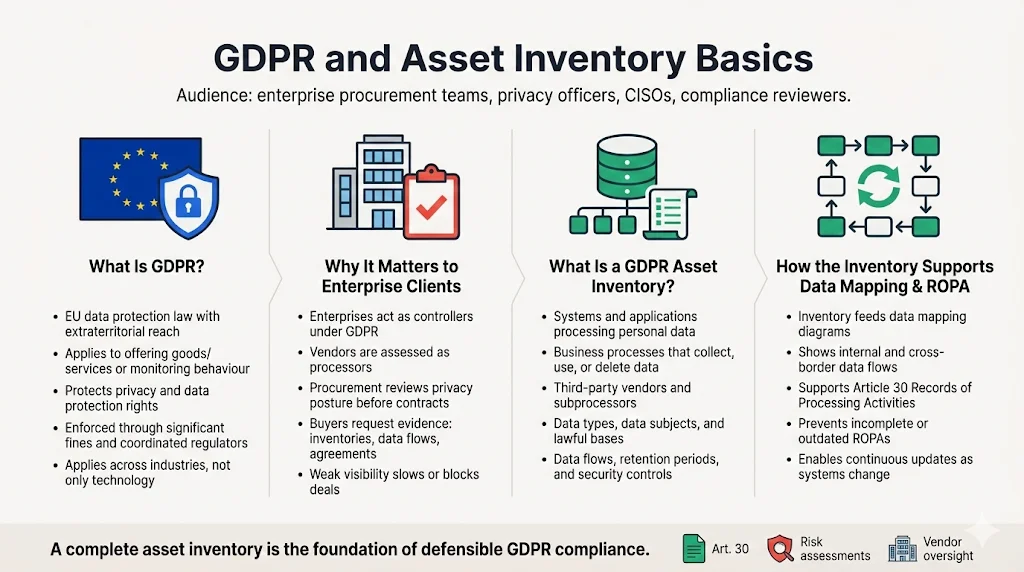
The General Data Protection Regulation (GDPR) is the EU’s data protection law. It applies to any organisation that offers goods or services to individuals in the EU or monitors their behaviour, regardless of the firm’s location. GDPR’s purpose is to protect individuals’ fundamental rights to privacy and data protection. Enforcement is serious: authorities have issued billions in fines and regulators coordinate cross‑border actions. Large technology firms have paid record penalties, but enforcement extends to finance, healthcare and telecommunications. This law matters to enterprise vendors because customers are increasingly accountable for their suppliers’ data practices.
Why GDPR is relevant to enterprise clients
Enterprise buyers often process sensitive information—customer records, employee data, healthcare information or financial details. Under GDPR, controllers must ensure that processors (vendors) implement appropriate technical and organisational measures. Procurement teams scrutinise vendors’ privacy posture, request access to ROPAs, data flow diagrams and third‑party agreements, and may refuse to work with suppliers who cannot demonstrate compliance. A thorough inventory shows that you understand your obligations, which reduces risk and accelerates contract negotiations.
What is a GDPR asset inventory?
In the context of the GDPR, an asset inventory (also called a data inventory) is a structured catalogue of systems, processes and personal data assets. It identifies:
-
Systems and applications (on‑premise and cloud) that store or process personal data.
-
Business processes where personal data is collected, used, shared or deleted.
-
Third‑party vendors that process personal data on your behalf, including software‑as‑a‑service providers, cloud hosting, analytics firms and contractors.
-
Data types and categories (names, contact information, payment details, health information, etc.), the categories of data subjects (customers, employees, partners) and the lawful basis for processing.
-
Data flows between systems, teams and vendors, including cross‑border transfers.
-
Retention periods and deletion triggers for each category of data.
-
Security controls such as encryption, access restrictions and audit logging.
Article 30 specifies that controllers must document their own name and contact details, the purposes of processing, categories of data subjects and personal data, recipients of the data, transfers to third countries, erasure deadlines and security measures. Processors must maintain similar records for activities they perform on behalf of controllers.
How the inventory supports data mapping and ROPA
A sound inventory is the starting point for data mapping—the visual representation of how personal data moves through systems and organisations. Mapping reveals dependencies between systems, shows where data leaves the organisation, and helps identify risks in processing. The inventory also feeds directly into the Record of Processing Activities (ROPA) required by Article 30. Without a comprehensive list of assets and flows, a ROPA will be incomplete, and auditors or regulators may view it as non‑compliant. Many privacy programs fail when they treat the ROPA as a static document rather than a living set of records supported by continuous inventory updates.
Core GDPR Concepts You Need to Know
Building a useful asset inventory requires an understanding of key GDPR terms and how they relate to data handling.
Personal data
The GDPR defines personal data as any information relating to an identified or identifiable natural person. An individual is identifiable if they can be singled out directly or indirectly through identifiers such as names, identification numbers, location data, online identifiers or factors specific to physical, physiological, genetic, mental, economic, cultural or social identity. This definition is broad and covers obvious identifiers (names, emails, phone numbers) as well as IP addresses, cookie identifiers, device IDs and pseudonymous identifiers. When inventorying data, treat anything that could be linked to an individual as personal data.
Data processing
The GDPR uses the term processing to describe any operation or set of operations on personal data. It includes collection, recording, organisation, storage, adaptation, retrieval, consultation, use, disclosure, transmission, alignment, combination, restriction, erasure or destruction. Even simple logging or storing data in a database counts as processing. Your inventory must capture all ways personal data is handled across its life cycle.
Data lifecycle
The data lifecycle spans the phases from collection through use, storage, sharing and deletion. In the context of GDPR, you must apply data minimisation (collect only what is necessary), purpose limitation (use the data only for specified purposes), storage limitation (retain it only for as long as needed) and integrity and confidentiality (protect it with appropriate security measures). An inventory tied to the data lifecycle helps enforce these principles—for example, by identifying systems where retention periods are overdue or where data is stored without a clear purpose.
Data protection and privacy compliance
Privacy compliance involves implementing policies, technical controls and organisational measures that meet legal requirements and protect individuals’ rights. A data inventory underpins this by giving visibility into what personal data you hold, why you have it, and how it is secured. Without it, teams cannot demonstrate lawful processing, respond to data subject requests or perform Data Protection Impact Assessments (DPIAs). Regulators and auditors expect to see a correlation between documented inventories and actual systems.
Regulatory requirements and Article 30
Article 30 of the GDPR requires controllers and processors to maintain detailed records of processing activities. The record must be in writing (which includes electronic form) and must be available to supervisory authorities on request. Small enterprises employing fewer than 250 persons may be exempt unless their processing is risky or involves special categories of data. Failure to maintain a proper record is a violation subject to fines. An asset inventory that captures the required elements forms the basis for compliance with this article.
Preparing for Your Inventory
Starting an inventory without preparation often leads to incomplete records and missed deadlines. Use the following steps to set a strong foundation.
Assemble your team
Inventory work spans multiple functions. Involve IT and security teams to identify systems and network architecture. Bring in legal and privacy experts to interpret GDPR requirements and define data categories. Include business unit representatives (product, marketing, sales, HR) because they often introduce new tools and processes. A cross‑functional team ensures you capture shadow systems and unstructured data.
Define scope and purpose
Decide which systems, departments and jurisdictions will be covered. For most enterprise vendors, the scope should include all services that store or process personal data of EU residents and all processing activities that support those services. Document the purpose for each data set and ensure it aligns with lawful bases (consent, contract, legitimate interest, etc.). Defining scope early helps you align with Article 30 and internal reporting obligations and prevents later surprises.
Set up documentation templates
Templates make inventory collection efficient. A simple table or form should capture:
-
Asset name and owner.
-
System type (database, application, storage, network device).
-
Data categories (e.g., personal identifiers, payment data, health data).
-
Purpose of processing.
-
Lawful basis.
-
Data subjects (customers, employees, prospects, contractors).
-
Transfers and recipients (third parties, cross‑border).
-
Retention period and deletion rules.
-
Security measures (encryption, authentication, logging, access controls).
-
Evidence location (audit logs, policies, contracts).
Standardising fields makes it easier to compile data into a central inventory and update it over time.
Free guide
The Asset Inventory Guide
A complete, auditor-ready asset inventory template for GDPR, ISO 27001, and SOC 2. Enter your work email and we'll send the PDF.
Building the Asset Inventory
Once you have a team and templates, follow this framework to build the inventory.
Identify all personal data assets
Start by compiling a list of systems, applications, databases and IT resources that process personal data. Sources include:
-
Configuration management databases (CMDBs) and IT asset management tools.
-
Cloud platforms (AWS, Azure, GCP) and their services (S3, EC2, databases).
-
Enterprise applications like CRM, HR systems, finance software, and marketing platforms.
-
Endpoint devices used by staff (laptops, mobile devices, IoT).
-
Shadow IT—tools purchased or adopted by teams without central approval. Surveys and interviews are essential to uncover these.
-
Third‑party services integrated via APIs or data exports (analytics, payment processors, customer support tools).
Create an exhaustive list; later you can exclude assets that do not handle personal data.
Classify the data
Once assets are identified, classify the data they process. Categories may include:
-
Sensitive data: special categories (health, genetic, biometric), payment card information, government identifiers.
-
Personal data: names, contact details, device IDs, IP addresses.
-
Operational data: logs, usage metrics that may contain personal identifiers.
-
Aggregate or anonymised data: aggregated metrics or reports.
You may also distinguish internal vs. third‑party data and note regulatory drivers (e.g., HIPAA for health data, PCI DSS for cardholder data). Classifying data helps prioritise controls and retention schedules.
Map data flows
Mapping shows how personal data moves between systems, teams and vendors. Use your inventory to document:
-
Data ingress: how data enters your environment (web forms, APIs, imports).
-
Data movement: transfers between internal systems, such as from application servers to databases or backups.
-
Third‑party flows: exports to vendors for analytics, payments, communications or storage.
-
Cross‑border transfers: flows to countries outside the EU or other regulated jurisdictions.
Visual diagrams help stakeholders understand complex flows. For example, the illustration below shows how data flows from internal systems into a personal data repository, then out to business teams and third‑party vendors:
Diagrams like this clarify the scope of processing, highlight potential bottlenecks and help identify insecure connections.
Document processing activities
For each asset, document the processing activities, including:
-
Purpose of processing: marketing communications, service delivery, billing, analytics, support, HR administration, etc.
-
Legal basis: consent, contractual necessity, legal obligation, vital interests, public interest, or legitimate interest.
-
Data subjects: customers, employees, users, contractors.
-
Retention and deletion: retention period and policy triggers for deletion.
-
Recipients: internal teams and external third parties (e.g., data processors, sub‑processors, governmental bodies).
-
Cross‑border transfers: which data is transferred to which countries and the safeguards used (Standard Contractual Clauses, adequacy decisions).
-
Security measures: encryption at rest and in transit, access controls, multi‑factor authentication, network segmentation, audit logging.
This detailed information helps build a ROPA that meets Article 30 requirements and provides evidence for auditors.
Strengthening Your Inventory with Controls
Security and access controls
An inventory is not just a list; it informs risk management. Apply appropriate security and access controls based on data sensitivity:
-
Encryption: Encrypt personal data at rest and in transit. This reduces the impact of breaches and may exempt data from notification obligations if it renders the data unintelligible.
-
Authentication: Use strong multi‑factor authentication for systems storing personal data and enforce least‑privilege access. Conduct periodic access reviews to remove unnecessary privileges. SOC 2 and ISO 27001 audits will check these controls.
-
Role‑based access control (RBAC): Assign roles based on job functions and restrict access to sensitive data accordingly. Use segregation of duties to prevent conflict of interest.
-
Monitoring and logging: Implement audit logs for access, modifications and deletions of personal data. Logs should be immutable and reviewed regularly.
These controls not only support GDPR compliance but also align with other frameworks like the AICPA’s Trust Services Criteria, ISO/IEC 27001 Annex controls and the HIPAA Security Rule.
Data minimisation and retention policies
Data minimisation requires collecting only data needed for a specified purpose. After defining your inventory, assess each data set’s necessity. If a system stores excessive personal data (e.g., logs containing IP addresses when aggregated metrics suffice), adjust your collection. Define retention periods for each category based on legal requirements and business needs, and implement deletion or anonymisation processes. Article 30 requires documenting erasure time limits. Retention schedules also support compliance with other regulations; for example, proposed revisions to the HIPAA Security Rule would require organisations to maintain a technology asset inventory and network map at least annually and review them when operations change.
Vendor management
Third‑party vendors are part of your processing chain and must be reflected in the inventory. Include vendor name, services provided, data categories processed, geographic locations and contract details. Collect Data Processing Agreements (DPAs), Standard Contractual Clauses (SCCs) and any certifications (e.g., ISO 27001, SOC 2). Regularly review vendor security posture, check sub‑processor disclosures, and ensure that data is transferred with appropriate safeguards. Many high‑profile GDPR fines stem from insufficient oversight of third parties, particularly marketing and analytics providers.
An inventory that's accurate on day one gets stale by day ninety.
Share your work email and we'll help you turn a one-time inventory into a maintained system of record.
Using the Asset Inventory in Practice
Support risk assessments
An up‑to‑date inventory feeds into risk assessments. NIST Special Publication 800‑30 emphasises that risk assessments provide executives with information to determine appropriate actions. By linking each asset to risk factors (data sensitivity, likelihood of threat, existing controls), you can prioritise remediation efforts. Use scoring models such as CVSS for vulnerability severity, and incorporate operational metrics like mean time to detect (MTTD) and mean time to respond (MTTR). Asset inventories also support privacy impact assessments (PIAs) and DPIAs by identifying high‑risk processing activities.
Audit trails and DPIA support
Auditors require evidence that controls operate effectively over time. A well‑maintained inventory provides the foundation for audit trails. It shows where evidence resides (e.g., access logs, encryption keys, vendor contracts) and allows auditors to sample controls across systems. When conducting DPIAs, the inventory helps you document processing purposes, necessity, proportionality and risks, making it easier to justify decisions and show regulators that you considered alternatives.
Responding to data subject requests
Data subjects have rights under the GDPR: access, rectification, erasure, restriction, portability and objection. To comply with these requests, you must know where the data resides. The inventory helps you locate personal data across systems and vendors quickly, verify that you have a lawful basis for holding it, and track whether it has been shared. Without this visibility, responding within statutory deadlines is near impossible and can lead to complaints or fines.
Maintaining and Updating Your Inventory
Treat the inventory as living documentation
An inventory is not a one‑off project. Systems change, new features are released, and departments adopt new tools. Set a cadence for reviewing and updating the inventory—monthly or quarterly for high‑risk processes, and at least annually for others. Align the review schedule with other compliance activities such as access reviews, vulnerability scans and vendor assessments. For regulated sectors like healthcare, the proposed HIPAA rule requires updating asset inventories and network maps whenever operations change and at least once every 12 months.
Use automation where possible
Manual inventorying is time‑consuming and prone to human error. Many tools can scan networks, cloud environments and code repositories to identify systems that handle personal data. Data discovery and classification tools (from providers like Varonis, BigID or Spirion) automatically identify sensitive data in unstructured files and databases. Integrations with ticketing and configuration management systems can capture new assets as they are created. However, automation is not enough on its own—people must still verify classifications, review vendor relationships and interpret legal requirements.
Common Roadblocks and How to Avoid Them
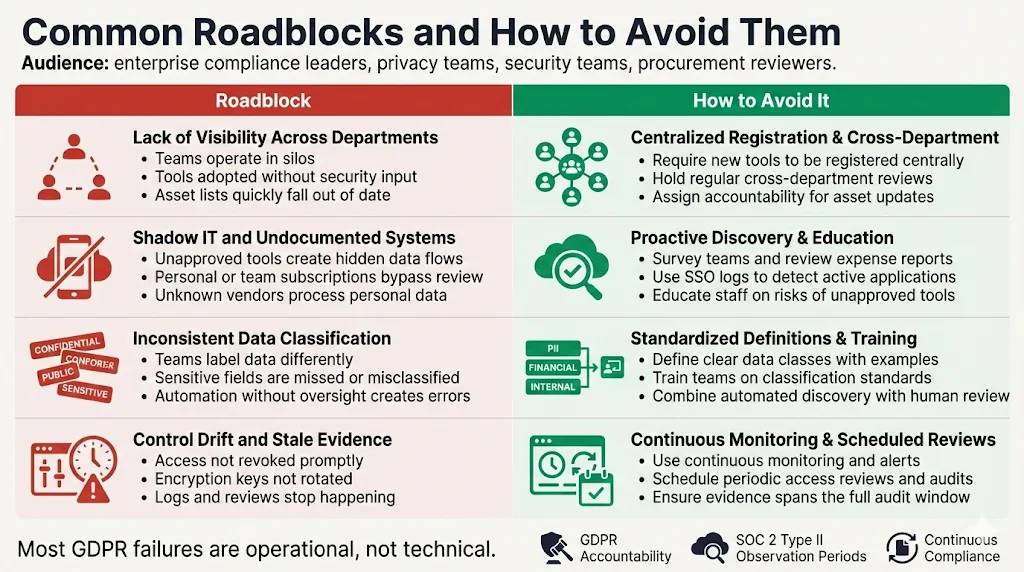
Lack of visibility across departments
Teams often work in silos. Marketing may run its own analytics, HR uses a separate HRIS, and engineering deploys new services without informing security. To overcome this, establish processes that require new tools or services to be registered with the compliance team. Regularly meet with department heads to discuss changes and review asset lists.
Shadow IT and undocumented systems
Shadow IT is the most common blind spot: employees sometimes adopt tools that are not centrally approved, creating hidden data flows. Conduct surveys and interviews, review expense reports for software subscriptions, and integrate with Single Sign‑On (SSO) logs to identify applications in use. Educate employees on why unapproved tools pose a risk and encourage them to involve IT in procurement decisions.
Inconsistent data classification
Without clear guidance, teams may label data inconsistently. Create a data classification policy that defines categories and examples. Provide training and incorporate classification into code reviews, data engineering pipelines and product development. Use automation to identify likely sensitive fields, but ensure human review.
Control drift and evidence staleness
Controls degrade over time. Privileged accounts remain active after employees leave, encryption keys are not rotated, and logs are not reviewed. Implement continuous monitoring tools to detect deviations and generate alerts. Conduct periodic audits and access reviews to verify that controls still operate as intended. Evidence must reflect the relevant observation period—SOC 2 Type II audits require consistent evidence over 6‑12 months.
FAQ
It is a registry of all systems, data assets, processes and data flows where personal data is collected, stored, processed or shared. It includes internal databases, applications, storage, devices, and third‑party vendors. Each entry captures the purpose of processing, data categories, legal basis, data subjects, transfers, retention periods and security measures.
Yes. While the term "asset inventory" is not used explicitly in the GDPR, Article 30 requires controllers and processors to maintain detailed records of processing activities. An inventory provides the raw material for these records and is essential for data mapping, DPIAs and responding to data subject requests.
Data mapping visually illustrates how personal data moves between systems and departments. It builds on the inventory by showing the direction and context of data flows, highlighting cross‑border transfers and third‑party integrations. Mapping helps identify risks and ensures that controls apply to every stage of the data lifecycle.
Regularly. At a minimum, review it annually and whenever you introduce new tools, services or processing activities. High‑risk areas—such as sensitive data processing or third‑party transfers—may require quarterly reviews. Proposed revisions to the HIPAA Security Rule recommend updating technology asset inventories and network maps at least every 12 months or when operations change.
Yes. Tools can automatically discover systems, classify data and map flows, reducing manual workload. However, automation should complement—not replace—human oversight. People must verify classifications, ensure completeness, interpret legal requirements and maintain vendor relationships. The most effective approach combines automated discovery with expert review to produce accurate, up‑to‑date inventories.
Turn your asset inventory into compliance evidence
Book a demo and we'll show how Konfirmity keeps your inventory, ROPA, and DPIAs current, self-serve or with our team running it for you.
Book a demo
Conclusion
Building and maintaining a GDPR asset inventory is not just a compliance checkbox. It is the foundation for privacy governance, risk management and operational excellence. With enforcement actions growing and business buyers demanding proof of security and privacy, an up‑to‑date inventory reduces risk, accelerates sales and supports cross‑framework compliance. Treat the inventory as living documentation, integrate it with your security program, and update it as systems evolve. By starting with security—implementing robust controls, monitoring, and remediation—and letting compliance follow, you build trust with buyers, auditors and regulators. Security that looks good on paper but fails in real‑world incidents is a liability; invest in durable controls and evidence that stand up to scrutiny.