Most enterprise healthcare buyers now expect evidence of robust security controls before procurement. Without operational security and continuous evidence, deals stall—even when teams believe they’re ready on paper. Mobile Device Security For HIPAA is central to this challenge. As smartphones, tablets and laptops become part of clinical workflows, regulated entities must protect electronic protected health information (ePHI) while enabling modern care delivery. In IBM’s 2025 Cost of a Data Breach study the healthcare industry logged the highest average breach cost—$7.42 million per incident—and breaches took 279 days on average to identify and contain. HHS’s Office for Civil Rights (OCR) reinforces that regulated entities must “ensure the confidentiality, integrity and availability” of all ePHI they create, receive or transmit.
This article explains what mobile device security means under HIPAA, why it matters, and how Konfirmity’s human‑led program helps healthcare organizations implement durable controls; it complements our broader HIPAA endpoint security guide, which covers servers and desktops alongside portable devices. Drawing on our support for 6 000+ security audits and 25 years of combined security expertise, we outline the operational steps, highlight pitfalls and provide templates for busy teams. You’ll see how concrete practices—inventorying devices, enforcing encryption, multi‑factor authentication, remote wipe, secure communication, continuous monitoring and training—translate into evidence that satisfies auditors and protects patients.
What “Mobile Device Security For HIPAA” Means
Under the HIPAA Security Rule, a mobile device is any portable computing or communication tool that can create, receive, store or transmit ePHI—smartphones, tablets, laptops, personal digital assistants, USB drives and even smart watches. HIPAA doesn’t distinguish between corporate‑owned devices and bring-own‑device (BYOD) deployments; if a device handles ePHI, it falls within the rule’s scope. The Security Rule requires regulated entities—healthcare providers, health plans and business associates—to implement administrative, physical and technical safeguards to protect ePHI’s confidentiality, integrity and availability. These safeguards apply whether data sits on the device (data at rest) or travels over networks (data in transit).
Why Mobile Device Security Matters for Healthcare Providers
Healthcare’s breach statistics underscore why mobile device security can’t be an afterthought:
-
High breach costs. IBM’s 2025 report notes that healthcare breaches cost an average of $7.42 million, the highest across all industries. The same report shows breaches take 279 days to detect and contain—five weeks longer than the global average.
-
Unsecured PHI exposure. An analysis of HHS’s Breach Portal for 2025 (January 1–August 31) found nearly 500 breaches impacting 37.5 million individuals. Healthcare providers accounted for 76% of breach reports, and hacking/IT incidents made up 78% of all cases. Network servers were the most common location of compromised data, but lost or stolen devices still regularly appear in OCR enforcement actions.
-
Regulatory enforcement. OCR emphasizes that regulated entities must ensure confidentiality, integrity and availability of ePHI and protect against reasonably anticipated threats. Failure to implement policies (for example, not having a device inventory or remote wipe capability) has led to six‑ and seven‑figure settlement agreements.
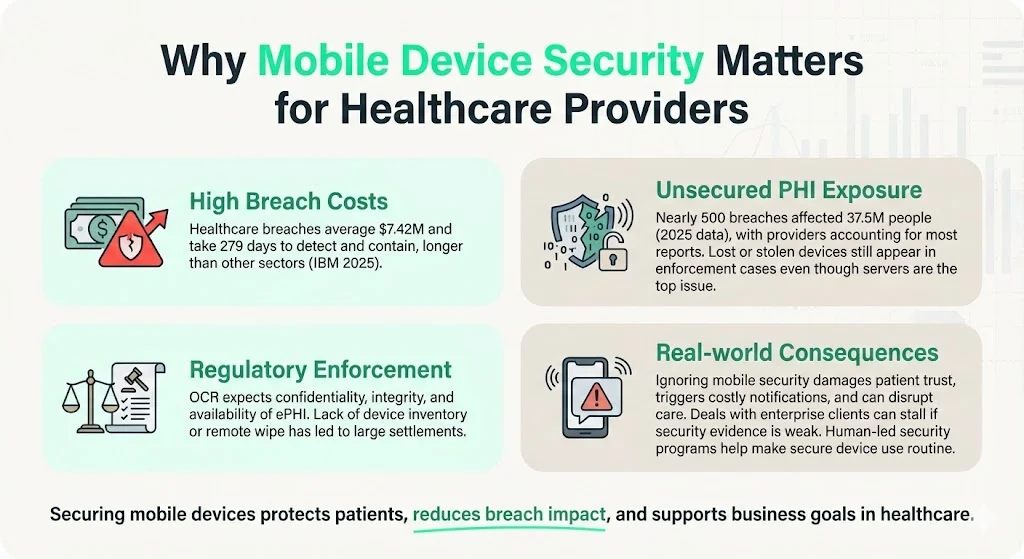
In practical terms, the consequence of ignoring mobile security is more than just fines. Breaches erode patient trust, trigger expensive notification obligations, drive class‑action litigation and can disrupt care delivery. For organizations pursuing enterprise clients, poor security documentation stalls deals during due‑diligence reviews. Human‑led security programs help mitigate these risks by making secure device usage the default operating mode.
HIPAA Basics for Mobile Devices
Privacy Rule vs. Security Rule
The HIPAA Privacy Rule governs how protected health information (PHI) may be used or disclosed; it establishes patients’ rights and the “minimum necessary” standard. By contrast, the HIPAA Security Rule sets security standards for electronic PHI (ePHI) and requires regulated entities to implement administrative, physical and technical safeguards. The Security Rule mandates that entities:
-
Ensure the confidentiality, integrity and availability of all ePHI.
-
Protect against reasonably anticipated threats, such as hacking or device theft.
-
Protect against impermissible uses or disclosures and ensure workforce compliance.
Covered Entities, Business Associates and BYOD
-
Covered entities include healthcare providers, health plans and clearinghouses that electronically transmit health information.
-
Business associates are vendors or partners who handle ePHI on behalf of a covered entity. Business associate agreements (BAAs) must obligate these partners to safeguard ePHI.
-
BYOD vs. corporate devices. HIPAA does not prohibit BYOD deployments but requires that any personal device used for work be subject to the same controls as corporate devices. This includes inventorying the device, enforcing encryption and remote wipe, and limiting access to authorized users. The National Institute of Standards and Technology (NIST) highlights that BYOD can expose organizations to privacy compromises if devices aren’t properly secured.
What Mobile Device Use Means under HIPAA
Any computing or storage hardware that can access, store or transmit ePHI is considered in scope. This includes:
-
Smartphones and tablets used for telehealth sessions, texting, photo documentation or accessing electronic medical records (EMRs).
-
Laptops used off‑site by clinicians for charting, billing or remote work.
-
External media (USB drives, memory cards) containing backups or image files.
-
Personal devices used in BYOD programs.
HIPAA applies even when the device is not owned by the provider. If data is stored or processed on the device, compliance obligations follow.
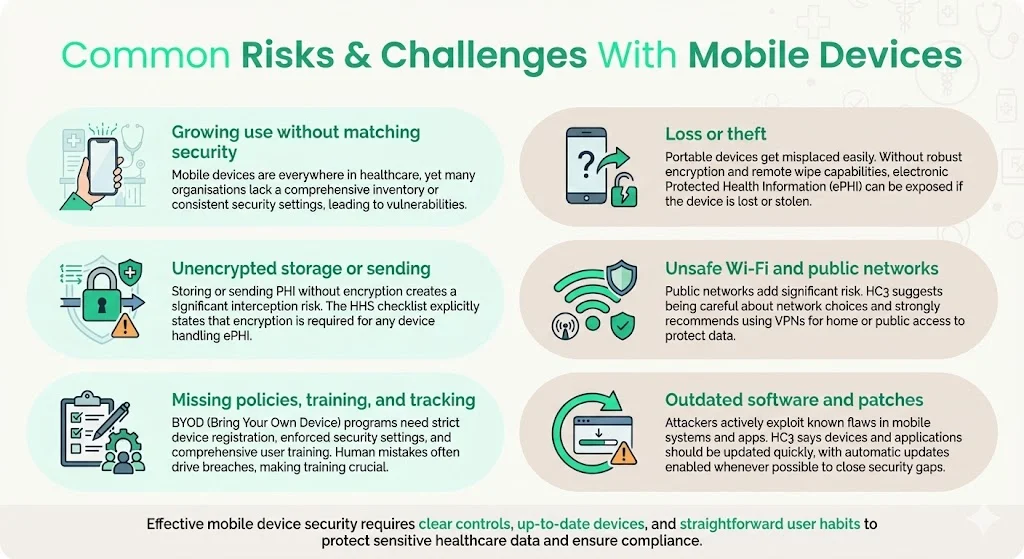
Common Risks & Challenges With Mobile Devices
-
Widespread adoption without matching security practices. Clinicians increasingly rely on mobile devices for convenience. However, organizations may lack a comprehensive inventory or fail to apply consistent security configurations.
-
Loss or theft of devices. Portable devices are easily stolen or misplaced, echoing the facility and hardware risks covered in our HIPAA physical security controls guide. Without encryption and remote wipe, unauthorized parties can access ePHI.
-
Unencrypted storage or transmission. Storing PHI on internal memory or transmitting it over unencrypted channels exposes data to interception. HHS’s mobile device checklist notes that encryption is required for any device storing or processing ePHI.
-
Unsecured Wi‑Fi and public networks. HC3’s checklist warns that users should be cautious about which networks they connect to and recommends using VPNs for residential or public networks.
-
Lack of policies, training and device tracking. BYOD programs amplify risk when organizations fail to register devices, enforce security settings or train users on safe practices. Human error remains a leading cause of breaches.
-
Outdated software and missing patches. Attackers frequently exploit vulnerabilities in mobile operating systems or apps. HC3 notes that devices and apps should be updated as soon as possible, using automatic updates when feasible.
Foundational Principles of Mobile Device Security
1) Confidentiality, Integrity and Availability (CIA)
The HIPAA Security Rule defines confidentiality as ensuring data is not disclosed to unauthorized persons. Integrity means data has not been altered or destroyed in an unauthorized manner. Availability requires that data is accessible and usable on demand by authorized individuals. These three principles guide the design of controls.
2) Risk Analysis and Management
Administrative safeguards require covered entities to perform accurate and thorough risk assessments to identify vulnerabilities. This process considers the entity’s size, technical capabilities, cost of measures and the probability/criticality of risks. Based on the assessment, entities select controls and update them regularly.
3) Policies, Procedures and Documentation
HIPAA mandates documented policies and procedures for device and media controls, access management, incident response, training and contingency plans. Entities must maintain documentation for at least six years and update it in response to environmental or organizational changes. Evidence of policy implementation must be available for audits.
Practical Steps & Best Practices
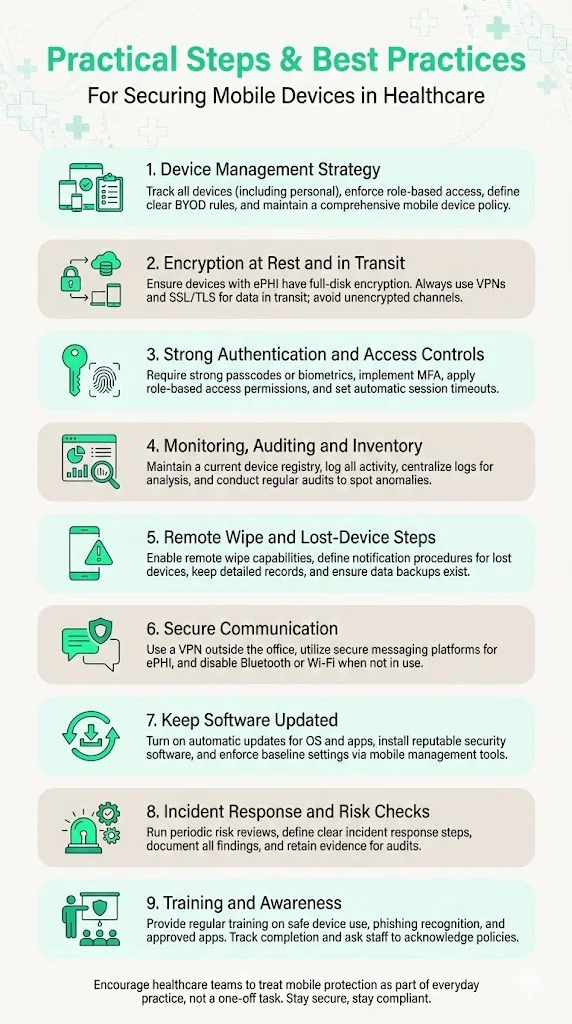
1. Develop and Implement a Device Management Strategy
Inventory and classification. Identify every mobile device that accesses, stores or transmits ePHI, including personal devices. Maintain a registry with device type, owner, operating system version, installed applications and ePHI access level. HC3’s checklist stresses the importance of inventory tracking for both enterprise and personally owned devices.
Access provisioning. Assign access rights based on roles. Implement the principle of least privilege—users receive the minimum necessary access to perform their job. Conduct regular access reviews and immediately revoke access for terminated or transferred staff.
BYOD vs. corporate‑owned. Decide whether to permit BYOD. If allowed, require registration, enforce policy attestation and use mobile device management (MDM) software to apply security settings (e.g., encryption, passcode, remote wipe). Deny access for unregistered devices.
Policy creation. Draft a mobile device policy defining acceptable use, required configurations, prohibited applications (e.g., file‑sharing and consumer messaging apps), monitoring practices and sanctions for violations. Konfirmity’s team often sees missing or outdated policies as a root cause of audit findings.
2. Enable Encryption: Data at Rest and In Transit
Encryption is non‑negotiable for devices storing ePHI. HC3 notes that HIPAA requires encryption for any device that stores or processes PHI and recommends end‑to‑end encryption; see our encryption at rest and in transit for HIPAA guide for the underlying standards. Implement full‑disk encryption on smartphones, tablets and laptops. For external media, use hardware‑based encryption or encrypted file containers, managing the underlying secrets per our HIPAA key management best practices guide.
Secure network protocols. Protect data in transit by enforcing VPN connections and SSL/TLS for remote access, email and messaging. HC3 advises using VPNs when connecting to residential or public networks. Avoid unencrypted Wi‑Fi; disable Wi‑Fi and Bluetooth when not needed.
Message and file exchange. Prohibit transmitting ePHI via consumer apps (e.g., standard SMS, WhatsApp) unless they are explicitly evaluated and determined to be HIPAA compliant. Use secure messaging platforms with encryption and audit logs.
3. Use Strong User Authentication & Access Controls
Passcodes and biometrics. Require password/PIN protection or biometric authentication on all devices. MedPro’s best practices call for appropriate password complexity, regular changes and masked entry. Implement auto‑lock after a short period of inactivity.
Multi‑factor authentication (MFA). Use MFA for accessing ePHI systems, especially remote access or admin privileges. For example, combine a password with a push notification or token. MFA can reduce the risk of compromised credentials, the leading cause of many breaches.
Role‑based access control (RBAC). Map users to roles that define the scope of their access. Align with the Privacy Rule’s minimum necessary standard.
Session management. Enforce session timeouts and automatic logoffs. Devices and apps should terminate sessions after inactivity, as recommended by HHS telehealth guidance.
4. Device Monitoring, Auditing and Inventory Management
Maintain a device registry. Document device identifiers (serial numbers, IMEI), assigned users, installation dates and status. Use MDM or enterprise mobility management (EMM) solutions to maintain real‑time inventory.
Logging and audit trails. Enable logging for device activity, access to apps and modifications of ePHI. Centralize logs for correlation and monitoring. The HIPAA Security Rule requires audit controls to record and examine activity in systems containing ePHI.
Periodic audits. Regularly review device logs, MDM reports and access records to detect anomalies. Audit the inventory quarterly to verify device status and compliance with policies.
5. Remote Wipe, Remote Disable and Lost‑Device Procedures
Remote wipe capability. Configure devices with remote wipe or disable functionality. HC3’s checklist recommends remote wiping and immediate reporting of lost or stolen devices. MDM platforms can trigger device wipe upon a lost device report or after a set number of failed login attempts.
Lost‑device protocol. Establish procedures for employees to report lost or stolen devices immediately. Specify who receives the report, how to verify the incident and when to initiate remote wipe. Maintain a written record of each incident and the actions taken.
Backup and recovery. Because remote wiping can destroy necessary operational data, implement a robust backup strategy. HC3 recommends the “3‑2‑1 rule”—keep three copies of data on two different media, with one copy offline. Ensure backups are encrypted and regularly tested.
6. Secure Communication Practices: VPN, Secure Messaging, Public Wi‑Fi Use
VPN enforcement. Mandate VPN connections when accessing ePHI from outside corporate networks. Ensure the VPN uses strong encryption (e.g., IPsec or SSL/TLS) and supports network segmentation. HC3 highlights limiting connectivity and using reputable access points with up‑to‑date firmware.
Secure messaging. Deploy HIPAA‑compliant messaging platforms that provide encryption, user authentication and audit logging. Require staff to use these platforms for PHI communication. Prohibit emailing ePHI to personal accounts.
Disable unnecessary services. Turn off Bluetooth, near‑field communication (NFC) and Wi‑Fi when not in use. Restrict installation of non‑work applications that could leak data or introduce malware. emphasizes not using unsecured Wi‑Fi networks or file‑sharing apps.
7. Keep Software Updated & Use Security Software
Timely updates. Enable automatic updates for operating systems and applications, as recommended by HC3. Test critical updates promptly and roll them out across devices.
Security software. Install mobile threat defense (MTD) or endpoint security solutions to detect malware, jailbreak/root detection and suspicious behavior. HC3 advises using anti‑malware capabilities and endpoint security software.
Configuration management. Configure devices and apps for full functionality, then tune for maximum security. Enforce baseline security settings via MDM policies.
8. Develop Incident Response & Risk Assessment Protocols
Risk analysis. Conduct regular risk assessments aligned with HIPAA’s administrative safeguards. Evaluate the probability and impact of threats such as lost devices, malware, unauthorized access or network interception. Use results to prioritize control improvements.
Incident response plan. Define procedures for reporting, triaging and remediating security incidents involving mobile devices, following the structure in our HIPAA incident response plan guide. Include steps for investigation, notification (as required by the Breach Notification Rule), root‑cause analysis and corrective actions.
Documentation and evidence. Maintain detailed records of risk assessments, policies, training sessions, incident reports and remediation. This evidence is critical during audits and demonstrates recognized security practices. The 2021 HITECH amendment instructs OCR to consider whether entities have had recognized security practices in place for the prior 12 months.
9. Training & Awareness for Staff
Regular training. Provide onboarding and recurring training on mobile device policies, PHI handling, phishing awareness and secure communication. HC3 recommends reminding users that they are handling sensitive data.
Human factors. Stress that technical controls alone are insufficient; mistakes such as sharing passwords or using personal messaging apps can lead to breaches. Simulate phishing attacks and track improvement.
Policy acknowledgement. Require employees to sign or electronically acknowledge mobile device policies and BAAs. This creates accountability and provides evidence during audits.
Mobile devices are the front door attackers use against healthcare PHI.
Share your work email and we'll harden your mobile security posture, not just the policy.
Example Policies, Templates & Checklists
Below are condensed examples to help busy teams operationalize mobile device security. Customize them to fit your organization’s size and technology stack.
Mobile Device Use Policy (BYOD + Corporate)
-
Scope. Applies to all devices (corporate and personal) used to access, store or transmit ePHI.
-
Registration. Users must register devices with IT/security. Unregistered devices are prohibited from accessing ePHI.
-
Acceptable Use. Devices may be used only for authorized healthcare purposes. Prohibits installation of unauthorized apps, file‑sharing programs and consumer messaging tools.
-
Security Settings. Requires encryption, passcode/biometric authentication, auto‑lock, remote wipe capability, up‑to‑date OS and security software. Disables Wi‑Fi/Bluetooth when not needed.
-
BYOD Attestation. Users agree to comply with policies, allow security software installation, and consent to remote wipe if the device is lost or the user leaves the organization.
-
Incident Reporting. Users must report lost/stolen devices or security incidents within 24 hours.
Device Onboarding Checklist
-
Device registered with IT/security (serial number, owner, OS version).
-
Passcode/biometric authentication enabled (meets complexity requirements).
-
Full‑disk encryption enabled and validated.
-
Mobile device management agent installed and connected to server.
-
VPN configured for remote access.
-
Security software (anti‑malware, firewall) installed and updated.
-
PHI‑related apps installed from approved list only.
-
User signed policy attestation and BAA (if applicable).
-
Backup configuration verified.
Off‑Boarding / Device Decommission Checklist
-
Access revoked in EMR systems and other PHI applications.
-
Device removed from MDM inventory.
-
Remote wipe executed (for personal devices) or device securely wiped and disposed (for corporate devices).
-
PHI backups transferred to secured storage and deleted from the device.
-
Document update in inventory and HR systems.
Incident Report Form
| Field | Description |
|---|---|
| Reporter | Name and role of person reporting the incident |
| Date & Time | When the incident occurred and when it was reported |
| Device | Device ID, owner, type and OS version |
| Incident Type | Lost or stolen device, suspected breach, unauthorized access, malware, etc. |
| Description | Narrative describing what happened, how it was discovered and which data may be affected |
| Actions Taken | Steps taken such as remote wipe triggered, device retrieved or law enforcement contacted |
| Notifications | Who was notified such as privacy officer, IT, OCR, affected individuals and when |
| Root Cause & Remediation | Preliminary analysis and planned corrective actions |
Quick Audit / Compliance Checklist
-
Encryption enabled on all devices storing ePHI.
-
Passcodes/MFA enforced on devices and PHI systems.
-
Software and OS patches are current.
-
Remote wipe capability active and tested.
-
Device inventory up to date.
-
Access logs and audit trails enabled and reviewed.
-
Staff training completed within the last 12 months.
-
Documented policies and BAAs maintained and updated.
-
Risk assessment conducted and documented.
-
Incident response plan tested.
Implementation Roadmap for Busy Teams
Implementing mobile device security is easier when broken into manageable phases. Below is a practical roadmap, with typical timelines drawn from Konfirmity’s delivery experience. We’ve helped teams achieve HIPAA readiness in 4–6 months compared to 9–12 months when self‑managed, while reducing internal effort by 75%.
| Phase | Activities | Duration* |
|---|---|---|
| Phase 0 – Inventory & Risk Analysis | Identify all mobile devices, map ePHI data flows, perform risk analysis, document threats and vulnerabilities. | 3–4 weeks |
| Phase 1 – Policy & Plan Drafting | Draft mobile device policy, onboarding and offboarding procedures, incident response plan and BAAs. Obtain executive sign-off. | 2–3 weeks |
| Phase 2 – Device Configuration | Deploy MDM solution, enable encryption, enforce authentication, install security software, configure VPN and remote wipe, disable unapproved services. | 4–6 weeks |
| Phase 3 – Training & Awareness | Roll out training programs, distribute policies, conduct phishing simulations, collect attestations. | 2 weeks |
| Phase 4 – Onboarding & Documentation | Onboard devices using checklists, update inventory, capture evidence for audits, sign BAAs. | Ongoing |
| Phase 5 – Monitoring & Continuous Improvement | Review logs and audit trails, perform quarterly access reviews, reassess risks annually, refine policies. | Continuous |
Durations are illustrative; actual timelines vary with organization size, complexity and resource availability.
Common Pitfalls and How to Avoid Them
-
Neglecting BYOD devices. Failing to include personal devices in the inventory or security program leaves a blind spot. Require registration and enforce policies uniformly.
-
Relying solely on passcodes. Passcodes without encryption or remote wipe still allow sophisticated attackers to extract data. Combine strong authentication, full‑disk encryption and remote wipe.
-
Ignoring updates. Outdated software exposes devices to known vulnerabilities. Enable automatic updates and patch promptly.
-
Using insecure communication. Sending ePHI over public Wi‑Fi or consumer messaging apps invites interception. Enforce VPN and secure messaging.
-
Insufficient training. Technical controls falter without user awareness. Train staff regularly and incorporate policy acknowledgment.
-
Poor documentation. During audits, regulators ask for evidence of policies, training, risk analysis and incident handling. Keep thorough records and update them.
Why Mobile Device Security Matters: Benefits Beyond Compliance
Strong mobile device security doesn’t just avoid penalties—it provides strategic advantages:
-
Protects patient privacy and trust. Patients expect their health information to remain confidential. Demonstrable security practices reinforce confidence.
-
Reduces breach costs and legal exposure. Faster detection and robust controls reduce the likelihood of breaches. When breaches occur, having recognized security practices can reduce fines and enforcement actions (OCR may consider whether practices were in place for 12 months).
-
Ensures data integrity and availability. Encryption, secure backups and resilient systems help preserve accurate medical records and keep them accessible during emergencies.
-
Supports flexible care delivery. Secure mobile workflows enable telehealth, home health visits and remote monitoring without compromising compliance. This is critical as healthcare embraces digital transformation.
-
Accelerates enterprise sales and partnerships. Enterprise buyers often require assurance artifacts (audit reports, policy evidence) before procurement. A mature device security program shortens sales cycles and enhances reputation.
See your real HIPAA mobile device gap, not a guess
Book a demo and we'll map your device fleet and BYOD program against the HIPAA Security Rule, self-serve or with our CISO-led team running it for you.
Book a demo
Conclusion
Mobile devices are indispensable in modern healthcare, but they introduce significant risks if not secured properly. The HIPAA Security Rule requires entities to ensure the confidentiality, integrity and availability of ePHI. Recent breach statistics show that healthcare remains the most expensive sector for data breaches, with average costs of $7.42 million and long detection times. The good news is that robust mobile device security controls are achievable. By inventorying devices, enforcing encryption, using strong authentication, implementing MDM, enabling remote wipe, securing communications, patching software, conducting regular risk assessments and training staff, organizations can protect patients and meet regulatory obligations.
Konfirmity’s human‑led, managed security and compliance service helps organizations build these controls inside their stack and maintain them year‑round. Our practitioners don’t just advise—we execute. We start with security and arrive at compliance, enabling teams to continue focusing on care delivery while remaining audit‑ready. Begin today by performing a device inventory, conducting a risk assessment and drafting or updating your mobile device policy. Treat mobile devices as first‑class members of your security program, and compliance will follow.
Frequently Asked Questions
1. How do you make a device HIPAA compliant?
A device becomes HIPAA compliant when it implements administrative, physical and technical safeguards that protect ePHI. This includes inventorying the device, enabling full‑disk encryption, enforcing strong authentication, installing security software, configuring VPN for remote access and registering the device in an MDM program. The organization must also document policies, train users and maintain audit logs.
2. How can you protect and secure health information when using a mobile device?
Follow the steps outlined in this guide: develop policies, inventory devices, encrypt data, implement authentication and MFA, monitor and audit usage, enable remote wipe, use secure communication channels, keep software updated and provide ongoing training. HC3’s checklist emphasizes limiting wireless connectivity, updating software, enforcing password complexity and using VPNs for untrusted networks.
3. Can I make my iPhone HIPAA compliant?
Yes. iOS devices support full‑disk encryption, strong passcodes, biometric authentication, remote wipe (via Apple’s Find My service), VPN configuration and mobile threat defense apps. To make an iPhone HIPAA compliant, enforce a complex passcode, enable Touch ID/Face ID, configure device management (MDM), install approved security software, restrict app installation to vetted apps and require VPN for external connections. Document the configuration and include the device in your inventory and monitoring program.
4. What is mobile device security?
Mobile device security encompasses policies, processes and technical controls that protect data on portable devices and the networks they use. In the HIPAA context it means ensuring ePHI remains confidential, intact and available when accessed, stored or transmitted on smartphones, tablets, laptops or other portable media. It involves risk analysis, encryption, authentication, secure communication, monitoring, remote wipe, training and documentation. The goal is to prevent unauthorized access or disclosure while enabling efficient healthcare workflows.