Most enterprise procurement teams now demand more than a policy document. They ask how you safeguard critical data, whether you can restore operations quickly and how you can prove it. Effective Research & Planning before designing your backup strategy lets you answer those questions with facts. The average cost of a data breach rose to USD 4.88 million in 2024, and regulators continue to tighten expectations around recovery. This article explains how backup testing under ISO / IEC 27001 works, why it matters to your business and how to design a test program that delivers evidence for auditors and enterprise clients alike.
Why backup testing matters for ISO 27001 compliance
ISO / IEC 27001 is the most widely recognized information security management standard. It requires organizations to define an Information Security Management System (ISMS) covering people, processes and technology across confidentiality, integrity and availability. Annex A contains the security controls, and control A.8.13 focuses on information backup. The control states that backup copies of information, software and systems should be maintained and regularly tested in accordance with a topic‑specific policy. Implementation guidance under ISO 27002 reinforces the need to have accurate backup records, reflect business requirements (such as Recovery Point Objectives – RPOs), store backups in a safe and secure remote location and regularly test backup media to ensure they can be relied on. In short, backing up alone is insufficient; you need evidence that the backups work when needed.

Testing supports more than ISO 27001. The US HIPAA Security Rule requires covered entities to create and maintain retrievable exact copies of electronic protected health information and to establish disaster recovery and emergency‑mode operation plans. It also calls for periodic testing and revision of contingency plans. The National Institute of Standards and Technology (NIST) echoes this; its data integrity guide advises organizations to create regular encrypted backups and to test the backup and restoration processes periodically. These requirements show that regulators expect proven recovery capability, not just storage.
From an enterprise sales perspective, backup testing underpins business continuity commitments in contracts and service level agreements (SLAs). A major outage can stall deals or trigger penalties if you fail to restore customer data within agreed timelines. Pentera’s analysis of IBM’s 2024 Cost of a Data Breach report highlights that breaches cost an average of USD 4.88 million, up from USD 4.45 million in 2023. Shadow data in cloud environments contributed to 35% of breaches and extended recovery times. These figures reinforce why large buyers insist on evidence of robust backup testing. Effective Research & Planning helps you identify the data and systems that need protection, determine RPOs and Recovery Time Objectives (RTOs), and map test frequencies to risk.
Key concepts and terminology
Understanding a few fundamental terms will help you design a backup test program that satisfies auditors and clients.
-
Information security: The discipline of preserving the confidentiality, integrity and availability of information. ISO 27001 requires that backups support these objectives by providing recoverable copies and protecting them with encryption.
-
Data recovery vs. disaster recovery: Data recovery is the act of restoring data from a backup after loss or corruption, while a disaster recovery plan covers the broader process of restoring systems and services after a major incident. Both rely on tested backups. NIST advises creating regular backups, storing them securely and testing restoration processes.
-
Backup validation: The process of confirming that backup files are intact, complete, non‑corrupted and can be restored. ISO 27002 emphasizes regularly testing backup media and verifying restoration procedures.
-
Risk management: Identifying, assessing and treating risks such as data loss, system outages or compliance failures. Effective backup testing reduces these risks by revealing issues before they impact customers.
-
Business continuity: The ability to maintain essential services during and after disruptive events. HIPAA requires an emergency‑mode operation plan, and ISO 27001 positions backup testing as a core part of continuity.
-
Test procedures: The methods used to evaluate backups, such as full restore tests, partial restores, media failure simulations or cyber‑attack scenarios. They should have defined scope, frequency and success criteria.
-
System integrity: Confidence that restored data matches the original, is free of corruption and supports application functionality. Validation often involves checksums, file comparisons and functional testing.
-
Security standards & compliance testing: Evidence of backup testing helps meet requirements in ISO 27001 control A.8.13, HIPAA contingency planning, SOC 2 availability controls (which include backup and restoration testing) and other frameworks.
Challenges for busy teams and enterprise service providers
Enterprises selling to large organizations face unique pressures. They operate at scale, support multi‑tenant environments and often have contractual obligations around recovery times. Typical pitfalls include:
-
Assuming backups are enough: Many teams perform routine backups but never attempt a restore. Without tests, they may find that the data is incomplete or the process takes too long during an outage.
-
Unverified recovery assumptions: RPOs and RTOs often live in sales decks but are not grounded in tested capabilities. This mismatch can lead to failed audits or lost deals.
-
Misalignment with risk: Some teams back up everything at the same frequency, regardless of data criticality. Effective Research & Planning helps prioritize systems based on impact and regulatory requirements.
-
Resource constraints: Engineering and operations teams are busy. Without a structured approach, backup testing can feel like an extra burden.
Konfirmity is a security-driven compliance platform that addresses these issues: run it self-serve, or add the fully-managed service and dedicated experts design, run and monitor backup tests for you. With 6,000+ audits and 25 years of combined technical expertise, Konfirmity reduces internal effort and delivers evidence tailored to enterprise buyers. Clients who self-manage often spend 550-600 hours per year preparing for audits; with managed delivery, that effort drops to around 75 hours. Controlled Research & Planning up front also compresses ISO 27001 readiness to four to five months versus nine to twelve months in a purely self-managed model.
CTA here: Book a demo
Practical guide: step‑by‑step backup testing for ISO 27001
Designing a repeatable backup test process requires thoughtful Research & Planning and coordination across security, operations and business teams. This seven‑step guide provides a blueprint.
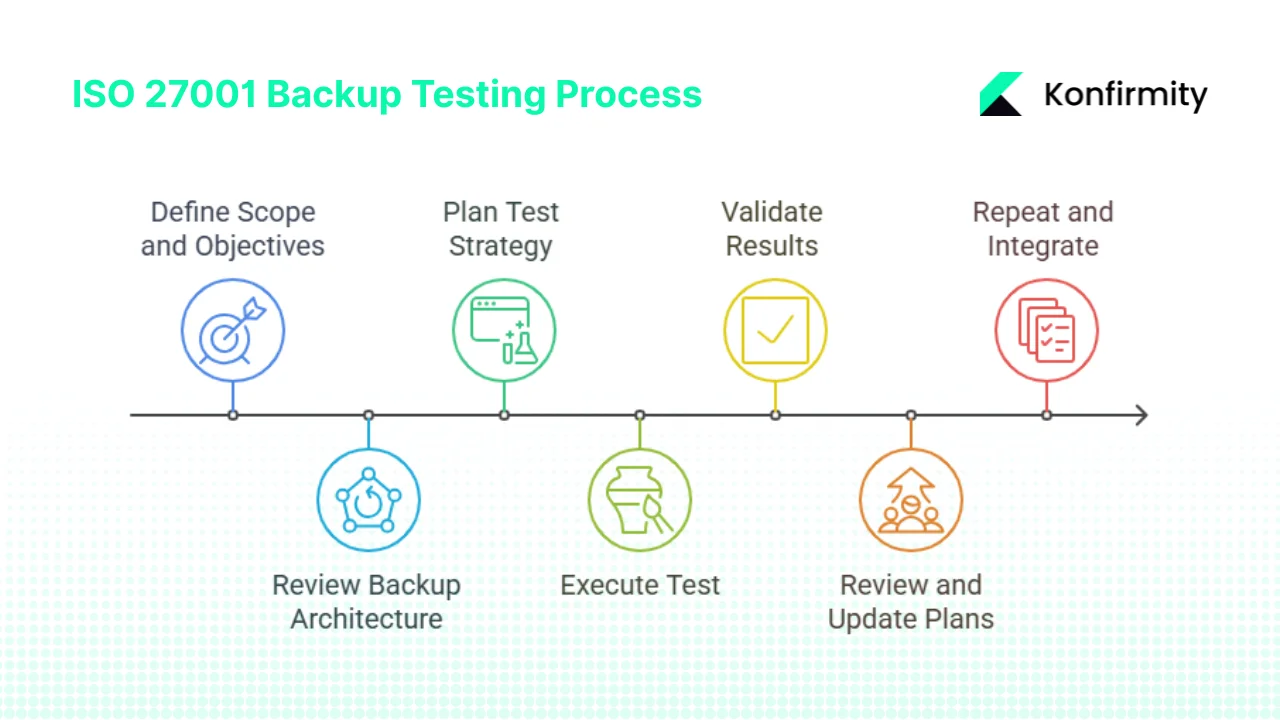
Step 1: Define scope and objectives
-
Identify critical data, systems and applications. Use your risk assessment and ISMS scope to determine which assets require backups. Factors include customer data, source code, configuration files and database contents.
-
Determine business impact. For each asset, establish RPO and RTO targets. RPO defines how much data loss is acceptable; RTO defines how quickly you must restore. These metrics should reflect contractual obligations and the cost of downtime.
-
Document objectives. Define why you are testing (regulatory compliance, SLA assurance, internal resilience) and link objectives back to control A.8.13 and other frameworks. Good Research & Planning here clarifies what evidence will matter to auditors and buyers.
Step 2: Review backup architecture, policies and procedures
-
Examine the backup policy. Ensure it specifies what is backed up, where it is stored, how often backups occur and retention periods. ISO 27002 calls for producing accurate and complete records of backups and documented restoration procedures.
-
Check storage architecture. Understand where backups reside: on‑site storage, off‑site facilities, cloud services or tapes. Verify that backups are encrypted and access is restricted. NIST recommends storing backups in secure locations and protecting them with encryption.
-
Validate documentation and ownership. Ensure roles and responsibilities are clear. If using managed services, confirm that responsibilities for backup management and testing are defined in contracts.
Step 3: Plan your backup test strategy
-
Select test types. Include full restore tests for critical systems, partial or file‑level restores for less critical data, incremental restore tests, media failure simulations and ransomware scenarios. Pretesh Biswas’ ISO 27002 guidance recommends regularly testing backup media and restoring to a test system.
-
Set frequency. Determine how often each test occurs. Critical databases may warrant monthly tests, while less critical applications might be tested quarterly. Align frequency with RPO/RTO requirements and business impact. HIPAA requires periodic testing of contingency plans.
-
Define success criteria. Outline measurable criteria such as data integrity checks, restore time vs. target RTO, system functionality and user acceptance. Record what constitutes a pass or fail.
-
Assign roles and communication plans. Identify who initiates tests, who oversees restoration, who validates results and who documents findings. Develop a communication plan to inform stakeholders of test schedules and outcomes.
Step 4: Execute the test
-
Select a backup instance. Choose a backup from the production schedule that reflects typical data volumes. For critical systems, use a backup from a high‑traffic period to stress the process.
-
Initiate the restore. Use documented procedures to restore data to a test environment. Avoid overwriting production data. Pretesh Biswas advises using a test system to avoid irreparable data damage or loss.
-
Validate data and system functionality. Compare checksums or hashes to confirm data integrity. Run application-level tests to ensure services start correctly and data is consistent.
-
Measure time to recover. Record the time from restore initiation to full availability. Compare this against your RTO. Measuring this systematically supports contractual commitments.
-
Log results. Document each step, including any failures or deviations from procedures.
Example scenario: critical database restore
A SaaS provider supporting enterprise clients runs a quarterly full restore test of its customer database. The team selects a nightly backup from the middle of the quarter. They restore the database to a separate recovery environment, run automated tests to verify data integrity, then spin up an application server to confirm queries return expected results. The entire process takes 45 minutes, within the 1‑hour RTO. The test log captures the backup source, restoration steps, validation results and any anomalies.
Step 5: Validate results and document findings
-
Assess integrity. Use file comparisons, checksums and application tests to ensure the restored data matches the backup. Any mismatches indicate corruption or incomplete backups.
-
Identify failures. Log missing files, corrupt data, restore errors, delays or documentation gaps. Determine root causes and whether they stem from storage issues, procedural mistakes or tooling limitations.
-
Map findings to risk. Update your risk register to reflect new insights. If restore times exceed RTOs or if critical data is missing, classify the risk and plan remediation.
Step 6: Review and update backup and recovery plans
-
Update policies and procedures. Based on test results, adjust backup frequency, retention schedules, encryption requirements or restoration procedures. Pretesh’s guidance stresses adjusting plans to reflect business requirements and security needs.
-
Adjust RTO/RPO if needed. If tests show that you consistently meet recovery targets with ample margin, consider shortening retention windows or optimizing resource allocation. If you miss targets, invest in faster storage, improved automation or additional off‑site copies.
-
Record evidence for audits. Maintain test logs, incident reports and management reviews. This documentation will support ISO 27001 audits, SOC 2 Type II assessments and customer questionnaires.
Step 7: Repeat and integrate into continual improvement
-
Establish a schedule. Integrate tests into your ISMS monitoring calendar. Automate reminders and assign owners so tests are not overlooked.
-
Feed results into risk treatment. Use test findings to update your Statement of Applicability, risk treatment plan, business continuity plan and incident response plan. Control gaps identified during tests should trigger remediation activities.
-
Report to senior management. Provide a summarized view of backup testing performance, pass/fail rates, major issues and risk status. This ensures leadership understands the organisation’s resilience posture and allocates resources appropriately.
Prove your backups work before the auditor asks you to.
Share your work email and we'll build a testing program that satisfies auditors.
Examples and templates for busy teams
The following examples illustrate how to put theory into practice.
Example test procedure: “Critical database restore”
-
Scenario description: Restoring a customer database for a SaaS application to validate RTO and data integrity.
-
Pre‑conditions: Identify the latest full backup and confirm a test environment is available. Define roles: backup administrator, database administrator and observer.
-
**Steps:
**
-
Notify stakeholders and obtain approval to run the test.
-
Retrieve the selected backup and import it into the test environment.
-
Verify database integrity using checksums and sample queries.
-
Start the application server and validate end‑to‑end functionality.
-
Record start and end times for each phase.
-
Document any issues and corrective actions.
-
-
Success criteria: Data matches production, the application functions correctly and restoration occurs within the defined RTO.
Example backup policy snippet
Policy statement: Backup copies of all missioncritical systems shall be performed daily, stored off‑site and restored at least quarterly to a sandbox environment. Testing shall validate the integrity and availability of the backups. This policy fulfills ISO 27001 control A.8.13 requirements and aligns with SOC 2 availability controls.
Template for test log/report
| Test Date | Asset | Backup Source | Test Type | Responsible | RTO Achieved | Issues Found | Action |
|---|---|---|---|---|---|---|---|
| 2025-06-10 | Customer DB | Backup #2315 | Full restore | DB admin | 45 min | None | Document success |
| 2025-06-15 | File server | Backup #8729 | Partial restore | Sysadmin | 20 min | Two files missing | Investigate missing data |
Template for management summary
-
Tests completed: 12 tests this quarter (8 full restores, 4 partial).
-
Pass rate: 92%; one partial restore exceeded the 30‑minute RTO by 5 minutes.
-
Major issues: A new data warehouse was not included in the backup schedule; test discovered the gap.
-
Risk exposure: Missing warehouse backups could delay customer reporting; identified for remediation.
-
Next steps: Add the data warehouse to the backup policy, increase test frequency for new systems and automate alerts when new assets are deployed.
Best practices and tips for enterprise‑grade backup testing
-
Automate where possible. Use scheduling tools to run tests during low‑usage periods and logging tools to capture outputs automatically. Scripts can compare checksums and measure restoration times.
-
Involve business stakeholders. Align RTO and RPO targets with business impact. Include product owners and customer success teams when planning tests so they understand the implications of downtime.
-
Use realistic recovery scenarios. Simulate ransomware attacks (where backups may also be encrypted), human error such as accidental deletion and infrastructure failures like server loss or cloud region outages.
-
Protect backups. Encrypt backup data and control access. NIST recommends storing backups in secure locations and protecting them with encryption.
-
Use metrics. Track the percentage of backups successfully restored, average time to recover and number of incidents prevented. These metrics support continuous improvement and provide evidence for audits.
-
Communicate outcomes. Share test results with internal stakeholders and enterprise clients. Demonstrating tested recovery capabilities can shorten procurement cycles and build trust.
-
Refresh regularly. Technology and business processes change. Review your backup strategy whenever you adopt new platforms, migrate to the cloud or alter data classification. Periodic Research & Planning ensures your strategy remains aligned with current risks.
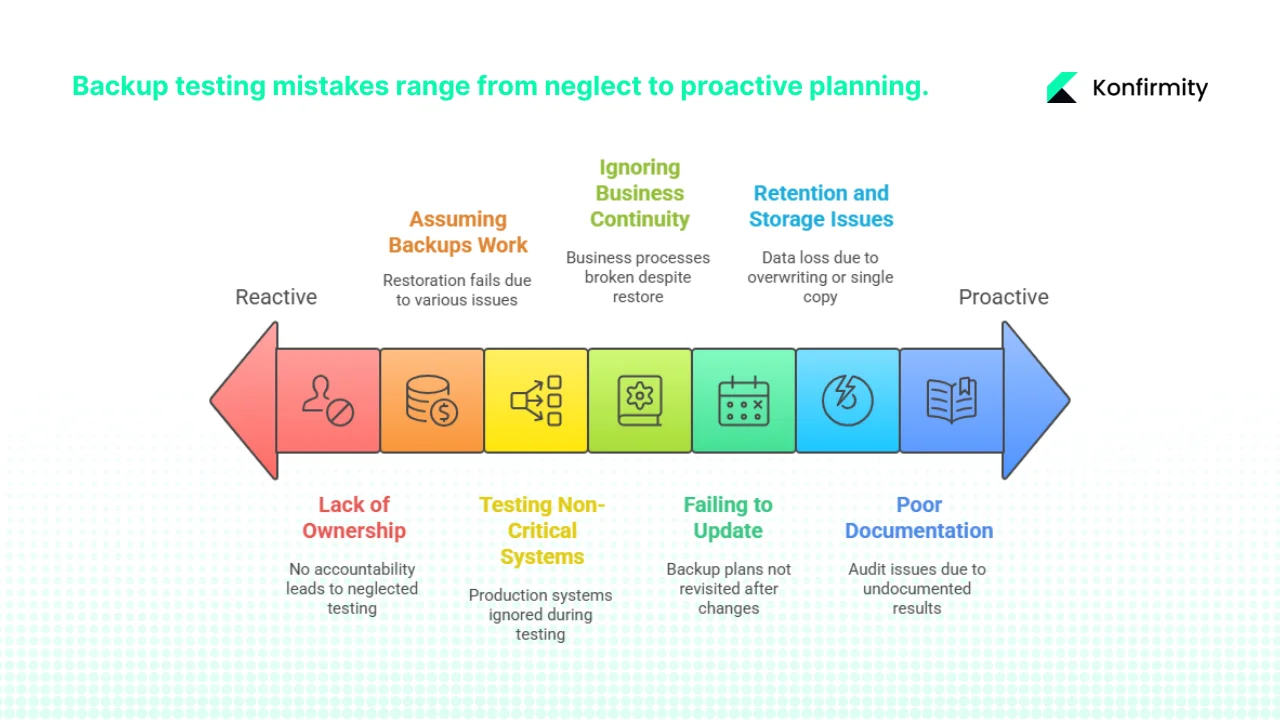
Common mistakes and how to avoid them
-
Relying on backups without testing. A backup is only as good as your ability to restore it. Regular tests uncover issues early. Use scheduled full and partial restores to keep confidence high.
-
Testing only small systems. It’s tempting to test minor applications because they’re easier, but ignoring core databases or critical SaaS platforms misses the point. Rotate through all high‑value assets.
-
Failing to document results. Without logs, you cannot show auditors that tests happened or prove compliance. Use the test log template to capture date, asset, outcome and corrective actions.
-
Ignoring business continuity alignment. A successful technical restore may still fail if downstream business processes break. Include representatives from operations and customer success in post‑test validation.
-
Overlooking retention and storage issues. Backups that are overwritten or stored on failing media defeat their purpose. Monitor storage health and verify that off‑site copies are up to date.
-
Lack of ownership. Backup testing falls through the cracks if no one is accountable. Assign clear owners for planning, execution and reporting.
-
Not updating plans after major changes. New systems, cloud migrations or significant data growth should trigger a refresh of your backup policy and test schedule. Continuous Research & Planning keeps your program relevant.
Compliance and audit considerations
Auditors and enterprise customers look for tangible evidence that you meet control A.8.13. They will review your backup policy, test logs, restoration procedures and management reviews. ISO 27002 lists producing accurate backup records, documenting restoration procedures, storing backups securely and regularly testing backup media. HIPAA requires retrievable copies of electronic protected health information, disaster recovery plans and periodic testing of contingency plans. SOC 2 availability controls include backup and restoration testing, while NIST’s data integrity guide emphasises periodic testing.
To satisfy these requirements:
-
Provide evidence. Retain test logs, restore reports and management summaries. During ISO 27001 certification audits, these artifacts demonstrate that control A.8.13 is operational.
-
Cross‑reference your Statement of Applicability (SoA). List control A.8.13 as applicable and describe how your backup testing satisfies it. Link evidence to risk treatment plans and internal audit findings.
-
Support third‑party due diligence. Enterprise clients increasingly request copies of test reports or aggregated statistics. Offer sanitized evidence that shows compliance without exposing sensitive details.
-
Use managed services wisely. If you rely on a cloud provider or backup vendor, ensure your contracts include obligations to provide testing evidence. Evaluate whether third‑party attestations (such as SOC 2 Type II reports) cover backup services.
CTA here: Book a demo
Conclusion
Enterprise buyers and regulators expect provable recovery capability. ISO 27001 control A.8.13 requires you to maintain and regularly test backup copies; HIPAA demands retrievable copies and contingency plan testing; NIST advises encrypted backups and periodic restoration tests. Meanwhile, data breaches cost an average of USD 4.88 million in 2024 and continue to rise. In this environment, backup testing is not a luxury—it's a core business requirement.
A disciplined program built on thoughtful Research & Planning ensures that your backups meet business needs, regulatory expectations and contractual commitments. Follow the seven‑step process outlined here: define scope and objectives, review architecture, plan the strategy, execute tests, validate results, update plans and integrate continuous improvement. Use the examples and templates to build repeatable processes. Engage experts where needed. By treating backup testing as an ongoing operational function, you can answer tough procurement questions confidently, cut audit preparation time and safeguard both your customers and your reputation.
FAQ
1) What is the ISO 27001 backup procedure?
ISO 27001 doesn’t prescribe a specific procedure but requires a topic‑specific backup policy and regular testing. A typical procedure involves identifying critical information and systems, determining backup frequency and retention, selecting storage locations (on‑site, off‑site, cloud), defining restoration steps, testing the process periodically and documenting results. Implementation guidance recommends producing accurate backup records, reflecting business requirements (RPOs), storing backups securely and testing the ability to restore backed‑up data onto a test system.
2) What is the 3‑2‑2 rule for backup?
The 3‑2‑2 rule expands on the well‑known 3‑2‑1 strategy by adding another off‑site copy. It recommends keeping three copies of your data (production plus two backups), storing them on two different media, and maintaining two off‑site copies in separate physical locations. This approach reduces the risk of single‑site disasters and ensures that at least one copy survives regional outages.
3) What is the ISO backup standard?
There is no standalone “ISO backup standard.” Backup requirements are embedded within ISO / IEC 27001’s Annex A. Control A.8.13 requires organizations to maintain and regularly test backup copies of information, software and systems. Detailed guidance appears in ISO / IEC 27002, which outlines considerations such as retention periods, remote storage, encryption and testing.
4) How often should backup systems in data centres be tested?
Testing frequency should reflect business impact and risk. For enterprise data centres, critical systems often warrant monthly or even weekly restore tests; less critical systems may be tested quarterly. Full disaster recovery site tests are usually conducted annually. HIPAA requires periodic testing and revision of contingency plans, while ISO 27002 advises regular testing of backup media. Align test schedules with your RTO/RPO targets, contractual obligations and findings from ongoing planning and review.