Most enterprise buyers now ask for security artefacts before they sign a contract. If you run a remote‑first team, gaps in your security programme turn into stalled deals and missed revenues. As remote work expands the attack surface and moves data off premises, information is scattered across personal laptops, home Wi‑Fi routers and cloud services. The average cost of a data breach is around $4.44 million in 2025, with ransomware present in 44% of incidents. Breaches linked to remote work are even more expensive: remote‑related security incidents cost $350,000 per incident compared with $210,000 for similar on‑site breaches. To protect their revenue and satisfy procurement teams, companies need a structured way to manage information security across distributed workforces.
This article explains ISO 27001 For Remote Teams, a framework for building robust controls and evidence flows around remote work. It draws on our experience at Konfirmity—with more than 6,000 security audits delivered and over 25 years of combined technical expertise—to show how real security programmes are designed and operated. We will break down the standard’s requirements, discuss risk‑based challenges, and provide a step‑by‑step implementation guide with templates and best practices.
What Is ISO 27001 and How It Applies to Remote Work
ISO 27001 is a global standard for establishing, implementing and continually improving an Information Security Management System (ISMS). An ISMS is a systematic approach to managing sensitive information and controlling risk through policies, processes and technology. The 2022 revision of ISO 27001 clarifies how the standard applies to distributed workforces. Control 6.7 of Annex A, “Remote Working,” requires organisations to implement security measures when personnel operate outside the office. Those measures must be documented, communicated and regularly updated as part of the ISMS.
For remote teams, ISO 27001 For Remote Teams translates into specific practices: define the scope of remote operations, assess risks arising from home networks and mobile devices, and implement controls that protect confidentiality, integrity and availability of information regardless of location. The standard’s risk‑based methodology is particularly useful in remote contexts because it anchors decisions in identified threats and business impact.
By aligning remote operations with ISO 27001, companies demonstrate to enterprise clients that they manage information security systematically—not through ad‑hoc checklists. This trust accelerates procurement cycles and reduces repetitive security questionnaires because a certified ISMS shows auditors and buyers that controls are in place and operating effectively.
Core ISO 27001 Requirements Relevant to Remote Teams
1. Establish an Information Security Management System (ISMS)
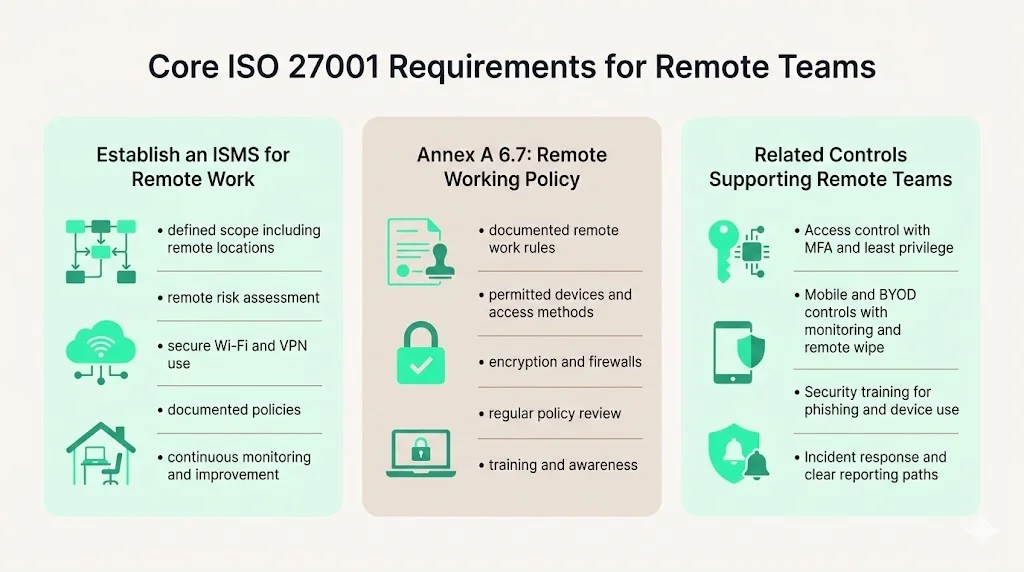
An ISMS is the backbone of ISO 27001. It defines how the organisation identifies and treats information security risks, including those introduced by remote work. Key elements of an ISMS include:
-
Scope definition – identify which processes, systems and teams (including contractors) are covered. For remote teams, this may include home offices, co‑working spaces and cloud services used for remote access.
-
Risk assessment and treatment – evaluate threats such as insecure Wi‑Fi networks and shadow IT, then decide whether to mitigate, transfer or accept each risk. NIST’s telework guidance emphasises using secure Wi‑Fi (WPA2/WPA3), strong passwords and virtual private networks (VPNs). These controls should be reflected in your ISMS.
-
Policies and procedures – document how remote work will be conducted securely. HighTable’s guidance notes that you must implement a specific remote working policy, ensure that security measures meet local laws and organisational needs, and address identified risks.
-
Monitoring and continuous improvement – collect evidence of control operation (e.g., access logs, training records), conduct internal audits and update controls based on incidents or changes. This continuous loop ensures the ISMS stays relevant as remote work evolves.
2. Annex A Control 6.7: Remote Working Policy
Control 6.7 is dedicated to remote working. It requires organisations to ensure that staff can access necessary controls while maintaining the integrity, confidentiality and security of business information. The control mandates a documented remote working policy outlining conditions under which remote work may occur, secure communication methods, remote access techniques and protective measures like firewalls and encryption.
Key requirements include:
-
Policy content – define who may work remotely, permitted devices, acceptable use, and responsibilities for protecting company data. The policy must address physical security of remote sites, legal systems where staff reside, secure communication methods, storage on personal devices and the risk of unauthorised access.
-
Regular review – evaluate and update the policy as circumstances change. Enterprise clients look for evidence that policies are current and reflect evolving risks.
-
Communication and awareness – ensure all personnel (employees, contractors, third parties) know the policy and can report incidents. HighTable stresses that you must provide training on the remote working policy and procedures.
3. Related Controls Impacting Remote Teams
While Control 6.7 is the centrepiece, other Annex A controls intersect with remote work:
-
Access control (Annex A 5.15) – implement least‑privilege access with multi‑factor authentication (MFA), VPNs or zero‑trust architecture. NIST recommends requiring multi‑factor authentication for enterprise access and using validated encryption technologies. Access reviews must be documented during audits.
-
Mobile and BYOD policies (Annex A 6.6) – define procedures for using personal devices, including registration, anti‑malware software and the ability to remotely wipe data. HighTable notes that organisations should provide secure devices and applications, ensure strong passwords and monitor remote work activities.
-
Employee training and awareness (Annex A 6.3) – conduct regular training on phishing, device security and incident reporting. NIST warns that social engineering tactics have evolved and teleworkers must remain vigilant.
-
Incident response (Annex A 5.25) – maintain a plan for detecting and responding to incidents in remote environments. Control 6.7 requires a clear system for reporting incidents and includes periodic audits to ensure controls remain effective.
Challenges of Remote Work Security
Remote work exposes organisations to new risks. With employees connecting from coffee shops, hotels and homes, the boundaries of corporate networks blur. NIST’s ITL Bulletin highlights several major concerns: lack of physical security for telework devices makes loss or theft more likely; remote access occurs over networks outside the organisation’s control; and exposing internal resources to external networks increases the likelihood of compromise.
The 360 Advanced blog explains that remote work has broadened the attack surface; employees use personal devices, home routers and public Wi‑Fi, undermining perimeter‑based security models. It lists vulnerabilities in VPN configurations, BYOD risks, insecure home networks and unsanctioned tools (shadow IT). These issues contribute to phishing and social engineering threats because remote employees rely heavily on email and messaging.
Data supports the urgency: the global average cost of a data breach is $4.44 million, and ransomware appears in 44% of breaches. Remote‑specific breaches cost about $350,000 per incident, significantly higher than the $210,000 average for office‑based incidents. Attackers often target remote setups because they can exploit insecure Wi‑Fi or outdated devices. When remote work expands internationally, companies must also consider local data protection laws and cross‑border transfer regulations, adding complexity to compliance.
ISO 27001 For Remote Teams helps identify and mitigate these risks. By conducting risk assessments, organisations can decide which controls are necessary: secure tunnelling, strong authentication, encryption, device management and network monitoring. In doing so, they build trust with enterprise clients who demand evidence that sensitive data remains safe even when employees work from home.
Step‑by‑Step Implementation Guide
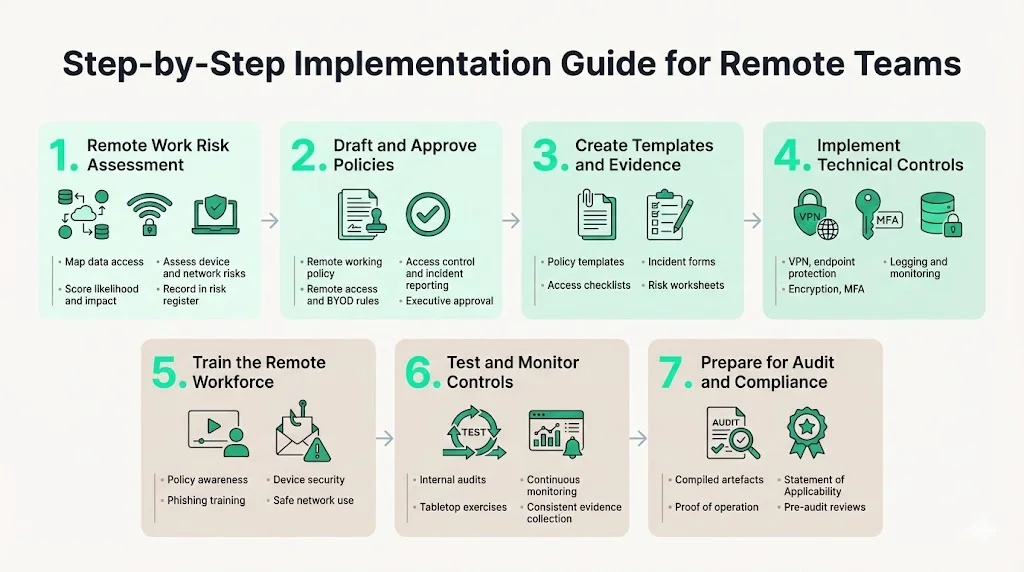
Step 1: Conduct a Remote Work Risk Assessment
Begin by mapping how data flows when employees work remotely. Identify the systems accessed (SaaS, cloud storage, internal applications), devices used (company‑issued or personal), and networks they connect through (home Wi‑Fi, coffee shop, cellular). Evaluate threats such as eavesdropping on Wi‑Fi, malware on unmanaged devices, unauthorised physical access by family members or visitors, and uncontrolled storage of sensitive documents. NIST advises ensuring home networks use WPA2 or WPA3 security and encouraging VPN use. Document identified risks and assign a likelihood and impact score to prioritise treatment.
For each risk, decide how to treat it—mitigate, transfer, accept or avoid—and record these decisions in your ISMS. Keep evidence of risk assessments because auditors will ask to see your risk register, treatment plans and approvals. At Konfirmity, we find that engaging technical leads and security owners early reduces the number of control gaps later in the audit process. Our clients typically achieve ISO 27001 readiness in 4–5 months with under 70 hours of internal effort compared with 9–12 months and 550–600 hours for teams that self-manage compliance.
Step 2: Draft and Approve Key Security Policies
The remote working policy is the cornerstone of Control 6.7. It should define purpose, scope, responsibilities, acceptable use and security requirements for working outside the office. Address physical security (e.g., lockable storage, shredders), network security (VPN, Wi‑Fi encryption), device security (anti‑malware, device hardening), and handling of sensitive data. HighTable’s guidance emphasises that the policy must demonstrate compliance with local laws and organisational needs.
Additional policies needed for remote work include:
-
Remote Access Policy – specify how to connect to company resources, authorised VPN clients, MFA requirements, and session timeout settings.
-
Acceptable Use Policy and BYOD Policy – set rules for using personal devices, personal email accounts, cloud storage and third‑party apps. NIST recommends enabling PINs, biometrics and automatic updates on BYOD devices.
-
Access Control Procedures – define approval flows for granting, modifying or revoking access to systems, along with periodic access reviews.
-
Incident Reporting Procedures – describe how to report lost devices, suspected phishing, or other security incidents. The remote working policy should include contact points and response timelines.
Obtain executive approval for each policy and publish them in a central location accessible to all staff. Use version control and ensure policy owners review and update them at least annually. Enterprise customers often ask to see these policies during due diligence.
Step 3: Build Supporting Documents and Templates
Templates accelerate implementation and help teams produce consistent evidence. Consider creating:
-
Remote working policy template – structured document covering purpose, scope, definitions, roles, responsibilities, security requirements and acceptable use. Include a section for acknowledging receipt and understanding.
-
Remote access policy template – checklist for approved connection methods (VPN, SSH, remote desktop), authentication requirements and network segmentation.
-
Acceptable use and BYOD policy template – guidelines for personal device registration, minimum security configurations, encryption requirements and monitoring consent.
-
Access control checklist – list of steps for user provisioning, privilege assignments and periodic access reviews.
-
Incident reporting form – capture details such as date/time, incident type, systems involved, data affected, and initial containment actions.
-
Risk assessment worksheet – spreadsheet to document identified risks, likelihood, impact, treatment plan, responsible owner and evidence of treatment.
At Konfirmity we deliver these templates as part of our managed service. Instead of leaving clients to interpret generic frameworks, we provide curated documents aligned with ISO 27001, SOC 2, HIPAA and GDPR. This reduces guesswork and accelerates readiness.
Remote work security must be airtight before the ISO 27001 audit begins.
Share your work email and we'll implement remote-work controls that satisfy auditors.
Step 4: Implement Technical Controls
Technical controls bring policies to life. Key measures for remote work include:
-
VPN and Tunnelling – provide secure communication channels between remote devices and corporate networks. NIST notes that secure tunnels such as IPsec or SSL VPNs protect confidentiality and integrity of communications.
-
Endpoint protection – deploy anti‑malware, host firewalls and device encryption. Ensure automatic patching is enabled so remote devices receive updates without delay.
-
Encryption – encrypt sensitive data at rest and in transit. Use proven algorithms and key management practices. The ITL Bulletin recommends validated encryption technologies.
-
Multi‑Factor Authentication – requires MFA for all remote access to reduce account takeover risk. Combine something users know (passwords) with something they have (token, phone) or something they are (biometrics).
-
Logging and Monitoring – capture logs from endpoints, VPN gateways and SaaS applications. Tune alerts for anomalous remote access patterns, especially during off‑hours. Use centralised logging to correlate events across distributed environments. Regularly review logs for suspicious activity and maintain evidence for auditors.
Step 5: Train Your Remote Workforce
Technology alone does not stop breaches; people must know how to use it. Training should cover:
-
Policy awareness – review the remote working policy, remote access procedures and incident reporting steps. Employees should know what is acceptable and how to handle sensitive data.
-
Phishing awareness – simulate phishing attacks and educate employees on recognising suspicious emails or messages. The 360 Advanced blog warns that phishing has surged in remote environments; training helps reduce this risk.
-
Device security – teach staff to enable PINs or biometrics, lock screens when not in use, apply updates and avoid installing unapproved software.
-
Safe network usage – instruct users to connect only to trusted Wi‑Fi networks and enable encryption. Provide guidance on using personal hotspots or corporate VPNs when travelling.
Track completion of training and maintain records to demonstrate compliance during audits. Refresh training annually or more often when new threats emerge.
Step 6: Test and Monitor
Implementing controls is not enough; they must be validated. Testing and monitoring help ensure your remote security programme works in practice:
-
Regular testing – perform internal audits of remote work controls, review policy adherence, and test technical controls such as VPN failover or mobile device management. HighTable recommends conducting remote audits via video calls to confirm that workers follow procedures.
-
Tabletop exercises – run incident response simulations involving remote scenarios (e.g., lost laptop, compromised VPN credentials). Evaluate detection, reporting and response times. Use lessons learned to update policies and training.
-
Continuous monitoring – use automated tools to monitor remote device compliance, patch levels and access patterns. When anomalies appear, investigate and remediate promptly. Maintain evidence logs for auditors.
-
Observation period – remember that ISO 27001 certification (and SOC 2 Type II) includes an observation window during which controls must be operating consistently. At Konfirmity we design controls to sustain evidence collection year‑round, avoiding last‑minute scrambling.
Step 7: Prepare for Compliance and Audit
When auditors review your remote work controls, they will look for both documentation and evidence of implementation. Prepare by:
-
Compiling artefacts – gather the remote working policy, risk assessments, training records, access control logs, incident reports and evidence of continuous monitoring. Ensure documents are versioned and dated.
-
Demonstrating implementation – provide proof that controls operate as described. For example, show VPN logs with MFA, endpoint encryption status, patch records and access reviews. Auditors may sample remote workers to verify compliance.
-
Maintaining the Statement of Applicability (SoA) – list which Annex A controls apply to your organisation and justify any exclusions. Explain how Control 6.7 interacts with other controls (access management, device security, etc.).
-
Scheduling internal audits – conduct internal audits before the external audit to identify gaps. Document findings and corrective actions. External auditors appreciate when organisations are proactive and transparent.
Konfirmity’s managed service assists clients through these steps. We execute control design, evidence collection and audit preparation, reducing internal effort by roughly 75% and helping clients maintain continuous compliance. Our approach addresses the pitfalls we see across 6,000+ security audits: incomplete documentation, inconsistent evidence, and last‑minute control implementation.
Templates & Tools You Can Use
To accelerate your ISO 27001 For Remote Teams implementation, use the following templates:
Template
Purpose
How to tailor
Remote working policy template
Outlines purpose, scope, definitions, roles, responsibilities, and security requirements for remote workers. Includes sections for physical security, network security, device security, acceptable use, incident reporting, and training.
Modify the scope to match your organisation’s structure, such as including contractors. Define roles such as policy owner and remote worker. Specify regional legal requirements when operating internationally.
Remote access policy template
Lists approved connection methods such as VPN and SSH, authentication requirements, session timeouts, and network segmentation rules.
Adjust technical settings like VPN clients and MFA vendors to fit your IT stack. Add network architecture diagrams to guide users and administrators.
Acceptable use and BYOD policy template
Sets rules for personal device registration, minimum configurations, encryption, anti-malware, monitoring consent, and acceptable applications.
Ma
These templates can be downloaded from Konfirmity’s portal or adapted from publicly available guidance. Using them saves weeks of drafting time and ensures consistency across teams.
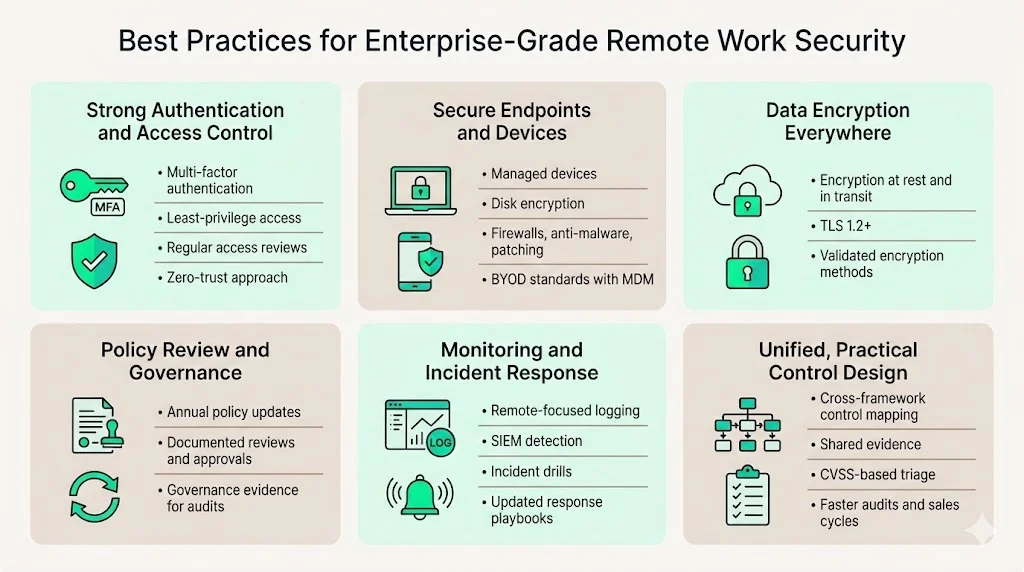
Best Practices for Enterprise‑Grade Remote Work Security
To build a remote security programme that stands up to buyers, auditors and attackers, follow these practices:
-
Strong authentication and access control – implement MFA for all remote access. Use least‑privilege principles and review access rights regularly. Zero‑trust architecture can reduce reliance on perimeter defences.
-
Endpoint protection and secure device configuration – provide company‑managed devices where possible. Enforce disk encryption, host firewalls, anti‑malware and automatic patching. For BYOD, enforce minimum security standards and install mobile device management (MDM) agents.
-
Data encryption for stored and in‑transit data – encrypt sensitive data on laptops, mobile devices and cloud storage. Use secure protocols (TLS 1.2+) and validated encryption technologies.
-
Regular review of policies and compliance requirements – update remote work policies at least annually or when your risk profile changes. Document reviews and approvals to show auditors you maintain governance.
-
Monitoring and incident response – set up logging and monitoring tailored to remote environments. Use security information and event management (SIEM) tools to detect anomalies. Run incident response exercises and update playbooks accordingly.
-
Human‑led programme design – avoid “compliance manufacturing.” Build controls that are effective in practice, not just on paper. At Konfirmity we embed control implementation in your stack and operate it daily. We provide dedicated experts, not just software, to manage your programme end‑to‑end.
-
Cross‑framework reuse – map controls across ISO 27001, SOC 2, HIPAA and GDPR to reduce duplication. For example, risk assessments, access reviews and incident response processes often satisfy multiple frameworks. Use CVSS‑based vulnerability triage and assign service level agreements (SLAs) for remediation. Our delivery patterns show that unified control mapping reduces audit fatigue and shortens sales cycles.
By following these practices, organisations can satisfy enterprise buyers’ due‑diligence requirements, reduce breach likelihood and respond quickly when incidents occur.
Make remote working controls provable, not just documented
Book a demo and we'll show how Konfirmity evidences device encryption, VPN use, training completion and home-working policy acceptance across a distributed team auditors will question.
Book a demo
Conclusion
ISO 27001 For Remote Teams is more than a tick‑box exercise—it is a framework for operating a secure and compliant distributed workforce. Remote work introduces risks such as insecure Wi‑Fi, unmanaged devices and shadow IT; data shows that remote‑related breaches are costly. ISO 27001’s risk‑based approach helps identify and mitigate these risks through a structured ISMS, documented policies and technical controls. Control 6.7 requires organisations to issue a remote working policy and ensure safe access to information, while related controls address access management, device security, training and incident response.
For enterprise buyers, proof of a mature ISMS signals reliability and reduces procurement friction. At Konfirmity, we believe in starting with security and arriving at compliance. We don’t just advise; we execute. Our human‑led, managed service builds and runs your programme year‑round, delivering continuous evidence and outcome‑as‑a‑service. When security looks good on paper but fails under incident pressure, it becomes a liability. Build your controls once, operate them daily, and let compliance follow.
Frequently Asked Questions
Yes. If remote work is part of your operations, Control 6.7 requires a documented remote working policy. The policy must define conditions for remote work, secure communication methods and responsibilities. Auditors will request to see this policy and evidence of its implementation.
Teleworking (used in ISO 27001:2013) and remote working (ISO 27001:2022) both cover working outside office premises. Mobile policies address devices on the move (laptops, tablets, phones) and may include BYOD rules. Remote work policies focus on fixed off‑site work and should integrate mobile and teleworking considerations.
Yes, but you must manage the associated risks. The policy should specify permitted devices, security configurations (passwords, encryption, anti‑malware) and monitoring requirements. NIST recommends enabling basic security features and keeping devices patched. Many organisations require device registration and reserve the right to remotely wipe data.
Auditors look for the remote working policy, risk assessments, training records, access logs, incident reports and evidence that controls operate as intended. They may sample remote workers to verify compliance. Provide records of policy reviews, access reviews, and logs showing MFA and VPN use. Evidence should be current and cover the observation period.
Review at least annually or whenever your risk profile changes (e.g., new technologies, changes in workforce location). HighTable advises reviewing the remote working policy regularly. Continuous monitoring and internal audits can reveal issues between formal reviews.