Most enterprise buyers now ask for assurance artifacts before procurement. Without operational security and continuous evidence, deals stall even when teams think they are ready on paper. Today’s hybrid workforce relies on smartphones, tablets and laptops to access corporate data from anywhere. According to NIST, mobile devices deliver vital access to workplace resources yet expose sensitive information to leaks and misuse. BYOD and teleworking amplify this exposure because personal devices lack corporate security controls and often run unpatched software. The global average cost of a data breach reached $4.88 million in 2024, showing the financial stakes. This guide explains ISO 27001 Mobile Device Security For ISO 27001 and offers practical steps, examples and templates. It is written for companies that sell to enterprise customers and need to show they protect data on every endpoint.
Why mobile device security matters in an ISO 27001 context
Phones and tablets have become tools for sales, support and field work, but they also create a new attack surface. Lost or stolen devices can expose client data; malicious apps may harvest credentials; and insecure Wi‑Fi invites eavesdropping. NIST warns that unsecured telework devices can spread worms. SentinelOne notes that personal devices often lack patches and antivirus, while Deepstrike reports that 42% of employees work remotely once a week. These factors drive regulatory penalties and lost revenue.
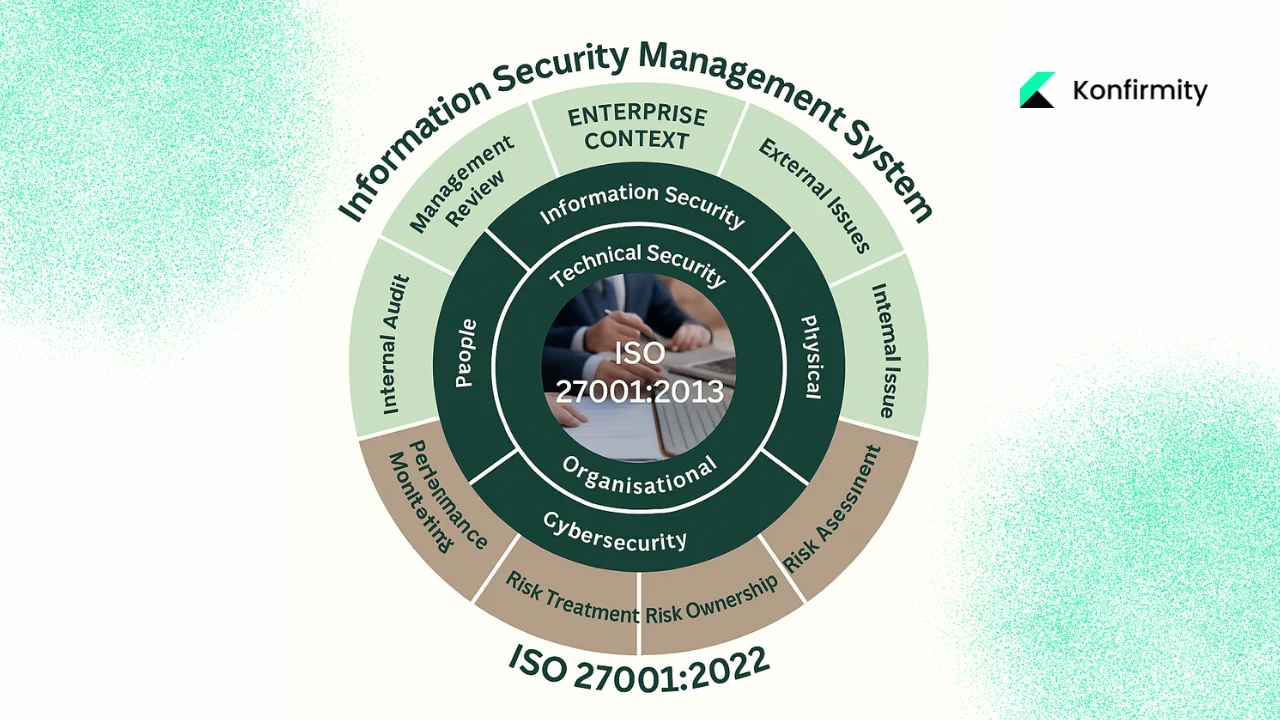
Remote working amplifies the need for policy because staff connect from home, airports and co‑working spaces. Without clear rules, personal tablets may store unencrypted data, and phishing emails can install keyloggers. BYOD blurs boundaries between corporate and personal activity. Each mobile device is an endpoint within the ISMS defined by ISO 27001. A risk‑based approach must include mobile endpoints.
For companies selling to enterprise buyers, mobile device security is more than an internal hygiene issue. Vendors are subject to due‑diligence questionnaires that probe whether they manage endpoints, enforce encryption and can remotely wipe a lost phone. Clients expect evidence that controls work in practice, and a vendor that fails to show disciplined mobile security may be classified as high risk, delaying or blocking a contract. In our experience supporting over six thousand audits across SOC 2, ISO 27001 and HIPAA, mobile device controls are a recurring challenge. Home-grown programs can take nearly a year to reach audit readiness, while our managed approach typically shortens this timeline and reduces the internal workload. A rigorous mobile program helps close this common gap.
Important ISO 27001 requirements and controls for mobile devices
ISO 27001’s clauses cover context, leadership, planning, support, operation, performance evaluation and improvement. Mobile devices are addressed in Annex A.6.2 in the 2013 standard and Annex A.8.1 “User endpoint devices” in the 2022 revision. Advisera notes that organisations must combine technology (authentication, encryption, backups), processes (device registration and acceptable use) and people measures (training and awareness). Knowing where mobile devices fit in ISO 27001 Mobile Device Security For ISO 27001 helps translate the standard into action.
Other Annex A controls apply as well. Access control policies (A.9) ensure that only authorised users can access data; cryptographic controls (A.10) require encryption of data at rest and in transit; physical security (A.11) extends to devices by locking them in secure locations and preventing unattended use; and operations security (A.12) covers configuration management and malware protection. In practice, this means maintaining an inventory, enforcing secure configuration, enabling full‑disk encryption, deploying antivirus and planning for remote wipe.
Overview table for quick reference
| Control | What it means for mobile devices | Example action |
|---|---|---|
| A.6.2.1 Mobile device policy | Define policy for company-owned and BYOD devices, including registration, acceptable use and responsibilities | Maintain an asset inventory with owner, model and OS; require remote-wipe capability |
| A.8.1 User endpoint devices | Protect information processed by, stored on or accessed through endpoints | Configure smartphones, tablets and laptops with encryption, screen lock and authorised apps |
| A.9 Access control | Limit access to authorised users and enforce least privilege | Require multi-factor authentication and role-based access; disable accounts when staff depart |
| A.12.6 Technical vulnerability management | Keep operating systems and applications up to date and remediate vulnerabilities quickly | Use MDM to push patches; block devices that fail to meet patch SLAs |
This table can serve as a quick reference when implementing ISO 27001 Mobile Device Security For ISO 27001. It shows how abstract controls translate into concrete actions on phones and laptops.
ISO 27001 Mobile Device Security: Step‑by‑step implementation guide
The following steps are designed for busy teams who need to implement mobile device security under ISO 27001 without adding months of overhead. Each step includes practical guidance and examples.
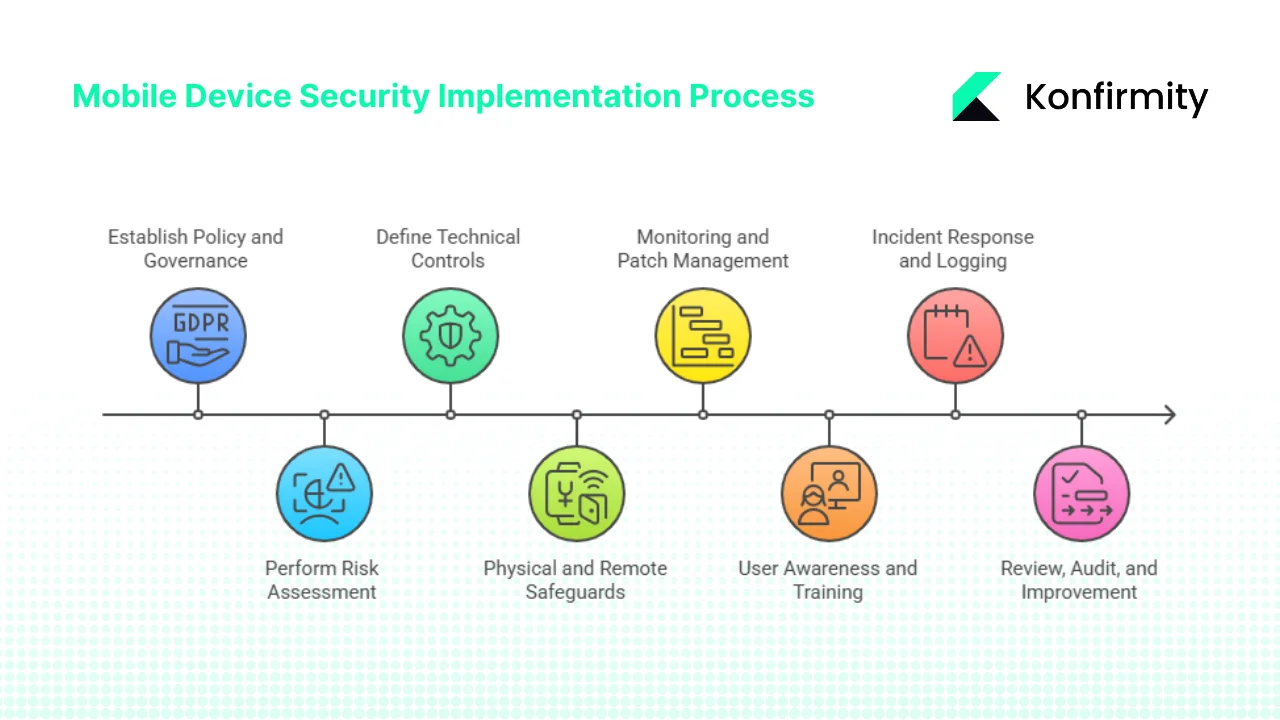
Step 1: Establish policy and governance
Start by defining the policy for mobile and remote work. Cover device registration, ownership, acceptable use and responsibilities. Distinguish between company‑owned and personal devices, and state that all devices accessing corporate data must meet the same security baseline. Define roles for the device owner, security team and IT support. Set conditions for encryption, screen locks and authorised applications. A clear policy sets expectations and gives the internal audit team a benchmark when evaluating compliance.
Step 2: Perform risk assessment
Identify the assets involved (smartphones, tablets, laptops) and the data they access. List threats such as theft, malware, phishing and lost devices and identify vulnerabilities such as unpatched operating systems or insecure Wi‑Fi. Evaluate the impact and likelihood of each threat, perhaps scoring them from 1 to 5 in a simple matrix. This informs which controls you prioritise.
This risk assessment anchors your mobile device security program under ISO 27001 and helps demonstrate that you apply a risk‑based approach when presenting evidence to auditors and enterprise buyers.
Step 3: Define technical controls
Based on the risk assessment, choose appropriate controls. Implement full device encryption to protect data at rest; configure mobile device management (MDM) or enterprise mobility management (EMM) solutions to enforce policies and manage configuration. Require strong authentication, such as complex passwords, biometrics and multi‑factor authentication. Use role‑based access control to grant the minimum access necessary. Encrypt data in transit with TLS when connecting to cloud services. Deploy endpoint detection and response (EDR) tools to monitor for malware. Disable unnecessary services and ensure the operating system is set to install updates automatically. The NIST guide on mobile security emphasises integrated tools to protect both networks and user privacy. The right technical controls reduce the probability and impact of threats.
These technical controls are central to your mobile device security program under ISO 27001 because auditors will look for evidence that encryption, authentication and configuration measures are consistently applied.
Step 4: Physical and remote safeguards
Maintain an up‑to‑date inventory of all devices, including model, operating system version, owner and encryption status. Require employees to keep devices under supervision or locked in a secure place when not in use; provide guidelines for travel such as carrying devices in hand luggage and avoiding unattended storage. Enable remote wipe or disablement for every device so that if a phone is lost or stolen, the data can be erased quickly. Back up critical data from mobile devices to a secure location to prevent data loss. NIST recommends physical security and encryption, backed by secure backups and secure destruction when data is no longer needed. These measures protect against both physical and logical threats.
Step 5: Monitoring, vulnerability and patch management
Continuously monitor devices for compliance with policy. Use MDM to push patches, manage configuration and enforce encryption and password policies. Install antivirus and EDR to detect malware. Perform regular scans for missing patches and security misconfigurations. Lock down non‑compliant devices until they are remediated. Establish service‑level agreements (SLAs) for patch deployment based on the risk of vulnerabilities—for example, high‑severity flaws must be patched within seven days. Record metrics such as the percentage of devices with up‑to‑date operating systems and the time to remediate vulnerabilities. Technical vulnerability management is mandated by ISO 27001 and is essential for preventing compromise.
Monitoring and patch management underpin your mobile device security program under ISO 27001, providing evidence that your controls operate continuously, not just during audits.
Step 6: User awareness and training
People are often the weakest link. Provide onboarding training that covers mobile risks: how to recognise phishing messages, why public Wi‑Fi is unsafe, and why only trusted apps should be installed. Educate users on secure practices such as not sharing devices with family members and enabling automatic screen locks. Schedule refresher training at least annually, and reinforce messages through periodic reminders or short quizzes. Encourage employees to report lost or stolen devices immediately. When training is tied to real incidents and examples, it becomes tangible. ISO 27001 emphasises competence and awareness in clause 7.3, making training an essential part of the ISMS.
User awareness and training are integral to ISO 27001 Mobile Device Security For ISO 27001 because people operate the devices and can either enforce or undermine security.
Step 7: Incident response and logging
Define a procedure for mobile device incidents. When a device is lost or stolen, the user must notify the security team, which can then trigger remote wipe and disable the account. Determine who has authority to initiate these actions, such as the security manager on call. Require that all device access and configuration changes be logged through MDM or system logs. Keep logs for a defined retention period to support audits and investigations. Evaluate the incident to understand the root cause and prevent recurrence. If a device is compromised by malware, isolate it from the network and follow standard incident response steps. Documenting these procedures ensures a consistent response and provides evidence during audits.
Having a repeatable incident response plan is a hallmark of a strong mobile device security program and demonstrates that the organisation can handle incidents effectively when clients or auditors ask for proof.
Step 8: Review, audit and continual improvement
After implementing controls, review the mobile device program periodically. Conduct internal audits to check whether devices are registered, encrypted and compliant with policy. Use metrics such as the percentage of devices that meet compliance requirements, time taken to apply patches and number of incidents. Share results with leadership and adjust controls accordingly. During the ISO 27001 certification process, the external auditor will expect a Statement of Applicability (SoA) that links each mobile control to the risk it mitigates. Document decisions and justifications. Continuous improvement is part of the standard and is essential for keeping pace with evolving threats.
Examples and mini‑templates for busy teams
Busy teams often ask for practical artifacts. A simple device inventory can be maintained in a spreadsheet or MDM. It might include columns for device ID, user, operating system version, encryption status and last patch date. For example:
| Device ID | User | OS version | Encryption | Last patch |
|---|---|---|---|---|
| DEV-001 | Alice | iOS 16.5 | Enabled | 2025-09-15 |
| DEV-002 | Bob | Android 14 | Enabled | 2025-08-30 |
Include a column for MDM enrollment and compliance status if using a management platform. This type of table supports audit evidence for your mobile device security controls.
For incident response, prepare a short checklist: verify the report with the user, trigger remote wipe and disable the account, update the inventory to mark the device as lost and reset any tokens associated with the device. Practising this checklist reduces reaction time and shows auditors that processes are in place.
Mobile device security that is enforced, not just documented, satisfies enterprise buyers.
Drop your work email and we'll implement mobile controls that meet ISO 27001 A.8.1.
How to integrate with enterprise client requirements
Enterprise buyers often ask whether devices are encrypted, protected by multi‑factor authentication and wipeable. Provide evidence such as policy documents and recent audit reports. A mature mobile program can speed up due diligence. Show metrics about device compliance and patch timelines. Our managed service implements and monitors these controls for you, providing continuous evidence and reducing sales friction. Aligning with additional standards such as ISO 27017 for cloud security and ISO 27018 for personal data protection strengthens your program and supports regulated clients. This integration demonstrates that your ISO 27001 Mobile Device Security For ISO 27001 program has depth.
CTA: Book a demo
Common pitfalls and how to avoid them
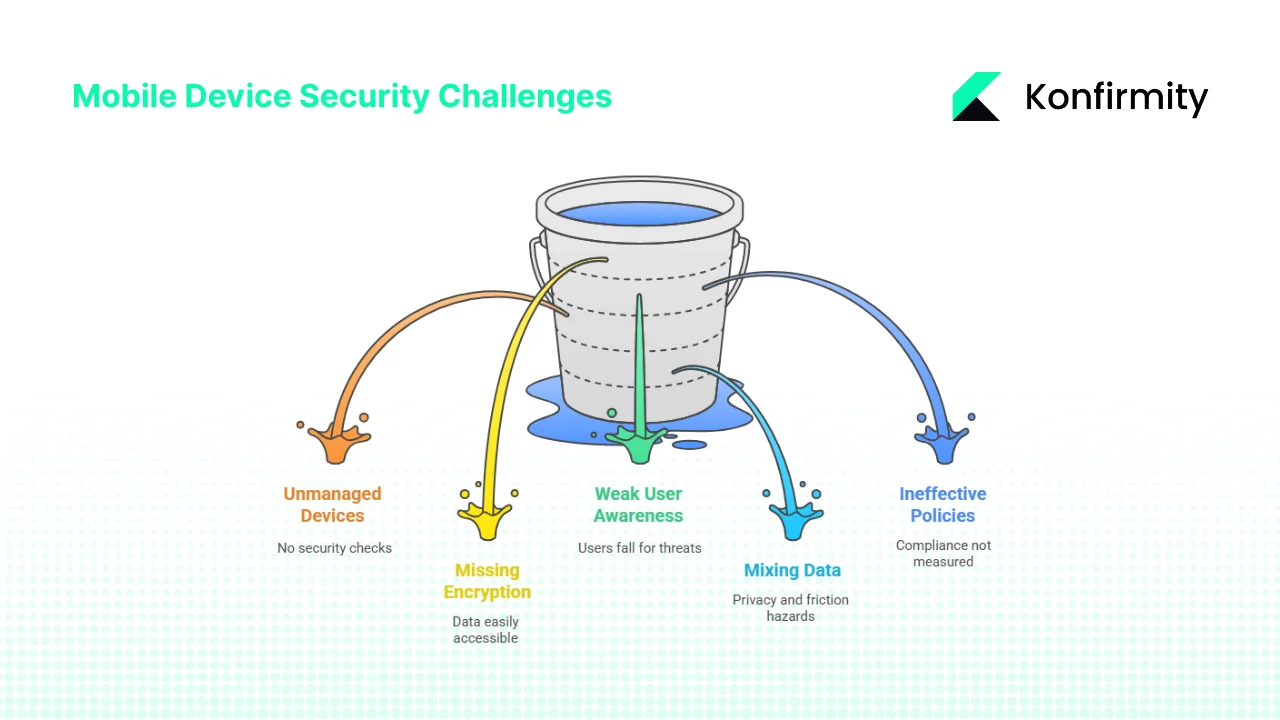
1. Unmanaged Devices Slipping Through
Many teams let staff connect personal phones or tablets without any checks. Once that happens, it becomes impossible to trust the device or prove it meets your controls.
Typical issues
-
Unknown devices reach email or file shares
-
No way to confirm patch status or lock screen settings
-
No ability to restrict risky apps
How to avoid it
-
Require enrolment in your MDM or endpoint platform before granting access
-
Block unmanaged devices at identity and network layers
-
Keep a simple approval workflow so users don’t look for shortcuts
2. Missing Encryption or Remote Wipe
A lost or stolen phone is a common incident. If encryption and remote wipe aren’t enabled, the data on it is wide open.
Typical issues
-
Local storage left unprotected
-
SD cards ignored
-
Remote wipe not tested, so it fails when needed
How to avoid it
-
Enforce full-device encryption (iOS and Android both support this)
-
Disable or control external storage
-
Run remote-wipe drills a few times a year to confirm it works
3. Weak User Awareness
Mobile threats aren’t always obvious. Without clear guidance, people fall for unsafe apps, unsecured public Wi-Fi, or grant permissions they shouldn’t. NIST stresses awareness for a reason: the person holding the device matters as much as the device itself.
Typical issues
-
Users ignore lock screens
-
They install risky apps or sideload software
-
They store sensitive files in personal apps
How to avoid it
-
Give short, scenario-based training instead of long slide decks
-
Focus on practical actions: locking screens, spotting risky apps, reporting lost devices quickly
-
Repeat the training regularly so it stays fresh
4. BYOD Mixing Personal and Corporate Data
Bring-Your-Own-Device setups can work well, but mixing personal and company data creates friction and privacy hazards.
Typical issues
-
Corporate data stored in personal app containers
-
Backups stored in personal cloud accounts
-
Limited control over device features you need to protect data
How to avoid it
-
Use containerisation or app-level work profiles
-
Keep clear boundaries: business apps manage business data; personal apps stay untouched
-
Explain to staff what the company can and cannot see on their phones
5. Policies That Sit on a Shelf
A long set of rules doesn’t keep devices safe unless you watch how they’re applied. Relying only on written requirements often leads to blind spots.
Typical issues
-
Compliance not measured
-
Exceptions granted without tracking
-
No periodic review of whether controls still make sense
How to avoid it
-
Enable monitoring in your MDM or endpoint platform
-
Produce regular compliance dashboards
-
Run periodic audits and update your controls when gaps show up
Conclusion
Mobile devices connect employees to systems and clients but also expose sensitive data. ISO 27001 treats these endpoints as part of the ISMS, and Annex A provides controls to protect them. This article explained the risks, described relevant clauses, provided an overview table and offered a practical implementation guide. By following these steps, companies selling to enterprise clients can demonstrate ISO 27001 Mobile Device Security For ISO 27001 and build trust. Strong mobile controls also support SOC 2, HIPAA and GDPR. Make sure you have a clear policy, technical controls, training and continuous monitoring. A program that works in practice is the best answer to due‑diligence questions and a foundation for secure business.
FAQs
Q1: Is MDM required for ISO 27001?
ISO 27001 does not explicitly mandate any particular product, but many of its controls—such as configuration management, vulnerability management and access control—are easier to implement and demonstrate with a mobile device management (MDM) or enterprise mobility management (EMM) tool. MDM helps ensure that devices are enrolled, configured, patched and remotely wipeable. Without it, teams must rely on manual processes, which can be error‑prone and difficult to evidence. For most organisations pursuing ISO 27001 mobile compliance, an MDM is a practical necessity rather than a formal requirement.
Q2: What is ISO 27017 and ISO 27018?
ISO 27017 builds on ISO 27001 by providing specific controls for cloud‑service security, including guidance on shared responsibilities, secure deletion and cloud provider–customer contracts. ISO 27018 focuses on protecting personally identifiable information in public clouds and supplements the controls in ISO 27002 and ISO 27001. These standards are relevant when mobile devices access cloud services. Implementing them alongside your mobile device security efforts strengthens your overall posture and assures clients that data is protected throughout its lifecycle.
Q3: Which security guidelines should be followed for mobile security?
Combine ISO 27001 controls with your organisational policy. Ensure full device encryption, enforce access control and strong authentication, deploy MDM to manage configuration and push patches, enable remote wipe, train users regularly, and monitor compliance. Consult external guidance such as NIST SP 800‑114 for telework and BYOD. These practices form the core of ISO 27001 Mobile Device Security For ISO 27001 and align with broader frameworks like SOC 2 and HIPAA.
Q4: What is Clause 8.1 of ISO 27001?
Clause 8.1 in the 2022 version of ISO 27001 refers to Annex A 8.1 “User endpoint devices.” It covers securing user endpoints, including smartphones, tablets and laptops, by ensuring information processed by, stored on or accessed through these devices is protected. It is the modern successor to the earlier control A.6.2 “Mobile devices and teleworking.” Clause 8.1 reminds organisations that user endpoints are part of the ISMS scope and must be addressed through policy, technical controls, training and monitoring. Implementing ISO 27001 Mobile Device Security For ISO 27001 is a practical way to meet this clause and demonstrate compliance to auditors and enterprise buyers.