

Most enterprise buyers now ask suppliers to prove that their security program works in practice. A SOC 2 report is part of that proof, but auditors and procurement teams expect more than polished policies. They want evidence that you control all the systems and data involved in delivering your service. At Konfirmity we have supported more than 6,000 security audits and see the same gap in almost every new client: poor asset visibility. Without a living register of everything in scope, teams risk security incidents, costly breaches and failed audits. This SOC 2 Asset Inventory Guide explains why complete visibility matters, how to build a scalable register and how to integrate it into your broader compliance and security program.
Why asset inventory matters
A clear inventory is the foundation of security. As Lansweeper’s research points out, security teams can protect only what they know exists. Forgotten servers, unpatched software and unsanctioned SaaS subscriptions leave openings for attackers. CISA’s 2025 guidance for operational technology repeats the same message: organisations must create an asset inventory because they cannot secure what they cannot see. Industry data shows that organisations with proper asset tracking find and fix vulnerabilities 65% faster and save about USD 1.76 million when incidents occur. The global average cost of a breach remains high—about USD 4.44 million in 2025—and hidden systems drive those costs upward.
Asset inventory also drives compliance. SOC 2 is a report on controls relevant to security, availability, processing integrity, confidentiality and privacy. The AICPA’s updated points of focus require accurate network and data flow diagrams and a comprehensive inventory of hardware and software. Auditors use the register to verify that controls cover all systems and that access is revoked for terminated staff. Other frameworks—ISO 27001, HIPAA, GDPR—impose similar requirements. A living register makes it easier to map controls across frameworks and to answer buyer due‑diligence questions during sales cycles.
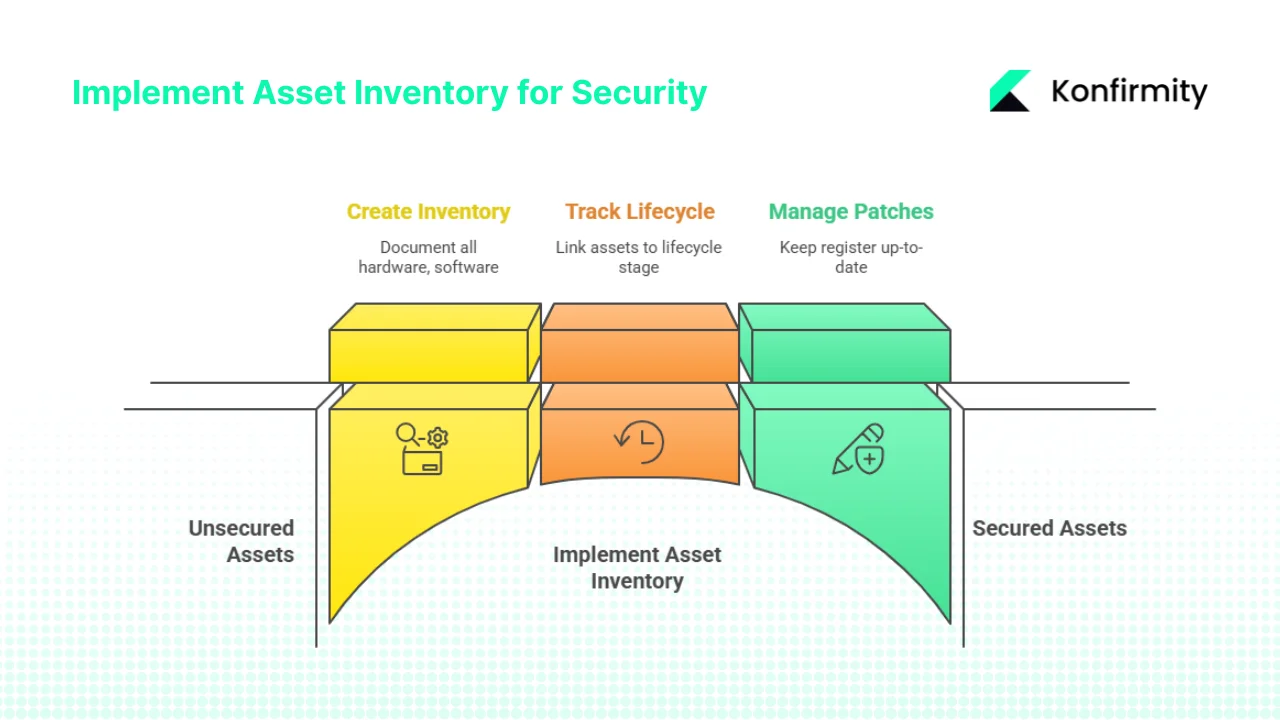
Finally, a good inventory cuts costs and improves operations. It helps avoid paying for unused licences, reduces procurement delays and supports patch management. By linking each asset to a lifecycle stage and owner, teams can reuse licences when employees leave and retire unsupported equipment. The updated Trust Services Criteria emphasise thorough patch management; an up‑to‑date register is the only way to know which devices need updates. The SOC 2 Asset Inventory Guide underscores these benefits.
What counts as an asset?
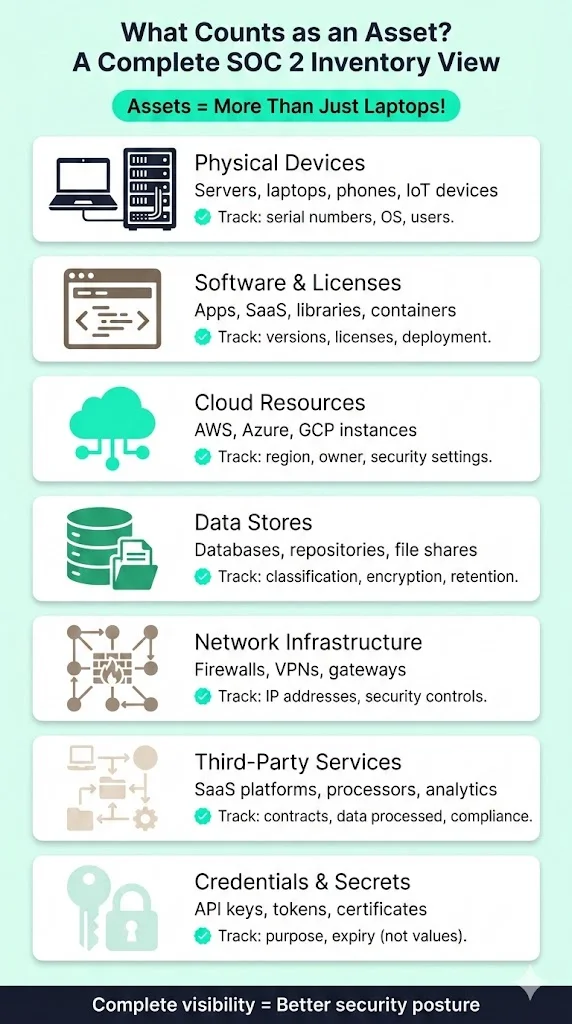
Many organisations equate assets with laptops or servers. The SOC 2 Asset Inventory Guide takes a broader view. Assets include:
-
Physical devices: servers, desktops, laptops, tablets, phones, network gear and IoT devices. Record serial numbers, models, operating systems and assigned users.
-
Software and licences: applications, micro‑services, libraries, SaaS subscriptions and container images. Track version numbers, licence type, configuration and deployment environment.
-
Cloud resources: compute instances, databases, storage buckets and load balancers across AWS, Azure, GCP or other providers. Note region, owner, security settings and connectivity.
-
Data stores and repositories: databases, file shares, object stores, code repositories and documentation. Include classification (public, internal, confidential, regulated), retention schedule and encryption status.
-
Network infrastructure: firewalls, gateways, VPN concentrators, subnets and identity providers. Capture IP addresses, MAC addresses, region and security controls.
-
Third‑party services: SaaS platforms, payment processors, analytics tools and any external service that processes or stores your data. Record contract terms, data processed and compliance status.
-
Credentials and secrets: API keys, tokens, certificates and other secrets. Track their existence, purpose and expiry without storing the values themselves.
This definition aligns with CISA’s observation that asset inventories must extend beyond device counting. In a modern stack, configuration as code, serverless functions and SaaS connectors are also assets.
From inventory to asset management
The SOC 2 Asset Inventory Guide also distinguishes between a register and full asset management. A register is a snapshot, and asset management is an ongoing process that discovers, classifies, scores risk and maintains assets through their life. Good CSAM feeds into access controls, vendor risk management, incident response and other controls. Lansweeper highlights that proper asset management enables risk prioritisation, accurate threat modelling, compliance alignment, resource optimisation and faster incident response. At Konfirmity we couple CSAM with control mapping: each asset is linked to SOC 2 control and other frameworks such as ISO 27001 or HIPAA. Our clients typically reach SOC 2 readiness in four to five months with under 70 hours of internal effort, compared with nine to twelve months and more than 550 hours when self‑managed. Clear taxonomy, automated discovery and continuous monitoring make the difference.
SOC 2 in context
A SOC 2 report is a voluntary attestation published by the AICPA that provides assurance to customers and partners. It covers five categories—security, availability, processing integrity, confidentiality and privacy. There are two report types: Type I assesses control design at a point in time, while Type II evaluates control effectiveness over an observation period.
The updated Trust Services Criteria add several points that affect asset inventory:
-
Service organisations must maintain accurate hardware and software inventories and provide network and data flow diagrams.
-
They must be able to recover company assets and restrict access immediately for terminated employees and partners.
-
They must enforce segregation of duties in change management and have strong patch management processes.
These updates show that asset visibility is central to SOC 2. Without a register, you cannot prove that controls apply to all systems or that access has been revoked.
Trust Services Criteria and asset tracking
Each of the five Trust Services Criteria influences what you track. Security covers access control and encryption; availability requires resilience and disaster recovery planning; processing integrity focuses on accurate pipelines and data handling; confidentiality demands classification, encryption and secure disposal; and privacy ensures that personal data is collected, used and disposed appropriately. An inventory ties assets to these criteria so you can apply the right controls.
Building a SOC 2‑ready inventory
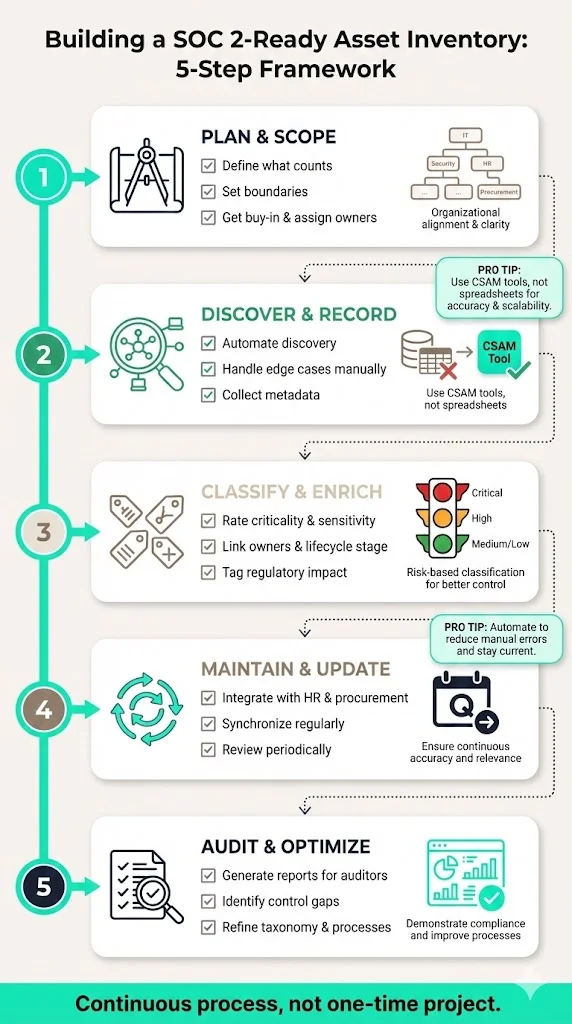
This SOC 2 Asset Inventory Guide provides a concise playbook for creating a register that satisfies auditors and supports operations. Use these steps as a framework and adapt them to your organisation.
1) Plan and scope
-
Define what counts. Decide which categories apply (hardware, software, cloud, data stores, repositories, credentials and third‑party services), including vendor‑owned systems.
-
Set boundaries. Decide whether to cover the whole organisation or only customer‑facing infrastructure and include anything that processes, stores or transmits customer data.
-
Get buy‑in and assign owners. Asset management touches engineering, IT, finance and HR. Secure executive support and assign a register owner; each asset also needs an owner responsible for updates and compliance.
2) Discover and record
-
Automate discovery. Use network scanning, endpoint agents, cloud inventory tools and SaaS management platforms to identify assets. Automation reduces human error and catches shadow IT.
-
Handle edge cases manually. Legacy devices, offline systems and documentation may need manual entry. Record them to avoid blind spots.
-
Collect metadata. Assign a unique ID and capture type, location, owner, version, licence terms, acquisition date and status. Use a CSAM tool rather than spreadsheets.
3) Classify and enrich
-
Rate criticality and sensitivity. Mark assets as critical, high, medium or low and label data as public, internal, confidential or regulated.
-
Link owners and lifecycle stage. Record who owns each asset and whether it is in production, development, staging or retired. Remove retired assets after secure disposal.
-
Tag regulatory impact. Mark assets subject to HIPAA, GDPR, PCI DSS or other regulations. This helps with cross‑framework compliance.
Free guide
The Asset Inventory Guide
A complete, auditor-ready asset inventory template covering ownership, classification, and lifecycle state. Enter your work email and we'll send the PDF.
4) Maintain and update
-
Integrate with HR and procurement. When people join or leave or equipment is purchased or retired, update the register automatically.
-
Synchronise regularly. Connect the register to cloud accounts and billing systems so new assets are captured and retired systems removed automatically.
-
Review periodically. Reconcile quarterly to catch orphaned assets, unused licences and misclassifications and share metrics with stakeholders.
5) Audit and optimise
-
Generate reports for auditors. Produce lists of systems, sorted by classification and owner, along with network diagrams and data flow diagrams. Demonstrate that terminated users no longer have access.
-
Identify control gaps. Use the register to find assets without encryption, monitoring or patching. Retire or isolate unsupported systems and reclaim unused licences.
-
Refine taxonomy and processes. As your organisation grows, revisit categories, labels and workflows. Add new asset types (e.g., serverless functions) as needed. Document lessons learned.
Suggested fields and templates
A usable register contains enough information to support security decisions without becoming overwhelming. The table below illustrates common fields for different asset types.
Asset type
Core fields
Extended fields
Common
Asset ID, category (hardware, software, cloud, data, credential, vendor), owner, department, location, criticality, sensitivity, stage (prod/dev/retired), acquisition date, last update, status
Comments or links to documentation
Hardware
Serial number, model, manufacturer, operating system, warranty expiry, assigned user, network identifiers (MAC/IP), encryption status
BIOS/firmware version, support contract
Software / SaaS / Cloud
Name, version, licence type, licence expiry, number of seats, assigned users, vendor, contract renewal date, data processed, configuration
Integration points, SLA commitments
Data stores / repositories
Classification, owner, location, access controls, encryption status, backup schedule, retention policy, regulatory tags
Volume size, number of records, last backup date
Vendors / third-party services
Vendor name, service type, contract dates, data processed, access privileges, compliance status, vendor risk rating, contact
Service level commitments, continuity clauses
Below is a concise example for a small SaaS startup:
Asset ID,Category,Name,Owner,Classification,Stage
HW-001,Hardware,Developer Laptop,Jane Smith,Internal,Production
SW-003,Software,GitHub Enterprise,Bob Chen,Confidential,Production
CL-007,Cloud,AWS RDS Instance,DB Team,Confidential,Production
VN-001,Vendor,Stripe Payment Gateway,Finance Team,Confidential,Production
These samples show how each entry ties to owners and classification. For larger organisations, adjust the fields and categories to reflect your environment. As you populate your register, this SOC 2 Asset Inventory Guide helps you decide which fields matter most.
How asset inventory supports SOC 2 controls
The SOC 2 Asset Inventory Guide explains how asset tracking underpins each control area.
A register underpins multiple control areas:
-
Access control: You need a list of systems to assign least‑privilege access. EY notes that user access reviews often fail when multiple lists are used to identify all users and service accounts. A unified register prevents such confusion and ensures timely de‑provisioning.
-
Security and confidentiality: Inventories allow encryption, patching and monitoring to be applied consistently. The AICPA highlights that patch management must include prompt identification, testing and verification.
-
Data classification and regulatory compliance: A register shows where sensitive data lives and which regulations apply. The Lansweeper article lists major laws that require asset inventories, such as GDPR, HIPAA, CCPA and PCI DSS.
-
Audit readiness and documentation: Auditors request architecture diagrams and evidence of control coverage. Updated inventories support these documents and show that terminated users’ access was revoked.
-
Risk assessment and incident response: Risk assessments depend on knowing what assets exist and how critical they are. In an incident, responders need to identify affected systems quickly. CISA emphasises that asset visibility is necessary to identify vulnerabilities and manage incidents.
-
Vendor management: Including vendors helps track third‑party risks. One industry overview notes that 62% of breaches are tied to poor third‑party risk management. A register with vendor ratings and contract dates supports regular reviews.
Common challenges and mitigation
Our SOC 2 Asset Inventory Guide calls out common pitfalls and how to avoid them.
Building a register is not trivial. Common pitfalls include:
-
Overreliance on spreadsheets: Spreadsheets become outdated and inconsistent. Use CSAM tools and automate discovery.
-
Missing and shadow assets: Cloud services, SaaS licences, data stores, repositories and unauthorised apps are often overlooked. Integrate discovery tools that scan cloud accounts and identity providers, and monitor network traffic to detect unsanctioned subscriptions.
-
Inventory drift and inconsistent classification: Assets are added or retired without updates, and labels may vary. Integrate with HR and procurement, set up alerts for changes and define classification and ownership policies upfront.
-
Lack of buy‑in: Asset management is cross‑functional. Secure leadership support, assign clear responsibilities and embed inventory updates into onboarding and offboarding.
Tips for scaling over time
-
Start small but design for growth: define taxonomy and roles early so migration is easier.
-
Automate discovery and integrate with cloud, endpoint, identity and billing systems to reduce manual work.
-
Link the register to access reviews, patch management, vulnerability scanning and vendor risk so it remains a living part of your programme.
-
Review it quarterly. If your team lacks capacity, a human‑led managed service like Konfirmity can run the programme and keep you audit‑ready all year.
Turn your asset inventory into SOC 2 evidence that stays current
Book a demo and we'll show how Konfirmity discovers your assets, keeps owners and classifications current, and hands your auditor the inventory evidence without a spreadsheet chase.
Book a demo
Conclusion
Enterprise buyers demand proof that your security program works beyond paper. Hidden systems and outdated lists are liabilities. A living asset register, updated automatically and tied to your controls, is the foundation of trust. The updated Trust Services Criteria require accurate inventories and diagrams, and CISA’s guidance echoes that you must see everything to protect it. Research shows that good asset management speeds up remediation and lowers breach costs. Use this SOC 2 Asset Inventory Guide as your blueprint: define scope, discover all assets, classify them carefully, update continuously and integrate the register into your security and compliance processes. Start with real security—compliance and trust will follow.
Frequently Asked Questions
This SOC 2 Asset Inventory Guide answers some of the common questions our clients ask.
The Trust Services Criteria are Security, Availability, Processing Integrity, Confidentiality and Privacy. Security is mandatory; the other categories are optional depending on your service and customer requirements.
It is a complete, up‑to‑date catalogue of all hardware, software, cloud resources, data stores, network components, repositories, vendor services and credentials that could affect your security posture. Each entry includes metadata, classification, ownership, location and lifecycle stage.
At a high level: define your scope; build an asset register; implement access and security controls; document policies; classify data; perform risk assessments; maintain system documentation; collect evidence over the observation period; and review and monitor controls. The AICPA emphasises network and data flow diagrams and updated inventories.
Record the asset type, unique identifier, owner, classification, lifecycle stage, location, configuration, licence or contract terms, data processed, regulatory tags and status. For hardware, add serial numbers and network identifiers. For software and cloud services, add version and licence expiry. For data stores, document classification, encryption and retention policy.
Continuous updates via automation are ideal. At minimum, perform quarterly reviews and before major audits. Integrate the register with HR, procurement and identity systems so new assets and retirements are captured automatically.







