

SOC 2 requires physical security controls under Common Criteria CC6.1, CC6.2, CC6.4, and CC6.6, covering access restriction, monitoring, and environmental protection for facilities, data centers, and sensitive hardware. Getting this wrong is expensive in ways that go beyond an audit finding: the 2021 OVHcloud data center fire took 3.6 million websites offline, and no amount of encryption or network hardening would have prevented it.
This guide is for CISOs, IT leaders, and compliance teams at midmarket companies pursuing SOC 2 — whether you operate an office, a data center, or a fully remote team. It draws on Konfirmity's experience across 6,000+ security audits to show what auditors actually test, not just what the criteria say on paper.
Key Takeaways: SOC 2 Physical Security Controls
SOC 2 requires physical security controls under Common Criteria CC6.1, CC6.2, CC6.4, and CC6.6, covering access restriction, monitoring, and environmental protection for facilities, data centers, and sensitive hardware. There is no single mandatory checklist — your controls need to match your actual risk and environment, whether that's an office, a data center, or a fully remote team. Auditors test physical security the same way they test any other control: policy plus evidence that it actually operated, not just a written plan.
What Are Physical Security Controls in SOC 2?
In the SOC 2 context, physical security controls are measures that prevent unauthorized individuals from entering premises, accessing systems, damaging equipment, or stealing media. These controls include facility access systems, surveillance cameras, security policies, barriers, environmental monitoring, visitor management, keys and locks, and device protection — they complement digital measures by addressing risks like tailgating, theft, fire, flooding, tampering, and environmental failure. For service organizations operating in colocation facilities or relying on cloud providers, understanding these controls matters because CC6.4 requires restricting access to facilities and sensitive assets, even when you don't own the building.
What SOC 2 Says About Physical Security
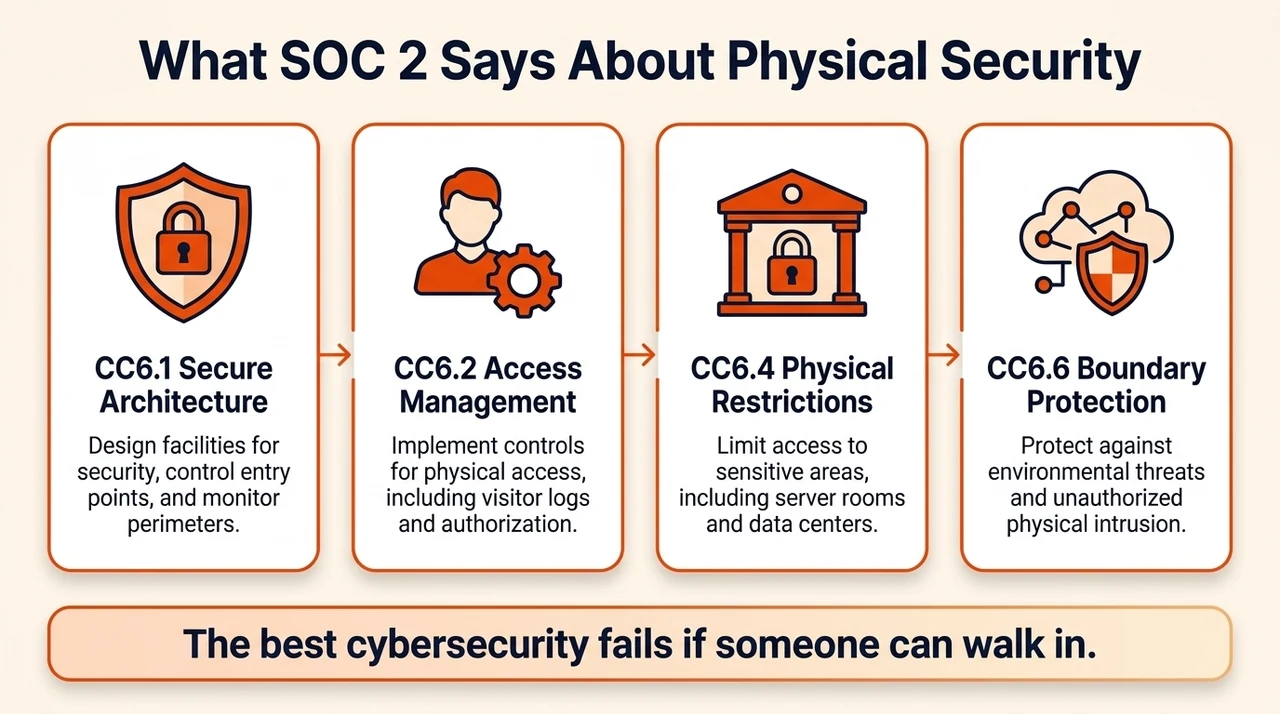
SOC 2's Trust Services Criteria require systems to be protected against unauthorized access in both logical and physical realms. CC6 governs both: CC6.1 demands secure architectures for protecting systems, CC6.2 requires proper user provisioning and revocation, CC6.4 focuses on physical access restrictions to facilities and backup media, CC6.5 addresses protecting physical assets until data is irretrievable, and CC6.6–6.8 cover boundary protection, data transmission, and software integrity. AICPA's own framing is blunt: the best cybersecurity is useless if someone can walk in and plug a device into a server.
Other frameworks echo this. NIST 800-53 mandates access controls, video surveillance, intrusion detection, and environmental monitoring. HIPAA's Security Rule requires facility access controls with contingency operations, visitor validation, and maintenance records. ISO 27001:2022 dedicates a full theme of controls to physical security — secure perimeters, secure cabling, equipment maintenance, supporting utilities. The cross-framework overlap makes one thing clear: physical safeguards aren't optional, they're integral to a defensible security program.
Physical Security Within CC6 (CC6.1, CC6.2, CC6.4, and CC6.6)
CC6.1 requires implementing logical access security software and infrastructure to protect information assets — inventorying data, restricting logical access, authenticating users, segmenting networks. CC6.2 expands on this with formal user registration and authorization processes, plus timely access removal. CC6.4 explicitly requires restricting physical access to facilities, backup media, and sensitive locations to authorized personnel — it recognizes that cloud-hosted systems may carve out some physical controls, but organizations still need visitor logs, access reviews, and assurance over the data center's own controls. CC6.6 addresses boundary protection: additional authentication for external access and firewall rules that block unauthorized traffic.
These criteria intertwine in practice. An access badge system interfacing with your identity provider to disable entry the moment employment ends supports CC6.2. A biometric reader at a server room supports CC6.4. A firewall complements CC6.6, but it cannot stop an intruder holding a stolen key. Effective SOC 2 programs implement physical and digital controls together, so there's no gap in the chain.
Why Physical Security Is Often Overlooked, but Critical
Organizations focused on cloud services sometimes assume that because their data lives in a hyperscaler's environment, physical risk is negligible. Physical breaches can trigger outcomes as bad as, or worse than, a cyberattack — the OVHcloud fire damaged four buildings and knocked millions of websites offline in a single incident. The global average cost of a data breach reached a record $4.99 million in 2026, up 12% year over year according to IBM's 2026 Cost of a Data Breach Report. Physical vulnerabilities — unauthorized access, theft, environmental hazards — compound these costs directly through operational downtime.
Physical controls get overlooked partly because digital threats dominate the headlines, but physical breaches cause the same reputational damage, data integrity issues, and financial loss as their digital counterparts. HIPAA's own guidance warns that unauthorized facility access can lead to theft of electronic protected health information, which is exactly why it requires policies for contingency operations, visitor validation, and maintenance records. Ignoring physical security leaves an organization exposed to consequences no amount of software can mitigate.
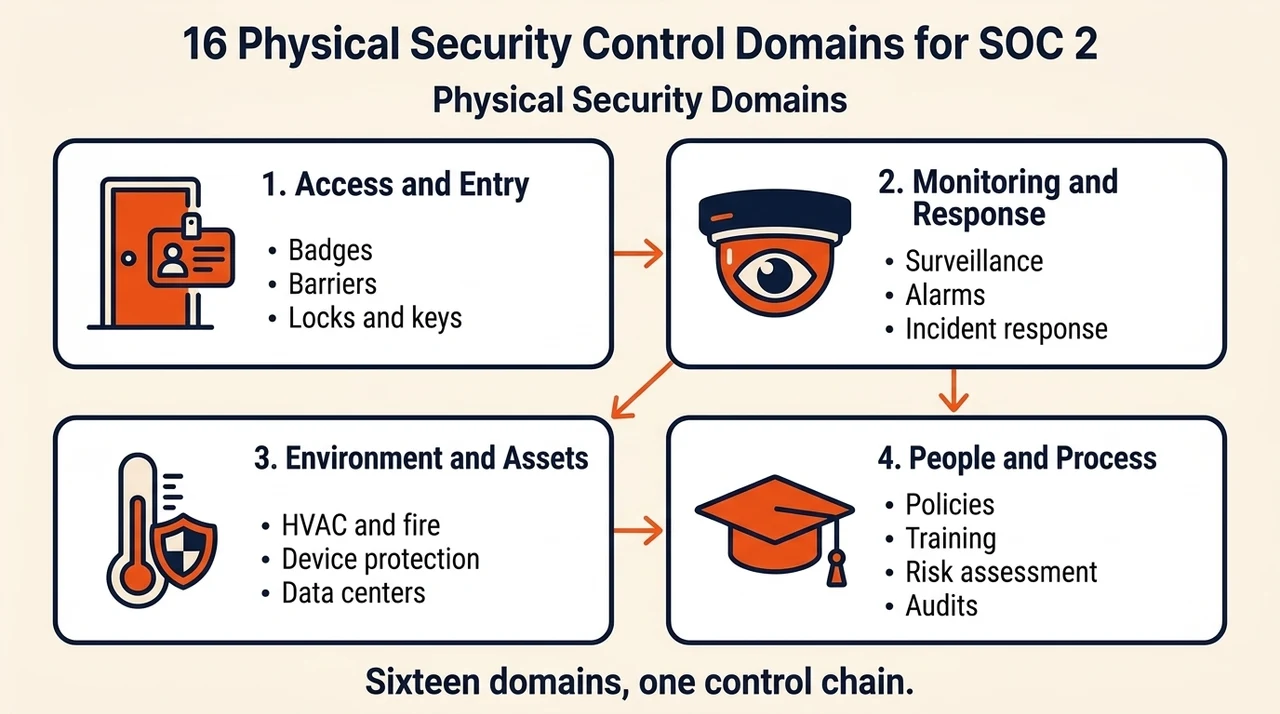
Key Physical Security Control Domains for SOC 2
The domains below map each physical safeguard to SOC 2 requirements, with concrete examples showing how teams actually implement them.
1. Access Control (Facility & Points of Entry)
Access control determines who's allowed inside a facility and which areas they can reach — badges, biometric scanners, role-based access lists, visitor passes. Under CC6.1 and CC6.2, organizations must verify identities and authorize users before granting access, then revoke it the moment employment ends. Under CC6.4, server rooms and backup storage need access limited to the people who actually need it.
Example: Konfirmity installs badge readers at office entrances and server rooms; access rights are managed through the HR system so termination in HR automatically disables the badge. Logs are retained for audit, and quarterly reviews confirm only authorized roles retain physical access.
2. Surveillance Systems
Cameras, motion sensors, and video analytics detect and deter unauthorized physical access, and provide the audit trail that supports SOC 2 evidence directly.
Example: a SaaS provider runs CCTV covering building entrances and server racks, retains footage for 90 days, restricts access to the footage itself, and confirms monthly that every camera is functioning.
3. Electronic Security Measures
Electronic locks, badge readers, alarm panels, and access logging systems provide granular control and evidence — logs need to integrate with identity management to show exactly who entered and when.
Example: a company's access control system logs every door event and feeds it into the GRC platform. When an employee leaves, their badge is automatically disabled, and the logs demonstrate that enforcement happened.
4. Entry Restrictions
Entry restrictions make certain areas accessible only under defined conditions — escorted entry, time-based access, role-based approval.
Example: contractors working on network infrastructure can only access the server room during business hours, escorted by a full-time employee. Visitors sign in, wear temporary badges, and stay in designated zones — all documented in access logs.
5. Security Policies
A written physical security policy codifies roles, responsibilities, and procedures, defining asset ownership, review cycles, enforcement actions, and exceptions.
Example: Konfirmity's policy template covers badge issuance, visitor management, device protection, environmental controls, and incident response, reviewed annually and after any major facility change.
6. Physical Barriers
Physical barriers — fences, turnstiles, locked doors, cages, and server cabinets — are the first line of defense.
Example: server racks sit in cages requiring separate keys, issued only to designated administrators and recorded in a key inventory. Exterior doors use steel frames and reinforced locks.
7. Alarm Systems
Intrusion alarms detect forced entry, tampering, and environmental anomalies, and alarm events need to trigger notifications and get recorded as evidence.
Example: door sensors and glass-break detectors connect to a monitoring service. A forced door alerts security and starts incident response; logs show the alarm time, response actions, and resolution.
Physical security controls are audit evidence, not just facility policy.
Share your work email and we'll help you bring your physical controls up to SOC 2 auditor standards.
8. Visitor Management
Visitor management means logging external visitors, issuing badges, verifying identification, and ensuring an escort.
Example: reception uses a digital kiosk capturing visitor name, host, arrival time, and a photo, issuing color-coded badges. Logs are retained for a year — enough to satisfy an auditor that physical access is genuinely controlled.
9. Locks and Keys
Even with electronic systems, physical keys remain common, and key management means issuance, inventory, auditing, and retrieval.
Example: master keys go only to facilities managers, tracked in a key inventory with quarterly audits confirming keys are returned when roles change. Key-cards paired with electronic locks also require deactivation on termination.
10. Environmental Controls
Environmental controls mitigate fire, smoke, overheating, water leaks, and power failure.
Example: server rooms run HVAC with temperature and humidity sensors, water-leak sensors under raised floors, inert-gas fire suppression (to avoid equipment damage sprinklers would cause), and UPS systems for outages. Monitoring logs from all of it become audit evidence.
11. Risk Assessment
Physical risk assessments identify threats — unauthorized entry, theft, natural disaster, sabotage — and guide which controls actually get built.
Example: a risk workshop maps high-risk areas (server rooms, reception, storage closets), rates likelihood and impact for each, and assigns specific controls (cameras, locks, alarms) accordingly. Results feed into the broader risk register and get refreshed annually or when a new facility comes into scope.
12. Security Audits
Regular physical security audits verify controls actually operate as intended — reviewing access logs, visitor logs, key inventories, barrier inspections, surveillance footage.
Example: a quarterly audit confirms badge logs match the HR roster, keys are all accounted for, and every camera is operational. Discrepancies trigger remediation on the spot.
13. Incident Response
Physical incidents — unauthorized entry, theft, equipment damage, environmental events — need to tie into the broader incident response plan.
Example: when an alarm triggers, security responds, gathers evidence, and files an incident report. Root cause gets analyzed, remediation (repairing a broken door, say) gets tracked, and the record is retained for the full observation period.
14. Security Training
Staff awareness is the defense against tailgating, lost keys, and insecure habits that no technical control can fully replace.
Example: every quarter, employees complete a training module on badge usage, reporting suspicious behavior, and device handling. Attendance and quiz results become audit evidence.
15. Device Protection
Physical devices remain entry points even in the cloud era — locking laptops to desks, cable locks on desktops, restricted USB ports, asset tagging, inventory.
Example: remote employees get laptops with full-disk encryption and tethering cables, required to be stored in lockable drawers when not in use. Asset tags and an asset management system track issuance and returns.
16. Data Centers and Colocation Facilities
Most companies don't own their data center — they rely on a cloud provider or colocation facility. Under SOC 2, you're still responsible for confirming your provider's physical security controls meet the standard, typically by reviewing the provider's own SOC 2 report (disclosed in your own report as a "carve-out" or "inclusive" method) rather than re-testing their facility yourself.
Example: document which provider hosts each system in scope, request and review the provider's current SOC 2 report annually, and keep that review on file as evidence for your own audit.
Step-by-Step Implementation for Busy Teams
The roadmap below aligns each step with CC6 and the broader Trust Services Criteria while collecting the evidence auditors will actually ask for.
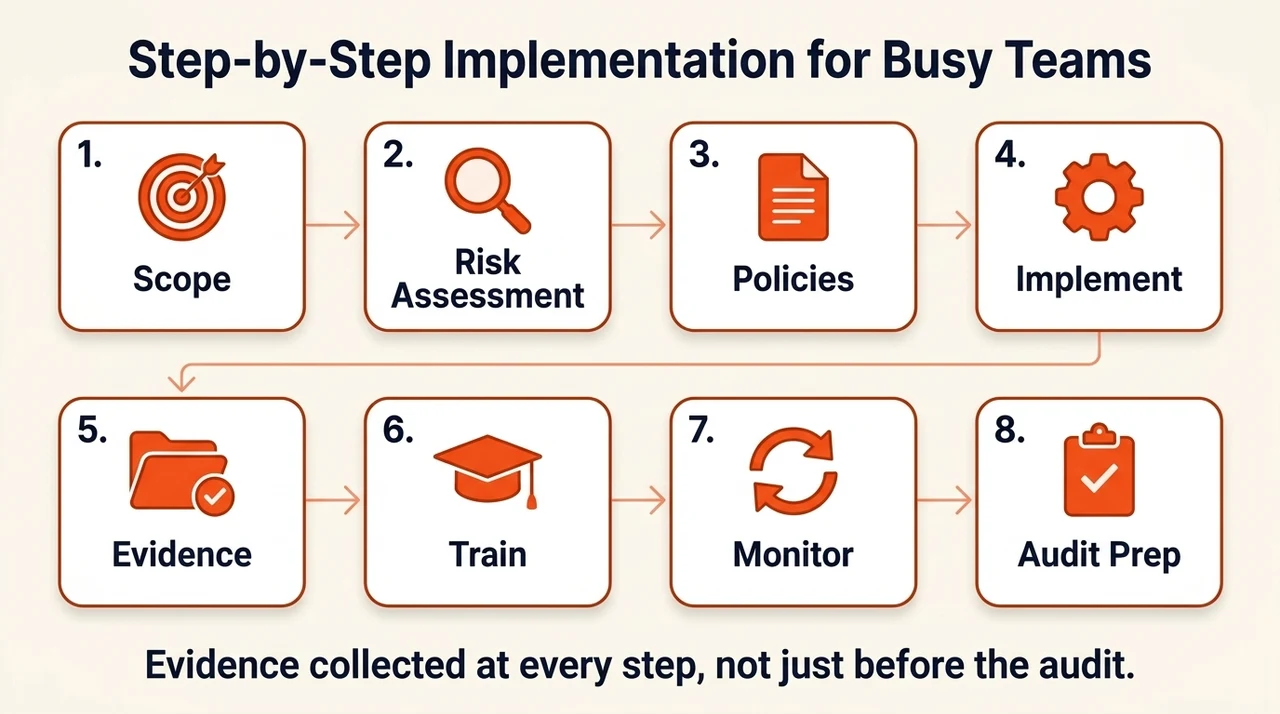
- Define the scope. Identify every physical location, facility, and device in your SOC 2 scope — headquarters, branch offices, colocation data centers, cloud provider responsibilities, backup sites, remote devices. For cloud-hosted systems, determine which physical controls the provider covers (review their SOC 2 report) and which you must implement yourself.
- Perform a physical security risk assessment. List each location, asset, and associated threat, rate likelihood and impact, and identify the controls that mitigate each one. Feed this into your broader risk register.
- Define policies and procedures. Draft or refine a policy covering access control, visitor management, device protection, environmental controls, key management, and incident response, with named owners and review cadence for each.
- Implement the controls. Install cameras, deploy electronic locks and biometric scanners, set up alarms, build a visitor management process, secure devices with locks and tagging. Integrate with HR or identity management for automatic provisioning and de-provisioning.
- Document control operation and gather evidence. SOC 2 Type II requires evidence that controls operated over the full observation period (often 3–12 months) — access logs, visitor logs, alarm events, maintenance records, key inventories, training records, all organized in an evidence tracker.
- Train staff and enforce awareness. Roll out initial training and periodic refreshers, with guidance for remote workers on securing devices, and collect attendance as evidence.
- Monitor, audit, review, and improve. Track KPIs — unauthorized entry attempts, overdue key returns, training completion — and refresh the risk assessment annually or after any facility change.
- Prepare for the audit. Compile a system description of the physical environment, a control matrix mapping each domain to CC6.x/CC3.x/CC7.x, and an evidence folder. Run a readiness assessment to catch gaps before the formal audit finds them.
Real-World Examples of SOC 2 Physical Security
These real-world examples show how different company shapes implement the same domains:
- Multi-site SaaS vendor. A software provider with offices in New York and Bangalore implemented visitor management and electronic access logs. During its SOC 2 Type II audit, the logs showed no unauthorized entries in the prior 12 months — the auditor cited it as a strength contributing to a clean opinion.
- Cloud-service provider migrating data centers. Moving from on-premises to a colocation facility, the provider installed flood sensors and HVAC monitoring to protect servers and backups, letting the auditor confirm environmental risk was controlled through the transition.
- Remote/hybrid workforce. An organization with a largely remote team adopted asset tagging, cable locks, and secure shipping for laptops, paired with training on secure home storage — satisfying the device-protection domain without a central office to control.
Templates and Resources for Physical Security
The templates and resources below turn this program from a policy binder into something a team actually runs — five artifacts that make it executable rather than theoretical:
- Physical Security Policy — access control, visitor management, environmental controls, locks and keys, incident response, and training requirements in one document.
- Control Matrix — maps each physical control to its SOC 2 criteria, with columns for description, domain, owner, evidence, frequency, and status.
- Evidence Tracker — records each control domain's evidence artifact, collection date, next review date, issues found, and remediation.
- Risk Assessment Worksheet — locations, assets, threats, vulnerabilities, risk ratings, mitigating controls, owners, status.
- Audit Checklist — barrier inspections, surveillance functionality checks, access log reviews, key inventory audits, visitor log reviews, training attendance verification.
Free checklist
The SOC 2 Physical Security Policy & Audit Checklist
A ready-to-adapt policy, a control matrix mapping all 16 domains to CC6, and a worked audit checklist showing exactly what auditors sample. Enter your work email and we'll send the PDF.
See how audit-ready your physical controls actually are
Book a demo and we'll map your current physical security program against what SOC 2 auditors and enterprise buyers actually check.
Book a demo
Frequently Asked Questions
Yes. SOC 2's Common Criteria include physical security under CC6.1, CC6.2, CC6.4, and CC6.6, which require organizations to restrict physical access to facilities, data centers, and sensitive hardware to authorized personnel, and to monitor and control the physical environment.
SOC 2 security controls are the safeguards an organization implements to meet the Trust Services Criteria — access control, risk management, monitoring, incident response, vendor management, and physical security, among other domains. There's no single mandatory list; organizations build their control set based on their own risk assessment and the criteria they include in their audit.
Logical access controls restrict who can access systems, applications, and data, typically through authentication and authorization. Physical access controls restrict who can physically enter facilities, data centers, or areas containing sensitive hardware. SOC 2's CC6 series covers both, since a system is only as secure as the weaker of its digital and physical protections.
Physical security controls are measures that prevent unauthorized individuals from entering premises, accessing systems, or reaching sensitive hardware. Common examples include badge or biometric access systems, visitor sign-in and escort policies, surveillance cameras, alarm systems, locks and keys, and environmental controls that protect equipment from damage.
SOC 2 requires organizations to restrict physical access to facilities, data centers, and sensitive hardware to authorized personnel, under Common Criteria CC6.1, CC6.2, CC6.4, and CC6.6. In practice this means access control systems (keycards, biometrics, or badge readers), visitor management (sign-in logs and escort policies), surveillance and monitoring, environmental controls, and secure handling of physical assets through their lifecycle. If you rely on a cloud provider or colocation facility, you meet this requirement by reviewing and documenting your provider's own physical security controls rather than testing their facility directly.
Conclusion
Enterprise buyers and healthcare organizations demand more than polished policies — they expect proof that physical and logical controls operate together to safeguard data and maintain uptime. Physical threats, from an unauthorized visitor to a fire or a flood, can undo digital safeguards and stall a deal just as fast as a breach can. Implementing robust physical controls builds trust, accelerates procurement, and protects the data your customers are trusting you with. Use the steps and templates in this guide to move from reactive fixes to a proactive, evidence-driven control posture — security that reads well but fails under real pressure is a liability; build the program once, operate it daily, and let compliance follow.







