

Enterprise buyers ask for hard evidence before they sign contracts. A simple security questionnaire is no longer sufficient when handling sensitive data or protected health information. The market knows that a lapse in access controls can result in high‑impact breaches; PwC’s 2024 Global Trust Insights study found that incidents costing more than USD 1 million rose from 27% to 36% as cloud use expanded, and IBM’s 2025 cost of a data breach report set the global average breach at USD 4.4 million. Clients and regulators therefore expect evidence that systems and information are shielded from unauthorised users. SOC 2 attestation has become the preferred yardstick, and access control is one of its most scrutinised areas.
This article shows why SOC 2 Role‑Based Access Control For SOC 2 is central to audit readiness and how it supports trust. We explain the RBAC model and its variants, describe why it suits enterprises, map it to SOC 2 requirements, provide step‑by‑step implementation guidance and templates, and discuss common pitfalls. As founder of Konfirmity, a human‑led managed security and compliance service with more than 6 000 security audits behind us and 25 years of combined expertise, I will also share hard‑won patterns from delivering SOC 2, ISO 27001, HIPAA and GDPR programmes. Rather than simply producing paperwork, we build controls in our clients’ infrastructure so compliance emerges naturally and deals move faster.
What is Role‑Based Access Control (RBAC)?
RBAC is an access control model that maps permissions to roles instead of granting permissions directly to each user. NIST describes it as a way to manage security in line with an organisation’s structure: each user receives one or more roles and each role has privileges that allow specific operationscsrc.nist.gov. This approach reduces administrative overhead; instead of managing access for hundreds of individuals, administrators define a few well‑scoped roles and assign users to them.
The modern RBAC standard, INCITS 359‑2012, specifies five basic elements: users, roles, permissions, operations and objects. Users are human or service accounts that request access. Roles represent job functions such as “DevOps engineer” or “Auditor.” Permissions specify allowed operations like “read billing database” or “deploy application.” Operations are actions (e.g., read, write, delete) and objects are the resources acted upon (e.g., a file, server or environment).
RBAC enforces three simple rules:
-
Role assignment – a user must first be assigned to a role in order to perform any operation. Access is never granted directly to individuals.
-
Role authorisation – a user can activate a role only if that user has been authorised for that role. This check makes sure only approved people assume privileged roles.
-
Permission authorisation – a requested operation is permitted only if the activated role includes the required permission. If the role does not allow the operation, the system denies access.
By focusing on roles and separating them from individual identities, RBAC provides a repeatable way to enforce least privilege and makes auditing simpler. It also allows role hierarchies and constraints, which are described below.
Types and Variants of RBAC Models
1) Core RBAC
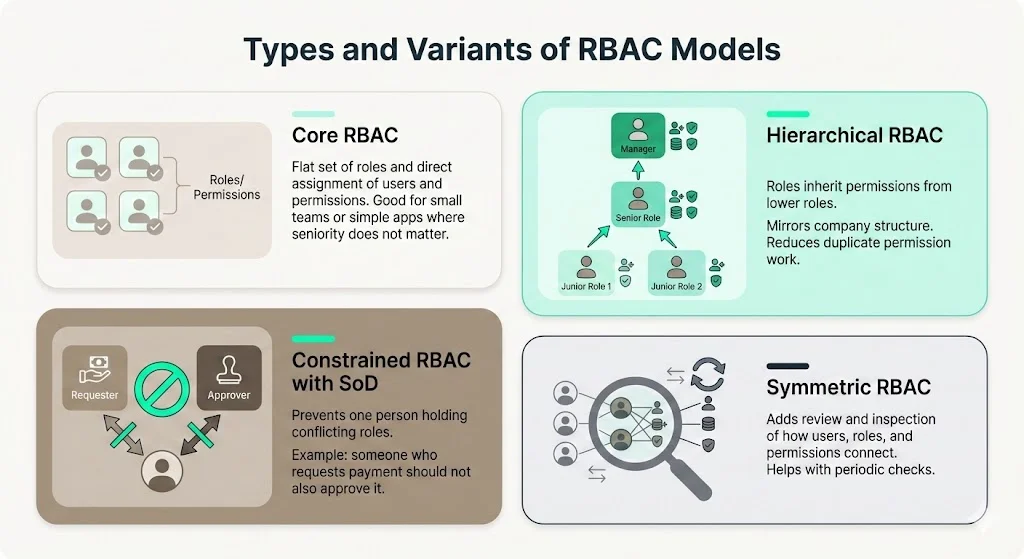
For SOC 2 Role‑Based Access Control For SOC 2, the core RBAC model defines a flat set of roles and sets the simplest baseline. The baseline RBAC model consists of the elements and rules described above. It establishes a flat set of roles and explicitly assigns users and permissions. This model suits smaller organisations or simple applications where there is no need to model seniority or segregation of duties.
2) Hierarchical RBAC
In SOC 2 Role‑Based Access Control For SOC 2, hierarchical RBAC mirrors enterprise structures to streamline inheritance of privileges.
Many enterprises have layered organisational structures. Hierarchical RBAC introduces parent‑child relationships between roles so that senior roles inherit the permissions of their subordinate roles. IBM’s guidance highlights that role hierarchies replicate reporting structures; a manager role can inherit the permissions of an analyst role while adding its own. This reduces duplication because permissions need not be repeated for each senior role, and it supports role growth – a promotion activates a new role rather than manually copying permissions.
3) Constrained RBAC with Separation of Duties (SoD)
Within SOC 2 Role‑Based Access Control For SOC 2, constrained RBAC enforces separation of duties by ensuring no user holds conflicting roles.
Constrained RBAC adds checks to prevent conflicts of interest. IBM describes this as enforcing separation of duties, where certain tasks require two people to complete. For example, the person who requests reimbursement must not be the one who approves the payment. In practice, this means defining mutually exclusive roles (e.g., “requester” and “approver”) and ensuring they are not assigned to the same user. SoD reduces fraud and prevents abuse of privilege.
4) Symmetric RBAC
When designing SOC 2 Role‑Based Access Control For SOC 2, symmetric RBAC offers deep visibility into how roles map to permissions and users.
The symmetric model extends constrained RBAC with review capabilities. Organisations can inspect how each permission maps to each role and each user, and adjust them as responsibilities shift. This degree of visibility is valuable for large firms that must prove every role grants only what is necessary. The symmetric model also supports periodic recertification by making it straightforward to review user‑to‑role and role‑to‑permission relationships.
Why RBAC Fits Enterprise Security
From an enterprise perspective, role‑based controls under SOC 2 offer a structured approach that simplifies management and supports audit readiness.
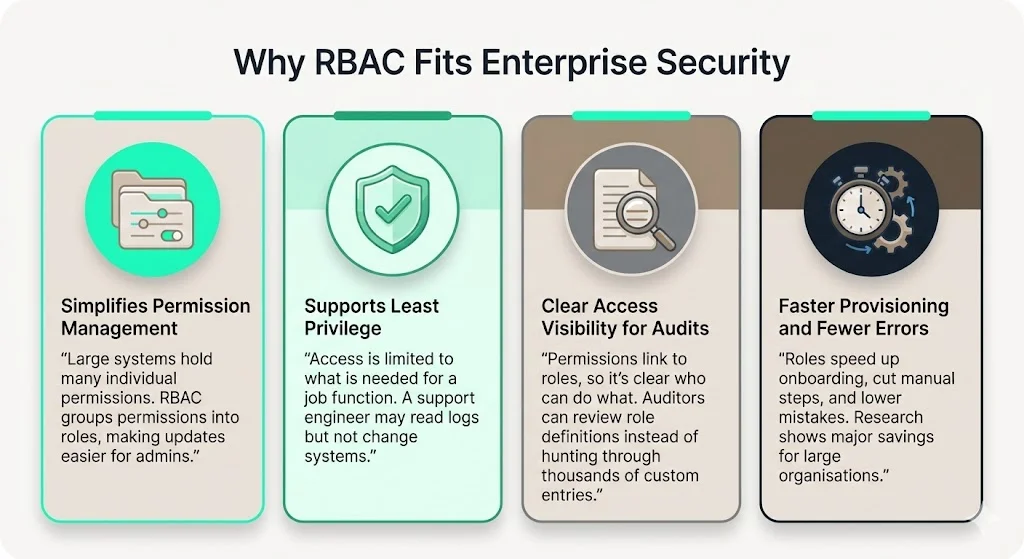
RBAC addresses several operational challenges for enterprises. Administrators of large systems often struggle with managing numerous individual permissions; by grouping them into roles, they simplify provisioning and revocation. NIST notes that with RBAC each user is assigned to one or more roles and each role is assigned to privileges. The software enforces complexity introduced by mutually exclusive roles or role hierarchies, making security administration easier.
RBAC helps enforce the principle of least privilege. ISO 27001 Annex A.9 states that access should be limited to information relevant to an employee’s work; the policy must consider business requirements and reflect information security risks. RBAC naturally aligns with this objective by defining roles with bounded scopes. For example, a support engineer might have read‑only access to customer tickets and logs but no rights to modify infrastructure. Since roles are designed around tasks rather than individual preferences, administrators are less tempted to grant broad permissions as a shortcut.
Access clarity is another reason RBAC is popular. Because permissions are tied to roles and roles map to job functions, it becomes easy to answer questions such as “who can deploy to production?” or “who can view billing data?” During audits, this clarity reduces friction; auditors can review role definitions, assignments and changes instead of sifting through thousands of custom entitlements. That is why enterprises with complex structures often adopt hierarchical RBAC – it provides visibility without micromanaging each individual account.
Finally, RBAC improves operations by reducing time spent on user management. NIST’s study found that RBAC research saved the industry over USD 1.1 billion through reduced employee downtime and efficient provisioning. Fewer manual actions mean fewer errors and faster onboarding, which matters when teams are growing rapidly.
SOC 2 Access Control Requirements: What Enterprises Must Meet
Overview of Trust Service Criteria:
SOC 2 reports evaluate controls at a service organisation against five Trust Service Criteria: Security, Availability, Processing Integrity, Confidentiality and Privacy. The security criterion is mandatory for all reports and covers user authentication, role‑based access controls, intrusion detection, system monitoring and encryption at rest and in transit. Availability examines uptime, disaster recovery and resilience. Processing integrity ensures data is processed accurately and without unauthorized modification. Confidentiality focuses on restricting sensitive information to those who need it and calls for role‑based access policies and access control lists. Privacy governs how organisations collect, retain and dispose of personally identifiable information.
SOC 2 does not prescribe a rigid checklist. Onspring explains that the AICPA defines “points of focus” within each criterion rather than providing a fixed requirements list. Organisations therefore customise their scope based on risk, promise and industry. A healthcare SaaS provider might include confidentiality and privacy, while a fintech platform may emphasise processing integrity and availability. However, every SOC 2 report must show evidence that access to systems and data is controlled and recertified over time.
SOC 2 Type I evaluates whether controls are designed correctly as of a specific date. SOC 2 Type II goes further by testing operating effectiveness over a period (typically 6–12 months). Type II requires continuous evidence, such as audit logs of access grants and revocations, periodic access reviews and proof of incident responses. For enterprise sales, clients usually demand a Type II report because it reflects operational maturity.
What SOC 2 Expects from Access Control:
Access control policies under SOC 2 must identify who can access systems and data, how access is approved and revoked, and how these decisions are logged. The Onspring guide notes that security controls should include multi‑factor authentication, intrusion detection, vulnerability scanning and encryption; confidentiality controls include role‑based access policies and periodic review of permissions. Auditors look not only at the existence of tools but also at their effectiveness – for example, whether failed logins are tracked and anomalies trigger alerts.
Evidence must show that access events are tied to a chain of approval and review. Granting a role, changing a permission or revoking access should record who approved the change, when it occurred and why. The HIPAA Security Rule, which shares principles with SOC 2, requires policies and procedures for authorising access to electronic protected health information (ePHI) based on the user’s role and mandates technical controls that allow only authorised persons to access ePHI. Such examples illustrate that regulators across frameworks expect traceability.
SOC 2 also expects recertification. Permissions should not remain indefinitely; at regular intervals (often quarterly) organisations must review each user’s roles and confirm they still reflect the person’s responsibilities. When roles change, access must be adjusted promptly. This recertification is one of the most commonly cited gaps in audits. As we will discuss later, automating reviews and recertification cycles is vital.
Common Access Control Types Apart from RBAC:
While RBAC is central, SOC 2 audits evaluate a mix of logical and physical controls. Logical controls include multi‑factor authentication, network segmentation, encryption and endpoint security. Physical controls cover badge‑based entry, biometrics and CCTV. The HHS overview of the HIPAA Security Rule requires facility access controls, device and media controls and audit trails, and these correspond to SOC 2’s confidentiality and security criteria. Organisations should also monitor vendor and third‑party access, ensure strong change‑management practices and maintain incident response procedures. RBAC works best when complemented by these broader safeguards.
How RBAC Supports SOC 2 Compliance
1) Meeting Access Control Requirements
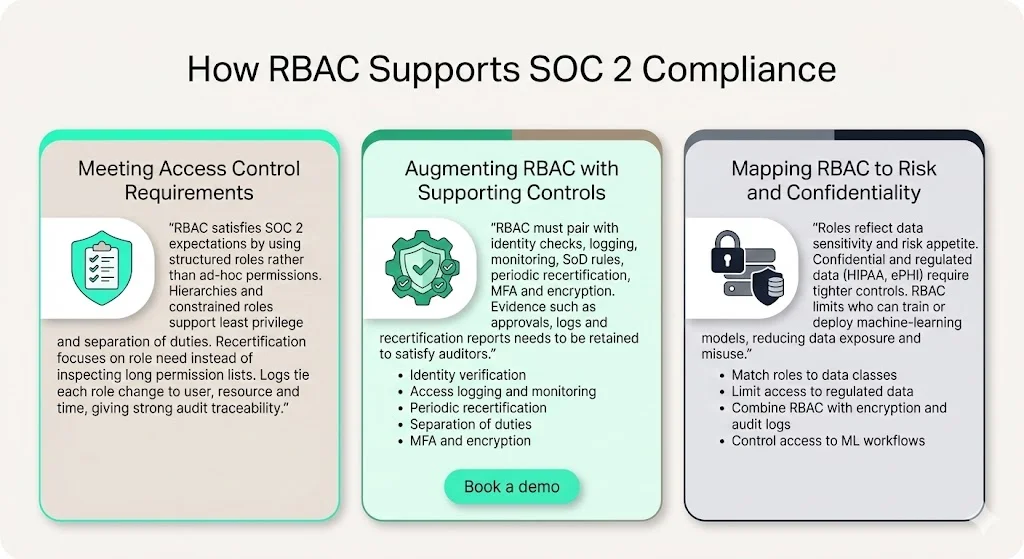
RBAC provides a structured way to satisfy SOC 2 expectations. Role assignments simplify management – administrators approve roles rather than custom permissions. The use of role hierarchies and constrained models ensures least privilege and separation of duties. Centralised role definitions prevent ad‑hoc entitlements that are difficult to audit.
RBAC also supports recertification. Because roles map to job functions, an access review can focus on whether a person still needs a role rather than examining dozens of individual permissions. Symmetric RBAC, with its ability to review both user‑role and role‑permission mappings, makes periodic access reviews and evidence collection straightforward.
From an audit perspective, RBAC yields clear logs. Each grant, revoke or role change is recorded with the role name, the user, the resource and the time. Auditors can trace privileges back to job duties. This traceability is essential for SOC 2 Type II reports, HIPAA Security Rule assessments and ISO 27001 Annex A.9 evaluations. When combined with identity verification measures (e.g., multi‑factor authentication) and encryption, RBAC helps meet confidentiality and security controls.
2) Augmenting RBAC with Supporting Controls
RBAC alone is not enough. Organisations must pair it with periodic reviews, identity proofing, monitoring and separation of duties checks. ISO 27001 stresses the need to review access based on changes in roles and to manage privileged access rights tightly. HIPAA requires audit controls to record and examine activity. Therefore, a mature programme will implement:
-
Identity verification – confirm users’ identities before assigning roles. This may involve HR onboarding procedures, background checks or identity providers with strong authentication.
-
Access logging and monitoring – collect logs of all role assignments, privilege use and administrative actions. Monitor for unusual patterns, such as a support engineer accessing production at odd hours.
-
Periodic recertification – schedule reviews (e.g., quarterly) where managers verify each user’s roles. Remove stale roles immediately.
-
Separation of duties – design constrained roles that must not be held together. For instance, an engineer who deploys code should not have permission to approve their own access request.
-
Multi‑factor authentication and encryption – ensure that even with a valid role, a compromise of credentials does not lead to an easy breach.
Evidence of these controls must be retained, as auditors will request logs, approval records and recertification reports. At Konfirmity we automate evidence collection inside clients’ environments so auditors can verify events quickly. Over 6 000 security audits taught us that evidence depth and continuity matter more than polished policies; auditors look for the ability to reconstruct events, not just documents.
3) Mapping RBAC to Risk and Confidentiality
RBAC helps match access with risk appetite. ISO 27001 emphasises that access rules should reflect information security risks and the organisation’s appetite. In practice, this means classifying systems and data (e.g., public, internal, confidential, regulated) and defining roles accordingly. A product engineer might have access to code repositories and staging environments but no right to view payroll. A payroll clerk may access salary data but not customer support tickets. By tying roles to risk categories, teams reduce the blast radius of a compromise.
For confidential and regulated data (such as ePHI under HIPAA), access control must be even tighter. The HIPAA Security Rule’s information access management standard requires authorising access only when appropriate to the user’s role. RBAC fits this requirement naturally; roles are defined by job duties, and the system enforces them. Combining RBAC with encryption and audit controls ensures that even if a role is abused, data remains encrypted and the event is captured.
Finally, RBAC reduces risk exposure from new technologies such as artificial intelligence. IBM’s 2025 report shows that 97% of organisations experiencing incidents with machine‑learning systems lacked proper access controls for those systems, and 63% lacked governance policies. The same report records that applying strong access controls and governance saved organisations an average of USD 1.9 million. RBAC, combined with machine‑learning model governance, can restrict who can train, deploy or query models, limiting misuse and data leakage.
Implementation Walkthrough
Many organisations struggle with design and execution. The following steps and template outlines have been refined through Konfirmity’s delivery of thousands of audits. They assume you are targeting SOC 2 Type II but apply equally to ISO 27001 and HIPAA programmes.
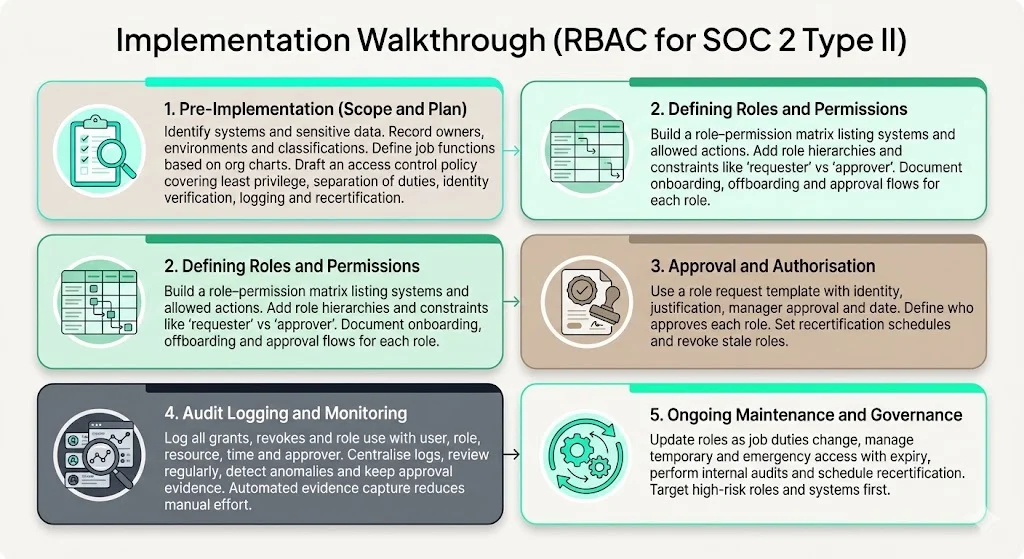
1. Pre‑Implementation: Scoping and Planning
In SOC 2 Role‑Based Access Control For SOC 2, scoping and planning is the first essential step.
-
Identify systems and data in scope – create a register of critical systems (e.g., production cloud accounts, customer databases, code repositories) and sensitive data (e.g., personal data, financial records, ePHI). Map them to applicable trust criteria and regulations. For each system, record its owner, environment (prod, staging), classification (public, internal, confidential) and associated risk.
-
Define job functions – list typical roles (e.g., Admin, DevOps, Support, Auditor, Manager). Use your organisation chart and RACI matrices to understand responsibilities. Avoid creating a unique role for each individual; start with coarse groups and refine as needed.
-
Draft an access control policy – articulate principles such as least privilege, separation of duties, identity verification, audit logging and recertification. Include how roles map to systems and data, how access requests are approved, and how temporary or emergency access is handled. Reference ISO 27001 Annex A.9 guidance on establishing, documenting and reviewing the policy.
2. Defining Roles and Permissions
Create a role–permission matrix that lists each role, a brief description, the systems or data it can access and the allowed actions. Keep descriptions short so the table is scannable. For example:
| Role | Systems/Data | Allowed actions | Purpose |
|---|---|---|---|
| Admin | All production systems | Manage, deploy | Maintain platform |
| DevOps | Cloud infrastructure | Deploy, update | Release code |
| Support | Ticketing system, logs | View, update | Assist customers |
| Auditor | Logs, audit portal | View | Review evidence |
| Manager | Dashboards, reports | View | Oversight |
You might also define role hierarchies – for instance, Admin inherits DevOps permissions – and constraints, such as prohibiting one user from holding both the “requester” and “approver” roles.
Map roles to identity management procedures. For each role, document onboarding and offboarding flows, including how HR or the hiring manager requests the role, who approves it, and what identity proofing is required. Tightly control privileged roles; ISO 27001 suggests reviewing privileged access rights regularly.
Get the free Access Review Playbook
A repeatable user access review that satisfies ISO 27001 and SOC 2 auditors, with the evidence to capture. Drop your work email and we'll send it over.
3. Approval and Authorisation Process
Design a role assignment request template. It should capture the requester’s identity, the role requested, justification, manager approval and date. The template should specify who is authorised to approve each role. Maintain these documents as evidence for auditors.
Establish a recertification schedule. For critical systems and privileged roles, recertification might occur quarterly; for less risky roles, semi‑annually. Define who reviews each role (e.g., system owner, security officer) and what constitutes evidence (e.g., current job description, audit trail of activities). Include a revocation policy for stale roles.
4. Audit Logging and Monitoring
Implement logging for all access events: role grants, revocations, changes, and resource access. Each log entry should include the user, role, resource, timestamp, action (grant, revoke or use) and approver. Use a central logging system to aggregate events across systems.
Define monitoring procedures. Schedule regular log reviews to detect anomalies such as unusual login times or repeated failed attempts. Use automation to flag suspicious patterns and integrate with your incident response playbook. HHS requires audit controls for ePHI; SOC 2 auditors have similar expectations.
Document evidence chains. For each access event, maintain associated approvals (e.g., signed request forms), logs and tickets. When an auditor requests proof that a user had access on a specific date, you can produce this chain quickly. Konfirmity’s managed service automates evidence capture to reduce manual work. Typical teams spend under 70 hours per year on recertification with our service compared to 550–600 hours when self‑managed.
5. Ongoing Maintenance and Governance
Access control is not a one‑time project. Establish processes for updating roles when job functions change, merging or splitting roles as the organisation evolves. When roles expand or contract, update the role–permission matrix and communicate changes to affected teams.
Handle temporary and emergency access through time‑bound roles with automatic expiry. For example, if an engineer needs admin access for a critical incident, the role should expire after a defined period unless reauthorised. Use “just‑in‑time” provisioning to limit standing privileges.
Schedule regular audits and recertification cycles. Perform internal audits to verify compliance with your policy and monitor for drift. Use risk‑based sampling to focus on high‑impact roles and systems. External auditors will review your evidence; continuous internal checks minimise surprises.
Common Challenges and Pitfalls
Role explosion happens when an organisation creates too many granular roles, making management unwieldy. Start with broad roles based on job functions and refine only when necessary. Use hierarchical RBAC to inherit permissions rather than creating separate roles for each seniority tier.
Stale permissions arise when users change jobs or leave the company but retain access. Automate offboarding and recertification. Integrate HR systems with identity platforms to trigger access revocation automatically.
Insufficient logging undermines compliance. Without detailed audit trails, you will be unable to prove who had access when. Centralise logs and include metadata like timestamps, approvers and justifications. Regularly verify that logging covers all critical systems.
Over‑reliance on RBAC alone misses other necessary controls. Combine RBAC with MFA, encryption, network segmentation, vulnerability management and vendor risk assessments. The HIPAA Security Rule requires technical controls, audit controls, authentication and transmission security; SOC 2 and ISO 27001 expect similar breadth. RBAC is one component of a multi‑layered defence.
Sample Templates
This section provides skeleton templates that readers can adapt. These are examples; adjust fields and approval paths to match your structure.
Access Control Policy Outline
-
Purpose and Scope – state why the policy exists, which systems and data it covers, and applicable frameworks (e.g., SOC 2, ISO 27001, HIPAA).
-
Principles – least privilege, separation of duties, role‑based assignment, recertification, identity verification.
-
Roles – list defined roles with a brief description.
-
Permission Granting – describe the request process, required approvals and documentation.
-
Recertification – specify review frequency, responsible parties and actions for revoking stale access.
-
Audit Logging – outline logging requirements and retention periods.
-
Revocation and Offboarding – detail steps to remove access promptly.
Role: Permission Matrix
Use the table provided earlier as a template. Keep systems/data and allowed actions concise. Include a column for justification if needed.
Role Assignment Request Template
| Field | Explanation |
|---|---|
| Requester | Name of user requesting access |
| Role requested | Name of role |
| Justification | Brief reason for access |
| Approver | Manager or system owner |
| Date | Request date |
Access Recertification Schedule & Log
| Role | Reviewer | Frequency | Evidence collected |
|---|---|---|---|
| Admin | Security officer | Quarterly | Activity logs, manager approval |
| DevOps | Engineering head | Quarterly | Deployment logs, job description |
| Support | Support lead | Semi-annual | Ticket logs, staffing roster |
| Auditor | Compliance lead | Annual | Audit reports, system logs |
Audit Log Entry Template
| Entry ID | User | Role | Resource | Action | Timestamp | Approver |
|---|---|---|---|---|---|---|
| 12345 | jdoe | DevOps | ProdCluster | Grant | 2025-01-15T09:30Z | msmith |
| 12346 | jdoe | DevOps | ProdCluster | Revoke | 2025-03-30T12:00Z | msmith |
Conclusion
Access control is one of the most visible aspects of SOC 2 and other assurance frameworks. Poorly managed permissions lead to incidents, fines and stalled sales, while well‑designed controls open the door to large deals. SOC 2 Role‑Based Access Control For SOC 2 provides a practical route to compliance because it maps permissions to job duties and simplifies provisioning, revocation and audit. When paired with supporting controls, RBAC enforces least privilege, enshrines separation of duties, and yields audit trails that stand up to scrutiny. ISO 27001 Annex A.9 emphasises limiting access to only what is needed, HIPAA requires role‑based authorisation, and SOC 2 expects continuous evidence of access decisions. RBAC satisfies these overlapping requirements.
Konfirmity’s human‑led, outcome‑as‑a‑service model starts with security and arrives at compliance. Unlike software‑only platforms that shift work to your team, we embed ourselves in your environment, design and operate controls, and maintain evidence year‑round. Typical SOC 2 readiness takes four to five months with our service, compared to nine to twelve months when self‑managed. Our clients record a 75% reduction in internal effort, fewer audit findings and faster approvals. Security that reads well on paper but fails under incident pressure is a liability; a working RBAC programme, backed by continuous monitoring and evidence, delivers both protection and trust.
Frequently Asked Questions
Overall, SOC 2 Role‑Based Access Control For SOC 2 unifies technical and procedural aspects of access management, making compliance natural.
1) What are the requirements for SOC 2 access control?
Organisations must identify which users can access which systems or data, implement approval workflows for granting access, keep logs of all access events and review permissions periodically. Policies should reflect least privilege and separation of duties, and every grant, change or revocation must be documented with an evidence chain. SOC 2 Type II audits expect continuous proof that controls operate effectively across the observation period.
2) What are the controls for SOC 2?
SOC 2 covers five Trust Service Criteria: Security, Availability, Processing Integrity, Confidentiality and Privacy. Controls span logical access (e.g., authentication, RBAC, encryption), physical security (e.g., badge‑based entry, locked data centres), system operations (e.g., monitoring, incident response), change management, risk assessment, vendor oversight and data handling. Frameworks like ISO 27001 and HIPAA have analogous requirements.
3) What are the four types of role‑based access control?
The standard decomposition includes core RBAC (flat roles), hierarchical RBAC (roles inherit permissions), constrained RBAC (adds separation of duties) and symmetric RBAC (adds review and mapping capabilities). Each builds upon the previous model to address organisational complexity.
4) What are the five criteria for SOC 2?
The Trust Service Criteria are Security (mandatory), Availability, Processing Integrity, Confidentiality and Privacy. Security covers authentication, RBAC, monitoring and encryption; availability concerns uptime and disaster recovery; processing integrity ensures data accuracy; confidentiality restricts access to sensitive information; and privacy governs how personal data is collected, used and disposed.







