Enterprise buyers are increasingly demanding evidence of security and privacy controls before closing deals. A well‑designed compliance program isn’t about ticking boxes; it’s about protecting customer data and maintaining operational integrity. This reality is especially stark under the European Union’s General Data Protection Regulation (GDPR). Since the law came into force in 2018, regulators have imposed over €5.88 billion in fines. In 2024 alone, penalties totalled around €1.2 billion. These numbers underscore that high stakes accompany the mishandling of personal data.
Manual compliance operations can’t keep up with the volume and complexity of modern data flows. Spreadsheets, email chains, and ad‑hoc legal reviews invite mistakes and delay responses. To handle obligations such as consent management, data mapping, risk assessments, breach reporting, and data subject access requests (DSARs) at scale, organisations are turning to GDPR automation tools—systems that orchestrate privacy processes and capture evidence automatically. This guide explains why automation matters, which requirements can be automated, how to implement it responsibly, and what to look for in enterprise‑grade solutions. It draws on industry statistics, regulatory requirements, and Konfirmity’s experience supporting more than 6,000 security audits.
What GDPR Automation Means for Enterprise Teams
At its core, GDPR automation refers to the systematic use of software to execute privacy obligations. These tools connect to systems across the enterprise—customer relationship management (CRM), identity and access management (IAM), human resources (HR), cloud infrastructure, and marketing platforms—to discover personal data, enforce consent choices, generate audit trails, and monitor for breaches. Modern platforms integrate privacy management features (consent, DSAR, cookie management) with risk and compliance capabilities (data mapping, policy generation, reporting) so teams can track obligations in real time.
Why Enterprises Should Invest in Automation
Reducing manual labour and risk. Manual compliance processes require hours of coordination between legal, IT, and operations. Mistakes introduce risk; missed DSAR deadlines or incomplete breach notifications can lead to fines. Automation reduces repetitive tasks and enforces policy consistently across systems. In IBM’s 2025 Cost of a Data Breach study, organisations using AI and automation saved an average of $2.22 million per incident. UK organisations deploying security AI cut breach costs to £3.11 million, compared with £3.78 million for companies without automation.
Faster compliance workflows. Regulators expect prompt responses. Data breaches must be reported within 72 hours of discovery. DSARs must be fulfilled within one month. Automating intake forms, identity verification, and workflow routing cuts cycle times. Termly’s 2025 DSAR statistics show that request volumes have grown 222% from 2021 to 2024, and 36% of internet users exercised their right to request data in 2024. Enterprises need tooling that can manage this surge without overwhelming staff.
Scalable documentation and audit readiness. GDPR requires organisations to maintain records of processing activities (ROPA) that detail data categories, purposes, recipients, and retention periods. Failure to provide complete records can lead to fines up to 10 million euros or 2% of global turnover. Automation platforms generate ROPA automatically and keep immutable logs of consent events, risk assessments, and breach responses. This documentation shortens audit preparation and demonstrates accountability to customers and regulators.
Intersection with Other Frameworks
GDPR automation is part of broader data protection and security programs. The NIST Privacy Framework and ISO 27001 require risk‑based approaches, continuous monitoring, and documented controls. SOC 2 Type II audits examine evidence over observation periods, covering security, availability, processing integrity, confidentiality, and privacy. HIPAA mandates administrative, physical, and technical safeguards for electronic protected health information (ePHI). An enterprise‑grade automation platform should map controls across frameworks and produce artefacts that satisfy multiple standards. Konfirmity often reuses evidence across SOC 2 and ISO 27001 audits, saving clients months of duplicate work.
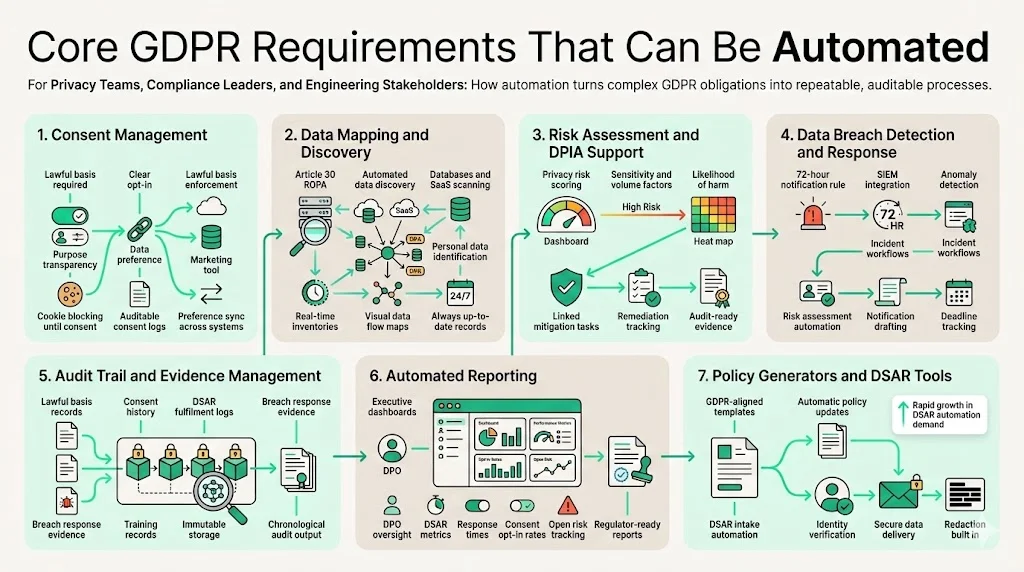
Core GDPR Requirements That Can Be Automated
1 Consent Management
Under the GDPR, processing personal data requires a lawful basis. Consent must be freely given, specific, informed and unambiguous. The controller must inform individuals of the purpose and their right to withdraw consent. Automation tools enforce consent choices across websites and applications, block non‑essential cookies until opt‑in, and maintain auditable logs of when and how consent was obtained. They also synchronise consent status across CRM, marketing platforms, and analytics stacks to ensure marketing campaigns respect user preferences.
2 Data Mapping and Discovery
Article 30 of the GDPR requires organisations to maintain records of processing activities, describing data categories, purposes, recipients, and storage periods. Automated data discovery tools scan databases, SaaS apps, file servers, and data warehouses to identify where personal data resides. They build real‑time inventories and create visual data flow maps that show how information moves between systems. This capability shortens the time to build an accurate ROPA—from weeks to minutes—and ensures records stay up to date as systems evolve.
3 Risk Assessment and Privacy Impact Tools
Prioritising privacy risks helps allocate resources efficiently. Platforms now incorporate risk scoring engines that evaluate processing activities based on sensitivity, volume, and the likelihood of harm. Some tools integrate with security scanners to map vulnerabilities to processing records. Dashboards highlight high‑risk processes that need Data Protection Impact Assessments (DPIAs). Teams can link risk scores to mitigation tasks and track remediation progress, producing evidence for auditors.
4 Data Breach Detection and Response
GDPR Article 33 mandates notifying authorities within 72 hours of becoming aware of a personal data breach. Automated detection tools integrate with security information and event management (SIEM) systems, intrusion detection, and anomaly monitoring to spot unusual activities. When an incident triggers threshold conditions, the platform initiates a breach workflow: it records the incident, assesses risk, drafts notifications, and tracks deadlines. Automation ensures notifications are timely and accurate, reducing the risk of regulatory penalties.
5 Audit Trail and Evidence Management
For audits, organisations must prove that controls operate effectively over time. GDPR compliance involves demonstrating lawful bases, DSAR processing, breach response, and training. Audit trail software captures every action—when consent was recorded, when a DSAR was fulfilled, when a breach was reported—and stores it immutably. During audits, privacy teams can produce chronological evidence without digging through emails or spreadsheets.
6 Automated Reporting
Executive leadership and Data Protection Officers need visibility into compliance posture. Automated reporting modules compile metrics such as DSAR volumes, response times, consent opt‑in rates, and outstanding risks. Pre‑built templates support regulators‑required reports and internal dashboards. Continuous monitoring ensures reports remain current and reduces the end‑of‑quarter scramble.
7 Policy Generators and DSAR Tools
Privacy policies must reflect current data practices and regulatory changes. Policy generators use templates aligned with GDPR articles and local variants. They update clauses automatically when laws change, reducing legal overhead. DSAR tools automate the intake and fulfillment process: they verify identity, collect data across systems, redact sensitive information, and deliver responses securely. According to Termly’s research, DSAR software revenues were valued at $100 million in 2023 and are projected to reach $500 million by 2030, reflecting growing demand for automated solutions.
Step‑by‑Step: How to Automate GDPR Compliance
Step 1: Preparation
Preparation begins by mapping existing GDPR processes. Document how consent is collected, how DSARs are handled, who performs risk assessments, and how breaches are reported. Identify pain points: manual data discovery, inconsistent record‑keeping, or delayed notifications. Bring together stakeholders from legal, privacy, IT, security, and compliance. Alignment across these teams is crucial because automation touches systems under each group’s control.
Step 2: Discover and Classify Data
Deploy automated data discovery tools to scan databases, object storage, SaaS applications, and file repositories. Classify personal data based on sensitivity (e.g., names, email addresses, financial records, health information) and map it to processing activities. Build your first ROPA by recording categories of data subjects, purposes, recipients, and storage periods. Assign ownership for each processing activity so accountability is clear.
Step 3: Automate Consent and DSAR Workflows
Implement consent management modules on websites and mobile apps. Configure cookie banners and preference centres to collect explicit opt‑in. Integrate with marketing and analytics platforms so consent status propagates automatically. For DSARs, deploy an intake form that authenticates users, categorises request types (access, deletion, rectification), and triggers automated searches across systems. Set up workflow routes: legal reviews for complex cases, IT for deletion, security for redactions. Ensure responses are logged and delivered within the one‑month timeframe.
GDPR automation is most effective when it enforces real security controls.
Share your work email and see how automated compliance maps to security outcomes.
Step 4: Automate Risk Assessments
Use risk assessment tools to evaluate processing activities for likelihood and impact. Consider data volume, sensitivity, cross‑border transfers, and processing purpose. Automated scoring helps prioritize DPIAs and mitigation efforts. Integrate risk findings into dashboards to track progress. Where high risks are identified, plan remediation and update the ROPA accordingly.
Step 5: Integrate Detection and Response
Connect SIEM, intrusion detection, and endpoint monitoring tools to an incident management platform. Define breach thresholds and create automated workflows that activate when triggers fire. The platform should generate an incident record, assign tasks, and draft notifications for supervisors and authorities. Templates should include time stamps and required information: nature of breach, categories of affected data, potential consequences, and mitigation measures. Automated notifications ensure the 72‑hour window is met.
Step 6: Continuous Monitoring and Reporting
Schedule automated scans to update data inventories and consent logs. Set up dashboards that display metrics on DSAR volumes, response times, outstanding risks, and breach incidents. Provide leadership with regular reports, highlighting trends and potential bottlenecks. Integration with ticketing systems can trigger remediation tasks when metrics exceed thresholds, ensuring continuous improvement.
Step 7: Validate and Refine
Automation isn’t “set and forget.” Regularly test workflows. Conduct mock DSAR exercises and breach simulations. Review audit logs for completeness and accuracy. Use outcomes of internal audits and external assessments to refine configurations. Update the ROPA when new systems are added or processing activities change. Train staff to understand the automated tools and the underlying compliance obligations.
Practical Examples of GDPR Automation Tools
Automation solutions vary widely. When assessing options, group them according to functionality:
-
Consent Management Platforms. These tools create cookie banners, manage granular consent preferences, enforce opt‑in before tracking, and maintain logs. They often support multiple regulations (GDPR, CCPA, LGPD) and integrate with tag managers. Examples include OneTrust, TrustArc, Usercentrics, and ConsentManager. Look for modules that synchronise preferences across all customer touchpoints and provide A/B testing of consent banners.
-
Data Mapping & Discovery Tools. Solutions like Collibra, BigID, and Securiti connect to databases, cloud providers, SaaS applications, and data lakes. They classify personal data (PII, ePHI) and build dynamic inventories. They also generate Article 30 records automatically and provide visual data flows. Effective tools reduce data mapping from weeks to minutes, as research shows an improvement of 95% when compared to manual discovery.
-
Risk & Compliance Automation Suites. Platforms such as Drata, Vanta, Scrut Automation, and Sprinto offer integrated compliance management. They map controls across GDPR, SOC 2, ISO 27001, and HIPAA. Features include automated evidence collection, continuous monitoring of controls, risk scoring, DPIA templates, and audit trail storage. These suites shorten the time to certification and reduce internal effort.
-
Breach Detection & Incident Workflow Tools. Tools like Splunk, Rapid7, and Microsoft Sentinel integrate security signals and orchestrate incident response. When they detect anomalies, they trigger privacy workflows for breach assessment, classification, notification, and remediation. Some platforms embed generative AI to draft notification letters and update regulators automatically.
-
Reporting & Policy Tools. Solutions such as Confluence (with compliance plug‑ins), Termly, and Legito generate privacy policies and produce compliance reports. They track regulatory updates and adjust policy language accordingly. Automated report generators produce metrics for leadership, auditors, and regulators in structured formats, reducing manual spreadsheet work.
Konfirmity partners with enterprise clients to evaluate these tools. Our experience shows that integrated suites deliver greater value when they connect with existing DevSecOps and engineering pipelines. However, no single tool solves everything—human expertise is essential for interpreting outputs and tailoring them to each organisation’s risk profile.
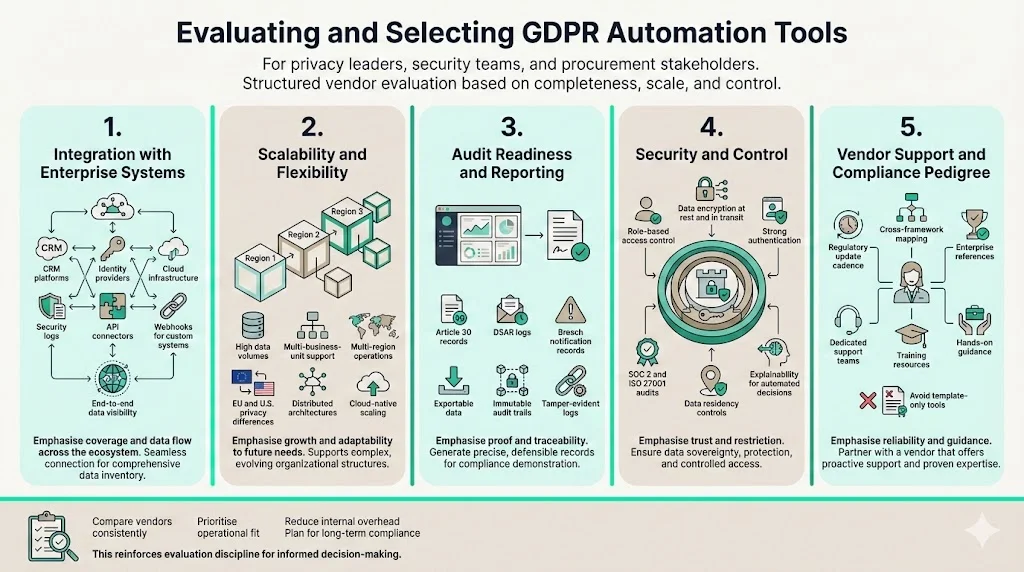
Evaluating and Selecting GDPR Automation Tools
When choosing automation solutions, consider the following criteria:
1 Integration with Enterprise Systems
Tools must connect to CRM platforms (e.g., Salesforce, HubSpot), identity providers (Okta, Azure AD), cloud services (AWS, GCP, Azure), and security logs. Integration breadth determines how complete the data inventory will be and how well consent choices propagate. Ask vendors whether they support API connectors and webhook integrations for custom systems.
2 Scalability and Flexibility
Scalability and flexibility matter because enterprises grow; tools should handle increasing data volumes, additional business units, and multi‑region operations. Look for solutions that support distributed architectures and provide configuration options for geographic differences (e.g., EU vs U.S. privacy laws). Cloud‑native platforms with microservices architectures often scale better than monolithic deployments.
3 Audit Readiness and Reporting
Assess whether the tool generates standard reports (Article 30 records, DSAR logs, breach notifications) and whether you can export data for custom analysis. Real‑time dashboards should allow you to track metrics like DSAR turnaround, consent opt‑outs, and risk scores. Audit trails should be immutable, with tamper‑evident logs.
4 Security and Control
Automation introduces new access paths. Ensure solutions have role‑based access control (RBAC), encryption of data in transit and at rest, and robust authentication. Evaluate whether the vendor has undergone independent audits (SOC 2, ISO 27001) and whether data is hosted within desired jurisdictions. Tools that leverage AI should include explainability features to justify decisions.
5 Vendor Support and Compliance Pedigree
Examine the vendor’s track record: Do they update their platform promptly when regulations change? Do they support cross‑framework control mapping? Are there customer references from enterprises of similar size and complexity? Vendors should offer dedicated customer success teams and training resources. Avoid platforms that simply provide templates without hands‑on guidance; you’ll end up spending internal hours customizing them.
Free evaluation kit
The Compliance Platform Evaluation & Migration Kit
A weighted scorecard, a 45-question vendor bank, a three-year total cost model, and ten red flags to compare GDPR automation platforms like the ones above before you sign a contract. Enter your work email and we'll send the kit.
Risks and Limitations of Automation
Automation is not a silver bullet. Several areas require human judgement:
-
Nuanced legal decisions. Determining lawful bases, balancing legitimate interests, or handling complex cross‑border transfers often requires counsel. Tools can flag issues but cannot replace legal analysis.
-
Interpreting context. DSAR fulfillment might involve redacting information that could reveal trade secrets or personal data about third parties. Automated redaction may miss nuances.
-
Change management. Introducing automation alters workflows. Employees need training to use new tools correctly and to trust automated outputs. Without buy‑in, teams may revert to manual processes.
-
False sense of security. Automated risk scores or breach detectors may not catch every scenario. Organisations must maintain manual oversight, perform regular audits, and adjust thresholds.
-
Data quality issues. Automation depends on clean data and accurate integrations. Duplicate records, misconfigured systems, or outdated mapping can produce misleading results.
Best Practices for Enterprise GDPR Automation
-
Start with high‑impact areas. Prioritise automating consent management and DSAR handling, where the volume and regulatory visibility are highest. This delivers immediate efficiency gains and reduces risk.
-
Maintain human oversight. Use automation to execute routine steps, but keep legal and privacy experts involved in complex cases. Regularly review automated outputs and fine‑tune algorithms based on findings.
-
Align privacy with security and engineering. Privacy is intertwined with security, operations, and product development. Establish cross‑functional governance groups to oversee automation initiatives. Integrate privacy controls into DevSecOps pipelines to catch issues earlier.
-
Validate continuously. Run periodic penetration tests, DSAR drills, and breach simulations. Compare logs from automated systems with manual spot checks. Engage external auditors to assess program maturity.
-
Document everything. Even with automation, documentation remains essential. Keep policies, ROPA, DPIAs, and training materials updated. Use automated tools to generate draft documents, then review them for accuracy.
-
Embrace a risk‑based mindset. Not all compliance obligations carry equal risk. Assess where processing activities intersect with sensitive data or high‑risk individuals. Focus automation on areas with the highest potential impact.
FAQs
Repetitive tasks such as consent logging, cookie management, data inventory creation, DSAR intake and fulfilment, breach detection workflows, and audit trail generation can all be handled by automation. Data mapping tools continuously scan systems to produce records of processing activities, while consent platforms synchronise user preferences across systems. Automated reporting modules compile metrics for regulators and internal stakeholders.
No. Automation speeds up routine workflows and reduces manual errors, but decisions about lawful bases, data minimisation, or cross‑border transfers still require legal expertise. Tools can flag when a DPIA is needed or when data is being processed without consent, but they don’t interpret the nuances of the GDPR or case law. Keep legal counsel involved in policy design and escalation paths.
Consent management platforms display opt‑in banners, collect and store consent choices, and enforce those preferences in real time. They ensure that non‑essential cookies are blocked until users consent and provide dashboards to monitor opt‑in and opt‑out rates. Logs include time stamps and proof of the consent event, demonstrating that the user’s agreement was informed and unambiguous.
Key features include deep integration with existing systems, scalability across regions, detailed audit trails, automated breach detection and notification, role‑based access, encryption, and vendor support. Tools should produce Article 30 reports, DSAR logs, and breach notifications automatically, while offering APIs for custom workflows. Evaluate vendors based on their compliance certifications and ability to map controls across frameworks.
Regulators focus on outcomes—are individuals’ rights protected, and are obligations met? Automation does not absolve organisations of responsibility, but it enhances accountability by creating consistent, auditable processes. Authorities expect organisations to maintain records of processing, respond to DSARs within one month, and notify breaches within 72 hours. Automation helps meet these requirements and produces evidence for audits. However, regulators still assess overall compliance, including human oversight and organisational accountability.
Pair automation with human-led compliance
Book a demo and we'll show how Konfirmity combines automated evidence collection with a CISO-led team so nothing falls through the gaps.
Book a demo
Conclusion
GDPR compliance is not a one‑time project but an ongoing commitment to protecting personal data and demonstrating accountability. As fines mount—€1.2 billion in 2024 alone—and request volumes surge, manual processes crumble under the weight. GDPR automation tools offer a path forward by streamlining consent management, data discovery, risk assessments, breach detection, DSAR handling, audit logging, and reporting. When implemented thoughtfully, automation reduces manual labour, accelerates response times, lowers breach costs by millions, and delivers real‑time visibility.
Yet automation is most effective when paired with human expertise. Nuanced decisions, contextual analysis, and change management require experienced practitioners. Konfirmity’s human‑led managed service embodies this balance. We implement controls within your stack, run your program year‑round, and keep you audit‑ready across SOC 2, ISO 27001, HIPAA, and GDPR. Typical SOC 2 readiness drops from 9–12 months to 4–5 months, and internal effort falls from 550–600 hours to under 70 hours per year. You can run your own ROI estimate to see what that means for your organisation. After supporting over 6,000 security audits, we know that durable security—not superficial paperwork—drives sustainable compliance.
Enterprises seeking to sell into regulated industries need to show that their privacy program can withstand scrutiny. Automation can transform compliance from a cost centre to a competitive advantage. By starting with security and arriving at compliance, organisations build trust with buyers, regulators, and consumers alike.