

In the current enterprise market, security is no longer a technical detail discussed after the contract is signed. It is the gatekeeper. Whether you are selling SaaS platforms, healthcare solutions, or data processing services, your enterprise buyers will demand proof of security before they issue a purchase order. For high-growth companies, the friction point in the sales cycle is almost always the security questionnaire or the request for a SOC 2 Type II report.
The financial stakes are clearer than ever. With the average cost of a data breach in the US reaching a record $10.22 million in 2025, enterprise buyers are prioritizing vendor risk management above nearly all else.
The traditional method of achieving compliance—hiring a consultant for a point-in-time assessment, filling out spreadsheets, and scrambling to gather screenshots right before an audit—is broken. It is slow, error-prone, and distracting for engineering teams who should be building products. More importantly, it often results in "compliance debt," where controls exist on paper but fail in reality.
This is where SOC 2 automation tools enter the conversation. These platforms promise to streamline the evidence collection process, monitor cloud infrastructure, and reduce the manual burden on your team. However, there is a distinct difference between buying a tool and building a durable security program.
At Konfirmity, we have supported over 6,000 security audits as a team with 25+ years of combined expertise. We see a recurring pattern: companies purchase software hoping it will solve their compliance problems, only to realize that a tool cannot make risk decisions or design controls. While automation is critical for scalability, it must be paired with human expertise to be effective. This guide details how to build a program that satisfies auditors and accelerates enterprise deals.
What SOC 2 Compliance Is
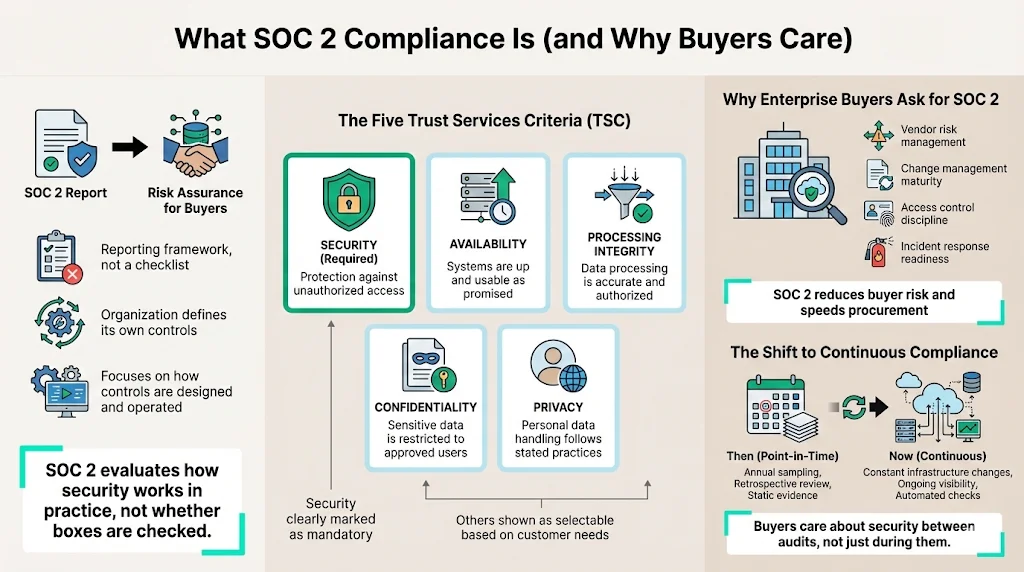
SOC 2 (Service Organization Control 2) is an auditing procedure developed by the American Institute of CPAs (AICPA). Unlike rigid checklists such as PCI-DSS, SOC 2 is a reporting framework. It requires a service organization to define its own controls based on five Trust Services Criteria (TSC):
- Security (Common Criteria): The system is protected against unauthorized access. This is the only mandatory criterion.
- Availability: The system is available for operation and use as committed or agreed.
- Processing Integrity: System processing is complete, valid, accurate, timely, and authorized.
- Confidentiality: Information designated as confidential is protected.
- Privacy: Personal information is collected, used, retained, disclosed, and disposed of in conformity with the entity’s privacy notice.
For enterprise buyers, a SOC 2 report is a risk management asset. When a Fortune 500 company assesses a vendor, they are looking for assurance that the vendor will not be the cause of a data breach. They want to see that you have a mature approach to change management, access control, and incident response.
The Shift to Continuous Compliance
Historically, audits were retrospective. An auditor would arrive once a year, look at a sample of changes, and issue a report. Today, the expectation has shifted. Modern infrastructure changes hourly. Buyers want to know that you remain secure between audit periods. This creates a compliance management need that manual processes cannot support. You cannot manually check AWS configurations or employee laptop encryption status every day. This operational reality drives the adoption of automation.
Why Automation Matters
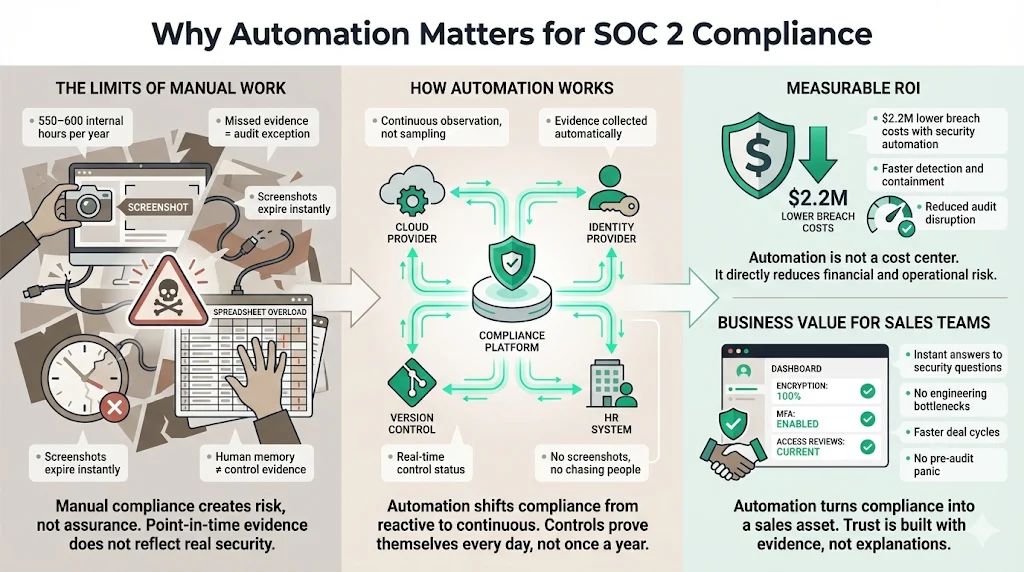
Manual compliance is a liability. Relying on humans to manually capture evidence (e.g., taking screenshots of firewall rules or user lists) introduces massive inefficiency and risk.
The Limits of Manual Work
- Resource Drain: We estimate that a self-managed SOC 2 preparation without automation consumes between 550 and 600 internal hours annually. Industry data supports this, with reports indicating that compliance tasks can consume thousands of hours annually across larger organizations if left unmanaged.
- Human Error: A missed evidence upload or a forgotten access review can result in a "qualified opinion" (a fail) or an exception in your final report.
- Static Evidence: A screenshot from June proves nothing about security in October.
The Role of Automation Automation changes the operating model by shifting from periodic sampling to continuous observation. SOC 2 automation tools connect directly to your tech stack—your cloud provider (AWS, GCP, Azure), identity provider (Okta, Google Workspace), version control system (GitHub, GitLab), and HR system (Rippling, Gusto).
The ROI is measurable. Organizations that deploy security AI and automation extensively save an average of $2.2 million in breach costs compared to those that do not, primarily due to faster identification and containment of threats.
Business Value for Sales For sales teams, the value is speed. When a prospect asks, "Do you encrypt data at rest?" you do not need to ask engineering. You have a dashboard showing 100% encryption coverage across all production databases. This immediate visibility builds trust. Furthermore, automation ensures you remain ready year-round, eliminating the "pre-audit panic" that freezes product development for weeks every year.
Key Requirements for SOC 2 Automation
To build a program that stands up to scrutiny, you must align your automation strategy with specific SOC 2 requirements. Below are the core areas where automation yields the highest return on investment.
1) Compliance Management
The foundation of the program is the management of the audit itself. Automation platforms serve as the system of record. Instead of scattered Google Drive folders, you have a centralized hub where controls are mapped to the Trust Services Criteria. This allows you to see exactly which controls satisfy the "Security" criteria and which apply to "Availability." It creates a single source of truth for the auditor.
2) Automated Controls
The most powerful feature of modern platforms is the ability to turn a policy into a testable logic check.
- Requirement: All production code must be reviewed.
- Automation: The tool connects to GitHub, scans branch protection rules, and verifies that "Require pull request reviews before merging" is enabled for the main branch. If someone disables this rule, the system triggers an alert.
- Evidence: The system logs a pass/fail result daily, creating a chain of evidence that covers the entire observation period.
3) Risk Assessment
SOC 2 requires a formal risk assessment. You must identify threats (e.g., unauthorized database access, ransomware, insider threat) and analyze their likelihood and impact. Automation tools often include risk registers with pre-populated threat libraries relevant to SaaS environments. While the tool can suggest risks, a human expert must validate the scoring. At Konfirmity, we often see companies accept default risk scores that do not reflect their actual environment, which auditors will challenge.
4) Policy Management
You need roughly 20–30 written policies (Information Security Policy, Acceptable Use, Incident Response, etc.). Automation streamlines the lifecycle of these documents:
- Creation: Providing templates based on best practices.
- Distribution: Tracking that every employee has read and acknowledged the policy.
- Review: Alerting the owner when a policy is due for its annual review. This replaces the spreadsheet typically used to track who signed what.
5) Access Control
Access control is the most common source of audit exceptions. Automation is essential here. By integrating with your Identity Provider (IdP), the system can:
- Flag accounts that do not have MFA enabled.
- Identify dormant accounts (users who haven't logged in for 90 days) that should be deactivated.
- Compare the employee roster in the HR system against the user list in AWS to detect terminated employees who still retain access. This "offboarding reconciliation" is a critical control that is nearly impossible to perfect manually.
6) Data Encryption
Auditors require proof that data is encrypted at rest and in transit.
- At Rest: The tool scans AWS RDS, S3 buckets, and EBS volumes to verify encryption is enabled. It also checks laptops via MDM (Mobile Device Management) integrations like Jamf or Kandji to ensure disk encryption (FileVault/BitLocker) is active.
- In Transit: Configuration checks on load balancers ensure TLS 1.2 or higher is enforced.
7) Vulnerability Scanning
SOC 2 requires you to monitor for system vulnerabilities. Automation tools manage this by:
- Orchestrating scheduled scans (e.g., weekly or monthly).
- Integrating with container scanning tools (like AWS ECR scanning) to flag vulnerabilities in production images.
- Tracking the "Time to Remediate." If your policy states critical vulnerabilities must be patched within 30 days, the tool tracks compliance against this SLA.
8) Security Monitoring & Incident Response
You must demonstrate the ability to detect and respond to incidents. Automation collects evidence that:
- CloudTrail or audit logs are enabled and tamper-protected.
- GuardDuty or equivalent threat detection services are active.
- Incidents are logged in a ticketing system (Jira/Linear). The tool does not replace the Incident Response team, but it proves the team has the data they need to work.
9) Vendor Management
Your vendors (subservice organizations) introduce risk. You are responsible for reviewing their security. Automation platforms help by:
- Maintaining a vendor inventory.
- Sending automated requests to vendors for their SOC 2 reports or security certificates.
- Reminding you to review those reports annually.
10) Audit Tracking and Report Generation
The end goal is the audit. SOC 2 automation tools simplify the interaction with the CPA firm. Instead of emailing zip files, you grant the auditor restricted access to the platform. They can view the controls, inspect the evidence, and sample populations directly. The tool then compiles this data into a format that accelerates the auditor's drafting of the final report.
11) Continuous Monitoring
This is the operational shift. Continuous monitoring means the system runs checks every hour or day. If a developer accidentally opens a security group to the public internet (0.0.0.0/0) on port 22, the tool flags it immediately. This allows remediation to happen in minutes, not months later during a pre-audit scramble. It aligns with the 91% of companies that plan to implement continuous compliance in the coming years.
SOC 2 automation tools work best when security comes before the workflow.
Share your work email and build a continuous compliance program that holds up year-round.
Step-by-Step Approach to SOC 2 Automation
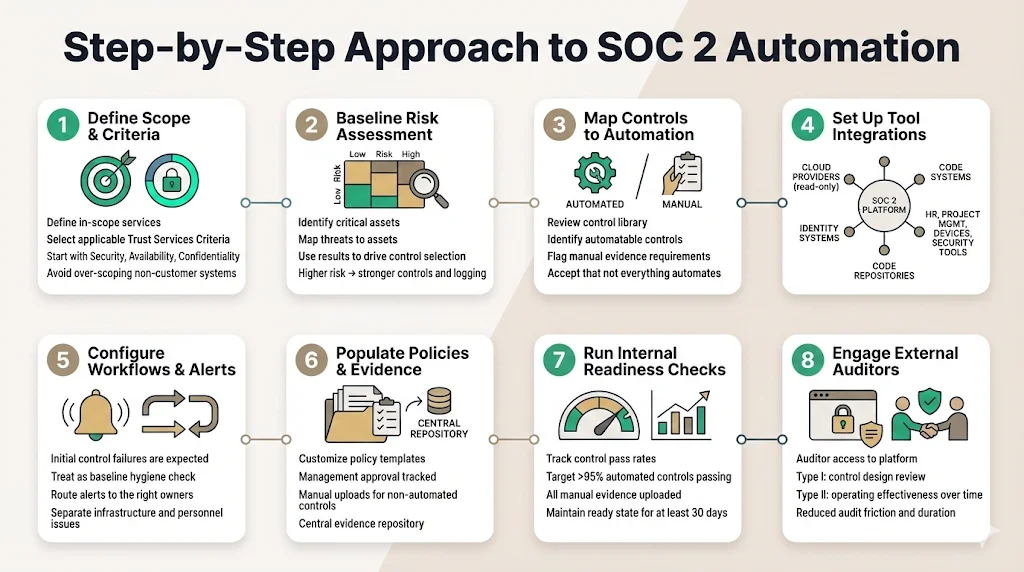
Implementing automation is not instantaneous. It requires a structured process to ensure the tool reflects your actual security posture.
Step 1: Define Scope & Criteria
Before connecting integrations, define the scope. Which services are included? Which Trust Services Criteria (TSC) apply? Most B2B SaaS companies start with Security, Availability, and Confidentiality. Avoid "over-scoping" by including systems that do not touch customer data, as this increases audit complexity and cost without adding value.
Step 2: Baseline Risk Assessment
Use the automated risk assessment modules to establish a baseline. Identify your critical assets (customer databases, code repositories, encryption keys). Map threats to these assets. This exercise informs which controls are necessary. If you determine that "Insider Threat" is high risk, you must implement stricter access controls and logging.
Step 3: Map Controls to Automation Capabilities
Not every SOC 2 control can be automated. Physical security of your office, for example, usually requires a manual upload of a floor plan or badge access log. In this step, you review the library of controls and determine which ones can be satisfied by SOC 2 automation tools (e.g., cloud configuration) and which require human process (e.g., quarterly management meetings).
Step 4: Set Up Tool Integrations
Connect your infrastructure.
- Cloud: AWS/GCP/Azure (via Read-Only roles).
- Identity: Google Workspace/Okta/Azure AD.
- Code: GitHub/GitLab/Bitbucket.
- HR: Rippling/Gusto/BambooHR.
- Project Management: Jira/Linear/Asana.
- Device Management: Jamf/Kandji/Intune.
- Security: CrowdStrike/SentinelOne.
Step 5: Configure Workflows & Alerts
Once data flows in, you will likely see a wave of "failing" controls. Do not panic. This is your baseline hygiene check. You might find 50 S3 buckets lacking logging or 10 employees without MFA. Configure the alerts so the right people are notified. Send infrastructure alerts to the DevOps lead and personnel alerts to the HR or IT admin.
Step 6: Populate Policy & Evidence Repositories
Draft your policies using the provided templates, customize them to your reality, and have management approve them. Upload these to the platform. For non-automated controls (like "Board of Directors Minutes"), upload the artifacts manually.
Step 7: Run Internal Readiness Checks
Use the platform’s dashboard to track progress. You are ready for the external audit only when your automated controls show a passing rate (typically >95%) and all manual evidence is uploaded. We recommend running in this "ready" state for at least 30 days before the official observation period begins to ensure stability.
Step 8: Engage External Auditors
Invite the auditor to the platform. They will review the design of your controls (Type I) or the operating effectiveness over time (Type II). Because the evidence is structured and linked, the auditor spends less time asking questions and more time verifying facts, which often reduces audit fees and duration. Before you choose a platform, model your SOC 2 compliance spend. Note that for Type II, the standard observation period is 3 to 12 months.
Templates & Assets to Support SOC 2 Automation
Automation requires fuel. That fuel comes in the form of policies and structured data.
Compliance Checklists
While software handles the "how," checklists handle the "what." A robust checklist helps project managers ensure no steps are missed. It should cover:
- Scoping: Defining the boundary of the system.
- Onboarding: Background checks, confidentiality agreements, security training.
- Offboarding: Revoking access, returning assets.
- Vendor Due Diligence: Reviewing critical vendors.
- Incident Response: Annual testing of the IR plan (tabletop exercises).
Policy Templates
Policies are the "laws" of your organization. Writing them from scratch is inefficient. Good automation platforms provide templates for:
- Access Control Policy: Defines how access is granted and revoked.
- Change Management Policy: Defines how code moves from development to production.
- Data Classification Policy: Defines public, internal, and confidential data.
- Business Continuity / Disaster Recovery Policy: Defines how you recover from outages.
- Vendor Risk Management Policy: Defines how you select 3rd parties.
Report Templates
Ultimately, you need reports for stakeholders.
- Gap Analysis Report: Shows where you are versus where you need to be.
- Corrective Action Plan: Details how you will fix gaps.
- User Access Review Evidence: A snapshot showing management reviewed user permissions.
How to Evaluate SOC 2 Automation Tools
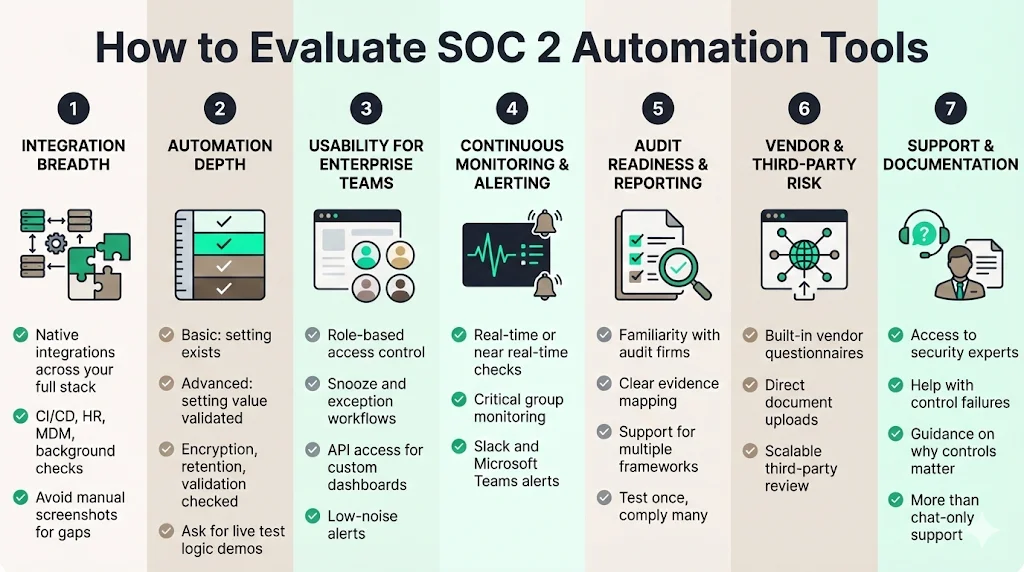
The market is crowded with vendors claiming to automate 90% of your compliance. The reality is often different. When selecting a tool, use the following criteria to cut through the marketing noise.
1) Integration Breadth
The value of the tool correlates directly to the number of native integrations it supports. If you use a niche CI/CD tool or a specific HR platform that the vendor does not support, you are back to manual screenshots. Ensure the tool covers your entire critical stack, including your MDM and Background Check providers.
2) Automation Depth
Not all "automation" is created equal. Some SOC 2 automation tools simply check if a setting exists. Better tools check the value of the setting.
- Basic: Checks if AWS CloudTrail is on.
- Advanced: Checks if CloudTrail is on, logs are encrypted, validation is enabled, and logs are retained for 365 days. Ask vendors for a demo of their specific test logic for your most complex controls.
3) Usability for Enterprise Teams
Your engineers will use this tool. If the interface is clunky or the alerts are noisy, they will ignore it. Look for:
- Role-Based Access Control (RBAC): Can you give developers access only to infrastructure controls?
- Snooze/Exception Workflows: Can you mark a control as "not applicable" or "snoozed" with a documented reason (e.g., a dev environment that doesn't need prod-level security)?
- API Access: Can you pull compliance data into your own dashboards?
4) Continuous Monitoring & Alerting
Does the tool scan once a day or in real-time? Real-time is preferred for critical security groups. Does it integrate with Slack or Microsoft Teams for alerts? You want alerts to go where your team works, not into an email inbox that nobody checks.
5) Audit Readiness & Reporting
Ask the vendor which audit firms are familiar with their platform. Auditors prefer platforms they know because it makes their job easier. Also, check if the tool supports other frameworks (ISO 27001, HIPAA, GDPR). You want to "test once, comply many" by mapping a single control (like MFA) to multiple frameworks.
6) Vendor & Third-Party Risk
Does the platform have a module for sending questionnaires to your vendors? Managing vendor risk via email is unscalable. The tool should allow vendors to upload their security docs directly to a portal.
7) Support & Documentation
This is the most overlooked factor. When a control fails and you don't know why, who do you call? Many software vendors offer only chat support. At Konfirmity, we believe this is insufficient. You need access to a dedicated security expert who understands why the control matters, not just how the software works.
Common Challenges & How Automation Helps
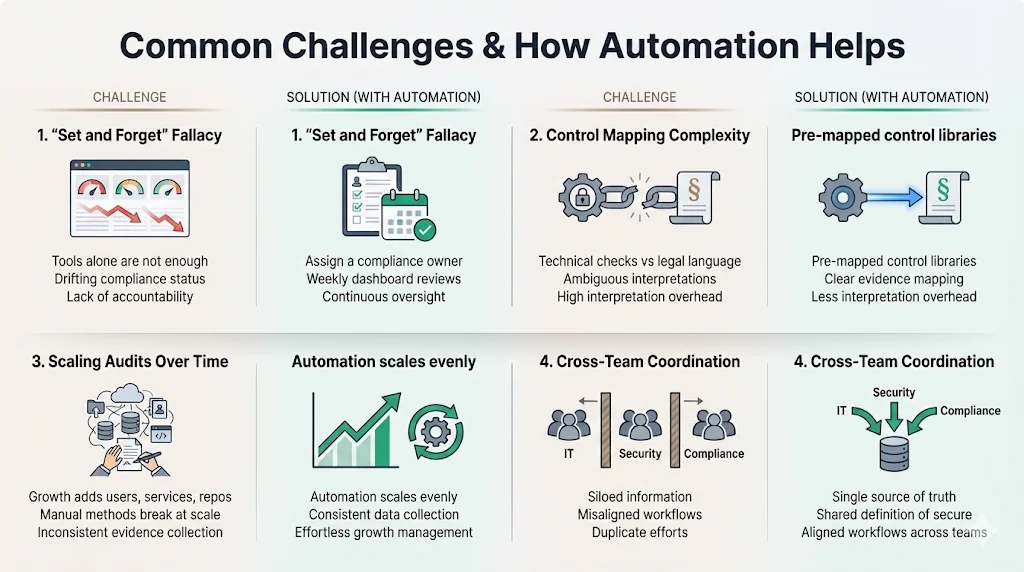
Even with the best tools, companies struggle. Understanding these pitfalls allows you to mitigate them.
Challenge 1: The "Set and Forget" Fallacy Companies often install a tool and think they are done. Six months later, they log in and see 40 failing controls because infrastructure changed.
- Solution: Automation provides the signal, but you need a process to react. Assign a "Compliance Owner" who reviews the dashboard weekly.
Challenge 2: Complexity of Mapping Controls Mapping a technical check (e.g., "S3 bucket encryption") to a vague legal requirement (e.g., "confidential data is protected") is difficult.
- Solution: Automation libraries come pre-mapped. This saves hundreds of hours of interpretation and debate.
Challenge 3: Scaling Audits Year-Over-Year Getting the first report is hard; maintaining it is harder. As you grow, you add more employees, more repos, and more microservices. Manual processes break at scale.
- Solution: Automation scales linearly. Monitoring 1,000 servers costs the same effort as monitoring 10. It brings consistency to evidence collection that manual teams cannot match.
Challenge 4: Coordinating Enterprise IT, Security, and Compliance These teams often work in silos. IT manages laptops, Security manages Cloud, Compliance manages policy.
- Solution: The platform becomes the collaboration layer. It forces teams to align on a single definition of "secure."
Conclusion
The demand for assurance in the enterprise supply chain will only increase. Your customers are under regulatory pressure, and they pass that pressure down to you. Implementing SOC 2 automation tools is no longer an "optional upgrade"—it is the baseline for doing business efficiently.
However, software alone is not a silver bullet. We have seen too many companies buy a subscription, connect their AWS account, and then fail their audit because they lacked the expertise to interpret the findings or design the underlying processes. Automation handles the data collection; humans must handle the governance.
At Konfirmity, we take an outcome-focused approach. Konfirmity is a security-driven compliance platform you can run self-serve or have fully managed, combining best-in-class automation with expert delivery. With the fully-managed service, we implement the controls, monitor the dashboards, remediate the gaps, and sit next to you during the audit. This managed delivery reduces the internal burden on your team by 75%, transforming compliance from a distraction into a durable competitive advantage.
Start with security. Build controls that actually protect your data. When you do that, compliance becomes a natural by-product, not a frantic yearly exercise.
FAQ
Q1. What exactly are SOC 2 automation tools?
These are software platforms that integrate with your technology stack (cloud, HR, identity providers) to automatically collect evidence, monitor security controls, and generate compliance reports, significantly reducing the manual effort required for SOC 2.
Q2. What tasks can be automated?
You can automate technical evidence collection (cloud configs, encryption status, backup verification), user access reviews (identifying missing MFA or terminated users), risk assessment scoring, policy distribution and tracking, and vendor security reviews.
Q3. Do automation tools replace auditors?
No. The tool prepares you for the audit and organizes the evidence. A licensed CPA firm must still perform the independent examination and issue the final SOC 2 report. The tool makes the auditor's job faster, which can lower audit fees.
Q4. How do these tools help with regulatory compliance?
They provide a structured framework to map your controls to regulations. They ensure consistency of evidence, prevent "evidence gaps" during the observation period, and present data in a format that auditors accept, reducing the risk of human error.
Q5. Can automation handle continuous monitoring?
Yes. This is their primary strength. Unlike manual sampling, automation platforms query your systems 24/7. They trigger immediate alerts if a control fails (e.g., an S3 bucket becomes public), allowing you to fix security issues in real-time rather than discovering them months later.







