

Most enterprise buyers now demand security assurance artifacts before they sign a contract. Relying on policies alone or filling out questionnaires by hand no longer works. Deals stall when a vendor cannot show that its controls actually operate and that evidence is current. This article offers a SOC 2 Tool Comparison drawn from frontline work – our team at Konfirmity has supported more than 6,000 security audits. The goal is to help CTOs, CISOs and security leaders understand why SOC 2 compliance matters and how to evaluate modern platforms. We will define SOC 2 and its Trust Service Criteria (TSC), explain why manual approaches are risky, describe step‑by‑step evaluation criteria, provide a side‑by‑side comparison of leading tools, walk through real scenarios, and share tips based on hard‑won experience. Along the way we will repeat our primary keyword SOC 2 Tool Comparison naturally and provide citations from authoritative sources.
What SOC 2 Compliance Is and Why Tools Matter
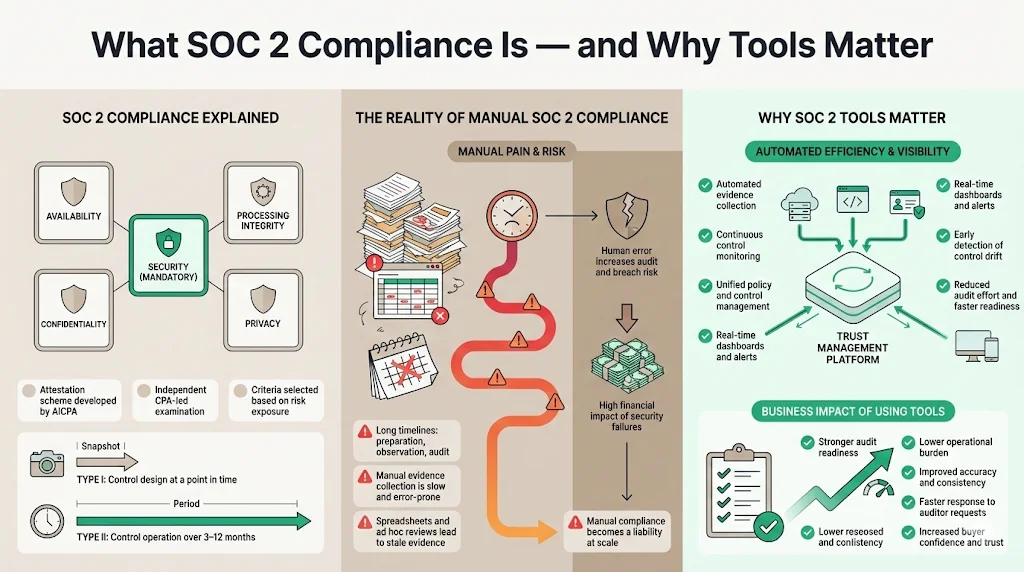
SOC 2 is an attestation scheme created by the American Institute of Certified Public Accountants (AICPA). It produces a report on the controls of a service organisation that are relevant to security, availability, processing integrity, confidentiality and privacy. The five Trust Service Criteria (TSC) are defined in the AICPA guide: Security (mandatory for all reports) ensures systems are protected; Availability confirms systems are ready for operation; Confidentiality protects designated confidential information; Processing Integrity ensures processing is complete, valid and timely; and Privacy ensures personal information is collected, used and retained according to commitments. Only security is mandatory; the other criteria are included based on the risks a vendor exposes. The illustration below summarises these categories.
Achieving SOC 2 compliance is not just a box‑ticking exercise. A Type I report assesses control design at a specific point in time, while a Type II report evaluates whether controls operate effectively over three to twelve months. For most organisations the process takes six to twelve months, including a preparation phase, an observation period and the audit itself. Manual evidence collection, spreadsheets and ad hoc access reviews are slow and error‑prone. A 2024 study reported that more than 12 percent of organisations still use paper‑based methods and spreadsheets, leading to inefficiencies and stale evidence. Scrut’s research shows that manual processes create bottlenecks and delays in the audit cycle. Human error also increases risk: the 2025 IBM Cost of a Data Breach report found the global average breach cost to be US$4.44 million, with U.S. breaches averaging US$10.22 million. Healthcare breaches remain the most expensive, costing US$7.42 million per incident and taking 279 days to contain. HHS’s penalty against Warby Parker for HIPAA violations illustrates the consequences of poor controls: the company paid US$1.5 million for failing to conduct a risk analysis and implement security measures. In this climate manual SOC 2 compliance is a liability.
Why tools matter: Modern SOC 2 tools automate evidence collection, continuously monitor controls, and unify policy management across frameworks. They reduce the manual burden of gathering logs, screenshots and access reviews, making it easier to prove that controls operate over time. These platforms also provide real‑time dashboards and alerts, so teams can remediate drift before an auditor arrives. With trust management becoming a strategic driver — 98 percent of leaders believe showcasing governance, risk and compliance (GRC) achievements increases customer trust — using the right tool is no longer optional. The SOC 2 Tool Comparison in this article will show how automation improves audit readiness, reduces effort and enhances credibility.
How to Evaluate SOC 2 Tools (Step‑by‑Step)
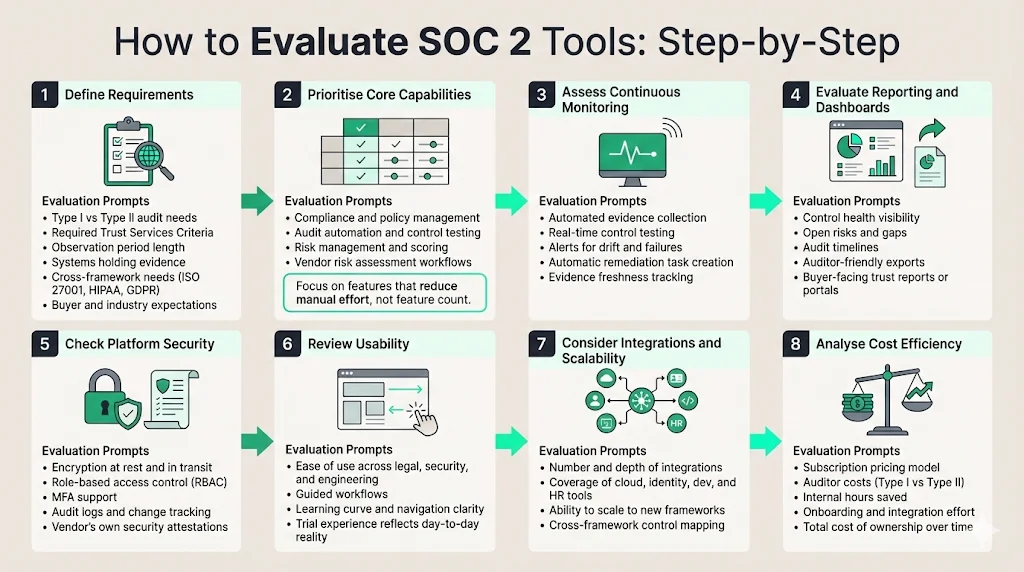
Selecting a SOC 2 platform requires more than reading marketing copy. The following eight steps, informed by industry standards and our delivery experience, provide a practical checklist.
Step 1: Define requirements
-
Scope and audit type. Decide whether you need a Type I (point‑in‑time) or Type II (operating effectiveness) report. Type II audits typically require at least a three‑month observation window and can last up to twelve months. Make sure you understand which Trust Service Criteria apply based on the data you process.
-
Integration needs. List the systems where evidence resides: cloud platforms (AWS, Azure, Google Cloud), identity providers (Okta), ticketing systems (Jira), HR platforms, code repositories and endpoint detection tools. The number and depth of integrations offered by a tool will determine how much evidence can be collected automatically.
-
Buyer expectations. Large enterprises and healthcare customers often demand Type II reports and may require additional frameworks such as ISO 27001, HIPAA or GDPR. Understand whether you need cross‑framework support and whether the platform can generate customer‑facing reports.
Step 2: Prioritize core capabilities
The heart of any SOC 2 Tool Comparison lies in understanding which features matter most.
-
Compliance management. Look for tools that centralise policies, controls and audit workflows. Secureframe offers prebuilt policy templates for SOC 2, ISO 27001, HIPAA and GDPR, along with versioning and personnel management. Hyperproof centralises risks, control frameworks and evidence into a single workspace, although large control libraries can become cluttered. Scrut centralises risk and compliance management across more than 50 frameworks and provides daily checks against 230+ CIS benchmarks.
-
Audit automation and controls tracking. Drata automates evidence collection and real‑time control testing, giving teams continuous visibility into compliance health. Vanta automates up to 90 percent of audit preparation and offers more than 375 integrations, with AI agents that upload policies and classify documents. Secureframe runs daily automated tests and sends real‑time alerts for configuration drift. Hyperproof’s Hypersyncs automate evidence collection from platforms like AWS and GitHub, though coverage of niche systems is limited. AuditBoard uses AI to automate manual tasks, generate reports and provide insights, and customers report saving 1,400 hours annually.
-
Security assessment and risk management. Many platforms now include risk registers and scoring. Hyperproof calculates control health based on testing, implementation, freshness, evidence and past‑due issues. Scrut performs daily monitoring of cloud and third‑party applications against hundreds of benchmarks, offering integrated incident management through SIEM and EDR tools. AuditBoard unifies risk, audit and compliance teams on one platform.
-
Vendor risk assessment. Vendor risk workflows are essential when subservice providers handle customer data. Secureframe includes vendor management with risk scoring and certificate expiry alerts. Vanta provides vendor risk intelligence and questionnaires. Scrut offers third‑party risk management to manage vendor questionnaires and unassessed vendors. Hyperproof includes custom fields and scopes to tag controls by vendor or subsidiary.
Step 3: Assess continuous monitoring capabilities
Continuous evidence collection shortens audit preparation. Drata emphasises real‑time visibility and continuous control testing. Vanta continuously monitors systems and automates over 1,200 compliance tests. Secureframe sends real‑time alerts when configurations drift or vendor certificates expire. Scrut performs daily cloud posture checks. Hyperproof’s freshness tracking flags when controls have not been tested or updated. Evaluate whether the tool can trigger alerts and automatically create remediation tasks.
Step 4: Evaluate reporting tools and dashboards
Internal teams need dashboards that show control health, open risks and upcoming audits. Hyperproof provides dashboards but often relies on external BI tools for deep analytics. Secureframe’s Trust Center allows vendors to share their compliance status with prospects, speeding sales cycles. Vanta offers a Trust Report to share compliance posture. Scrut’s dashboards show a holistic view of compliance posture and allow teams to drill down on policies, evidence and risks. Consider whether the platform exports reports in auditor‑friendly formats and whether it supports buyer‑facing documentation.
Step 5: Check security features
SOC 2 platforms handle sensitive evidence, so the security of the tool itself matters. Check for encryption at rest and in transit, role‑based access control (RBAC), multi‑factor authentication and audit logs. Policy versioning and change tracking are critical; Secureframe provides versioning and pre‑built policy templates. Ask vendors to explain their internal security controls and attestations (e.g., their own SOC 2 or ISO 27001 certifications).
Step 6: Review usability
Compliance teams span legal, security and engineering. An intuitive user interface reduces friction. Hyperproof reviewers praise its integration and dashboards but note a steep learning curve and cluttered navigation when dealing with large control libraries. Secureframe and Vanta are known for clean interfaces and guided workflows. Scrut offers guided workflows and clear dashboards, but some users mention limited customisation and syncing delays. Drata and AuditBoard offer user‑friendly dashboards with AI assistance. Run a trial to gauge ease of use for your team.
Step 7: Consider integration and scalability
Integration depth determines how much evidence can be collected automatically. Vanta boasts more than 375 integrations and automates over 1,200 tests. Secureframe connects to more than 150 tools including AWS, Azure, GitHub, Okta, Slack and Jira. Scrut has over 70 integrations and real‑time CIS benchmark checks. Hyperproof supports dozens of integrations with common enterprise apps but falls short compared to platforms with 200+ connectors. Drata and AuditBoard integrate with major cloud, identity and developer tools. Ensure the tool can scale to new frameworks; AuditBoard unifies multiple frameworks and automates cross‑mapping.
Step 8: Analyse cost efficiency
SOC 2 audit costs include software subscription fees and auditor fees. A 2025 Scrut article estimates Type I audits cost US$15 k–$40 k, while Type II audits run US$30 k–$80 k. Hyperproof pricing starts around US$12 k annually, with median contracts around US$40,355 and buyers paying US$22,928–$54,000. Vanta’s pricing starts at US$10 k per year and claims a 526 percent ROI. Some platforms charge per user, others per framework or per organisation. Evaluate total cost of ownership, including onboarding support and integration effort. Also consider the internal hours saved. AuditBoard customers report saving over 1,400 hours annually and reducing redundant controls by 64 percent. To put these figures against your own situation, model your compliance costs before committing to a platform.
Pick a compliance tool that strengthens security, not just your audit package.
Drop your work email and choose tools that build defensible security.
Side‑by‑Side Tool Comparison
The table below summarises key features of popular platforms. It is not exhaustive but covers the most requested tools for SOC 2 Tool Comparison.
| Tool | Compliance management | Audit automation & controls | Continuous monitoring | Integration capabilities | Reporting & dashboards | Scalability & frameworks | Cost range |
|---|---|---|---|---|---|---|---|
| Konfirmity | End-to-end managed service, requires 5–6 hours per month, includes CISO and security analysts, renewal and internal audit management. | SOC 2 Type II readiness in 4–5 months, 75 internal hours, automatic control implementation (50%), 60% evidence auto-managed with reminders. | 24/7 control monitoring, anomaly alerts, monthly health checks, no missed control failures, on-time reports, ongoing internal audits. | Integrates with AWS, GCP, Azure, Google Workspace, Azure AD, for asset tracking, vulnerability detection, staff onboarding, vendor alignment. | Real-time tracking for onboarding, training, device compliance, risk assessments, control progress, reminders for compliance updates. | Supports ISO 27001, SOC 2 Type II, HIPAA, PCI DSS, GDPR and MAS TRM. Controls can be mapped across frameworks with risk alignment. | Subscription-based pricing, includes platform use, managed services, and support, billed in advance, no hidden fees. |
| Drata | Centralises policies and controls; supports multiple frameworks | Automated evidence collection and real-time control tests; MTTR dashboards | Continuous control monitoring; supports TISAX and ISO 27018 | Integrates with major cloud, identity, and developer tools; 22+ frameworks | Real-time dashboards and audit-ready reports | Scales across SOC 2, ISO 27001, HIPAA; no-code automation workflows | Subscription pricing varies by scope; audit fees extra |
| Vanta | Policy management with content library for 27 frameworks | Automates up to 90% of audit prep; AI agent for policy uploads and classification | Continuous control monitoring; 1,200+ automated tests | 375+ integrations across cloud, identity, HR, ticketing | Trust Reports for external sharing | Supports SOC 2, ISO 27001, HIPAA, PCI DSS, GDPR | Starts around US$10k/year; reported 526% ROI over 3 years |
| Secureframe | Prebuilt policy templates, versioning, asset and personnel tracking | Daily automated tests with alerts for drift and vendor certificate expiry | Continuous monitoring across integrations | 150+ integrations including AWS, Azure, GitHub, Okta, Slack, Jira | Trust Center for sharing compliance status | Uses common controls mapping to reduce duplicate effort | Subscription pricing varies; typical spend not disclosed |
| AuditBoard | Unified platform for audit, risk, and compliance teams | Automated evidence collection and report generation; cross-framework mapping | Real-time risk and control dashboards | Integrates across the organisation’s compliance stack | Audit and management reports; customers report 1,400+ hours saved | Scales across SOC 2, ISO 27001, NIST with AI-driven guidance | Enterprise pricing; value tied to hours saved |
| Hyperproof | Central workspace for risks, controls, and evidence | Hypersync automates evidence from cloud and code repos | Control freshness tracking with alerts | Dozens of integrations; custom scopes and fields | Control health dashboards; deeper analysis via external BI | Suited for complex enterprise setups; steep learning curve | Starts ~US$12k; median ~US$40k depending on features |
| Scrut | Central risk and compliance management across 50+ frameworks | Automated evidence collection; removes 70%+ manual work | Real-time monitoring with daily checks across 230+ benchmarks | 70+ integrations including SIEM and EDR tools | Dashboards for risks, vendors, and audit timelines | Built-in policy library and corrective action tracking | Pricing not public; positioned as single, transparent pricing |
| Sprinto | Positioned as a simple alternative focused on fast setup | Automates ~90% of evidence collection | Continuous checks built into workflows | 200+ integrations | Standard compliance dashboards | Designed for quick SOC 2 and ISO rollouts | Pricing not detailed |
Tool Evaluation in Practice (Example Scenarios)
Scenario A: Preparing for a first SOC 2 audit
A startup selling into healthcare needs a SOC 2 Type II report to close an enterprise deal. The team begins by defining scope and selecting the security and confidentiality TSC. Using a tool like Scrut or Drata, they map existing controls to SOC 2 criteria, identify gaps and pull evidence from AWS, Azure and Jira automatically. Automated evidence collection eliminates over 70 percent of manual tasks, while continuous monitoring ensures that logs, access reviews and change‑management records remain up‑to‑date. The platform’s dashboards show control health and highlight tasks for developers, such as implementing multi‑factor authentication and encryption. After a three‑month observation period, the startup works with an independent CPA to finalise the audit. Preparation and observation combined take roughly six to twelve months, but automation reduces internal effort from hundreds of hours to manageable weekly check‑ins.
Scenario B: Maintaining compliance post‑audit
A mid‑market vendor has completed its first SOC 2 Type II audit. To remain audit‑ready, the compliance team uses a platform with continuous monitoring (e.g., Drata or Secureframe). The tool runs daily tests, alerts the team about configuration drift and vendor certificate expiry, and automatically collects evidence for future audits. Access reviews are scheduled at regular intervals through Hyperproof’s UAR module, replacing hundreds of manual steps. Real‑time dashboards show risk scores and open issues. When the company onboards a new vendor, Secureframe’s vendor management workflow collects questionnaires and scores risk. This continuous evidence stream ensures that the next SOC 2 report can be issued quickly, preventing sales delays and avoiding stale evidence.
Scenario C: Multi‑framework compliance
An enterprise sells into regulated sectors requiring SOC 2 Type II, ISO 27001 and HIPAA attestation. The team selects AuditBoard or Secureframe, which can map a single control across multiple frameworks. They leverage built-in policy libraries for ISO 27001 and HIPAA, create a Statement of Applicability, and integrate risk registers into the platform. As noted in OneTrust’s comparison, ISO 27001 certification covers about 83 percent of NIST CSF requirements, while NIST compliance covers 61 percent of ISO 27001. Cross‑mapping reduces duplication: controls like access management, encryption and incident response apply across SOC 2, ISO 27001 and HIPAA. The platform generates custom reports for each auditor and provides a Trust Center to share compliance status with customers. By unifying frameworks, the enterprise saves time and presents a coherent security posture to buyers.
Real‑World Tips for Tool Selection
-
Run proof‑of‑concept trials. Don’t rely on demos alone. Invite stakeholders from security, engineering and legal to test the tool for a few weeks. Evaluate how well integrations work, how intuitive the dashboards are and whether evidence collection covers your systems. Look for human‑led onboarding: platforms like Secureframe and AuditBoard provide guided setup and dedicated support.
-
Ask about audit support. The best vendors have partnerships with independent auditors and provide templates, checklists and dedicated support during the audit. Ask whether they will help you schedule observation periods, answer auditor questions and provide remediation advice.
-
Prioritise human‑led programmes. Software doesn’t design controls or perform risk analysis by itself. At Konfirmity we operate an end‑to‑end managed service that builds and runs your security programme. We don’t just advise — we execute. Our team has supported more than 6,000 security audits and draws on 25 years of combined expertise. We implement controls inside your stack and maintain continuous evidence, so that compliance is a natural result of good security.
-
Plan for growth. Choose a tool that can expand beyond SOC 2. If your roadmap includes ISO 27001, HIPAA or GDPR, ensure the platform offers policy templates, risk registers and cross‑framework mapping. As you add cloud services and new products, you’ll need additional integrations and scalability.
-
Consider total cost and effort. Budget for software subscriptions, audit fees and internal resources. Use our SOC 2 Tool Comparison to balance cost against features. Remember that a cheaper tool may require more manual work and extend the timeline. For example, Hyperproof’s median spend is around US$40 k, while Vanta may offer better ROI with automation.
Common Mistakes to Avoid
-
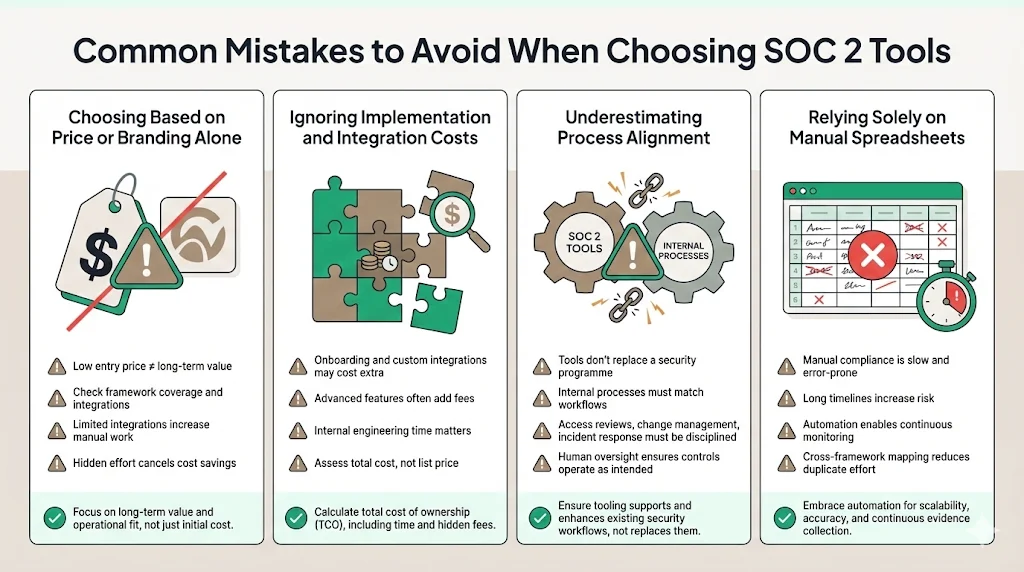
Choosing based on price or branding alone. A low entry price does not guarantee long‑term success. Evaluate whether the tool covers your required frameworks, has sufficient integrations and offers continuous monitoring. Platforms with fewer integrations may require manual evidence collection, negating cost savings.
-
Ignoring implementation and integration costs. Some tools charge extra for onboarding, custom integrations or advanced features. Also consider internal engineering time to connect systems and define controls.
-
Underestimating process alignment. Tools cannot replace a security programme. You must align internal processes—access reviews, change management, incident response—with the tool’s workflows. Without proper process discipline, automated evidence will still be incomplete. A human‑led managed service ensures that controls are designed and operated effectively.
-
Relying solely on manual spreadsheets. Manual compliance may seem cheaper initially but often takes six to eighteen months and increases the chance of errors. Automation platforms shorten the cycle and reduce workload. Invest in tools that support continuous monitoring and cross‑framework mapping.
Compare tools against your real evidence workload
Book a demo and we'll show what Konfirmity automates, what still needs a human, and what our team takes off your plate, so the comparison runs on facts rather than feature lists.
Book a demo
Conclusion
Enterprise customers and regulators expect proof of operational security, not just promises. SOC 2 compliance, when done properly, demonstrates that your controls meet the Trust Service Criteria and operate over time. Manual evidence collection and spreadsheet‑based control tracking increase risk and delay deals. A modern SOC 2 Tool Comparison shows that automation platforms such as Drata, Vanta, Secureframe, AuditBoard, Hyperproof and Scrut streamline compliance by centralising controls, automating evidence, monitoring continuously and providing clear reporting. Selecting the right tool requires understanding your scope, prioritising core capabilities, evaluating continuous monitoring, assessing reporting and security features, reviewing usability, checking integration depth and calculating total cost. Proof‑of‑concept trials, human‑led onboarding and cross‑framework scalability are essential. Ultimately, a durable security programme that operates daily is the strongest defence and the best way to impress enterprise buyers. Start with security and arrive at compliance.
FAQ (Frequently Asked Questions)
These are the questions buyers ask most frequently when comparing SOC 2 compliance tools.
A SOC 2 platform automates evidence collection, manages controls and prepares reports for SOC 2 audits. It centralises policies, integrates with cloud and identity systems, and provides dashboards and alerts. Tools like Drata, Vanta, Secureframe and Hyperproof perform these functions.
They reduce manual work by connecting to systems such as AWS, Azure, Okta and Jira, pulling logs and configuration data, scheduling control tests and generating audit documentation automatically. Vanta automates up to 90 percent of audit preparation, while Drata maintains real‑time evidence. Secureframe runs daily tests and sends real‑time alerts.
Not all. Modern platforms like Drata, Vanta and Secureframe provide continuous control checks and real‑time monitoring. Some legacy tools rely on periodic sampling, which may leave gaps. Assess whether the tool can detect configuration drift and produce automated test results.
Many leading platforms include workflows for vendor questionnaires, risk scoring and certificate management. Secureframe has vendor management with risk scoring and certificate expiry alerts. Vanta offers vendor risk intelligence. Scrut tracks unassessed vendors and open risks.
Key integrations include cloud platforms (AWS, Azure, Google Cloud), identity management systems (Okta), ticketing (Jira, ServiceNow), HR and payroll (Workday, BambooHR), code repositories (GitHub, GitLab), SIEM and EDR tools for incident management, and vendor management systems. Vanta leads with 375+ integrations, Secureframe offers 150+, Scrut supports 70+, and Hyperproof has dozens but may require custom connectors.







