Most enterprise buyers now request assurance artifacts before procurement. Weak or absent evidence stalls deals even when vendors think they are ready on paper. In our experience supporting more than six‑thousand audits and more than twenty‑five years of combined implementation expertise, the area that causes the most confusion is GDPR Logging And Monitoring. Vendors frequently focus on policy language rather than operational control design. They assume that a privacy notice and a handful of spreadsheets will satisfy regulators and buyers. Regulators see things differently. Article 30 of the General Data Protection Regulation (GDPR) compels organisations to maintain records of processing activities and to track who accessed personal data and for what purpose. Auditors expect evidence of these activities, not promises. This guide, written for CTOs, CISOs, compliance officers and executives responsible for selling to enterprise clients, breaks down what GDPR Logging And Monitoring really means, why it matters for sales and compliance, and how to implement durable controls that stand up to buyers, regulators and attackers.
Key Takeaways: GDPR Logging and Monitoring
GDPR does not name logging directly, but Article 32's security-of-processing requirement and the accountability principle make it a practical necessity for demonstrating compliance. Authentication and security logs should generally be retained 12 to 24 months and application logs 6 to 12 months, both within the general envelope regulators like France's CNIL treat as reasonable, longer only where a specific risk or legal obligation justifies it. Never log raw personal data you don't need: hash, mask, or tokenise identifiers at the point of log creation instead.
Why GDPR logging and monitoring still causes confusion for enterprise vendors
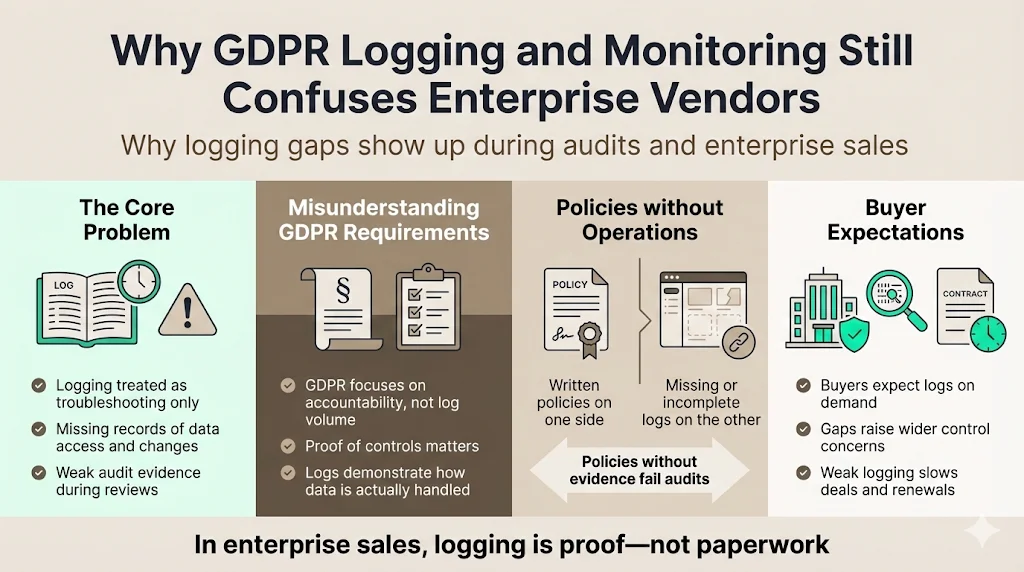
GDPR came into force in 2018 yet there remains a wide gap between policy rhetoric and actual logging practices. Many teams believe that logging is primarily a technical issue for troubleshooting. They often fail to record user access to personal data, changes to configurations or even consent-related events. When audit questions arrive, security logs are missing or incomplete. Buyers detect these omissions during due diligence and start asking whether other controls are equally weak. The confusion stems from three issues:
-
Misunderstanding of requirements – GDPR does not explicitly command “you must log everything.” Instead, it creates accountability obligations. Organisations must document how personal data is processed and demonstrate that they have implemented appropriate technical and organisational measures. Audit logs are the primary way to prove that accountability.
-
Focus on paperwork over operations – Some vendors spend months drafting policies but never instrument their systems. Policies without evidence are meaningless. During audits the absence of logs is cited as a key factor in violations.
-
Underestimation of buyer expectations – Enterprise buyers, particularly in healthcare and financial services, assume that a vendor can produce logs on demand. Without durable logging, vendors face extended sales cycles, lost deals and delayed contract renewals.
The risk of weak logging during audits, security reviews and vendor due diligence
Poor logging shows up quickly in technical due diligence. Auditors ask how the company tracks failed login attempts and whether unusual patterns trigger alerts. They look for transaction and error logs that demonstrate processing integrity. For SOC 2 Type II examinations, service organisations must show evidence over an observation period, including logs of access controls, results of regular vulnerability scans and incident responses. If the vendor cannot produce these artefacts, auditors will report exceptions and buyers may negotiate price concessions or walk away. In regulated sectors, weak logs can lead to regulatory findings or fines. Our team has seen penalties reach millions when investigators could not determine whether personal data had been accessed because logs were missing or tampered with.
What this guide covers and who it is written for
Here's what this guide covers: it is for teams building enterprise‑ready products: SaaS companies serving regulated industries, API‑first platforms handling sensitive data, and organisations developing internal tools for operations. It explains the difference between logging and monitoring; discusses relevant GDPR principles and how they apply to log design; outlines what should and should not be logged; and provides a step‑by‑step approach to implementing GDPR Logging And Monitoring. It also includes practical examples drawn from Konfirmity’s work supporting thousands of audits. Throughout, we position Konfirmity as a human‑led, managed security and compliance service. We execute and operate the program year‑round so that clients can start with security and arrive at compliance.
How proper logging supports both compliance and security outcomes
Logging is not just a checkbox for GDPR; it underpins both security and compliance. A well‑designed audit trail provides individual accountability, helps reconstruct events and detects intrusions. Regulators rely on logs during investigations to understand whether access was authorised and to what extent the organisation fulfilled its legal obligations. Security teams use logs to detect suspicious behaviour, correlate events across systems and build timelines during incidents. Faster detection matters: IBM's 2026 Cost of a Data Breach Report found the global average cost of a data breach reached $4.99 million, a 12% increase and a record high, driven largely by AI-enabled attacks. Effective GDPR Logging And Monitoring helps reduce those numbers by enabling rapid incident response and demonstrating compliance.
What GDPR Logging And Monitoring Really Means
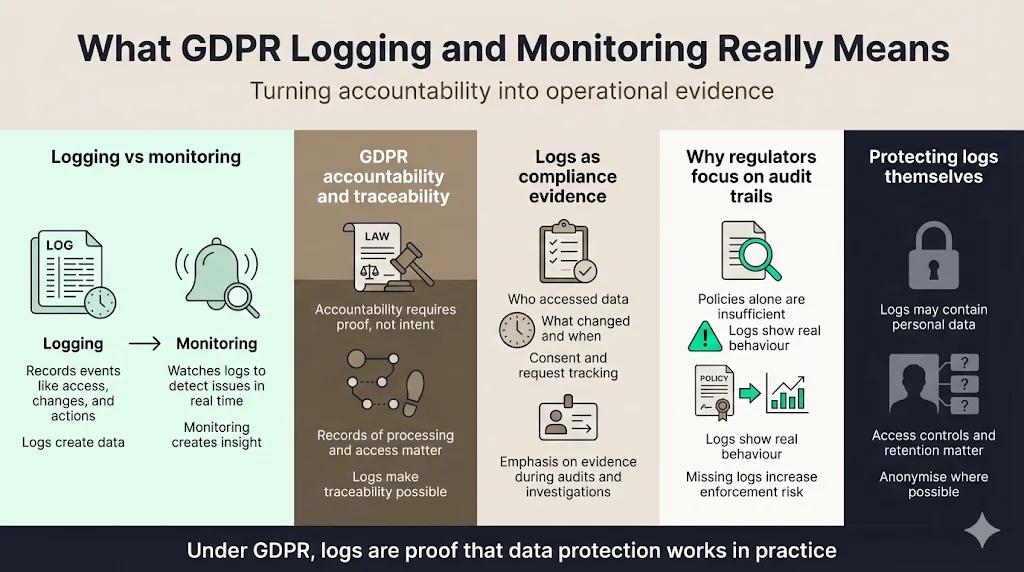
Plain explanation of logging vs monitoring
Logging records discrete events in your systems. Each event entry includes metadata such as a timestamp, user identifier, action performed and context. NIST defines audit trails as records of system and application processes and user activity, used to detect security violations and promote accountability. Monitoring, by contrast, is the ongoing observation of those logs and other data sources to detect anomalies or threats in real time. While logging provides the raw data, monitoring uses analytics and alerting to turn logs into actionable intelligence. Without sufficient logging, monitoring has little to work with; without monitoring, logs sit unused until an audit or breach.
How GDPR frames accountability and traceability
The GDPR introduces an accountability principle: controllers must be able to demonstrate compliance with all data protection principles. Article 30 requires organisations to maintain records of processing activities and keep a trail of where personal data is transmitted and stored, who has accessed it and for what reasons. Article 32 expands on integrity and confidentiality, requiring appropriate technical measures such as encryption and pseudonymisation to protect data. Although the regulation does not explicitly say “log access,” these articles make logging practically necessary. Without logs, it is impossible to prove compliance or detect misuse. Regulators care about audit trails, not just policies. Supervisory authorities often ask for logs during investigations to show that personal data was accessed lawfully and that breaches were discovered and reported in time.
The role of logs in proving data protection compliance
Audit logs capture who did what and when—information essential for proving compliance. Exabeam summarises GDPR requirements: organisations must implement detailed logging mechanisms to record every instance of data access, including who accessed personal data, when and why. Logs of data modifications should record what changed, who made the change and when, ensuring that any alteration can be traced back. Logs documenting consent, data subject requests and Data Protection Impact Assessments provide evidence that individuals were informed and that processing was lawful. Without these records, organisations cannot demonstrate compliance during audits or investigations.
Why regulators care about audit trails, not just policies
Regulators know that policies can be copied and pasted. Audit trails reveal the reality of operations. The NXLog guide notes that Article 30 compels organisations to audit and record how personal data is used and that logs can be mobilised to create an audit trail of how data has been processed. It also emphasises that logs often contain personal data themselves and must be protected and anonymised where possible. When investigators examine a breach, they expect to see logs of access and modifications. If logs are missing, organisations face higher fines and corrective action plans.
Why Logging Matters for Enterprise‑Focused Companies
Enterprise buyers expect evidence, not promises
Modern procurement processes include security questionnaires, vendor risk reviews and data processing agreements. Buyers ask for audit evidence—access logs, vulnerability scan results, incident response documentation—before signing contracts or renewing subscriptions. In our own delivery work, deals often stall because a vendor can’t provide evidence of least‑privilege enforcement or proper GDPR Logging And Monitoring. Enterprises see logging as a sign of operational maturity. It proves that the vendor can detect misuse, respond to incidents and comply with obligations such as breach notification. Lack of logging erodes trust and leads to longer sales cycles or lost business.
Logging as part of security questionnaires and vendor risk reviews
Security questionnaires increasingly include questions about logging scope, retention and access controls. SOC 2 auditors examine how a company tracks and escalates failed login attempts and whether unusual patterns trigger alerts. They expect evidence of transaction logging, error logging and input validation. For ISO 27001:2022, control 8.15 requires organisations to produce, store, protect and analyse logs recording activities, exceptions, faults and relevant events. HIPAA requires covered entities to maintain audit logs of access to electronic protected health information (ePHI) and recommends retaining them for at least six years. Enterprises use these frameworks as baselines when evaluating vendors. A company that fails to implement these baseline controls will struggle to pass technical due diligence.
How logging affects sales cycles, trust and contract renewals
Buyers sign multi‑year contracts with vendors they trust. Logging influences trust in several ways:
-
Speed of response – When an incident occurs, vendors with comprehensive logs can quickly determine the scope and impact. Those lacking logs take longer to investigate, increasing downtime and eroding client confidence.
-
Transparency during audits – Vendors with clear audit trails answer auditor questions quickly, reducing back‑and‑forth and avoiding extra costs. Logs show not just that policies exist but that they are operating effectively over time.
-
Contract renewals and upsells – Renewals often trigger security reviews. Vendors who can demonstrate continuous logging and monitoring face fewer objections. Those with weak logs may need to offer discounts or risk churn.
Common gaps buyers spot during technical due diligence
During technical due diligence we frequently encounter these gaps:
-
Incomplete logging scope – Critical systems generating personal data are not instrumented. API calls involving personal data have no access logs, making it impossible to reconstruct events.
-
Logs containing raw personal data – Logs capture full names, addresses or identifiers without masking, creating a risk of unauthorised exposure and breaching the data minimisation principle.
-
Lack of retention discipline – Logs are kept indefinitely, violating storage limitation, or deleted too soon, undermining accountability.
-
No separation of duties – Developers or administrators can both generate and delete logs, meaning logs could be altered without detection. Auditors expect immutability and tamper resistance.
-
Manual evidence collection – Teams scramble to gather logs during audits, resulting in outdated or inconsistent evidence. Continuous monitoring and automated evidence collection reduce this burden.
GDPR Principles That Apply to Logging
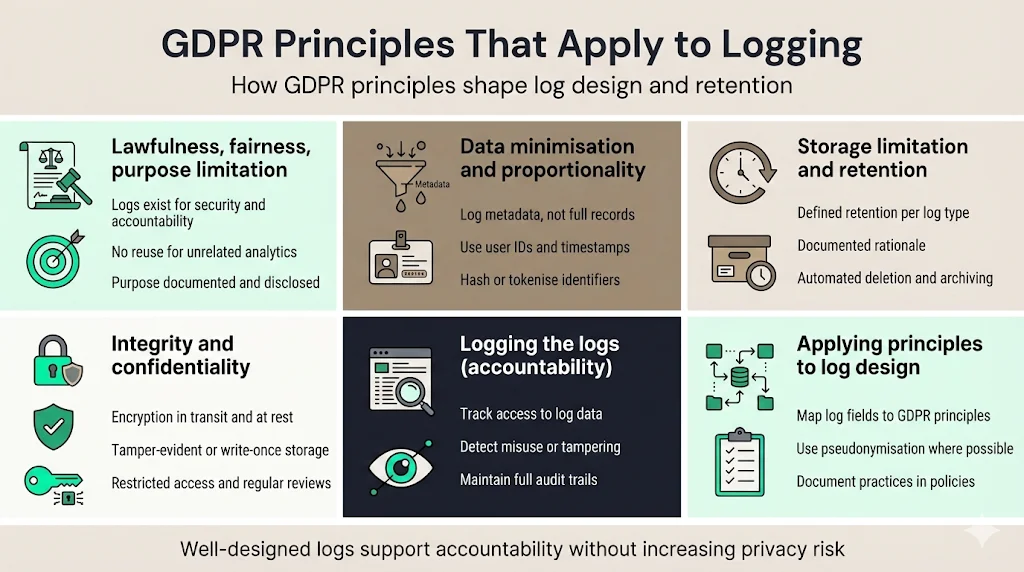
GDPR’s six foundational principles apply as much to logs as to the primary data processed. Each principle shapes how you design, retain and secure logs.
Lawfulness, fairness and purpose limitation
Logs must be collected and used lawfully and for legitimate purposes. The purpose of logs is to ensure accountability, maintain security and investigate incidents. Do not repurpose log data for unrelated business intelligence without additional legal basis. Document the purpose of each log category and communicate it in your privacy notices.
Data minimisation and proportionality in logs
The GDPR requires you to collect only data that is adequate, relevant and limited to what is necessary. This applies to logs too. Capturing full payloads or entire personal records in logs is excessive. Instead, log metadata such as user IDs and timestamps. If you need to correlate logs with personal data, consider hashing or tokenising identifiers. Use pseudonymisation or anonymisation to reduce risk.
Storage limitation and retention discipline
Logs should be kept only as long as necessary for the purposes defined. Exabeam advises retaining logs for an appropriate duration and documenting the rationale behind retention periods. HIPAA experts recommend a minimum of six years for healthcare audit logs, whereas other sectors may require shorter periods based on risk assessments. Automate deletion and archival to ensure that retention rules are enforced.
Integrity, confidentiality and access controls
Logs must be protected against tampering and unauthorised access. Encryption in transit and at rest, write‑once storage and cryptographic hashes help ensure integrity. Access should be restricted to authorised roles. Exabeam emphasises limiting access to logs containing personal data and regularly reviewing access privileges. Logging access to logs themselves—meta‑logging—creates a chain of accountability.
How these principles apply directly to log design
When designing logs, map each data element to these principles. For example, include user identifiers and timestamps (necessary for accountability), but avoid storing entire user profiles. Use pseudonymised identifiers where possible. Document retention periods per log type and implement automated deletion. Protect logs with role‑based access controls (RBAC), encryption and tamper‑evident storage. Monitor access to logs and generate alerts for suspicious activity. Provide clear documentation of logging practices in your privacy policies and security documentation.
Is Logging Required Under GDPR?
Direct and indirect obligations tied to logging
The GDPR does not explicitly say “log every event,” but several articles create indirect obligations. Article 5 requires accountability; Article 24 mandates that controllers implement appropriate technical and organisational measures; Article 30 requires records of processing activities; Article 32 obligates organisations to ensure integrity and confidentiality. Together, these provisions imply that logs are necessary to demonstrate compliance and to ensure security. Without logs, there is no way to show that processing was lawful or to investigate potential breaches.
Articles that drive logging expectations
Several GDPR articles drive logging expectations even though none of them names logging by name:
-
Article 30 – Maintain records of processing activities, including categories of recipients and transfers of personal data. Logs help record where data is transmitted and who accessed it.
-
Article 32 – Implement measures to ensure ongoing confidentiality, integrity and availability; examples include pseudonymisation and encryption. Logging helps detect deviations from these measures.
-
Article 33 – Notify supervisory authorities of a personal data breach within 72 hours. Logs are needed to identify what happened and whether notification thresholds are metnxlog.co.
-
Article 5(2) – Demonstrate compliance. Audit logs are essential for accountability.
GDPR Article 32: Security of Processing
Article 32 requires organisations to implement technical and organisational measures appropriate to the risk, including the ability to detect, respond to, and document security incidents; in practice, this is the article regulators point to when asking why an organisation has no logs to show during an investigation.
Difference between “explicit requirement” and “practical necessity”
While logging is not mandated word for word, it is a practical necessity to meet the accountability principle. Supervisory authorities often demand logs during investigations and view their absence as a sign of negligence. In regulated industries, other frameworks such as SOC 2, ISO 27001 and HIPAA explicitly require logs. In practice, no serious enterprise vendor can operate without GDPR Logging And Monitoring.
Why most regulators expect logs during investigations
Investigators need to reconstruct events to understand whether a breach occurred and if the organisation fulfilled its obligations. Without logs, they cannot determine whether access was authorised or whether notifications were sent within deadlines. Regulators may therefore assume the worst and apply higher penalties. Audit trails also support internal investigations by enabling your team to identify root causes and remediate issues quickly, reducing regulatory scrutiny and litigation risk.
What Should Be Logged for GDPR Compliance
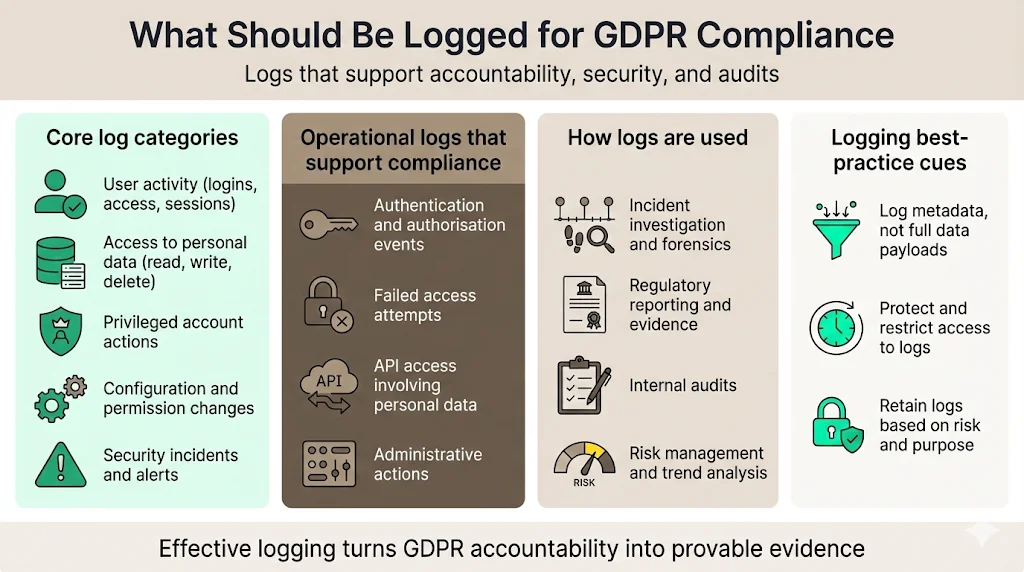
1) Core log categories
-
User activity tracking – Log user actions such as logins, logouts, session durations, and resource accesses. Record user IDs, timestamps and IP addresses. This helps establish accountability and detect suspicious behaviour.
-
Access to personal data – Capture every read, write or deletion of personal data, including the identity of the accessor, the affected data set and the legal basis. GDPR expects detailed logging of data access.
-
Privileged account actions – Monitor administrative actions such as granting or revoking roles, modifying permissions, or changing security settings. Privileged accounts are often targeted by attackers.
-
Configuration and permission changes – Record changes to system configurations, security policies, firewall rules and access control lists. Keep before‑and‑after states where feasible.
-
Security incident logs – Capture events flagged by intrusion detection systems, anti‑virus software and vulnerability scanners. Logs should include alerts, severity levels, affected assets and response steps.
2) Operational logs that support compliance
-
Authentication and authorization events – Log successful and failed login attempts, session tokens, MFA challenges and password resets. SOC 2 auditors will ask about failed login tracking.
-
Failed access attempts – Record access denials to sensitive data or restricted areas to detect brute force attacks and insider misuse.
-
API access involving personal data – Capture API calls, parameters (masked where necessary), response codes and authorization context. Rate limiting and abuse detection rely on these logs.
-
Administrative actions – Track actions by administrators such as creating or deleting users, changing configurations or performing bulk exports.
3) Mapping logs to GDPR use cases
-
Incident investigation – Logs enable forensic teams to reconstruct timelines, identify compromised accounts and determine the scope of incidents.
-
Regulatory reporting – Provide evidence to supervisory authorities that you fulfilled notification obligations and that data was processed lawfully.
-
Internal audits – Support internal audit teams in verifying that controls operate effectively and that no unauthorised access has occurred.
-
Risk management – Identify trends, measure control effectiveness and inform risk assessments. Continuous monitoring feeds into your Information Security Management System (ISMS) and risk treatment plans.
What Data Should Not Be Logged Under GDPR
Why excessive logging creates compliance risk
Collecting too much information in logs can violate GDPR principles. Logs themselves become repositories of personal data and thus require the same protections as primary datasets. Excessive logging increases the attack surface and complicates compliance efforts. Regulators may view unnecessary retention as a failure to respect data minimisation and storage limitation principles.
Examples of high‑risk log content
-
Raw personal data – Avoid logging full names, addresses, phone numbers or full data records. Where necessary, replace them with pseudonymous identifiers or hashed values.
-
Credentials and secrets – Do not log passwords, API keys, tokens or private keys. If authentication mechanisms inadvertently log credentials, sanitise them or configure systems to mask these values.
-
Sensitive identifiers – Protect Social Security numbers, national insurance numbers, passport numbers and other government identifiers. Do not log these values unless strictly required and then ensure they are encrypted or redacted.
-
Payment details – Avoid logging full credit card numbers or bank account numbers. If processing payments, rely on tokenisation and ensure your logs comply with PCI DSS requirements.
Safe alternatives like hashing, masking and tokenisation
Implement data masking or tokenisation at the point of log creation. Hash user identifiers with a secret salt so that logs remain useful for correlation but do not expose raw data. Use structured logging frameworks that automatically redact sensitive fields. When integrating with third‑party services, configure them to minimise personal data in logs. Regularly audit log fields to ensure no sensitive values slip through.
For IP addresses specifically, one documented approach is to keep only the first two octets of an IPv4 address (or the first three of an IPv6 address) for logs held beyond the short window needed to deliver the request itself, an approach discussed in an IETF Internet-Draft proposing updates to RFC 6302's server-logging guidance, which also suggests inbound IP addresses from short-lived request logs generally shouldn't be kept beyond about three days once they're no longer needed to serve the request.
How to validate logs against data minimisation rules
Conduct periodic reviews of log schemas and sample entries. Create a checklist that maps each field to a lawful purpose. Engage privacy teams to review whether logs contain unnecessary personal data. Implement automated scanners that search for patterns (e.g., 16‑digit numbers that look like credit cards) and alert when such content appears. Document decisions on log fields and retention periods to show auditors that you have applied data minimisation principles deliberately.
GDPR logging is only valuable when it produces audit-ready evidence.
See how Konfirmity's framework implementation and evidence collection tools turn logs like these into audit-ready evidence automatically.
Book a demo
Free template pack
Free Download: GDPR Logging & Monitoring Policy Pack
A logging policy with a documented lawful basis, a retention schedule, a personal-data-in-logs minimisation register, and a 72-hour breach notification worksheet, just enter your work email.
Designing GDPR‑Safe Audit Trails
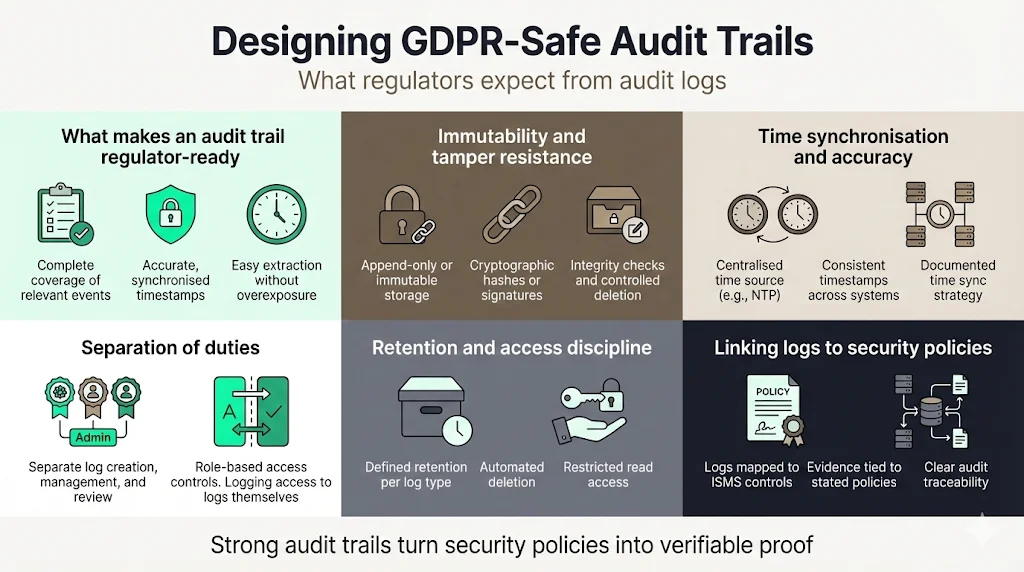
What makes an audit trail regulator‑ready
A regulator‑ready audit trail captures the right events, protects the data, ensures integrity and makes it easy to extract relevant information without exposing other records. Key characteristics include:
-
Completeness – Log all relevant events across systems handling personal data. This includes user activity, system events, configuration changes and security alerts.
-
Accuracy and synchronised time – Ensure time stamps are accurate and synchronised across systems. Time correlation is essential for reconstructing incidents.
-
Immutability and tamper resistance – Store logs in append‑only systems (e.g., WORM storage) and apply cryptographic hashes or digital signatures to detect alterations. HIPAA guidance suggests techniques such as hashing and verifying checksums.
-
Separation of duties – Assign different roles for generating logs, managing the logging infrastructure and reviewing logs. Prevent administrators from modifying or deleting logs without detection.
-
Retention discipline – Implement retention schedules per log category and automate deletion. Document the rationale behind retention periods.
-
Access controls – Restrict who can read logs, and log access to logs themselves.
-
Integration with incident response – Ensure logs feed into monitoring and incident response processes so that anomalies trigger alerts and actions.
Immutability and tamper resistance
Using tamper‑resistant storage, such as write‑once media or immutable object storage, ensures that logs cannot be altered retroactively. Apply cryptographic signatures to each log file or batch and verify them during retrieval. Maintain a chain of custody for log archives and restrict deletion rights. Conduct regular integrity checks and store hash values separately. These practices are particularly important for meeting standards like ISO 27001 control 8.15 and HIPAA audit log requirements.
Time synchronization and accuracy
Use Network Time Protocol (NTP) or similar services to synchronise clocks across servers, databases and network devices. Without consistent time stamps you cannot correlate events across systems or prove when an action occurred. Document your time synchronisation strategy in policies and include checks in operational monitoring.
Separation of duties
Define roles such as “log collector,” “log administrator” and “log reviewer.” Ensure that no single person can generate, modify and review logs without oversight. In our managed service, we implement role‑based access models that restrict privileges and capture meta‑logs of log access. This separation reduces the risk of insider misuse and supports accountability.
Linking audit trails to information security policies
Audit trails should map to your Information Security Management System (ISMS) policies. For example, if your policy states that privileged access requires approval and is logged, ensure that the logging configuration captures those approvals. Maintain a Statement of Applicability (SoA) that shows how each control is implemented and evidenced. During audits, this mapping allows you to prove that controls are working effectively.
Access Controls for Logs
Who should access logs and why
Only personnel with a legitimate business need should view or manage logs. Typical roles include security analysts, compliance officers, system administrators (limited to their domain) and audit teams. Avoid giving developers full access to production logs containing personal data; instead, provide pseudonymised logs for debugging.
Role‑based access models
Implement RBAC where permissions are granted based on job responsibilities. Use least privilege principles and document who has access to which logs. Exabeam highlights that limiting access to logs containing personal data and regularly reviewing permissions is essential for GDPR compliance. Record approvals for granting access and maintain an access review cadence (e.g., quarterly).
Logging access to logs themselves
Meta‑logging is the practice of logging when logs are viewed, modified or deleted. This creates a chain of accountability and deters misuse. Configure logging infrastructure to record user IDs, timestamps and actions on log repositories. Review these meta‑logs during internal audits.
Preventing insider misuse
Combine technical controls (RBAC, encryption, immutable storage) with administrative controls (background checks, user agreements, training). Monitor for unusual access patterns, such as an administrator downloading large volumes of logs or accessing logs outside of business hours. Set up alerts and incident response playbooks to handle insider threats.
Enterprise expectations during audits
During audits, expect questions about who can access logs, how access is granted and revoked, how often reviews occur and whether access to logs is logged. Provide evidence such as access control lists, approval records and meta‑logs. Demonstrate that you promptly revoke access when employees change roles or leave the company.
Log Retention and Storage Limits
How long can logs be stored under GDPR
There is no fixed retention period in the GDPR; instead, retention must align with the purpose of logging and the risk of keeping data longer than needed. Exabeam recommends establishing a data retention policy that specifies how long logs are kept and documenting the rationale. In healthcare, HIPAA guidance advises retaining audit logs for a minimum of six years. Other frameworks, such as NIST 800‑92, suggest aligning retention with organisational policies and sector‑specific laws. A common approach is to store security logs for 12 to 18 months and operational logs for 3 to 6 months, archiving older logs in cold storage accessible for investigations.
Balancing retention with storage limitation
Keeping logs longer than necessary increases risk; deleting them too soon undermines accountability. Assess the legal requirements (e.g., breach reporting timelines), operational needs (e.g., mean time between incidents), and potential for litigation. Align retention with these factors and update policies as regulations evolve. Document decisions and ensure they are defensible.
Typical retention ranges with justification
France's data protection authority, CNIL, has recommended a general retention window of six months to one year for traceability logs, extendable where a legal obligation or a particularly significant risk justifies it. The ranges below reflect that baseline, extended for the categories where ongoing threat-hunting and regulatory-inquiry needs justify a longer window:
| Log Category | Recommended Retention | Justification |
|---|---|---|
| Authentication and access logs | 12-24 months | Long enough to investigate patterns of abuse or respond to regulatory inquiries |
| Application logs | 6-12 months | Supports debugging and audit needs without retaining excessive personal data |
| Security alert logs | 12-24 months | Allows correlation across incidents and supports threat hunting |
| Consent and data-subject-request logs | Duration of processing plus the statutory limitation period | Must remain available for as long as the underlying processing, or a legal claim, could still be raised |
Building a retention policy
Develop category‑based retention rules. Document for each log type: purpose, content, retention period, storage location and disposal method. Automate deletion and archival processes to reduce human error and ensure enforcement. Incorporate legal hold procedures to suspend deletion if litigation or investigations require preserving logs. Regularly review and update retention policies as regulations or business needs change.
Automated deletion and archival
Use tools that support automatic rotation and archival of logs. When logs reach the end of their active retention period, move them to secure archives. Implement checksums or digital signatures in archives to ensure integrity. Ensure archival systems comply with access control and encryption requirements. For example, store logs in encrypted object storage with versioning and bucket policies preventing permanent deletion until the retention period expires.
Handling legal holds and investigations
When legal holds are issued, suspend deletion of relevant logs. Work with legal counsel to determine scope and duration. Document which logs are under hold and ensure they are preserved in their original state. After the hold is lifted, resume normal retention schedules and delete logs securely.
Monitoring vs Logging: Where Each Fits
Why logging alone is not enough
Logging captures events, but without monitoring those logs in near real time, threats may go unnoticed until damage is done. Real‑time monitoring tools, such as Security Information and Event Management (SIEM) systems, analyse log streams, detect anomalies and send alerts. Batch log review supports audits and forensics, but real‑time monitoring shortens the time to detect and contain breaches, thereby reducing costs.
Real‑time monitoring for threat detection
Implement monitoring that correlates events across multiple systems. For example, flag repeated failed login attempts, unusual geographic access patterns or sudden spikes in data export. Exabeam advises monitoring access and requests, capturing the purpose of the request, the identity of the requester and generating alerts for suspicious activities. Real‑time analytics can use machine learning or rule‑based detectors to spot anomalies and assign severity levels. Prioritise alerts by risk and tie them to incident response playbooks.
Batch analysis for audits and reviews
Batch analysis involves periodic review of logs to identify trends, ensure compliance and prepare for audits. Regularly review access logs for VIP data sets or critical systems. Use tools to query logs across multiple months to verify that access controls are functioning and that no unauthorised activity occurred. Document findings and remediation actions.
How automated monitoring systems reduce response time
Automated monitoring systems integrate with SIEM platforms to correlate alerts, enrich context and trigger workflow actions. Automated ticketing and notifications ensure that incidents are assigned quickly. In our managed service, integrated monitoring reduces mean time to detection (MTTD) and mean time to response (MTTR). Clients benefit from faster incident handling and reduced breach costs. For example, automating log ingestion and alerting reduced one client’s median investigation time by 50%, leading to faster containment and lower regulatory exposure.
If you're managing logging and monitoring across more than one framework, see our framework-specific guides for SOC 2, ISO 27001, and HIPAA. And if you're looking at logging as one piece of a broader ongoing compliance program, see our GDPR continuous monitoring guide.
System Monitoring Tools and Architecture
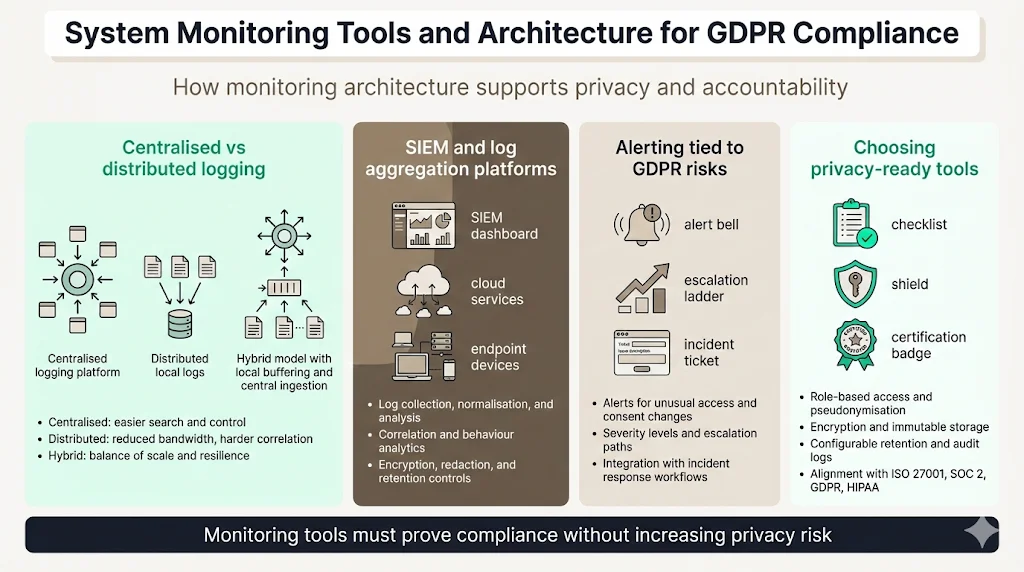
Centralised vs distributed logging setups
A centralised logging architecture aggregates logs from various systems into a single platform for analysis and storage. Benefits include simplified search, consistent access controls and easier retention management. However, centralised platforms require robust scaling and security. Distributed setups, where logs remain on local systems and are queried on demand, reduce bandwidth but complicate correlation. A hybrid approach uses local buffering with periodic centralised ingestion.
SIEM and log aggregation platforms
Security Information and Event Management platforms collect, store, normalise and analyse logs. They support rule‑based detection, user and entity behaviour analytics (UEBA), correlation with threat intelligence and compliance reporting. When selecting a SIEM, ensure it supports encryption, pseudonymisation and user access logging to meet GDPR requirements. Integration with endpoints and cloud services is critical. Choose tools that can redact sensitive fields, apply retention rules and export evidence for audits without overexposing personal data. In healthcare, ensure that your SIEM provider signs a Business Associate Agreement (BAA) and offers HIPAA‑compliant logging.
Alerting pipelines tied to GDPR risks
Configure alerts for events that could indicate GDPR non‑compliance: repeated failed consent checks, access to large volumes of personal data, or modifications to consent records. Include severity levels and escalation paths. Integrate with incident response platforms to generate tickets, notify stakeholders and document response steps. Test alerts regularly using tabletop exercises and simulated incidents to ensure they trigger correctly and provide actionable information.
Choosing tools that support privacy regulations adherence
Evaluate vendor offerings against privacy requirements. Key features include role‑based access, pseudonymisation support, encryption at rest and in transit, immutable storage, configurable retention policies and detailed audit logging. Assess whether the vendor is certified against standards such as ISO 27001, SOC 2 Type II or has achieved compliance with GDPR and HIPAA. Seek tools that generate compliance reports and map their controls to specific regulations.
Event Logging Standards and Best Practices
Consistent log formats
Use structured formats such as JSON or syslog to ensure that logs can be parsed and analysed consistently. Include metadata fields like user IDs, system identifiers, timestamps and network addresses. ISO 27001 control 8.15 specifies that logs should consider user IDs, system activities, dates and times of events, device identity, system identifiers and location, network addresses and protocols. Consistent formats facilitate automation, correlation and compliance.
Required metadata fields
The required metadata fields for a GDPR-compliant log entry, at a minimum, are:
-
Timestamp – The precise date and time of the event, synchronised across systems.
-
Event type – Describes the action (e.g., login success, login failure, data read, configuration change).
-
User identifier – An identifier for the user or process initiating the action. Use pseudonyms where necessary.
-
Source IP/host – The network address or host where the event originated.
-
Target resource – The data or system affected, such as a database table or API endpoint.
-
Outcome – Success or failure, including error codes.
-
Context – Additional fields relevant to the event, such as request parameters (masked) or transaction IDs.
Time stamps, user IDs and action context
Time stamps allow correlation across systems; user IDs establish accountability; and action context clarifies the purpose of the event. Without these fields, logs provide limited value for audits or investigations. Ensure time stamps include time zones and are stored in a standard format such as ISO 8601. Use unique identifiers for users and processes, and include session IDs when available.
Making logs usable for auditors and engineers
Organise logs so that they can be queried by auditors without exposing personal data. Use dashboards to summarise activity and provide filters for different log categories. Provide documentation that explains the meaning of each field and event type. During audits, prepare excerpts that show relevant events without including unnecessary information. Train engineers and compliance teams on how to interpret logs and use them for investigations.
How Logging Supports Breach Detection and Response
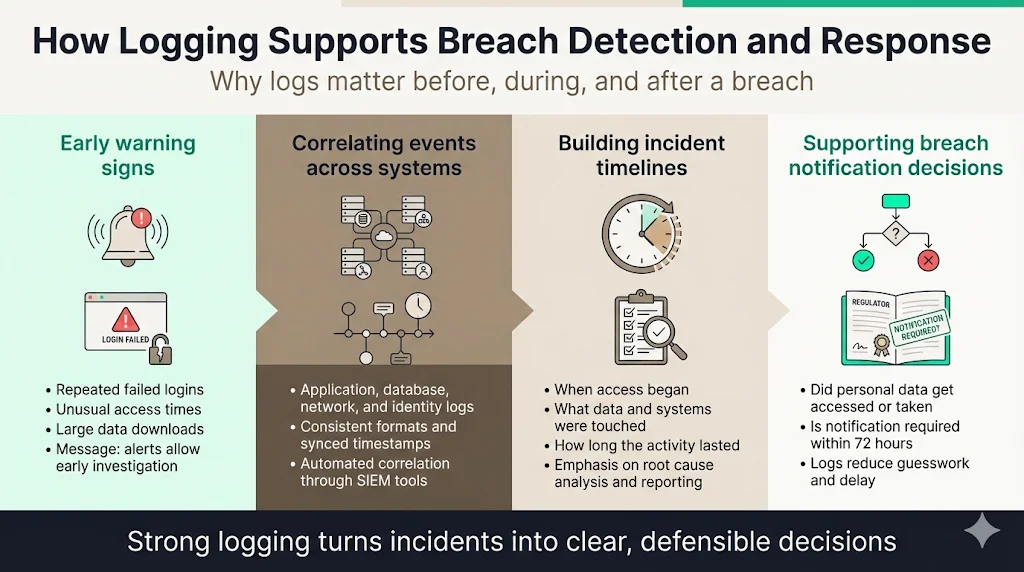
Early signals of suspicious behaviour
Logs provide early indicators of misuse, such as repeated failed logins, access to high‑risk data outside of business hours or attempts to download large volumes of data. When configured with alerts, these signals enable your team to investigate before an incident escalates. HIPAA guidance emphasises configuring automated alerts for suspicious activities such as multiple failed login attempts or attempts to export large volumes of patient data.
Correlating events across systems
During an incident, investigators need to stitch together events from application servers, databases, network devices and identity providers. Consistent log formats and synchronised time stamps allow correlation. SIEM platforms can automate this correlation and create a timeline that shows the attacker’s path. Without logs, it is impossible to trace the origin of an attack or determine the full impact, which can prolong recovery and increase costs.
Building timelines during incidents
Incident responders use logs to build detailed timelines: when the attacker gained access, what resources were touched, how long they lingered and when they were removed. These timelines support regulatory reporting, root cause analysis and lessons learned. Documenting this process in your incident response plan ensures that logs are collected and preserved during crises.
Evidence needed for breach notification decisions
Article 33 requires notification of personal data breaches within 72 hours when the breach is likely to result in risk to the rights and freedoms of individuals. Logs help determine whether personal data was accessed or exfiltrated, guiding whether notification is required. They also support the assessment of potential harm. Without logs, organisations may overreport or underreport, both of which carry reputational and regulatory risks. Comprehensive logging reduces uncertainty and enables timely, accurate notifications.
Regulatory Reporting and Documentation
What regulators may ask for
Regulators can request evidence such as access logs, change logs, incident reports, retention policies and consent records. They may ask for specific time frames or events, such as all accesses to a particular user’s data over the past six months. Having structured logs and documented retention policies enables you to respond quickly without exposing unrelated data.
How logs support accountability claims
When you claim compliance with GDPR, SOC 2 or ISO 27001, you must be able to demonstrate that your controls work. Logs provide proof of implementation. For example, if your privacy notice states that only authorised support staff can access customer records, logs should show that support personnel accessed records, that access was justified and that it was logged and reviewed. Logs also support accountability internally: managers can see whether policies are followed and take corrective action when they are not.
Preparing log extracts without overexposing data
When producing logs for regulators or auditors, extract only the relevant records and redact sensitive fields. Use pseudonyms or masking to anonymise personal data. Provide context around the logs (e.g., system description, control objectives) to help auditors understand the events. Maintain a log disclosure protocol that outlines who approves the release and how redaction is performed. Document the extraction process to show chain of custody and ensure integrity.
Internal review before external disclosure
Before sharing logs externally, conduct an internal review involving security, privacy and legal teams. Confirm that the requested information is provided and that no extraneous personal data is exposed. Ensure that the logs have not been altered and that the extraction process has been documented. Keep a record of what was shared, to whom and when. This practice protects your organisation from inadvertently disclosing sensitive information or violating contractual obligations.
Step‑by‑Step: Implementing GDPR Logging And Monitoring
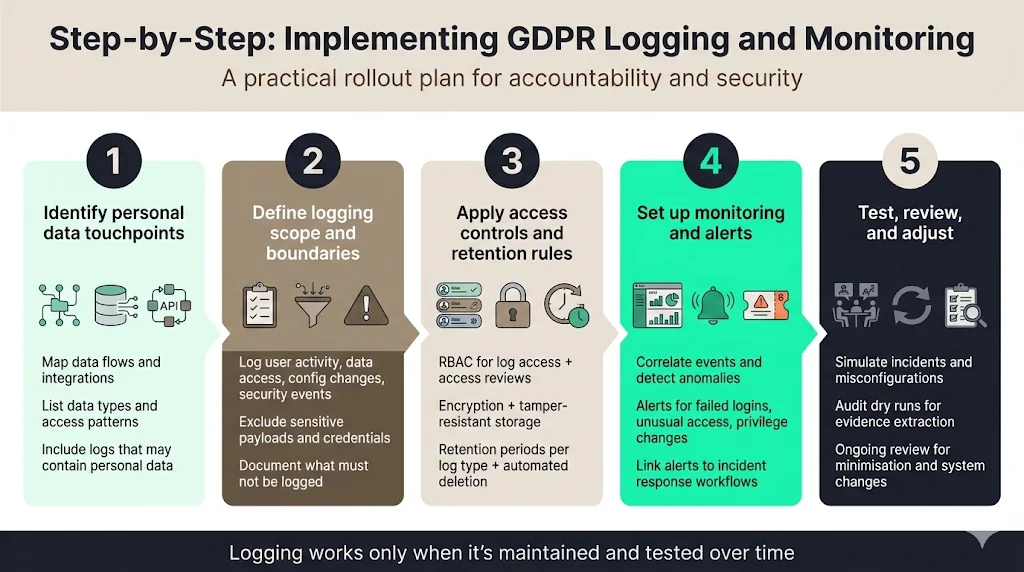
Step 1: Identify personal data touchpoints
Map where personal data flows through your systems. Identify databases, file stores, API endpoints, microservices and third‑party integrations that handle personal data. Include data generated by users (e.g., profile updates), system‑generated data (e.g., audit logs containing personal information) and data shared with processors. For each touchpoint, document the types of personal data processed, access patterns and regulatory requirements. This inventory forms the baseline for deciding what to log.
Step 2: Define logging scope and boundaries
Determine which events must be logged to meet accountability and security objectives. Include user activity, data access, configuration changes and security events. Exclude sensitive payloads, credentials and data that do not support accountability. Align your logging scope with ISO 27001 control 8.15 by ensuring that logs capture user IDs, system activities, dates, times, device identity and network information. Document boundaries to prevent accidental logging of sensitive content.
Step 3: Apply access controls and retention rules
Establish RBAC for log access and maintain an access review process. Use encryption and tamper‑resistant storage. Define retention periods per log category, documenting the rationale. Implement automated deletion and archival to enforce these periods. Ensure your policies meet sector‑specific obligations such as HIPAA’s six‑year recommendation for audit logs.
Step 4: Set up monitoring and alerts
Deploy SIEM or log aggregation platforms that can parse your logs, correlate events and generate alerts. Configure alerts for high‑risk scenarios: multiple failed login attempts, access to sensitive data outside of defined hours, unusual privilege escalations, or modifications to logging configurations. Integrate monitoring with incident response workflows so that alerts create tickets, page responders and start documentation. Use playbooks to triage alerts by severity and ensure timely remediation.
Step 5: Test, review and adjust
Validate your logging and monitoring design through regular tests. Conduct tabletop exercises simulating breaches or misconfigurations. Perform audit dry runs to ensure that logs contain the necessary information and that evidence can be extracted efficiently. Review logs periodically to confirm that data minimisation rules are followed and adjust as systems evolve. Continuous improvement is essential; treat logging as a living control, not a one‑time setup.
Practical Examples
Example 1: SaaS platform with enterprise clients
A SaaS provider serving enterprise clients processes personal data such as names, email addresses and usage metrics. To implement GDPR Logging And Monitoring, the provider:
-
Logs all administrative actions taken by internal staff, including viewing customer records, modifying user permissions and exporting data. Each log includes the user ID, timestamp, action, resource and justification.
-
Captures every access to customer data by customers themselves, with session identifiers and IP addresses.
-
Records changes to configuration settings, such as enabling multi‑factor authentication, updating password policies or modifying roles.
-
Implements monitoring that alerts on repeated failed login attempts or sudden surges in data exports.
-
Stores logs in a centralised, immutable repository and retains them for 18 months, with yearly review. Access to logs is limited to security engineers and compliance officers.
Example 2: API‑driven product
An API‑first company provides services to third‑party developers. It handles personal data such as device IDs and user tokens. The company:
-
Logs all API calls that access or modify personal data, recording the API key, endpoint, HTTP method, masked parameters and response codes.
-
Tracks rate limiting and abuse detection events, including the number of requests per minute per API key and triggers for throttling.
-
Logs token issuance, revocation and usage, capturing who created the token, the scopes granted and expiration.
-
Configures SIEM alerts for unusual bursts of requests or attempts to access protected endpoints without proper scope.
-
Retains API logs for 12 months and archives them for two years, using pseudonymised identifiers to reduce risk.
Example 3: Internal admin tooling
A company builds an internal tool for managing infrastructure resources. It uses privileged accounts and touches configuration data. To meet GDPR Logging And Monitoring requirements:
-
The tool logs all privileged actions, including creating, modifying and deleting resources. Each action log includes the admin’s user ID, timestamp, resource identifier and action description.
-
Changes to access control configurations are logged with before‑and‑after values for permissions.
-
Access to the audit logs themselves is restricted to a separate group of security personnel. Meta‑logs record when logs are viewed or exported.
-
The system enforces role‑based access, ensuring that administrators cannot delete logs.
-
Logs feed into a monitoring dashboard that highlights out‑of‑hours activity and repeated failed commands, triggering alerts and initiating incident response.
Common Mistakes to Avoid
The common mistakes to avoid when implementing GDPR logging and monitoring:
-
Logging too much by default – Capturing entire request bodies or database rows can breach data minimisation principles and increase risk. Stick to metadata and use pseudonymisation.
-
Ignoring retention enforcement – Retention policies mean little if logs are not deleted on schedule. Automate deletion and archive older logs.
-
Treating logs as internal‑only assets – Logs often contain personal data and must be protected with the same rigor as production data. Encrypt logs and restrict access.
-
Weak separation between production data and logs – Storing logs in the same database as operational data makes them vulnerable. Use separate storage with access controls and immutability.
-
Manual evidence preparation – Collecting logs manually during audits leads to errors and delays. Implement continuous evidence collection and generate reports automatically.
How GDPR Logging Strengthens Enterprise Trust
Strong logging and monitoring build confidence among buyers, auditors and regulators. Enterprise clients see that a vendor can answer security questions quickly, provide evidence of compliance and respond rapidly to incidents. Comprehensive logging leads to faster incident handling and lower breach costs. During audits, a well‑structured audit trail reduces the number of findings and eases the process. In procurement, vendors with transparent, evidence‑backed security practices move through due diligence faster and win deals more quickly. Our managed service clients typically achieve SOC 2 readiness in four to five months compared with nine to twelve months for self‑managed programs. They spend about seventy‑five hours per year on compliance tasks versus more than five hundred hours without support. Continuous GDPR Logging And Monitoring plays a big part in these outcomes because evidence is always ready when buyers ask.
Turn your logs into audit-ready evidence.
Share your work email and we'll show you how Konfirmity builds GDPR-safe logging and monitoring into your compliance program.
Conclusion: Evidence Beats Policy Every Time
Logging and monitoring are not one‑time tasks or boxes to tick. They are ongoing practices that underpin security and compliance. GDPR establishes accountability, and audit logs are how you demonstrate it. Enterprise buyers and regulators don’t accept promises; they need evidence. By implementing a robust GDPR Logging And Monitoring program—one that captures the right events, minimises data, enforces retention, applies access controls and integrates monitoring—you build a foundation of trust. Policies look good on paper, but logs show the truth of your operations. Invest in real security controls, operate them daily and let compliance follow.
GDPR Logging and Monitoring: Frequently Asked Questions
While GDPR does not explicitly mandate logging, it imposes accountability obligations. Article 30 requires records of processing activities, and Article 32 requires measures ensuring confidentiality and integrity. In practice, detailed logging is necessary to meet these obligations, prove compliance and respond to incidents.
Do not log raw personal data, credentials or sensitive identifiers. Avoid capturing full names, addresses or payment details. Instead, use pseudonymisation or hashing and only log metadata needed for accountability. Protect logs with encryption and restrict access.
There is no fixed retention period. Retention should be tied to the purpose of logging and the risk of keeping data. France's CNIL recommends a general baseline of six months to one year for traceability logs, extendable where a legal obligation or significant risk justifies it. Many organisations retain authentication and security logs for 12-24 months and application logs for 6-12 months, archiving older logs for investigations.
Audit logs provide early signals of suspicious activity and enable rapid investigation. They help build timelines, determine the scope of incidents and decide whether breach notification is required. Real‑time monitoring reduces time to detection and containment. Without logs, organisations may fail to detect breaches or provide incorrect information to regulators and customers.