


Most procurement teams at large companies now ask vendors to prove that their security controls actually work. They don’t just check boxes on a questionnaire: they look for audit logs, incident records and continuous evidence that the same controls operate day after day. This shift has been driven by the rising cost of breaches—IBM’s 2025 data report pegged the global average breach cost at USD 4.44 million and noted that U.S. organisations pay more than USD 10 million. Healthcare attacks cause even more harm; two‑thirds of hospital breaches disrupt patient treatment and almost a quarter are linked to higher mortality. Enterprise buyers are responding by demanding attestation reports like SOC 2 and evidence of continuous monitoring. Surveys show that 65% of firms say buyers insist on SOC 2 compliance and more than 30% of breaches involve vendors. Meanwhile, compliance isn’t getting simpler: 58% of organisations conducted four or more audits in 2025 and 35% did more than six, and the majority of C‑suite leaders now view compliance as a strategic enabler. In this landscape, robust logging pipelines become essential. They supply the objective, tamper‑evident evidence that auditors rely on and underpin security monitoring, alerting, and incident response.
Understanding SOC 2 Logging Requirements
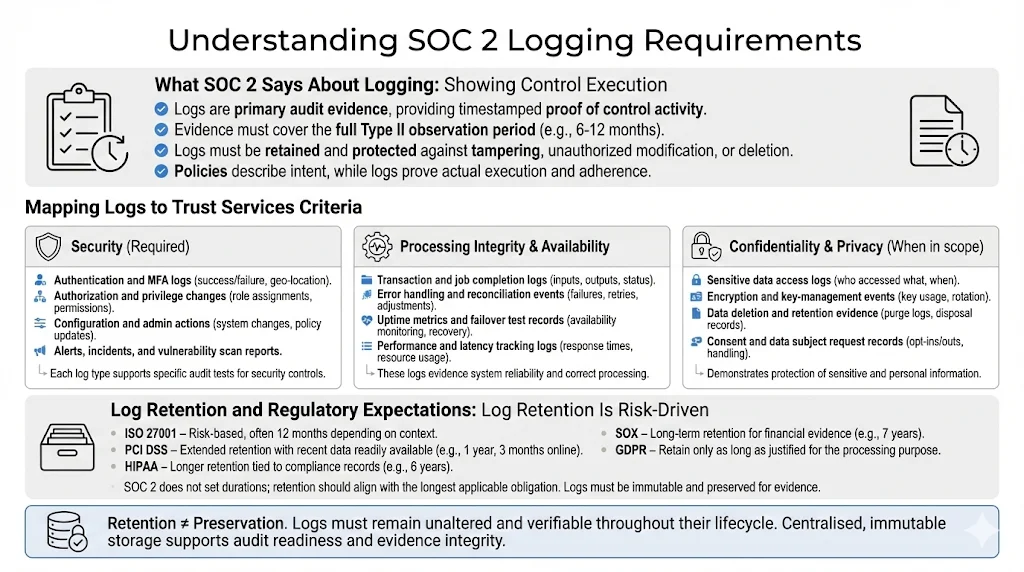
What SOC 2 Says About Logging
SOC 2’s Trust Services Criteria emphasise security, monitoring and control evidence. The Security criterion, mandatory in every SOC 2 report, requires protection against unauthorised access and disclosure. Points of focus include identity management, multi‑factor authentication and logging and monitoring. Auditors treat logs as primary evidence because they provide objective, timestamped records. When testing controls, auditors request access logs, permission change history, security policies, risk assessments, training records, incident response documentation and backup schedules. For Type II reports they expect evidence covering the entire observation period—typically six to twelve months. Logs must therefore be retained beyond the lifetime of the systems that generate them and stored in tamper‑evident archives.
Logging isn’t limited to security. The Availability criterion looks for proof that systems meet uptime commitments, such as disaster‑recovery tests and performance monitoring. Processing Integrity requires evidence that transactions are complete, accurate and timely. Error logs, input validation records and reconciliation reports all play a role. Confidentiality and Privacy—often included when vendors handle sensitive or regulated data—require controls around encryption, data classification, consent management and data disposal. Logs demonstrating how sensitive data is accessed, processed and purged help auditors verify these criteria. In short, SOC 2 logging is about showing, not telling. A policy may articulate intent, but only logs prove execution.
Mapping Logs to Trust Services Criteria
-
Security (required) – Capture logs from identity and access management (IAM) systems, application servers, databases and infrastructure components. Authentication logs show who attempted to sign in and whether multi‑factor authentication was enforced. Authorization logs record role assignments, privilege escalations and revocations. System event logs reveal configuration changes, administrative actions and anomaly detections. Auditors rely on these logs to confirm least‑privilege access and to investigate anomalies. Evidence of intrusion detection alerts, vulnerability scans and incident response actions further demonstrates that security monitoring is active.
-
Processing Integrity & Availability – Performance and application logs track job completion, queue depths, API latency and errors. Availability is demonstrated through uptime monitoring reports, disaster‑recovery tests and failover logs. Processing integrity involves input/output validation, error handling and transaction logging. Logs should show that transactions are processed completely and accurately and that errors are identified and remediated.
-
Confidentiality & Privacy – When these criteria are in scope, logs need to demonstrate how sensitive data is accessed, encrypted, transmitted and deleted. Examples include database access logs, data classification tags, encryption state changes and key‑management activities. Privacy logs may record consent capture, data subject requests and disposal schedules. In our experience, auditors often request retention and disposal evidence—logs showing that data is purged according to the policy and relevant regulations.
Regulatory Touchpoints
SOC 2 doesn’t prescribe specific log retention durations. Instead, it expects organisations to set policies based on risk and external obligations. Several frameworks provide guidance:
-
NERC – Requires six months of log retention and three years of audit records. This influences SOC 2 programmes for vendors serving energy or critical infrastructure.
-
ISO 27001 – Suggests retaining logs for at least twelve months. ISO also requires logging user activities to monitor system use but leaves durations to the organisation’s risk assessment.
-
Sarbanes‑Oxley (SOX) – Requires financial records, including logs supporting financial reporting, to be retained for seven years.
-
PCI DSS – Mandates log retention for twelve months, with the most recent three months available for immediate analysis.
-
HIPAA – Mandates retention of certain records, such as policies and risk analyses, for six years. Logs showing ePHI access may need to be retained for similar periods depending on state law.
-
GDPR – Doesn’t specify durations but requires organisations to justify why they keep personal data. Logs containing personal data should be retained only as long as necessary to satisfy the processing purpose.
The National Institute of Standards and Technology (NIST) recommends that organisations may need to keep copies of logs longer than the original source supports and to implement archival processes. Log preservation is distinct from log retention; preserved logs must remain unaltered for evidentiary purposes. Techniques such as log compression, reduction, normalisation and message digests help maintain integrity and reduce storage costs. A good SOC 2 logging policy will therefore align retention with the longest relevant requirement while protecting logs in immutable storage.
2. Core Components of a Logging Pipeline
A SOC 2 Logging Pipelines For SOC 2 consists of several interdependent layers that work together to capture, transport, store and analyse events. Building the pipeline thoughtfully ensures that logs provide both operational value and audit evidence.
-
Log Sources – Identify all systems that produce relevant events: application servers, database servers, operating systems, cloud platforms (e.g., AWS CloudTrail), network devices, IAM tools, CI/CD pipelines, sub‑service providers and SaaS applications. Audit trails should record user activity, access control changes, system events, configuration changes and security events.
-
Collection Layer – Use agents, syslog daemons, API fetchers or cloud‑native logging services to collect events. Ensure that collection agents run with least‑privilege access and are configured to capture the right event categories. Collection should occur as close to the source as possible to minimise loss.
-
Transport & Storage – Move logs over secure channels (e.g., TLS) into a centralised storage platform. Many teams use message queues (like Kafka), object storage (e.g., S3 with server‑side encryption) or managed log services. Storage must support write‑once‑read‑many (WORM) behaviour and be encrypted at rest. To preserve integrity, compute message digests or digital signatures and store them alongside each log batch. Redundant storage across availability zones and daily backups help maintain resilience.
-
Processing & Normalisation – Parse and structure logs into consistent fields (e.g., timestamp, hostname, user, event type, source IP) so they are searchable and comparable. Normalisation reduces heterogeneity across sources and supports correlation. Many platforms use event schemas such as the Elastic Common Schema or OpenTelemetry. Filtering and reduction remove noise and reduce storage costs while retaining events that support security analysis.
-
Indexing & Search – Index logs in a database or search engine to enable fast queries. Analysts should be able to pivot by time range, user, host, event type or other fields. Efficient indexing supports compliance tests (e.g., “show all failed logins for user X between May and June”).
-
Alerting & Monitoring – Define thresholds and triggers for unusual behaviour. Examples include repeated failed logins, privilege escalation, suspicious API calls, or configuration changes outside of change windows. Use SIEM or detection platforms to correlate events and alert analysts. Automated monitoring reduces manual analysis time.
-
Retention Rules – Implement policies that define how long logs are retained, when they are archived, and when they are purged. Policies should align with SOC 2, regulatory requirements and risk appetite. Tiered storage (hot, warm, cold) balances cost and accessibility. For example, store the last three months in a hot index for real‑time analytics and archive older logs for long‑term evidence.
-
Access Controls – Restrict who can view or modify logs. Use role‑based access control (RBAC) integrated with your identity provider. Access should be logged itself, and any changes to retention policies should be reviewed and approved. Keep secrets (e.g., API keys) out of logs by redacting them at collection time.
Step‑by‑Step Guide to Building a Logging Pipeline for SOC 2
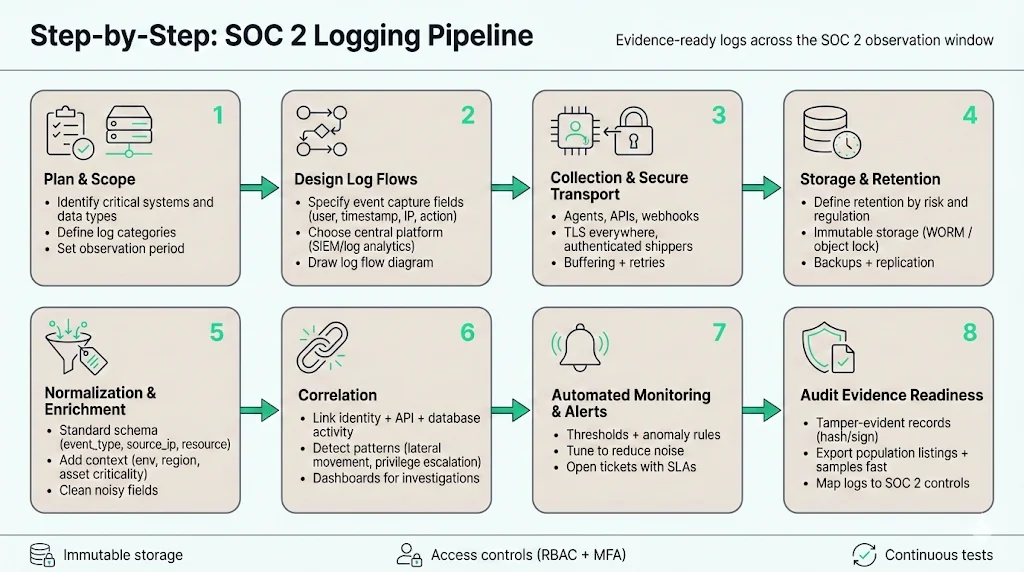
Plan & Scope
-
Identify critical systems and data types – List all systems that store or process customer data or support business operations. Include IAM platforms, network devices, application servers, SaaS services and vendor APIs. Assess data sensitivity: regulated data (e.g., protected health information) may require extended logging and privacy controls.
-
Define log categories – Establish categories such as access logs, system events, application errors, configuration changes, privilege escalations, network flows and API calls. Map each category to the relevant trust services criteria (e.g., access logs for security, performance logs for availability). Document why each category is collected and how it supports risk mitigation.
-
Determine observation period – For a Type II report, decide how long logs must be collected to cover the audit window. Six months is often a minimum; many auditors prefer twelve months. Start collecting logs early to ensure you have evidence when the period begins.
Design Log Flows
-
Define event capture – Specify which events are captured from each source. Use vendor documentation to enable audit logging and ensure important fields (timestamps, user IDs, IP addresses, request context) are included. Label events using a consistent schema and include metadata (e.g., environment, region, application name).
-
Choose tooling – Select a centralised logging platform or SIEM that supports your scale and compliance needs. Cloud‑native services like AWS CloudWatch/CloudTrail, Azure Monitor, Google Cloud Logging or third‑party tools like Splunk, Elastic and Datadog can ingest and index logs. Evaluate whether the platform supports WORM storage, encryption, RBAC and multi‑framework evidence mapping.
-
Establish log flow diagrams – Document how events move from sources through collectors, message queues, processors and storage. Include security controls (TLS encryption, authentication), failure handling (retries, buffering) and alerting points. Clear diagrams help engineering and audit teams understand the pipeline and debug issues.
Implement Collection & Storage
-
Set up agents and collectors – Deploy log agents on servers and integrate cloud logging services. Configure them to send logs in near‑real‑time to your collector. For SaaS platforms that do not support agents, use scheduled API pulls or webhooks.
-
Configure secure transport – Encrypt logs in transit (TLS) and authenticate agents to prevent spoofing. Use dedicated network paths or VPNs for sensitive environments. Avoid sending logs over public networks without encryption.
-
Define retention durations – Based on regulatory requirements and risk assessment, set retention durations. Many organisations retain logs for at least six months and often twelve months or longer for critical systems. Document the rationale and revisit it annually.
-
Store logs immutably – Use WORM storage or object storage with versioning and write‑once policies. Compute hashes for each log file and store them separately to detect tampering. Replicate storage across regions and implement access logging on the storage itself.
Normalisation & Correlation
-
Standardise field names – Adopt a common schema (e.g., user, source_ip, event_type, resource) to unify logs from diverse sources. This simplifies search queries and correlation.
-
Enrich events – Add context such as business unit, data classification, asset criticality or geolocation. Enrichment helps analysts prioritise alerts and auditors understand the environment.
-
Correlate related events – Link events across systems to tell a full story. For example, correlate a login from the IAM system with subsequent API calls and database queries. Correlation engines within SIEMs can detect patterns such as lateral movement or privilege escalation.
Automated Monitoring & Alerts
-
Define thresholds and triggers – Set rules for unusual behaviour. Examples: more than five failed login attempts within ten minutes; multiple privilege escalations from the same account; API calls from unusual geographies; or configuration changes outside of approved change windows.
-
Leverage SIEM and detection platforms – Use rule‑based alerts, machine‑learning models or behavioural analytics to detect anomalies. Integrate with incident management tools to assign investigations and track resolution. Automated monitoring reduces manual review and surfaces threats quickly.
-
Tune alerts to reduce noise – As Graylog noted in its review of 2025 security trends, teams struggled because the effort to interpret huge data volumes grew faster than staffing or budgets. Tune thresholds, whitelist expected behaviours and prioritise high‑risk events. Use case‑based views rather than generic dashboards.
Evidence Logging for Audit
-
Timestamped, tamper‑evident logs – Ensure every log entry contains a precise timestamp, unique identifier and cryptographic hash. Use append‑only storage to prevent alteration. Include sequence numbers to detect missing events.
-
Immutable storage – Store logs in systems that enforce write‑once semantics. NIST recommends techniques such as message digests and digital signatures to detect modifications. Redundant copies and backups further protect evidence.
-
Capture population listings and samples – Auditors may ask for a full list of events (e.g., all change tickets during the period) and then sample specific entries. Your logging pipeline should support exporting comprehensive listings and retrieving individual samples quickly.
Testing & Verification
-
Conduct periodic tests – Test that logs are captured, transmitted and stored as expected. Simulate events such as failed logins, misconfigurations or incident scenarios and verify that alerts fire and logs are retained.
-
Validate pipeline behaviour – Review logs end‑to‑end: verify that timestamps are accurate, fields are populated, and hashes match. Test failover scenarios (e.g., network outage) to ensure logs are buffered and forwarded when connectivity returns.
-
Perform audit rehearsals – Run mock audits to practice retrieving evidence. Use sample requests (e.g., “show all administrative actions in the last six months”) and verify that the pipeline can produce accurate results quickly.
Documentation
-
Develop logging policies and standard operating procedures (SOPs) – Document what events are logged, retention durations, responsibilities and review cadence. Include procedures for handling alerts, investigating incidents and escalating issues.
-
Map logs to controls – Maintain a control matrix that links each SOC 2 control to the logs that provide evidence. For example, map CC6.1 (logical access controls) to authentication logs and RBAC change records. This helps during audits and ensures no control is left without evidence.
-
Integrate incident response and remediation – Define how incident handlers use logs to triage, investigate and contain issues. Document which queries or dashboards support each scenario. Link log evidence to your incident response plan so auditors can trace events from detection through resolution.
Best Practices in Log Management for SOC 2
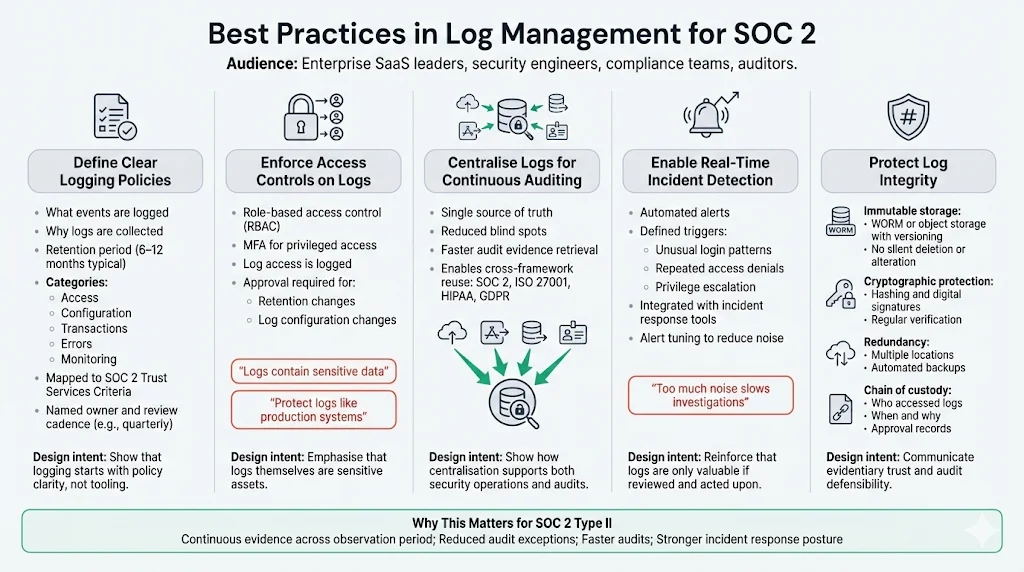
Define Clear Logging Policies
Clarity reduces gaps and confusion. A robust logging policy should state what events are collected, why they are collected and how long they are retained. Define categories (access, configuration, transactions, errors, monitoring) and specify the trust services criteria they support. Record retention durations that align with SOC 2, external regulations and business risk—commonly six to twelve months for log data. Assign an owner (e.g., security operations lead) and set a review cadence (e.g., quarterly) to ensure the policy stays current.
Enforce Access Controls on Logs
Restrict log access to authorised personnel. Logs often contain sensitive information (usernames, IP addresses, error messages) and can become a target themselves. Use role‑based access control integrated with your identity provider and enforce multi‑factor authentication for privileged users. Log access should itself be logged. NIST recommends using digital signatures and encryption to protect log integrity. Storing logs in write‑once, read‑many systems prevents tampering and supports evidentiary requirements. Ensure that modifications to retention policies or log settings require approval and are recorded for audit.
Centralise Logs for Continuous Auditing
Storing logs in disparate systems creates blind spots. Centralisation allows analysts to see a full picture of events and reduces the risk of missing critical signals. Centralised, tamper‑resistant logs reviewed regularly were identified as a best practice in SOC 2 audit preparation. This approach reduces the time auditors spend chasing evidence and allows teams to run queries that span multiple sources. Centralisation also supports cross‑framework mapping: logs collected for SOC 2 can often be reused for ISO 27001, HIPAA or GDPR evidence.
Enable Real‑Time Incident Detection
Manual log analysis is labour‑intensive and prone to error. Automated monitoring and alerting platforms detect anomalies faster and free analysts to focus on investigation. Define clear triggers (e.g., unusual login patterns, repeated access denials, privilege escalations) and integrate alerts with incident management tools. Use behavioural analytics to identify subtle patterns like lateral movement or data exfiltration. Tune alerts to minimise noise; Graylog’s 2025 trend report warns that overwhelming dashboards and unfiltered data slow investigations.
Protect Log Integrity
Logs must be trustworthy. To protect integrity, implement the following measures:
-
Immutable storage – Use WORM or object storage with versioning. Prevent administrators from deleting or altering logs. Use access controls and encryption at rest.
-
Cryptographic hashing and signatures – Compute hashes for log files and store them separately. NIST recommends digital signatures to detect modifications. Verify hashes regularly as part of log integrity checks.
-
Redundancy and backups – Store logs in multiple locations with automated backups. This ensures logs survive infrastructure failures or attacks.
-
Chain of custody – When logs are used as evidence, maintain documentation showing who accessed them and when. Include timestamps and approvals to demonstrate that evidence is preserved.
A logging pipeline built for security is also built for audits.
Drop your work email and we'll harden your pipeline into compliance-ready infrastructure.
Templates & Examples
Logging Policy Template for SOC 2
Teams often struggle to articulate what their logging policies should contain. The table below provides a template you can copy or adapt. Fill in the fields according to your environment and risk assessment.
| Section | Description |
|---|---|
| Purpose | Briefly state why logging is necessary (e.g., to provide evidence for SOC 2, detect security incidents, and ensure system performance). |
| Scope | List systems in scope (applications, databases, infrastructure, SaaS platforms, sub-service providers). Clarify boundaries, including which systems are out of scope. |
| Retained Event Types | Define categories such as access, authentication, authorisation changes, configuration changes, transactions, errors, performance metrics, and security alerts. |
| Retention Duration | Specify how long each category is stored (e.g., 12 months for security events, 6 months for system events) based on regulatory requirements. |
| Storage Location | Identify where logs are stored (e.g., S3 bucket with WORM policy, SIEM index, cold archive). |
| Owner | Assign responsibility, such as the security operations lead or compliance manager. |
| Review Cadence | Define how often the policy and logging configuration are reviewed (e.g., quarterly). |
| Access Control | Document how access to logs is restricted and audited (e.g., RBAC, MFA, approval workflow). |
| Evidence Mapping | Link log categories to specific SOC 2 controls (e.g., CC6.1 – access control logs; CC6.3 – change management logs). |
Log Retention Matrix Template
Use this table to document retention requirements for various log types. Adjust durations based on risk and regulatory obligations. Example entries are provided.
| Log Type | Source | Retention Period | Storage Location | Owner |
|---|---|---|---|---|
| Access Logs | IAM system | 12 months | S3 bucket with versioning | Security Operations |
| System Events | Application servers | 6 months | Central log database | Infrastructure Team |
| Error Logs | Application & API | 12 months | SIEM index | DevOps |
| Change Management Tickets | Git, CI/CD pipeline | 12 months | Ticketing system & archive | Engineering Lead |
| Database Audit Logs | Managed database service | 12 months (extended for sensitive data) | Encrypted object storage | Data Team |
| Monitoring Alerts | SIEM/EDR | 12 months | Centralised alerting platform | SOC Analyst |
| Third-Party Logs | SaaS and vendor systems | Align with vendor contract (min. 6 months) | Vendor portal export & archive | Compliance Officer |
Event Classification & Alert Templates
Below are example event classifications, suggested thresholds and response steps. Adapt them to your environment and risk profile.
-
Authentication failure threshold – Trigger: More than 5 failed login attempts for a user within 10 minutes. Response: Lock account, alert SOC analyst, investigate source IP.
-
Privilege escalation – Trigger: Any change that grants admin rights to an account. Response: Send immediate alert to security team; verify change is authorised via ticket; if unauthorised, disable account and investigate related actions.
-
Unusual API behaviour – Trigger: API requests from geographies not associated with the user or requests with unusually high data volume. Response: Alert DevOps; review recent deployments; block API token if necessary.
-
Configuration change outside maintenance window – Trigger: Configuration change or deployment outside scheduled change window. Response: Notify change advisory board; verify emergency change; roll back if unauthorised.
-
Data exfiltration pattern – Trigger: Large data transfers from production database to external IPs. Response: Isolate network connection; perform forensic review; notify incident response team.
SOP for Incident Logging & Response
-
Identify the incident – Recognise unusual behaviour via automated alerts, user reports or monitoring dashboards. Log the time, source and nature of the alert.
-
Gather relevant logs – Use your logging platform to retrieve all events related to the incident: authentication logs, system events, API calls, configuration changes, database queries, etc. Document queries used so auditors can reproduce them.
-
Analyse and correlate – Correlate events to understand the timeline and impact. Identify the root cause (e.g., compromised credentials, misconfiguration, vulnerability exploit). Record evidence of each step.
-
Escalate with context – Notify the appropriate escalation team (e.g., SOC, engineering, legal) and provide contextual information: timeline, affected systems, users involved, potential data exposure. Use ticketing or incident response tools to track actions and decisions.
-
Contain and remediate – Implement containment measures (e.g., revoking credentials, isolating systems), then remediate underlying issues. Document actions and gather logs proving that remediation steps were executed (e.g., patch applied, access revoked).
-
Archive for audit – Store all incident logs, analysis notes, communication records and remediation evidence in a dedicated, tamper‑proof archive. Tag them with incident identifiers, timestamps and control references. Update the incident response plan based on lessons learned.
Common Challenges & How to Overcome Them
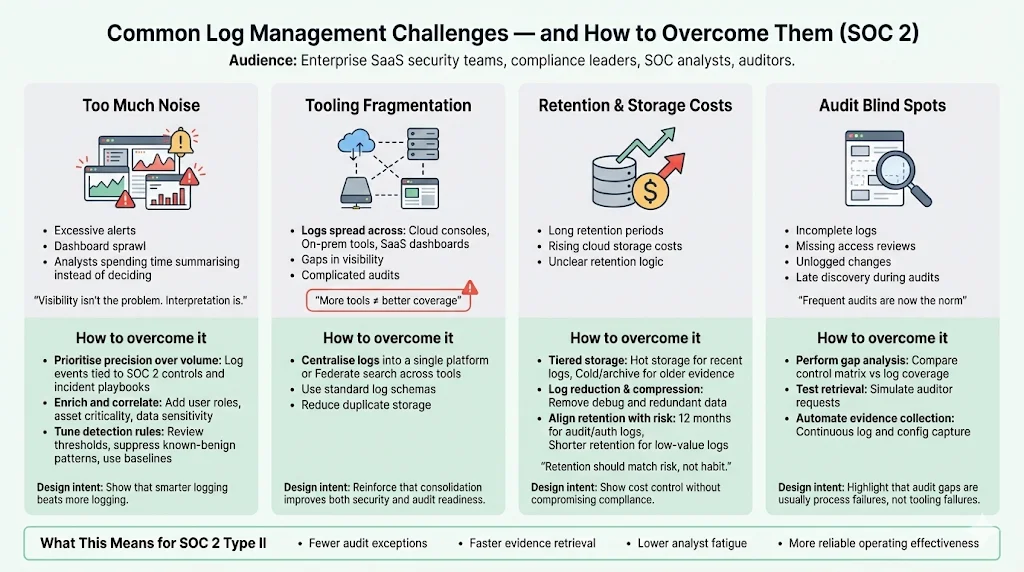
Too Much Noise
One of the most frequent complaints from security teams is information overload. In 2025, security operations centres (SOCs) were not slowed by limited visibility but by the effort required to interpret growing volumes of data. Dashboards multiplied, alert queues grew, and analysts spent more time summarising dashboards than making decisions. To overcome noise:
-
Prioritise precision over volume – Collect logs that support specific investigation paths rather than indiscriminate ingestion. Graylog predicts that in 2026 teams will adopt selective data strategies. Focus on events that map directly to SOC 2 controls, risk scenarios or incident playbooks.
-
Enrich and correlate – Enriched logs with context (user roles, asset criticality, data classifications) make it easier to filter out low‑risk events. Correlation engines tie together related events and reduce false positives.
-
Tune detection rules – Regularly review alerts for relevance. Adjust thresholds, suppress known‑benign patterns and incorporate behavioural baselines.
Tooling Fragmentation
Many organisations collect logs in multiple tools—cloud vendor consoles, on‑premises agents, third‑party SaaS dashboards. Fragmentation creates gaps and complicates audits. The SOC 2 benchmark study found that nearly 90% of reports include subservice providers and that vendors use 16 or more tools on average, increasing complexity. Consolidate logs into a central platform or at least federate search across tools. Use standard schemas so that logs from diverse sources can be searched consistently. Consolidation also simplifies evidence exports during audits and reduces duplicate storage.
Retention & Storage Costs
Retaining logs for months or years can be expensive, particularly with cloud storage. Cloud costs shaped retention decisions in 2025. To balance cost and compliance:
-
Tiered storage – Keep recent logs in “hot” storage for active monitoring and older logs in “cold” or archive storage. Tiering reduces costs while keeping evidence accessible for audits.
-
Log reduction and compression – NIST advises filtering out unneeded data and compressing logs to reduce storage volume. Remove debug logs or redundant entries that do not support compliance.
-
Align retention with risk – Not all logs need the same retention period. For example, authentication and audit logs may require twelve months, whereas debug logs may be purged after a few weeks. Document the rationale and verify that retention policies meet external obligations.
Audit Blind Spots
Audits often uncover blind spots in logging coverage. Incomplete logs, missing access reviews or unlogged changes can cause audit findings. Frequent audits are becoming the norm; 58% of organisations performed four or more audits in 2025. To avoid gaps:
-
Perform gap analysis – Periodically compare your control matrix against your logging coverage. Identify controls lacking evidence and address them.
-
Test retrieval – Regularly test your ability to retrieve logs over the observation period. Simulate auditor requests and verify that logs are complete and unmodified.
-
Automate evidence collection – Use tools that continuously pull logs and configuration data. Konfirmity’s delivery experience shows that automation reduces manual effort and ensures completeness.
How Logging Pipelines Support Enterprise Readiness
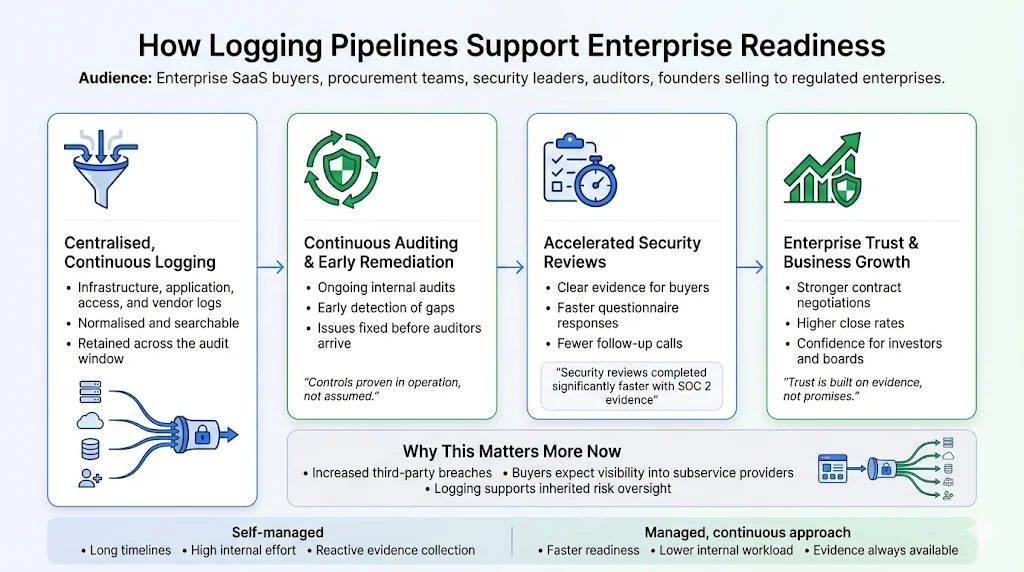
Robust logging pipelines are about more than compliance; they are core to operational security and business growth. Logs serve as evidence for security policies and regulatory standards. During audits, they demonstrate that controls operate effectively over time, supporting the auditor’s opinion. For procurement teams, logs accelerate due diligence by providing transparent proof of security posture. Konfirmity’s clients report that packaging SOC 2 reports with quarterly access reviews, vulnerability scan results and documented incident responses speeds up security reviews and closes deals faster.
Logging pipelines also support continuous auditing. With centralised, accessible logs, teams can perform internal audits throughout the year and remediate issues before the formal audit begins. This proactive approach reduces findings and builds a culture of continuous improvement. It also aligns with emerging SOC 2 guidance emphasising dynamic risk assessment and vendor management. As supply‑chain breaches become more common and costly—third‑party breaches cost more than USD 5 million on average—auditors and buyers will expect evidence that vendors monitor their subservice providers and manage inherited risks.
Finally, robust logging pipelines enhance contract negotiations. Surveys show that 58% of organisations have adopted SOC 2 certification and 42% require vendors to provide SOC 2 or ISO certification. Companies with SOC 2 reports complete security reviews up to 81% faster. SOC 2 adoption continues to rise—adoptions increased by 40% in 2024. Venture capitalists prefer investing in companies with SOC 2 compliance, and 60% of startups are more likely to win business when they have a SOC 2 report. A well‑designed logging pipeline underpins these benefits by delivering the evidence that makes the report credible.
At Konfirmity we have seen the difference firsthand. Our human‑led, managed security and compliance service provides end‑to‑end support: we build controls inside your stack, collect evidence continuously and manage audits year‑round. This approach typically reduces SOC 2 readiness to four‑to‑five months and requires under 70 hours per year** from the client’s team. By contrast, self‑managed programs often take nine‑to‑twelve months and consume 550–600 hours of internal time. Beyond the numbers, the managed approach ensures that security controls are implemented properly and operated daily, not just assembled for an audit. We don’t just advise—we execute.
Design a log pipeline you will not rebuild before the audit
Book a demo and we'll show how Konfirmity maps your collection, retention and alerting decisions to the evidence an auditor asks for, so the pipeline earns its keep twice.
Book a demo
Conclusion
SOC 2 logging isn’t just a compliance checkbox; it’s the backbone of a security program that stands up to auditors, customers and attackers. A well‑designed pipeline captures the right events from across your systems, transports them securely, normalises and correlates them for analysis, and stores them immutably for long‑term evidence. It supports real‑time detection, continuous auditing and the operational resilience that enterprise buyers expect. The SOC 2 Logging Pipelines For SOC 2 outlined in this guide provide both security value and audit readiness. In a world where breaches are expensive and trust is hard‑won, investing in structured logging is both pragmatic and strategic.
Frequently Asked Questions
Events should capture access attempts, privilege changes, authentication successes and failures, configuration changes, system errors, transaction processing, performance metrics and security alerts. Logs must cover both user and machine activities and map to the relevant trust services criteria.
SOC 2 does not mandate a fixed retention period. Best practice, influenced by other frameworks, is to retain logs for six to twelve months. Longer retention may be necessary to satisfy regulations such as SOX or HIPAA. Document your retention rationale and align it with risk.
No. Logs must be protected against tampering. Use WORM storage, compute cryptographic hashes and store them separately, encrypt logs in transit and at rest, and restrict access via RBAC. Tamper‑evident storage ensures that logs are admissible as audit evidence.
A logging pipeline is the system that collects, processes and stores events. A Security Information and Event Management (SIEM) tool ingests logs but focuses on analysis, correlation and alerting. A pipeline feeds a SIEM; the SIEM generates insights and triggers. Both are needed for a complete SOC 2 evidence strategy.
SOC 2 does not explicitly require automated alerts, but automated monitoring significantly strengthens security and audit readiness. Manual log reviews are impractical at scale; automated detection reduces the time to identify incidents and demonstrates continuous monitoring.







