Under HIPAA, the confidentiality, integrity, and availability of ePHI depend on controlling the devices, accounts, and data used by staff and third parties. Onboarding introduces new assets into the environment; offboarding retires or repurposes them. Any lapse can lead to unauthorized access or data loss. Real‑world incidents show that stolen laptops, orphaned system accounts, and unmonitored shared drives often cause reportable breaches. The HIPAA Security Rule proposes requiring regulated entities to notify the Department of Health and Human Services (HHS) within 24 hours when workforce access changes, highlighting the importance of timely offboarding.
Employee transitions represent a period of heightened risk. New hires must receive access only to the minimum ePHI needed to perform their role, per HIPAA’s “minimum necessary” standard. Departing employees must have all accounts deactivated immediately. Yet many healthcare organizations rely on informal checklists or ad‑hoc processes. Missing just one account or external drive can mean a violation.
This article addresses the common gaps in asset onboarding and offboarding, including incomplete inventories, delayed credential revocation, and lack of documentation. It draws on guidance from HHS, NIST, ISO, AICPA, and our experience supporting more than 6,000 security audits as a team with 25+ years of combined expertise. Leaders at Konfirmity have seen that durable programs reduce the time to prepare for SOC 2 or ISO 27001 audits from 9–12 months to around 4–5 months and save teams hundreds of hours. We will outline what assets mean in a HIPAA context, best practices for HIPAA Asset Onboarding And Offboarding, management of inventories, the role of IT, and how to build a repeatable process. This article is for CTOs, CISOs, compliance officers, and healthcare executives seeking to implement or improve HIPAA Asset Onboarding And Offboarding.
What “Assets” Mean in a HIPAA Context
In HIPAA, an “asset” includes any physical, logical, or data item that can store, process, or transmit ePHI. NIST’s Special Publication 800‑66 describes assets as hardware, software, systems, services, and information that must be prioritized based on their sensitivity and criticality. We categorise assets into three types: physical, logical, and data.
Physical assets: laptops, desktops, mobile devices, removable media
Physical assets include laptops, desktops, tablets, smartphones, and removable media (USB drives, external hard drives). These devices often hold cached ePHI or provide access to systems where ePHI resides. HIPAA’s physical safeguards require covered entities to implement device and media controls, such as policies and procedures for the receipt and removal of hardware and electronic media containing ePHI, and maintain accountability for assets. Encryption, secure configuration, and physical security are critical to prevent theft or loss.
Logical assets: system accounts, EHR access, cloud platforms, email
Logical assets are user and service accounts that enable access to EHR systems, practice management software, cloud storage, email systems, and other applications. Each account must be uniquely identifiable, with least‑privilege access, per the technical safeguards of HIPAA. Shared accounts, generic logins, or service accounts without ownership increase the risk of unauthorized use. The proposed HIPAA rule update would mandate multifactor authentication for all remote and privileged access to ePHI.
Data assets: ePHI, backups, shared drives, third‑party systems
Data assets are not limited to the records in the electronic health record (EHR). They include ePHI in structured and unstructured formats, backups stored in on‑site and cloud environments, files in shared drives or messaging platforms, and data processed by vendors or business associates. NIST’s risk assessment questions emphasize including removable media and remote access devices in inventory and documenting configuration standards. When healthcare organizations adopt Software‑as‑a‑Service (SaaS) systems, they must ensure that data flows are mapped and subject to Business Associate Agreements (BAAs).
Why Asset Lifecycle Management Is Central to HIPAA
Asset lifecycle management refers to the processes of identifying, provisioning, monitoring, and retiring assets from the moment they enter the organization through to their final disposition. HIPAA’s administrative, physical, and technical safeguards apply across this lifecycle. For example, administrative safeguards require a security management process that includes risk assessment and risk management, workforce security, and information access management. Technical safeguards demand access controls, audit controls, integrity protection, and transmission security. Without a lifecycle perspective, organizations may focus on provisioning and neglect offboarding, leaving accounts active or devices unencrypted.
Lifecycle management supports privacy compliance by enforcing the “minimum necessary” principle and data minimization across all stages. When assets move from onboarding to active use, access rights should be reviewed whenever an employee’s role changes. During offboarding, assets must be recovered, sanitized, and redeployed or destroyed. The proposed updates to the Security Rule would require maintaining a technology asset inventory and network map that tracks the movement of ePHI and revising it at least every 12 months or after operational changes.
Risks created by poor lifecycle management include orphaned devices with sensitive data, forgotten service accounts, and unencrypted backups. Studies show that more than half of security risks stem from assets that were never formally inventoried, and over 60% of incidents involve orphaned assets. Without a clear inventory and ownership, organizations cannot meet the technical safeguard of audit controls to record and examine activity in systems that contain ePHI.
HIPAA Requirements That Impact Asset Management
Core HIPAA Rules That Apply
The HIPAA Security Rule sets forth administrative, physical, and technical safeguards to protect ePHI. Administratively, organizations must conduct risk assessments, designate security officials, manage workforce security and information access, train workforce members, and develop contingency plans. Physical safeguards require facility access controls, workstation use and security, and device and media control policies. Technical safeguards mandate access control, audit logging, integrity protection, authentication, and encryption of data in transit. In the context of asset onboarding and offboarding, these controls require that each device, account, and dataset is identified, tracked, and configured with appropriate safeguards.
The HIPAA Privacy Rule imposes the “minimum necessary” standard on uses and disclosures of PHI. Covered entities must develop policies and procedures to limit access and requests to the minimum necessary to accomplish the intended purpose. Onboarding must therefore assign the least privileges required for a role, and offboarding must remove access promptly. Business Associate Agreements (BAAs) must require vendors to meet the same standards. HHS’s proposed rule would also require covered entities to notify the Department within 24 hours of access changes, reinforcing the need for timely offboarding.
Administrative, Physical, and Technical Safeguards
Administrative safeguards tie asset management to broader security governance. The security management process includes risk analysis and risk management; workforce security ensures that staff have appropriate authorization and supervision; information access management implements the “minimum necessary” principle; security awareness training educates staff on asset handling; and contingency planning ensures that systems can continue to operate during emergencies. Onboarding must integrate with risk management processes to determine if new devices or applications introduce vulnerabilities. Offboarding must be reflected in contingency planning, ensuring that backup data is securely retained or transferred.
Physical safeguards require facility access controls and workstation security policies. For remote or hybrid staff, this includes issuing encrypted devices and verifying physical environment security. Device and media controls call for policies on disposal and reuse, record of hardware and media movement, and data removal before disposal. Offboarding must include collecting all hardware and media or verifying their secure destruction.
Technical safeguards revolve around controlling access to ePHI systems. Unique user identification and authentication, emergency access procedures, automatic logoff, and encryption are baseline requirements. Audit controls require mechanisms to record and examine system activity. Integrity safeguards protect data from alteration or destruction. Transmission security demands encryption when sending ePHI. The proposed Security Rule updates would require multi‑factor authentication and encryption at rest and in transit. Organizations must implement these safeguards for each asset at onboarding and verify compliance at offboarding.
Shared Responsibility Across Teams
Effective asset management is a cross‑functional effort. Compliance leaders define policies, interpret HIPAA requirements, and oversee evidence collection. IT and security teams manage devices, accounts, and configurations, enforce technical safeguards, and monitor logs. Human Resources (HR) coordinates the onboarding and offboarding timeline, ensuring that new hires are provisioned before the start date and departing employees are removed on the last day. Department managers define role‑based access needs and maintain accountability for assets assigned to their teams. Without clear ownership, tasks fall through the cracks, causing delays that create security gaps. Konfirmity’s experience shows that standardized, cross‑functional processes reduce errors and shorten audit preparation time.
Asset Onboarding Best Practices Under HIPAA
1) Pre‑Onboarding Preparation
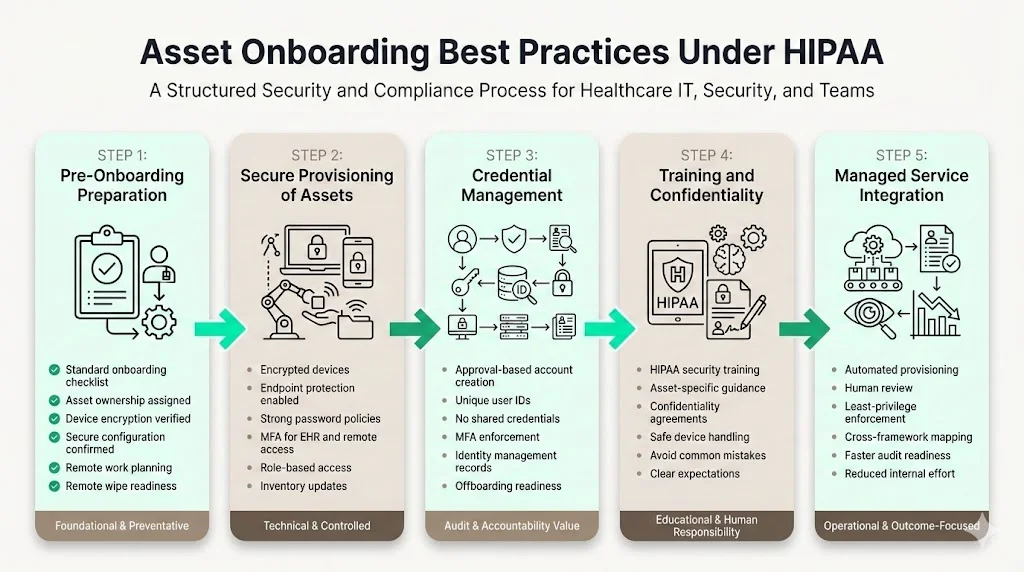
An effective HIPAA Asset Onboarding And Offboarding program begins before a new employee starts. Teams should develop a standardized onboarding checklist that covers asset assignment, account provisioning, training, and documentation. The checklist ensures that nothing is missed when multiple departments are involved. Each asset should have an owner—often the hiring manager or IT—who is accountable for its configuration, issuance, and retrieval. Aligning onboarding steps with security policies means verifying that devices are encrypted, using current operating systems, and configured with endpoint protection before handover. Where remote or hybrid work is involved, plan for shipping devices, verifying the physical environment, and implementing remote wipe capability.
2) Secure Provisioning of Assets
Issuing devices involves more than handing over hardware. Under HIPAA, devices storing or accessing ePHI must be encrypted and configured with secure settings (e.g., strong password policy, disabled unused services, endpoint detection and response). Multi‑factor authentication should be enforced for EHR systems, remote access, and administrative accounts. The NIST risk assessment guidance encourages updating hardware and software inventory regularly and including removable media and remote devices. Access control should reflect the employee’s job role, granting only the privileges necessary to perform tasks. For example, a billing specialist may require access to payment systems but not to sensitive clinical notes. Limiting access prevents accidental or unauthorized disclosure.
A gap in your asset inventory is a gap an auditor will find first.
Share your work email and we'll show how Konfirmity tracks every device, account, and dataset from hire to exit.
3) Credential Management During Onboarding
Every account should be created through an approval workflow tied to HR or management authorization. Unique user IDs allow audit logs to trace actions to individuals. The organization should implement strong password policies (e.g., length, complexity, expiration) and multi‑factor authentication. Credentials and tokens should not be shared. Some healthcare organizations use generic accounts for devices or shared workstations; these should be avoided or restricted to minimal functionality, with additional controls such as badge authentication. Document issued credentials in an identity management system, linking each account to the person and role. This record is essential for later offboarding.
4) Training and Confidentiality Protocols
HIPAA requires workforce training that covers security policies, procedures, and asset handling. Onboarding should include training specific to the assets assigned. Employees must sign confidentiality agreements acknowledging their responsibility for protecting ePHI and following company policy. Training should highlight common pitfalls: leaving laptops unattended, writing passwords on sticky notes, transferring ePHI via personal email, or using unauthorized cloud services. Setting clear expectations during onboarding reduces the risk of human error later. See our HIPAA training requirements guide for how to structure this program.
5) Integration with the Konfirmity Platform
In our experience delivering 6,000+ security audits, onboarding processes that tie directly into the Konfirmity platform produce better outcomes. Konfirmity uses a combination of automated provisioning tools and human oversight to ensure that devices are configured correctly and accounts follow least‑privilege principles. Our team maps assets to control requirements across HIPAA, SOC 2, ISO 27001, and GDPR frameworks, so organizations gain cross‑framework coverage. For example, a single access review process can satisfy SOC 2’s access control criteria and ISO 27001’s Annex A controls. By embedding these steps into onboarding, we reduce the observation window to 4–5 months rather than the typical 9–12 months and save teams over 75% of effort, leaving them free to focus on patient care.
Asset Offboarding Best Practices Under HIPAA
1) Why Offboarding Is a High‑Risk Moment
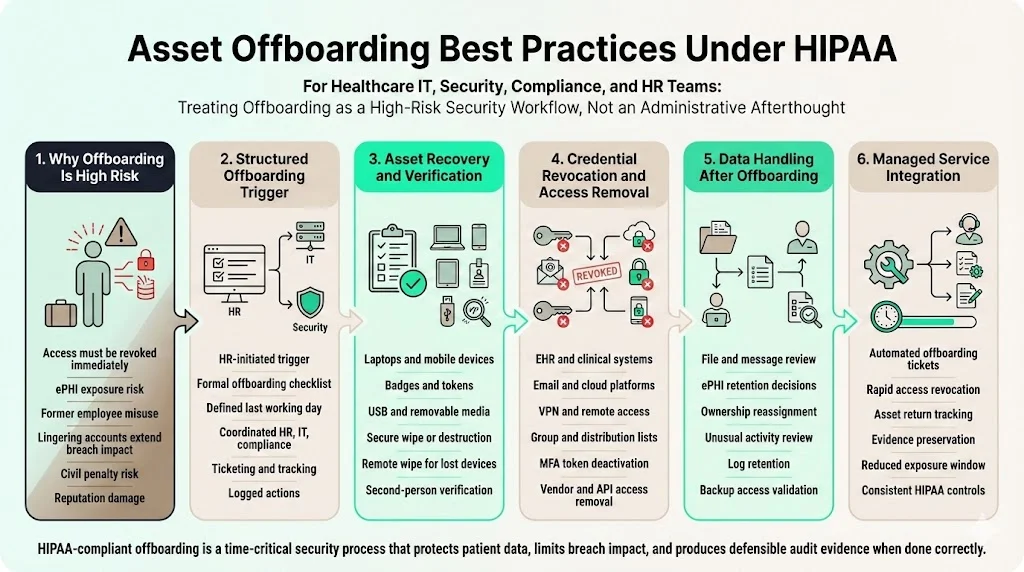
Offboarding presents some of the highest risks in HIPAA compliance. When an employee leaves, failing to promptly revoke access can leave ePHI exposed. The proposed Security Rule would require regulated entities to notify HHS within 24 hours of changes to workforce access. Real‑world breaches often involve former employees accessing systems after departure or taking devices containing ePHI. The IBM 2024 report notes that the average time to contain a breach is 258 days; lingering accounts extend this window. Poor offboarding undermines risk management efforts and can trigger civil penalties.
For example, a healthcare provider in 2024 paid a settlement after failing to disable access for a departing physician, who later downloaded a list of patients and used the information to advertise new services. This case illustrates how offboarding failures harm patient privacy and reputation. In our audits, we routinely find shared accounts or unreturned USB drives left active weeks after an employee left. Offboarding must be executed as a structured, documented process to prevent such scenarios.
2) Structured Offboarding Process
Offboarding should be triggered automatically when HR indicates a resignation, termination, or role change. A formal offboarding checklist coordinates tasks across HR, IT, compliance, and department managers. The checklist must include the date and time of the last day, access removal schedule, device collection, data transfer, and responsibilities for each step. Using a ticketing or identity lifecycle management system helps track progress and accountability; our HIPAA ticketing workflows guide covers how to structure that system. Offboarding should align with payroll or exit interviews to avoid delays.
Coordination between HR and IT ensures that access removal happens concurrently with departure. For voluntary departures, schedule revocation at the end of the last working day. For involuntary terminations, disable accounts immediately at the time of notice. Deactivate remote access (VPN, remote desktop) and remove personal devices enrolled in mobile device management. Document each action and maintain logs for audit evidence.
3) Asset Recovery and Verification
Asset recovery means physically collecting every device issued to the employee and verifying, with a second reviewer, that nothing was missed. Collect all physical devices issued to the employee, including laptops, tablets, phones, badges, USB drives, and tokens. If remote employees cannot return devices in person, arrange for shipping with tracking and require them to send pictures verifying packaging. For removable media, verify that all items are returned and securely wipe or destroy them. Check local storage to confirm that no ePHI remains; remote wipe tools can erase devices as soon as they connect to the network. Device recovery should be documented, with verification by a second person to prevent collusion or oversight.
For logical assets, verify that the employee does not have access to any third‑party systems, SaaS applications, or shared drives. Many organizations forget about marketing platforms, collaboration tools, or vendor portals, which can still contain ePHI or proprietary information. Use your asset inventory to cross‑check all systems to which the user had access.
4) Credential Revocation and Access Removal
Immediately deactivate the user’s accounts in the EHR, practice management software, email, VPN, file shares, cloud platforms, and any other systems. Revocation should be automated through an identity and access management (IAM) system when possible. Remove the user from distribution lists and group policies. For shared or generic accounts that remain active (e.g., nurse station computers), change the shared password and update any physical tokens. Confirm that multi‑factor tokens (hardware or app) assigned to the departing employee are disabled.
Some workflows involve third‑party credentials managed by vendors. The organization must coordinate with vendors to disable those accounts or rotate API keys. For example, a billing service may have remote access to the EHR; the BAA should include offboarding obligations, which is one reason vendor offboarding belongs inside your broader third-party risk process. If a vendor provided a device or account, ensure that the vendor collects it or can confirm its disposal.
5) Data Handling After Offboarding
Offboarding is not complete until data ownership is transferred or secured. The departing employee’s files, messages, and notes may contain ePHI or intellectual property. Determine which data should be retained, archived, or deleted. In some cases, another team member should assume ownership of active cases or documents. Audit recent access activity to identify any unusual downloads or transfers before departure. Retain system logs and offboarding documentation for compliance review; logs provide evidence that offboarding controls were applied.
A final review of backups and cloud storage ensures that the user’s accounts or data are not still accessible. Some organizations maintain long‑term access after termination for legal discovery; in such cases, ensure that the account is disabled and cannot be used to log in. Document the rationale for retaining data.
6) Integration with the Konfirmity Platform
With the fully-managed service, Konfirmity automates much of the offboarding process. Our team coordinates with HR to generate automatic offboarding tickets that revoke access to 20+ systems within minutes. We track asset returns with digital signatures and maintain evidence for the audit window. In one case, a client had over 3,000 user accounts across 12 platforms; after implementing our process, they reduced the time to fully offboard an employee from three days to under two hours, cutting risk exposure by 90%. These operational improvements directly support HIPAA Asset Onboarding And Offboarding compliance.
Managing Asset Inventory for HIPAA Compliance
Building and Maintaining an Asset Inventory
A living asset inventory is the foundation of HIPAA Asset Onboarding And Offboarding and cross‑framework readiness. The proposed HIPAA rule would mandate that regulated entities develop and revise a technology asset inventory at least every 12 months. ISO 27001:2022 Annex A control 5.9 requires organizations to maintain an inventory of information and associated assets and assign owners to them. The inventory should include details such as asset type, unique identifier, location, assigned owner, configuration, risk classification, encryption status, and BAA linkage for vendor‑managed systems. Linking assets to users and roles allows organizations to quickly identify who has access to what and to perform access reviews.
Many incidents stem from assets that were never formally inventoried or have no owner. Research suggests more than half of security risks arise from un‑inventoried assets and over 60% of incidents involve orphaned devices or accounts. Each asset’s record must include its current status (active, retired, in repair), location (on‑site, remote, vendor), and disposal method. A configuration management database (CMDB) or asset management tool can centralize this information.
Ongoing Asset Reviews
Asset inventories are not set‑and‑forget. Scheduled reviews—quarterly or semi‑annually—verify that the inventory reflects reality. Conduct spot checks after staffing changes to ensure that new hires have been added and departures removed. Compare system logs and IAM records against the inventory to detect unauthorized or orphaned assets. Use inventory data to support audits by generating reports that show compliance status, asset ownership, and risk ratings. If the organization implements cross‑framework controls, the inventory becomes evidence for SOC 2 criteria and ISO 27001 statements of applicability. Konfirmity’s solution ties inventory reviews to continuous monitoring, enabling real‑time alerts when new devices join the network or when accounts remain active beyond termination dates.
An inventory that's accurate on day one gets stale by the next hire.
Share your work email and we'll help you turn quarterly inventory reviews into a maintained system of record.
Role of IT in HIPAA Asset Onboarding and Offboarding
IT as the Control Point for Access
IT is the central control point for provisioning and revoking access. This responsibility includes enforcing role‑based access controls, implementing multi‑factor authentication, and monitoring unusual activity. Technical safeguards require unique user IDs, access logs, and encryption. IT must configure systems so that audit logs are retained and can be examined for suspicious behavior. For remote and hybrid work, IT must ensure secure VPN and network segmentation as proposed by the new HIPAA rule. When IT fails to manage these controls, compliance gaps appear. In our experience, outsourcing system administration to vendors without oversight can lead to outdated permissions and misconfigured encryption.
Collaboration With HR and Compliance
IT cannot operate in a silo. Collaboration with HR ensures that onboarding and offboarding timelines align; our HIPAA roles and responsibilities guide maps out who owns each handoff. HR notifies IT of start and end dates; IT schedules provisioning and deprovisioning accordingly. Compliance teams provide the policy context and audit evidence requirements. Clear ownership of each step prevents duplication or omission. For example, compliance may require multi‑factor authentication, HR triggers account creation, and IT configures authentication apps. Regular cross‑functional meetings, shared dashboards, and accountability metrics keep everyone aligned. In our managed service, we embed a dedicated compliance officer within the client’s team to coordinate these interactions.
Risk Management and Policy Alignment
Asset onboarding and offboarding must be viewed through the lens of risk management. Identify risks during onboarding—such as giving new employees broad access or using untested devices—and mitigate them through training and controls. During role changes, review access privileges and update them promptly. During offboarding, remove access quickly and confirm asset return. The risk assessment process recommended by NIST includes evaluating hardware and software inventories, the inclusion of removable media and remote devices, and documentation of configuration and patch management. The business impact and asset criticality assessment helps prioritize which assets require strict controls.
Policies should reflect real‑world workflows. For example, with remote and hybrid staff, device recovery procedures must account for shipping and remote wipe capability. For third parties, BAAs must specify asset management responsibilities. When new technologies like telehealth platforms or artificial intelligence tools are introduced, update policies to cover them. Failure to update policies leads to gaps; in 2024, we encountered a client using a new remote‑scribing service without a BAA, creating an untracked data asset that contained thousands of patient records. By integrating policy updates into change‑management processes, you prevent such oversights.
Common Mistakes Healthcare Organizations Make
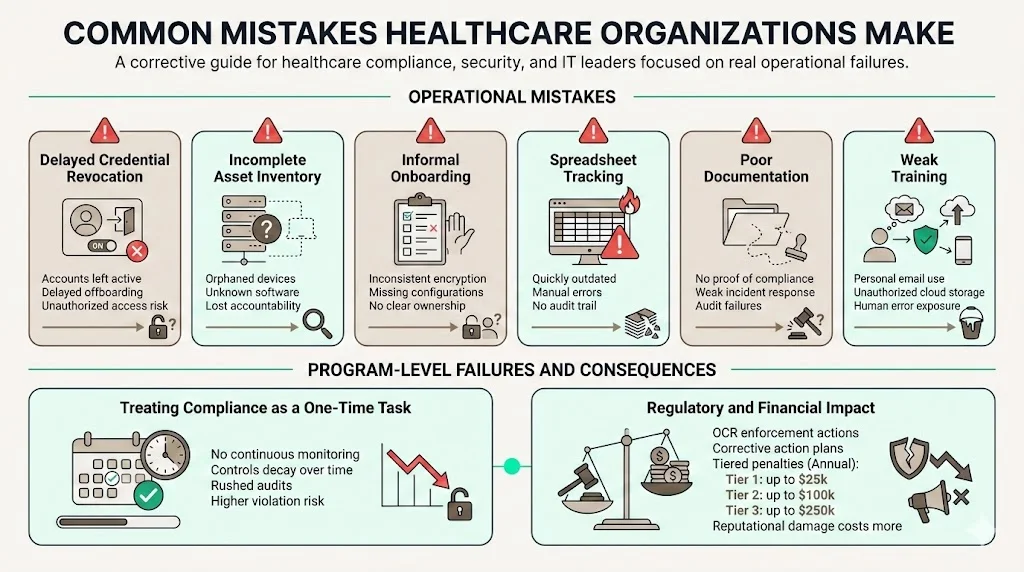
Through our audits and engagements, we see patterns of mistakes that undermine HIPAA Asset Onboarding And Offboarding. Delayed credential revocation is common; sometimes accounts remain active for weeks after departure. Incomplete asset inventories lead to orphaned devices or software. Informal onboarding processes result in inconsistent device encryption or missing documentation. Many organizations rely on spreadsheets to track devices and accounts; these quickly become outdated. Lack of documentation means that when an incident occurs, the organization cannot prove compliance. Insufficient training leads to staff using personal email or cloud storage for ePHI. Recognizing these pitfalls is the first step to fixing them.
Another mistake is treating HIPAA compliance as a one‑time project. Some vendors promise “compliance in two weeks,” but real security programs require continuous monitoring, evidence collection, and control design. Without a sustainable program, controls degrade, and the risk of violation increases. In 2025, HHS’s Office for Civil Rights (OCR) continued to levy fines and corrective action plans on healthcare providers that failed to implement reasonable safeguards; penalties can range from $141 to $71,162 per violation, with annual caps at $25,000 for Tier 1, $100,000 for Tier 2, and $250,000 for Tier 3 under the enforcement discretion policy. Investing in a robust program is cheaper than paying penalties and suffering reputational harm.
Building a Repeatable, Auditable Process
To meet HIPAA requirements and cross‑framework expectations, asset onboarding and offboarding must be repeatable and auditable. Standard operating procedures (SOPs) document each step, assigned roles, and expected outcomes. Use checklists for onboarding and offboarding tasks and maintain them in a shared system. Centralized documentation ensures that all activities, approvals, and decisions are recorded. Regular internal reviews—at least quarterly—test the SOPs and reveal improvements. When auditors or investigators request evidence, you can provide logs, checklists, and attestations demonstrating that each asset moved through the lifecycle correctly.
A repeatable process also prepares you for audits across frameworks. SOC 2 auditors evaluate controls across five trust services criteria with 64 individual requirements. ISO 27001:2022 requires evidence of Annex A controls such as asset returns and inventories. GDPR demands records of processing and data minimization. When you design your processes to satisfy HIPAA, SOC 2, ISO 27001, and GDPR simultaneously, you gain efficiency and reduce friction in enterprise procurement. Konfirmity helps organizations achieve SOC 2 Type II readiness in 4–5 months—versus 9–12 months self‑managed—by integrating control implementation inside the client’s stack and maintaining evidence year‑round. We reduce the internal effort to under 70 hours per year, compared to 550–600 hours required when managing everything manually. These results underscore the value of a security-driven compliance program, run self-serve or fully managed.
See your real HIPAA asset lifecycle gap, not a guess
Book a demo and we'll map your onboarding and offboarding process against the Security Rule requirements, self-serve or with our CISO-led team running it for you.
Book a demo
Frequently Asked Questions (FAQ)
Any device, system, account, or dataset that stores or accesses ePHI is an asset. Physical assets include laptops, desktops, tablets, smartphones, and removable media. Logical assets include system accounts, EHR credentials, cloud services, and email. Data assets include ePHI in structured and unstructured forms, backups, shared drives, and third‑party platforms. During HIPAA Asset Onboarding And Offboarding, all of these items require evaluation and documentation.
Lingering access allows former employees or contractors to view, download, or alter ePHI, violating the Privacy and Security Rules. The proposed Security Rule requires entities to notify HHS within 24 hours when workforce access changes. When accounts remain active, they can be exploited by attackers. Offboarding failures contribute to orphaned assets, a major source of incidents.
IT implements and enforces access removal, collects devices, and deactivates accounts. IT must maintain audit logs, ensure encryption, and monitor for unusual activity. Collaboration with HR and compliance ensures that offboarding occurs on time and meets policy requirements. Multi‑factor authentication and encryption must remain in place until the account is disabled.
At minimum, inventories should be updated at least annually and after major operational changes, as proposed by HHS. However, best practice is to conduct quarterly reviews and spot checks following staffing changes. Continuous monitoring tools can alert organizations to new devices or accounts that appear outside the approved inventory.
Civil penalties vary by tier and can reach up to $71,162 per violation, with annual caps of $25,000 for Tier 1, $100,000 for Tier 2, and $250,000 for Tier 3 under the enforcement discretion policy. Penalties often include corrective action plans requiring organizations to implement improved asset management. Beyond monetary fines, reputational harm and legal costs can be significant.
Conclusion
HIPAA Asset Onboarding And Offboarding must be treated as a continuous program rather than a one‑off task. From the moment an asset enters the organization to its final disposition, devices, accounts, and data require controls that align with administrative, physical, and technical safeguards. The “minimum necessary” standard guides access assignments, while inventory management and offboarding ensure that assets do not linger unmonitored. The costs of failure—breaches costing nearly USD 9.77 million on average and penalties up to hundreds of thousands of dollars—are far higher than the investment in a robust program.
Planning, coordination, and follow‑through are essential. Compliance, IT, HR, and department leaders must own their parts of the process. Documented procedures, automated provisioning and deprovisioning, and continuous monitoring keep the program scalable. Konfirmity's fully-managed service demonstrates that integrating control implementation, evidence collection, and audit support yields faster readiness and less burden on internal teams. Ultimately, strong HIPAA Asset Onboarding And Offboarding protects patients, supports enterprise sales, and strengthens the organization against threats.