

Most enterprise buyers now ask for security and privacy evidence before they even talk about price. In 2025 the average cost of a data breach dropped to $4.44 million, yet the United States saw a new high of $10.22 million because of regulatory penalties and rising detection costs. At the same time the mean time to identify and contain a breach fell to 241 days. These numbers show why a robust control environment is no longer optional. The AICPA’s SOC 2 framework sets a standard for how service providers design, operate and report on controls related to security, availability, processing integrity, confidentiality and privacy. For companies selling into large businesses or handling protected health information, the distinction between a well‑run program and a paper‑only exercise determines whether deals close. This article demystifies SOC 2 Do’s And Don’ts for technical and business leaders. It explains how the Trust Services Criteria work, describes the difference between Type I and Type II reports, and provides concrete steps, examples and templates that teams can use.
What SOC 2 Is (and Isn’t)
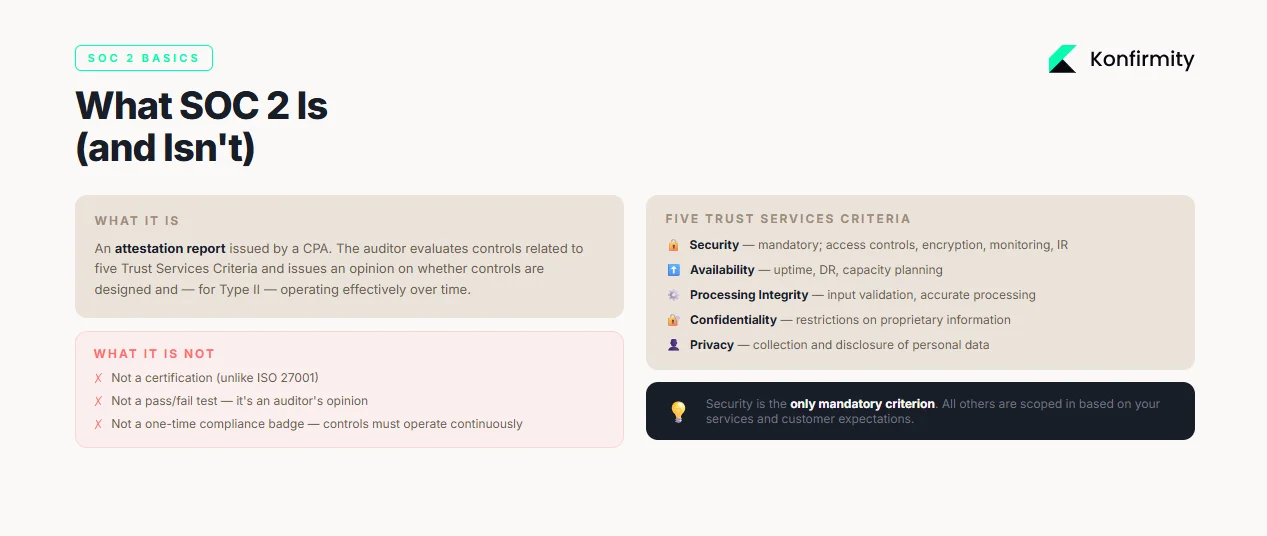
SOC 2 is an attestation report issued by a certified public accountant. It evaluates controls relevant to five Trust Services Criteria: security, availability, processing integrity, confidentiality and privacy. Industry guidance reminds us that each category contains specific criteria standardized by the AICPA. Security is mandatory; the other categories are optional and must reflect customer demands. The criteria break down further into common control areas: control environment, communication, risk assessment, monitoring, control activities, logical and physical access, system operations, change management and risk mitigation. Availability looks at capacity management, environmental protections and backup testing. Processing integrity focuses on defined processing requirements, input validation and accurate processing. Confidentiality addresses restrictions on proprietary information, and privacy covers the collection and disclosure of personal data. SOC 2 is not a certification; it is an auditor’s opinion on whether controls are designed and, for Type II, operating effectively over time.
Type I vs. Type II
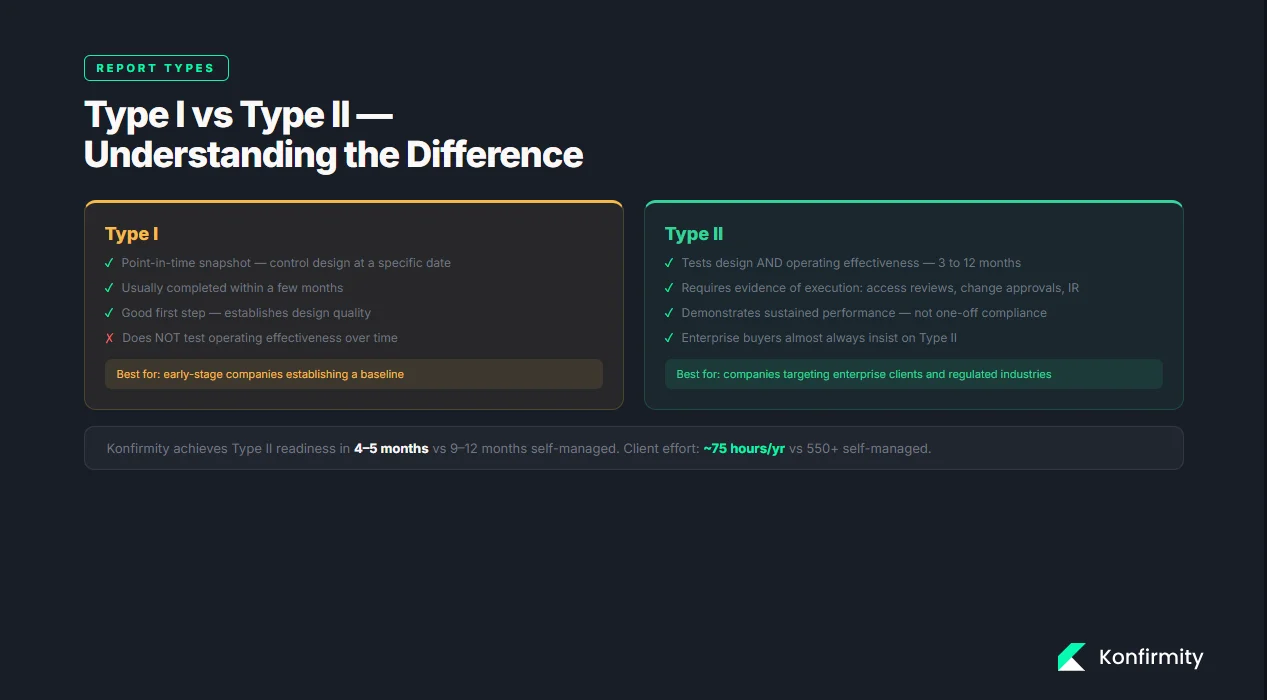
Understanding the difference between report types is critical for planning. A Type I examination is a point‑in‑time snapshot that evaluates whether controls are suitably designed and documented at a specific date. The AuditBoard guide notes that Type I focuses on design and may be completed within a few months. A Type II assessment goes further: the auditor tests the operating effectiveness of controls across an observation period, often three to twelve months. Type II requires evidence of control execution, such as samples of access reviews, change approvals and incident responses. Buyers often insist on Type II reports because they demonstrate sustained performance rather than one‑off compliance.
How SOC 2 Works: Core Concepts
1) Security controls
Security controls are the foundation of SOC 2 compliance. These include technical measures such as multi‑factor authentication, access restrictions, encryption, logging and monitoring, as well as procedural controls like change management and incident response. The AICPA clarifies that SOC 2 reports are intended to assure users about the security, availability and processing integrity of systems and the confidentiality and privacy of information. Effective controls prevent unauthorized access and reduce the impact of incidents. Without them, an audit reduces to a paper exercise with no operational benefit.
2) Internal controls and documentation
Documentation forms the backbone of an audit. Auditors review policies, procedures, diagrams and logs to verify that controls exist and that people follow them. Policies should cover access control, password standards, change management, incident response and privacy. Procedures must describe how these policies are implemented, including who performs each step and how evidence is collected. Evidence may include screenshots of configuration settings, log exports, training records, and tickets from change management systems. Without clear documentation and evidence, an auditor cannot issue a clean opinion.
3) Risk management
SOC 2 expects organizations to identify and address risks. The NIST Risk Management Framework provides a seven‑step process that any organization can use to manage information security and privacy risk. The steps—prepare, categorize, select, implement, assess, authorize and monitor—help teams scope their systems, choose appropriate controls and continuously monitor their effectiveness. A thorough risk assessment evaluates threats, vulnerabilities and potential impacts. It feeds into a gap analysis to determine which controls exist, which need improvement and what remediation plans are required. Risk management is not a one‑time activity; it should be revisited as systems, threats and regulatory requirements evolve.
4) Audit readiness
Being audit‑ready means having controls implemented, documented and operating as intended. Readiness assessments—whether internal or conducted by a third party—identify gaps before the formal audit. Auditors will test the design and operation of controls, review evidence and look for consistency across the observation period. Preparing for fieldwork involves organizing evidence into folders, mapping controls to the Trust Services Criteria and ensuring that personnel can describe how they carry out procedures. Poor readiness leads to findings, delays and potential sales impact.
SOC 2 Do’s (with Steps & Examples)
This section distills SOC 2 Do’s And Don’ts into concrete actions. Each “do” includes steps, examples and templates that teams can adapt.
1. Start with scoping and risk assessment
Do clearly define your audit scope. Begin by selecting the Trust Services Criteria that align with your services and customer expectations. For most SaaS providers security and availability are mandatory; processing integrity, confidentiality and privacy depend on the nature of data processed. Identify in‑scope systems, applications, cloud services and processes. Gather architecture diagrams and data flow maps. Perform a risk assessment using the NIST RMF approach: categorize systems, assess threats and vulnerabilities, determine likelihood and impact, and prioritize mitigation. Conduct a gap analysis to compare existing controls against TSC requirements and document remediation tasks.
Example: Scoping Worksheet
| System/Process | Data Processed | TSC Categories |
|---|---|---|
| Customer web application | User profiles, usage logs | Security, Availability |
| Payment processing service | Payment tokens, transaction records | Security, Processing integrity, Confidentiality |
| Support ticketing system | Customer emails, attachments | Security, Confidentiality, Privacy |
2. Build and document core security policies
Do create clear policies for access control, password management, incident response and privacy. Each policy should state its purpose, scope, roles and responsibilities, implementation steps and evidence requirements. For example, an access control policy may define who approves access, how least‑privilege is enforced and how access reviews occur. The incident response plan should include detection, containment, eradication, recovery and post‑mortem analysis. Maintain these documents in a central repository and review them annually or when systems change. Auditors will expect to see that policies are in place and updated.
Policy Template Snippets
| Policy Area | Key Fields |
|---|---|
| Access Control | Purpose; Scope; Roles (system owner, approver); Procedures (on-boarding, off-boarding, periodic reviews); Evidence (access logs, review records) |
| Incident Response | Detection & triage; Roles (incident commander, communications); Notification procedures; Documentation requirements |
| Password & Authentication | Password complexity; Multi-factor requirements; Reset procedures; Monitoring |
3. Implement and monitor controls
Do map each control to the relevant Trust Services Criteria and implement them within your technology stack. For instance, enable multi‑factor authentication for privileged accounts, enforce encryption in transit and at rest, and restrict administrative access. Define a schedule for monitoring and testing controls. Security controls should be tested quarterly; availability controls may require monthly capacity checks. Use automated tools for continuous monitoring where possible and set alerts for deviations.
Example: Control Monitoring Schedule
| Control | Implementation | Testing Frequency | Evidence |
|---|---|---|---|
| Multi-factor authentication | Enabled for all admin accounts | Quarterly login test | MFA logs, test results |
| Backup & recovery | Daily backups with encrypted storage | Monthly restore test | Backup logs, test report |
| Change management | Approval required for code deploys | Weekly review of change tickets | Change logs, approvals |
4. Collect and organize evidence continuously
Do not leave evidence collection until the end of the audit window. Collect logs, tickets, screenshots and training records as you perform activities. Assign an evidence owner for each control; this person is responsible for capturing and storing artifacts in an organized repository. Tools can automate evidence collection, but manual processes must include regular check‑ins. Organize evidence by control and date; this makes it easier for auditors to sample transactions.
Evidence Tracker
| Control | Evidence Type | Owner |
|---|---|---|
| Access reviews | Quarterly review spreadsheet, signed approvals | Security lead |
| Incident response | Incident ticket, post-mortem report, communication logs | Incident response team |
| Vendor assessment | Completed questionnaire, SOC 2 report, risk rating | Compliance manager |
5. Train employees and assign owners
Do invest in security awareness and role‑based training. Untrained staff can bypass controls, leading to breaches. Create a training calendar with topics aligned to your controls. For example, month one could cover password policies and phishing; month two might focus on change management and incident reporting; month three might address privacy and data handling. Document attendance and quiz results. Assign a control owner for each TSC area. Owners are accountable for implementing controls, collecting evidence and responding to audit inquiries.
Monthly Training Calendar
| Month | Topic | Audience | Evidence |
|---|---|---|---|
| January | Password standards & phishing awareness | All employees | Attendance log, quiz scores |
| February | Change management procedures | Engineering team | Training slides, sign-in sheet |
| March | Data privacy & incident reporting | Customer support | Training recording, acknowledgement |
6. Run readiness assessments regularly
Do schedule internal or external readiness assessments well before the formal audit. These assessments review whether controls are in place, evidence is collected and gaps are resolved. Use checklists to ensure consistency.
Readiness Assessment Checklist
| Question | Status |
|---|---|
| Selected TSC categories documented? | Yes/No |
| Systems and processes scoped accurately? | Yes/No |
| Policies and procedures approved and published? | Yes/No |
| Control owners assigned? | Yes/No |
| Evidence collected for each control? | Yes/No |
| Gaps identified and remediation plans documented? | Yes/No |
The SOC 2 do's and don'ts only help if your controls back them up.
Drop your work email and we'll assess where your current program is audit-ready.
7. Manage vendors with due diligence
Do evaluate the security posture of third parties and document vendor assessments. Many breaches involve third‑party compromises. Collect each vendor’s SOC 2 or ISO 27001 report, review their security questionnaires and assign a risk rating. Require business associate agreements when handling protected health information. Periodically review vendor access and enforce least‑privilege. Document the review cycle and findings.
SOC 2 Don’ts (and What to Do Instead)
Understanding SOC 2 Do’s And Don’ts also means recognizing common missteps. Avoid these pitfalls and implement the suggested alternatives.
1. Don’t treat SOC 2 as a one‑time project
Some teams scramble to prepare for a single audit and then move on. This approach undermines security and sets you up for failure in the next report. Instead, build ongoing assessment routines. Schedule quarterly risk reviews, monthly control monitoring and continuous evidence collection. The observation period for Type II is at least three months and often six to twelve months. Without continuous operations you will have insufficient samples for auditors.
2. Don’t skip documentation or evidence
Policies without evidence will fail audit validation. Auditors rely on evidence to assess whether controls function. Maintain regular logs, records and screenshots. Use an evidence tracker (see above) and set reminders to gather artifacts. If a procedure changes, update the related policy and record the change. Document everything you say you do.
3. Don’t ignore employee awareness
Even the best controls break when people are unaware of their responsibilities. Without training, passwords get reused, access reviews are skipped and incidents go unreported. Set recurring sessions and track participation. Reinforce critical topics like phishing, social engineering and privacy. Make security part of the onboarding process and refresh training each year.
4. Don’t ignore vendor risks
Third parties can introduce gaps. A recent study found that vendor and supply chain compromises were the second most prevalent attack vector and second costliest, averaging $4.91 million. Treat vendor management as part of your control environment. Perform periodic reviews, document risk ratings and follow up on remediation items.
5. Don’t leave testing until the last minute
Waiting for the auditor to ask questions is a recipe for panic. Run internal control tests before the audit window closes. For example, test backup restorations monthly, review access logs quarterly and simulate incident response scenarios. Document test results and remediate failures promptly.
6. Don’t rely on manual processes that only one person understands
Hardcoding processes in one individual’s workflow creates fragility. Document procedures, standardize steps and assign backup owners. Use checklists and shared repositories. If a key person leaves, the program should continue without disruption.
Templates You Can Copy
To make SOC 2 Do’s And Don’ts actionable, the following templates help structure your program. Customize them to fit your organization.
Scoping Worksheet
| Field | Description |
|---|---|
| System/Service | Name of the application, database or process being assessed |
| Data Types | Categories of data processed (e.g., customer PII, payment info, health records) |
| Trust Services Criteria | Security, Availability, Processing integrity, Confidentiality, Privacy |
| Criticality | Low/Medium/High based on business impact |
Risk Assessment Matrix
| Risk | Likelihood (Low/Med/High) | Impact (Low/Med/High) | Mitigation |
|---|---|---|---|
| Unauthorized access to production environment | Medium | High | Enforce MFA, restrict admin access, quarterly reviews |
| Unencrypted data transmission | Low | High | TLS 1.2 or higher, certificate management |
| Backup failure | Medium | Medium | Daily backups, monthly restore tests |
| Vendor outage | Low | Medium | Redundant providers, contract SLAs |
Control Inventory Table
| Control ID | Control Description | TSC Category | Owner | Evidence |
|---|---|---|---|---|
| AC-1 | Enforce unique user accounts with MFA for privileged access | Security | IT administrator | Access control logs |
| PI-2 | Validate input data for completeness and accuracy | Processing integrity | Engineering lead | Test cases, code reviews |
| A-1 | Maintain uptime with redundant infrastructure and disaster recovery | Availability | Operations team | Uptime reports, DR test results |
Policy Template Snippets
Access Control Policy
- Purpose: Ensure only authorized individuals access systems and data.
- Scope: Applies to all systems storing or processing in‑scope data.
- Roles: System owner, approver, user; define responsibilities for granting, reviewing and revoking access.
- Procedures: On‑boarding/off‑boarding steps; periodic access reviews; requirement for least‑privilege.
- Evidence: Access request forms, approval records, review logs.
Incident Response Plan
- Detection: Monitor logs and alerts for signs of compromise.
- Containment: Isolate affected systems to prevent spread.
- Eradication: Remove malicious artifacts and close vulnerabilities.
- Recovery: Restore systems from clean backups; verify integrity.
- Post‑mortem: Document the timeline, root cause and lessons learned.
Password and Authentication Policy
- Complexity: Minimum length, character requirements, prohibition of reuse.
- Multi‑factor: Enforce MFA for administrative accounts and remote access.
- Reset Procedures: Use secure channels for password resets; require identity verification.
- Monitoring: Review authentication logs for anomalies.
Evidence Tracker
| Control | Evidence Item | Frequency | Owner |
|---|---|---|---|
| Access reviews | Review spreadsheet signed by approvers | Quarterly | Security lead |
| Change management | Approved change tickets | Weekly | Engineering manager |
| Training | Attendance and quiz results | Monthly | HR coordinator |
| Vendor assessments | Completed questionnaires and risk ratings | Annually | Compliance manager |
Training Plan Checklist
| Task | Responsible | Frequency |
|---|---|---|
| Develop security awareness content | Security team | Annually |
| Schedule training sessions | HR coordinator | Quarterly |
| Track attendance and scores | HR coordinator | After each session |
| Update training materials based on incidents | Security team | As needed |
Audit Readiness Checklist
A quick reference to confirm you are prepared for an auditor:
-
Define scope and criteria. Select the Trust Services Criteria and list all systems and data in scope.
-
Conduct risk assessment and gap analysis. Use the risk assessment matrix to evaluate threats and determine mitigation plans.
-
Document and implement security policies. Policies for access control, change management, incident response and privacy are written, approved and communicated.
-
Run internal testing. Test backups, access reviews, incident response drills and change management to ensure controls operate.
-
Collect evidence and audit artifacts. Evidence tracker is up‑to‑date with logs, approvals, screenshots and training records.
-
Engage the auditor and prepare the final evidence set. Select a CPA firm, share scoping details, provide a readiness report and schedule fieldwork.
Stop treating SOC 2 as a once-a-year project
Book a demo and we'll show how Konfirmity keeps scoping, evidence collection and access reviews running all year, so the don'ts in this article never become your audit findings.
Book a demo
Conclusion
Good security programs don’t happen by accident. SOC 2 Do’s And Don’ts show that real compliance is built on thoughtful design, continuous operation and honest evidence. The Do’s start with scoping and risk management, building clear policies, implementing and monitoring controls, collecting evidence, training staff, running readiness assessments and managing vendors. The Don’ts warn against treating SOC 2 as a project, neglecting documentation, skipping training, ignoring vendor risks, delaying testing and relying on undocumented processes. By following these guidelines, teams can shrink their audit timeline. Konfirmity’s delivery work has shown that a managed service can achieve a Type II report in four to five months with under 70 hours of client effort, while self‑managed programs often take nine to twelve months and more than 550 hours. Durable controls not only earn clean audit opinions but also reduce breach risk and keep enterprise sales moving.
FAQs
Failing to treat SOC 2 as an ongoing program. Teams sometimes rush to assemble policies and evidence right before the audit, only to find that controls were not operating throughout the observation period. Continuous monitoring and evidence collection prevent last‑minute panic.
Review policies at least annually or whenever a significant change occurs—such as launching a new product, adopting a new cloud provider or responding to an incident. Update procedures to reflect lessons learned and new regulations. Keep evidence logs current.
Automation reduces effort and improves accuracy, but it is not mandatory. The NIST RMF encourages repeatable processes. Whether manual or automated, controls must operate consistently and evidence must be available. Managed services can offload much of the overhead by integrating with your systems and collecting evidence on your behalf.
A Type I report evaluates the design of controls at a specific point in time; it can usually be completed in two to three months. A Type II report evaluates both design and operating effectiveness over three to twelve months. Buyers prefer Type II because it demonstrates sustained security.
Yes, provided they cover the relevant controls and are updated to reflect current practices. Policies written for ISO 27001, HIPAA or GDPR often align with SOC 2 if they address the Trust Services Criteria. Cross‑framework reuse can speed up preparation, but ensure that policy language matches SOC 2 terminology and that evidence is collected accordingly.







