Most enterprise health‑tech deals now come with long security questionnaires and vendor contracts. Buyers ask for assurance reports and business associate agreements (BAAs) before procurement. Regulators such as the U.S. Department of Health and Human Services (HHS) audit healthcare providers and vendors through the Office for Civil Rights (OCR) to verify that electronic protected health information (ePHI) is protected. Those who are unprepared face penalties and lost revenue. The 2024–2025 HIPAA audit program emphasises ransomware preparedness and hacking controls. A 2024 Office of Inspector General report criticised the narrow scope of past OCR audits and called for broader reviews that include physical and technical safeguards.
In short, HIPAA Audit Preparation refers to building and operating a security and privacy program that stands up to external scrutiny. For healthcare companies, being audit‑ready preserves patient trust, avoids regulatory fines, and accelerates sales. IBM’s 2025 data‑breach study found that global breach costs fell to $4.44 M, while U.S. breaches averaged $10.22 M; healthcare breaches cost $7.42 M with a typical lifecycle of 279 days. Penalties for HIPAA violations can reach $2.1 M per violation per year, and recent OCR settlements include $1.5 M with Warby Parker and $200,000 with Oregon Health & Science University. For executives the message is clear: audit readiness costs less than non‑compliance.
For a plain-language breakdown of what all this typically costs, see our HIPAA audit cost guide. This article explains how to handle HIPAA audits using practical, evidence‑backed steps. We discuss what audits involve, the important HIPAA rules and frameworks, pre‑audit planning, a seven‑step audit readiness workflow, common audit areas, template resources, and tips for continuous readiness. We also share lessons from Konfirmity—a human‑led, managed security and compliance service that has supported more than 6 000 security audits as a team with 25+ years of combined expertise—to show what works in real healthcare settings.
What Is a HIPAA Audit?
The OCR runs the HIPAA audit program to assess compliance with the Privacy, Security and Breach Notification Rules. The 2024–2025 program will examine the security practices of 50 entities and emphasise controls to prevent hacking and ransomware. Audits may be triggered by scheduled oversight, random selection, breach investigations, or complaints filed by patients or staff. Covered entities (providers, health plans, clearinghouses) and business associates (vendors handling PHI) can also perform internal audits or hire third‑party auditors to assess readiness.
What Auditors Review
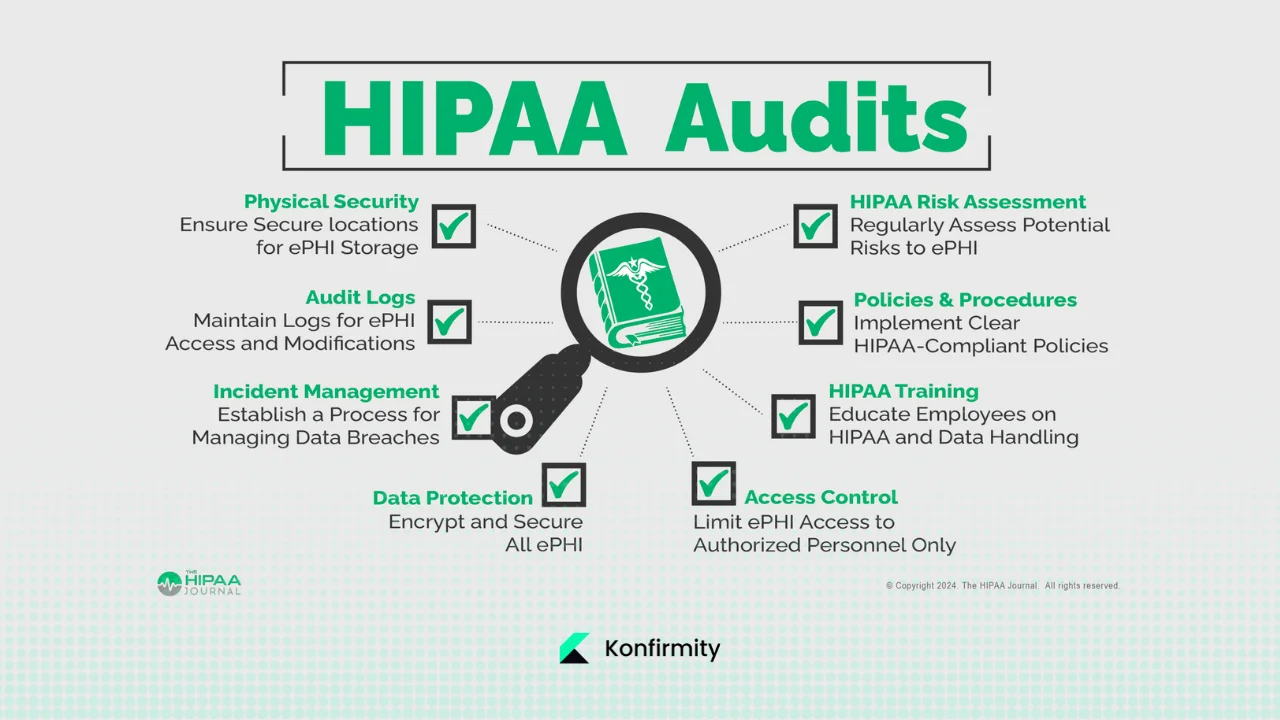
Auditors request policies, procedures and evidence covering:
-
Administrative safeguards – risk analysis, workforce security, training, incident response, sanctions and contingency plans as outlined in the Security Rule.
-
Physical safeguards – facility access controls, workstation and device security, disposal procedures.
-
Technical safeguards – access control, encryption, audit controls, integrity, authentication and secure transmission.
- Privacy rule compliance – compliance with the “minimum necessary” principle that limits PHI use and disclosure to the smallest amount required.
-
Breach notification readiness – documentation of incident response plans and breach notifications to individuals, HHS and sometimes the media.
- Documentation – risk assessments, evidence of control operation, staff training records, vendor risk assessments, and historical logs (six‑year retention is common).
The goal of these audits is not to issue a “certification” but to test whether your security program meets HIPAA standards. OCR provides guidance on audit procedures, but external CPAs or assessors might follow AICPA standards or ISO frameworks when combining HIPAA with SOC 2 or ISO 27001 attestation.
Why Audits Matter for Covered Entities and Business Associates
Under HIPAA, covered entities and business associates have distinct obligations. Covered entities are responsible for implementing compliant policies and ensuring that business associates protect PHI. Business associates must sign BAAs and are directly liable for certain HIPAA requirements; they must only use or disclose PHI as permitted by the contract and must comply with the Security Rule. Non‑compliance can lead to civil money penalties (up to $2.1 M per year per violation), corrective action plans, and public settlements. Reputational damage and lost sales often exceed the regulatory fines; in healthcare the average cost of a breach remains $7.42 M. Being audit‑ready also accelerates procurement: many health‑tech buyers will not sign contracts without evidence of HIPAA compliance and vendor diligence.
Important HIPAA Rules and Frameworks
1) Privacy, Security and Breach Notification Rules
-
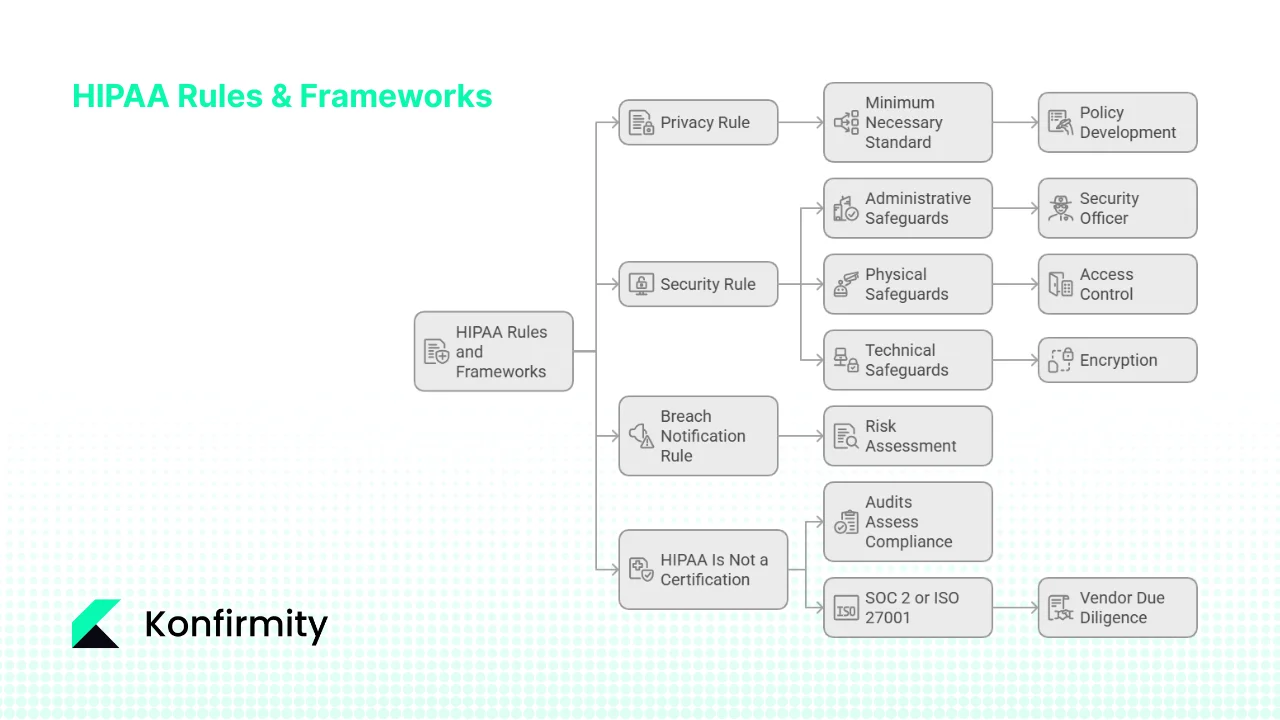
Privacy Rule – Governs how PHI is used and disclosed. It mandates the minimum necessary principle for uses and disclosures, provides patients the right to access their records, and requires BAAs for vendors.
-
Security Rule – Specifies administrative, physical and technical safeguards to protect ePHI. It requires a risk analysis and risk management program, workforce training, access controls, encryption, audit logging and incident response.
-
Breach Notification Rule – Requires covered entities and business associates to notify affected individuals, HHS and sometimes media after an impermissible disclosure of unsecured PHI. A risk assessment determines whether the incident poses a low probability of compromise; otherwise notification is mandatory.
2) Administrative, Physical and Technical Safeguards
These safeguards divide controls into people‑, facility‑ and technology‑oriented measures:
-
Administrative safeguards: assign a security officer, conduct risk analyses, manage workforce access, provide training, develop policies, prepare incident response and contingency plans.
-
Physical safeguards: secure buildings and devices, control facility access, protect laptops and media, and use secure disposal methods.
-
Technical safeguards: implement role‑based access controls, enforce authentication and encryption, maintain audit logs, verify data integrity and secure transmissions.
3) Minimum Necessary Standard
The Privacy Rule’s “minimum necessary” standard requires organisations to limit the PHI they use or share. Policies should specify which roles need access, what information categories are necessary, and under what conditions access is granted. Exceptions exist for patient requests, medical care, and compliance with legal requirements.
4) HIPAA Is Not a Certification
There is no official HIPAA certification. Audits assess your security program’s compliance with the Privacy, Security and Breach Notification Rules. Unlike SOC 2 or ISO 27001, HIPAA does not provide a certificate; instead, it expects continuous compliance and documentation. Many organisations pursue SOC 2 or ISO 27001 in parallel to satisfy vendor due‑diligence. For example, SOC 2 Type II reports require demonstrating control effectiveness over a 3–12 month observation period, with most firms taking 6–12 months for the first report. ISO 27001, meanwhile, requires an information security management system (ISMS) with risk‑based internal audits at planned intervals; organisations must audit all processes at least once per year and update their annual audit plan. Blending these frameworks allows a healthcare company to satisfy both regulatory and customer expectations.
Pre‑Audit Preparation: Setting the Foundation
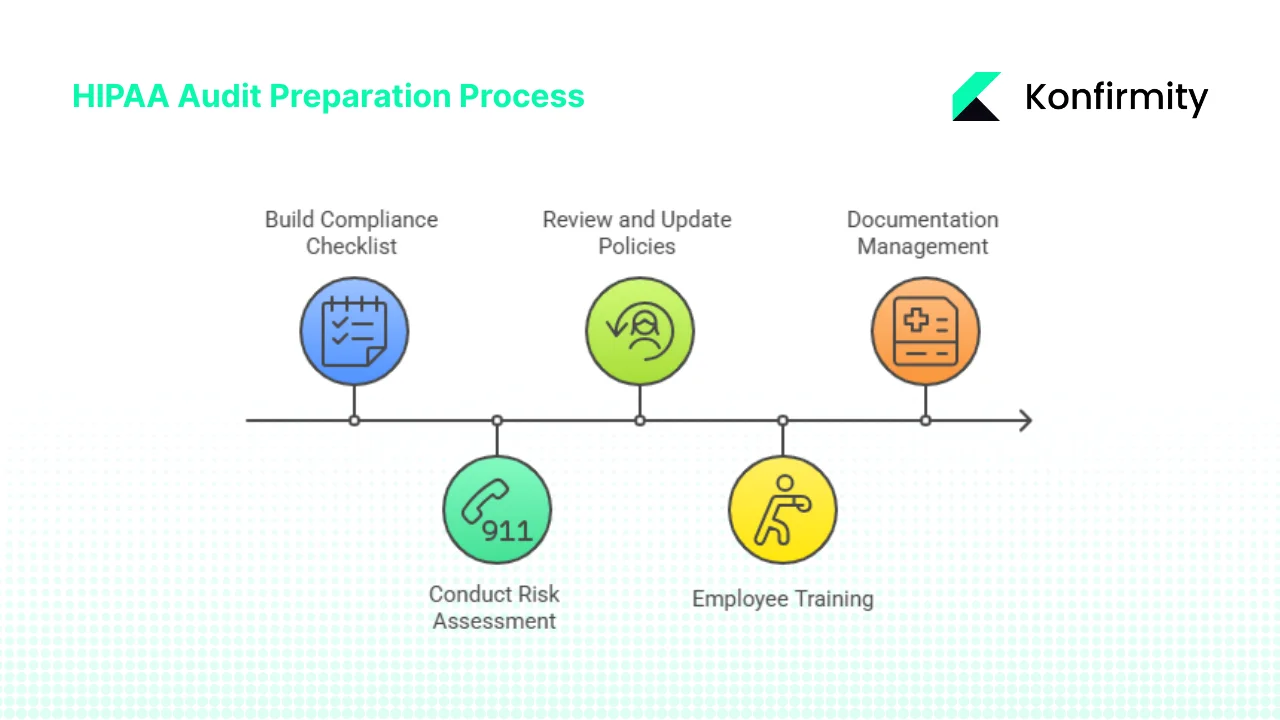
Effective HIPAA Audit Preparation starts with building a detailed compliance checklist, conducting a thorough risk assessment, and updating policies and training. These foundational steps ensure you are not scrambling at the last minute.
1. Build a Compliance Checklist
A well‑structured checklist clarifies requirements and prevents missed controls. Items typically include:
-
PHI safeguarding – encryption, authentication, physical security, device controls.
-
Documentation management – policies, procedures, risk assessments, remediation plans, incident logs, audit trails (maintained for at least six years for many records).
-
Third‑party risk management – list of vendors, BAAs, risk assessments, monitoring.
-
Policy updates – version history, approvals, and regular review schedule.
Adapt the checklist to your organisation’s size, services, ePHI types, and vendor ecosystem. At Konfirmity we map controls across HIPAA, SOC 2 and ISO 27001 so that evidence collected once can satisfy multiple frameworks. Smaller clinics may prioritise basic access controls and encryption; a telehealth platform with multiple microservices may need more detailed network segmentation and vulnerability management.
2. Conduct a Risk Assessment
Risk analysis is the foundation of the Security Rule. NIST SP 800‑66r2 describes it as an “accurate and thorough assessment of the potential risks and vulnerabilities to the confidentiality, integrity and availability of electronic protected health information”. A sound risk assessment identifies where ePHI is stored, processed and transmitted; enumerates threats (e.g., phishing, ransomware, insider misuse); and evaluates likelihood and impact. The NIST guide outlines steps: prepare by mapping ePHI flows, identify threats and vulnerabilities, assess controls, determine impact, prioritise risks, and document results. Regulators expect this process to be ongoing—repeat annually or when systems change, using frameworks such as NIST SP 800‑30 or IR 8286.
3. Review and Update Security Policies
Outdated policies are a red flag in audits. Ensure that policies cover:
-
Access control – least‑privilege, role‑based access, onboarding and off‑boarding processes, user verification.
- Encryption – encryption at rest and in transit, cryptographic secret handling, mobile device encryption.
-
Audit trail – system logs for access, modification and deletion of ePHI, daily/weekly log review, alerting on anomalies.
-
Incident response and breach notification – step‑by‑step response plan, escalation contacts, communication templates for individuals and HHS.
-
Vendor risk – onboarding procedures, BAA templates, periodic vendor reviews.
Document these policies, have them approved by leadership, and communicate them to staff. Provide accessible versions in your knowledge base and review them annually or whenever regulatory guidance changes.
4. Employee Training and Workforce Awareness
Humans remain the weakest link. Regular training reduces phishing success and ensures staff know when to report incidents. At minimum provide:
-
Onboarding training covering HIPAA basics, privacy principles and your organisation’s security policies.
-
Role‑based training suited for job functions (e.g., clinicians vs. developers).
-
Periodic refresher training (e.g., annual) with quizzes and acknowledgement.
-
Incident drills such as phishing simulations and tabletop drills to practise response.
Record attendance and test results; auditors will ask for proof. A human‑led service like Konfirmity can handle training logistics and maintain compliance records to lighten the burden on your team.
5. Documentation Management
Documentation management is what turns your program into evidence an auditor can actually verify. Maintain organised records of:
-
Policies and procedures.
-
Risk assessments and remediation reports.
-
System configurations and architecture diagrams.
-
Training logs and acknowledgements.
-
Access reviews and audit logs.
-
Vendor assessments and BAAs.
-
Incident reports and breach notifications.
HIPAA requires retaining certain documents for six years from creation or last effective date. Keep both current and historical versions to demonstrate continuous improvement. Use secure document management systems with version control and restricted access.
Audit Readiness: A Practical Seven‑Step Workflow
HIPAA Audit Preparation is a lifecycle, not a checklist. Based on our experience running more than six thousand audits, we advise the following seven‑step workflow. This approach matches common questions about the audit process and integrates lessons from SOC 2 and ISO 27001 implementations.
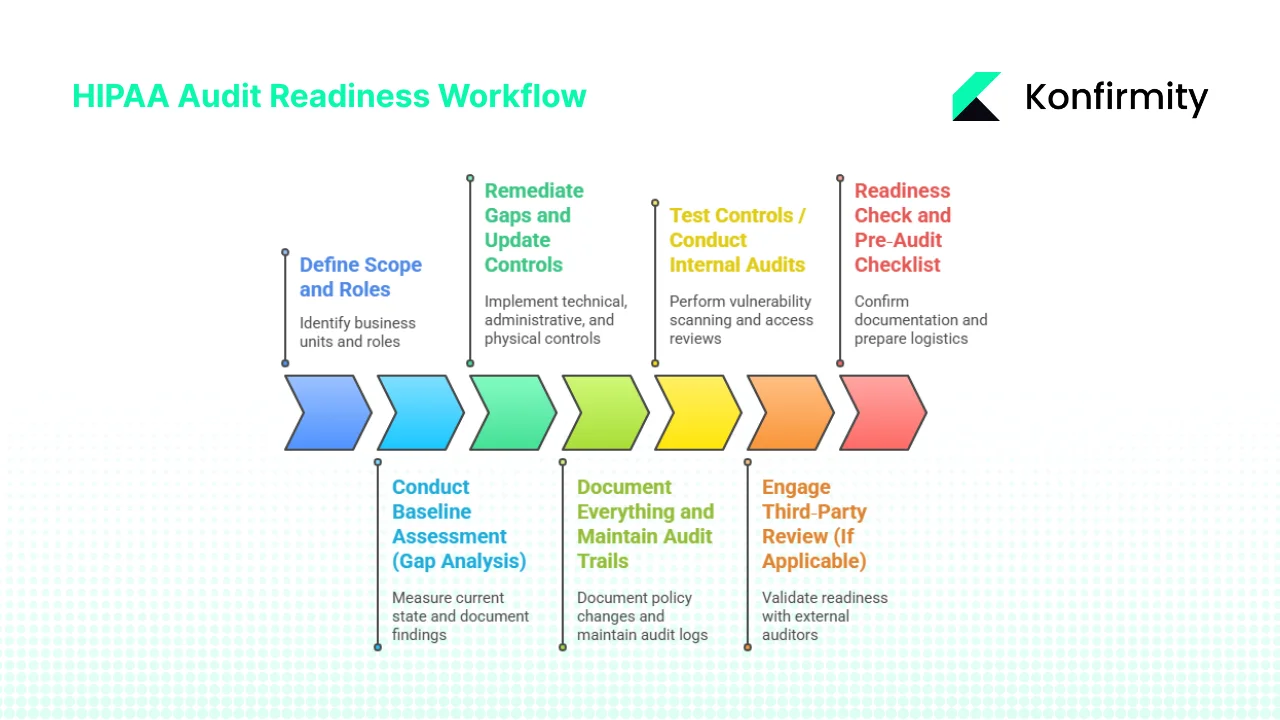
Step 1: Define Scope and Roles
Identify which business units, information systems and data flows involve ePHI. Draw a data‑flow diagram showing how PHI moves through your environment, from intake portals to back‑office databases and third‑party services. Limit scope where possible; focusing on the systems that handle ePHI reduces effort. Assign important roles:
-
Privacy Officer – responsible for HIPAA compliance and privacy program.
-
Security Officer – oversees technical safeguards, risk management and incident response.
-
Audit Lead – coordinates evidence gathering and liaises with auditors.
-
Remediation Lead – ensures gaps are addressed and communicates status to leadership.
Define roles in charters and ensure they have authority to act.
Step 2: Conduct Baseline Assessment (Gap Analysis)
For a deeper walkthrough of this stage, see our HIPAA gap assessment guide. Use your compliance checklist to measure your current state. Mark each control as “complete,” “partial” or “missing.” Document high‑risk findings such as:
-
Lax access controls or inactive user accounts.
-
Lack of encryption for mobile devices and backups.
-
Absence of regular vulnerability scanning or patch management.
-
No process for quarterly access reviews.
This baseline provides the roadmap for remediation. Combine it with your risk assessment to prioritise issues that could expose ePHI or block deals.
Preparing for a HIPAA audit means fixing real security issues, not rehearsing answers.
Drop your work email and see what auditors check before you face them.
Step 3: Remediate Gaps and Update Controls
Address gaps based on risk priority. Implement or enhance:
-
Technical controls: enable encryption (AES‑256, TLS 1.3), enforce multi‑factor authentication, configure role‑based access, deploy log management and intrusion detection.
-
Administrative controls: update policies, formalise vendor management, schedule regular vulnerability scans and penetration tests, perform quarterly access reviews.
-
Physical controls: restrict facility access, secure workstations, maintain device inventories and disposal procedures.
Monitor progress using remediation trackers. At Konfirmity we often see teams under‑estimate the time needed to fix access control issues; tasks such as centralising identity providers, automating off‑boarding, and retrofitting encryption into legacy systems take significant effort. A human‑led managed service can handle these tasks while your engineers stay focused on product development.
Step 4: Document Everything and Maintain Audit Trails
Every policy change, system configuration, training session, and remediation action must be documented. Maintain audit logs showing who accessed or modified ePHI, when and what actions they took. Regulators expect logs to cover at least six years, and auditors test samples from multiple time ranges. Use automated logging tools integrated into your infrastructure to capture events across databases, file systems and cloud services. Generate daily or weekly log review reports that flag anomalies and confirm that nothing suspicious went unnoticed.
Step 5: Test Controls / Conduct Internal Audits
Before inviting regulators, test your controls. Internal or “mock” audits reveal gaps early and provide a safe environment for improvement. Our HIPAA internal audit guide walks through how to structure this testing so findings surface before an external assessor does. Activities include:
-
Vulnerability scanning – at least quarterly; fix high‑risk vulnerabilities within defined SLAs.
-
Penetration testing – annually or after major changes to assess real‑world exploitability.
-
Access reviews – quarterly checks to ensure users have only necessary privileges.
-
Policy enforcement checks – confirm policies are followed, such as encryption of portable devices and timely off‑boarding.
We advise matching test frequency with your overall compliance cadence. For example, SOC 2 Type II requires a 3‑12 month observation period; performing quarterly internal audits keeps evidence fresh.
Step 6: Engage Third‑Party Review (If Applicable)
Our HIPAA auditor selection guide covers how to vet and choose the right firm for this step. Large covered entities and business associates often engage external auditors to validate readiness. External assessments add objectivity and credibility, particularly when selling to enterprise buyers. They also help map your program to other frameworks such as SOC 2, ISO 27001 or GDPR. For example, a CPA firm may run a combined SOC 2 + HIPAA attestation, leveraging the same evidence. For SOC 2 Type II, most organisations choose an initial 3–6‑month observation period followed by annual 12‑month periods. A third‑party auditor can help you select the right window and ensure you meet AICPA trust services criteria for security, availability, processing integrity, confidentiality and privacy.
Step 7: Readiness Check and Pre‑Audit Checklist
Before the auditor arrives:
-
Confirm all documentation is current (policies, procedures, risk assessments, training logs).
-
Verify that remediation tasks are complete or tracked with planned completion dates.
- Ensure important personnel (privacy officer, security officer, audit lead) are available during the audit.
-
Test system access to ensure auditors can access logs and systems without delays.
-
Prepare logistics: schedule meetings, secure conference rooms, provide remote access instructions, and share your scope and evidence index.
A pre‑audit checklist ensures you are not scrambling on audit day. During our 25 years of work, we’ve learned that early organisation reduces stress and demonstrates maturity to auditors.
Common Audit Areas with Examples and Templates
Auditors typically focus on specific controls. During HIPAA Audit Preparation, they examine seven major areas, with practical examples and templates you can adapt. For a deeper look at how these show up as findings, see our common HIPAA audit findings breakdown.
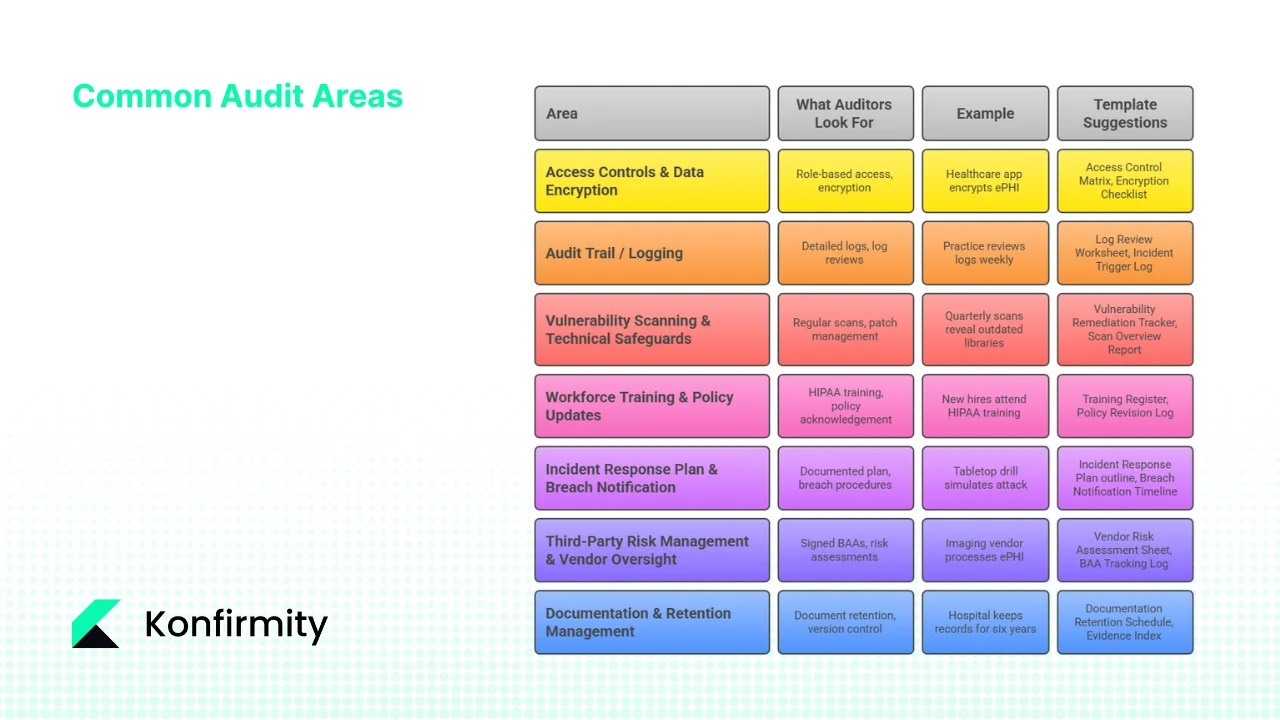
1. Access Controls & Data Encryption
What auditors look for: Role‑based access, least privilege, authentication methods, password policies, MFA enforcement, encryption of data at rest and in transit.
Example: A healthcare app stores ePHI on mobile devices. Auditors will check that the device is encrypted, remote wipe is enabled and access is revoked when staff leave. They’ll verify that role changes are promptly reflected in system permissions.
Template suggestions: Access Control Matrix (mapping users to roles and permissions), Encryption Implementation Checklist (covering databases, backups, mobile devices).
2. Audit Trail / Logging
What auditors look for: Detailed logs of ePHI access, changes and deletions; daily or weekly log reviews; automated alerts for unusual activity.
Example: A practice reviews logs every Monday and flags unusual access patterns (e.g., after‑hours login from a foreign IP). The incident response team investigates and documents findings.
Templates: Log Review Worksheet (records date, reviewer, findings), Incident Trigger Log (records alerts and actions taken).
3. Vulnerability Scanning & Technical Safeguards
What auditors look for: Regular vulnerability scans, penetration testing, timely patch management, network segmentation, change management.
Example: Quarterly vulnerability scans reveal outdated libraries in an electronic health record (EHR) system. Remediation is tracked, with high‑severity issues resolved within 30 days and medium‑severity within 90 days.
Templates: Vulnerability Remediation Tracker (lists identified vulnerabilities, severity, owner, status), Scan Overview Report (provides an overview of scan results and remediation progress).
4. Workforce Training & Policy Updates
What auditors look for: Evidence that all workforce members received HIPAA training, role‑based training, and annual refresher courses; acknowledgement of updated policies.
Example: New hires attend a HIPAA training session and sign an acknowledgement record. The organisation tracks completion in a Training Attendance Register and logs policy revision dates.
Templates: Training Register (captures attendees, date, course type), Policy Revision Log (records version, author, approval date, next review date).
5. Incident Response Plan & Breach Notification
What auditors look for: A documented incident response plan, roles and responsibilities, contact lists, and evidence of test drills; documented breach notification procedures.
Example: The organisation conducts a tabletop drill simulating a ransomware attack. The response team follows the incident response plan, documents actions, and updates the plan based on lessons learned. If a real breach occurs, the team uses a Breach Notification Timeline to notify affected individuals and HHS within required timelines.
Templates: Incident Response Plan outline (sections: preparation, detection, analysis, containment, eradication, recovery, post‑incident review), Breach Notification Timeline checklist (tracks discovery date, risk analysis, notification deadlines, communications sent).
6. Third‑Party Risk Management & Vendor Oversight
What auditors look for: Signed BAAs, vendor risk assessments, due diligence records, monitoring of vendor compliance.
Example: An imaging vendor processes ePHI for a radiology practice. The practice maintains a Vendor Risk Assessment Sheet, obtains a signed BAA, and reviews the vendor’s SOC 2 report annually.
Templates: Vendor Risk Assessment Sheet (assesses vendor controls, service scope, data handling, security posture), BAA Tracking Log (records contract dates, renewal reminders, vendor contacts).
7. Documentation & Retention Management
What auditors look for: Evidence of document retention for at least six years, version control, and retrieval processes.
Example: A hospital keeps risk assessments, policies, training logs and incident records for six years. When auditors ask for a 2019 risk assessment, the hospital can quickly retrieve the file and show how the risk was addressed.
Templates: Documentation Retention Schedule (listing each document type, retention period, storage location) and Evidence Index (cataloguing evidence with cross‑references to controls and frameworks).
For the request-level view, every inquiry OCR’s protocol makes and the evidence that closes it, see our HIPAA audit checklist.
Free download
The HIPAA Audit Request List
Every audit area above as a tracker: rule citation, evidence owner, where the evidence lives, and the date it was last refreshed — plus worked risk analysis, PHI inventory, training and log-review tabs. Enter your work email and we'll send the PDF.
Template Library for Busy Teams
To help teams move quickly with their HIPAA Audit Preparation, we provide ready‑to‑use templates. Each template is designed to save time and ensure completeness.
| Template | Description | Adaptation Tips |
|---|---|---|
| HIPAA Audit Checklist | A detailed checklist consistent with the Privacy, Security and Breach Notification Rules. Includes administrative, physical and technical safeguards and references to SOC 2/ISO 27001 where applicable. | Adjust scope based on your services; mark items relevant to your environment. |
| Risk Assessment Worksheet | A step-by-step workbook following NIST SP 800-66r2 methodology: identify assets, threats, vulnerabilities, evaluate likelihood/impact, and prioritise remediation. | Use risk scoring suited to your organisation's impact and likelihood tolerance. |
| Access Control & Encryption Matrix | Maps user roles to required access and documents encryption status for data stores, backups and mobile devices. | Update whenever roles change or new systems are added; coordinate with HR and DevOps. |
| Audit Log Review Sheet | Captures log review frequency, reviewer, findings, and follow-up actions. Helps demonstrate ongoing monitoring. | Integrate with your SIEM or log management tool for automated population. |
| Vulnerability Scan Overview & Remediation Tracker | Provides an overview of scan results, severity ratings, and tracks remediation status, deadlines and owners. | Match remediation SLAs with risk categories; update after each scan. |
| Training Register & Policy Revision Log | Records training attendance, course types, and policy version history. | Use to schedule refresher training; link to HR systems to track new hires. |
| Incident Response Plan & Breach Notification Timeline | Provides a structured approach to incident handling and notification deadlines. | Customise for your environment; include contact details, escalation paths and legal counsel coordination. |
| Vendor Risk Assessment Sheet & BAA Tracker | Assesses vendor security posture, collects BAAs, and schedules periodic reviews. | Prioritise vendors based on the sensitivity of PHI they handle; integrate with procurement workflows. |
To embed these templates into your workflows, create a monthly or quarterly cadence. For example, schedule log reviews weekly, vulnerability scans quarterly, risk assessments annually, and policy reviews every 12–18 months. Use dashboards to track progress and assign tasks. Organise documentation in a central repository with role‑based permissions. A managed service like Konfirmity can integrate these templates into your operations and maintain them over time.
Maintenance and Continuous Readiness
Audit readiness is not a one‑time project; it’s continuous HIPAA Audit Preparation and operations. Key practices include:
-
Regular internal audits: Conduct quarterly or semi‑annual internal audits to check control effectiveness. This matches SOC 2’s continuous observation and ISO 27001’s requirement to audit all processes at least once per year.
-
Policy review cycles: Update policies every 12–18 months or after major changes. Keep version histories and approval records.
-
Monitoring tools: Use automated solutions for vulnerability management, log aggregation, access reviews, and vendor monitoring. These tools reduce manual effort and ensure evidence is always current.
-
Calendar cadence:
-
Monthly – log reviews, access deprovisioning checks, incident response drills.
-
Quarterly – vulnerability scanning and patching, access reviews, internal audits.
-
Semi‑annual – third‑party risk reviews, tabletop drills.
-
Annual – full risk assessment, policy review, SOC 2/ISO 27001 surveillance audits.
-
Every 12 months – renew SOC 2 reports (SOC 2 reports are valid for 12 months) and update BAAs.
-
-
-
Mindset of compliance: Encourage security awareness across the organisation. Encourage staff to report anomalies and participate in drills. Hold vendors accountable for their controls through regular reviews and contract clauses.
Konfirmity’s human‑led model emphasises continuous monitoring and remediation. Instead of handing you templates and leaving, we operate your security program alongside your team. Our clients typically achieve SOC 2 readiness in 4–5 months versus 9–12 months when self‑managed. We reduce internal effort to around under 70 hours per year—compared with 550–600 hours for self‑managed programs—by automating evidence collection and handling remediation tasks. For HIPAA clients, we embed PHI safeguards into these frameworks so that a single set of controls yields evidence usable across multiple compliance requirements.
FAQs
Q1. How should you prepare for a HIPAA audit?
Preparation begins with defining the audit scope and assigning roles. Build a tailored compliance checklist covering administrative, physical and technical safeguards, perform a risk assessment to identify and prioritise threats, and remediate gaps. Update policies, train staff, manage documentation, and test controls through internal audits. Engage third‑party auditors if needed and conduct a readiness check before audit day. Maintain evidence for at least six years.
Q2. What are the seven steps in the audit process?
-
Define scope and roles.
-
Conduct a baseline assessment (gap analysis).
-
Remediate gaps and update controls.
-
Document everything and maintain audit trails.
-
Test controls / conduct internal audits.
-
Engage third‑party review (if applicable).
-
Perform a readiness check and finalise the pre‑audit checklist.
Q3. What does a HIPAA audit consist of?
A HIPAA audit includes a review of your policies and procedures, risk analysis, administrative, physical and technical safeguards, audit trails and logs, staff training records, vendor management (BAAs), incident response plan and breach notification readiness, and documentation with six‑year retention.
Q4. What are the steps in preparing for an audit?
The preparation steps mirror Q1 and the seven‑step workflow: define scope and roles, create a compliance checklist, conduct a risk assessment, remediate gaps, document everything, test controls through internal audits, and perform a readiness check with evidence accessible. Don’t wait until a regulator calls—embed these practices into your daily operations.
See your real HIPAA audit readiness gap, not a guess
Book a demo and we'll map your preparation against the Security Rule requirements, self-serve or with our CISO-led team running it for you.
Book a demo
Conclusion
Preparing for a HIPAA audit—often called HIPAA Audit Preparation—is more than producing documents. It’s about building a security program that withstands attacks, protects patients and accelerates deals. The Privacy, Security and Breach Notification Rules set clear expectations: risk analysis, administrative, physical and technical safeguards, minimum necessary use of PHI, breach response and documentation. Auditors examine how these controls operate in your environment and whether evidence demonstrates sustained performance.
A pragmatic approach starts with a customised compliance checklist, a thorough risk assessment, updated policies, workforce training, and disciplined documentation. Follow the seven‑step workflow: scope and roles, baseline assessment, remediation, documentation, control testing, third‑party reviews and final readiness. Focus on common audit areas—access control, logging, vulnerability management, training, incident response, vendor oversight, documentation—and use templates to save time. Build continuous readiness through regular audits, policy reviews, automated monitoring and a mindset of compliance.
With more than 6,000 security audits behind us, Konfirmity has seen that security built into daily operations leads to compliance that stands up to regulators, buyers and attackers. Choose a human‑led partner to design and run your program, and let HIPAA audit preparation become part of your operational rhythm. Start today: download a template, assign roles, schedule your first internal audit and commit to continuous improvement. Real security is the foundation on which compliance is built.