

For companies selling to enterprise clients, the security questionnaire is the new gatekeeper. It does not matter how disruptive your product is; if you cannot prove you handle data securely, the deal stalls. Procurement teams do not operate on trust—they operate on verification. This verification comes in the form of a SOC 2 report, and the foundation of that report is evidence.
Many organizations misunderstand SOC 2 as a document generation exercise. They draft policies, create an employee handbook, and assume they are ready. However, the American Institute of Certified Public Accountants (AICPA) designed SOC 2 to evaluate operational effectiveness, not just intent. Policies state what you plan to do; evidence proves you actually did it.
With the global average cost of a data breach reaching $4.88 million in 2024, enterprise buyers are more cautious than ever. Without organized, secure, and immutable evidence, an audit becomes a chaotic scramble that results in "qualified" opinions—a red flag for any buyer. This guide details practical SOC 2 evidence storage best practices to help you maintain a state of continuous audit readiness, satisfy enterprise due diligence, and close deals faster.
Why Evidence Storage Matters in SOC 2 Compliance
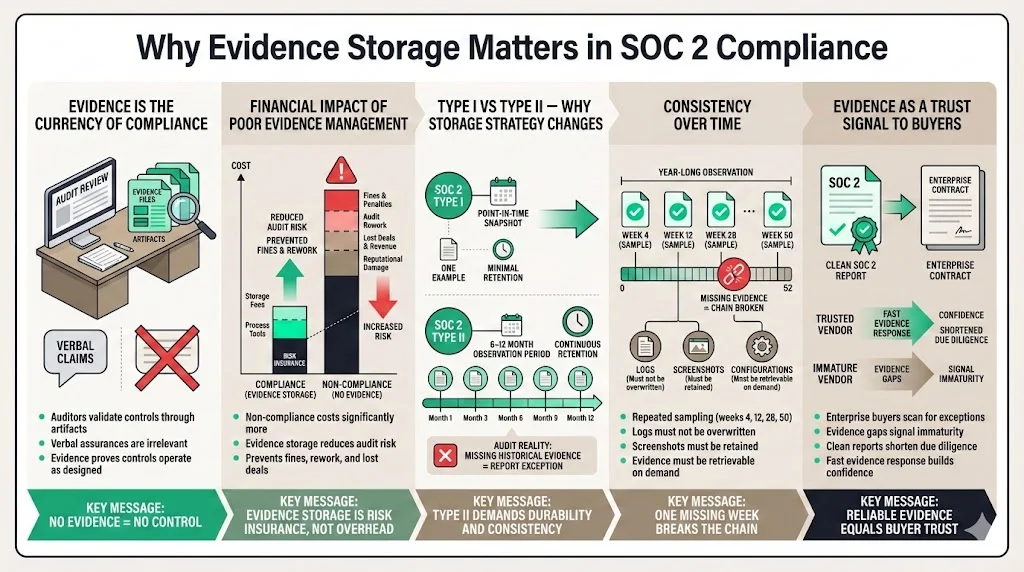
Evidence is the currency of compliance. In a SOC 2 audit, the auditor’s job is to validate that the controls you designed are functioning effectively. They cannot take your word for it; they require artifacts that demonstrate the control in action.
Financial impact drives this requirement. According to research by GlobalSCAPE and the Ponemon Institute, the cost of non-compliance is 2.71 times higher than the cost of maintaining compliance. Investing in proper evidence storage is not just an administrative cost; it is an insurance policy against much steeper fines and revenue loss.
The Shift from Type I to Type II
The distinction between SOC 2 Type I and Type II audits fundamentally changes your evidence storage strategy.
- Type I looks at a specific point in time. You show the auditor one example of a control (e.g., one background check, one change ticket) to prove the design is suitable.
- Type II evaluates operating effectiveness over a period, typically 6 to 12 months.
For a Type II report, which is the standard requirement for enterprise procurement, consistency is non-negotiable. If you claim to review access logs weekly, the auditor will request samples from weeks 4, 12, 28, and 50. If you cannot produce evidence for week 28 because the logs were overwritten or the screenshot was lost, you face an exception in your report.
Evidence as a Trust Signal
Enterprise buyers engage in rigorous vendor risk management. When they review your SOC 2 report, they look for a "clean" opinion. Gaps in evidence lead to exceptions, which signal operational immaturity. Proper storage practices ensure that when the auditor asks for proof, you can provide it immediately. This reliability signals to your customers that their data is safe in your hands.
Understand the Evidence You Need to Store
Before implementing storage solutions, you must identify what constitutes valid evidence. In our experience supporting over 6,000 security audits, we see teams fail not because they didn't perform the task, but because they captured the wrong data.
Common Types of SOC 2 Evidence
Evidence generally falls into three categories:
- System-Generated Logs: These are automated records of events. Examples include:
- Application access logs.
- Cloud infrastructure (AWS/Azure/GCP) activity logs (e.g., CloudTrail).
- Database query logs.
- Antivirus/EDR scan reports.
- Configuration States: Proof of how a system is set up at a specific time.
- Exported firewall rules.
- Password policy settings (screenshots or JSON exports).
- Encryption configurations (KMS settings).
- Backup schedules.
- Process Artifacts: Documentation of human actions.
- Change management tickets (Jira/Linear) showing approval workflows.
- Onboarding/offboarding checklists.
- Minutes from quarterly security committee meetings.
- Incident response post-mortems.
The Critical Role of Metadata
A screenshot of a setting is worthless without context. Auditors verify the validity of evidence through metadata. SOC 2 evidence storage best practices dictate that every artifact must clearly display:
- Timestamp: When the evidence was created or the event occurred.
- System Name: The URL, hostname, or ID of the system being shown.
- User Identity: Who performed the action or took the screenshot.
If you store a screenshot named settings.png with no date visible in the image, an auditor cannot verify if it belongs to the current audit period.
Secure Storage Principles for SOC 2 Evidence
Storing evidence of your security controls requires its own security measures. Ironically, the repository where you keep your compliance artifacts often holds sensitive data regarding your infrastructure vulnerabilities and employee details. It must be protected with the same rigor as your production data.
1) Secure Storage Infrastructure
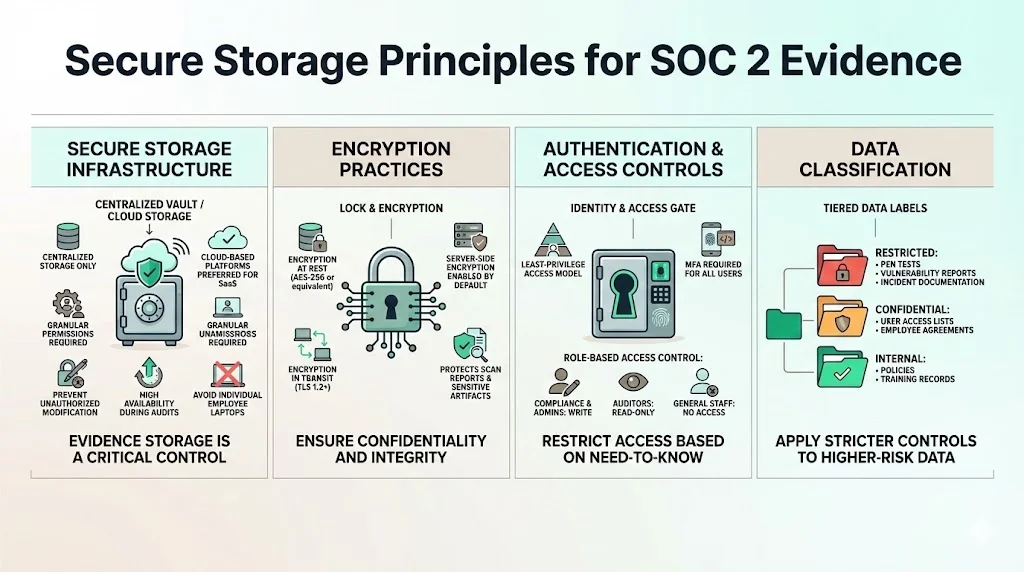
You face a choice between cloud-based storage and on-premise solutions. For modern SaaS companies, cloud storage (e.g., dedicated S3 buckets, Google Drive with strict permissions, or specialized GRC platforms) is the standard.
- Confidentiality: The platform must support granular permissions.
- Integrity: The platform must prevent unauthorized modification.
- Availability: The data must be accessible to the auditor when the audit begins.
At Konfirmity, we advise against storing evidence on individual employee laptops. If that employee leaves or their device fails, the evidence is lost, creating an audit gap. Centralized, redundant storage is mandatory.
2) Encryption Practices
Encryption is a core component of the Trust Services Criteria (confidentiality).
- At Rest: Evidence volumes must be encrypted using industry-standard algorithms (e.g., AES-256). If you use a cloud provider, enable server-side encryption by default.
- In Transit: All uploads and downloads of evidence must occur over encrypted channels (TLS 1.2 or higher).
This protects sensitive artifacts, such as vulnerability scan reports or user lists, from interception or leakage.
3) Authentication and Access Controls
Access to the evidence repository should be restricted based on the principle of least privilege.
- Strong Authentication: Multi-Factor Authentication (MFA) must be enforced for all users accessing the evidence store.
- Role-Based Access Control (RBAC): Only the compliance team and system administrators should have write access. Auditors should be granted "read-only" access. General employees should have no access.
4) Data Classification
Not all evidence carries the same risk. Organize and classify data within your storage hierarchy.
- Restricted: Vulnerability assessments, penetration test results, incident reports (requires highest security).
- Confidential: User access lists, employee agreements, background check confirmations.
- Internal: Policy documents, training logs.
Proper classification allows you to apply stricter security policies to the most sensitive folders.
Ensuring Data Integrity Over Time
For an auditor to accept your evidence, they must trust that it has not been doctored. SOC 2 evidence storage best practices require mechanisms to prove integrity.
Evidence storage is only useful if integrity is provable at audit time.
Share your work email and store SOC 2 evidence that satisfies tough reviewers.
Immutable Storage (WORM)
Write-Once-Read-Many (WORM) storage technology prevents files from being altered or deleted for a set retention period. AWS S3 Object Lock is a prime example. By placing a governance mode lock on log archives, you mathematically prove to auditors that logs from six months ago are exactly as they were when generated.
Hashing and Checksums
For manual exports, generating a cryptographic hash (SHA-256) of the file upon creation establishes a baseline. If the file integrity is questioned later, you can re-hash the file and match it to the original value. While manual hashing is tedious, many automated compliance tools handle this in the background.
Version Control
If you store policy documents or configuration files in a version control system (like Git), the commit history serves as an audit trail. It shows exactly when a file changed and who changed it. Ensure the .git history is preserved and accessible.
Audit Trails and Monitoring
Who watches the evidence? To satisfy the Monitoring criteria of SOC 2, you must track interactions with your evidence repository.
Continuous Monitoring
Enable access logging on your evidence storage buckets or folders. You need to know:
- Who viewed a file?
- Who uploaded a new version?
- Did anyone attempt to delete a file?
Traceability
If an auditor asks, "Who modified this access review document?", your logs should provide the answer instantly. This level of traceability is often missing in ad-hoc storage methods (like shared folders without audit logging enabled). It demonstrates operational maturity and control over your compliance environment.
Backup Procedures for Evidence
Imagine reaching the end of a 12-month observation period only to have a ransomware attack or accidental deletion wipe out your logs. You would fail the audit, wasting a year of effort and potentially losing enterprise contracts.
Backup Routines
Treat your evidence repository as a production system.
- Frequency: Backups should occur daily for active evidence stores.
- Separation: Store backups in a separate region or account to protect against disaster or compromise of the primary account.
Restoration Testing
Backups are theoretical until tested. Schedule semi-annual tests to restore evidence files. Document these tests—the test record itself becomes evidence of your backup control.
Retention Schedules
Match retention with your audit cycle and regulatory obligations. For SOC 2, you typically need to retain evidence for at least the duration of the audit period plus the time required to issue the report. However, many enterprise master service agreements (MSAs) require data retention for 3–7 years. Configure your storage lifecycle policies to automate this retention and eventual deletion.
Compliance Requirements and Documentation Standards
There is a distinct difference between "documentation" and "evidence," though both are stored. Documentation describes the design of a control (e.g., the Access Control Policy). Evidence proves the execution (e.g., the ticket granting access to Jane Doe).
Organizing for Auditor Review
Auditors bill by the hour. A disorganized evidence dump increases costs and frustration.
- Folder Structure: Map folders directly to the Trust Services Criteria (e.g., CC6.1 - Logical Access, CC7.1 - System Operations).
- Naming Conventions: Standardize file names.
- Bad: screenshot.png
- Good: 2025-07-15_Production_DB_Access_Review.pdf
- Linking Evidence to Controls: Maintain a control matrix (often in a spreadsheet or GRC tool) that links specific files to specific control numbers.
The Checklist
Typical evidence requiring storage includes:
- HR: Background checks (redacted), signed handbooks, offer letters.
- Access: Access request tickets, termination tickets, quarterly access reviews.
- DevOps: Pull requests showing code review, deploy logs, vulnerability scans.
- Management: Risk assessments, vendor reviews, board meeting minutes.
Cloud Security Considerations
As infrastructure becomes increasingly code-defined, your cloud environment is both the subject of the audit and the home of the evidence.
Segmentation
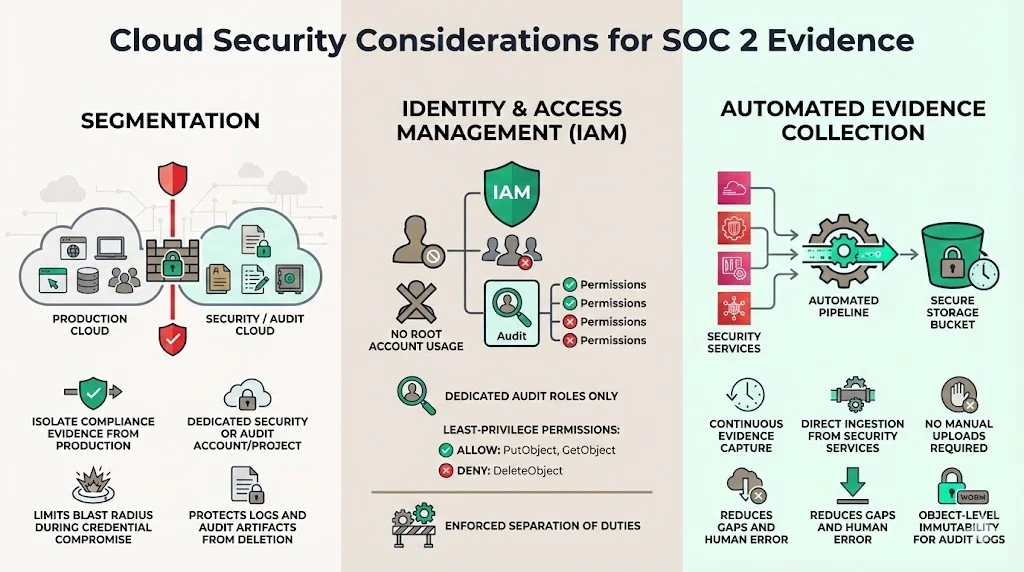
Isolate compliance evidence from production workloads. Use a dedicated "Security/Audit" AWS account or a segregated project in GCP. This limits the "blast radius" if production credentials are compromised—attackers won't be able to delete the logs that reveal their presence.
Identity and Access Management (IAM)
Adhere to strict IAM policies. Avoid using root accounts to manage evidence. Create specific roles (e.g., Audit_Manager) with permissions limited to PutObject and GetObject, but deny DeleteObject.
Automated Collection
Services like AWS Security Hub or GuardDuty generate findings automatically. Configuring these to pipe directly into your secure storage (e.g., an S3 bucket with Object Lock) ensures you capture evidence without human intervention, reducing the risk of gaps.
Risk Management in Evidence Storage
Storage is not a "set and forget" operation. You must assess the risks associated with how you handle these artifacts.
Risks
- Tampering: An administrator altering logs to hide a mistake.
- Loss: Accidental deletion or corruption.
- Unauthorized Exposure: Leaking sensitive vulnerability data to the public internet.
Mitigation Controls
- Change Management: Apply change control processes to the configuration of the evidence storage system itself.
- Alerting: Configure alerts for any "Delete" operations in the evidence repository.
- Periodic Audits: Internally audit the evidence folder quarterly to ensure teams are uploading artifacts as required. Do not wait for the external auditor to find the empty folders.
Vendor Management and Third-Party Data
Your SOC 2 scope likely includes third-party vendors (e.g., hosting providers, authentication services). With 35.5% of data breaches in 2024 originating from third parties, capturing evidence of vendor compliance is critical.
Reviewing Vendor Reports
You must collect SOC 2 reports or ISO 27001 certificates from your critical vendors annually. Store these reports in your "Vendor Management" evidence folder.
Shared Responsibility
Understand what evidence belongs to you vs. the vendor. For a SaaS platform running on AWS:
- AWS Evidence: Physical security of data centers (AWS SOC 2 report).
- Your Evidence: Virtual firewall rules and IAM user access (Your configuration exports).
Ensure you are capturing the logs that are your responsibility. AWS will not turn on CloudTrail for you; that is a control you must implement and evidence you must store.
Tools and Automation for Evidence Storage
The market is flooded with GRC (Governance, Risk, and Compliance) automation platforms. These tools connect to your stack via API and automatically pull evidence (like user lists or passing test results) into a central repository.
The Role of Automation
Automation is excellent for high-volume, repetitive data. It ensures that SOC 2 evidence storage best practices regarding frequency and consistency are met. A 2024 IBM report noted that organizations extensively using AI and automation saved an average of $2.2 million in breach costs, illustrating the financial value of removing manual error from security processes.
The Limitations of Tools
However, a tool is not a strategy. Automation agents break when APIs change. They generate false positives. They cannot interpret the context of a board meeting minute or a complex manual workflow. We often see companies buy a tool, assume it is running perfectly, and then fail their audit because an API token expired three months ago and no evidence was collected.
Beyond Tooling: The Managed Option
This is where a managed service differs from software alone. Konfirmity is a security-driven compliance platform you can run self-serve or have fully managed. With the fully-managed service, tools assist but experts execute: we manage the lifecycle of the evidence, verifying that the logs are actual, readable, and mapped to the controls. We handle the 250-600 hours of operational overhead that compliance typically demands, allowing your engineering leaders to focus on product.
Conclusion
Implementing strong SOC 2 evidence storage best practices is not about pleasing an auditor; it is about building a defensible security posture that withstands scrutiny from enterprise buyers.
When you treat evidence storage as a core operational process rather than a once-a-year panic, you reduce business risk. You ensure that when a lucrative deal lands on the table, you can answer the security questionnaire with confidence and proof, not vague promises.
The goal is to start with security and arrive at compliance. By securing your infrastructure, encrypting your data, and maintaining immutable logs, you build a system that is secure by design. The SOC 2 report is simply the natural output of that well-run system.
Don't let paper promises be your strategy. Build controls that stand up to buyers, auditors, and attackers alike.
Frequently Asked Questions (FAQ)
Q1. How long must SOC 2 evidence be stored?
For a Type II audit, evidence must cover the entire audit period, which is typically 6 to 12 months. However, best practice is to match retention with your customer contracts and business continuity plans, often requiring data to be retrievable for 3 to 7 years.
Q2. Can evidence storage be automated?
Yes, significantly. Modern GRC tools and cloud scripts can automate the collection and storage of technical evidence (logs, configurations). However, manual processes (HR reviews, physical security checks) often still require human intervention to upload artifacts to the storage location.
Q3. What is the difference between evidence and documentation?
Documentation (policies, procedures) describes the intended design of your controls. Evidence (logs, tickets, screenshots) proves the actual execution of those controls over time. You need both, but evidence is what validates the control's operating effectiveness.
Q4. What happens if evidence is incomplete during an audit?
If evidence is missing for a specific period within the audit window, the auditor cannot verify the control operated continuously. This may lead to a "qualified opinion" (a finding/exception) in your final report. In some cases, auditors may extend the audit timeline to collect more data, delaying your report issuance.
Q5. How do enterprise buyers evaluate evidence storage?
Sophisticated buyers look for proof of data integrity. They want to know that your logs are immutable (cannot be changed), that access to evidence is restricted (RBAC), and that you have uninterrupted audit trails. They view resilient evidence storage as a proxy for your overall data governance maturity.







