Healthcare organizations are under unprecedented scrutiny. In procurement, prospective buyers demand detailed evidence that patient data is protected. Regulators in the United States and abroad have increased enforcement actions, with penalties in 2024–2025 reaching into the millions. Meanwhile, the average cost of a healthcare data breach in the United States rose to $10.22 million in 2025 and cases took nearly 279 days to identify and contain. With the stakes high and the volume of electronic protected health information (ePHI) growing, manual approaches to compliance no longer suffice.
This article examines HIPAA automation tools—software and services that automate risk assessment, evidence collection, auditing, and access control. For a broader look at how automated platforms stack up against managed services on price and coverage, see our HIPAA tool comparison guide. It explains what HIPAA requires, why manual compliance falls short, what functions automation tools perform, and how to evaluate and implement them. You’ll also see how a human‑led, managed service like Konfirmity combines deep expertise with automation to deliver durable security that satisfies buyers, auditors, and regulators.
Understanding HIPAA and the Need for Automation
The Health Insurance Portability and Accountability Act (HIPAA) Security Rule sets national standards to protect health information maintained or transmitted electronically. The Rule organizes safeguards into administrative, physical, and technical categories.
-
Administrative safeguards require regulated entities to assess potential risks to ePHI and implement controls to reduce vulnerabilities. HHS explicitly mandates an “accurate and thorough assessment of potential risks and vulnerabilities” and a process to manage those risks. Entities must designate a security official, implement workforce security policies, control access according to the minimum necessary principle, train staff, and maintain incident response and contingency plans.
-
Physical safeguards address facility access, workstation security, and device and media controls to prevent unauthorized physical access to systems containing ePHI.
-
Technical safeguards require access controls, audit controls, integrity controls, authentication, and transmission security to ensure only authorized individuals access ePHI.
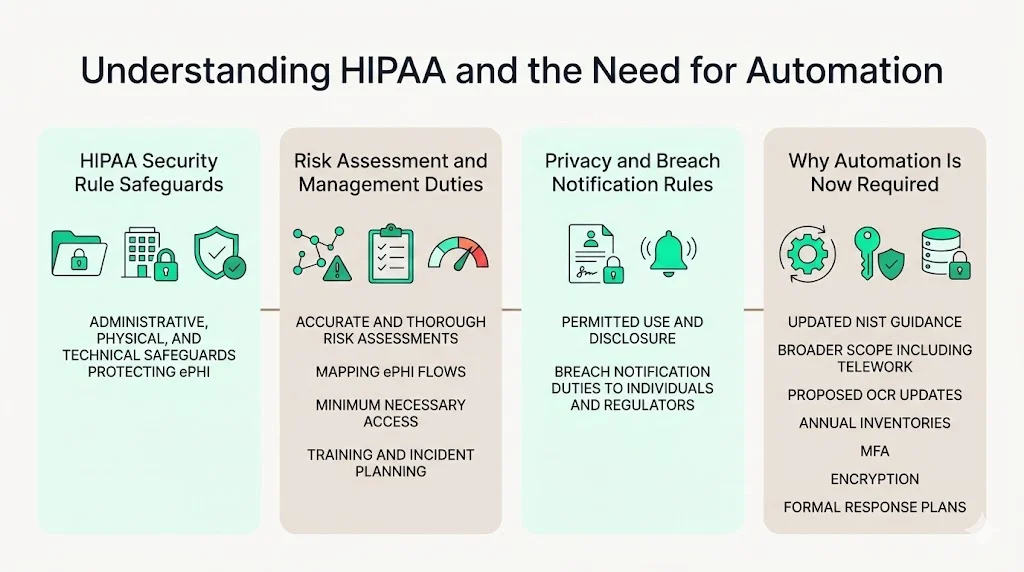
In 2024 the National Institute of Standards and Technology (NIST) updated its HIPAA security guidance, SP 800‑66 Revision 2, outlining how to conduct risk assessments. It explains that a regulated entity must conduct an accurate and thorough assessment of potential risks to the confidentiality, integrity, and availability of ePHI and then implement security measures to reduce risks to a reasonable level. The guidance lists steps such as mapping where ePHI is created and transmitted, identifying threats, and ensuring the scope covers teleworkers and all connected devices.
The HIPAA Privacy Rule works in tandem, setting rules for how information may be used and disclosed, while the Breach Notification Rule requires regulated entities to notify individuals and regulators when unsecured ePHI is compromised. In December 2024, the Office for Civil Rights (OCR) proposed sweeping modifications to the Security Rule, including annual technical inventories, mandatory multi‑factor authentication (MFA) for systems handling ePHI, more detailed risk assessments, rigorous vendor oversight, encryption at rest and in transit, and formal incident response plans. This means that in 2026 organizations will need to demonstrate not just policies, but continuous evidence of security controls in operation.
Why Manual Compliance Alone Falls Short
Many organizations still approach HIPAA compliance as a one‑time project: write policies, conduct a risk assessment, file documents, and move on. That approach is failing. Regulatory requirements span hundreds of pages and cross‑reference multiple statutes. They require ongoing risk management, periodic evaluations, and documented evidence of control operation. Human‑driven processes—spreadsheets, emails, manual checklists—cannot keep pace with the volume of ePHI, the complexity of modern IT environments, or the escalating threat landscape.
Two data points illustrate the risk. IBM’s 2025 Cost of a Data Breach Report found that healthcare breaches cost an average of $7.42 million despite a slight year‑over‑year drop, and breaches took 279 days on average to identify and contain. Long detection windows reflect gaps in monitoring and incident response. Meanwhile, OCR and state attorneys general imposed some of the highest HIPAA penalties in 2024–2025, including a $6.75 million settlement for a multi‑state data breach and penalties ranging from $600,000 to $4.5 million for failures to conduct risk analyses or terminate access promptly. These cases underscore that regulators expect timely risk assessments, robust access controls, and rapid breach notification.
Manual compliance processes struggle on several fronts:
-
Scale and complexity: Healthcare organizations operate dozens of applications, medical devices, and integrations. Mapping where ePHI flows and ensuring every user has appropriate access is nearly impossible with spreadsheets.
-
Timeliness: Manual reviews and self‑audits often occur annually or in response to an incident. They rarely detect misconfigurations or unauthorized access in real time. Attackers exploit these gaps.
-
Evidence gaps: Auditors require evidence—logs, reports, screen captures—that controls are operating effectively over an observation period. Pulling this evidence manually for each audit consumes hundreds of hours and invites errors.
-
Human error: Manual data entry and ad‑hoc processes lead to inconsistent documentation, missed steps, and delayed updates when regulations change.
What Automation Brings to the Table
HIPAA automation tools address these gaps by continuously enforcing, monitoring, and documenting compliance. They:
-
Automate workflows: Tools integrate with electronic health record (EHR) systems, identity and access management (IAM) platforms, and service desks to enforce policy‑driven approvals, role‑based access, and deprovisioning. This ensures that changes in staff status automatically trigger access revocation and evidence capture.
-
Perform risk assessments: Risk assessment modules scan infrastructure for vulnerabilities, map ePHI flows, and score risks according to frameworks like NIST SP 800‑30. They track remediation actions and produce reports aligned with OCR requirements.
-
Enable continuous monitoring: Automated tools ingest logs from EHR systems, firewalls, and cloud platforms to detect anomalies, unauthorized access, and potential breaches. Dashboards show compliance posture in real time, enabling faster response.
-
Reduce human error: By standardizing workflows and automating evidence collection, these tools reduce manual data entry and the risk of omitted documentation.
-
Improve audit readiness: Pre‑built reports align with HIPAA Security Rule standards, making it easier to demonstrate compliance during audits and vendor due‑diligence processes.
Core Functions of HIPAA Automation Tools
Automation software is not monolithic. It spans several functions that collectively support compliance and security.
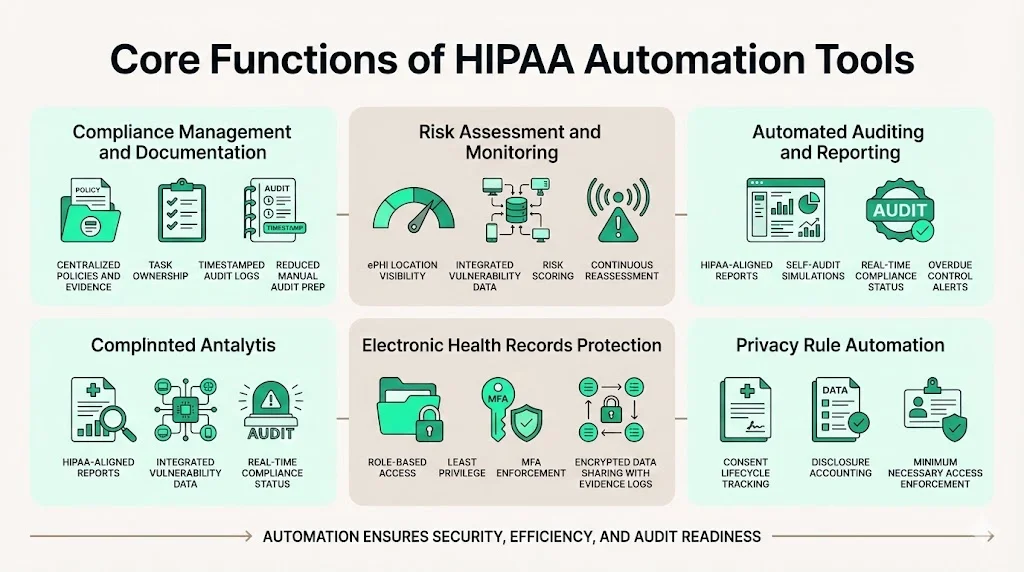
1) Compliance Management & Documentation Automation
At the foundation is compliance management. These modules centralize policies, procedures, and evidence. They track policy updates, assign tasks to owners, and create an immutable audit trail. When auditors request proof that access reviews were performed or policies were updated, the system provides timestamped logs without manual collation. Automated documentation reduces the hundreds of hours often spent assembling binders for a HIPAA audit.
2) Risk Assessment & Monitoring
Risk assessment tools integrate with vulnerability scanners and asset inventories to identify weaknesses. As NIST’s guidance explains, risk assessment must identify where ePHI is created, transmitted, and stored. Automated tools pull network maps, asset inventories, and scanner results into a unified dashboard. They assign risk scores based on factors like threat likelihood and potential impact and track remediation progress. Continuous monitoring features schedule recurring assessments and automatically update risk scores when systems change.
3) Automated Auditing & Reporting
Auditing modules generate pre‑configured reports aligned with HIPAA’s administrative, physical, and technical safeguards. Self‑audit functions let organizations simulate an OCR or third‑party audit, highlighting gaps before regulators or buyers do. Real‑time dashboards show compliance status across control domains, and alerts trigger when policies, access reviews, or training requirements are overdue. Templates for audit logs and evidence submission streamline the formal audit process.
4) Electronic Health Records Protection
Protecting EHR systems goes beyond encryption. Automation tools enforce role‑based access and least‑privilege principles by integrating with IAM and EHR platforms. They ensure MFA is enabled where required and log every access event for review. Transmission security features encrypt data in transit and at rest, aligning with proposed updates that mandate encryption. When providers share ePHI with external partners, secure file‑transfer and API gateways maintain confidentiality and produce evidence that data was transmitted securely.
5) Privacy Rule Automation
HIPAA’s Privacy Rule requires tracking of patient consents, disclosures, and the minimum necessary use of information. Automation tools manage consent lifecycles, record when a patient authorizes the release of information, and automatically update EHR access accordingly. Disclosure logs capture who accessed what data and why, enabling covered entities to respond quickly to patient requests for an accounting of disclosures.
How to Evaluate HIPAA Automation Tools (Checklist)
Not all automation solutions are created equal. When evaluating vendors, consider the following factors.
Integration & Technical Fit
-
Compatibility with existing systems: The tool should integrate with your EHR, IAM, single sign‑on (SSO), security information and event management (SIEM), and ticketing platforms. APIs and connectors allow for automated data exchange and evidence collection.
-
Deployment options: Verify whether the solution is cloud‑based, on‑premises, or hybrid and ensure it meets your infrastructure and data sovereignty needs.
Core Features to Look For
-
Automated risk assessments: The tool should scan infrastructure, map ePHI flows, assign risk scores, and track remediation actions.
-
Policy and consent tracking: Look for modules that centralize policies, manage version control, and record patient consents.
-
Reporting and audit modules: Pre‑built reports for HIPAA, SOC 2, and ISO 27001 help you demonstrate compliance across frameworks.
-
Role‑based access and encryption support: Ensure the tool enforces least‑privilege access, supports MFA, and provides encryption of data at rest and in transit.
Scalability & Support
Evaluate whether the platform can scale with your organization’s growth. Ask about vendor support, service‑level agreements (SLAs), and the frequency of updates. Some vendors offer managed services where experts handle configuration, monitoring, and evidence collection. These can drastically reduce the internal workload compared with self‑serve software.
HIPAA automation tools work best when built on a strong security foundation.
Drop your work email and we'll assess which automation controls close your real compliance risks.
Security Standards & Data Security
Look for solutions that comply with recognized security standards, such as ISO 27001 or SOC 2 Type II. Ask for attestations, penetration test reports, and details about their own security controls. Data should be encrypted in transit and at rest, with strong authentication and access controls. Logging and monitoring functions must cover the tool itself, not just your environment.
Example Tool Categories
Below is a high‑level comparison of tool categories:
| Tool category | Focus | Pros | Cons |
|---|---|---|---|
| Full compliance platforms | End-to-end management (risk, policies, audits) | Broad coverage across HIPAA, SOC 2, ISO 27001; includes evidence management and support | May require more integration effort; costlier |
| Risk assessment tools | Scanning and scoring infrastructure | Rapid identification of vulnerabilities; risk dashboards | Often lack policy management or audit modules |
| Workflow automation engines | Automate specific processes (e.g., access reviews, consent) | Flexible; can be tailored to unique processes | Need configuration and may not include reporting |
| Reporting automation software | Generate audit-ready reports and dashboards | Quick evidence export; supports multiple frameworks | Limited active enforcement or risk scanning |
See our HIPAA controls list guide for the underlying safeguard catalogue that any of these tool categories should be automating evidence against. Konfirmity falls into the full compliance platform category but differentiates itself by delivering a human‑led, managed service. Instead of expecting your team to learn a new tool and perform 650+ internal hours of work, our experts configure controls in your environment, monitor them daily, and keep you audit‑ready year‑round. The result: typical SOC 2 readiness in 4–5 months versus 9–12 months with self‑managed tools, and under 70 hours/year** of client effort instead of 550–600 hours. You can calculate your compliance ROI to put a dollar figure on that difference. These numbers reflect patterns from our 6,000+ security audits and 25+ years of combined expertise.
Free evaluation kit
The Compliance Platform Evaluation & Migration Kit
A weighted scorecard, a 45-question vendor bank, a three-year total cost model, and ten red flags to compare HIPAA automation platforms like the ones above before you sign a contract. Enter your work email and we'll send the kit.
Step‑by‑Step Guide to Implementing HIPAA Automation Tools
Adopting automation is not a matter of flipping a switch. Follow these steps to implement tools effectively.
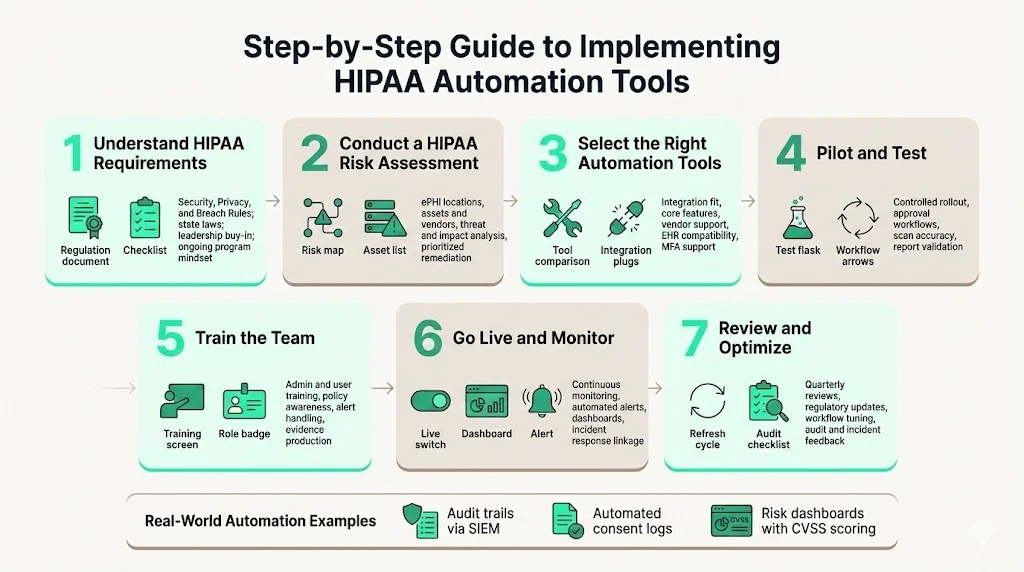
Step 1: Understand HIPAA Requirements Internally
Begin by reviewing the HIPAA Security, Privacy, and Breach Notification Rules, as well as any state laws that apply. Use HHS and NIST guidance to map administrative, physical, and technical safeguards. Train key stakeholders on regulatory obligations and ensure leadership understands that compliance is an ongoing program, not a project.
Step 2: Conduct an Initial HIPAA Risk Assessment
Perform a baseline risk analysis using a structured methodology like the one outlined in NIST SP 800‑66r2. Identify where ePHI is created, stored, and transmitted; list assets and third parties; and map workflows. Use questionnaires, vulnerability scans, and interviews to identify threats, vulnerabilities, and the likelihood and impact of different scenarios. Document the results and prioritize remediation actions.
Step 3: Pick the Right Automation Tool(s)
Picking the right automation tool means matching vendors to your actual requirements, not the flashiest demo. Compare solutions against the evaluation criteria above. Focus on integration fit, core features, vendor support, and security posture. Consider whether a managed service will offload operational tasks from your team. In healthcare, integration with EHR systems and compliance with new MFA requirements are critical.
Step 4: Pilot & Test
Before a full roll‑out, pilot the tool in a controlled environment. Integrate it with test instances of your EHR and IAM systems. Confirm that workflows behave as expected: access requests trigger appropriate approvals, risk scans identify known vulnerabilities, and reports reflect actual data. Identify any gaps or false positives.
Step 5: Train Your Team
Tool adoption hinges on user training. Provide hands-on sessions for administrators and end users. Cover not just how to use the tool, but also HIPAA policies, role definitions, and responsibilities. Ensure staff know how to respond to alerts and produce evidence when requested.
Step 6: Go Live & Monitor Continuously
Move from pilot to production. Enable continuous monitoring for risk and compliance metrics. Configure automated alerts for anomalies, overdue tasks, or policy violations. Use dashboards to visualize risk posture and control status. Integrate the tool’s alerts with your incident response playbooks.
Step 7: Review and Optimize
HIPAA compliance is dynamic. Schedule quarterly reviews to evaluate whether the tool meets your needs, update configurations, and incorporate new regulatory changes. For example, proposed updates call for annual technical inventories, MFA, and more detailed incident response plans. Adjust workflows as systems evolve, and incorporate lessons learned from audits or incidents.
Example implementation snippets:
-
Automating breach evidence: The same audit trail an automated platform maintains for daily monitoring is what your team pulls first when the clock starts on a breach notification — automating evidence collection ahead of time is what keeps that response fast.
-
Automating audit trails: A hospital uses an automation platform to collect server logs, EHR access logs, and network events into a SIEM. The platform filters for ePHI‑related activity and stores logs in an immutable repository. When auditors request proof of access reviews, the hospital exports a report showing all accesses, justifications, and approvals over the observation period.
-
Consent logs: A clinic integrates consent management software with its EHR. When patients sign a digital consent form, the tool automatically records the consent, updates the patient’s access permissions, and logs the transaction. If a patient withdraws consent, access privileges are revoked immediately.
-
Risk dashboards: A health technology vendor deploys a risk assessment engine that scans its cloud environment nightly. The dashboard shows open vulnerabilities, their CVSS scores, remediation deadlines, and compliance status across HIPAA and SOC 2. Risk scoring informs patch management and resource allocation.
Examples of HIPAA Automation in Action
Automated Reporting Example
Consider a multi‑specialty hospital preparing for an OCR audit. Manual evidence preparation previously consumed two full‑time employees for six weeks. With automation, the hospital configured scheduled evidence exports. Each week, the platform compiles access logs, training completion records, policy acknowledgments, and risk assessment updates into a consolidated report. When auditors ask for proof of administrative safeguards, the hospital produces a single file containing all required evidence. Alerts notify compliance leaders if any evidence items are missing.
Risk Assessment Automation in Practice
A digital health startup uses a risk assessment tool that integrates with its infrastructure as code pipelines. The tool scans Kubernetes clusters, identifies misconfigured network policies, and maps where ePHI flows through microservices. It assigns risk scores using NIST’s recommended methodology and generates remediation tasks in the team’s ticketing system. Each task includes references to relevant controls (e.g., encryption requirements, MFA) and deadlines based on the severity. Continuous scanning ensures that new deployments do not introduce untracked ePHI flows.
Consent & Access Automation
A regional health network implements a consent and access automation platform. Patients manage their consents through a portal, specifying which providers can view their data. When a patient opts out of certain research uses, the system immediately updates access controls in the EHR and revokes previously granted permissions. The platform logs every consent change and access event. If an employee attempts to access records without a valid consent, the system denies access, alerts compliance, and records the incident. During due‑diligence reviews, the network demonstrates its capability to honor patient choices and produce detailed disclosure logs.
Common Challenges & Solutions
Even with automation, organizations face practical challenges. Recognizing these and applying best practices can smooth the path to compliance.
Implementation Challenges
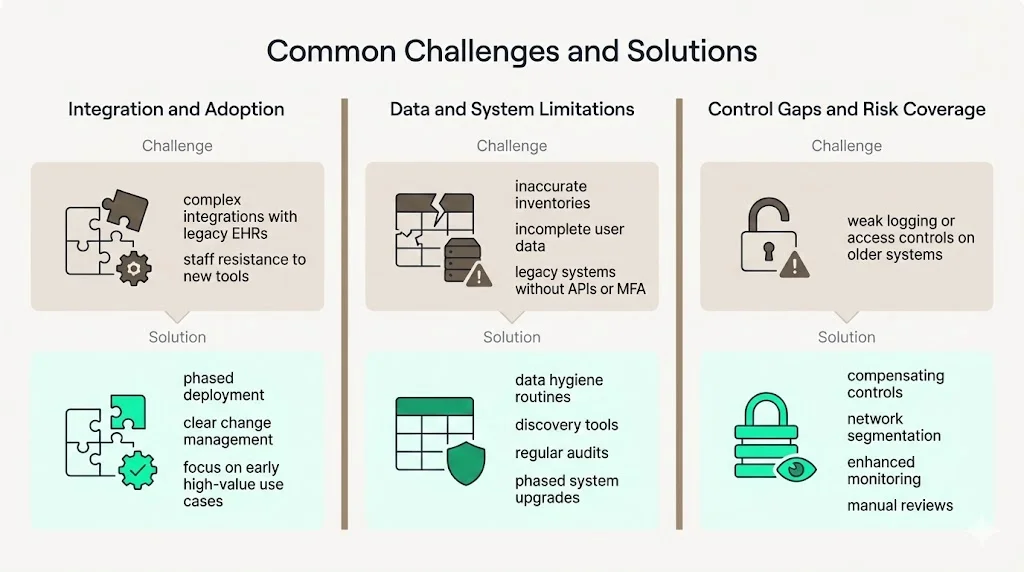
Rolling out automation surfaces its own implementation challenges before the tool ever produces useful evidence.
-
Integration complexity: Healthcare environments are heterogeneous. Integrating automation tools with legacy EHR systems, custom databases, and third‑party applications can be daunting.
-
Staff resistance: Employees may fear that automation will replace their roles or impose burdensome processes. Without proper change management, adoption can stall.
Technical Challenges
Beyond people and process, automation runs into technical challenges rooted in the data it depends on.
-
Data accuracy: Automation is only as good as its inputs. Incomplete asset inventories or inaccurate user directories lead to false confidence.
-
Legacy systems: Older devices and software may lack APIs or support for MFA and logging. These require compensating controls or phased retirement.
Solutions & Best Practices
The following solutions and best practices address the implementation and technical challenges above.
-
Phased deployment: Start with high‑value processes—such as access reviews and risk assessments—and expand gradually. Early wins build momentum and demonstrate value.
-
Continuous training: Educate staff on why automation is needed and how it supports their roles. Emphasize that human oversight remains essential; automation reduces drudgery but still requires expert interpretation.
-
Data hygiene: Maintain accurate asset and user inventories. Use discovery tools and regular audits to ensure completeness. Without accurate data, automation cannot enforce the right controls.
-
Compensating controls for legacy systems: Where MFA or logging cannot be enabled, implement compensating controls such as network segmentation, strict monitoring, and manual reviews until the system can be upgraded or replaced.
Future Directions for HIPAA Automation (2026 and Beyond)
By 2026 automation will expand beyond basic workflow enforcement. Expect three significant trends:
-
AI‑driven compliance: Machine learning will analyze log data, detect patterns, and predict non‑compliance before it occurs. Natural language processing may classify policies and map them to controls. AI will also automate the mapping of HIPAA controls to other frameworks (SOC 2, ISO 27001, GDPR), enabling cross‑framework reuse of evidence and reducing duplicative effort.
-
Adaptive risk scoring: Risk assessment engines will incorporate threat intelligence, vulnerability feeds, and business impact analyses to adjust risk scores dynamically. For example, if a new zero‑day vulnerability affects a critical EHR module, the tool will elevate the risk score and accelerate remediation. Adaptive scoring supports risk‑based prioritization and resource allocation.
-
Cross‑framework compliance automation: More organizations will seek unified control sets that satisfy multiple regulations. Automation platforms will map controls across HIPAA, SOC 2, ISO 27001, and GDPR, allowing evidence collected in one context to serve multiple audits. This reduces audit fatigue and speeds procurement.
Regulatory changes will also shape the automation landscape. The proposed OCR modifications—annual technical inventories, mandatory MFA, rigorous vendor oversight, encryption standards, formal incident response planning, disaster recovery requirements, and annual audits—will likely be finalized. Automation tools must evolve to enforce these requirements and provide evidence of compliance. Vendors that offer flexible control mapping and regular updates will help organizations stay ahead of evolving obligations.
See what your HIPAA automation actually proves, not a guess
Book a demo and we'll check whether your automated controls produce the evidence auditors expect, self-serve or with our CISO-led team running it for you.
Book a demo
Conclusion
HIPAA compliance is no longer a check‑box exercise. The rising cost of breaches, lengthy detection times, and record‑breaking penalties show that regulators expect more than written policies; they demand continuous evidence that security controls operate effectively. Manual approaches cannot keep pace with the complexity of modern healthcare environments.
HIPAA automation tools fill this gap. They automate risk assessments, enforce access controls, collect evidence, and monitor compliance in real time. When integrated with human expertise—like the managed service offered by Konfirmity—automation becomes a force multiplier. It reduces internal workload from hundreds of hours to a manageable effort, accelerates audit readiness, and positions organizations to respond rapidly to incidents and regulatory changes.
Security programs that look good on paper but fail in practice are liabilities. Build controls inside your technology stack, operate them daily, and let compliance follow. When you start with security, you arrive at compliance.
FAQs
They are software and service platforms that automate tasks required by HIPAA, such as risk assessments, policy management, access control, audit logging, and reporting. These tools integrate with existing systems to enforce controls and collect evidence automatically.
They centralize policies, track updates, assign tasks, and maintain evidence logs. Automated reporting modules produce audit‑ready reports showing compliance with administrative, physical, and technical safeguards.
Automation reduces the burden but does not eliminate the need for human oversight. Experts must interpret risk assessments, respond to alerts, and adjust controls based on business context. A managed service combines tools with experienced practitioners to deliver outcomes.
Key features include automated risk assessments, policy and consent tracking, reporting and audit modules, role‑based access controls, encryption support, and integration with EHR and IAM systems. Ensure the vendor’s own security practices meet recognized standards such as SOC 2 or ISO 27001.
Timelines vary with scope and complexity. With a managed service like Konfirmity, SOC 2 readiness often takes 4–5 months compared with 9–12 months when self‑managed. HIPAA automation implementations typically follow a phased approach: initial risk assessment, pilot, training, go‑live, and continuous optimization.
Yes—when properly configured and supported by strong vendor practices. Look for tools that encrypt data in transit and at rest, enforce MFA, provide robust access controls, and maintain detailed logs. Evaluate vendor attestations such as SOC 2 Type II to verify their own security.
Absolutely. They assemble evidence over the observation period, generate audit logs, and provide dashboards showing compliance status. This reduces the time and effort needed to prepare for regulatory audits and vendor due‑diligence reviews.