Electronic protected health information (ePHI) is essential for modern healthcare delivery, yet it is extremely sensitive. Regulated entities under the Health Insurance Portability and Accountability Act (HIPAA) must keep those data sets confidential, available and accurate. HIPAA Backup And Recovery For HIPAA refers to the set of technical and administrative measures that healthcare providers and their service partners must implement to create retrievable copies of ePHI and to restore operations when systems fail. In this article I will break down what the HIPAA rules actually say about backups and disaster recovery, why these safeguards matter, and how to design a resilient program. As founder of Konfirmity, a human‑led managed security and compliance provider, I have helped many teams prepare for audits, pass due diligence, and continue operating after incidents. The guidance below blends statutory requirements with real‑world implementation insights.
What HIPAA Actually Requires
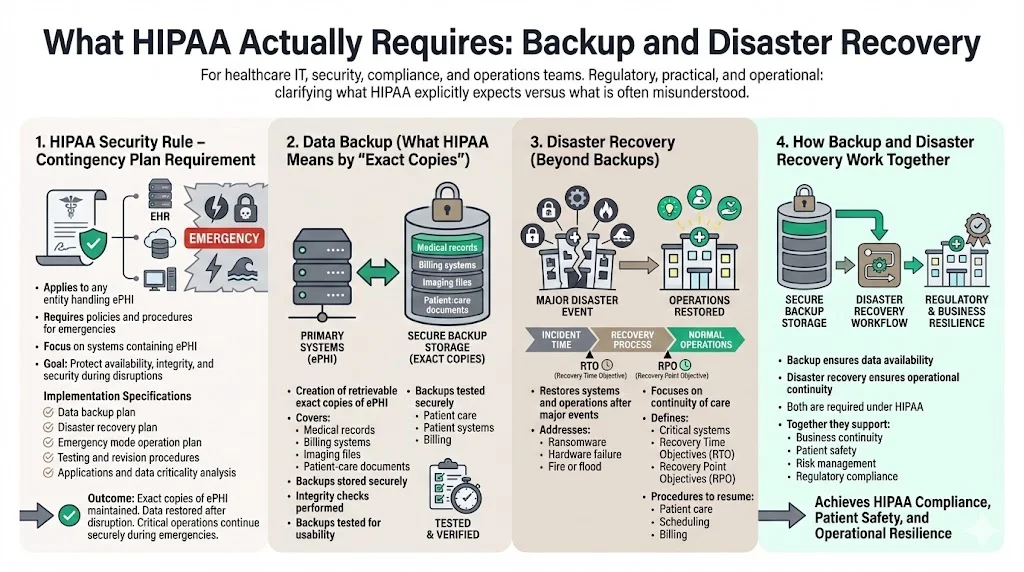
HIPAA’s Security Rule applies to any organization that creates, receives, maintains or transmits ePHI. Within that rule, the Contingency Plan standard (§164.308(a)(7)) mandates that covered entities and business associates implement policies and procedures for responding to emergencies that damage systems containing ePHI. The standard is broad and includes five implementation specifications: a data backup plan, a disaster recovery plan, an emergency mode operation plan, testing and revision procedures, and an applications and data criticality analysis. These specifications ensure that healthcare providers create exact copies of ePHI and can restore data and operations quickly after a disruption. HIPAA requires that entities maintain retrievable exact copies of ePHI, restore any loss of data, and continue critical business processes while protecting ePHI during emergency mode operations.
Backup vs. Disaster Recovery
It is helpful to distinguish between data backup and disaster recovery, two pillars of the contingency plan. Data backup refers to creating and maintaining retrievable exact copies of ePHI. That includes electronic medical records, billing systems, imaging files and any electronic document used for patient care. These copies should be stored securely and checked for integrity.
Disaster recovery is broader. It involves procedures to restore data and resume operations after a catastrophic event such as ransomware, hardware failure, fire or flood. While backup addresses data copies, disaster recovery addresses the ability of the organization to continue treating patients, scheduling appointments and billing insurers. Disaster recovery plans identify critical systems, define recovery time and recovery point objectives, and outline steps to restore those systems. Both backup and disaster recovery are required under HIPAA and together they support business continuity and risk management.
Core Concepts in HIPAA Backup and Recovery
1) Data Protection and Medical Data Security
The primary objective of backup and recovery is to protect the confidentiality, integrity and availability of medical records. The HIPAA Security Rule requires implementing technical controls to limit access, monitor activity and encrypt transmissions. Encryption is an addressable requirement but is widely considered an essential safeguard. The HIPAA Journal explains that data at rest and in transit should be encrypted using standards such as those defined in NIST Special Publications 800‑111 for storage and 800‑52 for network communication. Encryption ensures that if an unauthorized party accesses backup files or intercepts an off‑site transfer, the ePHI remains unreadable. The same article points out that encryption solutions meeting these NIST standards can help organizations demonstrate compliance under the HITECH amendment.
2) Compliance Standards You Must Meet
The Security Rule is not the only source of backup obligations. The Privacy Rule requires entities to document policies and procedures implemented to comply with HIPAA and to maintain those records for at least six years from their creation or last effective date. Disaster recovery and contingency plans are among the documents subject to this six‑year retention requirement. The Privacy Rule also requires that patients receive an accounting of disclosures of their ePHI for the preceding six years. To fulfill this accountability, audit logs and backup records must be retained and accessible. Many states impose longer retention periods for medical records; organizations should follow the longer requirement when state law exceeds HIPAA’s minimum.
3) Disaster Recovery and Business Continuity
HIPAA mandates a formal disaster recovery plan (§164.308(a)(7)(ii)(B)) requiring procedures to restore any loss of data. A separate emergency mode operation plan (§164.308(a)(7)(ii)(C)) ensures that critical business processes continue during a crisis while maintaining security of ePHI. There is also a testing and revision procedure (§164.308(a)(7)(ii)(D)) that calls for periodic testing of contingency plans and revising them based on results. Regular testing ensures that backups can actually be restored and that staff understand their roles. Finally, an applications and data criticality analysis (§164.308(a)(7)(ii)(E)) requires organizations to prioritize systems and data sets based on their importance to patient care. This analysis helps determine which systems must be recovered first during a disaster.
Best Practices for HIPAA Backup and Recovery
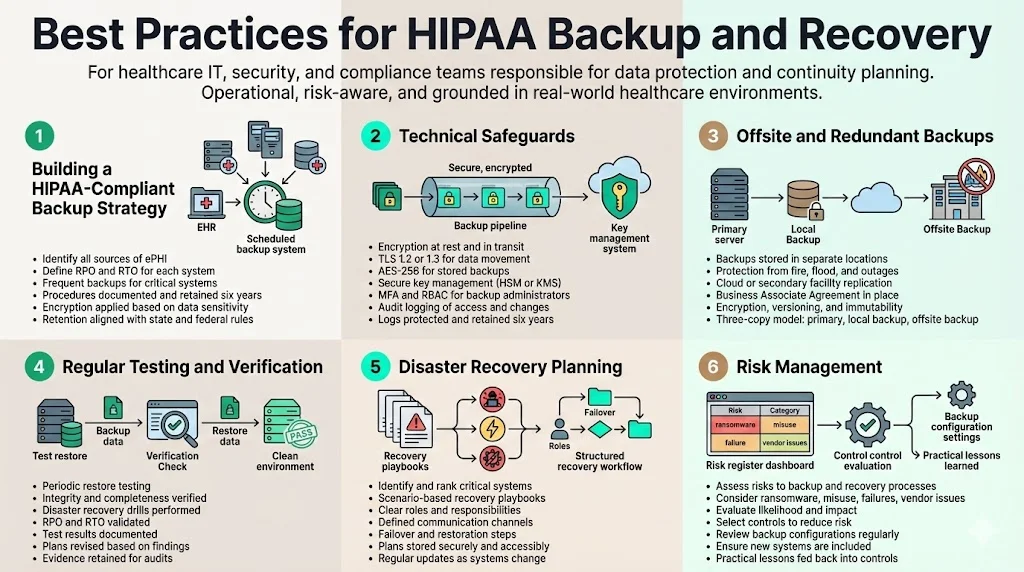
1) Building a HIPAA‑Compliant Backup Strategy
A structured backup program starts with identifying all sources of ePHI. This includes electronic health record systems, imaging archives, billing software, email systems containing patient information and any databases containing personal identifiers. Determine the recovery point objective (RPO)—the maximum allowable time between backups—and the recovery time objective (RTO)—the maximum allowable time to restore service. For mission‑critical systems, daily or even hourly backups may be appropriate. After establishing objectives, schedule backups and document procedures. HIPAA requires documentation of these processes and retention of the documents for at least six years. In my experience at Konfirmity, organizations typically set RPOs of 24 hours or less and RTOs of four to eight hours for core clinical systems. However, these metrics should reflect an organization’s tolerance for data loss and downtime.
Align backup strategy with broader information security goals. Evaluate the confidentiality of each dataset and apply encryption where appropriate. For example, offline backups of ePHI should be encrypted using AES‑256 and stored in secure, tamper‑evident media. Document retention schedules must respect state record‑keeping laws if they require longer retention than HIPAA.
2) Technical Safeguards
Technical safeguards prevent unauthorized access to backup copies. Encryption is a cornerstone. The HIPAA Journal notes that encryption at rest and in transit—following NIST SP 800‑111 and SP 800‑52—ensures ePHI remains unreadable and indecipherable to anyone without authorization. For data in transit, use TLS 1.2 or 1.3 with perfect forward secrecy. For data at rest, full‑disk encryption with AES‑256 is widely used. Encryption keys should be managed through hardware security modules (HSMs) or cloud key management services to prevent compromise.
Access controls restrict who can view or modify backup archives. Implement multi‑factor authentication (MFA) for administrative accounts and use role‑based access control (RBAC) to enforce least privilege. Grant backup administrators only the privileges necessary to perform backup and recovery tasks. Access to encryption keys must be tightly controlled.
Audit logging is another requirement. The Privacy Rule requires covered entities to retain logs and documentation of actions related to ePHI, including logs of access and changes. Logging ensures that organizations can track who accessed backup data, identify anomalies and investigate incidents. These logs must be protected from tampering and retained for at least six years. Modern solutions integrate logging with security information and event management (SIEM) platforms, enabling continuous monitoring and early detection of unauthorized activity.
3) Offsite and Redundant Backups
Storing backups in a single location exposes organizations to catastrophic loss if a disaster affects that location. Offsite backups—whether in another facility or in a cloud data centre—protect against fires, floods and localized outages. The Contingency Plan implementation guidance encourages storing backups in a safe, secure place. Geographically separated backups provide redundancy. Many healthcare organizations use cloud backup services that replicate data across multiple regions. When using a cloud provider, ensure that the provider signs a Business Associate Agreement (see section 5.2) and offers encryption, immutable backups and versioning. Immutable backups prevent alteration or deletion, making them resistant to ransomware. For critical systems, maintain at least three copies: the primary dataset, a local backup and an offsite or cloud backup.
4) Regular Testing and Verification
Backups are only valuable if they work when needed. HIPAA’s testing and revision specification requires organizations to implement procedures for periodic testing of contingency plans; our HIPAA backup testing guide walks through a repeatable process for these restores. In practice, this means restoring data from backups to verify integrity and timeliness. Perform test restores on a schedule (e.g., quarterly) and document the results. Use disaster recovery drills to simulate full‑scale restoration of systems and evaluate whether RTO and RPO objectives are met. After each test, revise the backup plan based on lessons learned. Document these tests and revisions and retain the documentation for the required period. At Konfirmity, we often see organizations fail to test large database restores. During an audit, missing test evidence is a common finding. Continuous verification, combined with automated integrity checks, reduces the risk that a backup will fail during a crisis.
5) Disaster Recovery Planning
A disaster recovery plan outlines the actions needed to restore operations after a disruption, tying into the broader program described in our HIPAA business continuity and disaster recovery guide. Start by listing critical systems and ranking them based on their importance to patient care and regulatory requirements, fulfilling the applications and data criticality analysis. Develop playbooks for different scenarios: hardware failure, ransomware, natural disaster and prolonged power outage. Each playbook should assign roles and responsibilities, specify communication channels (including contact details for internal teams and external partners), and describe failover procedures. Maintain copies of the plan in multiple locations and ensure they are accessible during a crisis. Periodically update the plan to reflect new systems, emerging threats and lessons from tests. Disaster recovery planning is not a one‑time exercise but a continuous process.
Your HIPAA backup strategy is a security control, not just a recovery precaution.
Drop your work email and we'll review whether your backup and DR posture satisfies OCR.
6) Risk Management
Risk assessments are central to HIPAA compliance. The Security Rule requires covered entities to conduct an accurate and thorough assessment of the potential risks and vulnerabilities to ePHI. Evaluate threats such as ransomware, insider misuse, hardware failures and vendor breaches. For each risk, determine the likelihood and potential impact and then select controls to reduce risk to an acceptable level. Assess the risk of backup failures themselves. For example, misconfigured retention policies may overwrite necessary backups, or backup systems may be exposed to unauthorized access if not segmented. Regular risk assessments help ensure controls stay effective and adapt to new threats.
Konfirmity’s experience shows that organizations often overlook the risk of backup software misconfiguration. In one audit, a client had scheduled nightly backups but had not verified that the backup job included a new file share added six months earlier. When ransomware struck, the missing share delayed recovery by several days. A simple checklist for adding new data sources to the backup schedule would have prevented this oversight. Incorporating such practical lessons into risk management processes improves the program’s resilience.
Selecting Tools and Services
What to Look For in Backup Solutions
Choosing the right backup solution is a critical decision. A suitable product or service should support encryption at rest and in transit, provide offsite storage options and offer immutable backups with versioning. Versioning allows recovery from a specific point in time and protects against silent corruption or ransomware. Verify that the product integrates with your existing cybersecurity controls: MFA, SIEM logging and intrusion detection. Look for independent attestations such as SOC 2 Type II or ISO 27001 certification, which indicate that the provider has undergone a rigorous security evaluation. Our team has supported more than 6,000 security audits and seen that solutions with independent attestations reduce due diligence friction and accelerate sales cycles.
Business Associate Agreements
When outsourcing backup or using cloud services that handle ePHI, covered entities must sign a Business Associate Agreement (BAA). The Department of Health and Human Services clarifies that a business associate is any person or entity that creates, receives, maintains or transmits ePHI on behalf of a covered entity. HIPAA rules require that covered entities and business associates enter into contracts to ensure appropriate safeguards of ePHI. The contract must define permissible uses and disclosures of ePHI, require the business associate to implement safeguards, report breaches and allow HHS access to records. The HIPAA Journal emphasizes that before disclosing PHI to a business associate, a covered entity must enter into a BAA and that subcontractors used by business associates must also sign downstream BAAs. Failure to have a BAA when using a backup vendor is a violation that can lead to substantial fines.
At Konfirmity, we often review vendor contracts and find missing or incomplete BAAs. Many cloud storage providers offer security features but avoid taking on HIPAA obligations. Always confirm that the vendor will sign a BAA that meets all HIPAA requirements and that they pass our vendor risk assessments. You should also verify that the vendor’s employees receive HIPAA training and that the provider offers access to audit logs for your own compliance reporting.
Evaluating Vendors
Assess potential backup providers using a structured checklist. Key questions include:
-
Encryption and security: Do they offer AES‑256 encryption for data at rest and TLS 1.2/1.3 for data in transit? Are encryption keys stored in HSMs? Do they support immutable backups?
-
Availability and redundancy: Do they store backups in geographically separate locations? What is the provider’s own disaster recovery plan?
-
Service Level Agreements (SLAs): What are their RPO and RTO commitments? Are these commitments backed by financial penalties?
-
Support and expertise: Are support hours adequate for a 24×7 healthcare environment? Do they offer assistance during recovery, or is the service self‑serve?
-
Certifications and attestations: Are they SOC 2 Type II compliant? Do they have ISO 27001 certification? These attestations signal maturity in security practices.
-
Business Associate Agreement: Will they sign a BAA that addresses all HIPAA requirements and includes downstream subcontractor obligations?
-
Audit log access: Can you obtain detailed logs of who accesses backup data and configuration changes, to satisfy audit and retention requirements?
Organizations should also evaluate the provider’s reputation and financial stability, as well as any previous breach or enforcement history. If a vendor has recently been subject to enforcement actions, consider the root cause and remediation.
Integrating Backup and Recovery into Daily Operations
Policies and Documentation
HIPAA requires written policies and procedures covering data backup, disaster recovery and emergency operations. These documents must outline who is responsible for backups, how backups are performed, how often they are tested and how to restore systems. They must also describe retention schedules, encryption standards and procedures for verifying integrity. Under 45 CFR §164.530, policies and procedures must be documented and retained for at least six years from their creation or last in effect. Covered entities should maintain records of backup schedules, restoration tests, training sessions and plan revisions. Documentation supports audit readiness and demonstrates compliance to regulators and clients.
In our work, we help clients create living documents rather than static binders. After each test or incident, we update the policy and log the change. This level of evidence satisfies auditors who often request change logs and proof that policies are regularly reviewed. Automating document management through a compliance platform can reduce administrative burden and provide version control.
Training and Roles
Even the best backup systems fail if staff members do not know how to use them. HIPAA requires workforce training on security policies and procedures. All personnel involved in data backup and recovery must be trained on how to initiate backups, verify success, respond to alerts and perform restores. They should also understand their roles in the disaster recovery plan, including escalation paths and communication protocols. Regular training reduces the risk of human error, one of the main drivers of data breaches in the 2026 IBM report, where human factors such as phishing and stolen credentials were major contributors. Training sessions should include tabletop exercises and live drills that mirror potential incidents, followed by debriefs to identify improvement areas.
Assign specific roles for backup and recovery activities. A backup administrator oversees the scheduling and integrity of backups, while a recovery coordinator manages restoration during incidents. An information security officer ensures that controls meet HIPAA requirements, and a compliance officer maintains documentation and manages audits. Role separation reduces the risk of insider misuse and ensures there are no single points of failure.
Common Challenges and How to Handle Them
1) Scaling with Growth
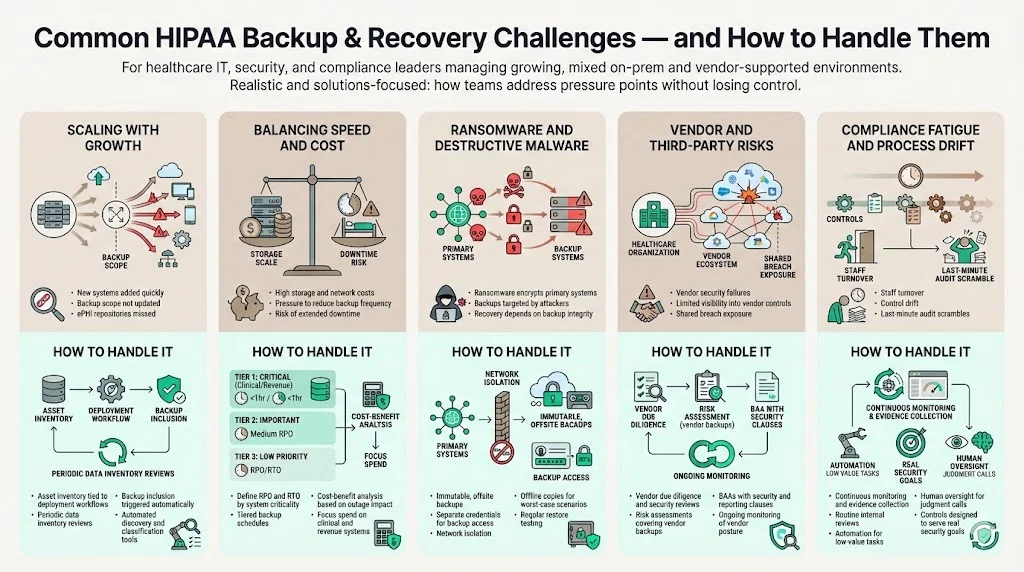
As healthcare organizations adopt new systems, integrate telehealth platforms and accumulate more data, backup scopes can quickly expand. The inclusion of new data sources is often overlooked. The Contingency Plan standard requires that all systems storing ePHI be included in the data backup plan. A gap can arise when teams add a new imaging system or messaging application but do not update the backup schedule. To manage growth, implement an asset management process that triggers backup inclusion whenever a new system goes into production. Conduct periodic reviews of data inventories to ensure all ePHI repositories are identified. Use automation to discover and classify data, reducing manual overhead.
2) Balancing Speed and Cost
Backup frequency and storage depth have cost implications. Daily full backups with frequent incremental snapshots may require considerable storage and network capacity. Organizations must balance the cost of storage with the potential cost of data loss and downtime. The 2025 IBM report showed that the average cost of a healthcare data breach in the United States was $7.42 million, while the cost of U.S. data breaches overall reached $10.22 million. These figures illustrate the financial impact of insufficient backups or prolonged recovery. A cost‑benefit analysis should consider the probability of different failure scenarios and the cost of downtime. Tiered backup approaches—such as more frequent backups for critical systems and less frequent for non‑critical systems—can optimize cost.
3) Ransomware and Destructive Malware
Ransomware remains a leading cause of healthcare breaches. The 2025 report noted that phishing replaced stolen credentials as the top initial access vector, while ransom demands averaged $5.08 million. Offsite, immutable backups are essential to withstand ransomware. Immutable backups cannot be altered or encrypted by malware. Store backups on systems isolated from the primary network and require separate credentials for access. Regularly test restoring from these backups to ensure they are uncorrupted. Additionally, maintain offline copies disconnected from networks for worst‑case scenarios, and coordinate these restores with your HIPAA incident response plan so containment and recovery stay in sync.
4) Vendor and Third‑Party Risks
Organizations often rely on vendors for backup services, hosting and storage. The 2026 IBM report underscores the rising cost of breaches driven by human factors, including stolen credentials and phishing. Vendors are not immune to these risks. Conduct thorough due diligence on vendors, including security practices, audit history and financial stability. A vendor that fails to assess risks to ePHI can lead to enforcement actions; for example, in 2025 the HHS Office for Civil Rights settled a ransomware investigation with BST & Co. CPAs, a business associate that reported a ransomware incident affecting 170,000 individuals. The investigation found that BST had not assessed the potential risks and vulnerabilities to ePHI, resulting in a $175,000 settlement. This case underscores that business associates must implement appropriate risk analysis and backup controls, the same gaps highlighted in our HIPAA breach notification guide. Include vendor risk assessments in your risk management program and ensure BAAs impose security obligations and reporting requirements.
5) Compliance Fatigue and Process Drift
Maintaining compliance over years can lead to process drift, where initially well‑designed controls become ineffective due to staff turnover, changing systems or complacency. Routine audits and continuous monitoring help prevent drift. Evidence collection should be ongoing rather than a last‑minute scramble before an audit. At Konfirmity, we reduce compliance fatigue by operating as a managed service: our team handles evidence collection, continuous monitoring and remediation tracking. Clients spend about 75 hours per year on compliance tasks instead of hundreds of hours self‑managing. We also design controls that serve security objectives, so compliance becomes a natural outcome rather than a separate project. This human‑led approach ensures that programs remain effective as technology and regulations evolve.
See your real HIPAA backup and recovery gap, not a guess
Book a demo and we'll map your contingency plan against the Security Rule requirements, self-serve or with our CISO-led team running it for you.
Book a demo
Conclusion
Data backup and recovery are not optional add‑ons for healthcare providers; they are essential safeguards required under HIPAA. The Contingency Plan standard demands policies for creating and maintaining exact copies of ePHI, restoring data and continuing operations during emergencies. Strong encryption, access controls and audit logging protect backups from unauthorized access. Offsite and redundant backups, regular testing, and well‑rehearsed recovery plans ensure that organizations can survive ransomware attacks, hardware failures and natural disasters. Documentation and training keep staff ready and provide evidence for audits.
Building such a program requires more than purchasing software. It demands careful planning, risk assessment, continuous monitoring and human expertise. Human error remains a leading cause of breaches, so ongoing training and clear roles are vital. The cost of failure is high: the average cost of a healthcare data breach in the United States was $7.42 million in 2025, and in 2026 the global average breach cost climbed to $4.88 million. By investing in HIPAA Backup And Recovery For HIPAA programs that prioritize durability and operational readiness, healthcare organizations protect patient trust, meet regulatory obligations and support uninterrupted care. In an environment where enterprise clients demand evidence of security maturity before procurement, backup and recovery controls are foundational. Konfirmity’s human‑led managed service—built on thousands of audits and decades of expertise—helps organizations implement these controls inside their stack and stay audit‑ready year‑round.
FAQs
1. How often should healthcare organizations back up ePHI?
HIPAA does not prescribe a specific backup frequency. Organizations should set their own schedule based on how much data loss they can tolerate. Many providers perform daily backups for clinical systems and more frequent snapshots for high‑transaction databases. Ensure that backups are tested regularly and that retention periods respect state laws and the six‑year HIPAA documentation requirement.
2. Does HIPAA require cloud or offsite backups?
Yes. HIPAA expects covered entities to maintain retrievable exact copies of ePHI and to protect against local disasters. Storing backups in a geographically separate location or cloud service with appropriate security measures and a signed Business Associate Agreement satisfies this expectation.
3. What’s the difference between a backup and an archive?
A backup is a copy of data made for restoration after data loss. It is often overwritten or versioned according to a retention schedule. An archive is long‑term storage of records maintained for legal or business requirements. HIPAA requires certain documentation, including policies, procedures, BAAs and audit logs, to be retained for at least six years. State laws may require longer retention for patient records.
4. What happens if backup fails during a disaster?
Failure to restore ePHI after an incident can violate the contingency plan requirement and lead to enforcement actions. In 2025, a business associate was fined $175,000 after a ransomware incident exposed 170,000 patient records and investigators found that the organization had not assessed risks to ePHI. Regular testing and documentation of restores help mitigate this risk.
5. Are HIPAA backups encrypted?
Yes. While encryption is an addressable specification, using it is strongly advised. Implement AES‑256 encryption for data at rest and TLS 1.2/1.3 for data in transit. The HIPAA Journal notes that encryption solutions complying with NIST SP 800‑111 and SP 800‑52 contribute to compliance. Use proper key management and restrict access to encryption keys. Encrypting backups reduces breach risk and can qualify covered entities for enforcement discretion under the HITECH amendment.