

Most enterprise buyers ask for proof of security before they sign. Without operational security and constant evidence, deals stall—even when teams think they’re ready on paper. Endpoint protection is a linchpin because laptops, desktops, servers and mobile devices sit at the edge of our systems. Attackers know this: Verizon’s 2023 Mobile Security Index notes that roughly 90 % of successful cyber‑attacks and 70 % of data breaches begin at endpoints. When enterprise customers do their due diligence, they look closely at how you secure these devices and how you prove it through frameworks like SOC 2. This article unpacks SOC 2 Endpoint Security For SOC 2—why it matters, what auditors expect, the controls you need, and how human‑led programs like Konfirmity help organizations stay audit‑ready.
What Is SOC 2 and Why It Matters
SOC 2 (System and Organization Controls 2) is an attestation framework from the American Institute of Certified Public Accountants (AICPA) designed to evaluate internal controls over the security, availability, processing integrity, confidentiality and privacy of data. A licensed CPA firm performs a SOC 2 audit, producing a report used by customers and partners to gauge a vendor’s security posture. There are two report types:
-
Type I examines control design at a point in time. It is often used for early‑stage companies to demonstrate intent.
-
Type II assesses both design and operating effectiveness over an observation period (usually 3–12 months) and is preferred by mature buyers.
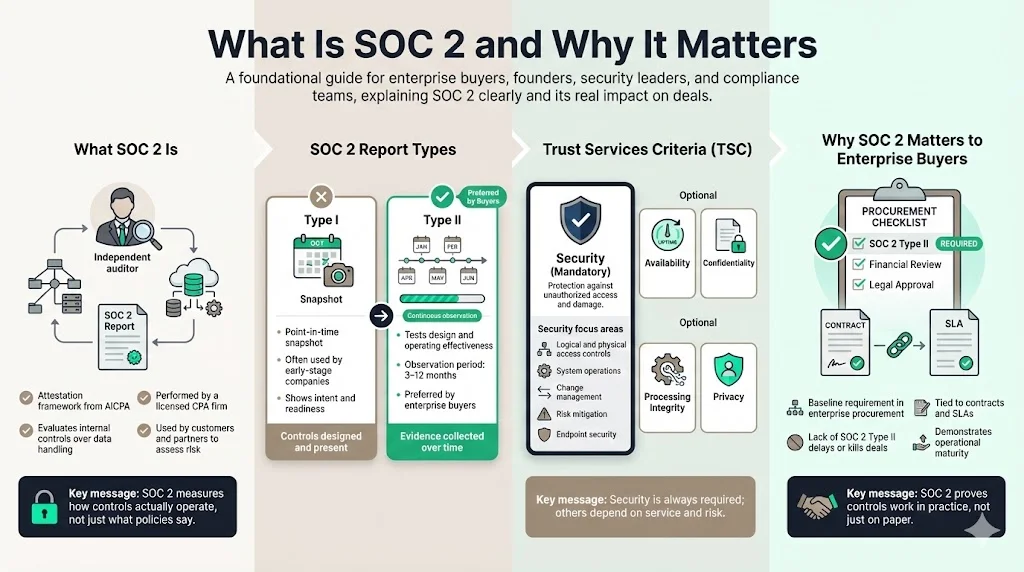
Of the five Trust Services Criteria (TSCs), only the Security criterion is mandatory. Organizations may add Availability, Confidentiality, Processing Integrity or Privacy depending on customer demands, regulatory obligations and services provided. The Security TSC establishes benchmarks for protecting information and systems against unauthorized access or damage, referencing nine points of focus such as logical and physical access controls, system operations, change management and risk mitigation. Endpoint security falls squarely under these points.
Enterprise procurement teams use SOC 2 as a baseline requirement. In Konfirmity’s delivery work (over 6,000 security audits supported and 25 years of combined expertise), we see deals delayed or lost when vendors are unable to provide a SOC 2 Type II report. Buyers tie contract clauses and SLA commitments to SOC 2 compliance. Meeting the framework demonstrates operational maturity—not just policy paperwork.
Understanding Endpoint Security in SOC 2
What Endpoint Security Means
Endpoint security encompasses tools and practices that protect devices, whether company‑owned or bring‑your‑own devices (BYOD). It involves:
-
Access controls: enforcing strong authentication (e.g., multi‑factor), least‑privilege, and role‑based access to local and network resources.
-
Antivirus and Endpoint Detection & Response (EDR): monitoring for malicious activity and responding quickly when malware is detected.
-
Encryption: ensuring data at rest and in transit is unreadable if devices are lost or compromised.
-
Network segmentation: isolating endpoints from sensitive resources through virtual LANs, firewalls or zero‑trust policies.
-
Configuration hardening: removing unnecessary services, applying secure defaults and restricting administrative privileges.
These measures are consistent with cybersecurity best practices and frameworks like NIST SP 800‑53, which emphasises secure software updates and patch management. In August 2025, NIST released SP 800‑53 Revision 5.2, focusing on improving the security and reliability of software updates and patches in response to Executive Order 14306. Keeping endpoints patched is therefore not only a best practice but also a compliance expectation.
Why Endpoints Matter for Enterprise Security
Endpoints are the entry point for attackers. Users often blend personal and work activities, blurring boundaries. The Verizon Mobile Security Index notes that 90 % of successful cyber‑attacks and 70 % of data breaches originate at endpoint devices. BYOD amplifies this risk: Venn’s 2026 compliance guide reports that personal devices can increase unauthorized access, data leakage and weak security controls. Essential BYOD controls include mobile device management (MDM) for encryption and remote wipe, network segmentation, data isolation, conditional access, signed policies, logging and periodic compliance checks. Without these, attackers can exploit unpatched devices, credentials saved in browsers or messaging apps, and poor user practices.
Guardz’s 2025 research reveals worrying behaviors: 36 % of employees delay security updates, 71 % store passwords on personal phones, and 92 % of remote workers use personal devices for work tasks. Meanwhile Microsoft research shows that 80–90 % of successful ransomware attacks stem from unmanaged devices. Such statistics illustrate why SOC 2 audits pay close attention to endpoint controls.
SOC 2 Trust Services Criteria and Endpoint Security
While SOC 2 allows organizations to choose which criteria to include, the Security criterion is always in scope. Endpoint security directly addresses several security points of focus:
-
Logical and physical access controls: ensure only authorized users can access systems. This includes password policies, multi‑factor authentication (MFA) and least‑privilege management.
-
System operations: maintain operational resilience by monitoring for security events, responding to incidents and maintaining backups.
-
Change management: ensure updates to endpoints (patches, configuration changes) are tested and approved before deployment.
-
Risk mitigation: identify and address endpoint risks through threat modeling, vulnerability scanning and continuous monitoring.
Endpoint controls also support Confidentiality and Availability. Encryption protects sensitive data from unauthorized disclosure. Patching and backup practices maintain availability by preventing downtime from malware or unplanned failures. If organizations handle personally identifiable information or health data, endpoint controls can help satisfy Privacy requirements under HIPAA or GDPR.
Core Endpoint Security Controls for SOC 2
Auditors expect a structured set of controls. Below is an overview of control categories that Konfirmity regularly implements for clients.
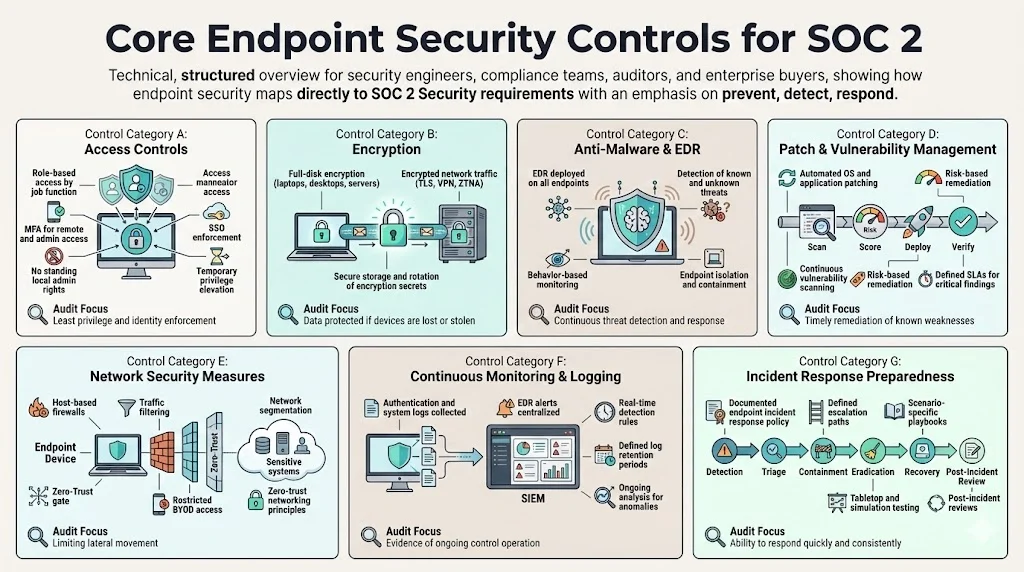
a. Access Controls
-
Role‑based access: Define roles for different job functions and restrict endpoint privileges accordingly. For example, engineers receive privileged access to development environments but are unable to log into production without approval.
-
Multi‑factor authentication (MFA): Require MFA for all remote access and administrative functions. Integrate identity providers like Okta or Azure AD to enforce MFA across SSO platforms.
-
Local administrator rights management: Remove default administrative rights on endpoints. Use privileged access management tools to grant temporary elevation when required. This reduces the attack surface for malware and limits lateral movement.
b. Encryption
-
Encryption at rest: Use full‑disk encryption (e.g., BitLocker, FileVault) on laptops, desktops and servers to protect data if a device is lost or stolen.
-
Encryption in transit: Enforce TLS for all network communications. Use VPNs or zero‑trust network access to ensure remote traffic is encrypted.
-
Management of cryptographic secrets: Store encryption secrets securely, rotate them periodically and restrict access to secret management systems.
c. Anti‑Malware and Endpoint Detection & Response (EDR)
-
EDR/antivirus deployment: Install EDR solutions across all endpoints to detect known and unknown threats. Help Net Security reported that endpoint malware detections increased by 300 % in Q3 2024, highlighting the need for advanced detection.
-
Continuous monitoring and alerts: Configure EDR tools to send logs to a Security Information and Event Management (SIEM) platform. Monitor for suspicious behavior such as process injection, unusual network connections or privilege escalation.
-
Response and isolation: Define playbooks for isolating infected endpoints, collecting forensic evidence and restoring devices from trusted backups. Integrate EDR with incident response automation when possible.
d. Patch and Vulnerability Management
-
Regular patching: Establish a schedule for applying operating system and application patches. Use automated deployment tools to reduce manual errors.
-
Vulnerability scanning: Perform continuous vulnerability scanning to identify missing patches, misconfigurations and weak software versions. The NIST SP 800‑53 Rev 5.2 update emphasises the importance of secure software updates and patch management.
-
Risk‑based prioritization: Prioritize remediation based on severity (e.g., CVSS score), exploit availability and business impact. Define SLA commitments (SLAs) to address critical vulnerabilities within a defined timeframe.
e. Network Security Measures
-
Firewalls and host‑based protections: Configure endpoint firewalls to restrict inbound and outbound traffic. Use intrusion detection or prevention systems to block malicious traffic.
-
Segmentation: Separate endpoints from sensitive systems through VLANs, VPN gateways or zero‑trust network access. Venn advises restricting BYOD devices to non‑critical parts of the network.
-
Zero‑trust networking: Implement policies where every connection is authenticated, authorized and encrypted. This reduces the risk of lateral movement if a device is compromised.
f. Continuous Monitoring & Logging
-
Log collection: Forward endpoint logs (EDR alerts, authentication events, system logs) to a central SIEM. This supports threat hunting and audit evidence.
-
Real‑time alerts: Configure detection rules for unusual behavior such as repeated login failures, sudden spikes in network traffic or changes to security configurations.
-
Retention and analysis: Maintain log retention according to regulatory requirements (e.g., 90 days or longer). Use analytics to detect anomalies and measure control effectiveness.
g. Incident Response Preparedness
-
Incident response policy: Define how to handle endpoint security events, including roles, escalation paths and communication protocols. Sikich notes that the Security TSC includes incident response planning.
-
Playbooks: Develop specific playbooks for common scenarios, such as malware outbreaks, lost/stolen devices or unauthorized access. These playbooks should detail containment, eradication, recovery and post‑incident review steps.
-
Exercises and testing: Conduct tabletop exercises and red‑team simulations to validate readiness. Review lessons learned and update procedures accordingly.
Endpoint security is where most enterprise audit findings actually live.
Share your work email and close the endpoint controls that auditors flag most often.
Documenting Endpoint Security for SOC 2
Effective security requires documentation. Auditors want to see that your policies are more than a paper shield. Documentation should cover:
a. Security Policies and Standards
-
Endpoint protection policy: Describe approved devices, required security software, encryption mandates, and acceptable use. Include remote work guidelines and BYOD restrictions.
-
Acceptable use / remote work policy: Outline what employees are permitted and prohibited from doing on company and personal devices. The policy should require regular patching, prohibit saving credentials in unapproved apps and restrict storage of company data on personal devices.
-
Patch and configuration standards: Specify timelines for applying patches, baseline configurations and secure system settings.
b. Procedures
-
Configuration, deployment and update procedures: Document how to install and configure endpoint tools (EDR, encryption, MDM), how to enrol devices, and how to keep them updated.
-
Onboarding and offboarding: Outline steps to ensure new devices meet security standards before accessing systems and to revoke access and wipe devices during offboarding. Capterra’s offboarding study (cited via Guardz) found that 71 % of HR workers had at least one employee fail to return company devices and that 59 % of stolen equipment contained sensitive information. Clear procedures mitigate these risks.
c. Templates You Can Use
Konfirmity provides policy templates built from our experience across 6,000+ security audits. They include:
-
Endpoint Security Policy: details required software, encryption and EDR settings.
-
Device Configuration Standards: baseline settings for operating systems, browsers and security tools.
-
Patch Management Procedure: timelines, responsible parties, and escalation for missed patches.
-
Incident Response Playbook (endpoint focused): step‑by‑step guide for investigating and remediating device compromises.
-
Access Control Policy: describes role definitions, MFA requirements, onboarding and offboarding processes.
Using these templates accelerates readiness and ensures consistency across devices. Customization is essential; each organization should adapt them to reflect unique risks and technology stacks.
Evidence and Audit Readiness: What Auditors Look For
Auditors evaluate whether controls are both designed and operating effectively. Evidence must demonstrate that endpoint security controls are consistently applied over the observation period (for Type II). Important evidence types include:
a. Evidence Types
-
Configuration snapshots showing encryption enabled, EDR running and default admin accounts disabled.
-
Logs and reports demonstrating patch cycles, vulnerability scans and timely remediation.
-
Identity and access management (IAM) logs showing MFA enrolment, role assignments and privilege reviews.
-
Alert histories from endpoint tools and SIEM systems, along with incident response records showing how alerts were handled.
b. Continuous Evidence vs. Point‑in‑Time
For Type I, a single set of evidence on a specified date may suffice. Type II requires continuous evidence over the entire observation period. This means maintaining change logs, audit trails and monitoring reports that prove controls operated consistently. Tools like Konfirmity’s managed service automate evidence collection, reducing manual overhead.
c. Linking Policies to Practice
Auditors want proof that written policies are followed. If your endpoint protection policy states that all laptops must use full‑disk encryption and EDR, auditors will verify device inventories, configuration reports and logs. If policies require quarterly access reviews, provide evidence of those reviews and any remediation actions. The link between policy and execution is often where organizations stumble, leading to findings and remediation work.
Integrating Endpoint Security With Broader SOC 2 Controls
Endpoint security does not exist in isolation. To build a cohesive compliance program, integrate device controls with other SOC 2 control areas:
-
Risk management and threat modeling: Identify endpoint‑related threats (malware, lost devices, insider misuse) and evaluate their likelihood and impact. This feeds into your risk register and informs control priorities.
-
Vulnerability assessments in addition to endpoints: Combine endpoint scanning with network, application and cloud vulnerability assessments. Use results to refine patching schedules and segmentation rules.
-
Network security and segmentation: match firewall rules and segmentation with endpoint posture. For instance, only devices compliant with security baselines should access production networks.
-
Identity and access controls: Integrate endpoint health checks with conditional access. Devices failing security checks should be quarantined or forced to remediate before accessing sensitive systems.
-
Incident response and post‑incident reporting: Incorporate endpoint events into your incident response program. Use root cause analysis from endpoint incidents to update policies, training and technical controls.
Integration ensures that SOC 2 Endpoint Security For SOC 2 contributes to your entire security posture rather than being a siloed initiative.
Endpoint Tools and Continuous Monitoring
Choosing the right tools is critical for ongoing visibility and audit readiness. Consider the following:
-
EDR vs. traditional antivirus: EDR provides behavioral analytics and threat hunting capabilities that traditional antivirus alone is unable to provide. This reduces dwell time and supports rapid incident response. However, EDR platforms can generate more alerts, requiring skilled analysts to triage.
-
SIEM integration: Sending endpoint logs to a SIEM enables correlation across sources (network, identity, application). A SIEM helps demonstrate continuous monitoring for SOC 2 Type II but demands tuning to avoid alert fatigue.
-
GRC platforms: Governance, risk and compliance (GRC) tools help map controls to frameworks, track evidence and manage audits. They can centralize policy documentation, risk assessments and remediation tasks.
-
MDM and unified endpoint management (UEM): MDM tools enforce encryption, push updates and manage mobile devices. UEM solutions extend this to desktops, laptops and IoT devices, providing a single pane of glass for device posture.
Konfirmity integrates these tools into our managed service, ensuring that logs, alerts and evidence flow into a central repository. We operate the tools, monitor daily and handle remediation, so clients spend around 75 hours per year on compliance activities rather than 550–600 hours typical of self‑managed programs. Our approach scales as organizations add devices or expand into healthcare or financial services with stricter regulations.
Best Practices for Endpoint Security in SOC 2
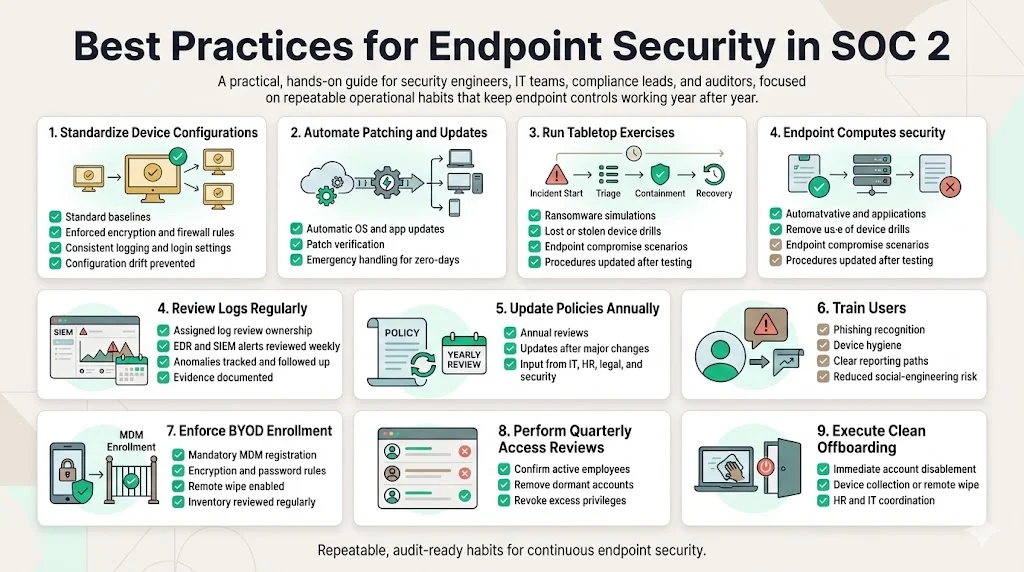
Based on thousands of audits and decades of experience, we suggest the following practical steps:
-
Standardize device configurations: Use gold images or configuration management tools (e.g., Ansible, Intune) to enforce consistent settings. Include encryption, firewall rules, login banners and logging settings.
-
Automate patching and updates: Set up automatic update channels for operating systems and applications. Use vulnerability management tools to verify patch status. Handle zero‑day patches as emergency changes.
-
Conduct regular tabletop exercises: Test incident response playbooks with realistic scenarios. Include endpoint compromise, ransomware infection and lost device scenarios. Adjust procedures based on findings.
-
Review logs weekly: Assign responsibility for reviewing SIEM alerts and EDR events. Look for patterns indicating policy violations or evolving threats. Document findings and follow up on anomalies.
-
Update policies annually: Revisit policies and procedures at least once a year or when significant changes occur (new tools, acquisitions, regulatory updates). Engage stakeholders across IT, HR, legal and security.
-
Train users: Provide security awareness training focusing on device hygiene, phishing recognition and reporting suspicious activity. Help Net Security noted that attackers increasingly use social engineering and malicious documents; user training reduces success rates.
-
Enforce BYOD enrollment: Require personal devices to register with your MDM before accessing corporate resources. Enforce encryption, password policies and remote wipe. Regularly review BYOD inventories to detect unregistered devices.
-
Perform quarterly access reviews: Verify that endpoint user accounts still correspond to active employees. Remove dormant accounts and revoke privileges for departed staff.
-
Establish clear offboarding processes: Collect or remotely wipe company data from departing employees’ devices. Coordinate with HR to ensure accounts are disabled immediately.
Following these practices helps organizations achieve and maintain compliance while reducing the risk of breaches.
Common Pitfalls and How to Avoid Them
Despite best intentions, many organizations stumble during SOC 2 assessments. Here are common pitfalls and how to avoid them:
-
Treating endpoint security as a one‑time configuration: Controls degrade over time through drift, new threats or user actions. Mitigation: implement continuous monitoring, periodic audits and configuration management.
-
Missing documentation or outdated evidence: Auditors need current evidence that controls operated throughout the observation period. Mitigation: automate evidence collection and schedule regular reviews.
-
Disconnect between tools and policies: Deploying EDR or MDM without updating policies leaves gaps. Mitigation: synchronize tools with documented processes; ensure policies reference actual tool configurations and tasks.
-
Poor onboarding/offboarding processes: Failing to enrol new devices or revoke access for departing staff creates unmanaged endpoints. Mitigation: integrate device provisioning into HR workflows; enforce MDM registration before granting access.
-
Over‑scoping or under‑scoping SOC 2 criteria: Adding unnecessary criteria increases audit complexity; omitting required criteria disappoints customers. Mitigation: perform scoping exercises with stakeholders and match criteria with customer demands.
Avoiding these pitfalls requires ongoing attention and a human‑led, managed program—not a set‑and‑forget tool. Konfirmity’s experts monitor controls daily, adjust configurations, and guide teams through audits.
Conclusion
Strong endpoint security is fundamental to building trust with enterprise clients and passing SOC 2 audits. Attackers increasingly exploit endpoint weaknesses, as seen in the 300 % surge in malware detections and the fact that 90 % of attacks originate at endpoints. At the same time, buyers demand evidence that controls work in practice, not just on paper. SOC 2 Endpoint Security For SOC 2 requires bringing together policies, technical controls, monitoring and incident response under the Security TSC and, where applicable, Confidentiality and Availability.
Konfirmity’s human‑led, managed security and compliance service helps companies start with security and arrive at compliance. We design and implement controls inside your stack, operate them year‑round, collect evidence continuously and support audits. Our clients typically achieve SOC 2 readiness in 4–5 months versus 9–12 months self‑managed, saving hundreds of hours and reducing findings. In a world where security that looks good in documents but fails under incident pressure is risky, build a program that stands up to buyers, auditors and attackers.
FAQ Section
1. What is endpoint security in SOC 2?
Endpoint security refers to the tools and practices that protect devices (laptops, desktops, servers, phones) from threats. For SOC 2, endpoint security encompasses access controls, encryption, anti‑malware/EDR, patch management and monitoring. It ensures endpoints do not become entry points for attackers, aligning with the Security TSC.
2. Which SOC 2 Trust Services Criteria apply to endpoints?
The primary criterion is Security, which is required for every SOC 2 report. Endpoint controls also support Confidentiality and Availability when these criteria are in scope. Encryption and access controls protect confidential data, while patching and backups support availability.
3. What evidence is required for endpoint security controls?
Auditors look for configuration snapshots showing encryption and EDR enabled; logs demonstrating timely patching and vulnerability remediation; identity management logs showing MFA and role changes; and alert histories with documented responses.
4. How do auditors test endpoint security?
Auditors review your policies and compare them to actual device configurations. They inspect logs, vulnerability scans, access reviews and incident response records. For Type II reports, they verify that controls operated continuously over the observation period.
5. Do endpoint tools need continuous monitoring?
Yes. Continuous monitoring demonstrates ongoing effectiveness, particularly for SOC 2 Type II. By forwarding logs to a SIEM and enabling real‑time alerts, you can show auditors that you detect and respond to threats promptly and maintain consistent control operation.







