Most healthcare organizations view logging and monitoring as a storage problem—a requirement to hoard terabytes of data in case an auditor asks for it. This is a fundamental misunderstanding of why the requirement exists. In my experience across 6,000+ security audits, I have seen that logs are rarely the issue; the issue is that nobody is looking at them until after a breach has occurred.
Security that exists only on paper collapses under pressure. For healthcare companies handling Protected Health Information (ePHI), the choice is absolute: you either have visibility into who is touching patient data, or you do not.
This guide details the operational demands of HIPAA Secure Configuration Baselines regarding audit controls. We will move past the theoretical text of the HIPAA Security Rule and examine how to implement a durable logging strategy that satisfies HHS/OCR regulators and, more importantly, actually detects intruders.
At Konfirmity, we do not believe in "compliance manufacturing"—the act of generating artifacts solely to pass an audit. We implement controls inside your stack. We define the configuration, manage the evidence, and ensure your program functions year-round. This approach reduces the internal burden on engineering teams from the typical 550–600 hours to roughly 75 hours per year.
Here is how you build a logging and monitoring program that works.
What Logging and Monitoring Mean Under HIPAA
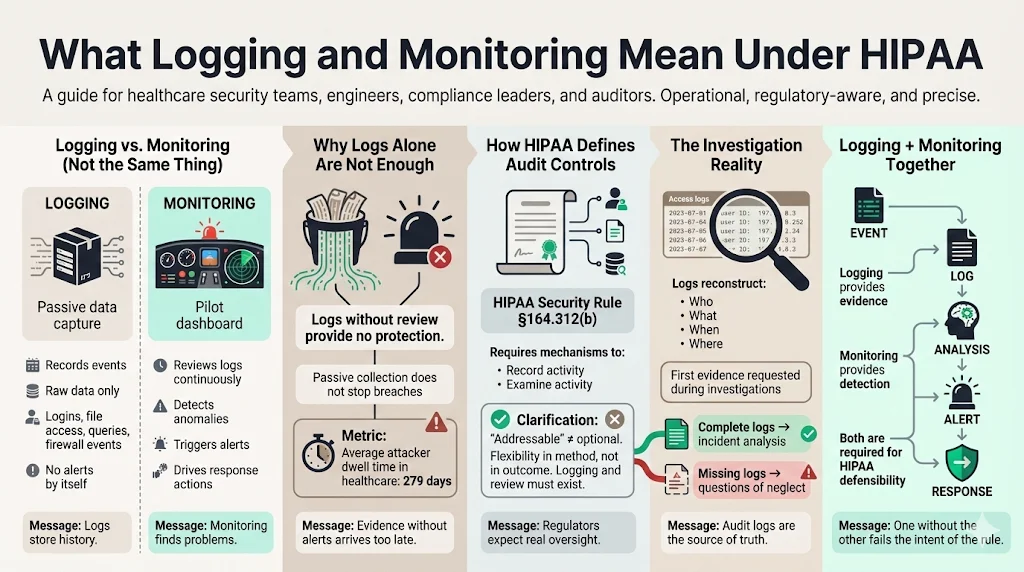
There is a distinct operational difference between logging and monitoring, yet many engineering teams conflate the two.
Logging is the passive act of recording events. It is the flight recorder on an aircraft. It captures raw data: logins, file access, database queries, and firewall accepts/denies. If you have logs but no review process, you are compliant only in the strictest, most useless sense of the word.
Monitoring is the active analysis of those logs to identify anomalies. It is the pilot scanning the instruments. Under HIPAA, simply having a bucket of S3 logs is insufficient if you lack the mechanism to review them.
The Department of Health and Human Services (HHS) makes this clear in the Security Rule. The goal is not data collection; the goal is audit controls. An audit trail allows an organization to reconstruct the "who, what, when, and where" of a specific event. Without active monitoring, a breach can persist for months. In 2025, the average dwell time—the time an attacker sits inside a network before detection—reached 279 days in the healthcare sector. Logging provides the evidence; monitoring provides the alert.
How HIPAA Defines Audit Controls
The HIPAA Security Rule (45 C.F.R. § 164.312(b)) requires covered entities to "implement hardware, software, and/or procedural mechanisms that record and examine activity in information systems that contain or use electronic protected health information."
This standard is technically "addressable" rather than "required." Do not let that language fool you. In the context of OCR enforcement, "addressable" does not mean optional. It means you have flexibility in how you implement it, but you must implement it. If you choose not to log access to ePHI, you must document a compelling reason why—and in modern cloud environments, there is rarely a valid excuse.
Regulators view audit logs as the primary source of truth during an investigation. If a patient alleges their data was snooped on by a hospital employee, or if a ransomware group exfiltrates a database, the first thing an investigator asks for is the access log. If that log does not exist or shows gaps, the investigation shifts from "bad luck" to "willful neglect."
What HIPAA Requires Organizations to Log
Core Log Types Required for HIPAA
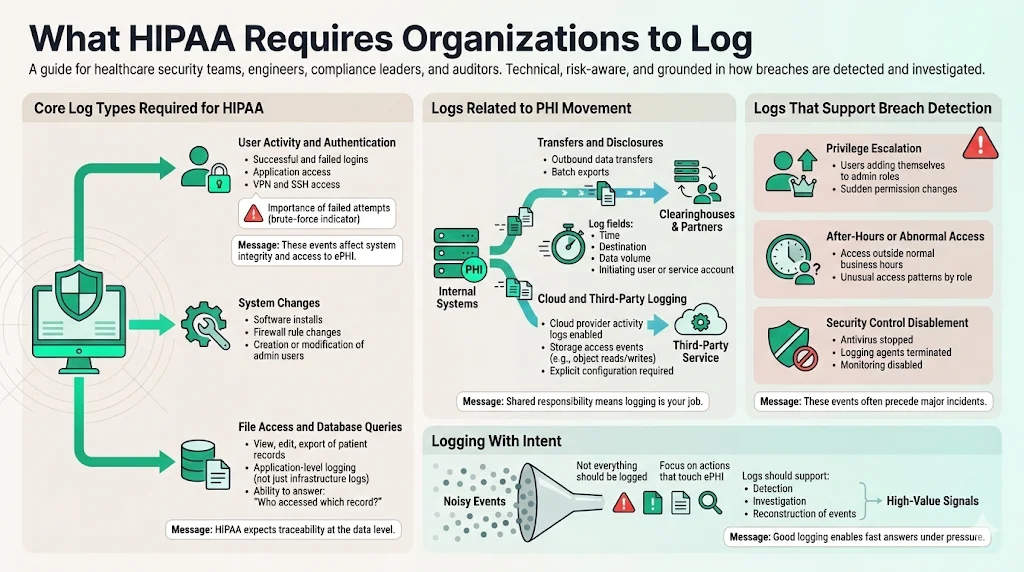
To establish HIPAA Secure Configuration Baselines, you must identify exactly which events trigger a log entry. You cannot log everything—the noise will drown out the signal—but you must log specific actions that touch ePHI.
User Activity and Authentication: Every successful and failed login attempt must be recorded. This includes direct access to applications, VPN connections, and SSH access to servers hosting ePHI. We often find that companies log successful logins but ignore failed ones. A sequence of 5,000 failed login attempts followed by one success is the clearest indicator of a brute-force attack.
System Changes: Modifications to the system itself—installing software, changing firewall rules, or creating new admin users—must generate an audit trail. These actions affect the integrity of the environment hosting the data.
File Access and Database Queries: This is the most granular and difficult tier. You need to know not just that User A logged in, but that User A viewed Patient Record B. In cloud-native applications, this usually involves application-level logging where the software writes a record to a database every time a "view" or "export" function is triggered.
Logs Related to PHI Movement
Data rarely stays static. It moves between your database, your application, your backups, and your vendors.
Transfers and Disclosures: If your application sends a batch of claims data to a clearinghouse, that transfer is a loggable event. The log should capture the time, the destination, the size of the transfer, and the user or service account that initiated it.
Cloud and Third-Party Logging: Your responsibility extends to your Business Associates (BAs). If you use AWS, Google Cloud, or Azure, you must enable CloudTrail or Cloud Audit Logs. A common gap we see in our audits is the "shared responsibility model" confusion. AWS secures the physical server, but they do not configure your logging for you. You must explicitly configure the service to track S3 bucket access.
Logs That Support Breach Detection
Effective security relies on detecting the precursor to a breach. HIPAA Secure Configuration Baselines should be tuned to capture:
- Privilege Escalation: If a standard user suddenly adds themselves to the "Administrators" group, this is a critical alert.
- After-Hours Activity: Access patterns that deviate from the norm (e.g., a billing clerk accessing records at 3:00 AM on a Sunday) often indicate compromised credentials.
- Disablement of Security Tools: Malware often attempts to kill antivirus or logging agents before encrypting files. A "logging stopped" event is a high-severity indicator.
HIPAA Logging Best Practices for Healthcare Companies
Building Strong Audit Trails
An audit trail is legal evidence. Like any chain of evidence, it must be tamper-resistant.
Centralized Collection: Never store logs locally on the server that generates them. If an attacker compromises a web server, the first thing they will do is delete the /var/log directory to cover their tracks. Logs should be shipped immediately to a separate, secured location (a centralized log server or a SIEM); our HIPAA logging pipelines guide covers how to design that shipping and normalization layer.
Time Synchronization (NTP): In distributed systems, time matters. If your database server is three minutes behind your web server, reconstructing an incident becomes impossible. Use Network Time Protocol (NTP) to ensure all systems are synchronized to a single time source.
Immutable Storage: Ideally, logs should be stored in a Write-Once-Read-Many (WORM) format. This ensures that once a log entry is written, it cannot be modified or deleted until the retention period expires.
Matching Logs With Security Policies
Technologists often configure logging based on defaults rather than policy. This leads to gaps. Your logging configuration must correspond directly to your written Information Security Policy.
If your policy states, "We review access to high-risk data weekly," but your logs only retain data for 24 hours, you have a policy violation. At Konfirmity, we map these controls for you. We ensure that the technical reality matches the administrative promise. This consistency is critical during SOC 2 and HIPAA audits. An auditor will ask to see the policy, and then they will ask to see the evidence that supports it. Discrepancies here lead to findings.
Monitoring Logs for Threats and Incidents
Why Monitoring Matters as Much as Logging
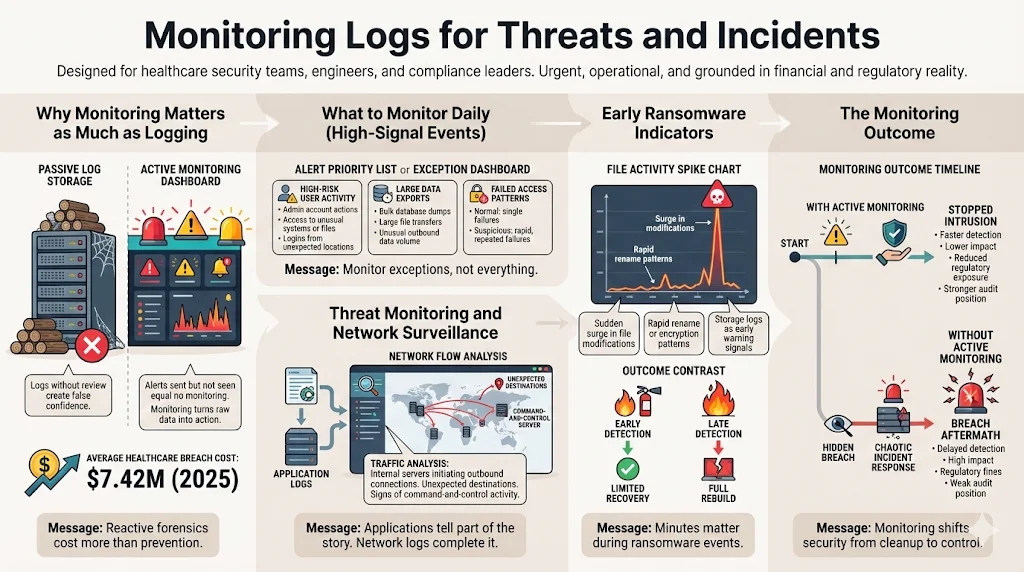
Collecting data without reviewing it provides a false sense of security. I have supported clients who suffered breaches despite having terabytes of logs. Why? Because the alerts were going to an email address nobody checked.
Risk management requires visibility. Monitoring transforms raw data into actionable intelligence. It allows you to stop an intrusion while it is happening, rather than just cleaning up the mess afterward. In 2025, the average cost of a healthcare data breach reached $7.42 million—the highest of any industry. Relying solely on reactive forensics is a financial liability.
What to Monitor on a Daily Basis
You cannot review every line of code. You need to monitor exceptions.
High-Risk User Activity: Focus on users with administrative privileges. What are they doing? Are they accessing files they typically do not touch? Are they logging in from unusual geographic locations?
Large Data Exports: Data exfiltration is the endgame of most modern attacks. Monitoring for "large file transfers" or "bulk database dumps" is one of the most effective ways to catch an insider threat or an external attacker preparing for extortion.
Failed Access: A single failed password is a typo. One hundred failed passwords in a minute is a script.
Logs you never review are just storage bills waiting to happen.
Drop your work email and we'll turn your audit logs into a real threat-detection program.
Threat Monitoring and Network Surveillance
Your application logs tell only half the story. You must link these with network logs.
Traffic Analysis: Are your internal database servers attempting to initiate connections to the public internet? In a properly architected environment, this should never happen. If a database server tries to connect to an unknown IP address in Eastern Europe, it is a sign of a command-and-control (C2) infection.
Ransomware Indicators: Early signs of ransomware often appear in storage logs. A sudden spike in "file modify" or "file rename" operations can indicate the encryption process starting. Rapid detection here can mean the difference between restoring a few files and rebuilding the entire infrastructure.
Tools and Technologies for HIPAA Logging And Monitoring
Common Monitoring Tools Used in Healthcare
The market is saturated with tools, but they generally fall into three categories:
- SIEM (Security Information and Event Management): Platforms like Splunk, Datadog, or Sumo Logic. These ingest logs from everywhere, normalize the data, and allow for querying; see our HIPAA SIEM use cases guide for the detection rules to build on top of them.
- Cloud-Native Tools: AWS CloudWatch, Azure Monitor, Google Cloud Operations. These are essential for infrastructure monitoring but often need to be piped into a SIEM for a holistic view.
- IDS/IPS (Intrusion Detection/Prevention): Tools that monitor network traffic for known attack signatures.
What to Look for in Monitoring Tools
When selecting a tool stack, do not buy based on the sales brochure. Buy based on operational fit.
Real-Time Capabilities: Can the tool alert you within seconds? If the latency is 24 hours, the tool is useless for incident response.
Retention Management: Can the tool automate data lifecycles? Storing logs is expensive. You need a tool that can keep "hot" data for 30 days for immediate analysis and move older data to "cold" storage for long-term compliance.
Encryption: The logs themselves contain sensitive data. The tool must support encryption at rest and in transit.
Managing Logs Across Hybrid and Cloud Systems
Most modern healthcare companies run hybrid environments. You might have an EMR on-premise and a patient portal in AWS.
Centralization is the challenge here. You need a "single pane of glass." Without it, your security team has to jump between five different consoles to understand a single incident. This fragmentation increases the "Mean Time to Detect" (MTTD) and "Mean Time to Respond" (MTTR).
At Konfirmity, we often encounter organizations using default settings across disparate systems. We help them define HIPAA Secure Configuration Baselines that standardize logging formats (like JSON) across all platforms, ensuring that a log from a firewall looks structurally similar to a log from a database, making aggregation possible.
Log Retention and Storage Requirements
How Long HIPAA Audit Logs Should Be Kept
This is a common area of confusion. HIPAA regulations (45 CFR § 164.316(b)(2)(i)) state that documentation of policies and procedures must be kept for six years. However, the rule does not explicitly set a six-year retention period for audit logs themselves.
That said, industry best practice—including guidance found in NIST SP 800-66 Rev. 2—suggests robust retention policies.
- Legal Minimum: Many interpret the six-year documentation rule to extend to the audit trails that prove the documentation was followed.
- Operational Standard: For active analysis, 90 days to 1 year is standard. For cold storage (archival), we advise sticking to the 6-year mark to match the statute of limitations for many civil actions.
Securing Stored Logs
Logs are a goldmine for attackers. If I can read your logs, I can learn your internal architecture, your usernames, and your patch levels.
Encryption at Rest: Logs in storage (S3 buckets, dedicated servers) must be encrypted.
Access Control: Who has access to the logs? Only the security and compliance teams should have read access. System administrators should have write access (to send logs) but ideally should not be able to delete or modify them.
Integrity Checks: Use hashing algorithms to verify that log files have not been altered. If a log file from three years ago has a modified timestamp of yesterday, it is corrupted evidence.
Roles and Responsibilities
Who Is Responsible for Monitoring HIPAA Logs
Responsibility cannot be diffuse. If everyone is responsible, nobody is responsible.
- Security Team: Responsible for defining the HIPAA Secure Configuration Baselines and configuring the SIEM alerts. They handle the daily triage of high-priority events.
- IT/Engineering: Responsible for ensuring the systems are actually generating the logs and that the agents are running.
- Compliance Officer: Responsible for spot-checking that the reviews are happening and documenting the process for auditors.
Training Staff on Log Review and Response
You cannot just hand a junior engineer a Splunk dashboard and walk away. Log review requires context.
Reviewers need to know what "normal" looks like. They need training on:
- Identifying false positives.
- The escalation path for confirmed incidents.
- How to preserve evidence without corrupting it.
This is where managed services provide value. Building an internal 24/7 Security Operations Center (SOC) is cost-prohibitive for many mid-sized healthcare companies. Konfirmity acts as that operational layer, providing the expertise to filter noise and surface only genuine risks, folding logging into the broader continuous monitoring program rather than treating it as a standalone task.
What Happens During a HIPAA Investigation
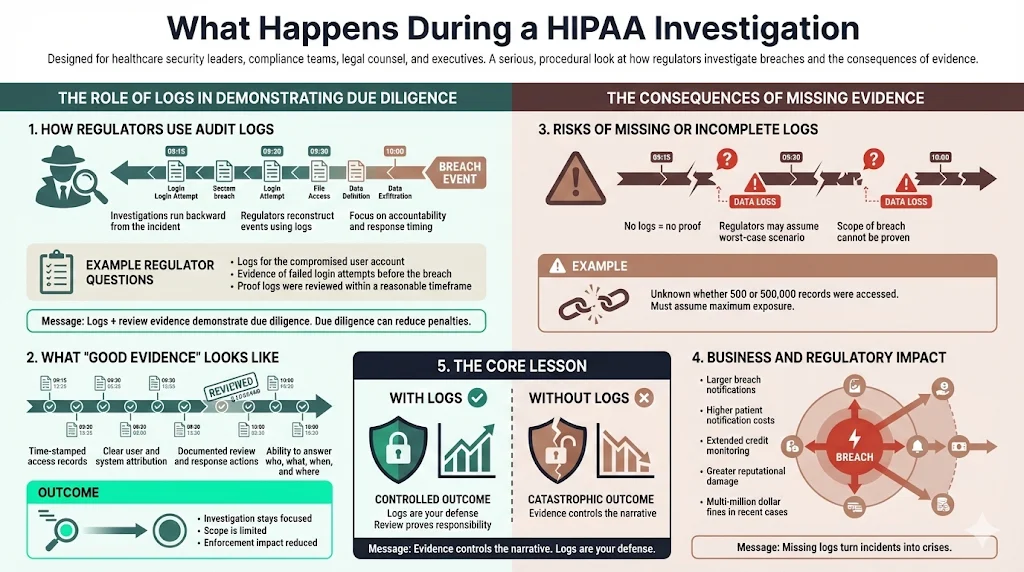
How Regulators Use Audit Logs
When the Office for Civil Rights (OCR) investigates a breach, they work backward. They want to see the audit trail leading up to the event.
They will ask specific questions:
- "Show us the logs for the specific user account compromised."
- "Show us that you detected the failed login attempts prior to the breach."
- "Prove that your team reviewed these logs within a reasonable timeframe."
If you can produce clean, time-stamped logs and evidence of review, you demonstrate "due diligence." This can significantly reduce fines and penalties.
Risks of Missing or Incomplete Logs
If you cannot produce logs, the regulator may assume the worst. In legal terms, this is often treated as an adverse inference. Without logs, you cannot prove the scope of the breach.
Did the attacker access 500 records or 500,000? If you don't know, you must assume the higher number. This forces you to notify more patients, pay for more credit monitoring, and suffer greater reputational damage. Recent enforcement actions have seen fines climb into the millions when organizations fail to safeguard ePHI. Missing logs turn a manageable incident into a catastrophic one.
Step-by-Step HIPAA Logging And Monitoring Framework
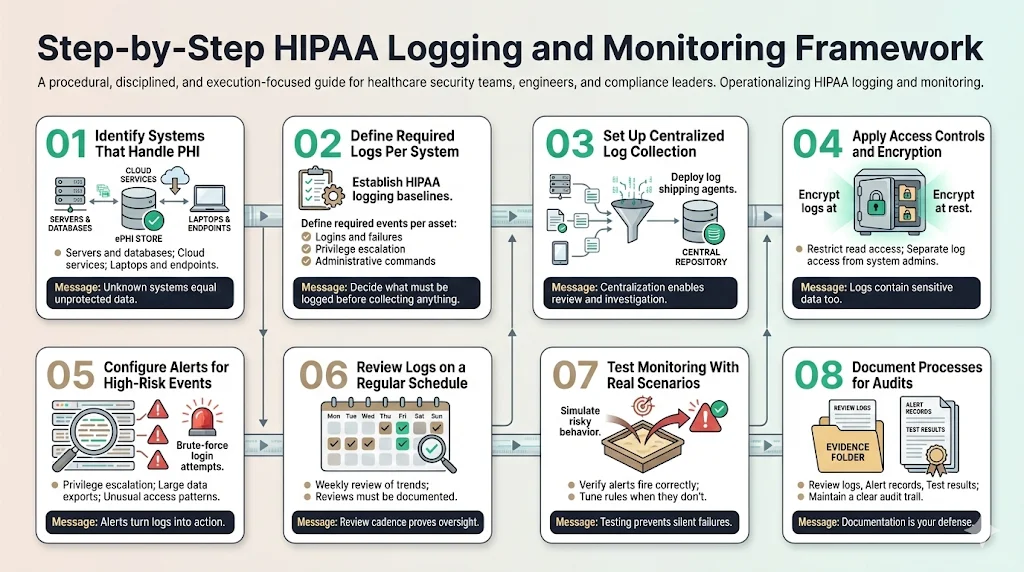
To move from theory to practice, follow this execution framework.
Step 1: Identify Systems That Handle PHI Create a data flow diagram. You cannot protect what you do not know about. List every server, database, and laptop that touches ePHI.
Step 2: Define Required Logs for Each System Establish your HIPAA Secure Configuration Baselines for logging. Determine exactly which events (logins, failures, sudo commands) must be captured on each asset type.
Step 3: Set Up Centralized Log Collection Deploy agents (e.g., Fluentd, Splunk Forwarder) to ship logs to a secure, central repository immediately upon generation.
Step 4: Apply Access Controls and Encryption Lock down the central log repository. Ensure it is encrypted and that only authorized personnel have read access.
Step 5: Configure Alerts for High-Risk Events Don't just collect data. configure alerts for the "red flags" discussed in Section 2—brute force attempts, privilege escalation, and massive data exports.
Step 6: Review Logs on a Regular Schedule Implement a daily review process for high-priority alerts and a weekly review for general trends. Document these reviews.
Step 7: Test Monitoring With Real Scenarios Do not wait for a hacker to test your system. Run a simulation. Create a dummy user and try to access a sensitive file. Did the alert fire? If not, adjust your configuration.
Step 8: Document Processes for Audits Keep a paper trail of your reviews. This is your defense during an audit.
See your real HIPAA logging gap, not a guess
Book a demo and we'll map your logging and monitoring program against the Security Rule requirements, self-serve or with our CISO-led team running it for you.
Book a demo
Conclusion
Compliance is not a finish line; it is a baseline for operations. The companies that survive audits and attacks are the ones that treat logging and monitoring as a core engineering discipline, not a regulatory annoyance.
At Konfirmity, we help organizations build this discipline. We do not just hand you a roadmap; we drive the car. By implementing HIPAA Secure Configuration Baselines within your infrastructure and managing the evidence collection, we ensure that your security posture remains durable long after the auditor leaves the building.
Effective logging reduces the blast radius of a breach. It turns a potential disaster into a managed incident. Start with security, execute with precision, and compliance will follow naturally.
Frequently Asked Questions (FAQ)
1) What logs does HIPAA require organizations to keep?
HIPAA requires organizations to record and examine activity in information systems containing ePHI. This includes user activity logs (logins/logouts), file access logs (who viewed/modified data), system change logs, and records of PHI transfers. The goal is to establish a complete audit trail.
2) How long should HIPAA audit logs be retained?
While HIPAA mandates a six-year retention period for policies and documentation, it does not strictly define the period for technical audit logs. However, most organizations retain logs for at least one year for active monitoring and up to six years in cold storage to align with legal statutes and the documentation requirement.
3) Who is responsible for monitoring HIPAA logs?
Monitoring is a shared responsibility. The Security team typically oversees the strategy and threat analysis, IT ensures the logging infrastructure functions, and Compliance verifies that reviews occur. In many organizations, this burden is offloaded to a managed service partner like Konfirmity to ensure consistency.
4) What happens if audit logs are missing during an investigation?
Missing logs are a severe liability. Without them, you cannot prove the scope of a breach, which may force you to notify all patients rather than just those affected. Regulators may view missing logs as evidence of willful neglect, leading to significantly higher fines and enforcement actions.
5) How do HIPAA Secure Configuration Baselines relate to logging?
HIPAA Secure Configuration Baselines are the technical standards you apply to your systems to ensure they are secure and compliant. Part of this baseline includes configuring the operating system and applications to generate the specific logs required for HIPAA, such as enabling audit subsystems and setting appropriate retention policies.
6) Can we use default cloud logging for HIPAA?
Default logging is rarely sufficient. While cloud providers like AWS or Azure offer logging tools, they must be explicitly configured to capture the correct degree of detail for HIPAA compliance. relying on "out of the box" settings often results in gaps regarding specific ePHI access events.
7) Why is time synchronization (NTP) important for HIPAA logging?
Accurate timestamps are critical for forensic reconstruction. If your systems are not synchronized, it becomes impossible to correlate events across different servers (e.g., matching a firewall entry to a database query), rendering the audit trail useless for investigation.