In the enterprise technology sector, particularly when selling to healthcare, "uptime" is not merely a service level agreement (SLA) metric; it is a patient safety issue. For companies providing software or infrastructure to Covered Entities (hospitals, insurers, clinics), the ability to maintain operations during a crisis is the primary litmus test for vendor viability.
Most enterprise buyers now request assurance artifacts before procurement. Without operational security and continuous evidence, deals stall—even when teams think they are "ready" on paper. This is specifically true regarding HIPAA Business Continuity And DR (Disaster Recovery). While many organizations view HIPAA primarily through the lens of privacy (keeping data secret), the Security Rule places equal weight on availability (keeping data accessible).
If a ransomware attack locks your SaaS platform, or an AWS region failure takes your database offline, can your healthcare clients still function? If the answer is "no," or "we’ll figure it out when it happens," you are a liability to their compliance posture.
This article details the operational demands of HIPAA Business Continuity And DR. It is written for CTOs, CISOs, and engineering leaders who must prove to enterprise auditors and buyers that their systems can survive a disaster without compromising electronic Protected Health Information (ePHI).
What Are Business Continuity and Disaster Recovery?
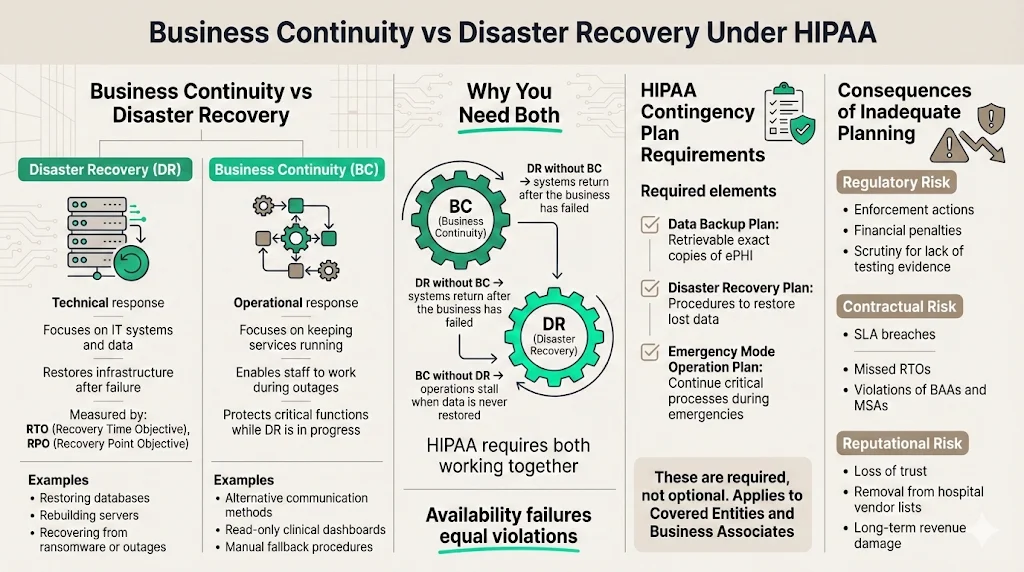
Though often grouped together, Business Continuity (BC) and Disaster Recovery (DR) serve distinct functions within your resilience strategy.
- Disaster Recovery (DR) is the "technical" response. It focuses on the IT infrastructure and data. If a server fails, a data center floods, or a database is corrupted, DR is the set of procedures and technologies used to restore those systems to a functional state. It is measured in Recovery Time Objectives (RTO) and Recovery Point Objectives (RPO).
- Business Continuity (BC) is the "operational" response. It focuses on the organization's ability to continue delivering critical services while the technical teams work on the fix. If your email server is down, how do employees communicate? If your primary dashboard is inaccessible, is there a read-only backup available for urgent clinical queries?
In the context of HIPAA Business Continuity And DR, you must have both. Restoring a database (DR) is useless if the business has already collapsed due to an inability to process transactions (BC). Conversely, a continuity plan that relies on manual paper processes will fail if the underlying data is never restored.
How They Fit Into HIPAA
The HIPAA Security Rule (45 CFR § 164.308(a)(7)) explicitly requires a Contingency Plan. This is not an optional suggestion. The regulation states that Covered Entities and Business Associates must establish (and implement as needed) policies and procedures for responding to an emergency or other occurrence (for example, fire, vandalism, system failure, and natural disaster) that damages systems that contain ePHI.
The specific implementation specifications include:
- Data Backup Plan (Required): Procedures to create and maintain retrievable exact copies of ePHI.
- Disaster Recovery Plan (Required): Procedures to restore any loss of data.
- Emergency Mode Operation Plan (Required): Procedures to enable continuation of critical business processes for protection of the security of ePHI while operating in emergency mode.
The link between continuity/DR and protecting ePHI is direct. Availability is one of the three pillars of the CIA triad (Confidentiality, Integrity, Availability). If a doctor cannot access a patient's allergy history because your cloud instance is down, that is a HIPAA violation just as severe as a data breach.
Why Covered Entities and Business Associates Must Plan
For Business Associates (vendors), the risk is existential. In 2025, enforcement actions and audit scrutiny have intensified. The Office for Civil Rights (OCR) and independent auditors are no longer satisfied with a static PDF policy stored in a GRC tool. They demand evidence of testing and resilience.
If your HIPAA Business Continuity And DR strategy is missing or inadequate:
- Regulatory Consequences: You face direct fines for noncompliance. In 2025 alone, the OCR has continued its aggressive enforcement, with high-profile penalties such as the $1.5 million fine against Warby Parker for Security Rule failures. Additionally, large settlements like the $4.75 million agreement with Montefiore Medical Center in 2024 highlight the financial severity of failing to protect ePHI.
- Contractual Breach: Most Business Associate Agreements (BAAs) and enterprise Master Services Agreements (MSAs) include strict clauses regarding uptime and notification timelines. Failing to recover within the agreed RTO constitutes a breach of contract.
- Reputational Damage: In the healthcare sector, trust is hard to gain and easy to lose. A vendor known for extended outages during critical periods will be removed from the procurement lists of major hospital networks.
HIPAA Business Continuity & DR Core Requirements
At Konfirmity, we have supported over 6,000 security audits. A recurring pattern we see is organizations confusing "backups" with "disaster recovery." Having a snapshot of your database is a good start, but it is not a plan. Here are the core requirements you must implement.
1) Data Backup Strategies
The foundation of any HIPAA Business Continuity And DR plan is the data backup strategy. HIPAA requires "exact, retrievable copies," covered in more depth in our HIPAA backup and recovery guide.
- Frequency: This is dictated by your RPO. If your RPO is 1 hour, daily backups are insufficient. For critical ePHI, we usually suggest continuous replication or transaction log backups every 5–15 minutes, coupled with daily full snapshots.
- Storage Methods: Backups must be encrypted at rest and in transit. This is non-negotiable.
- Immutability: With the rise of ransomware, backups must be immutable (read-only) for a set period. Attackers often target backup repositories first to prevent recovery. The threat is escalating; reports indicate a 58% increase in ransomware victims in 2025 compared to the previous year.
- The 3-2-1 Rule: Maintain three copies of data, on two different media types, with one copy offsite (or in a completely different cloud region).
2) Disaster Recovery Planning (DRP)
Your DRP is the technical runbook. It should not be a high-level policy document; it must be a step-by-step guide that an engineer can follow at 3 AM when the primary architect is on vacation.
The DRP must define procedures to restore lost data and critical systems. It covers:
- Cyberattacks: Specific steps for isolating infected nodes, scrubbing malware, and restoring from clean backups.
- System Failures: Procedures for spinning up infrastructure in a secondary zone or region.
- Natural Disasters: Handling physical data center loss (less common in cloud-native environments, but still relevant regarding availability zones).
3) Emergency Mode Operation Procedures
This is the most frequently overlooked requirement. While the engineers are executing the DRP, what does the rest of the company do?
The Emergency Mode Operation Plan ensures critical functions continue.
- Communication: How do you notify clients — including the regulatory notifications covered in our HIPAA breach notification guide? Do you have a status page hosted on infrastructure separate from your main app?
- Alternate Processing: If your automated claims processing engine is down, is there a manual workaround? Can you queue requests to be processed in bulk once the system returns?
- Security in Emergency Mode: You may not lower your security shields just because you are in disaster mode. ePHI must remain encrypted and access-controlled, even during failover.
4) Application & Data Criticality Analysis
You may not save everything at once. A Criticality Analysis helps you prioritize.
- Tier 0 (Vital): Identity providers, encryption keys, master databases. These must be restored immediately.
- Tier 1 (Critical): Core application servers, patient-facing portals.
- Tier 2 (Important): Reporting dashboards, historical archives.
- Tier 3 (Non-Critical): Dev/Test environments.
We often see companies wasting resources trying to restore a dev environment while their production authentication service is still down. A rigorous analysis prevents this.
5) Testing and Revision Procedures
A plan that is not tested is a hypothesis. HIPAA requires periodic testing. We will discuss this in detail in Section 6, but understand that "testing" means more than just checking a box; see our HIPAA backup testing guide for a repeatable restore-testing process. It involves verifying that your backups are valid and that your team knows how to execute the runbook.
Integrating Risk Management & Cybersecurity
HIPAA Business Continuity And DR is not an island; it interacts heavily with your broader risk management and cybersecurity programs. In 2025, the primary cause of disasters is malicious activity, not hardware failure.
1) Risk Management in HIPAA DR & BC Plans
You must conduct a formal Risk Assessment to identify potential threats to your ePHI. This assessment informs your DR strategy.
- If your assessment identifies a high risk of ransomware due to unpatched endpoints, your DR plan must prioritize immutable backups and rapid isolation protocols.
- If your assessment identifies a risk of cloud provider outages (e.g., US-East-1 going down), your DR plan must include multi-region failover.
This is where expert delivery differs from software-only solutions. A software tool can give you a risk assessment template, but it cannot analyze your specific architecture to tell you where your actual risks lie. With the fully-managed service, we implement controls inside your stack based on reality, not just generic templates.
2) Cybersecurity Measures
Continuity planning must coordinate with cybersecurity best practices.
- Ransomware Defense: Your continuity plan is your ultimate defense against ransomware. If you can wipe and restore your environment in 4 hours, you do not need to pay the ransom.
- Network Protections: During a recovery, networks are vulnerable. Your plan must ensure that firewalls and access control lists (ACLs) are re-established correctly in the recovery environment.
- Access Control: Who has the authority to trigger the DR plan? This "break-glass" access must be tightly controlled and monitored, following the same least-privilege principles in our HIPAA access control best practices guide.
Continuity plans without security controls fail the moment they matter.
Drop your work email and build a DR program that holds up under real pressure.
3) Incident Response Planning
Incident Response (IR) and DR are cousins; our HIPAA incident response plan guide covers the IR side in detail. IR handles the containment and eradication of a threat (e.g., kicking the hacker out). DR handles the recovery of the damage (e.g., restoring the deleted database).
These teams must coordinate. If the DR team restores a database before the IR team has patched the vulnerability that let the hacker in, the hacker will simply encrypt the database again. This interaction requires precise choreography, documented in your plans.
System Redundancy and Continuity of Operations
High availability is the proactive side of HIPAA Business Continuity And DR. If your systems are redundant enough, a "disaster" might just be a minor blip in performance rather than an outage.
System Redundancy
Redundancy means removing single points of failure.
- Database Replication: Using Read Replicas and Multi-AZ deployments ensures that if one node fails, another takes over automatically.
- Load Balancing: Distributing traffic across multiple servers prevents a single server overload from taking down the application.
- Backup Sites: For critical enterprise applications, a "warm" standby site (infrastructure deployed but stopped) or "hot" standby (infrastructure running and receiving data) in a secondary region is standard practice.
Ensuring Continuity of Operations
Continuity of Operations (COOP) focuses on the human element. If your headquarters has a power outage, can your support team work remotely? (Post-2020, the answer is usually yes, but it must be documented).
The cost of failing here is immense. According to recent data, healthcare downtime costs hospitals an average of $7,900 per minute. For large hospitals, this figure can surge even higher, making resilience a financial imperative.
Key elements include:
- Succession Planning: If the CTO is unavailable during a crisis, who makes the decision to failover?
- Vendor Dependencies: If your authentication provider (e.g., Auth0 or Okta) goes down, what is your contingency? You rely on Business Associates just as your clients rely on you. You must understand their continuity plans.
Practical Templates and Tools
While we emphasize that templates alone are insufficient, they provide a necessary structure. However, a template is only as good as the data you put into it.
Contingency Plan Templates
A standard contingency plan package should include:
- Business Impact Analysis (BIA): A document quantifying the impact of downtime on specific business processes (financial, legal, reputational).
- Risk Assessment: The registry of threats and vulnerabilities.
- Data Backup & Storage Plan: The technical schedule of snapshots, retention policies, and encryption details.
- DRP and BCP Documents: The actual runbooks.
Sample DR Checklist
When the alarm sounds, nobody reads a 50-page policy. You need a checklist.
- Assessment: Confirm the outage and classify severity.
- Activation: Declare disaster and notify stakeholders.
- Containment: Isolate affected systems (if cyber-related).
- Restoration: Execute restore from clean backup (Point-in-time recovery).
- Verification: Validate data integrity and application functionality.
- Switchover: Route DNS/traffic to the recovered environment.
- Communication: Update status page and notify customers.
Business Continuity Plan (BCP) Structure
A solid BCP structure includes:
- Purpose and Scope: What parts of the business are covered?
- Roles and Responsibilities: The "Crisis Management Team" roster.
- Trigger Criteria: When do we activate this plan? (e.g., "Outage exceeding 4 hours").
- Resource Requirements: What hardware, software, and personnel are needed?
- Return to Normal: Procedures for moving back to the primary site once the disaster is resolved.
Free template
The Backup & Disaster Recovery Policy Template
A ready-to-adapt backup and recovery policy, an RPO/RTO worksheet, and a worked restore-test log, so your HIPAA contingency plan produces the evidence an auditor actually asks for. Enter your work email and we'll send the PDF.
Best Practices for Implementation
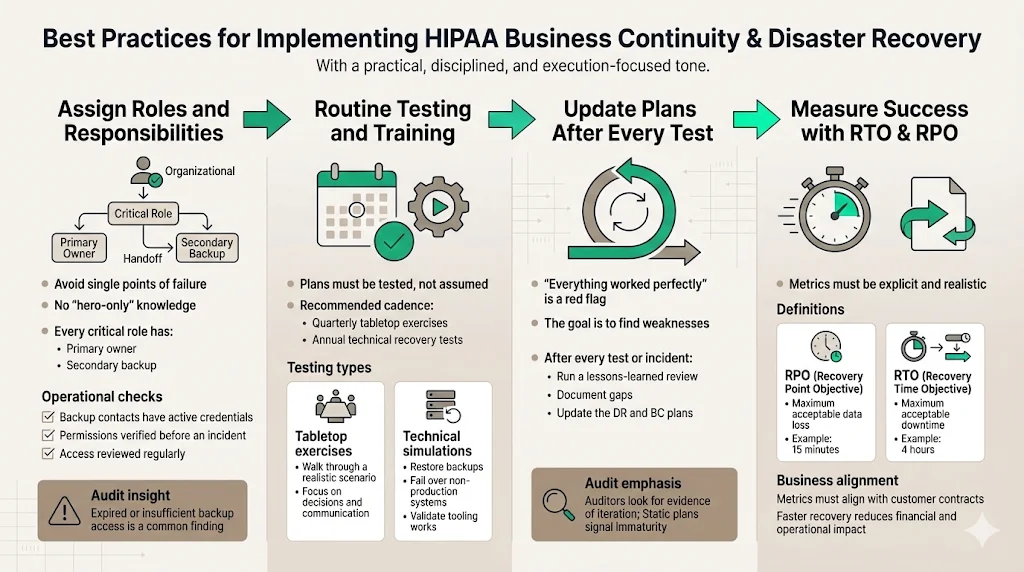
Implementing HIPAA Business Continuity And DR well comes down to a handful of best practices that separate a plan on paper from one that actually holds up. At Konfirmity, we view compliance as a downstream effect of good security. You build the controls because they protect the business; you document them to satisfy the auditor.
1) Assigning Roles and Responsibilities
One of the biggest pitfalls we see is the "Hero Syndrome," where one lead engineer knows everything. If that person is unreachable, the plan fails.
- Primary and Secondary Contacts: Every critical role needs a backup.
- Access Reviews: Ensure that the backup personnel actually have the permissions needed to execute the recovery scripts. We often find during audits that the secondary admin's credentials have expired or lack root access.
2) Routine Testing and Training
You must test your HIPAA Business Continuity And DR plans. The frequency depends on your risk profile, but quarterly is a good target for tabletop exercises, with annual full-scale technical tests.
- Tabletop Exercises: A guided discussion where the team talks through a simulated disaster (e.g., "Ransomware has encrypted the production database. Go."). This exposes gaps in communication and logic without disrupting operations.
- Simulation/Technical Tests: Actually failing over a non-production environment or restoring a backup to a test sandbox. This proves the technology works.
3) Updating Plans Post-Test
A test that results in "everything went perfectly" is usually a bad test. The goal is to find failure points. After every test (or real incident), you must conduct a "Lessons Learned" or "After Action Review." Update the DRP based on these findings. This iteration is what auditors look for—evidence that the program is living, not static.
4) Measuring Success: RTO & RPO
Define your metrics clearly.
- RPO (Recovery Point Objective): How much data can you afford to lose? (e.g., 15 minutes).
- RTO (Recovery Time Objective): How quickly must the system be back online? (e.g., 4 hours).
These metrics must coordinate with your customer contracts. With healthcare breaches costing an average of $9.77 million in 2024 (the highest of any industry for 14 years running), your RTO must be aggressive to minimize financial bleeding.
Real-world Scenarios and Use Cases
To illustrate how this works in the field, let’s look at two scenarios relevant to enterprise clients.
Scenario A: The Ransomware Attack
- Event: A developer's compromised laptop introduces ransomware into the network, encrypting the primary patient database.
- Response:
- Detection: Intrusion Detection System (IDS) alerts the security team.
- Containment: The Incident Response team isolates the VPC.
- Assessment: The database is confirmed encrypted.
- Decision: The Crisis Management Team decides NOT to pay ransom and initiates the DR plan.
- Restoration: Engineering spins up a new DB instance and restores from the immutable backup taken 10 minutes prior to the infection (RPO met).
- Verification: Data integrity is checked.
- Recovery: The application is repointed to the new DB. Total downtime: 3 hours (RTO met).
Scenario B: The Cloud Provider Outage
- Event: A major AWS region (e.g., us-east-1) experiences a total outage affecting EC2 and RDS.
- Response:
- Monitoring: Synthetic monitoring detects 100% packet loss.
- Activation: Automated failover logic triggers (or manual decision is made).
- Failover: DNS is updated to point to the "Warm Standby" environment in us-west-2.
- Data Sync: Because Cross-Region Replication was active, the standby database is up to date within 5 seconds.
- Operation: Traffic flows to the West region. Performance is slightly slower due to latency, but the service is available.
Frequently Asked Questions (FAQ)
Q1: What’s the difference between HIPAA business continuity and disaster recovery?
HIPAA Business Continuity And DR are related but distinct. Disaster Recovery (DR) is the technical process of restoring IT infrastructure and data (e.g., restoring a server from backup). Business Continuity (BC) is the broader operational plan to keep the business functions running during the outage (e.g., using manual forms while the server is down).
Q2: Are both data backup and disaster recovery required under HIPAA?
Yes. The HIPAA Security Rule requires both. You must have a Data Backup Plan (to create copies of ePHI) and a Disaster Recovery Plan (to restore that data). You also need an Emergency Mode Operation Plan to function while systems are being restored.
Q3: How often should HIPAA continuity and DR plans be tested?
We suggest a risk-based approach. At a minimum, conduct a tabletop exercise annually. For high-growth enterprise SaaS companies, we advise quarterly tabletops and annual technical recovery tests. This frequency assures enterprise buyers that your recovery times are realistic.
Q4: What happens if a covered entity fails to have a HIPAA DR plan?
The consequences include potential civil money penalties from the OCR, which can reach millions of dollars depending on the tier of negligence. More immediately, the lack of a plan creates immense operational risk—if you lose data and cannot restore it, you may face lawsuits from patients and breach of contract claims from partners.
Q5: Can templates alone ensure HIPAA compliance?
No. Templates provide a starting structure, but they are not "compliance." A template cannot restore your server. Tools are helpful, but they must be supported by proper policies, rigorous testing, and human expertise to adapt the plan to your specific technology stack and business risks. Compliance is an outcome of operational security, not a document download.
See your real HIPAA continuity gap, not a guess
Book a demo and we'll map your backup, DR, and continuity posture against the Security Rule requirements, self-serve or with our CISO-led team running it for you.
Book a demo
Conclusion
Security that looks good in documents but fails under incident pressure is a liability. For healthcare technology companies, HIPAA Business Continuity And DR is not a checkbox exercise—it is the difference between a minor service hiccup and a catastrophic business failure.
We operate in a reality where 6,000+ security audits have taught us that hope is not a strategy. Enterprise buyers know this. They are demanding proof of resilience because their own compliance depends on it.
By implementing strong backup strategies, validating them with rigorous testing, and integrating them into a security-driven risk management program, you do more than pass an audit. You build a company that can survive the worst days of the internet and keep promises to customers.
Start with security. Build the controls inside your stack. Operate them daily. The compliance certification will follow naturally, and more importantly, your business will endure.