Most enterprise buyers now ask for assurance artefacts before signing contracts, and healthcare organisations are under intense scrutiny because they handle protected health information (PHI) under HIPAA. Compliance is more than a checkbox: OCR resumed audits in 2025 with an initial cohort of 50 entities, the average healthcare breach costs over $7 million, and HHS reported hundreds of incidents affecting tens of millions of Americans. Regulators continue to levy settlements such as the $175 000 agreement with BST & Co. after a ransomware infection exposed the PHI of 170 000 patients.
This guide is written for executives, CTOs, CISOs, compliance officers and security practitioners responsible for handling patient data. It draws on HIPAA’s rules, the latest enforcement actions, recognised security frameworks, and Konfirmity’s experience supporting more than 6,000 security audits. You will learn what HIPAA Do’s And Don’ts look like in daily operations, how to build a durable compliance programme and why strong security practices accelerate enterprise sales. The rest of this guide outlines practical controls and processes—from policy through execution—to help you stay compliant.
What HIPAA Is Designed to Protect
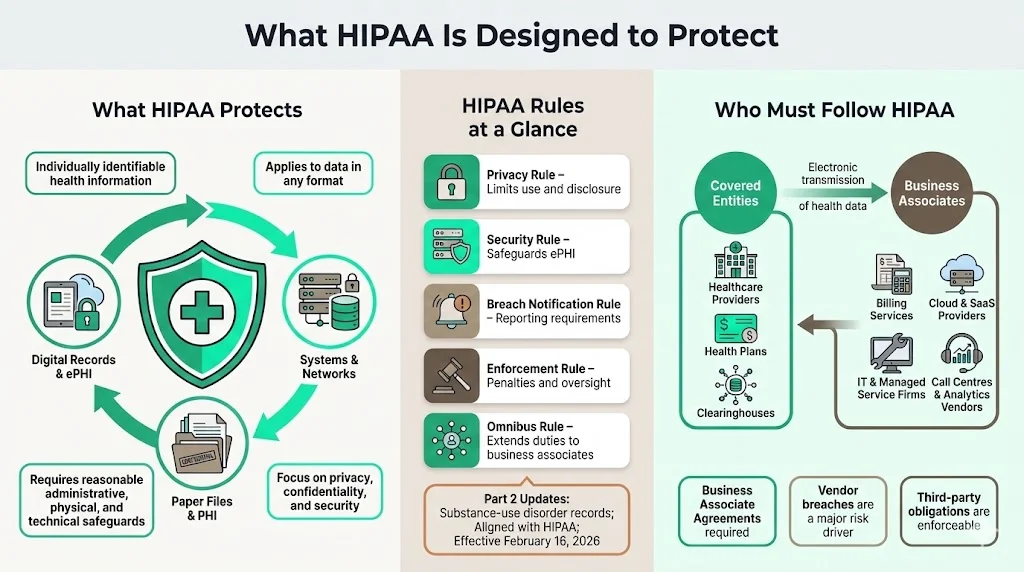
HIPAA protects the privacy and confidentiality of individually identifiable health information in any format and requires covered entities and business associates to implement reasonable administrative, physical and technical safeguards. Its Privacy, Security, Breach Notification, Enforcement and Omnibus Rules set limits on use and disclosure, safeguard ePHI, mandate breach notification, define penalties and extend obligations to business associates. Upcoming Part 2 updates align substance‑use disorder records with HIPAA and take effect on February 16 2026.
Who Must Follow HIPAA
Covered entities include healthcare providers, health plans and clearinghouses that transmit health information electronically. Business associates are vendors that create, receive or transmit PHI on behalf of covered entities—such as billing services, cloud providers and IT contractors. Third parties like call centres and analytics firms must sign Business Associate Agreements; vendor breaches were a major factor in 2025 incidents.
Core HIPAA Do’s: What Healthcare Companies Should Always Do
Understanding and applying the right HIPAA Do’s And Don’ts is critical. This section outlines the core "do’s"—actions that every healthcare company should take to secure patient data and satisfy auditors.
1) Do Protect Patient Privacy at Every Touchpoint
Handle PHI across systems and teams. Map where patient data enters, moves and resides across systems, teams and vendors. Collect only what is necessary, limit internal sharing, use de‑identified data and prevent non‑clinical departments from storing PHI. Enforce role‑based access and restrict exports or printing.
Apply the minimum‑necessary standard. Disclose only the information needed to accomplish a task; over‑sharing—such as sending full clinical histories for insurance verification—is a violation. Training and system design should reinforce this rule.
Prevent unauthorized disclosure. Remind staff not to discuss PHI in public or on social media. Encrypt communications, obtain consent for marketing or research uses, use privacy screens and secure disposal bins, and monitor printing or downloads.
2) Do Put Strong Data Security Measures in Place
HIPAA’s Security Rule mandates administrative, physical and technical safeguards. Modern breaches show why these controls must be rigorous. In the 2024–2025 period, OCR proposed making encryption of electronic PHI mandatory. The proposed rule states that encryption is currently an addressable implementation specification; organisations must evaluate whether encryption is reasonable for their environment, document their decision and implement an alternative if not. OCR argues that because encryption is widely available and affordable, regulated entities should already encrypt ePHI; the proposal would explicitly require encryption with limited exceptions.
Encrypt at rest and in transit. Encrypt databases, backups, storage devices and endpoints. Use TLS for web applications and secure SMTP or file‑sharing protocols for communications. Implement encryption mechanisms for portable devices and document key management procedures. Regularly test encryption to ensure it is configured properly; remember that encryption without key protection provides a false sense of security.
Use secure communication channels. For email, require secure messaging portals or encrypted attachments when transmitting PHI. Avoid consumer messaging apps; they lack HIPAA‑compliant encryption, logging and access controls. Implement secure file‑transfer services with authentication and automatic link expiry. For voice or telehealth calls, use platforms that sign BAAs and provide end‑to‑end encryption.
Protect cloud and internal systems. Configure cloud services with least‑privilege roles, network segmentation and logging. Use intrusion detection systems and security information and event management (SIEM) tools. Review firewalls and security groups regularly. For on‑premises systems, patch promptly, harden operating systems, disable unused services and restrict physical access.
3) Do Control Access to Patient Data
Role‑based access controls (RBAC). Align access privileges with job duties. Provision accounts based on least privilege and enforce multi‑factor authentication (MFA) for administrative roles. Maintain a documented matrix mapping roles to permissions. When employees change roles or leave, immediately adjust or disable access.
Access controls for systems and devices. Use unique user IDs; shared credentials and generic logins undermine accountability. Mandate strong passwords and password managers; implement MFA on all PHI‑handling systems. Enforce screen locking and remote wipe capabilities on mobile devices. Restrict the use of personal laptops or email for PHI.
Audit controls to track access and activity. Log who accessed which data, when and from where. Include logs from electronic health record (EHR) systems, databases, file servers and cloud services. Retain logs for the period required by your policies (often six years). Automate alerts for unusual access patterns—such as large exports or access outside business hours.
4) Do Train Employees Regularly
HIPAA requires that covered entities and business associates provide security awareness and training to all workforce members. The proposed 2025 security rule emphasises that awareness training remains a recognised security practice.
New hire training and annual refreshers. Onboard employees with HIPAA basics: definitions of PHI, permitted uses, minimum necessary rule, sanctions for violations and reporting procedures. Provide annual refreshers and incorporate scenario‑based exercises (e.g., how to handle misdirected emails or lost devices). Use interactive formats (quizzes, tabletop exercises) to reinforce learning.
Role‑specific training. Tailor training for clinicians, IT, billing and executive teams. IT staff should understand encryption, access controls and incident response. Clinical staff need to know how to discuss PHI in mixed settings. Management should recognise compliance as a business imperative, not an IT project.
Address common mistakes. Remind teams that curiosity (peeking at celebrity records), convenience (using personal email) and complacency (leaving charts unattended) are leading causes of violations. Make reporting easy and foster a culture where near misses are shared rather than hidden. Our HIPAA training requirements guide covers curriculum and cadence in more depth.
5) Do Conduct Routine Risk Assessment
OCR frequently penalises organisations for failing to perform comprehensive risk analyses (our HIPAA gap assessment guide covers how to run one); this was cited as a deficiency in the BST settlement. A risk assessment identifies vulnerabilities in systems, processes and facilities and informs mitigation.
Assess technical, physical and administrative risks. Review network architecture, application code, access controls, password policies, endpoint security and incident response. Examine facility safeguards (locks, cameras, disaster recovery sites) and administrative processes (vendor management, HR offboarding). Use frameworks such as NIST SP 800‑30 for risk analysis and SP 800‑53 for control selection.
Document findings and act. Prioritise remediation based on impact and likelihood. Track actions through a central risk register. Share results with leadership and allocate budget accordingly. Repeat assessments at least annually or after major system changes. Regulators expect documented evidence of both identified risks and the steps taken to address them.
6) Do Follow Authorization Requirements
Certain uses and disclosures of PHI require patient authorization, such as marketing, sale of information or sharing psychotherapy notes. Obtain written authorizations with clear descriptions of the data to be released, the purpose, expiration date and the right to revoke. Store authorizations securely and link them to the relevant records. Common mistakes include using outdated forms, collecting blanket consents that exceed the intended purpose or failing to document revocations. When in doubt, consult legal counsel before disclosing PHI.
7) Do Prepare for Breach Notification
Our HIPAA breach notification guide covers this timeline in full. The Breach Notification Rule requires covered entities to notify affected individuals without unreasonable delay, and no later than 60 days after discovery. Breaches affecting more than 500 individuals must also be reported to HHS and sometimes local media. In 2025 OCR pointed out that many organisations fail to meet timelines or provide incomplete notifications; delaying breach reporting is considered a willful violation.
Internal response. Develop an incident response plan that outlines roles, investigation procedures and communication channels. Establish criteria for when to involve legal counsel, forensic specialists and law enforcement. Maintain a breach log to track incident chronology and decisions.
Notification timelines. Start the 60‑day clock when you first become aware of a potential breach—not after confirmation. Send written notices that describe what happened, the data involved, steps taken to contain the breach, recommended precautions for patients and contact information. Retain copies for audit.
8) Do Maintain Proper Record Retention
HIPAA does not specify exact retention periods for all records, but the Omnibus Rule and state laws often require keeping documentation (policies, authorizations, logs, risk assessments) for at least six years. Retain longer if contracts, state law or litigation holds require it. Implement secure storage—whether on‑premises or in the cloud—with version control and regular backups. Use secure shredding or digital wiping for disposal. Regularly audit retention schedules to ensure that records are deleted or anonymised when the retention period ends.
Do the security work first. HIPAA compliance follows from real safeguards.
Drop your work email and see what real HIPAA security looks like.
Critical HIPAA Don’ts: Common Mistakes That Trigger Violations
These “don’ts” complement the earlier do’s and complete the picture of HIPAA Do’s And Don’ts. Avoiding these mistakes is just as important as implementing controls.
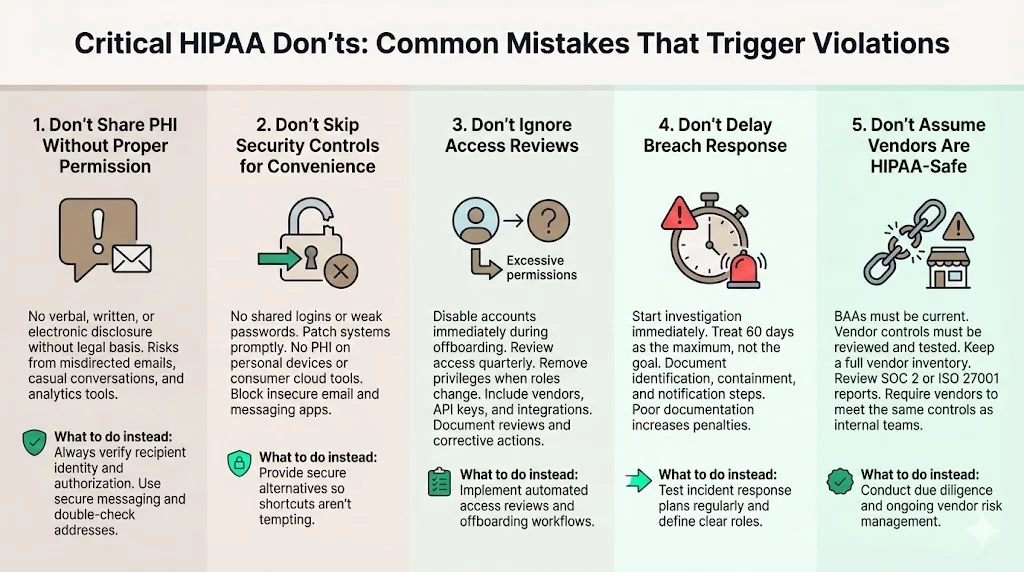
1) Don’t Share PHI Without Proper Permission
Never disclose PHI verbally, electronically or in writing without legal basis. Informal conversations in elevators, emails sent to the wrong recipient or exposing data in marketing analytics (as occurred with Blue Shield of California, where misconfigured Google Analytics potentially exposed 4.7 million members) are violations. Always verify the recipient’s identity and authorisation. Use secure messaging and double‑check email addresses.
2) Don’t Skip Security Controls for Convenience
Shared logins, weak passwords and unpatched devices are common shortcuts that lead to breaches. In many 2025 incidents, attackers exploited misconfigured systems or outdated software. Encourage employees not to store PHI on personal laptops or cloud drives. Block consumer email services and messaging apps. Provide secure alternatives so that convenience does not become an excuse for non‑compliance.
3) Don’t Ignore Access Reviews
Dormant accounts and excessive privileges are a major threat. Ensure that offboarding procedures immediately disable accounts when employees leave. Review access rights quarterly; remove access when job duties change. Document reviews and remedial actions. Include vendors in your reviews—many breaches stem from forgotten API keys or unused vendor accounts.
4) Don’t Delay Breach Response
Waiting for confirmation before starting an investigation can cost you. Use the 60‑day notification window as the outer limit; aim for much faster disclosure. Document all steps taken to identify, contain and notify. Failing to document your response can lead to higher penalties.
5) Don’t Assume Vendors Are HIPAA‑Safe
Outdated or missing BAAs, untested vendor controls and absent risk assessments invite trouble. The Episource breach showed how a vendor’s ransomware incident impacted multiple health plans. Keep an inventory of all vendors with access to PHI, evaluate their security posture, ensure they sign BAAs and require them to follow the same controls you implement internally — our HIPAA third-party risk guide walks through how to run this vetting process. Review vendor SOC 2 or ISO 27001 reports and ask for their risk assessments.
HIPAA Do’s And Don’ts for Daily Operations
1) Email, Messaging and File Sharing
-
Use secure communication platforms. Choose email services that support end‑to‑end encryption and sign BAAs. Deploy secure messaging portals for patient communications.
-
Enforce encryption for attachments. Do not send PHI through unencrypted attachments. Use password‑protected files with separate channels for the password.
-
Avoid consumer messaging tools. Apps like WhatsApp or Slack (without enterprise controls) may not meet HIPAA requirements and typically lack audit logs. Use platforms designed for healthcare or enterprise collaboration with compliance features.
-
Control file sharing. Implement centralized file‑sharing systems that restrict who can access folders containing PHI. Expire links automatically and track downloads. Deny third‑party file‑sharing services that lack encryption or logging.
2) Remote Work and Mobile Devices
-
Harden endpoints. Require full‑disk encryption, strong passwords and MFA. Install endpoint protection and automatic patching. Use mobile‑device management (MDM) to enforce policies and wipe lost devices.
-
Secure remote access. Provide VPNs or zero‑trust network access solutions. Restrict remote access to authorised devices. Use network segmentation to limit what remote users can reach.
-
Plan for lost or stolen devices. Document procedures for reporting, locking and wiping devices. Provide employees with contact details for the security team and emphasise prompt reporting.
3) Data Storage and System Management
-
Choose secure storage. Evaluate cloud vendors’ compliance certifications (e.g., SOC 2, ISO 27001, HITRUST) and ensure they sign BAAs. On‑premises systems must be physically secured with restricted access and environmental controls.
-
Backup and recovery. Maintain regular backups stored separately from the primary system. Test restores quarterly. Document recovery time objectives (RTO) and recovery point objectives (RPO).
-
Monitor and audit. Use SIEMs to monitor logs and alerts. Regularly review audit trails for anomalous access. Maintain a configuration management database (CMDB) to track systems and data flows.
Most Common HIPAA Violations and How to Avoid Them
-
Unauthorized access and weak controls. Curiosity breaches—employees viewing celebrity records—and shared or unused accounts are common violations. Enforce unique logins, role‑based access, multi‑factor authentication and prompt offboarding.
-
Insufficient training and failing the minimum‑necessary standard. Employees who do not understand HIPAA inadvertently overshare PHI. Provide regular training with real‑life scenarios and ensure workflows limit data to what is needed.
-
Poor breach response planning. Organisations often delay investigations or fail to document responses. Prepare an incident response plan, rehearse it and assign clear responsibilities.
Building a HIPAA Compliance Checklist
Use a structured checklist (see our HIPAA compliance checklist) to translate HIPAA Do’s And Don’ts into operational actions. Administrative safeguards include appointing a security officer, conducting risk assessments, enforcing training, applying sanctions and managing vendor relationships through BAAs. Technical safeguards cover access controls, encryption at rest and in transit, audit logging, integrity and transmission security, and secure configurations. Physical safeguards involve controlling facility access, protecting workstations and servers, maintaining device inventories and securely disposing of hardware or media. Ongoing review means scheduling regular access reviews and risk assessments, running tabletop exercises, performing continuous monitoring and keeping documentation current for auditors. Konfirmity’s managed service streamlines these tasks: clients typically achieve SOC 2 Type II or ISO 27001 readiness in 4–5 months and spend under 70 hours a year on compliance activities rather than 550–600 hours. The programme includes control mapping across HIPAA, SOC 2 and ISO 27001, continuous monitoring, evidence collection and audit support.
Free download
The HIPAA Audit Request List
Turn these Do’s and Don’ts into an audit-ready tracker: rule citation, evidence owner, where the evidence lives, and the date it was last refreshed — plus worked risk analysis, PHI inventory, training and log-review tabs. Enter your work email and we'll send the PDF.
Key Takeaways for Healthcare Companies
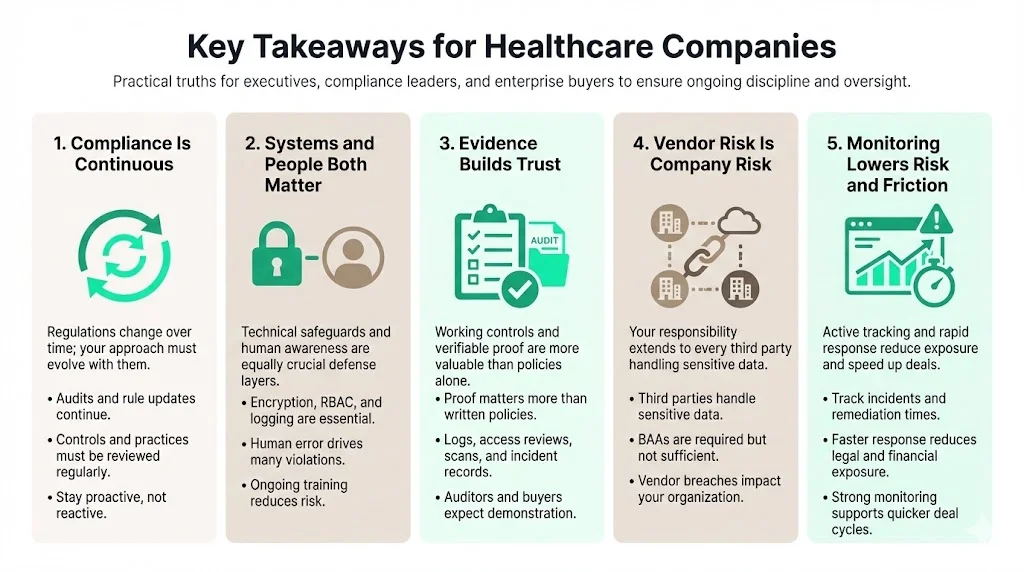
The key takeaways for healthcare companies: treat compliance as continuous, invest in trained people alongside technical safeguards, collect real evidence, own vendor risk, and monitor continuously to cut both breach costs and deal-cycle time.
-
HIPAA compliance is a continuous process. Regulations evolve—OCR revived audits in 2025 and proposed making encryption mandatory. Stay current by following HHS updates, reviewing your controls and revisiting the HIPAA Do’s And Don’ts regularly.
-
Strong systems and trained people matter. Technical safeguards (encryption, RBAC, logging) are critical, but human factors cause most violations. Invest in training and build a culture where privacy and security are part of daily work.
-
Evidence drives trust. Enterprise buyers and auditors care about real evidence, not policy documents. Provide logs, access reviews, vulnerability scans and incident reports to demonstrate that controls work.
-
Vendor risk is your risk. Evaluate third parties, require BAAs, and integrate vendors into your risk assessments. The majority of large 2025 breaches involved vendors.
-
Continuous monitoring reduces legal and financial risk. Track metrics like incident response times and vulnerability remediation. Fewer findings and faster resolutions lead to lower breach costs and quicker deal cycles.
Frequently Asked Questions (FAQ)
1) What are the five HIPAA rules?
-
Privacy Rule: Governs how PHI may be used and disclosed; grants patients rights to access, amend and receive copies of their records.
-
Security Rule: Requires administrative, physical and technical safeguards to protect ePHI. Proposed updates in 2025 would make encryption mandatory.
-
Breach Notification Rule: Mandates notifying affected individuals, HHS and sometimes the media within 60 days of discovering certain breaches.
-
Enforcement Rule: Sets out the investigation process and civil monetary penalties. Fines range from $141 to $2,134,831 per violation depending on culpability.
-
Omnibus Rule: Strengthens privacy protections, extends compliance requirements to business associates and updates penalties.
2) What can’t you do under HIPAA?
You can't share, access or leave PHI exposed without a legitimate, authorised purpose, and you can't sit on a breach past the 60-day notification window. Specifically, you cannot:
-
Share PHI without patient authorisation or a permitted use.
-
Access patient records without a legitimate purpose. Curious browsing is a violation.
-
Leave PHI unsecured—paper charts on desks, unlocked screens, or unencrypted databases.
-
Delay breach reporting beyond 60 days.
-
Ignore the minimum‑necessary principle—only disclose what is required.
3) What is the most common HIPAA violation?
Unauthorized access by employees is among the most common violations. Staff sometimes view records out of curiosity or share credentials. Enforce unique accounts, monitor logs and discipline offenders.
4) What is the golden rule of HIPAA?
Use or share patient information only when it is needed to perform your job. This encapsulates the HIPAA Do’s And Don’ts: apply the minimum‑necessary standard (if a task can be completed with partial information, do not request or disclose more) and combine it with strong security controls, encryption and continuous monitoring to maintain trust and meet both regulatory and business objectives.
See your real HIPAA do's and don'ts gap, not a guess
Book a demo and we'll map your program against the Security Rule requirements, self-serve or with our CISO-led team running it for you.
Book a demo
Conclusion
HIPAA compliance is not just a regulatory burden; it is a commitment to protect the people you serve and a competitive differentiator. Real enforcement actions—in which organisations paid $175 000 for ransomware‑related failures—and data breach statistics remind us that ignoring or trivialising HIPAA carries financial, reputational and ethical consequences. Healthcare providers, vendors and partners must integrate HIPAA Do’s And Don’ts into every decision. Start with a risk‑based approach, implement strong controls, train your workforce and demand the same discipline from your vendors. When security is embedded in operations and evidence is collected continuously, compliance becomes a natural by‑product and patients can trust that their data is safe.
Following these practices protects patient trust and supports sustainable, long‑term enterprise deals.