Most enterprise buyers and regulators now demand tangible proof that healthcare providers handle protected health information (PHI) correctly. Storing evidence properly under the Health Insurance Portability and Accountability Act (HIPAA) is about more than passing an audit—it affects sales cycles, insurance premiums, and patient trust. The average cost of a healthcare data breach in the United States fell to $7.42 million in 2025, yet healthcare still tops the cost charts among industries. Aside from financial loss, breaches cause months of disruption; in 2025 it took an average of 279 days to identify and contain a healthcare breach. This article explains HIPAA Evidence Storage Best Practices, weaving together the Security Rule, Privacy Rule, and Breach Notification Rule with practical insights from Konfirmity’s 6,000-plus security audits and 25 years of combined expertise. Evidence in this context encompasses logs, audit trails, backups, and documentation—artifacts that show how your controls work day‑to‑day. When you implement strong controls and continuously collect evidence, compliance becomes a natural outcome and you position your organization for faster deals, fewer findings, and resilience under attack.
Understanding the HIPAA Rules That Shape Storage
The Security Rule
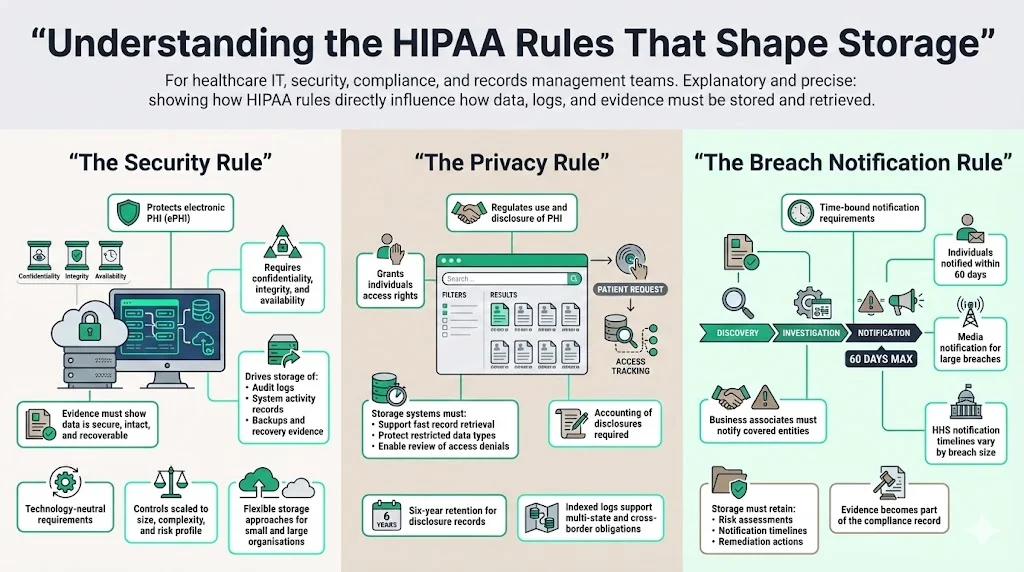
The Security Rule establishes administrative, physical, and technical safeguards to protect electronic PHI (ePHI). At its core it requires regulated entities to ensure the confidentiality, integrity, and availability of all ePHI they create, receive, maintain or transmit. Confidentiality means information is not disclosed to unauthorized persons; integrity means data is not altered or destroyed in an unauthorized manner; availability ensures information is accessible and usable on demand. These concepts drive evidence storage practices. Logs, audit trails, and backups help demonstrate that data remains intact, secure, and recoverable. The Security Rule does not prescribe specific technologies; instead it expects organizations to assess their size, complexity, technical capabilities, costs, and risk profile to determine reasonable and appropriate controls. That flexibility allows smaller clinics and large hospital systems alike to implement evidence storage solutions that fit their budgets while still meeting HIPAA expectations.
The Privacy Rule
The Privacy Rule regulates the use and disclosure of PHI and grants individuals rights to access their records. Covered entities must provide patients with the ability to review and obtain copies of their designated record set, except in limited circumstances such as psychotherapy notes or information compiled for legal proceedings. If access is denied, the patient must be allowed to seek a review of that decision. Storage systems therefore need searchable archives and retention practices that make records readily available on demand without compromising security. They must also support an accounting of disclosures for a six‑year period. These requirements influence how logs are indexed and stored, particularly when dealing with multiple state regulations and cross‑border transfers.
The Breach Notification Rule
When a breach of unsecured PHI occurs, the Breach Notification Rule dictates time‑bound obligations. Covered entities must notify affected individuals without unreasonable delay and no later than 60 days after discovering the incident. If more than 500 residents of a state are affected, the entity must also provide notice to major media outlets. Separate notifications must be sent to the Secretary of Health and Human Services; for breaches involving 500 or more individuals the notice is due within 60 days, whereas breaches affecting fewer than 500 people can be reported annually. Business associates are obligated to notify their covered entities without unreasonable delay. Documented evidence of these notifications—including timelines, risk assessments, and remedial actions—becomes part of the organization’s compliance record.
Core Evidence Storage Concepts Every Team Should Know
1) Data Security
Securing stored ePHI goes past encrypting files—it involves a holistic approach encompassing technical and administrative safeguards. The Security Rule requires regulated entities to protect against reasonably anticipated threats and impermissible uses. Technical safeguards include access controls, audit logs, and integrity checks. Administrative safeguards mandate risk assessments, assigned security responsibility, workforce training, and contingency planning. Physical safeguards involve facility access controls, workstation security, and device media controls. Together these safeguards create the foundation of evidence storage.
From a practitioner’s perspective, storing evidence securely means ensuring that logs, backups, and documents are protected against alteration and tampering. For example, immutable storage or write‑once‑read‑many (WORM) repositories preserve audit trails and mitigate ransomware. Implementing tamper‑evident cryptographic hashes on logs ensures integrity during transfer and archival. At Konfirmity we regularly deploy SIEM (Security Information and Event Management) platforms that collect logs across systems and feed them into tamper‑proof storage, satisfying both HIPAA and other frameworks like SOC 2 and ISO 27001. Implementing these measures exemplifies HIPAA Evidence Storage Best Practices, ensuring ePHI remains confidential, intact, and recoverable.
2) Confidentiality Protocols
Confidentiality protocols govern who can access sensitive data. HIPAA’s “minimum necessary” standard requires limiting access to the minimum information needed to perform a job. Role‑based access control (RBAC) defines permissions based on job duties, and least‑privilege principles prevent users from gaining unwarranted rights. Policies should specify how access is granted, modified, and revoked; logs should capture who accessed ePHI, when, and for what purpose.
Regular access reviews are critical, on a schedule like the one in our HIPAA evidence review cadence guide. We suggest quarterly or semi‑annual reviews depending on organizational size and risk appetite. During these reviews, managers verify that users still need their assigned privileges and remove stale accounts. Automated identity governance tools can streamline reviews and produce evidence showing that access recertifications occurred. In our experience across thousands of audits, missed access reviews are a common finding. Implementing routine review cycles not only helps meet HIPAA requirements but also eases ISO 27001 Annex A control A.9 and SOC 2 CC6 obligations.
3) Secure Storage Solutions
Choosing where to store evidence affects cost, scalability, and risk. The three predominant models are on‑premises, cloud, and hybrid storage:
-
On‑premises: Organizations retain physical control over their servers and storage devices. This option offers direct oversight but demands significant investment in hardware, redundancy, power, and physical security. It can be appropriate for entities with strict regulatory or contractual obligations that limit data from leaving specific jurisdictions. However, you must implement strong disaster recovery and offsite backups to mitigate single‑point failure risks.
-
Cloud: Cloud providers offer elastic storage, high durability, and geographic redundancy. Most reputable providers support encryption at rest and in transit, role‑based access controls, and activity logging. HIPAA requires a Business Associate Agreement (BAA) with any third‑party that stores or processes PHI. When choosing a cloud provider, examine their attestations (SOC 2 Type II, ISO 27001, HITRUST) and ensure their service allows you to export logs and maintain copies offsite. In our practice, cloud storage solutions often reduce infrastructure overhead and accelerate evidence collection, but they require careful configuration to avoid misconfigurations that expose PHI.
-
Hybrid: Combining on‑premises and cloud offers flexibility. Critical or sensitive logs can reside on‑premises while less sensitive evidence or longer retention archives live in the cloud. Hybrid models often appear in multi‑state or multi‑country operations where data residency laws differ.
Regardless of the model, ensure cryptographic secrets are managed properly. Use dedicated secret management services or hardware security modules (HSMs) to separate secret management from storage. Maintain documented secret rotation procedures and map them into your audit trail.
Technical Best Practices for HIPAA Evidence Storage
1) Access Controls
Access control mechanisms provide the first line of defence for evidence repositories. HIPAA’s technical safeguards require implementing mechanisms to allow only authorized persons to access ePHI. Practical implementations include:
-
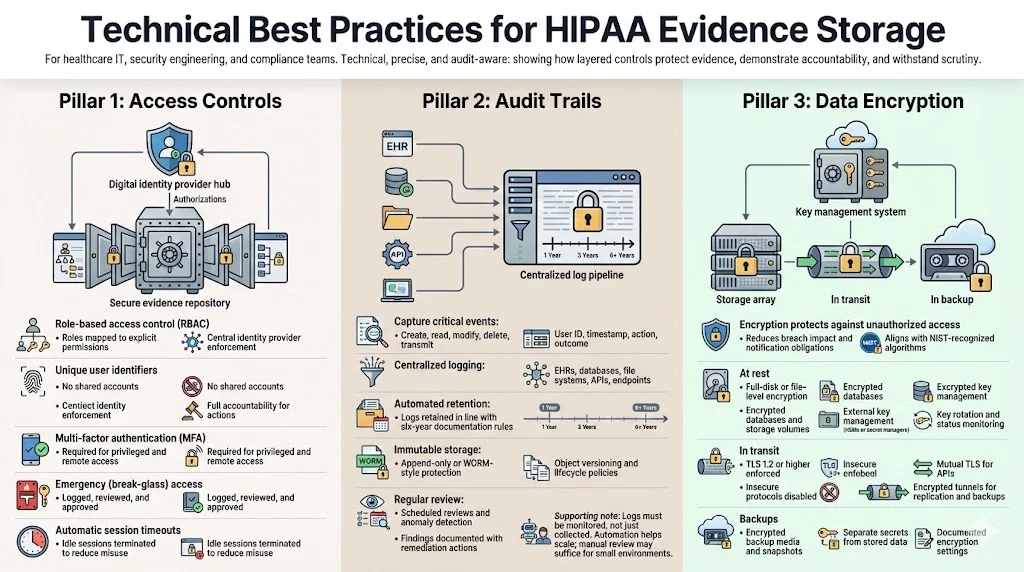
Role‑based access control (RBAC): Map roles (e.g., system administrator, compliance analyst, auditor) to explicit permissions. Use central identity providers (IdPs) to enforce RBAC across systems. Integrate with directories (e.g., LDAP, Active Directory) and ensure that applications respect the directory’s group assignments.
-
Unique identifiers: Assign each user a unique ID to track actions. Shared accounts obscure accountability and are frowned upon under both HIPAA and SOC 2.
-
Multi‑factor authentication (MFA): Require MFA for privileged access to storage systems, management consoles, and remote access. MFA reduces the risk that compromised credentials alone will grant access.
-
Emergency access: Establish break‑glass procedures for emergency situations. Document and log each occurrence, and review these events during post‑mortems.
-
Automatic session logout: Configure systems to terminate idle sessions after a period of inactivity, reducing the chance of unauthorized use.
2) Audit Trails
Audit trails provide traceability and help detect unauthorized access or suspicious activity. HIPAA’s technical safeguards require implementing hardware, software, and/or procedural mechanisms that record and examine activity in systems containing ePHI. Effective audit trails:
-
Capture relevant events: Determine which activities need monitoring—creation, reading, modification, deletion, and transmission of ePHI—and include user identity, timestamp, event type, and outcome.
-
Centralize logs: Consolidate logs from EHR systems, databases, file servers, APIs, cloud services, and endpoints into a central repository. This improves correlation, detection of patterns, and retention management.
-
Automate retention: HIPAA requires retaining documentation and records for at least six years from the date created or last in effect. Although HIPAA does not specify a period for audit log retention, matching logs to the six‑year rule provides defensible evidence. Use retention policies in your SIEM or log management solution to enforce the appropriate periods.
-
Enable immutable storage: Where feasible, store logs in tamper‑evident storage such as WORM media or systems that support append‑only writes. For cloud storage, enable object versioning and lifecycle policies.
-
Review regularly: Conduct periodic reviews of log activity to detect anomalies. Automate exception reports and define metrics to assess the effectiveness of the audit process. Document findings and remediation actions.
In field audits, we often see organizations generating logs but failing to monitor them; our HIPAA logging and monitoring guide covers how to close that gap. Tools such as SIEM platforms with builtin detection rules, user and entity behavior analytics (UEBA), and security orchestration and automation (SOAR) can streamline reviews. For small practices, simpler log management with periodic manual review may suffice. It is essential to demonstrate that logs are collected, retained, and reviewed according to a documented schedule.
3) Data Encryption
Encryption protects ePHI from unauthorized access both at rest and in transit. Under the current Security Rule encryption is an “addressable” implementation specification; it must be implemented when reasonable and appropriate or replaced with an equivalent alternative. Even though not strictly mandatory, strong encryption is widely considered best practice. Encrypting communications ensures that intercepted traffic is unreadable. The HIPAA Journal notes that encryption solutions that comply with NIST guidelines—such as AES‑192 or AES‑256—contribute toward recognized security practices. In 2025 a proposal to amend the Security Rule would make encryption mandatory for both data at rest and in transit; providers should act now to upgrade systems. Using encryption across all systems is fundamental to compliance.
Implement encryption at multiple layers:
-
At rest: Use volume‑based or file‑based encryption on servers and storage systems. For cloud storage, enable server‑side encryption and manage secrets externally via HSMs or secret management services. Monitor encryption status and rotation.
-
In transit: Enforce TLS 1.2 or higher on network connections; restrict insecure protocols. For APIs, use mutual TLS and sign messages. For remote backups or replication, ensure encrypted tunnels.
-
Backups: Encrypt backup media and cloud snapshots using separate secrets. Document encryption settings and store secrets separately from encrypted data.
Implementing encryption across all environments reduces the risk that a lost laptop, stolen drive, or intercepted network traffic will expose ePHI. It also reduces regulatory exposure: under the Breach Notification Rule, breaches involving properly encrypted data may be exempt from notification because the data is considered “unsecured” only when not rendered unusable to unauthorized individuals.
Stored HIPAA evidence is only as safe as the controls protecting it.
Share your work email and secure your evidence storage with controls OCR expects to see.
Planning for Retention and Recovery
1) Retention Policies
HIPAA sets a baseline retention requirement: covered entities must keep compliance documentation—including policies, risk analyses, workforce training records, business associate agreements, breach files, and audit trails—for six years from the date created or last in effect. Many states require longer retention for medical records; providers should follow the most stringent rule. Practical tips include:
-
Version and date‑stamp documents: Maintain version control for policies, procedures, and BAAs. For example, if a privacy policy is updated on April 15 2025, keep the prior version until at least April 15 2031.
-
Automate reminders: Use compliance management tools to track when records are due for secure disposal and to suspend destruction during litigation holds or investigations.
-
Integrate state law matrix: Map record types to retention periods required by state, federal, and contractual obligations. For multi‑state operations, apply the longest period.
-
Document rationale: Record the reasoning behind retention decisions so auditors can review your process.
Konfirmity often designs master retention schedules that harmonize HIPAA’s six‑year rule with ISO 27001’s document control requirements and SOC 2’s criteria around system description and evidence. This harmonization prevents duplication and ensures that a single set of evidence supports multiple frameworks.
2) Backup and Recovery
Backups must be regular, complete, encrypted, and tested. Under the Security Rule’s contingency planning requirements, covered entities must establish plans for backing up ePHI, restoring lost data, and continuing critical business processes during emergencies; see our HIPAA backup and recovery guide for the full set of controls. Best practices include:
-
Regular schedule: Perform backups at intervals in sync with your data change frequency and recovery point objectives (RPOs). For transactional systems, daily or hourly backups may be appropriate; for less frequently changing documents, weekly might suffice.
-
Encryption and integrity checks: Encrypt backups and store integrity hashes separately. Verify backup integrity during creation and restoration.
-
Redundancy: Use multiple geographic locations (for cloud) or offsite facilities to avoid single points of failure. Hybrid models may replicate on‑premises backups to cloud storage.
-
Testing: Run recovery drills to verify that backups can be restored within defined recovery time objectives (RTOs). Document results and remediate gaps.
Konfirmity’s managed service integrates backup monitoring into our continuous controls testing. We set up automated alerts for failed backups, expired media, and replication lag. During audits, we provide evidence of backup schedules, encrypted repositories, and test results to demonstrate operational readiness.
3) Disaster Recovery Planning
Disaster recovery planning ties evidence storage into broader business continuity. HIPAA’s contingency plan standard requires procedures to respond to emergencies that damage systems containing ePHI. This includes establishing an emergency mode operation plan, data backup plan, disaster recovery plan, and testing the plan periodically. Integrate evidence storage by:
-
Including evidence repositories in the recovery scope: Identify which systems house logs, backups, and documentation. Ensure they are part of your disaster recovery runbooks.
-
Defining alternate sites: Pre‑provision storage at alternate locations or cloud regions. Use infrastructure‑as‑code to rebuild environments quickly.
-
Prioritizing recovery: Determine the order in which systems should be restored. EHR systems may be first; evidence repositories often follow soon after to support investigations. Document dependencies.
-
Testing integrated scenarios: Simulate disasters that affect both operational systems and evidence stores. Confirm that logs and backups remain accessible and prove their integrity.
Our experience shows that organizations often neglect evidence systems during disaster planning. In more than half of the incidents we’ve handled, initial recovery efforts restored production applications but left logs offline, hindering root‑cause analysis. Integrating evidence storage into continuity plans prevents these gaps.
Chain of Custody and Documentation
1) What Chain of Custody Means for HIPAA Evidence
Chain of custody refers to the chronological documentation of how evidence is collected, transferred, stored, and accessed. While often associated with legal proceedings, it also matters for compliance and forensics. A clear chain of custody shows that evidence has not been tampered with and is therefore reliable. For HIPAA evidence—logs, audit trails, backups, policies—maintaining chain of custody involves recording who handled the evidence, when, under what conditions, and where it was stored. The Censinet guidance notes that audit evidence should be kept for at least six years and that organizations should use encryption, role‑based access controls, secure repositories and tamper‑prevention methods such as immutable storage. Recording every transfer in a chain‑of‑custody log (date, time, sender, receiver, purpose, and condition) provides auditors with assurance that evidence is authentic. Maintaining accurate chain-of-custody logs is a core aspect of HIPAA Evidence Storage Best Practices and supports investigators during audits or incidents.
2) Documentation Standards
Documentation under HIPAA spans policies, procedures, risk analyses, workforce training, business associate agreements, and breach files. The documentation requirement in 45 CFR §164.316 specifies that policies, procedures, and related records must be maintained for six years. A strong documentation program links each control to evidence of its operation. Tips for building documentation standards include:
-
Policy library: Maintain a single, version‑controlled repository of security and privacy policies. Include revision history, approval dates, and cross‑references to applicable frameworks (SOC 2 CC1–CC5, ISO 27001 Annex A).
-
Procedure playbooks: Develop step‑by‑step procedures for evidence collection, retention, backup, and destruction. Attach forms or checklists to capture crucial information (e.g., chain‑of‑custody logs).
-
Change management records: Document changes to systems, configurations, or processes that affect evidence storage. Track approvals, testing, and deployment results.
-
Link evidence to controls: Use an evidence management system or matrix to link each control to specific logs, screenshots, queries, or reports. This practice accelerates audit responses and ensures that evidence remains current.
Consistent documentation also supports SOC 2 and ISO 27001 audits. For example, SOC 2 requires documenting system changes and access reviews during the observation period, while ISO 27001 requires maintaining a Statement of Applicability and risk treatment plans. Cross‑referencing documentation across frameworks reduces duplication and ensures that a single set of controls produces evidence for multiple requirements.
Organizational Practices That Strengthen Storage Security
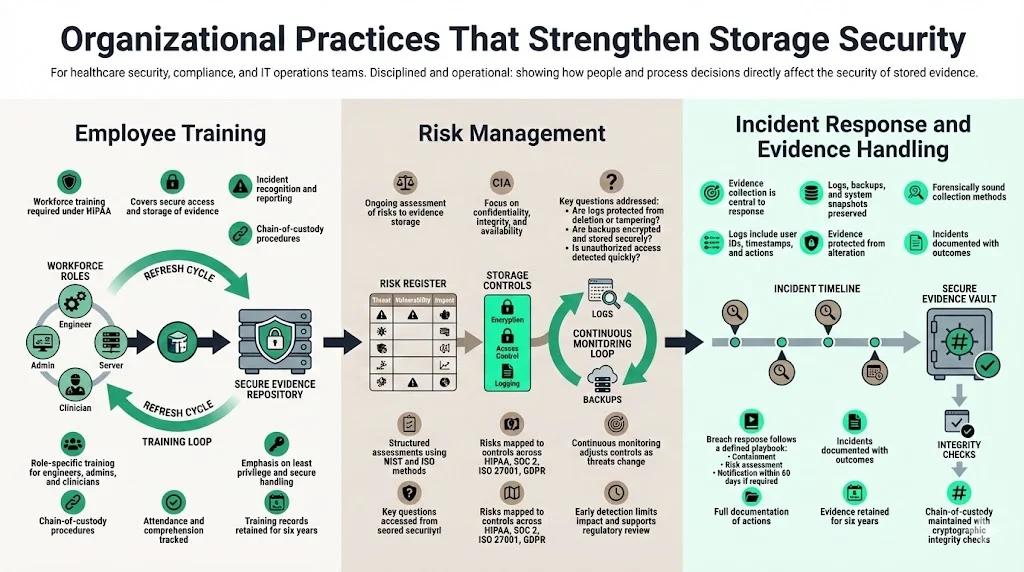
1) Employee Training
Most breaches stem from human error. HIPAA mandates that workforce members be trained on security policies and procedures. Training should cover how to access and store evidence properly, how to recognize and report incidents, and how to follow chain‑of‑custody procedures. Regular refresher sessions are essential as threats and technologies change. In our managed service, we provide targeted training modules for engineers, administrators, and clinicians, focusing on least‑privilege principles, secure data handling, and evidence retention. We track attendance and comprehension and retain training records for at least six years.
2) Risk Management
HIPAA’s Security Management Process requires a thorough assessment of potential risks and vulnerabilities to ePHI and mandates ongoing risk management. For evidence storage, risk assessments should evaluate the confidentiality, integrity, and availability of logs, backups, and documentation. Questions to consider include: Are audit logs properly secured and reviewed? Could an attacker modify or delete logs? Is backup media encrypted and stored offsite? Do the organization’s processes detect unauthorized access promptly? Use frameworks such as the NIST Cybersecurity Framework, NIST SP 800‑30 (risk assessment), and ISO 27005 to structure assessments.
Konfirmity’s program begins with a baseline risk analysis that maps risks to controls across HIPAA, SOC 2, ISO 27001, and GDPR. We then implement continuous risk monitoring, adjusting controls as threats change. In one 2025 case, a healthcare startup storing logs on a misconfigured S3 bucket suffered unauthorized access. Because we had implemented real‑time monitoring and centralized retention policies, the breach was detected within hours, contained, and the evidence used to demonstrate compliance during regulator inquiries.
3) Incident Response
Effective incident response hinges on collecting and preserving evidence. When security incidents occur, organizations should gather logs, backups, and system snapshots relevant to the incident. Evidence systems must support forensic investigations; logs should include user identifiers, timestamps, and event details, and they must be collected in a forensically sound manner—without altering the original data. HIPAA requires covered entities to document security incidents and their outcomes. When a breach is discovered, incident response teams should follow an established playbook: contain the incident, perform a risk assessment to determine if breach notification is required, notify affected parties within 60 days, and document all actions taken. Evidence collected during the incident becomes part of the breach file and must be retained for at least six years.
From our field experience, many organizations struggle with evidence collection under pressure. To help, we equip clients with automated forensics playbooks that gather logs, snapshots, and memory dumps, compute cryptographic hashes, and store them in a secure evidence vault. We also coordinate with legal teams to maintain privilege and ensure that evidence meets chain‑of‑custody requirements.
Tools and Technologies That Help
Several technologies support HIPAA Evidence Storage Best Practices, providing secure repositories, monitoring, retention, and compliance management.
Technology can simplify compliance, but tools alone do not guarantee sound evidence storage. Below are categories of solutions that support HIPAA Evidence Storage Best Practices:
-
Secure repositories: SIEM systems (e.g., Splunk, LogRhythm, Elastic), immutable storage (e.g., Amazon S3 Object Lock, Azure Immutable Blob Storage), and regulatory compliance platforms create centralized, tamper‑proof repositories for logs and documentation. Choose platforms that provide long‑term retention, strong encryption, role‑based access, and easy export of evidence for audits.
-
Monitoring tools: Continuous monitoring identifies anomalies and signs of tampering. User and entity behavior analytics (UEBA) detect deviations in user activity. File integrity monitoring (FIM) tools verify that log files and backups remain unchanged. Real‑time alerts enable rapid response.
-
Retention and backup management: Solutions like Cohesity, Rubrik, or AWS Backup automate encrypted backups, enforce retention policies, and support immutable snapshots. They provide evidence of backup schedules, integrity checks, and restoration tests.
-
Compliance management: Platforms such as Konfirmity’s own portal manage control mappings, evidence collection, task reminders, and audit readiness across HIPAA, SOC 2, ISO 27001, and GDPR. They help teams understand what evidence is required for each control and produce reports for auditors.
It is critical to choose tools that integrate with your existing stack, support automation, and produce verifiable evidence. During tool selection, insist on vendor attestations (e.g., SOC 2 Type II), encryption capabilities, and BAAs. Evaluate the total cost of ownership, including configuration, monitoring, and training.
Recap of Essential Best Practices
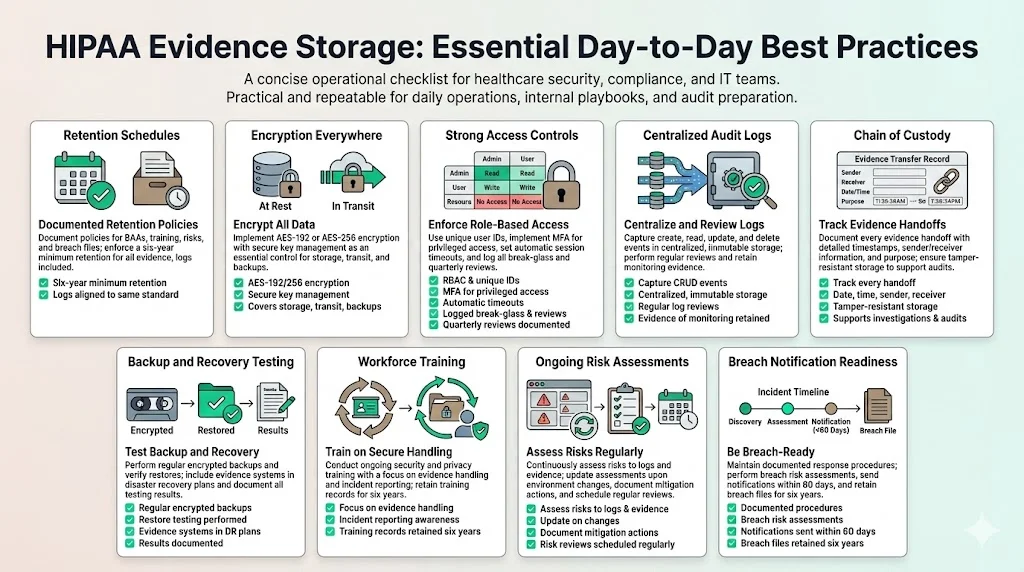
Below is a concise list of day‑to‑day practices teams should adopt to meet HIPAA Evidence Storage Best Practices:
-
Establish a documented retention schedule: Keep policies, procedures, BAAs, training records, risk assessments, and breach files for at least six years. Match log retention with the six‑year standard.
-
Encrypt ePHI at rest and in transit: Use AES‑192 or AES‑256 encryption and manage secrets securely. Even though encryption is “addressable,” consider it essential.
-
Implement strong access controls: Enforce RBAC, unique user IDs, MFA, automatic session timeouts, and break‑glass procedures. Review access quarterly and document decisions.
-
Centralize and monitor audit logs: Capture creation, access, modification, and deletion events; store logs in immutable, centralized repositories; review logs regularly.
-
Maintain chain‑of‑custody records: Record every transfer of evidence (date, time, sender, receiver, purpose) and use tamper‑proof storage.
-
Test backups and disaster recovery: Perform encrypted backups regularly, test restorations, and integrate evidence systems into disaster recovery plans.
-
Train your workforce: Provide security and privacy training, focusing on evidence handling and incident response; retain training records for six years.
-
Conduct regular risk assessments: Evaluate threats to evidence storage, update risk analyses as environments change, and document risk management actions.
-
Prepare for breach notification: Document incident response procedures, perform risk assessments to determine notification obligations, and provide notices within 60 days. Retain breach files and notification records for six years.
See your real HIPAA evidence storage gap, not a guess
Book a demo and we'll map your evidence storage and retention program against the Security Rule requirements, self-serve or with our CISO-led team running it for you.
Book a demo
Conclusion
Meeting HIPAA requirements does not require overcomplicating your environment. It demands clear controls, continuous evidence collection, and regular testing. HIPAA Evidence Storage Best Practices focus on confidentiality, integrity, availability, and accountability. Implementing encryption across the board, enforcing RBAC and MFA, collecting immutable audit trails, and retaining documentation for six years provide a solid foundation. Cross‑framework harmonization—mapping controls to SOC 2, ISO 27001, GDPR, and other obligations—prevents duplication and accelerates enterprise deals. Konfirmity’s human‑led, managed security and compliance service embodies the principle of starting with security and arriving at compliance. We implement controls within your stack, operate them daily, and keep you audit‑ready year‑round. In our experience, healthcare clients that invest in durable evidence storage reduce audit preparation effort by 75 percent, shorten SOC 2 readiness from 9–12 months to 4–5 months, and free up hundreds of internal hours. Security that reads well on paper but fails under incident pressure is a liability. Build your program once, operate it continuously, and let compliance follow.
FAQ Section
1. How long must healthcare organizations store HIPAA‑related evidence?
HIPAA generally requires covered entities to retain compliance documentation—including policies, risk analyses, training records, audit trails, and breach files—for at least six years from the date it was created or last in effect. Some state laws impose longer retention periods, so always follow the most stringent requirement.
2. Does HIPAA mandate encryption for stored evidence?
Encryption is an addressable implementation specification under HIPAA; organizations must evaluate whether encryption is reasonable and appropriate and, if so, implement it or an equivalent alternative. In practice, strong encryption (AES‑192 or AES‑256) for data at rest and in transit is considered a baseline best practice. Encrypting backups and removable media is equally important.
3. What is a chain of custody in storage and why does it matter?
A chain of custody is a chronological record documenting how evidence was collected, stored, transferred, and accessed. It includes who handled the evidence, when, and under what conditions. Maintaining chain‑of‑custody logs ensures evidence integrity and is essential for audits, investigations, and legal proceedings. The Censinet guide advises using encryption, role‑based access, and immutable storage, and recording every transfer in a chain‑of‑custody log.
4. Do backups need to be encrypted?
Yes. Backups must receive the same protection as primary data. Encrypting backups prevents unauthorized access if media is lost or stolen. HIPAA treats backups as part of ePHI storage, so encryption, access controls, and integrity checks must be applied to backup data. Regularly test restoration to confirm that encrypted backups can be decrypted and restored.
5. What happens if stored evidence is lost or corrupted?
Loss or corruption of evidence can trigger breach notification obligations. Under the Breach Notification Rule, if unsecured PHI is compromised, covered entities must notify affected individuals and, when appropriate, the media and the Secretary of HHS within 60 days. To mitigate this risk, implement redundant, encrypted backups, monitor for tampering, and include evidence systems in disaster recovery plans. If evidence is lost but properly encrypted and rendered unreadable, notification may not be required.