Health information is among the most sensitive data an organisation can hold. Breaches not only undermine trust but also invite regulatory action and derail procurement and partnerships. In recent years, healthcare has been the costliest sector for data breaches — averaging US$7.42 million per incident in 2025. As a founder and operator at Konfirmity, I work with teams that store protected health information (PHI) on their own servers and networks. They often ask, “What does HIPAA for on‑prem mean, and how do we meet it?” HIPAA For On‑Prem refers to applying the Health Insurance Portability and Accountability Act’s requirements to systems that you own and manage on site. That includes your racks of servers, storage arrays, network switches, and the IT infrastructure you control inside your buildings. Meeting these obligations is non‑negotiable if you handle patient records without pushing everything to a public cloud. This article speaks to chief technology officers, chief information security officers, compliance officers and senior engineers who need a realistic path to on‑prem compliance.
We’ll cover the purpose of HIPAA, the unique challenges of local infrastructure, and the practical steps to build a defensible program. You’ll see what regulators expect under the Privacy Rule, Security Rule and Breach Notification Rule; how on‑premises operations differ from cloud deployments; why physical safeguards matter; and how to design controls that stand up to auditors and procurement questionnaires. Along the way, I’ll share insights from more than 6 000 security audits and 25 years of combined technical expertise at Konfirmity, including timelines, pitfalls and patterns we see in the field. The goal is to help you start with security and arrive at compliance — not just produce documents for an audit.
What Is HIPAA Compliance?
HIPAA is a U.S. federal law enacted in 1996 to modernise healthcare by encouraging the electronic exchange of data while ensuring the confidentiality, integrity and availability of patient information. For our purposes, the regulation imposes three core obligations:
-
Privacy Rule – sets limits on how covered entities and their business associates may use and disclose PHI. It gives patients rights over their data and mandates policies that restrict access to a “minimum necessary” basis.
-
Security Rule – requires administrative, physical and technical safeguards to protect electronic PHI (ePHI). Organisations must perform risk analyses, implement reasonable measures to reduce vulnerabilities, and maintain ongoing programs. These safeguards are flexible: the U.S. Department of Health and Human Services (HHS) emphasises that entities should evaluate their size, complexity and capabilities to determine appropriate controls.
-
Breach Notification Rule – obligates covered entities and business associates to notify affected individuals, HHS and (for large incidents) the media after a breach of unsecured PHI. Notices must be sent without undue delay, no later than 60 days after discovery, and must describe what happened, the types of information involved, steps individuals should take, and mitigation measures. If more than 500 individuals are affected, the Secretary of HHS and prominent media outlets must be notified within 60 days.
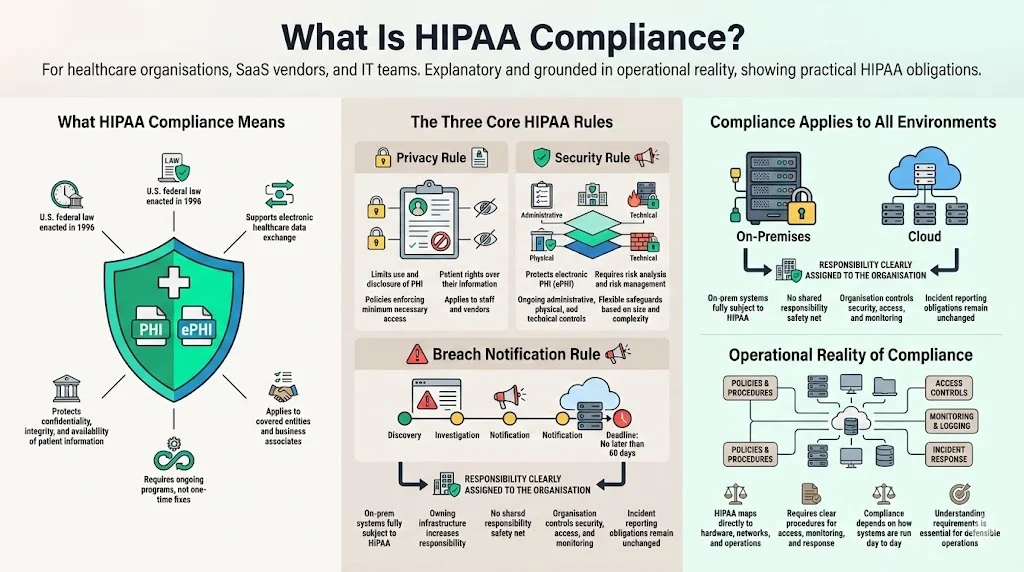
On‑premises systems are fully subject to these rules. Owning the infrastructure does not exempt you from the obligation to protect patient confidentiality or report incidents. In fact, running servers in your own environment shifts more control — and responsibility — onto your organisation. You can’t rely on a cloud provider’s shared responsibility model. This reality demands a clear understanding of the regulatory requirements and how they map to in‑house hardware, networks and operational procedures.
Why On‑Premises Compliance Is Unique
On‑prem infrastructure gives you granular control over data residency, networking and hardware. You decide where servers live, who can enter your data centre, how cables route traffic, and which devices connect to your LAN. This can be beneficial when procurement or local laws require explicit data localisation or when low‑latency systems need to live near clinical workflows — a very different calculus than the one cloud-native teams face, which we cover in our HIPAA for SaaS guide. It also allows network isolation — you can physically separate segments that handle PHI from general corporate traffic.
However, this control comes with risks. Unlike cloud deployments where the provider maintains the physical facility and many layers of security, an on‑prem environment requires you to control and monitor everything. Threats include:
-
Hardware theft or tampering. Servers, disks and tapes could be stolen or replaced if the room is not physically secure.
-
Unauthorised access. Without strong badge controls and logging, staff or visitors may wander into sensitive areas. Insider threats become particularly acute when employees have unfettered physical access to racks and cables.
-
Environmental hazards. Fires, floods and power failures can destroy equipment. Without redundant power or temperature control, a small event can become a disaster.
-
Internal misconfigurations. On‑premises systems often involve custom networks and custom setups. Misconfigured firewalls, open ports or default credentials can expose ePHI. Many breaches stem from human error rather than advanced attackers.
Despite these challenges, some organisations choose on‑prem for specific reasons. They need to store records within a particular jurisdiction, integrate with proprietary medical devices, or meet contractual obligations that predate cloud adoption. In such cases, strong safeguards and documented procedures are crucial to show auditors and buyers that your environment is under control, much as we describe for teams choosing AWS or GCP instead.
Essential Regulatory Requirements for HIPAA For On‑Prem
HIPAA’s Security Rule breaks safeguards into administrative, technical, and physical categories. Each area contains standards and implementation specifications. For on‑prem operations, these requirements have special considerations because you control the entire stack. Below is a structured overview to help you design your program.
1) Administrative Safeguards
- Assign a HIPAA Security Officer. HHS requires regulated entities to designate a responsible person to develop and implement security policies. In practice, we suggest naming a senior leader with decision‑making authority (often the CISO or head of compliance) to oversee the program. They must coordinate with IT, legal and clinical teams, approve risk assessments and ensure corrective actions occur.
- Develop policies and procedures. Written policies codify how you protect ePHI and respond to incidents. They should cover acceptable use of systems, remote access, encryption, patch management, change control, incident response and contingency plans. A document alone is insufficient; the policies must reflect actual practice and be reviewed regularly. In our work, we see organisations fail audits because the policy library hasn’t been updated for years or does not match the way systems are configured.
- Conduct risk analyses and manage risk. The Security Rule requires an “accurate and thorough assessment of the potential risks and vulnerabilities to the confidentiality, integrity, and availability of electronic protected health information”. NIST’s 2024 guide describes steps: before starting, understand where ePHI is created, received, stored, processed and transmitted; map data flows; and include all devices and networks, including remote workers and Internet‑of‑Things medical devices. The assessment should identify threats (e.g., phishing, ransomware, insider misuse) and vulnerabilities such as unpatched systems or weak physical controls. Assign risk ratings (likelihood and impact) and implement controls to reduce residual risk. HHS emphasises that risk analysis is an ongoing process; reviews should occur whenever there are significant changes in technology or operations.
- Workforce security and training. Covered entities must train all members of their workforce on security policies and procedures. On‑premises environments require training on physical access protocols, badge usage, visitor escort procedures, and secure handling of hardware. Training should be part of onboarding and repeated annually or whenever systems change. It should also cover social engineering and phishing, which remain leading causes of breaches according to the IBM 2025 report.
- Information access management. Implement role‑based access control and the principle of least privilege. Document who can access each system and why. Periodically review access lists and revoke unnecessary accounts. Many of our clients reduce audit findings by automating access reviews and using approval workflows integrated with identity providers. Keep in mind: if you host servers yourself, you must also control physical access to these systems.
2) Technical Safeguards
- Unique user identification and authentication. Every user must have a unique ID for systems storing or processing ePHI. Implement strong passwords, multi‑factor authentication (MFA) and account lockout after failed attempts. We advocate MFA for all administrator accounts and remote access, using tokens or biometrics where possible. On‑premises directories (e.g., Active Directory) should integrate with your MFA solution.
- Access controls and least privilege. Role‑based access control should reflect job functions. Administrators should have separate accounts for administration and everyday tasks. For example, DBAs might have privileges only on the databases they manage, not on the entire server. Logging should capture every privileged action.
- Encryption at rest and in transit. HIPAA does not explicitly require encryption, but regulators view it as an “addressable” implementation and expect entities to explain why they do not use it. Given the high breach costs, encryption is a sensible baseline. Disk encryption (e.g., AES‑256) helps protect data if a server or drive is stolen. Transport Layer Security (TLS) should be enforced for all connections, including internal APIs. For tapes and removable media, use encryption keys managed by a hardware security module (HSM).
- Audit controls and monitoring. Technical safeguards require “hardware, software, and/or procedural mechanisms” to record and examine activity in systems that contain ePHI. In an on‑prem environment, configure central logging (for example, a security information and event management platform) to collect logs from servers, firewalls, switches and applications. Make sure logs include user IDs, timestamps, accessed resources and the outcome of each action. Set retention periods consistent with your legal obligations and security needs. Automate alerts for unusual activity, such as login attempts outside of working hours or data downloads that are larger than normal.
- Automatic logoff and session timeouts. Workstations should lock after inactivity, and remote sessions should time out automatically. Servers accessible via SSH or remote desktop should implement idle session timeouts. This reduces risk from unattended terminals in clinical areas and prevents attackers from hijacking sessions.
- Integrity controls and transmission security. Implement cryptographic signatures or hashes for critical files and application data to detect tampering. Use secure protocols (e.g., SFTP, HTTPS) for transferring ePHI. Monitor network traffic for anomalies that could indicate man‑in‑the‑middle attacks.
3) Physical Safeguards
Physical safeguards protect the buildings, rooms and equipment where ePHI is stored. The Security Rule lists four standards: facility access controls, workstation use, workstation security, and device and media controls. On‑prem operations emphasise these measures because your organisation, not a third‑party data centre, must implement them; see our HIPAA physical security controls guide for a deeper walkthrough of each standard.
- Facility access controls. Limit physical entry to server rooms and telecommunications closets. Implement badge readers and log access attempts. Maintain a facility security plan and keep maintenance records — for example, documenting who performed repairs or upgrades. Put contingency operations in place to allow essential staff to access systems during emergencies, and test these procedures regularly.
- Workstation uses policies. Define the proper functions and surroundings for workstations that handle ePHI. For instance, prohibit installing unapproved software, connecting personal devices or using unsecured Wi‑Fi. Keep screens positioned away from public view and ensure that medical carts and bedside monitors are logged out when not attended.
- Workstation security. Apply physical safeguards to restrict access to workstations. Use cable locks or cabinets for desktops and deploy privacy screens. For laptops and tablets used in clinics, implement device management that can remotely lock, wipe or locate devices.
- Device and media controls. Establish procedures for receiving, removing, transferring and disposing of hardware and electronic media that contain ePHI. Require secure disposal — such as shredding or degaussing drives — and track media re‑use with an accountability log. Ensure backups are encrypted and stored off site in a secure vault or secondary facility.
4) Privacy Rule Considerations
Even when you host systems in‑house, the Privacy Rule still governs how PHI is accessed and disclosed. Limit uses to treatment, payment and healthcare operations unless you have patient authorisation or another specific permission. Employees should only access records relevant to their duties. Implement auditing to detect inappropriate snooping. Train staff on confidentiality obligations and sanctions for violations. When vendors access your on‑prem systems (e.g., for support), ensure you have business associate agreements that bind them to HIPAA’s terms.
5) Breach Notification Requirements
Define what constitutes a breach: any impermissible acquisition, access, use or disclosure of PHI that compromises security or privacy. The Breach Notification Rule requires covered entities to notify individuals and HHS without unreasonable delay and within 60 days of discovering a breach. For incidents affecting 500 or more people, you must also notify the media. Business associates must inform the covered entity of breaches so that notifications can be made. Develop procedures to quickly assess whether an incident meets the definition of a breach, perform a risk assessment to determine if there is a low probability that PHI has been compromised, and execute your notification plan.
Step‑by‑Step Guide to Implementing HIPAA On‑Prem
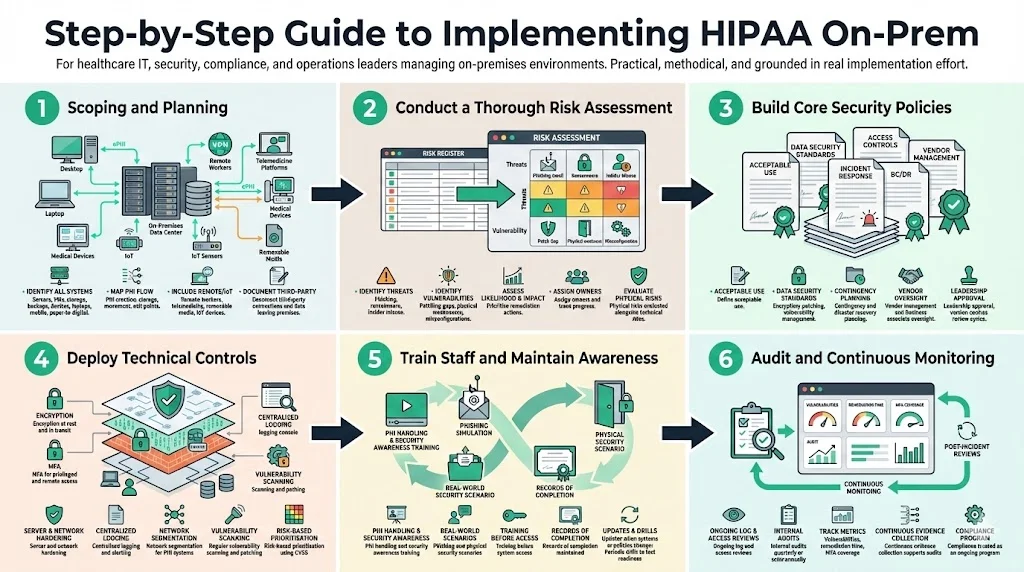
Building a complaint on‑prem program is not an overnight undertaking. From our experience at Konfirmity, most midsize healthcare organisations take 4–5 months to reach audit readiness when supported by a managed service, compared with 9–12 months when doing it alone. The steps below provide a roadmap; adjust them based on your size, complexity and risk tolerance.
Step 1: Scoping and Planning
Start by identifying all systems and processes that handle ePHI. This includes servers, virtual machines, storage arrays, network devices, backup systems, medical devices, laptops and mobile devices, as well as paper records that may be scanned or digitised. Map how ePHI flows between systems: where it is created (e.g., EHRs, registration forms), how it moves across your network, where it is stored, and how it leaves your environment (e.g., external labs, insurers). NIST emphasises that the scope must include remote workers, telemedicine platforms, removable media and IoT medical devices — if your on-prem environment is also supporting a distributed staff, see our HIPAA for remote teams guide for the device and network controls that layer on top. Document third‑party connections, such as billing services or data analytics partners, and identify any data leaving your premises.
Step 2: Conduct a Thorough Risk Assessment
Perform a risk assessment following the methodology outlined by NIST: prepare for the assessment by understanding your assets and processes; identify reasonably anticipated threats such as phishing, ransomware or insider misuse; determine vulnerabilities, including unpatched software, weak physical controls or misconfigured access; assess the likelihood and impact of each risk; and prioritise mitigation actions. Use a risk register to document findings and assign owners. From our audits, we often see that organisations underestimate physical risks (e.g., unlocked server rooms, single points of failure in HVAC) and overestimate technical complexity. In 2025, the U.S. Department of Health and Human Services’ Office for Civil Rights (OCR) conducted a risk analysis enforcement initiative and closed nine investigations with financial penalties. This demonstrates regulators’ focus on risk assessments — take this activity seriously.
Step 3: Build Core Security Policies
Draft or update security policies and procedures reflecting both HIPAA and your organisation’s risks. Core policies should cover:
-
Acceptable use of systems and network resources.
-
Data security standards (e.g., encryption requirements, vulnerability management, patching schedules). According to IBM’s 2025 report, on‑premises breaches accounted for 28% of all breaches and cost an average of US$4.01 million, lower than multi‑environment breaches but still significant. Strong baseline security reduces both risk and cost.
-
Remote and physical access controls — define who may access server rooms, how visitors are escorted, and how remote connections are authenticated.
-
Incident response — steps to detect, respond to and report incidents. Include contact lists, investigation procedures and communication protocols.
-
Contingency planning — backup and disaster recovery procedures, alternate work arrangements and system restoration priorities.
-
Vendor management — vetting and contracting with business associates, including due diligence questionnaires and ongoing monitoring.
Use established templates to save time and ensure completeness (see Section 6). Policies must be approved by leadership and communicated to all staff. Document review cycles and keep version history.
On-prem PHI security deserves more than a policy template.
Share your work email and we'll build real controls into your on-prem environment.
Step 4: Deploy Technical Controls
Based on the risk assessment and policies, implement technical measures. This includes:
-
Enabling encryption for data at rest and in transit. Use full‑disk encryption on servers and portable devices; enforce TLS for all network services.
-
Implementing MFA for privileged accounts and remote access. MFA reduces the risk of compromised credentials, which IBM reports as a common vector in healthcare breaches.
-
Hardening servers and network devices. Disable unnecessary services, remove default credentials, and enforce secure configurations. Use configuration management tools to maintain consistency.
-
Setting up logging and monitoring. Centralise logs, define alert thresholds, and enable audit trails for every system that handles ePHI. Use behaviour analytics to detect anomalies.
-
Segmenting networks. Separate PHI systems from general office networks using firewalls and VLANs. Restrict communication paths to the minimum necessary.
-
Regular vulnerability scanning and patching. Scan your environment at least monthly and patch critical flaws according to your risk appetite. Evaluate vulnerabilities using the Common Vulnerability Scoring System (CVSS) and track remediation with service agreements.
Step 5: Train Staff and Maintain Awareness
Technology alone can’t guarantee security. Educate your workforce on PHI handling, phishing, physical security and reporting procedures. Use short, scenario‑based modules that demonstrate how everyday actions (e.g., propping open a server room door) create risks. Keep records of training completion and ensure new employees complete modules before they access sensitive systems. Update training when policies or systems change, and conduct periodic drills to test awareness.
Step 6: Audit and Continuous Monitoring
Compliance is not a one‑time project. Perform regular reviews of access logs, firewall rules and audit trails to detect anomalies. Conduct quarterly or semi‑annual internal audits against the HIPAA controls and document findings. Use metrics such as the number of open vulnerabilities, time to remediate, percentage of systems with MFA, and frequency of access reviews. When incidents occur, conduct post‑mortems and update policies and controls accordingly. Konfirmity clients often adopt continuous compliance tooling integrated with our managed service to automate evidence collection and monitor control effectiveness year‑round.
Templates You Can Use
Templates accelerate the implementation of an on‑prem HIPAA program by providing structure and checklists that match regulatory requirements. Below are common template types that can help.
HIPAA Compliance Checklist
An all‑encompassing checklist covers all major requirements of the Privacy, Security and Breach Notification Rules. It should include:
-
Status of policies and procedures (drafted, approved, in effect).
-
Completion dates for risk assessments and remedial actions.
-
Evidence of encryption, access controls and physical safeguards.
-
Training logs and attendance records.
-
Incident response testing and breach notification readiness.
Use the checklist to track progress and demonstrate compliance to auditors, buyers and insurers. When we conduct gap analyses for new clients, we often start with a checklist to quickly identify missing elements and set priorities.
Compliance Policy & Procedure Templates
Standardised templates help you create consistent and audit‑ready policies. Examples include:
-
Acceptable use policy – outlines permitted and prohibited activities on company systems. Specifies how employees may access ePHI and what actions are disallowed (e.g., sharing credentials, using personal email to transmit PHI).
-
Data security policy – establishes baseline security practices such as encryption, patching, secure configuration, vulnerability management and secure coding.
-
Remote and physical access controls policy – defines procedures for granting, reviewing and revoking logical and physical access. Specifies visitor management, badge protocols and escort requirements.
-
Incident response plan – details roles, escalation paths and steps for containment, eradication and recovery.
-
Contingency plan – covers backups, off‑site storage, failover procedures and restoration priorities.
-
Business associate management policy – describes due diligence, contract clauses and ongoing oversight of third parties.
Templates should match recognized frameworks such as NIST SP 800‑53, ISO 27001 and SOC 2. Konfirmity’s managed service provides a library of templates adapted to healthcare use cases, saving clients dozens of hours and reducing omissions during audits.
Security Policy Template Suite
For a deeper security program, a suite of policies addresses specific domains. Examples include:
-
Workstation use policy – governs proper usage of desktops, laptops and tablets, addressing physical placement, session locking and restrictions on local storage.
-
Network security policy – describes segmentation, firewall management, intrusion detection and secure wireless protocols.
-
Incident response and investigation policy – outlines triage processes, evidence handling and root‑cause analysis.
-
Contingency and disaster recovery plan – defines recovery time objectives, recovery point objectives, alternate facilities and communication strategies.
-
Vendor risk management policy – sets out evaluation criteria, due diligence processes and periodic reviews of business associates.
Leveraging such templates helps ensure consistency across departments and reduces drafting time. They also provide a clear starting point for auditors to assess control design and effectiveness.
Best Practices for On‑Prem HIPAA Security
In addition to the regulatory requirements, practical security measures help reduce breach likelihood and impact. The following practices derive from our experience and industry sources:
-
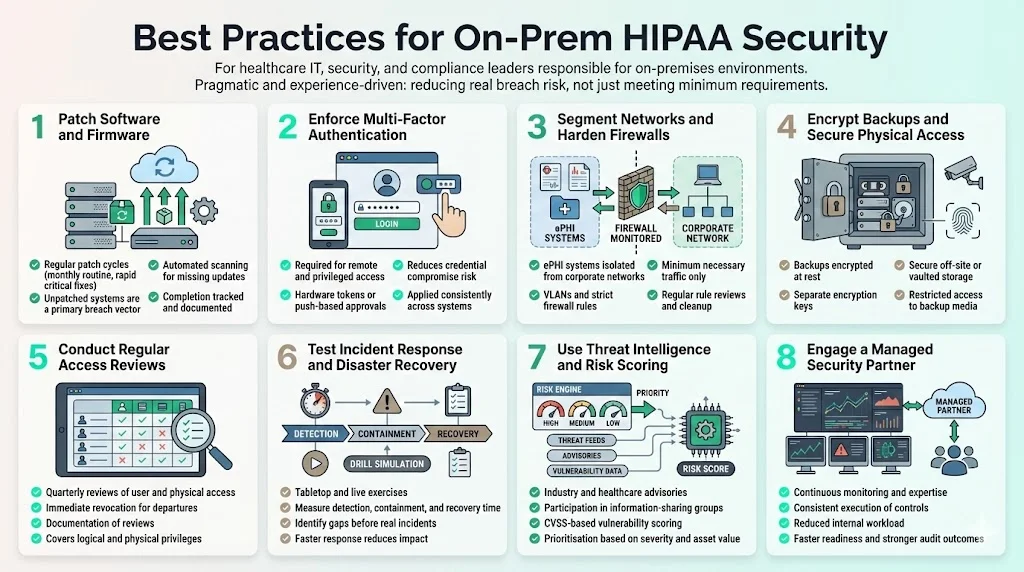
Keep software and firmware patched. Unpatched systems remain a top vector for breaches. Establish a patch cycle (e.g., monthly for routine patches, within 7–14 days for critical issues) and track completion. Use automated tools to scan for missing updates — our HIPAA vulnerability management guide covers how to prioritise and track this at scale.
-
Require multi‑factor authentication for all remote and privileged access. Use factors that are hard to phish, such as hardware tokens or push‑based approvals.
-
Segment networks and enforce strict firewall rules. Isolate servers storing ePHI from general corporate networks. Use firewalls and VLANs to restrict traffic to what is required. Regularly review rules and remove unused ports.
-
Encrypt backups and restrict physical access. Store backup media in secure off‑site facilities or vaults. Encrypt backup files and maintain separate encryption keys. Limit who can access backup tapes or cloud storage.
-
Conduct regular access reviews. At least quarterly, review user accounts and privileges, both logical and physical. Revoke access for departed employees immediately and document the review process.
-
Test incident response and disaster recovery. Conduct table‑top and live drills to ensure staff know how to respond. Review the time to detect, contain and recover. According to IBM, on‑prem breaches were the fastest to resolve in 2025 (average 217 days compared to 276 days for multi‑environment breaches). However, 217 days is still too long; proper testing helps reduce detection and response times.
-
Use threat intelligence and vulnerability scoring. Participate in information‑sharing groups and subscribe to advisories relevant to healthcare. Assess vulnerabilities using CVSS and prioritise remediation based on severity and asset criticality.
-
Engage a managed security partner. Human‑led programs provide expertise, consistent execution and ongoing monitoring. In our experience, this approach reduces internal effort by 75% compared with self‑managed compliance, accelerates readiness and improves audit outcomes.
Common Pitfalls and How to Avoid Them
-
Viewing compliance as a one‑time project. HIPAA requires continuous monitoring and improvement. Many organisations handle it like a simple checklist activity before an audit, then drift back into old habits. Build processes and automation that sustain controls year‑round.
-
Missing or outdated documentation. Auditors will ask for written policies, risk assessments, training logs and evidence of control operation. Failing to update documents or losing records is a frequent cause of findings. Use a document management system with version control and assign owners for each document.
-
Ignoring physical environment risks. Teams focus on firewalls and encryption but neglect the basics: locked doors, visitor logs, fire suppression and temperature control. These often surface during audits. Perform physical walkthroughs and remediate issues like propped doors or exposed cables.
-
Over‑provisioned access. Granting broad privileges for convenience leads to insider threats. Implement least‑privilege by default, enforce separation of duties and review access regularly.
-
Inadequate incident response preparation. Without clear procedures and practice, teams respond inconsistently and miss breach reporting deadlines. Develop a plan, assign roles and run practice sessions to refine your approach.
-
Underestimating third‑party risk. On‑prem operations still rely on vendors for maintenance, support or software. Business associate agreements should clearly allocate responsibilities for compliance, and your organisation must monitor vendor security posture.
See your real HIPAA gap for on-prem, not a guess
Book a demo and we'll map your on-prem infrastructure against the Security Rule requirements, self-serve or with our CISO-led team running it for you.
Book a demo
Conclusion
On‑premises HIPAA compliance is demanding but achievable. Healthcare organisations choosing to host their own infrastructure must implement administrative, technical and physical safeguards, conduct rigorous risk analyses and maintain continuous monitoring. Data breach trends show that healthcare remains a prime target, with the highest costs and lengthy breach lifecycles. Regulators are increasing enforcement: OCR’s 2025 risk analysis initiative resulted in multiple settlements. The stakes are high: failing to secure PHI undermines patient trust, invites penalties and stalls enterprise deals.
A structured program, supported by templates and guided by experienced professionals, can accelerate readiness. By mapping ePHI flows, conducting thorough risk assessments, building policies consistent with frameworks like NIST SP 800‑66r2, deploying strong technical and physical controls, training your staff and auditing continuously, you will build a resilient environment. Organisations that invest in these measures not only comply with HIPAA but also improve their security posture, reduce breach costs and shorten sales cycles.
Security that looks good on paper but fails under real‑world pressure is a liability. Design controls inside your stack, operate them daily, and regard compliance as a natural outcome of a mature security program. Human‑led, managed services like those offered by Konfirmity can provide the expertise and horsepower to sustain these efforts. Start with security and arrive at compliance.
FAQ
1. What makes on‑prem HIPAA compliance different from cloud compliance?
When you host infrastructure yourself, you are responsible for the physical facility, hardware, network and software. You can’t rely on a cloud provider’s controls or certifications. This means implementing your own physical safeguards and managing environmental risks. Cloud providers may provide encryption, access controls and auditing tools, but they do not relieve you of obligations under HIPAA. On‑prem compliance therefore involves more direct control and more work.
2. Do I need all the templates listed to be compliant?
Not necessarily, but using thorough templates helps ensure you do not miss critical requirements. At minimum, you need documented policies covering acceptable use, data security, access control, incident response, contingency planning and vendor management, as well as checklists to track implementation. Customise templates to fit your environment and risk profile.
3. How often should I review my on‑prem HIPAA compliance?
Review at least annually and whenever you introduce new systems, change processes or experience significant incidents. Risk analyses should be updated to reflect changes in technology, threats or organisational structure. Continuous monitoring of controls and periodic internal audits will help keep you ready for external assessments.
4. Is encryption mandatory for PHI on‑prem?
HIPAA treats encryption as an addressable implementation specification, meaning you must implement it if it is reasonable and appropriate. Given the high risk and cost of breaches, encryption is strongly advised. If you choose not to encrypt, you must document the reasons and implement compensating controls. Most auditors and buyers expect encryption for data at rest and in transit.