In the current enterprise ecosystem, security compliance is no longer a "nice-to-have" badge on your website; it is the primary gatekeeper for revenue. If you sell software to healthcare providers, payers, or clearinghouses, your ability to close deals hinges on your ability to prove you can protect sensitive data.
For SaaS founders and engineering leaders, the immediate instinct is often to look for a quick fix. You might start with a HIPAA tool comparison, hoping to find software that automates the entire burden away. However, tools alone cannot interpret the law or manage the operational reality of security.
In 2025 and heading into 2026, the Department of Health and Human Services (HHS) and the Office for Civil Rights (OCR) have intensified their focus on digital health platforms. The cost of a data breach has hit record highs—averaging $7.42 million for healthcare organizations in 2025—and audit scrutiny has moved beyond checking boxes to examining evidence of continuous control.
This article details exactly what SaaS platforms must do to achieve and maintain HIPAA compliance. We will examine the specific administrative, physical, and technical safeguards required, clarify the role of Business Associate Agreements (BAAs), and provide actionable steps to build a security program that satisfies auditors and enterprise buyers alike.
What “HIPAA For SaaS” Actually Means
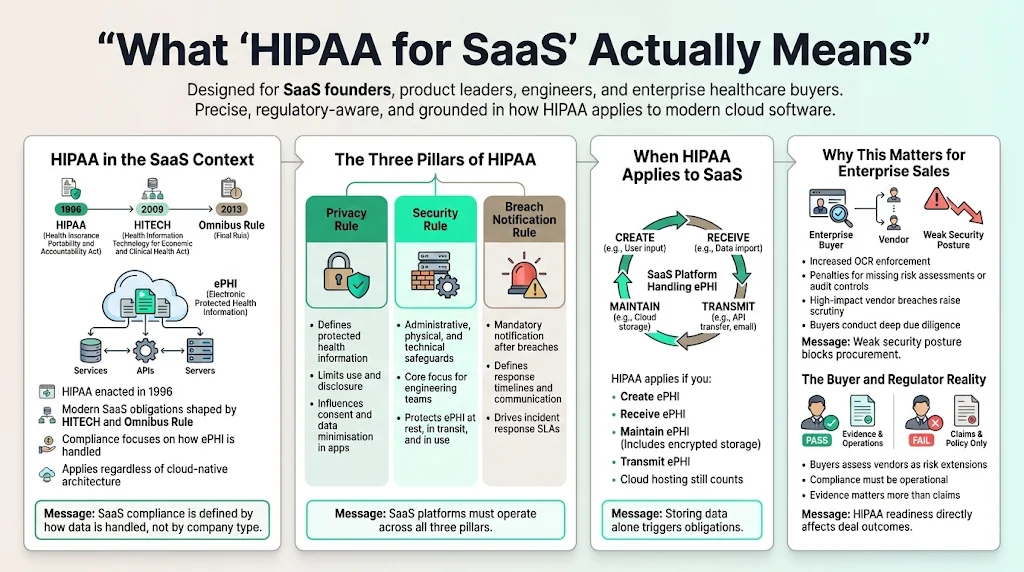
The Health Insurance Portability and Accountability Act (HIPAA) is a federal law enacted in 1996, but its application to modern SaaS platforms is defined largely by the HITECH Act and the Omnibus Rule. For a SaaS company, "compliance" means strictly adhering to three specific rules regarding Electronic Protected Health Information (ePHI).
The Three Pillars of HIPAA
- The Privacy Rule: This establishes national standards for the protection of certain health information. It defines what data is protected and sets limits on how that data can be used or disclosed. For SaaS, this often dictates how your application logic handles user consent and data minimization.
- The Security Rule: This is the most critical component for engineering teams. It establishes a national set of security standards for protecting health information that is held or transferred in electronic form. It requires specific administrative, physical, and technical safeguards.
- The Breach Notification Rule: This requires covered entities and their business associates to provide notification following a breach of unsecured protected health information. In a SaaS context, this dictates your incident response SLAs (Service Level Agreements) and communication protocols.
Why It Matters for SaaS
If your platform creates, receives, maintains, or transmits ePHI, you are subject to these regulations. "Maintains" is the operative word here; even if the data is encrypted and you do not hold the encryption keys (a rare architecture), simply storing the data on your servers (or your AWS S3 buckets) triggers compliance obligations.
The stakes are high. In 2024 alone, the OCR settled 22 investigations, imposing penalties on organizations that failed to conduct risk assessments or implement audit controls. The massive Change Healthcare ransomware attack, which affected over 100 million individuals, demonstrated the catastrophic impact of vendor risk. Enterprise healthcare buyers now perform deep vendor due diligence. If your security posture is weak, you will not pass procurement.
Who Needs to Comply: Covered Entities vs. Business Associates
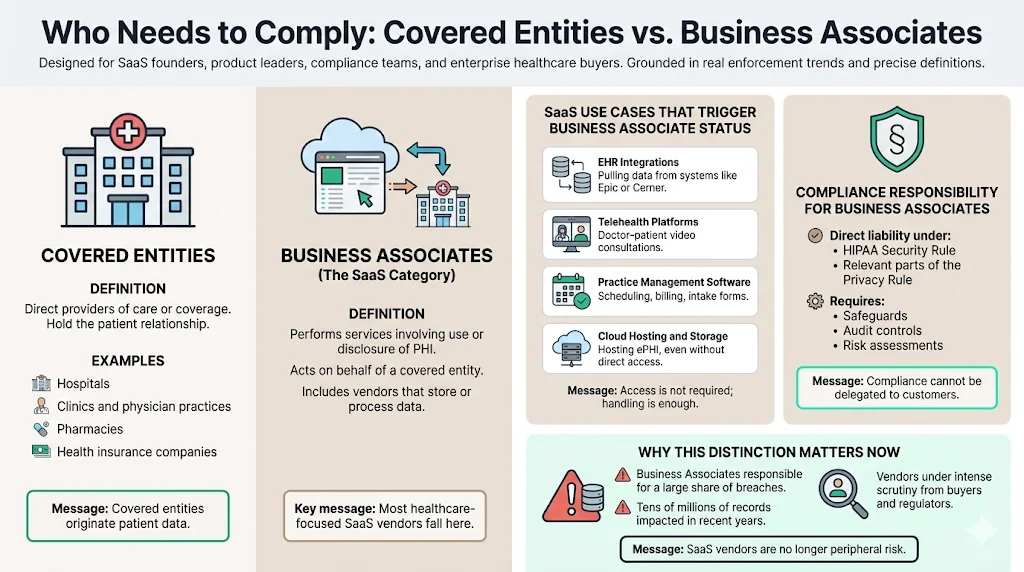
Understanding where you fit in the legal chain is vital. HIPAA classifies organizations into two primary categories.
Covered Entities
These are the direct providers of care or coverage. Hospitals, clinics, doctors, pharmacies, and health insurance companies are covered entities. They have a direct relationship with the patient.
Business Associates (The SaaS Category)
A Business Associate (BA) is a person or entity that performs certain functions or activities that involve the use or disclosure of protected health information on behalf of, or provides services to, a covered entity.
If you are a SaaS provider selling to a hospital, you are almost certainly a Business Associate.
Examples of SaaS use cases that trigger business associate status:
- EHR Integrations: Platforms that pull patient data from Epic or Cerner to run analytics.
- Telehealth Platforms: Video conferencing tools specifically designed for doctor-patient consultations.
- Practice Management Software: Tools that handle scheduling, billing, or patient intake forms containing medical history.
- Cloud Hosting & Storage: Managed service providers that host ePHI (even if they don't access it).
If you're hosting on a specific platform, see our guides to HIPAA cloud compliance on AWS and HIPAA cloud compliance on GCP for platform‑specific controls.
If you fall into this category, you are directly liable for compliance with the HIPAA Security Rule and parts of the Privacy Rule. Recent statistics show that Business Associates were responsible for breaches affecting over 93 million records in early 2025, underlining why vendors face such intense scrutiny.
Core HIPAA Requirements for SaaS Platforms
To withstand an audit and protect patient data, you must implement safeguards across three specific domains. This goes beyond what a basic HIPAA tool comparison might suggest is necessary.
Administrative Safeguards
This domain covers the "management" of security. It makes up over half of the HIPAA Security Rule requirements.
- Security Management Process: You must conduct an accurate and thorough assessment of the potential risks and vulnerabilities to the confidentiality, integrity, and availability of ePHI. This is not a one-time event but a continuous process.
- Assigned Security Responsibility: You must designate a security official (often a CISO or designated lead) responsible for developing and implementing policies.
- Workforce Training: Every employee with potential access to ePHI must undergo training on security policies and procedures. At Konfirmity, we see companies fail audits because they cannot prove when an employee was trained relative to when they were granted access.
- Incident Response: You must have a documented plan for responding to security incidents, including how you identify, report, and mitigate breaches.
Technical Safeguards
These are the controls implemented within your application and infrastructure stack.
- Access Control: You must assign a unique name and/or number for identifying and tracking user identity. Shared accounts are strictly prohibited.
- Emergency Access Procedure: You need established procedures for obtaining necessary ePHI during an emergency (e.g., system failure).
- Audit Controls: You must implement hardware, software, and/or procedural mechanisms that record and examine activity in information systems that contain or use ePHI. This means extensive logging of who accessed what data and when.
- Integrity: Implement mechanisms to corroborate that ePHI has not been altered or destroyed in an unauthorized manner.
- Transmission Security: You must guard against unauthorized access to ePHI that is being transmitted over an electronic communications network. This mandates encryption in transit (TLS 1.2 or higher).
Physical Safeguards
Even if you are 100% cloud-native, physical safeguards apply.
- Facility Access Controls: While you rely on your cloud provider (AWS, Azure, GCP) for the physical security of the servers, you are responsible for the physical security of the devices your employees use to access those servers. This includes laptop encryption, clean desk policies, and office security.
- Workstation Use & Security: Policies must restrict the way workstations are used and ensure that unauthorized users cannot access them (e.g., automatic screen locks).
Privacy Rule Adherence
For SaaS, the Privacy Rule dictates Data Minimization. You should only collect, store, and access the minimum amount of PHI necessary to perform the required function. If your application logs capture full request bodies that contain patient names, you are violating this principle and creating a massive security risk.
Business Associate Agreements (BAAs): What You Must Know
A Business Associate Agreement (BAA) is a legally binding contract between a HIPAA-covered entity and a HIPAA business associate (or between two business associates).
When is it Required?
- Between You and Your Customer: Your healthcare clients will require you to sign their BAA before they send you a single byte of data.
- Between You and Your Vendors: This is the "Subcontractor" rule. If you use AWS to host the application, you must sign AWS’s BAA. If you use a logging provider like Datadog or Splunk, and logs contain PHI, you need a BAA with them, and every subprocessor you add should go through the same third-party risk review you'd apply to any vendor touching ePHI.
Core Components of a BAA
A valid BAA must:
- Describe the permitted and required uses of PHI by the business associate.
- Provide that the business associate will not use or further disclose the PHI other than as permitted or required by the contract or as required by law.
- Require the business associate to use appropriate safeguards to prevent a use or disclosure of the PHI other than as provided for by the contract.
- Require the business associate to report to the covered entity any use or disclosure of the PHI not provided for by its contract, including incidents that constitute breaches of unsecured PHI.
Critical Pitfall: Using a service that refuses to sign a BAA (e.g., the free tier of a generic analytics tool) involves a high risk of non-compliance if that tool touches ePHI.
SaaS platforms handling PHI need security built in, not bolted on.
Share your work email and turn your SaaS architecture into audit-ready compliance.
Step-by-Step Guide to HIPAA Compliance for SaaS
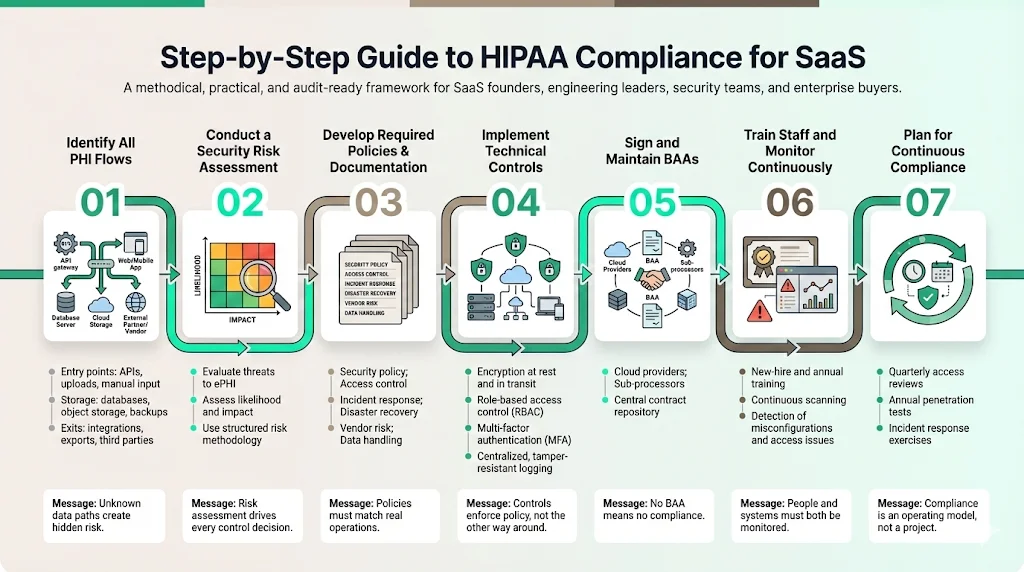
Implementing a program that stands up to scrutiny requires a systematic approach. This is the exact methodology Konfirmity uses to guide SaaS platforms from zero to audit-ready.
Step 1: Identify All PHI Flows
You cannot protect what you do not know exists. Map the flow of data from the moment it enters your system (API, manual entry, file upload) to where it rests (database, S3, backups) and where it exits. Identify every third-party service that touches this data.
Step 2: Conduct a Security Risk Assessment
This is the foundational document of your compliance program. You must evaluate the likelihood and impact of potential risks to ePHI. Refer to NIST SP 800-30 for authoritative guidance on conducting risk assessments. This analysis will dictate which controls are reasonable and appropriate for your specific environment.
Step 3: Develop Required Policies & Documentation
Write the rules of the road. Your policies should cover:
- Information Security Policy
- Access Control Policy
- Incident Response Policy
- Disaster Recovery & Business Continuity
- Vendor Risk Management
- Data Classification & Handling
Teams often rely on a HIPAA tool comparison to find software that automates policy distribution. While helpful, the content of these policies must match your actual engineering practices. A policy that says "we review logs daily" is a liability if you only review them monthly.
Step 4: Implement Technical Controls
Configure your infrastructure to enforce your policies.
- Encryption: Enable AES-256 encryption for all databases and storage buckets. Enforce TLS 1.2+ for all data in transit.
- Access: Implement Role-Based Access Control (RBAC) and enforce Multi-Factor Authentication (MFA) for all production access.
- Logging: Centralize logs and ensure they are immutable (cannot be tampered with).
Step 5: Sign and Maintain BAAs with Partners
Audit your vendor list. Ensure you have signed BAAs with your cloud provider (AWS/GCP/Azure) and any other sub-processors handling ePHI. Store these agreements in a central repository.
Step 6: Train Staff and Conduct Ongoing Monitoring
Train your team upon hire and annually thereafter. But do not stop there. Implement continuous monitoring of your controls. Use automated scanners to check for open ports, unencrypted buckets, or unauthorized access attempts.
Step 7: Plan for Continuous Compliance
Compliance is not a destination; it is an operational state. Schedule quarterly access reviews, annual penetration tests, and regular table-top exercises for incident response.
Templates You Can Use
While a HIPAA tool comparison might lead you to platforms selling generic templates, effective documentation must be tailored. Below are structural outlines you can adapt.
HIPAA Readiness Checklist (SaaS)
- Data Mapping: All ePHI flows documented.
- Risk Analysis: Annual Risk Assessment completed and signed.
- Agreements:
- BAA signed with all clients.
- BAA signed with all sub-processors.
- Technical:
- Encryption at rest enabled.
- Encryption in transit enabled.
- MFA enforced on all accounts.
- Audit logs retained for 6 years.
- Administrative:
- Security Officer appointed.
- Staff training completed.
- Sanction policy in place.
- Physical:
- Device encryption enforced.
- Office physical security verified.
Sample Business Associate Agreement (BAA) Structure
- Definitions: clearly define PHI, Covered Entity, and Business Associate.
- Obligations of Business Associate:
- Limitations on use and disclosure.
- Safeguards implementation.
- Reporting of breaches (specify timeline, e.g., "within 10 business days").
- Agreements with subcontractors.
- Permitted Uses: Data aggregation, management, and administration.
- Term and Termination: Procedures for returning or destroying PHI upon contract end.
Incident Response Plan Outline
- Preparation: Team contact list, tools, and training.
- Identification: How to detect and validate an incident.
- Containment: Short-term and long-term strategy (e.g., isolating a server).
- Eradication: Removing the threat (e.g., deleting malware, revoking credentials).
- Recovery: Restoring systems to normal operation.
- Lessons Learned: Post-incident analysis and policy updates.
Common Pitfalls and How to Avoid Them
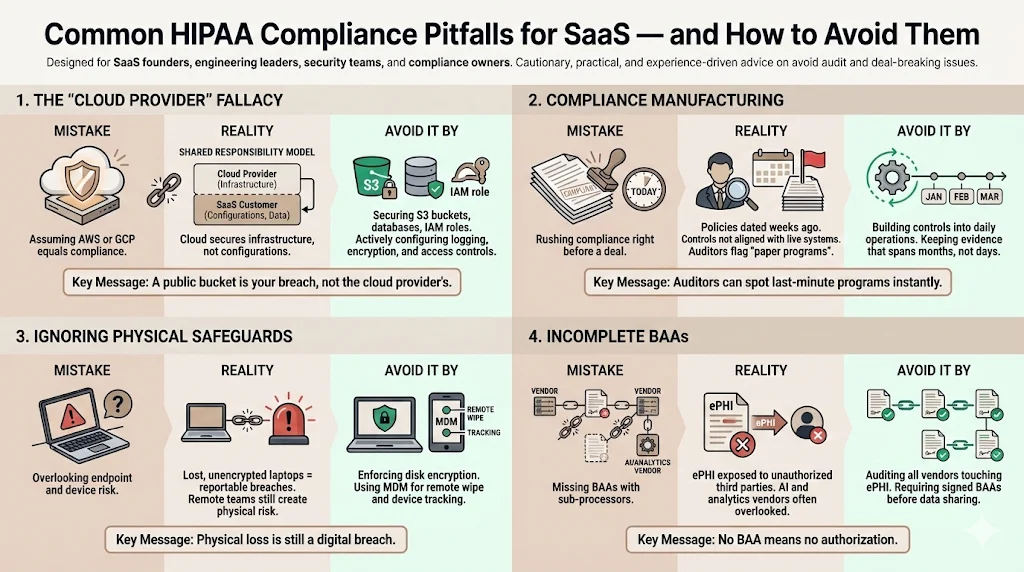
In our experience supporting over 6,000 security audits, we see SaaS companies make the same mistakes repeatedly.
1) The "Cloud Provider" Fallacy
Many founders believe that hosting on AWS or Google Cloud makes them HIPAA compliant by default. This is false. Our HIPAA shared responsibility model breakdown covers this in depth, but in short: the cloud provider secures the cloud, but you are responsible for security in the cloud. If you leave an S3 bucket public, that is your breach, not Amazon's. Teams that self-host instead face a different split of duties, which we cover in our HIPAA for on-prem guide.
2) Compliance Manufacturing
Some companies attempt to "manufacture" compliance two weeks before a deal closes. They rush to generate policy documents that nobody reads and implement controls that break the product. A superficial HIPAA tool comparison rarely reveals these operational deficits. Auditors are trained to spot "paper programs." If your policy dates are all from last week, but your system has been live for two years, you will face intense scrutiny.
3) Ignoring the Physical
Remote-first companies often forget physical safeguards. If an employee loses an unencrypted laptop containing downloaded patient data, that is a reportable breach. You must use Mobile Device Management (MDM) to enforce disk encryption and remote wipe capabilities; our HIPAA for remote teams guide covers the full set of controls a distributed engineering team needs.
4) Incomplete BAAs
Failing to secure a BAA with a downstream vendor is a critical gap. If you use an AI API to process patient notes, and that AI vendor does not sign a BAA, you are exposing ePHI to an unauthorized third party.
Measuring and Maintaining Compliance Over Time
The most difficult part of HIPAA is not achieving compliance; it is maintaining it. A snapshot of security is worthless the day after it is taken.
The Cost of Maintenance
Self-managing a rigorous compliance program typically consumes 550–600 hours of internal engineering and leadership time annually. This involves evidence collection, vendor reviews, access control audits, and policy updates. This distraction kills product velocity.
Continuous Monitoring
You need a system that monitors your cloud environment 24/7. When a developer accidentally opens a security group to the public internet, you need an alert immediately, not during an annual audit. This is why a HIPAA tool comparison often fails to account for the human expertise required to interpret those alerts and remediate them.
The Konfirmity Difference
Konfirmity is a security-driven compliance platform. Run it self-serve, or add the fully-managed service and our experts become an extension of your security team, implementing the controls inside your stack, managing evidence collection, and handling audit defense.
While self-managed teams struggle with the overhead, our clients are audit-ready in 4–5 months, requiring only about 75 hours of their time per year. We move you from "compliance manufacturing" to durable security operations.
See your real HIPAA gap for SaaS, not a guess
Book a demo and we'll map your SaaS platform's ePHI flows against the Security Rule requirements, self-serve or with our CISO-led team running it for you.
Book a demo
Conclusion
Achieving HIPAA compliance is a rigorous process that demands attention to detail across legal, administrative, and technical domains. It is the baseline requirement for entering the healthcare market. While completing a HIPAA tool comparison is only the first step, the real work lies in the execution and maintenance of your security program.
Enterprise buyers in 2026 demand proof. They want to see that your security is operational, not just theoretical. By building a program rooted in real risk management—rather than just checking boxes—you protect your patients, secure your revenue, and build a defensible position in the market.
Before spending months on a HIPAA tool comparison, consider the operational outcomes you need. Security that looks good in documents but fails under incident pressure is a liability. Build the program once, operate it daily, and let compliance follow.
FAQ
1. Does every SaaS company need HIPAA compliance?
No. You only need to comply if your SaaS service creates, receives, stores, or transmits PHI on behalf of a healthcare covered entity. If you sell HR software that never touches health data, HIPAA likely does not apply.
2. What makes a SaaS provider a Business Associate?
If the SaaS handles PHI for a covered entity, it generally qualifies as a business associate under HIPAA and must sign a Business Associate Agreement (BAA).
3. What HIPAA safeguards apply most to SaaS platforms?
Technical safeguards (like encryption, access controls, and audit logs) are paramount for SaaS, alongside administrative safeguards (risk assessments, training) and physical safeguards for employee devices.
4. How long does HIPAA compliance take for SaaS companies?
Timelines vary based on maturity. Validating your choice during a HIPAA tool comparison and implementing simple documentation may take weeks, but full implementation of controls, evidence collection, and audit readiness typically takes 4–6 months. With Konfirmity's managed service, this timeline is often accelerated and the internal burden significantly reduced.