HIPAA regulations are not new, but the technical environment in which they operate shifts constantly. As we move through 2025, the average cost of a healthcare data breach has reached $9.77 million, maintaining its position as the costliest industry for data breaches for the 14th consecutive year. This rise is driven by ransomware attacks that specifically target the availability of care, forcing systems offline and endangering patient safety. Security leaders know that prevention is ideal, but detection and response are mandatory.
HIPAA Logging Pipelines For HIPAA compliance serve two critical functions. First, they provide the legal evidence required by the Office for Civil Rights (OCR) to prove that an organization managed access to ePHI correctly. Second, and perhaps more critically, they function as the central nervous system for security operations. Without a functional pipeline, your Security Information and Event Management (SIEM) system is deaf, and your Incident Response (IR) team is blind.
At Konfirmity, we reject the idea that compliance is a "paper exercise." We are a security-driven compliance platform, and you can add a fully-managed service, because software alone cannot interpret the nuance of a security event. A tool can collect data, but it takes experienced engineers to design a pipeline that stands up to scrutiny. Readers of this guide will gain a practical understanding of how to build logging infrastructure that meets regulatory demands and provides actual security value.
What HIPAA Logging Pipelines Are
When we discuss a logging pipeline in a healthcare context, we are referring to the end-to-end infrastructure responsible for the lifecycle of log data. It is not enough to simply "turn on logging" at the server level.
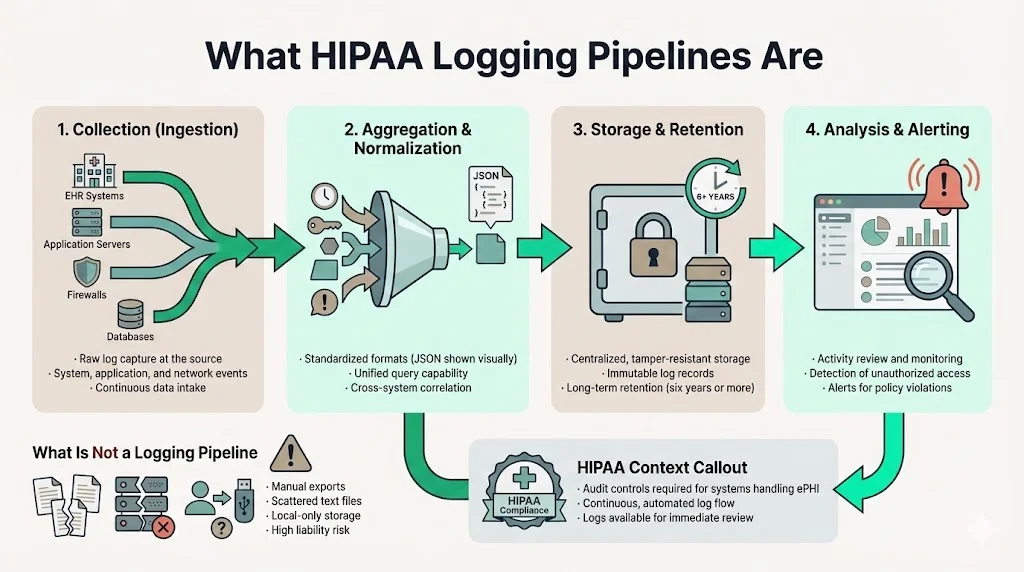
A functional pipeline consists of four distinct stages:
- Collection (Ingestion): The mechanism that captures raw data from EHR systems, application servers, firewalls, and databases.
- Aggregation & Normalization: The process of bringing disparate data formats into a unified standard (typically JSON) so they can be queried together.
- Storage & Retention: The secure, immutable repository where logs are kept for the required duration (often six years or more).
- Analysis & Alerting: The operational layer where data is reviewed for anomalies, unauthorized access, or policy violations.
The Health Insurance Portability and Accountability Act (HIPAA) mandates "Audit Controls" to record and examine activity in information systems containing or using ePHI. However, a pipeline goes further than a simple list of files. It implies a continuous, automated flow of data that is resistant to tampering and available for immediate analysis; see our HIPAA logging and monitoring guide for how the examine side of that requirement should work day-to-day.
If you rely on manual exports or disjointed text files scattered across local servers, you do not have a pipeline. You have a liability.
Why Logging Matters in Healthcare
The stakes in healthcare differ from other sectors. In retail, a breach means replacing credit cards. In healthcare, a breach exposes permanent medical histories and can disrupt life-saving treatments.
Security Monitoring and Breach Prevention
A static defense is a failed defense. Attackers today dwell in networks for days or weeks before deploying ransomware. A well-constructed logging pipeline allows security teams to detect the faint signals of this reconnaissance phase—failed authentication attempts, privilege escalation, or lateral movement—before data exfiltration occurs, the same signals a vulnerability management program should already be tracking.
Regulatory Pressure and Proof of Diligence
During an OCR investigation following a breach, the burden of proof rests on the covered entity or business associate. You must demonstrate exactly which records were accessed. If your logs are fragmented or stop abruptly during the incident window, regulators may assume the worst-case scenario regarding the scope of the breach. This can lead to maximum fines and reputational ruin.
Implementing HIPAA Logging Pipelines For HIPAA obligations is the only way to generate the forensic evidence necessary to limit liability. It transforms a "he-said, she-said" situation into an objective timeline of facts.
Core HIPAA Audit Log Requirements
To build a compliant system, we must look at the specific legal requirements. The HIPAA Security Rule, specifically 45 CFR §164.312(b), outlines the standard for Audit Controls. While the rule is technology-neutral, the industry interpretation has solidified around specific technical expectations.
HIPAA Standards for Audit Controls
The regulation requires covered entities to "implement hardware, software, and/or procedural mechanisms that record and examine activity in information systems that contain or use electronic protected health information."
This means:
- Recording: Logging must be automatic. It cannot depend on human intervention.
- Examining: You must actually review the logs. Collecting data that no one looks at is a compliance failure.
What Must Be Logged
Based on NIST SP 800-92 (Guide to Computer Security Log Management) and OCR audit protocols, the following events are mandatory for a complete audit trail:
- Authentication Events: Successful and failed logins.
- PHI Access: Who opened a patient record? (Read access).
- Modification & Deletion: Who changed a diagnosis? Who deleted a file?
- Administrative Actions: Changes to user privileges, creation of new accounts, or disabling of security software.
- System Events: Server shutdowns, reboots, or changes to the logging configuration itself.
Elements Every Log Entry Should Have
A log entry that lacks context is useless. Every record passing through your pipeline must contain:
- Timestamp: Precise date and time (synchronized via NTP).
- User ID: The unique identifier of the person or service account.
- Action: What happened (e.g., "Read," "Write," "Delete").
- Target: The specific record or system accessed (e.g., "PatientRecord_12345").
- Source: The IP address or workstation ID initiating the request.
- Outcome: Success or Failure.
Design Principles for HIPAA Logging Pipelines
Building this infrastructure requires architectural discipline. At Konfirmity, we design these systems to be "secure by default." Here are the core principles we apply when deploying HIPAA Logging Pipelines For HIPAA environments.
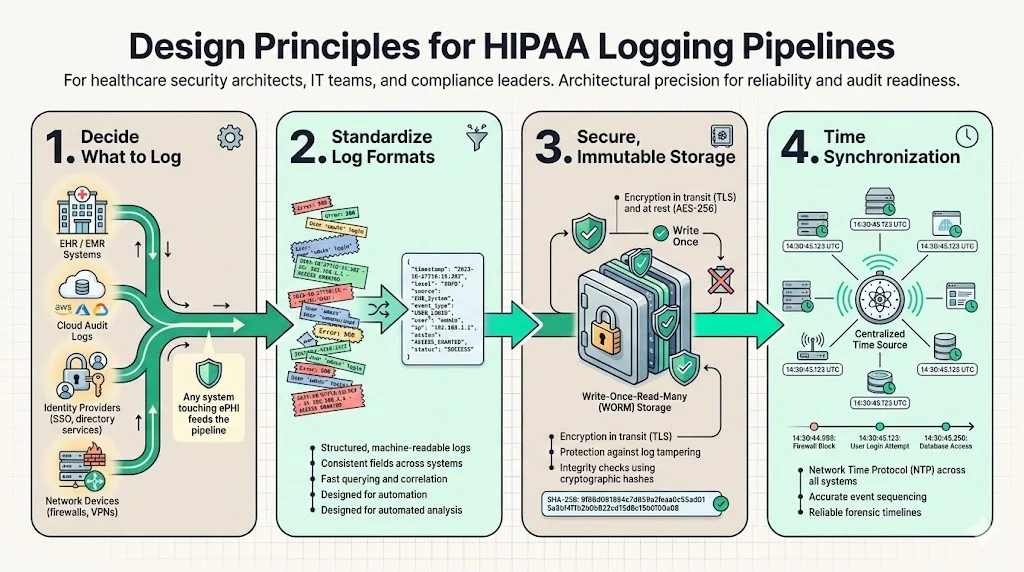
1) Determine What to Log
The first step is a scope assessment. You cannot log everything without drowning in noise, but you cannot miss critical systems.
- EHR/EMR Systems: The primary source of patient data interaction.
- Cloud Infrastructure: AWS CloudTrail, Azure Monitor, or Google Cloud Audit Logs.
- Identity Providers: Okta, Active Directory, or other SSO providers.
- Network Devices: Firewalls, VPN concentrators, and load balancers.
We map these sources to your data flow diagrams. If a system touches ePHI, it feeds the pipeline.
A compliant logging pipeline catches threats, not just compliance boxes.
Share your work email and design logging that serves security and auditors.
2) Standardize Log Formats
Machine readability is vital. Proprietary binary formats or unstructured text blobs make analysis slow and difficult. We enforce structured logging, typically in JSON format.
Example of a structured log entry:
{
  "timestamp": "2025-10-27T14:30:00Z",
  "event\_type": "access\_phi",
  "user\_id": "dr\_smith",
  "source\_ip": "192.168.1.50",
  "resource\_id": "patient\_record\_9988",
  "action": "read",
  "outcome": "success",
  "encryption\_status": "encrypted"
}
This structure allows an analyst to run a query like SELECT * WHERE user_id = 'dr_smith' AND action = 'delete' in milliseconds.
3) Ensure Secure, Immutable Storage
The integrity of the log data is as important as the patient data itself. Savvy attackers will attempt to modify logs to cover their tracks.
- Encryption: Logs must be encrypted in transit (TLS 1.2 or higher) and at rest (AES-256).
- WORM Storage: Use Write-Once-Read-Many storage policies (e.g., AWS S3 Object Lock). This prevents anyone, even a root user, from deleting or overwriting a log file before the retention period expires.
- Hashing: Use cryptographic hashing to verify that log files have not been altered since creation, the same integrity checks we bake into our secure configuration baselines.
4) Incorporate Time Synchronization
Forensics relies on sequence. If your database server is two minutes behind your application server, reconstructing an attack timeline becomes impossible. All components in the pipeline must sync to a reliable external time source using Network Time Protocol (NTP).
Access Controls and Privacy Safeguards
It is a paradox of security that audit logs are themselves high-risk targets. They contain details about network architecture, user behavior, and potentially leaked PHI if an application errors out and dumps data into a debug log.
Limiting Access
Access to the logging repository must be restricted to authorized personnel only—typically the security, compliance, and engineering leads. We utilize strict Role-Based Access Control (RBAC). A developer may need access to application error logs to fix a bug, but they should not have access to the security audit trails showing login patterns.
Separation of Duties
Ideally, the team that manages the systems generating the logs should not control the system storing the logs. This separation prevents an administrator from performing an unauthorized action and then deleting the evidence. With Konfirmity's fully-managed service, our team often acts as this independent oversight layer, ensuring that the audit trail remains pristine.
Protecting PHI in Logs
A common engineering mistake is logging full HTTP requests, which may include patient names or SSNs in the URL parameters or body. This pollutes your log storage with ePHI, complicating your compliance scope.
- Data Masking: Configure the pipeline to scrub or hash sensitive fields before they are written to disk.
- Review: Regularly audit your logs to verify no raw ePHI is leaking into the system.
Log Retention and Archiving
Storage costs money, but missing data costs more. Defining a retention policy is a balancing act between operational needs and legal mandates.
How Long to Keep Logs
While the HIPAA Security Rule does not explicitly state a retention period for audit logs specifically, the general administrative requirements mandate retaining documentation for six years from the date of creation or last effective date, as cited in 45 CFR §164.316(b)(2)(i). Most legal counsel advises applying this six-year rule to audit logs to defend against potential malpractice suits or long-tail breach investigations. Furthermore, state laws may impose stricter requirements.
Lifecycle Management
Keeping six years of logs in a high-performance analytics engine (hot storage) is prohibitively expensive. We recommend a tiered approach:
- Hot Storage (30-90 days): Keep recent data in your SIEM or analytics tool for immediate querying and active monitoring.
- Warm Storage (3-12 months): Move data to a lower-cost, slightly slower access tier for periodic reviews.
- Cold Archival (1 year - 6 years+): Move data to deep storage (e.g., AWS Glacier). This data is rarely accessed but is preserved for legal defense.
Automating these transitions is essential. If you rely on manual archiving, you will eventually run out of disk space or lose data.
Using Logs for Security Monitoring
Collecting data is only the first half of the battle. You must utilize that data to detect threats. This is where HIPAA Logging Pipelines For HIPAA compliance transitions into active security operations.
Integrating your pipeline with a SIEM (Security Information and Event Management) allows you to define logic that spots trouble; our HIPAA SIEM use cases guide details the specific correlation rules worth building first.
- Impossible Travel: A user logs in from New York and then from London ten minutes later.
- Bulk Export: A user who typically accesses 10 records a day suddenly accesses 500 records in one hour.
- Privilege Escalation: A standard user account suddenly is added to the "Domain Admins" group.
At Konfirmity, we configure these alerts based on the specific risk profile of the healthcare organization. We tune the thresholds to avoid alert fatigue, ensuring that when an alarm rings, it signifies a real issue that needs human attention.
Supporting Incident Response
When a breach occurs, speed is the deciding factor in containment. An incident response team needs to answer three questions immediately:
- How did they get in?
- What did they touch?
- Are they still here?
Your logging pipeline answers these questions, feeding directly into the workflow described in our HIPAA incident response plan guide. Without granular logs, your investigation is guesswork. You might have to assume the attackers accessed all patient records because you cannot prove they didn't. This specific distinction can mean the difference between notifying 500 patients or 500,000 patients.
A well-indexed pipeline allows responders to pivot quickly—filtering by IP address to see every action taken by the attacker, or filtering by user ID to see compromised accounts. This capability is not just a "nice to have"; it is a requirement for minimizing the impact of a breach.
Common Pitfalls and How to Avoid Them
In our work assessing compliance readiness, we see the same errors repeated across the sector.
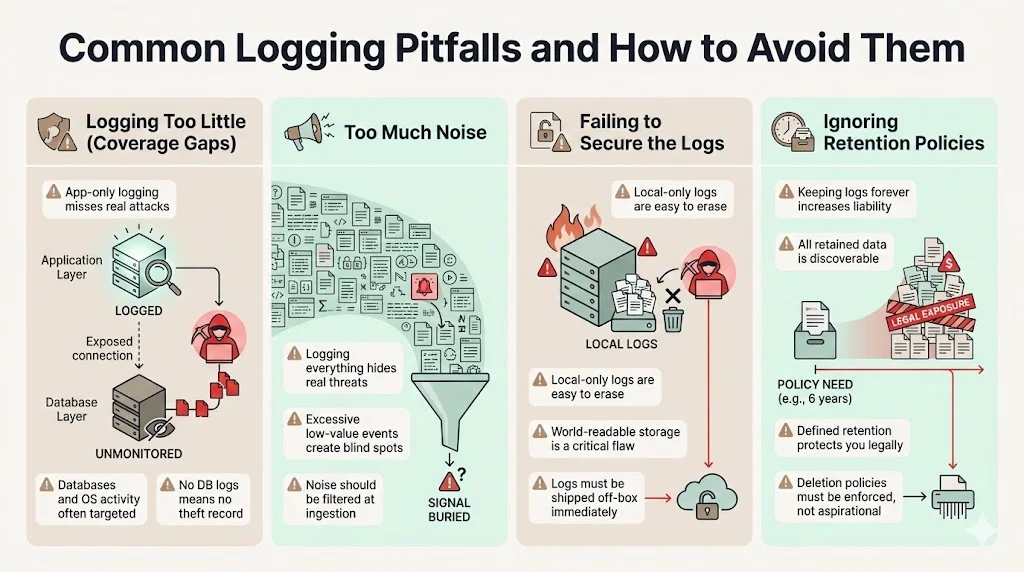
1) Logging Too Little (Coverage Gaps)
Many organizations log only the application layer but ignore the underlying database or operating system. Attackers often bypass the application to query the database directly. If you don't log DB queries, you have no record of the theft.
2) Too Much Noise
"Log everything" sounds like a good strategy until you have to find a needle in a haystack. Logging every single mouse movement or CSS load creates terabytes of useless data that hides the actual security signals. You need a strategy to filter out noise at the ingestion point.
3) Failing to Secure the Logs
We frequently find log files stored in world-readable folders on the same server generating them. If an attacker compromises that server, they delete the logs immediately. Logs must be shipped off-box instantly.
4) Ignoring Retention Policies
We often see companies keeping logs indefinitely "just in case." This is a liability. If you are sued, any data you possess is discoverable. If you have a valid retention policy that says you delete data after seven years, and you follow it, you are legally protected. If you keep it forever, you may be forced to hand over 15-year-old data that harms your defense.
Technical and Organizational Best Practices
To succeed, you must combine technology with human governance. Here is the Konfirmity approach to establishing functional HIPAA Logging Pipelines For HIPAA adherence.
1) Centralize and Standardize
Do not allow individual departments to run their own logging silos. Centralize all ingestion into a single data lake or SIEM. This provides a unified view of the organization's security posture.
2) Automate Ingestion and Normalization
Use agents (like Fluentd, Logstash, or CloudWatch Agent) to ship logs automatically. Do not rely on cron jobs or manual scripts. Ensure the normalization process handles different time zones and character encodings.
3) Document Everything
You need a formal "Logging and Monitoring Policy." This document should define what is logged, who has access, how long it is kept, and who reviews it. During an audit, you must present this policy and evidence that you follow it.
4) Train Your Teams
Developers need to know how to write loggable code. Operations teams need to know how to maintain the pipeline. Security analysts need to know how to interpret the data. Investment in training yields higher returns than investment in more storage.
See your real HIPAA logging pipeline gap, not a guess
Book a demo and we'll map your log collection and retention pipeline against the Security Rule requirements, self-serve or with our CISO-led team running it for you.
Book a demo
Conclusion
Building HIPAA Logging Pipelines For HIPAA compliance is not a one-time project. It is a permanent operational commitment. It requires durable infrastructure, constant tuning, and vigilant oversight.
The market is flooded with tools that promise instant compliance, but tools do not make decisions; people do. A log is only as valuable as the analyst interpreting it. This is why Konfirmity is a security-driven compliance platform you can run self-serve or have fully managed. Either way we build the controls inside your stack, monitor them year-round, and ensure that your evidence holds up, not just on audit day, but during a real-world crisis.
Healthcare leaders must shift their mindset. Do not build a logging pipeline to please an auditor. Build it to protect your patients. If you do that, compliance will follow naturally.
FAQs
1) What logs are required under HIPAA?
The regulations require covered entities to implement audit controls that record and examine activity in information systems containing or using ePHI. This specifically covers events that involve PHI access (read/write), authentication attempts (logins/logouts), administrative changes (user creation, privilege escalation), and system security events (firewall changes, server shutdowns).
2) How long should audit logs be retained?
While the HIPAA Security Rule is non-specific on the exact duration for audit logs, the general administrative requirements mandate a six-year retention baseline for documentation. However, HIPAA Logging Pipelines For HIPAA strategies often incorporate longer retention periods based on state laws (such as statutes of limitations for medical malpractice) or specific Business Associate Agreements (BAAs) with partners.
3) Who should have access to log data?
Access must be restricted based on the principle of least privilege. Only authorized compliance officers, security analysts, and audit personnel should have access to the full audit trail. System administrators should have access only to the logs necessary for system maintenance, not the full security timeline.
4) How do logs support incident investigations?
Logs provide the only objective, chronological record of an event. They allow forensic teams to reconstruct the "who, what, when, and where" of a breach. By analyzing the data from HIPAA Logging Pipelines For HIPAA systems, investigators can determine the entry point of the attacker, the specific patient records that were compromised, and whether the attacker maintained persistence in the network.
5) What mistakes lead to logging gaps?
Common issues include failing to synchronize clocks (NTP), which scrambles the timeline; logging only at the application layer while ignoring databases; storing logs locally where attackers can delete them; and failing to review the logs regularly. A pipeline that collects data but is never analyzed is a compliance failure.