Enterprise buyers and regulators no longer accept security promises on paper. In 2025, HIPAA audits are underway with a heightened focus on ransomware and hacking. At the same time, healthcare data breaches are escalating in volume and severity. In 2023 alone, 725 incidents exposed more than 133 million patient records, and hacking‑related breaches increased 239% between 2018 and 2023. The Change Healthcare ransomware attack in early 2024 pushed the total number of compromised records to over 276 million, underscoring how disruptive a single event can be. As CTOs, CISOs and compliance officers know, investigations into these breaches hinge on the quality of your audit logs. HIPAA’s Security Rule explicitly requires entities to “implement hardware, software, and procedural mechanisms that record and examine activity in information systems” and to regularly review records of information system activity, such as audit logs and security incident reports. Building this capability is not optional – it is the foundation for security operations and regulatory preparedness.
This article, written from the perspective of a practitioner who has managed 6,000+ security audits as a team with 25+ years of combined expertise, explains how a human‑led, managed security and compliance program can help healthcare providers implement HIPAA SIEM use cases for HIPAA in a sustainable way. We’ll explore what HIPAA audit log requirements really entail, how Security Information and Event Management (SIEM) platforms support those requirements, and why robust audit monitoring reduces breach costs and accelerates enterprise deals. Throughout the discussion we’ll draw on practical lessons from Konfirmity’s work implementing SOC 2, ISO 27001 and HIPAA programs for technology companies and healthcare providers.
HIPAA Audit Log Requirements
Mandatory Audit Controls and Documentation
HIPAA’s technical safeguards mandate that covered entities and business associates implement audit controls to “record and examine activity in information systems that contain or use electronic protected health information (ePHI)”. Administrative safeguards require organizations to regularly review records of information system activity, such as audit logs, access reports and security incident tracking reports. These controls are complemented by documentation requirements: policies, procedures and related records must be retained for at least six years from the date of creation or when last in effect. While the regulations do not prescribe a particular log format, they do expect logs to capture a full picture of who accessed ePHI, when and what they did.
What Logs Need to Capture
To satisfy the minimum necessary standard, audit logs must record at least three categories of events:
-
User authentication and access events – successful and failed login attempts, password changes and resets. These events show who is entering the system and whether unauthorized users are attempting access.
-
PHI access and modification activities – viewing, creating, modifying or deleting patient records. Logging these actions allows organizations to reconstruct data flows and prove that only authorized personnel interacted with ePHI.
-
System‑level security events – changes to user permissions, database modifications affecting PHI, firewall activities, anti‑malware alerts and even physical access to facilities. This category covers the broader operational context that could enable or signal a breach.
Retention and Integrity
The Office for Civil Rights (OCR) and compliance experts recommend retaining audit logs for at least six years, aligning with HIPAA’s documentation rules. Logs must be protected from alteration or deletion and stored in tamper‑evident systems. NIST’s log management guidance urges organizations to ensure that log data is encrypted in transit and at rest and to use cryptographic hashes to detect tampering.
HIPAA Logging Requirements and SIEM
What a SIEM Does
A Security Information and Event Management (SIEM) platform aggregates logs from diverse systems, normalizes them, correlates events and raises alerts—the ingestion and normalization layer we cover in more depth in our HIPAA logging pipelines guide. NIST describes SIEM as a type of centralized logging software that uses log servers and databases to collect data from hosts either agentlessly or via agents, performs event filtering and aggregation and correlates logs across systems. SIEM products understand dozens of log formats and provide analysts with graphical dashboards, knowledge bases, incident tracking and asset context. They often encrypt data in transit and authenticate agents to protect confidentiality and integrity.
SIEM’s Role in HIPAA Compliance
SIEM platforms support HIPAA requirements in three ways:
-
Centralized logging: they act as a single repository for audit logs, ensuring that activities across electronic health record (EHR) systems, servers, databases, network devices and applications are captured consistently.
-
Correlation and detection: by analyzing logs from multiple sources, a SIEM can identify patterns that would be invisible in siloed logs, such as simultaneous login failures and unusual record access. NIST notes that SIEMs prioritize significant events and can initiate automated responses.
-
Reporting and evidence: SIEM dashboards and reporting tools simplify the creation of audit reports that show who accessed what, when and from where. They also preserve the evidentiary quality of logs by ensuring integrity and chain of custody.
Why Healthcare Companies Need Strong Audit Monitoring
1. Security and Compliance Risks
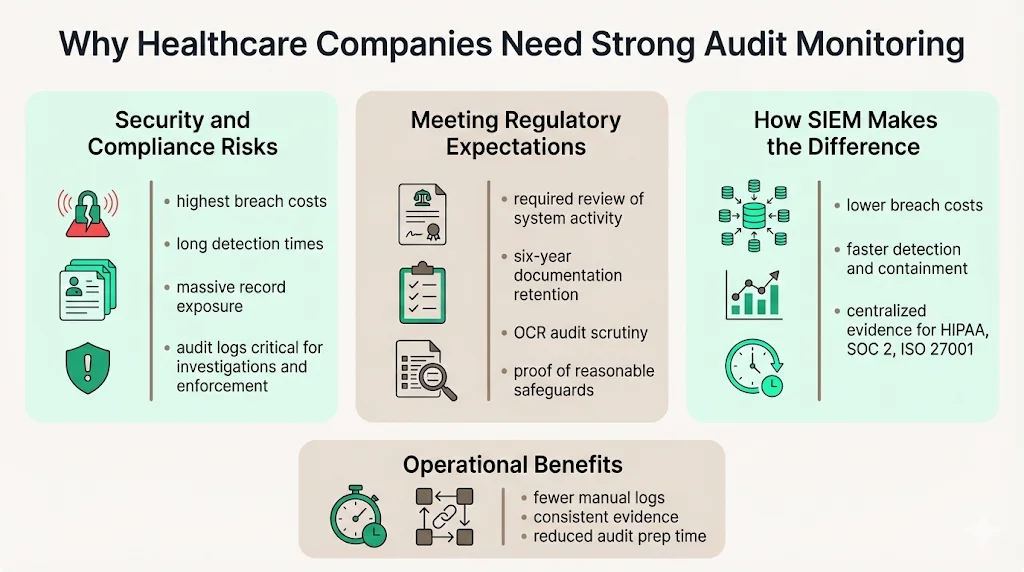
The healthcare sector remains the most expensive industry for data breaches. According to IBM’s 2025 Cost of a Data Breach Report, the average U.S. breach cost climbed to $10.22 millionhipaajournal.com, while healthcare breaches averaged $7.42 million even after a substantial year‑over‑year drop. Breaches in healthcare also take the longest to identify and contain—279 days on average. The HIPAA Journal notes that 2023 set a record with 168 million healthcare records exposed and early 2024 incidents pushed the total to 276 million. These numbers underscore how catastrophic unauthorized access can be.
Audit logs play a pivotal role in breach investigations. OCR’s 2025 settlements show that failing to conduct risk analyses and review audit logs leads to enforcement actions. For example, the Guam Memorial Hospital Authority settlement required the hospital to develop a written process to regularly review records of information system activity, such as audit logs, access reports and security incident tracking reports. Without robust logging and monitoring, organizations cannot reconstruct incidents or prove they met the HIPAA standard of “reasonable and appropriate” safeguards.
2. Meeting Regulatory Expectations
HIPAA does not prescribe exact log formats or review frequencies, leaving those decisions to the risk analysis. However, the Security Rule requires that covered entities regularly review information system activity and maintain documentation of policies, procedures and actions for six years. OCR’s audit protocols ask entities whether their systems support audit controls, how logs are reviewed and whether improvements are needed. Effective audit monitoring demonstrates accountability and can mitigate penalties when incidents occur.
3. How SIEM Helps
In IBM’s 2025 breach report, strong SIEM or security analytics use reduced breach costs to $3.91 million, compared with $4.83 million when used at low levels. That $920,000 difference shows the financial impact of centralized logging and real‑time detection. SIEMs also reduce detection and containment time; organizations using AI and automation—which often includes SIEM—shortened detection to 51 days and containment to 153 days, compared with 72 days and 212 days in organizations without such tools. For healthcare providers handling ePHI, reducing the dwell time of attackers directly limits regulatory exposure and patient harm.
From Konfirmity’s perspective, the value of SIEM extends beyond breach metrics. Over thousands of audits we see that organizations with centralized logging find it easier to produce evidence for ISO 27001, SOC 2 and HIPAA assessments. Without a SIEM, teams often rely on disparate logs, manual scripts and spreadsheets, leading to inconsistent evidence and missed events. Centralizing logs through a managed SIEM reduces this evidence collection burden, saving 75+ hours per year compared with manual methods and facilitating multi‑framework control mapping.
Core HIPAA SIEM Use Cases
Implementing HIPAA SIEM use cases for HIPAA is not about ticking boxes; it’s about building operational security that stands up under attack and audit pressure. Below are actionable scenarios drawn from both regulatory requirements and real‑world experience.
3.1 Real‑Time Monitoring for Suspicious Access
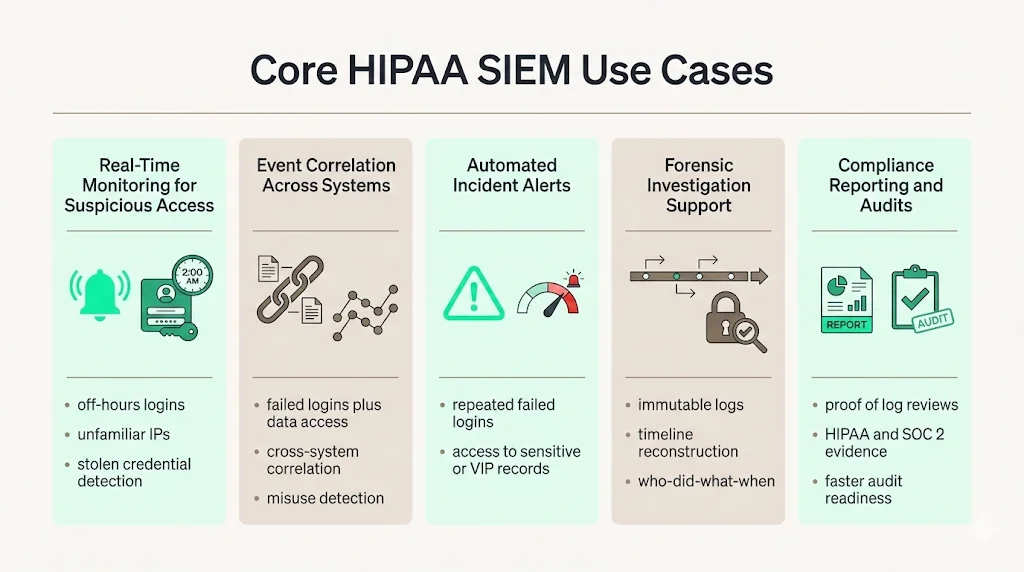
- Detect unusual logins or off‑hours activity.* A SIEM can alert when a user logs in outside normal operating hours or from an unfamiliar IP address. Such monitoring aligns with HIPAA’s requirement to capture user authentication events. For instance, if an attacker obtains stolen credentials and attempts to access an EHR after midnight, the SIEM will flag the anomaly and trigger an investigation. Organizations should tune alerts to their workflow to avoid alert fatigue while ensuring high‑risk events are escalated.
3.2 Correlating Events Across Systems
Connect authentication failures with file access. Attackers often brute‑force credentials and then pivot to extract patient data. By correlating repeated failed login attempts on a domain controller with subsequent access to sensitive files, the SIEM highlights a potential compromise. This correlation would be nearly impossible using separate system logs. NIST notes that SIEM products can “identify and prioritize significant events” and perform cross‑log correlation.
Spot patterns indicating misuse. A nurse who searches thousands of records without a corresponding treatment relationship may be snooping. By correlating EHR access logs with scheduling data, the SIEM can spot out‑of‑scope browsing and raise a privacy investigation. HIPAA requires capturing PHI access and modification activities; SIEM correlation brings those events into context.
A SIEM without tuned use cases is just noise waiting to miss a breach.
Share your work email and we'll configure HIPAA-specific SIEM alerts that actually matter.
3.3 Automated Incident Alerts
Multiple failed access attempts. Configuring the SIEM to alert on a threshold of failed logins helps teams respond quickly to credential‑stuffing attacks. Alerts should include user ID, source IP and time to expedite triage.
Access to high‑risk records. Many providers flag VIP patient records or sensitive diagnoses. SIEM rules can trigger alerts when such records are accessed, especially outside of the responsible care team’s roster. These alerts align with the minimum necessary standard and help detect insider misuse.
3.4 Support for Forensic Investigations
During a breach investigation, auditors and incident responders reconstruct a narrative of events, following the same workflow described in our HIPAA incident response plan guide. SIEM platforms preserve evidentiary quality, offering immutable logs, hashes and timeline reconstruction. They enable analysts to answer “Who did what and when?” across multiple systems. NIST emphasizes that SIEM products assist analysts with dashboards, incident tracking and asset context. A managed SIEM also ensures logs are retained in accordance with HIPAA’s six‑year requirement.
3.5 Compliance Reporting and Audits
Audit readiness is a continuous process. SIEMs generate reports that demonstrate compliance with HIPAA, ISO 27001 and SOC 2 control requirements. For example, when auditors ask to see evidence of regular log reviews, you can produce SIEM reports showing daily or weekly reviews and any escalated alerts. This reduces the manual effort and risk of missing documentation. From our experience, organizations using a managed SIEM complete SOC 2 readiness in 4–5 months, compared with 9–12 months when building logging and evidence pipelines themselves.
Key Steps to Implement HIPAA SIEM for Log Compliance
4.1 Identify Log Sources
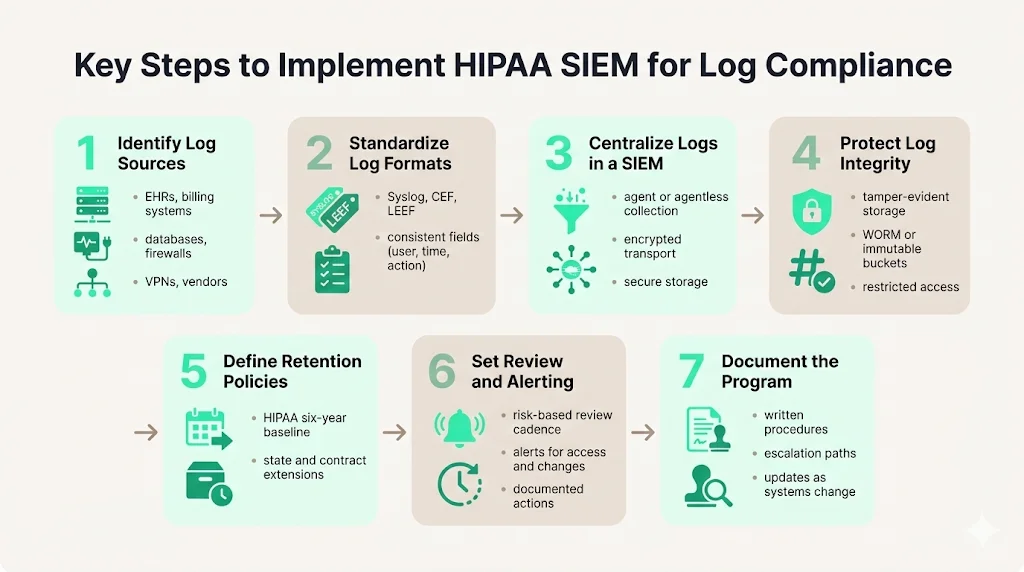
Start by cataloging systems that create, transmit or store ePHI: EHR platforms, billing and laboratory systems, mobile apps, servers, databases, firewalls, VPN gateways and medical devices. Also include business associate systems if they process your data. The Guam Memorial Hospital case shows that failing to include all systems in risk analysis leads to compliance failures.
4.2 Standardize Log Formats
Inconsistent log formats impede analysis. Wherever possible use common formats like Syslog, Common Event Format (CEF) or LEEF. Standardization ensures logs contain at minimum the user ID, timestamp, action, object, source and outcome, the same baseline discipline we apply across secure configuration baselines for every system that touches ePHI. Konfirmity often sees teams skip this step, leading to time‑consuming custom parsers during audits.
4.3 Centralize Logs in SIEM
Forward logs from all sources into a centralized SIEM. Agentless collection can pull logs from devices without installing software, while agents can normalize and filter data at the source. Choose a method based on the system’s capabilities, bandwidth and security requirements. Ensure that logs are encrypted during transmission and stored securely.
4.4 Secure Log Integrity
Use cryptographic hashes, write‑once‑read‑many (WORM) storage or immutable cloud buckets to detect and prevent tampering. Access to logs should be strictly controlled with role‑based access control; administrators should not be able to alter logs. Tamper‑evident storage is critical for forensic credibility and regulatory trust.
4.5 Define Retention Policies
Document how long each type of log will be retained. While HIPAA’s six‑year rule is a baseline, state laws or contractual obligations may require longer retention. For example, some state Medicaid programs require ten years of record retention. Longer retention may also be prudent for vendor risk management and legal holds.
4.6 Set Up Review and Alerting
Establish a schedule for log review based on risk and system criticality – daily for high‑risk systems, weekly or monthly for others, folded into the broader continuous monitoring program rather than run as a standalone task. Configure SIEM alert rules for events like multiple failed logins, access to sensitive records or configuration changes. Document each review’s findings and actions; these records demonstrate compliance with HIPAA’s requirement to regularly review system activity.
4.7 Document Processes
Auditors will ask to see evidence of your logging program. Maintain written procedures that cover log collection, retention, review frequency, incident escalation and updates. Documentation should be available to those responsible for implementation and updated as systems or risks change.
Best Practices for HIPAA SIEM Logging
Implementing HIPAA SIEM use cases for HIPAA requires discipline and continuous improvement. The following best practices serve as a checklist:
-
Automate collection and centralization: rely on software to capture logs in real time. Manual logging is error‑prone and cannot scale with growing data volumes.
-
Encrypt logs: protect logs in transit and at rest with strong encryption like AES‑256 and TLS 1.2+.
-
Role‑based access control for log review: restrict log access to designated analysts and compliance officers.
-
Schedule regular audit reviews: implement a cadence based on risk assessments and document findings.
-
Align monitoring with risk assessment: incorporate new systems, vendors and cloud services into your log plan. Ensure legacy systems and third‑party tools, which often have weak logging, are covered.
-
Ensure immutability of critical logs: use WORM or blockchain‑based storage to prevent alterations.
-
Integrate with incident response: ensure that logs feed directly into your incident response runbooks so that investigations are efficient and evidence is preserved.
These practices mirror NIST’s recommendations for log management and address gaps commonly observed in audits. Konfirmity’s experience shows that organizations following these practices reduce audit findings by 40–60% and accelerate sales cycles because buyers have greater confidence in their security posture.
Common Challenges and How to Overcome Them
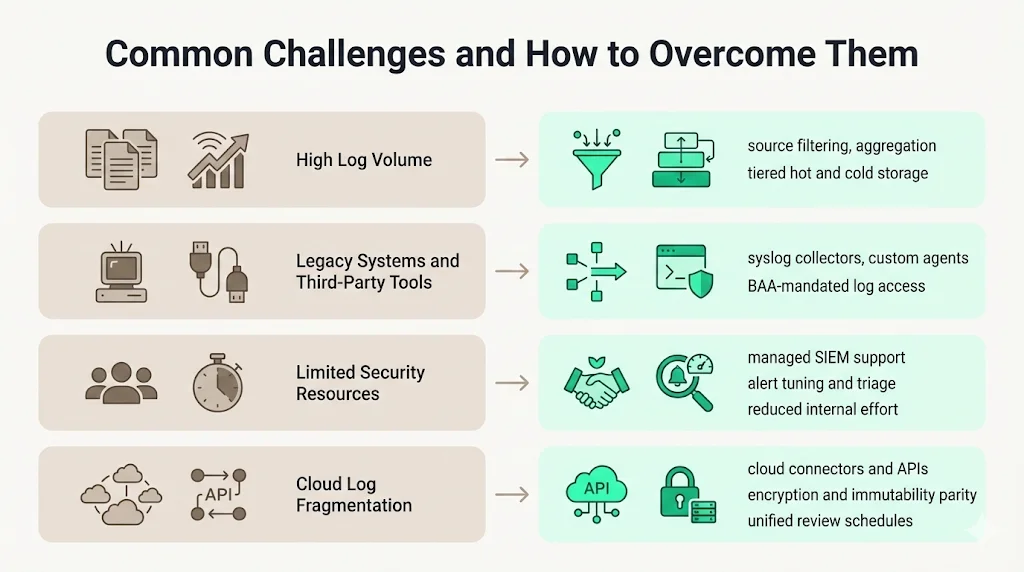
6.1 Volume of Logs
Healthcare environments generate enormous volumes of data. EHRs, PACS systems, IoT devices and cloud applications can produce terabytes of logs per month. Without filtering and aggregation, storage and analysis costs grow rapidly. Use SIEM agents to perform event filtering and aggregation at the source discard non‑security events and compress logs. Consider tiered storage: hot storage for recent logs and cold storage for long‑term retention.
6.2 Legacy Systems and Third‑Party Tools
Many legacy EHRs and medical devices lack modern logging capabilities. To mitigate gaps, deploy syslog collectors or custom agents that translate proprietary logs into standardized formats. For third‑party SaaS providers, ensure Business Associate Agreements (BAAs) require access to relevant logs and that logs can be exported to your SIEM.
6.3 Resource Constraints
Skilled security analysts are scarce, and healthcare organizations often operate with limited budgets. A human‑led, managed service model addresses this by pairing your internal team with dedicated external experts who handle log tuning, alert triage and continuous evidence collection. This managed approach can reduce internal effort from 550–600 hours per year (self‑managed) to under 70 hours while sustaining continuous audit readiness. It also ensures knowledge continuity during staff turnover.
6.4 Integrating Cloud Services
As providers adopt cloud EHR platforms and telehealth solutions, logs may reside in multiple vendor environments. Use cloud connectors or APIs to ingest logs into your SIEM. Verify that each cloud provider supports retention, immutability and encryption comparable to your on‑premise controls. Include cloud logs in your review schedule to ensure consistent oversight.
Measuring Success
To gauge the effectiveness of your logging program and HIPAA SIEM use cases for HIPAA, track metrics such as:
-
Time to detect anomalies: measure how quickly the SIEM flags unusual access or configuration changes. Target detection in minutes for critical systems.
-
Time to contain incidents: track the interval from detection to resolution. Organizations using AI and automation reduce containment to 153 days versus 212 days without such tools; set similar goals tailored to your environment.
-
Audit readiness: assess how quickly you can produce evidence of log reviews, incident response and policy updates during an audit. A mature SIEM program should enable you to generate reports within hours.
-
Log coverage: calculate the percentage of systems, applications and vendors feeding logs into the SIEM. Aim for coverage above 90% and document gaps with remediation plans.
Regularly review these metrics with stakeholders. High coverage and fast detection times translate into lower breach costs and higher confidence from buyers and regulators.
See your real HIPAA SIEM coverage gap, not a guess
Book a demo and we'll map your detection use cases against the Security Rule requirements, self-serve or with our CISO-led team running it for you.
Book a demo
Conclusion
HIPAA is clear about one thing: you must record and examine activity in every system that handles ePHI. But the regulations deliberately avoid prescribing technology, leaving it up to each organization to design controls that fit their risk profile. In practice, meeting HIPAA’s audit log requirements without a centralized, well‑managed SIEM is nearly impossible. The volume of data, diversity of systems and complexity of modern breaches require correlation and real‑time detection.
For healthcare companies, adopting HIPAA SIEM use cases for HIPAA is not just about passing audits. It’s about protecting patients, preserving trust and enabling growth. Strong audit monitoring reduces breach costs by nearly $1 million, accelerates detection and containment and simplifies evidence collection across frameworks like SOC 2 and ISO 27001. A human‑led, managed service model ensures that your SIEM implementation is more than a deployment—it’s a continuously operated program that aligns security controls with regulatory obligations and business objectives. In a world where attackers and auditors show no sign of letting up, build security that stands up to both.
Frequently Asked Questions
HIPAA requires entities to record and examine user authentication events, including successful and failed login attempts; access to ePHI, such as viewing, creating, modifying or deleting patient records; and system‑level security events like configuration changes, firewall activity and anti‑malware alerts. Logging should also include who performed the action, when and from where.
HIPAA’s documentation rule requires organizations to retain records of policies, procedures and actions for six years. Most experts extend this requirement to audit logs. Some states and contracts may mandate longer retention, so organizations should document a policy that meets or exceeds six years.
HIPAA does not mandate specific technologies. It mandates audit controls and the regular review of system activity. A SIEM is one of the most effective ways to meet these requirements because it centralizes logs, performs correlation and provides evidence for audits. Strong use of SIEM reduces breach costs significantly and accelerates detection and containment.
Auditors check that logs record relevant events – user authentication, PHI access and system changes; that logs are retained appropriately; and that review and response procedures are documented and followed. They may also verify that logs are immutable, encrypted and secured against tampering, and that alerting and incident response processes are integrated with log management.