Most enterprise buyers expect proof of operational security before signing a contract. In healthcare, that means showing how your help‑desk and incident queues respect privacy rules, protect patient information and stand up under audit. A point‑in‑time compliance checklist no longer suffices. Attackers target hospitals and insurers with ransomware, phishing and supply chain exploits, and regulators respond with tougher audits and breach notification rules. In January 2025 the U.S. Department of Health and Human Services (HHS) announced a new audit program focused on hacking and ransomware, selecting 50 covered entities and business associates for inspection. At the same time, the OCR breach portal counted 725 large healthcare data breaches in 2024. Ticketing workflows can either be a liability or a first line of defense. This article explains HIPAA Ticketing Workflows For HIPAA, their relevance to patient data protection and how to build them in 2026.
Understanding HIPAA and its relevance to ticketing
HIPAA is a set of U.S. regulations requiring covered entities (healthcare providers, health plans and clearinghouses) and their business associates to protect protected health information (PHI). The Privacy Rule governs the permissible uses and disclosures of PHI, while the Security Rule requires administrative, physical and technical safeguards, and the Breach Notification Rule mandates timely reporting of incidents. Under the Breach Notification Rule a covered entity must notify the Secretary of HHS within 60 days of discovering a breach affecting 500 or more individuals. The Security Rule emphasises risk analysis, access controls, audit logging, transmission security and workforce training. Every help‑desk ticket that touches PHI is therefore subject to regulatory obligations.
Ticket management, incident reporting and security workflows. In this context a ticket represents any request or report — a patient complaint, a system alert or a third‑party notification — that may involve PHI. Incident reporting is the process of classifying, triaging and escalating security or privacy events, including near misses. Security workflows are the automated steps, approvals and records that accompany each ticket to enforce policies and provide evidence. HIPAA Ticketing Workflows For HIPAA ensure that these processes adhere to privacy and security requirements while supporting operational efficiency.
What makes a ticketing system HIPAA‑compliant?
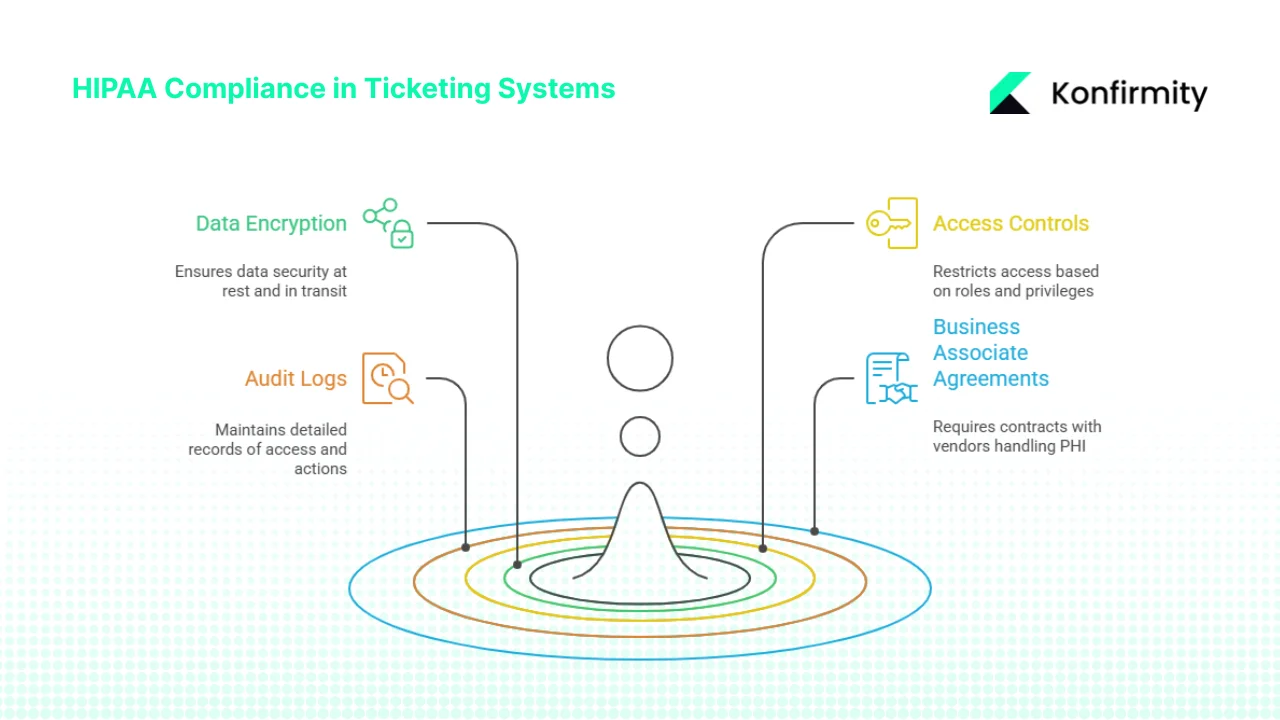
1) Encryption of data at rest and in transit
The HIPAA Security Rule includes addressable implementation specifications for encryption. While not always mandatory, encryption significantly affects breach notification obligations: encrypted data is unreadable and therefore not considered unsecured. The HIPAA Journal notes that when encryption solutions comply with NIST SP 800‑111 for data at rest and NIST SP 800‑52 for data in transit, they contribute to compliance with recognised security frameworks. These standards ensure that electronic PHI (ePHI) stored on servers, desktops or mobile devices is unreadable without the proper key, and that communications are protected by strong protocols such as TLS 1.3. Ticketing systems storing attachments, notes or logs must encrypt the database and enforce transport‑layer security between components.
2) Role‑based access controls and privacy regulations enforcement
Access to tickets should be granted on the principle of least privilege. Agents handling PHI should be authenticated through multi‑factor mechanisms and assigned roles that restrict what they can view or change. The proposed 2025 updates to the HIPAA Security Rule emphasise the need for configuration management and explicit audit trails for access changes, requiring regulated entities to assess whether encryption and other safeguards are reasonable and appropriate. Aligning ticket permissions with job functions reduces insider threat risk and ensures compliance with the Minimum Necessary Rule.
3) Audit logs with detailed access and action records
HIPAA requires covered entities to maintain audit records for at least six years. Audit logs must record who accessed ePHI, what actions they performed, and when. Keragon’s 2025 update stresses that these records should capture user and system activities, support incident forensics and be reviewed regularly. For ticketing systems this means logging every change — ticket creation, updates, escalations, reassignments and resolution — along with user identity and timestamps. Automated log retention and integrity controls ensure that logs cannot be altered and that they are available for audits or breach investigations.
4) Business Associate Agreements (BAAs)
When a vendor processes or stores PHI on behalf of a covered entity, HIPAA requires a written business associate contract. HHS guidance explains that the contract must specify what the business associate is engaged to do and require compliance with HIPAA’s privacy and security rules. Ticketing software providers, managed services and any subcontractors who might access ticket data must sign BAAs, following the same third-party risk process you'd apply to any other vendor. Without a valid BAA, a third‑party tool cannot be considered HIPAA‑compliant.
Building HIPAA Ticketing Workflows in 2026
Konfirmity’s delivery team has implemented thousands of compliance programs across healthcare, SaaS and financial services. Our human‑led, managed service approach integrates security controls inside client workflows so that compliance emerges naturally. Based on our experience running more than 6 000 security audits and 25+ years of combined expertise, we outline five practical steps for building HIPAA Ticketing Workflows For HIPAA in 2026.
Ticketing workflows that handle PHI need security baked into every step.
Share your work email and we'll harden your HIPAA ticketing workflow from intake to resolution.
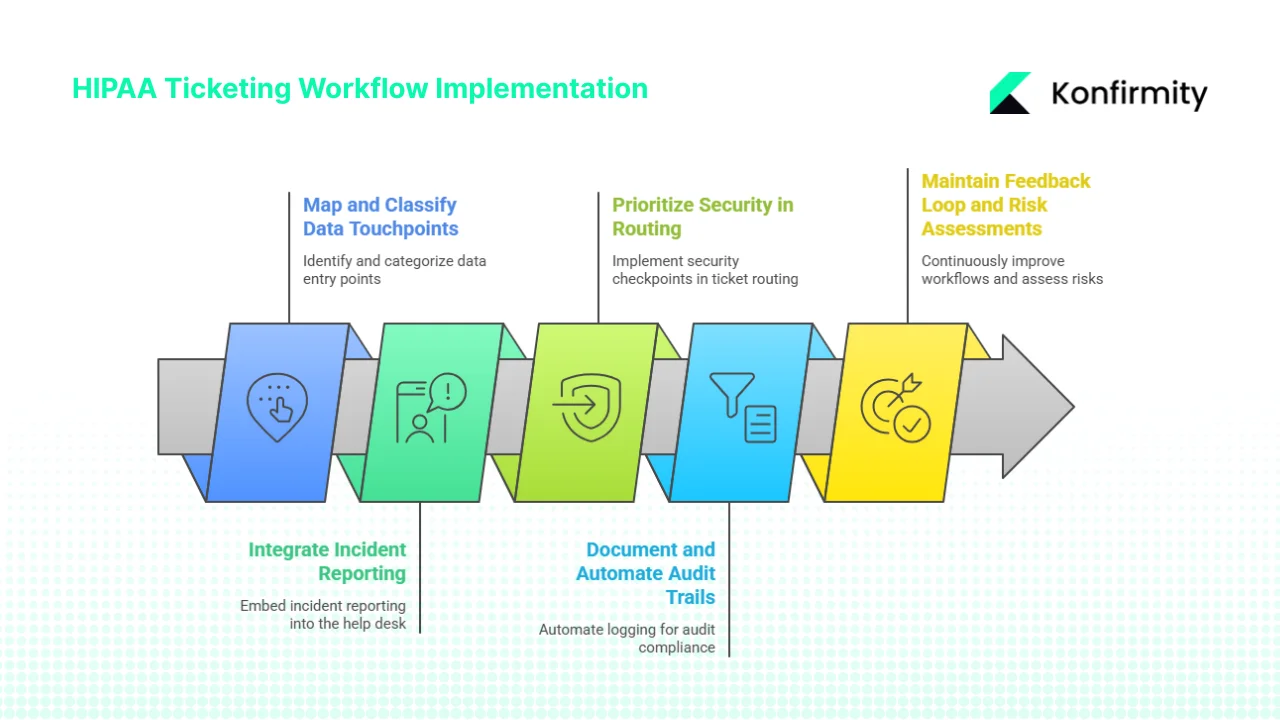
1) Map and classify data touchpoints
Start by mapping where PHI enters your organisation and how it flows through systems. This includes patient portals, call centres, electronic health record (EHR) integrations, cloud storage, email threads and third‑party API endpoints. The same ticketing or identity lifecycle tooling often does double duty for asset onboarding and offboarding requests, so it's worth designing the classification scheme to cover both. Assign sensitivity labels to ticket categories: a lost password request may involve no PHI, while a complaint about medical billing or clinical care may contain full medical records. Align categories with severity levels so that high‑sensitivity tickets trigger enhanced workflows. Clear classification helps prevent misrouted tickets and unintentional disclosures.
2) Integrate incident reporting with compliance controls
HIPAA Ticketing Workflows For HIPAA must embed incident reporting into the help‑desk itself. Issues involving ePHI should automatically generate compliance tasks. For example, if a user reports that an attachment containing lab results was sent to the wrong patient, the system should flag a potential breach and notify the compliance officer. Automated alerts can track when PHI is referenced in comments or attachments, prompting risk assessments. According to HHS, covered entities must notify the Secretary of breaches affecting 500 or more individuals within 60 days, so early detection and timely escalation are essential.
3) Prioritise security in ticket routing
Security checkpoints should be embedded into routing logic to protect HIPAA Ticketing Workflows For HIPAA. Tickets containing PHI should require multi‑factor authentication for internal reassignments, and privileged actions such as exporting data or downloading attachments should trigger additional approvals. Our team often implements dynamic routing rules: for instance, PHI‑related tickets may only be assigned to agents who have completed annual HIPAA training and passed role‑based access reviews. Two‑factor verification during escalation reduces the risk of unauthorized reassignments and ensures that only qualified staff handle sensitive data.
4) Document and automate audit trails
Automated logging is the backbone of defensible HIPAA Ticketing Workflows For HIPAA. Each ticket should include immutable records of creation, updates, file uploads, comments, escalations and closures. Logs must capture user identifiers, IP addresses, timestamps and previous values to support forensic analysis. HIPAA requires retaining audit logs for six years; storing them in tamper‑evident systems with automated retention policies ensures compliance and simplifies audits. The logs also support breach investigations: during the 2024‑2025 OCR audit cycle, HHS selected entities based on their ability to demonstrate security controls against ransomware. Comprehensive ticketing logs show auditors how issues were detected, escalated and resolved.
5) Maintain a continuous feedback loop and perform risk assessments
Ticketing workflows must evolve with new threats and regulatory updates — see our guide to what changed in HIPAA for 2026 for what's driving the latest requirements. Use incident metrics and patterns to refine categories, response times and escalation paths. Conduct regular risk assessments that cover ticket handling processes, vendor integrations and emerging technologies such as generative AI. IBM’s 2025 Cost of a Data Breach Report found that healthcare breaches cost an average of $7.42 million and took 279 days to identify and contain. Continuous monitoring and improvement reduces both detection time and financial impact.
Best practices for HIPAA Ticketing Workflows
1) Develop standard operating procedures (SOPs). Document how agents should handle tickets involving PHI: what to record, who to notify and how to verify identity. SOPs should reference the HIPAA Privacy Rule and organisational privacy policies and must be updated when regulations change. Agents need clarity on the difference between routine customer service requests and notifiable incidents.
2) Invest in role‑based training and automation. Provide regular HIPAA training focused on ticketing workflows, including how to recognise PHI, apply the Minimum Necessary Rule and avoid unsecure channels; see our HIPAA training requirements guide for the broader curriculum this should sit inside. Automate compliance tasks wherever possible — for example, automatically sending a follow‑up form when a ticket is marked as a breach or requiring a compliance officer’s approval before closing an incident ticket. Automation reduces human error and frees up staff time.
3) Monitor metrics and reporting. Use dashboard metrics to identify bottlenecks and security gaps. Track average response times for PHI‑related tickets, the number of escalations and how often audit logs are reviewed. Investigate deviations and adjust processes accordingly.
4) Ensure integration with EHR and clinical systems. Ticketing systems should communicate with EHR platforms, identity providers and security information and event management (SIEM) tools. Integration avoids manual copying of PHI and ensures that updates propagate back to the source, simplifying retention and audit logging.
How ticketing workflows support data breach handling
A well‑designed ticketing workflow is crucial during a breach event. When a security incident occurs — for example, when unauthorized access to an EHR system is detected — a ticket is generated automatically. The workflow should include:
-
Immediate classification and containment. The ticketing system identifies whether ePHI is involved and triggers containment actions. Multi‑factor authentication ensures that only designated incident responders can access the ticket. The system also enforces encryption of all attachments.
-
Documentation and notification. Every action is logged — including communications with technical teams and external vendors — creating an audit trail. HHS requires notifying the Secretary within 60 days for breaches affecting 500 or more individuals; our HIPAA breach notification guide walks through this process end to end. Workflows can automatically remind compliance teams of this deadline and populate breach notification forms.
-
Escalation and resolution. Tickets route to security leadership and legal counsel. Evidence collected from logs, access reviews and vulnerability scanners supports root‑cause analysis. Once remediation is complete, the workflow archives the ticket and associated evidence, maintaining the six‑year retention requirement. These records demonstrate due diligence during audits and litigation.
Tools and technologies for HIPAA ticketing
Key features to look for
Ticketing platforms should offer encrypted messaging, secure file transfer, single sign-on integration, pre‑configured HIPAA workflows and automated triggers that schedule security reviews or incident response plans when certain conditions are met. Avoid unapproved chat apps and ensure e‑mail attachments are archived read‑only to meet retention requirements.
Trends for 2026
Artificial intelligence is reshaping ticketing. AI‑assisted routing and analytics can prioritise tickets and surface patterns indicating systemic issues. However, AI introduces new risks: IBM’s 2025 report observed that 13 % of breaches involved the use of AI by attackers and that many organisations lacked AI governance. HIPAA Ticketing Workflows For HIPAA should include controls for AI systems, monitor model behaviour and ensure vendors sign BAAs and provide transparency into their AI models.
Common pitfalls and how to avoid them
Common problems in HIPAA Ticketing Workflows For HIPAA include over‑reliance on manual processes, failing to review audit logs, using vendors that refuse BAAs and underestimating staff training — our HIPAA do's and don'ts guide rounds up the most common mistakes across the whole program. Automate classification and routing, schedule periodic log reviews and incorporate findings into risk assessments. Demand that vendors sign BAAs and invest in regular role‑specific training to keep staff aware of policies and threats.
See your real HIPAA ticketing workflow gap, not a guess
Book a demo and we'll map your help-desk and incident queues against the Security Rule requirements, self-serve or with our CISO-led team running it for you.
Book a demo
Conclusion
Healthcare data breaches are costly and disruptive. In 2024 the OCR breach portal recorded 725 large healthcare data breaches, and IBM’s 2025 report pegged the average cost of a U.S. data breach at $10.22 million with healthcare still the most expensive sector. Regulators respond with rigorous audits; the 2024‑2025 HIPAA audit program focuses on ransomware and hacking. To thrive in this environment, healthcare companies must build robust HIPAA Ticketing Workflows For HIPAA that make security part of daily operations.
A compliant workflow encrypts data, limits access, records actions, retains logs for at least six years and ensures that vendors sign BAAs. It integrates incident reporting with regulatory deadlines, automates routing and escalation and evolves through continuous feedback. Konfirmity’s human‑led, managed security and compliance service installs these controls inside your stack so that security becomes part of daily operations. By focusing on real security outcomes and continuous evidence, organisations can shorten sales cycles, satisfy buyers and protect patient trust. Security that looks good on paper but fails under pressure is a liability. Build durable HIPAA Ticketing Workflows For HIPAA once, operate them daily and let compliance follow.
FAQs
The journey to HIPAA compliance involves (1) conducting comprehensive risk assessments to identify vulnerabilities, (2) implementing administrative, physical and technical policies and procedures that address those risks, (3) training staff on privacy and security obligations and verifying their understanding, (4) applying safeguards such as encryption, multi‑factor authentication, access controls and audit logging, and (5) monitoring compliance through audits, log reviews and continuous improvement.
There is no single “algorithm,” but a reliable approach follows a risk‑based lifecycle: assess risks, map data flows and identify threats; implement administrative, technical and physical safeguards tailored to those risks; document policies, procedures and evidence; monitor and test controls regularly; and update practices when threats or regulations change. This mirrors other frameworks such as SOC 2 Type II, where auditors observe controls over a defined period (typically 6–12 months) to ensure they operate effectively.
Generative AI can be used in healthcare only when deployed in a controlled environment. A HIPAA‑compliant implementation requires encryption, robust access controls, audit logging, secure hosting and a BAA with the AI vendor. Standard public models do not offer these guarantees and therefore are not automatically HIPAA‑compliant. Healthcare organisations should work with vendors that provide HIPAA‑ready deployments and implement safeguards such as content filtering and model audit trails.
Yes. Zoom offers a Zoom for Healthcare product that includes advanced encryption, role‑based access controls and HIPAA‑compliant features. Crucially, Zoom for Healthcare signs a BAA with customers. Standard Zoom accounts and most consumer video platforms lack the controls and contractual assurances required by HIPAA, so healthcare organisations should use the dedicated version and configure it according to security best practices.