Healthcare data protection is no longer a theoretical task in paperwork. It is an operational necessity. For healthcare companies and the technology vendors that serve them, the margin for error has vanished. In 2024 alone, the Office for Civil Rights (OCR) settled multiple enforcement actions resulting in millions of dollars in penalties, signaling a shift from "corrective action" to immediate punitive measures for negligence.
For CTOs, CISOs, and compliance leaders, the challenge is clear: You must prove you protect patient data, or you can not do business. Whether you are a direct provider or a technology vendor, the market demand for HIPAA For SaaS and healthcare-grade security has intensified. Enterprise buyers now require assurance artifacts before procurement conversations even begin. If you lack operational security and continuous evidence, deals stall—even if you believe you are "compliant" on paper.
This guide moves outside generic advice. We will examine what HIPAA compliance actually requires in a modern technical environment, how to evaluate the tools claiming to solve it, and why software alone often fails to deliver the audit readiness teams expect.
What HIPAA Compliance Really Requires Today
Compliance is not a static state; it is a continuous process of risk management. While the Privacy Rule gets significant attention, the Security Rule is the primary concern for technical teams and SaaS providers.
Brief Introduction to HIPAA Rules
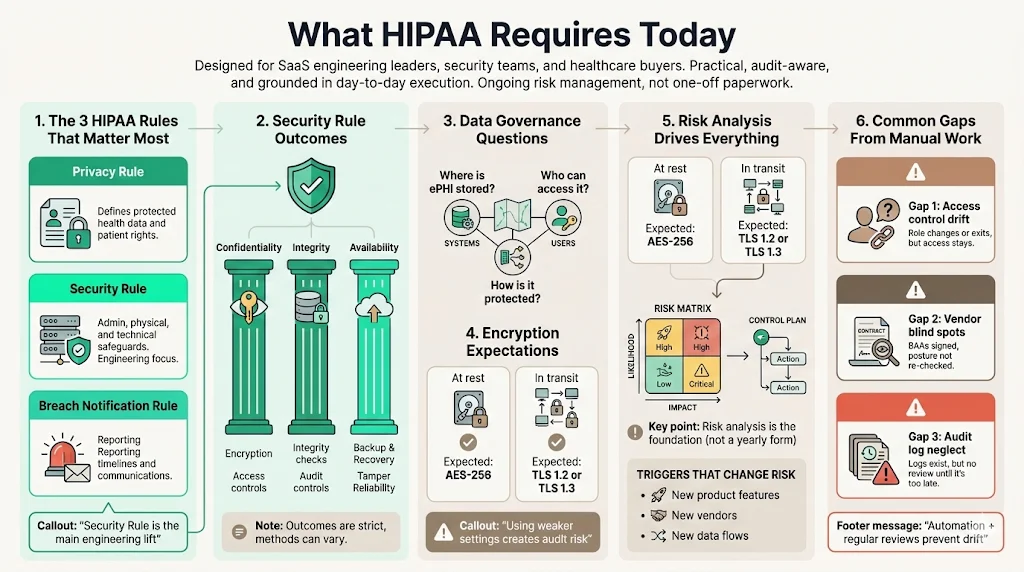
The Health Insurance Portability and Accountability Act (HIPAA) comprises several rules, but for modern connected health, three are critical:
- The Privacy Rule: Defines what constitutes ePHI and sets standards for patient rights.
- The Security Rule: Mandates specific administrative, physical, and technical safeguards to ensure the confidentiality, integrity, and availability of ePHI. You can view the specific Administrative Safeguards (45 CFR § 164.308) here.
- The Breach Notification Rule: Dictates timelines and protocols for reporting data compromises to HHS and affected individuals.
The Security Rule is where most technical teams fail. It requires distinct controls, such as encryption standards (NIST recommendations), audit controls (hardware, software, and procedural mechanisms), and integrity controls.
Data Security and Privacy Protection at the Center
HIPAA compliance is fundamentally about data governance. It asks: Do you know where your data is, who can access it, and how it is protected?
The requirements are prescriptive regarding outcomes but flexible regarding methods. For example, 45 CFR § 164.312(a)(2)(iv) requires "encryption and decryption," but it does not specify the algorithm. However, industry standards (and auditors) expect AES-256 for data at rest and TLS 1.2 or 1.3 for data in transit. Implementing anything less creates a defensibility gap during an audit.
The Role of Risk Management
The foundation of HIPAA compliance is the Risk Analysis (45 CFR § 164.308(a)(1)(ii)(A)). This is not a one-time questionnaire. It must be an accurate and thorough assessment of the potential risks and vulnerabilities to the confidentiality, integrity, and availability of ePHI, utilizing guidance such as NIST Special Publication 800-30 Revision 1.
In our work, we often see companies treating risk analysis as an annual formality. In reality, it should drive your entire security strategy. If a new HIPAA For SaaS feature is released, or a new vendor is onboarded, the risk profile changes. Your compliance program must capture that delta.
Common Compliance Gaps Caused by Manual Work
When teams rely on manual processes, consistency suffers. Common gaps include:
- Access Control Drift: Employees change roles or leave, but their access rights remain active.
- Vendor Blind Spots: Business Associate Agreements (BAAs) are signed but filed away, and the vendor's security posture is never re-evaluated.
- Audit Log Neglect: Systems generate logs, but no one reviews them until a breach occurs, by which point the data may be overwritten.
Why Healthcare Teams Use HIPAA Compliance Tools
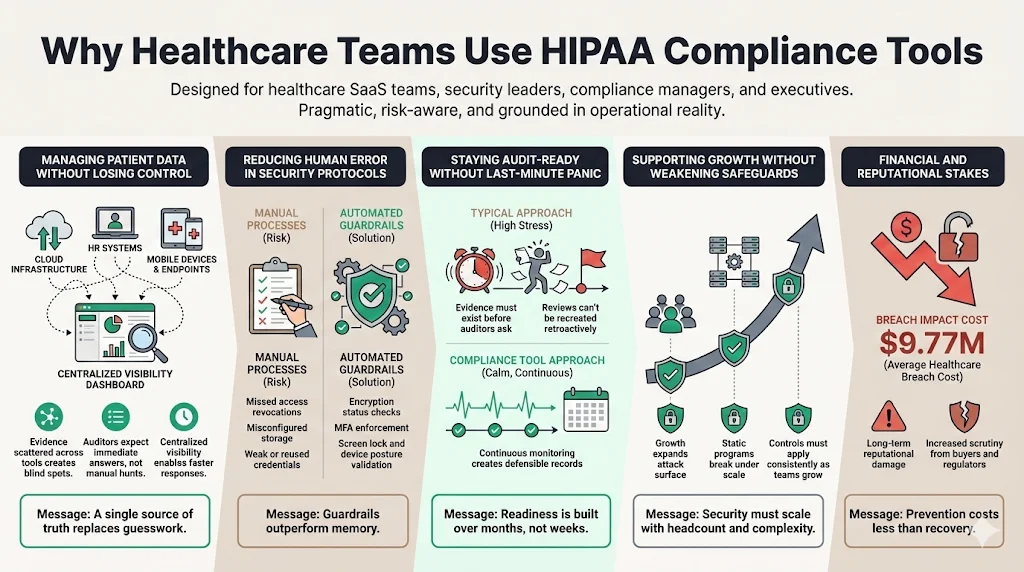
Managing patient data across disparate systems without losing control is impossible with manual spreadsheets. As organizations scale, the "brute force" method of compliance becomes a liability. The stakes are financial as well as reputational: the 2024 IBM Cost of a Data Breach Report reveals that healthcare breach costs have hit $9.77 million, the highest of any industry for 14 consecutive years.
1) Managing Patient Data Without Losing Control
Healthcare companies use specialized tools to create a central source of truth. Instead of chasing evidence across AWS consoles, HR systems, and device management logs, a resilient platform centralizes this data. This visibility is critical for answering the fundamental question posed by auditors: "Show me the evidence."
2) Reducing Human Error in Security Protocols
Humans are poor at repetitive, high-stakes tasks. We forget to revoke access. We misconfigure S3 buckets. We use weak passwords. Compliance tools and managed services enforce guardrails. They automate the collection of evidence—checking that encryption is on, multi-factor authentication (MFA) is enabled, and screen locks are active—removing reliance on human memory.
3) Keeping Audit Readiness Without Last-Minute Stress
The "audit scramble" is a symptom of a broken process. It occurs when teams try to manufacture compliance two weeks before an auditor arrives. This approach is dangerous. If an auditor asks for a sample of access reviews from six months ago, and you didn't do them, you can not retroactively create that evidence.
Tools and managed services aim to keep organizations "audit-ready" year-round. However, a tool alone only flags the issue; it does not fix it. This is why Konfirmity offers expert-run monitoring on top of the platform. We monitor the controls continuously so that when the audit window opens, the evidence is already there.
4) Supporting Growth Without Weakening Safeguards
Growth introduces complexity. New employees, new code, and new integrations all expand the attack surface. A static compliance program breaks under this pressure. Effective HIPAA For SaaS solutions scale with the company, applying the same rigorous controls to the 100th employee as they did to the 10th.
Core Features to Look for in a HIPAA Compliance Tool
Not all tools are created equal. When evaluating solutions, look for deep functionality in these five areas.
1) Security and Data Protection
This is the non-negotiable baseline.
- Encryption Verification: The tool should automatically verify that data stores (databases, object storage, block storage) are encrypted at rest, per Technical Safeguards.
- Policy Management: It needs a secure repository for version-controlled policies. Auditors look for the "created date," "last reviewed date," and "approved by" metadata.
- Privacy Controls: Features that help track data subject access requests and consent management, aligning with the Privacy Rule.
2) Monitoring and Accountability
You can not secure what you do not monitor.
- Audit Trails: The system must generate immutable logs of its own activity. Who changed the policy? Who marked a control as compliant?
- Continuous Monitoring: Integration with your cloud provider (AWS, Azure, GCP) to scan for misconfigurations every hour, not once a year.
- Alerting: Immediate notifications when a critical control fails (e.g., an S3 bucket becoming public).
3) Access and Identity Management
Identity is the new perimeter.
- Role-Based Access Control (RBAC): The tool should map internal users to specific roles with defined permissions.
- Least-Privilege Enforcement: Automated reviews that flag users with excessive permissions.
- Offboarding Workflows: A structured process to ensure terminated employees lose access to all systems immediately, with evidence logs to prove it.
4) Business Associate Oversight
For many healthcare companies, third-party vendors are the biggest risk.
- BAA Tracking: A dashboard that tracks the status of all Business Associate Agreements.
- Vendor Risk Management: Workflows to send security questionnaires to vendors and score their risk levels — the same scoring process covered in our vendor risk mapping guide.
- Renewal Reminders: Alerts when a vendor contract or security assessment needs review.
5) Compliance Operations
This is the "getting it done" layer.
- Risk Assessment Workflows: Templates and logic to conduct NIST-based risk assessments (SP 800-30).
- Task Assignment: The ability to assign specific remediation tasks to engineers or HR staff.
- Evidence Collection: Automated scrapers that pull screenshots or JSON configurations from your tech stack to serve as audit proof.
HIPAA Tool Comparison Criteria for Busy Teams
Selecting a tool is a strategic decision. Use these criteria to filter the noise.
Setup Time and Learning Curve
How long until you see value? Some enterprise GRC (Governance, Risk, and Compliance) platforms take six months to configure. Agile healthcare teams need solutions that deploy in weeks. However, beware of tools promising "instant compliance." Real security takes time to implement. At Konfirmity, we typically see a 4–5 month window for full SOC 2/HIPAA readiness when done correctly, versus 9–12 months for self-managed programs.
The right HIPAA tool supports your security program, not replaces it.
Drop your work email and choose tools that fit real compliance needs.
Automation Depth Versus Manual Effort
Does the tool fix the problem, or just tell you about it? Many HIPAA For SaaS scanners generate thousands of alerts but offer no help in remediation. Look for high-fidelity automation that understands context, separating critical risks from false positives.
Reporting Clarity for Leadership and Auditors
Can the tool generate a report that a non-technical Board member understands? Can it export data in a format the auditor accepts? The reporting engine is your interface with the outside world.
Support for Healthcare Compliance Outside HIPAA
Healthcare is rarely just about HIPAA. You may also need to comply with HITRUST, SOC 2, or ISO 27001. A single-framework tool is a dead end.
Cost Predictability and Scalability
Pricing models vary. Some charge by employee count, others by revenue or connected integrations. Ensure the pricing model matches your growth trajectory so your compliance costs don't explode as you scale. Before locking in a vendor, see the savings for your team using a managed approach versus a self-serve platform.
HIPAA Tools With Comparison & Examples
Konfirmity is a security-driven compliance platform. Run it self-serve, or add the fully-managed service and our experts operate as an extension of your security team. With managed delivery, we implement the controls inside your stack and handle the 600+ hours of work required to configure monitoring, write policies, and triage vulnerabilities. Either way, you get more than a login and a dashboard; you get audit-readiness as a working program. We bridge the gap between "having a tool" and "having a program."
Comparing Tools Side by Side
| Feature | Automated Platforms (e.g., Sprinto) | Legacy GRC (e.g., ComplyAssistant) | Managed Service (Konfirmity) |
|---|---|---|---|
| Security Protocols | High automation, requires technical oversight | Manual documentation focus | Managed implementation & monitoring |
| Data Encryption | Checks config status | Policy based | Verifies & remediates gaps |
| Audit Readiness | Evidence repository provided | Document storage provided | Auditor interface & defense provided |
| BAA Management | Automated tracking | Strong workflow logic | Vendor risk review & tracking |
| Ease of Use | Developer-friendly | Admin-focused | Zero-touch for internal teams |
| Best Fit | Tech startups with internal security staff | Hospitals / Traditional Providers | SaaS/HealthTech needing guaranteed outcomes |
Analysis: For purely technical teams with spare capacity, automated platforms offer visibility. For traditional providers, legacy GRC fits the administrative workflow. But for companies where the engineering team needs to focus on product, Konfirmity's fully-managed service delivers the highest ROI by removing the labor burden entirely.
Can One Tool Handle More Than HIPAA?
The short answer is yes, and it is highly suggested.
Overlapping Controls Between HIPAA, SOC 2, and ISO 27001
There is significant overlap between frameworks.
- Access Control: HIPAA 164.308(a)(4) matches closely with SOC 2 CC 6.1 (Logical Access).
- Risk Assessment: HIPAA 164.308(a)(1)(ii)(A) mirrors ISO 27001 Clause 6.1.2 (Information security risk assessment) — see our full HIPAA controls list for how these map into a single control set.
- Incident Response: HIPAA 164.308(a)(6)(ii) maps to SOC 2 CC 7.3.
Benefits of Shared Risk Management Systems
Using a single platform or service allows you to "test once, comply many." You perform one User Access Review, and that evidence satisfies the auditor for SOC 2, the certifier for ISO 27001, and the OCR for HIPAA. This reduces "audit fatigue" for your staff.
When a Single Platform Makes Sense
If you are a B2B SaaS company selling to hospitals, you will likely need SOC 2 Type II and HIPAA. A unified approach is essential here. Managing these in silos guarantees duplicated effort and conflicting policies.
When Separate Tools May Still Be Needed
If you have highly specific needs—such as medical device certification (FDA requirements) or strict financial compliance (PCI-DSS Level 1)—you may need specialized modules or add-ons. However, the core Information Security Management System (ISMS) should remain centralized.
How to Choose the Right HIPAA Tool for Your Team
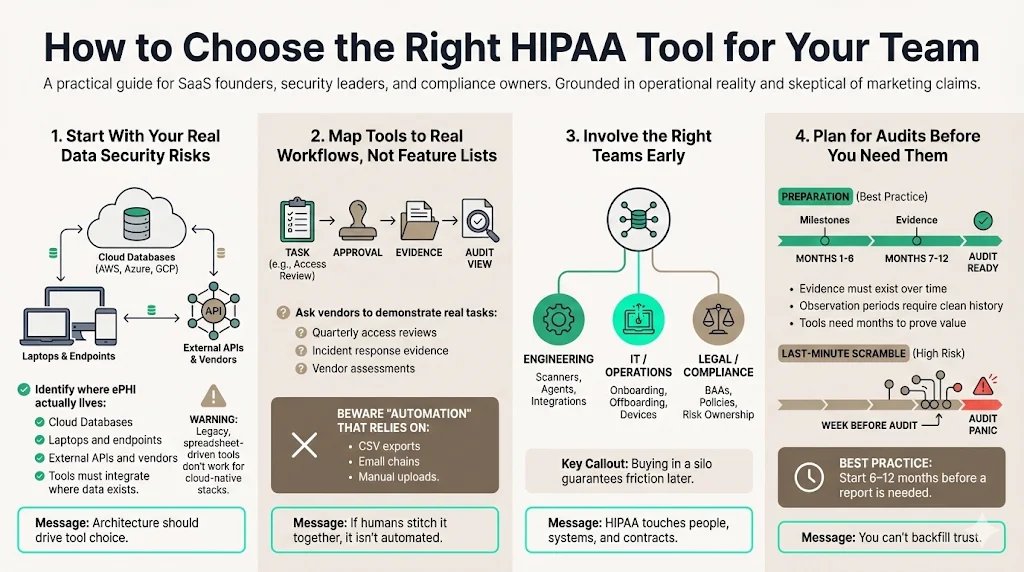
1) Start with Current Data Security Risks
Don't start with features; start with your architecture. Where is your ePHI? Is it in AWS RDS? Is it on laptops? Is it in third-party APIs? Choose a solution that integrates natively with where your data lives. If you are cloud-native, a legacy GRC tool will be useless.
2) Map Tools to Real Workflows, Not Feature Lists
Demos are misleading. Ask the vendor: "Show me exactly how I perform a quarterly access review." If the answer involves exporting a CSV, emailing it to managers, and uploading a PDF back to the system, run away. That is not automation.
3) Involve Compliance, IT, and Operations Early
Buying a HIPAA For SaaS tool in a silo is a recipe for failure. Engineering needs to vet the agents/scanners. HR needs to vet the onboarding workflows. Legal needs to vet the BAA templates.
4) Plan for Audits Before They Happen
The best time to buy a tool or engage a service is 6–12 months before you need the report. Building a durable control environment takes time. An "observation period" for SOC 2 or a surveillance audit for ISO requires months of clean data.
Common Mistakes Teams Make During HIPAA Tool Selection
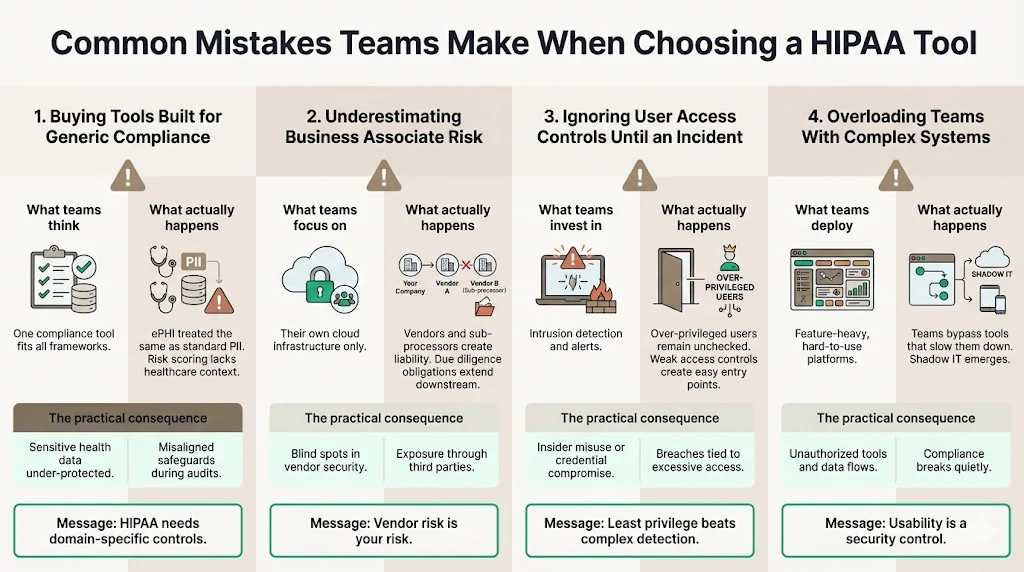
1) Buying Tools Built for Generic Compliance
Generic tools often lack the nuance of HIPAA. They might treat all data as equal, failing to distinguish ePHI from standard PII. This leads to improper risk categorization and potential under-protection of sensitive health data.
2) Underestimating Business Associate Risk
Many teams focus entirely on their own cloud infrastructure and forget their vendors. Under HIPAA, you are liable for the due diligence of your Business Associates. A tool that doesn't centralize Vendor Risk Management leaves a massive liability gap.
3) Ignoring User Access Controls Until an Incident
We often see teams implementing complex intrusion detection systems while leaving the front door open with weak access controls. Over-privileged users are the most common vector for data breaches. Prioritize tools that enforce least-privilege access rigorously.
4) Overloading Teams with Complex Systems
If your team is also weighing how much of this to automate outright versus staff, our HIPAA automation tools guide breaks down which functions are safe to automate and which still need a human owner. The most secure tool is the one your team actually uses. If a system is too complex, employees will bypass it. Security that introduces too much friction results in "shadow IT," where employees use unauthorized, easier tools to get their work done, effectively breaking compliance.
See what your HIPAA tooling actually covers, not a guess
Book a demo and we'll map your current stack against the Security Rule requirements it needs to satisfy, self-serve or with our CISO-led team running it for you.
Book a demo
Conclusion
HIPAA tool comparison is about fit, not just features. The market is flooded with software promising instant results, but experienced leaders know that compliance is an outcome of operational discipline, not a product you buy.
The right solution reduces the risk management effort while improving visibility. It turns compliance from a blocker into a business accelerator. When enterprise buyers see a clean, well-managed security posture, confidence increases, and sales cycles shorten.
Busy healthcare teams gain time, clarity, and confidence by choosing the right partner. At Konfirmity, we believe that security that looks good in documents but fails under incident pressure is a liability. By combining human expertise with rigorous processes, we help you build controls that stand up to scrutiny. We don't just advise—we execute, ensuring your organization is secure, compliant, and ready for growth.
Frequently Asked Questions (FAQ)
1) What features should HIPAA compliance tools include?
Essential features include data encryption verification, immutable audit trails, granular user access controls, NIST-based risk assessment workflows, and complete Business Associate management. These features address the core technical and administrative safeguards of the HIPAA Security Rule.
2) Are automated HIPAA tools accepted by auditors?
Yes, auditors accept automated tools provided the evidence, controls, and logs are clear, traceable, and complete. However, the tool is only the repository. The auditor validates that the controls described in the tool are actually functioning in the environment.
3) How do HIPAA tools support Business Associate management?
Effective tools support this by tracking all active vendors, storing and monitoring the status of BAAs, assessing access risk for each vendor, and triggering automated review cycles to ensure third-party security remains up to date.
4) Can one tool cover HIPAA, SOC 2, and ISO 27001 together?
Yes. Many modern platforms and managed services support "cross-mapping" or shared controls. Since there is significant overlap in requirements (e.g., access reviews, change management, backup protocols), a single system can collect evidence once and apply it to multiple frameworks, saving hundreds of hours.
5) How does Konfirmity differ from a standard SaaS compliance tool?
Konfirmity is a security-driven compliance platform with an optional fully-managed service. A standalone SaaS tool gives you a dashboard you must manage yourself; with Konfirmity you can run the platform self-serve, or add the managed service and a dedicated team implements controls, monitors your environment, and manages the audit process for you. Managed delivery reduces internal effort from ~600 hours to ~75 hours per year.