Procurement teams in 2026 routinely ask vendors for evidence of operational security before any deal moves forward. The rise of cloud‑native architectures, distributed workforces and machine‑learning projects has made point‑in‑time audits feel like relics. Vendors that cling to manual evidence collection find their sales cycles slowing down and their risk of errors growing. To stay competitive, enterprise technology providers must operate from an information security management system (ISMS) built on internationally recognised standards. ISO/IEC 27001 is the most widely adopted ISMS framework, outlining requirements for a risk‑based security programme. It helps organisations manage confidentiality, integrity and availability of data across people, processes and technology.
At the same time, manual compliance processes do not scale. Because evidence lives in multiple cloud platforms, source control systems, identity providers and ticketing tools, spreadsheets and screenshots cannot keep pace with modern infrastructure. Continuous control monitoring and automated evidence collection have therefore become essential. When implemented properly, automation reduces workload, shortens audits, lowers operational risk and keeps teams focused on building secure products.
This article is written for CTOs, CISOs, engineering VPs and compliance officers who sell to large enterprises and healthcare buyers. It explains why ISO 27001 matters for sales cycles and regulatory obligations, how automation platforms work, what capabilities to evaluate, and the steps required to put them in place. Throughout the piece, you will see guidance from recognised standards bodies and regulators, current breach‑cost data and lessons from Konfirmity’s experience delivering over 6,000 security audits with a 25‑year combined track record.
What you will learn
-
A clear definition of ISO 27001 automation tools and why manual approaches no longer meet enterprise needs.
-
The main capabilities offered by modern tools—risk assessment, continuous monitoring, policy management, audit readiness and more.
-
A step‑by‑step plan for automating ISO 27001 compliance inside complex technology stacks.
-
Measurable benefits: faster certification, reduced risk, lower cost and improved visibility.
-
A practical checklist for choosing the right solution, with examples of leading platforms.
-
Answers to common questions from business and technical leaders.
What Are ISO 27001 Automation Tools?
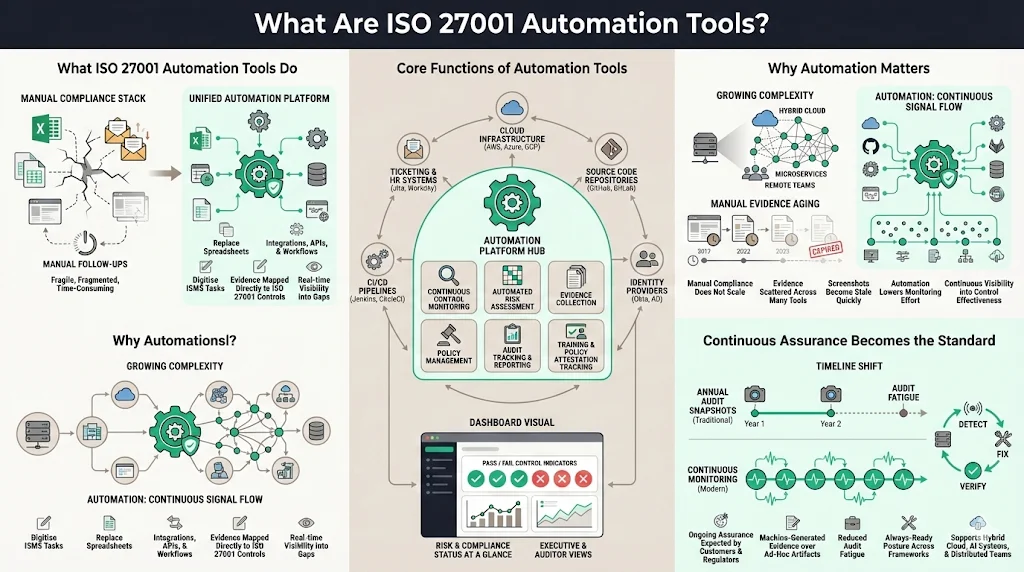
ISO 27001 automation tools are platforms that digitise and streamline the tasks required to maintain an ISO‑aligned ISMS. In the early days of compliance, teams tracked policies, risks and evidence in spreadsheets, manually emailed colleagues for artifacts and copied screenshots into document repositories. This approach is error‑prone and does not scale when the business runs multiple cloud environments, microservice deployments and distributed teams. Automation platforms replace manual effort with integrations, APIs and workflow engines. They continuously collect evidence from cloud providers, source code repositories, identity platforms and ticketing systems, map that evidence to specific controls, and surface compliance gaps in real time.
The core functions of ISO 27001 automation tools include continuous monitoring of control effectiveness, automated risk assessment, evidence collection, policy management, audit tracking and reporting. A modern platform connects to cloud infrastructure to pull configuration details (such as encryption settings, firewall rules and container posture). It links to identity providers to capture multifactor authentication status, privileged access events and user lifecycle changes. It interfaces with software delivery pipelines to collect merge approvals, test results and deployment records. It also gathers training completion, policy acceptance and HR data. These data flows feed dashboards that show auditors and executives where controls pass or fail and enable corrective actions before official audits.
Why automation matters
Manual compliance work does not stand up to the complexity and speed of enterprise operations. Organisations now operate across hybrid, multi‑cloud environments, integrate machine‑learning systems and have remote and hybrid staff. Evidence is scattered across dozens of tools. Screenshots and ad‑hoc queries become outdated quickly. According to ISO, an effective ISMS must manage risks related to data security and maintain control effectiveness over time. The National Institute of Standards and Technology (NIST) notes that automation lowers monitoring costs, enhances efficiency and allows tools to recognise patterns in large data sets that human analysts might miss. Automation augments security professionals by handling repetitive tasks and freeing them to focus on high‑value analysis.
Continuous assurance is not just a technical aspiration; it is becoming an expectation from regulators and customers. SureCloud’s 2026 evidence automation study observed that proactive, machine‑generated evidence is no longer optional. Organisations that adopt unified governance, continuous monitoring and repeatable workflows can reduce audit fatigue, strengthen security and stay ready across all frameworks. Customers and regulators increasingly expect ongoing visibility rather than annual snapshots. Four trends—hybrid cloud expansion, AI governance needs, demand for continuous assurance and workforce decentralisation—make automation essential. Enterprises that move from point‑in‑time audits to continuous, proactive security reduce time spent preparing for audits, avoid last‑minute scrambles and operate with confidence.
Core Capabilities of ISO 27001 Automation Tools
An effective automation platform covers the entire lifecycle of information security management. The capabilities below correspond to typical ISMS tasks and map to Annex A control families. When evaluating solutions, confirm how each capability integrates with your stack and supports ISO 27001 requirements.
1) Information Security Management & Compliance Automation
At the foundation, the platform maintains an ISO‑aligned ISMS. It stores the organisational scope, risk register and Statement of Applicability (SoA), links policies to controls, and tracks the status of each control across departments. Because ISO 27001 requires an organisation to establish, implement, maintain and continually improve its ISMS, automation ensures that updates are documented and evidence is preserved. Integration with existing systems—configuration management databases, HR systems, ticketing tools and identity platforms—allows the ISMS to stay current without manual copying.
2) Risk Assessment Tools
ISO 27001 emphasises risk management: organisations must identify risks to data confidentiality, integrity and availability, evaluate them and treat them appropriately. Automation platforms support continuous risk assessment by analysing configuration data, vulnerability scans, access events and change histories. They assign risk scores based on control maturity, industry benchmarks and business context, and prioritise remediation tasks. Some platforms integrate with vulnerability management systems to import common vulnerabilities and exposures (CVEs) and assign severity based on CVSS scores. Others allow custom scoring models. Continuous risk scoring ensures that high‑impact issues are addressed promptly rather than discovered during an annual review.
3) Security Audit Software
Audit modules automate the workflow for internal and external audits. They provide auditors with read‑only access to control evidence, generate standardised artefact packages and track the status of audit requests. Automation tools pull logs, access records and configuration settings directly from source systems, reducing the need for manual screenshots. Dashboards show readiness across control families and highlight areas requiring attention. During an audit, the platform can provide evidence of control design and operating effectiveness over the observation period, which is critical for ISO 27001 and SOC 2 Type II attestation.
4) Document & Policy Management
ISO 27001 requires organisations to maintain documented information such as policies, procedures and records. Platforms provide central libraries for policies mapped to specific clauses, with version control, approval workflows and distribution tracking. Changes to policies are logged, and affected users are notified. This ensures that the organisation can demonstrate that policies are current and have been communicated. Searchable repositories also simplify evidence collection during audits.
5) Continuous Monitoring & Vulnerability Scanning
NIST’s continuous monitoring guideline stresses that automation collects more data more frequently and from a larger pool of technologies, making ongoing control of information security practical. ISO 27001 automation tools test controls regularly—checking encryption settings, logging retention, network segmentation, patch status and misconfigurations across environments. Some integrate with security information and event management (SIEM) systems to feed real‑time alerts into compliance dashboards. Others include vulnerability scanning engines that detect missing patches and misconfigurations, map findings to relevant controls and create remediation tasks.
6) Incident Response Automation
When security events occur, automation tools log them, notify the right teams and map incidents to affected controls. This ensures that the incident response process is documented and that corrective actions are linked to the relevant policies and risk treatments. Integrated workflows can trigger root‑cause analysis, create tickets and track progress until closure. After an incident, evidence is preserved for auditors.
7) Access Control Systems & User Access Review
Access management is a critical pillar of both ISO 27001 and other frameworks. Automated tools connect to identity providers—such as single sign-on services, directory services and multi‑factor providers—to monitor user provisioning, role changes and privilege escalations. They enforce periodic access reviews, identify dormant accounts and flag discrepancies between policy and actual access. Because identity‑related evidence must be retained for audits, automation eliminates the need for manual collection.
8) Threat Detection Solutions
Leading platforms integrate with endpoint detection and response (EDR), network detection and behavioural analytics tools. They map alerts to control frameworks and trigger compliance notifications. When anomalies or unapproved changes are detected, the system creates tasks for security teams and records evidence for future audits. This linkage ensures that threats are not only remediated but also documented as part of the ISMS.
9) Security Reporting
Executives, security leads and auditors require different levels of information. Automation platforms offer custom dashboards that present aggregated metrics for leadership and detailed views for technical teams. They generate ISO‑compliant reports on demand, summarising control status, open risks, remediation progress and policy changes. Reports can be exported for boards, investors or external auditors, reducing preparation time.
10) Workflow Automation
Automation tools assign tasks to control owners, send reminders for risk assessments, schedule access reviews and track evidence submissions. They maintain audit trails for every activity, proving that processes were followed consistently. Integrations with ticketing systems allow compliance tasks to appear alongside engineering work, helping teams manage obligations without context switching.
11) Data Encryption Tools
While not all platforms include encryption engines, many enforce encryption policies by scanning cloud configurations and endpoints to verify that data at rest and in transit is encrypted with approved algorithms. ISO 27001 Annex A controls require organisations to implement cryptographic controls and protect encryption keys. Automated checks ensure that encryption standards are applied consistently across workloads.
Automate compliance so your team focuses on real security work.
Share your work email and we'll show which controls deserve automation first.
Step‑by‑Step Guide to Implementing ISO 27001 Automation
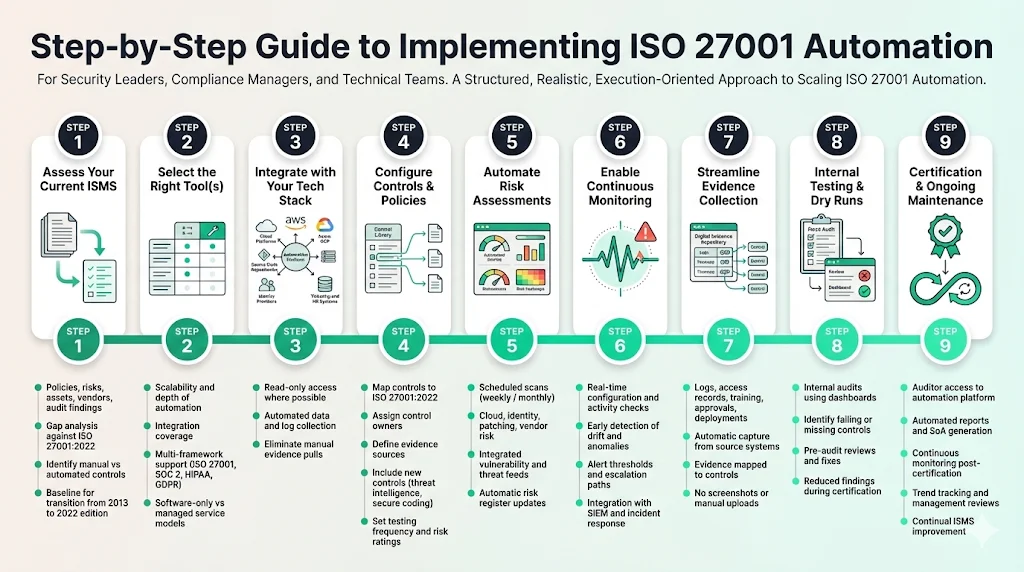
Step 1: Assess your current ISMS
Start by evaluating your existing security programme. Assemble documents—policies, risk assessments, asset inventories, vendor assessments and audit findings. Identify gaps between current practices and ISO 27001 requirements, including the updated 2022 revision (which introduced new controls for threat intelligence, cloud service security and secure coding). If your certification is based on the 2013 edition, you must transition to the 2022 version by 31 October 2025. Create a baseline so you know which controls are already automated and which rely on manual work.
Step 2: Select the right tool(s)
Evaluate automation platforms based on scalability, depth of automation, ease of integration and vendor support. Consider whether you need a single end‑to‑end tool or a combination of specialised modules. For example, vendors like Vanta, Cyber Sierra, Sprinto and Scrut provide ISO 27001 automation tools that handle evidence collection and continuous control monitoring. Ask for references from enterprises of similar size and complexity. Look for evidence that the platform supports dual frameworks (ISO 27001, SOC 2, HIPAA, GDPR) to avoid duplicate work. Assess pricing transparency and whether the vendor offers managed services. Konfirmity operates as a human‑led managed service rather than pure software; its teams implement and run the programme for you.
Step 3: Integrate with your tech stack
Once you select a platform, connect it to your cloud accounts (AWS, Azure, GCP), source code management (GitHub, GitLab), container platforms, identity providers (Okta, Azure AD), ticketing systems (Jira, ServiceNow) and HR systems. Use read‑only scopes where possible to minimise risk. These integrations allow the automation tool to pull configuration data, access logs, change approvals and training records automatically. Without deep integrations, evidence collection still requires manual intervention.
Step 4: Configure controls & policies
Map your controls to the clauses of ISO 27001:2022. Many platforms come with pre‑defined control libraries that can be customized. Ensure each control is assigned to an owner, has a clear description and includes the evidence sources that will verify its operation. Define workflows for policy approvals and distribution. Incorporate new 2022 controls such as threat intelligence and secure coding into your plan. Assign risk ratings and determine how often each control should be tested.
Step 5: Automate risk assessments
Configure automated scans to run at regular intervals—weekly or monthly depending on your risk appetite. The tool should review cloud configurations, patch status, identity events and vendor risk. Ensure that risk scoring reflects business impact and aligns with your risk register. Integrate vulnerability scanners and external threat feeds. Use the results to update the risk register automatically and schedule remediation tasks.
Step 6: Enable continuous monitoring
Turn on real‑time checks. Continuous monitoring collects data from systems and controls at high frequency, helping to detect misconfigurations and anomalies earlier. NIST emphasises that automation can reduce the time security professionals spend on redundant tasks and provide comprehensive situational awareness. Set alert thresholds and escalation paths. Consider linking the automation tool to your SIEM and incident response platform to unify security and compliance notifications.
Step 7: Streamline evidence collection
Automated evidence capture is a core value. Configure the platform to pull logs, access records, policy acknowledgements, training completion, code reviews and deployment records directly from source systems. The tool should store evidence in a secure repository with timestamps and metadata. Evidence should be mapped to specific controls and ready for auditors. Avoid manual screenshots and attachments; they quickly become obsolete.
Step 8: Internal testing & dry runs
Before engaging an external auditor, perform internal audits using your automation platform. Review dashboards to identify controls with failing or missing evidence. Run a mock audit and ask independent team members or third‑party experts to examine the evidence. Use the results to fix gaps and train control owners. Konfirmity’s teams often perform pre‑audit assessments to ensure that all controls operate consistently across observation periods. By conducting dry runs, you reduce the number of findings during certification and shorten the time to issue resolution.
Step 9: Certification & ongoing maintenance
When your internal readiness is high, proceed to certification. Provide auditors with restricted access to the automation platform so they can view evidence and request clarifications. Automated reporting accelerates this process by generating the Statement of Applicability, risk treatment plan and control evidence packages. After certification, continue running continuous monitoring and evidence collection. ISO emphasises continual improvement of the ISMS; automation makes this feasible. Use dashboards to track trends, adjust risk treatments and update policies. Plan regular management reviews and integrate lessons from incidents.
Benefits for Enterprise Clients
Enterprise and healthcare buyers care about results: proof of security, minimal disruption to operations and confidence that vendors meet regulatory obligations. ISO 27001 automation tools deliver tangible benefits.
1) Faster time to certification
Automated evidence collection and continuous monitoring drastically reduce manual workload. Konfirmity’s experience shows that a well‑implemented automation programme can achieve ISO 27001 readiness in 4–5 months, compared with 9–12 months for self‑managed projects. Evidence is always up to date, so teams do not need to scramble during the observation period. SureCloud notes that unified governance and repeatable workflows reduce audit fatigue and maintain readiness across frameworks.
2) Reduced operational risk
Continuous monitoring surfaces misconfigurations, access anomalies and vulnerability exposures before they lead to incidents. NIST highlights that automation makes security‑related information readily available and supports collecting more data more frequently. By integrating with SIEM and incident response tools, enterprises can quickly detect and remediate threats. In 2025, the U.S. Department of Health and Human Services imposed a $1.5 million civil money penalty on Warby Parker for failing to conduct an accurate risk analysis and to implement sufficient security measures. Automated risk assessments and continuous monitoring could have identified those gaps earlier.
3) Lower cost & resource use
Manual compliance programmes often require hundreds of hours from engineering and security teams and expensive consultants. Automation reduces internal hours by more than 75% in many cases. Organisations avoid duplicated effort across multiple frameworks because evidence can be reused. Lower audit preparation time translates into lower consulting fees and less disruption to product development. Before committing to a tool or programme, estimate your compliance automation savings.
4) Better reporting & visibility
Dashboards provide real‑time views of control health, risks and remediation progress. Executives can make informed decisions quickly. Security leads can drill into specific failures and assign tasks. Auditors can access evidence directly without repeated requests. This transparency builds trust with customers and regulators. IBM’s 2025 Cost of a Data Breach report notes that data breaches involving multiple environments cost an average of USD 5.05 million, while breaches on premises cost USD 4.01 million. Improving visibility reduces the likelihood of such costly incidents.
5) Scales across complex environments
Enterprise vendors operate across many regions, teams and technologies. Automation platforms support multi‑tenant architectures, granular access controls and hierarchical reporting. Control owners in different business units can manage their tasks while executives view aggregated data. A mature platform can map evidence across ISO 27001, SOC 2, HIPAA and GDPR, enabling cross‑framework efficiencies and reducing duplication of effort.
How to Choose the Right Automation Tool
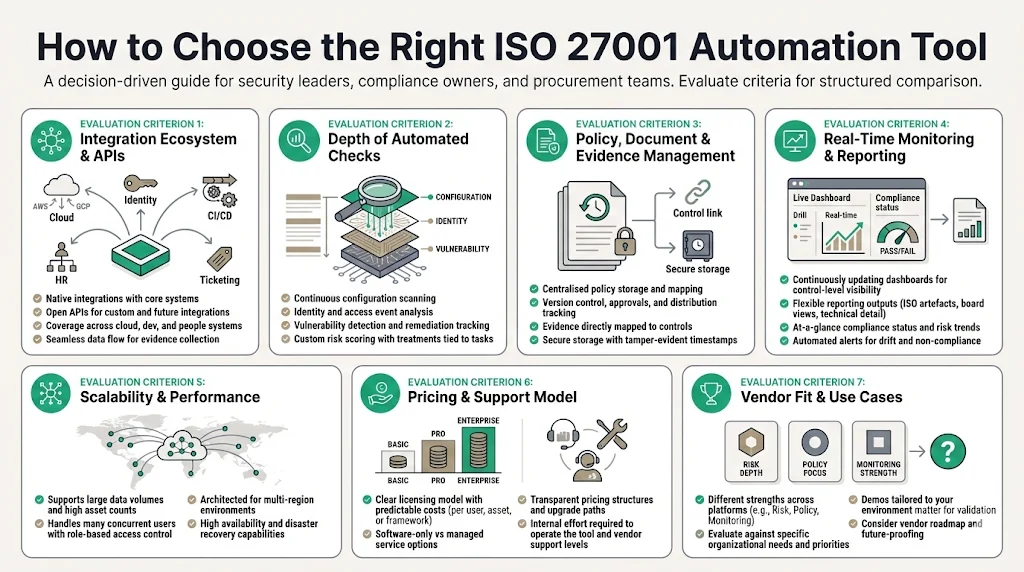
Selecting a solution should be based on objective criteria rather than marketing promises. Use this checklist when evaluating providers:
-
Integration ecosystem and APIs: Confirm that the tool connects natively to your cloud providers, identity platforms, development pipelines, ticketing systems and HR systems. Look for open APIs to support custom integrations and future‑proofing.
-
Depth of automated risk and control checks: Evaluate how deeply the platform inspects configurations, access events and code repositories. Does it support continuous scanning, vulnerability management and custom risk scoring? Are risk treatments tied to tasks?
-
Document, policy and evidence management: The tool should centralise policies with version control, map them to controls and store evidence securely with time stamps. Look for approval workflows and distribution tracking.
-
Real‑time monitoring and reporting: Ensure dashboards update continuously and provide drill‑down capabilities. Reporting should be flexible, allowing you to generate ISO‑compliant artefacts, board summaries and technical details.
-
Scalability and performance: The platform must handle large volumes of data and users without slowing down. Ask vendors how they support multi‑region environments and whether they offer role‑based access controls.
-
Pricing and vendor support model: Understand licensing—per user, per asset or per framework—and any additional costs. Evaluate whether the vendor offers managed services or expects your team to operate the tool. Konfirmity differs from pure software by providing a human‑led managed service.
-
Vendor examples: Platforms such as Vanta, Cyber Sierra, Sprinto and Scrut specialise in ISO 27001 automation tools. Secureframe, AuditBoard and Drata are other widely used solutions. Each product has different strengths—some focus on continuous monitoring across multiple frameworks; others provide strong policy management or deep risk analytics. Ask for demonstrations tailored to your environment.
Conclusion
The days of last‑minute scrambles are behind us. ISO 27001 has become a prerequisite for enterprise and healthcare deals, and compliance programmes are now judged by their operational maturity. An ISMS built on automation demonstrates that your organisation manages risks proactively, implements controls consistently and produces evidence continuously. ISO emphasises continual improvement and risk management; NIST shows that automation enhances monitoring efficiency and makes security data readily available. Regulators like the HHS Office for Civil Rights are imposing million‑dollar penalties on organisations that fail to perform thorough risk analyses. Breach costs continue to climb, with hybrid cloud breaches averaging over USD 5 million.
Konfirmity’s experience delivering thousands of audits proves that success does not come from simply buying software. It comes from building a security programme that fits your technology stack and business context, running it daily, and letting compliance follow. Human‑led expertise paired with automation ensures that controls are not just designed but operate in practice. Start with security—select the right ISO 27001 automation tools, build a risk‑based ISMS and automate evidence. Arrive at compliance as a natural result.
FAQ
1. What makes ISO 27001 automation different from general compliance platforms?
General governance, risk and compliance software often provides generic task tracking and document repositories. ISO 27001 automation tools go deeper by connecting directly to cloud configurations, source code repositories and identity providers. They perform continuous monitoring of technical controls, automate risk assessments and map evidence to specific ISO clauses. This reduces manual work and ensures that the ISMS remains current rather than becoming a static document.
2. Can ISO 27001 compliance be fully automated?
Automation handles repetitive evidence collection, risk scoring and workflow management. However, human judgement remains vital. Security professionals must interpret risk context, approve policy changes, conduct management reviews and make decisions about acceptable risk levels. NIST emphasises that while automation reduces routine work, it cannot replace human analysis. The goal is to free humans to focus on strategic security decisions, not to remove them from the process.
3. Do automation tools replace auditors?
No. Auditors provide independent verification that controls are designed and operating effectively. Automation tools make the audit process smoother by providing organised evidence and real‑time dashboards. Auditors still test controls, review evidence and interview stakeholders. Automation reduces the time spent collecting and organising documents, allowing auditors to focus on evaluating control effectiveness.
4. How long does it take to automate ISO 27001 compliance?
Implementation timelines vary based on organisational size, complexity and the maturity of existing processes. With a dedicated automation platform and expert guidance, many organisations achieve ISO 27001 readiness within 4–5 months. Self‑managed programmes without automation can take 9–12 months or more. The most time‑consuming tasks are integrating systems, mapping controls and remediating gaps; automation accelerates these steps by providing ready‑made integrations and continuous assessments.