ISO 27001 backup and recovery is governed by Annex A 8.13, "Information Backup," which requires organizations to maintain and regularly test backup copies of information, software, and systems against a documented policy — a scanner-free, evidence-based requirement that a scheduled backup job alone does not satisfy. Getting it wrong is expensive: IBM's 2026 Cost of a Data Breach Report found the global average breach cost reached a record $4.99 million, up 12% year over year, and the mean time to identify and contain a breach rose to 247 days — reversing five straight years of improvement. Fast, verified recovery is one of the few levers an organization fully controls in that timeline.
This guide is for CISOs, IT leaders, and compliance teams at midmarket and startup companies — particularly fintechs with license obligations, healthcare vendors handling PHI, and companies selling into enterprise accounts, where an unrecoverable backup isn't a technical footnote, it's a broken contractual commitment.
Key Takeaways: ISO 27001 Backup and Disaster Recovery
- Annex A 8.13 requires maintaining and regularly testing backup copies of data, software, and systems against a documented, topic-specific policy — not just running scheduled jobs.
- Backup and disaster recovery are related but distinct: backup restores data to a point in time; disaster recovery restores full systems and services after a major disruption.
- A compliant program needs a written backup policy, defined RTO and RPO objectives, encrypted and tested backups, and documented restore-test results as audit evidence.
- The most common gap Konfirmity finds in audits isn't missing backups — it's untested ones: a scheduled job with no proof the data actually restores.
- ISO 27001:2022 moved continuity requirements out of the old "Annex A 17" clause (2013 edition) into Annex A 5.29 (information security during disruption) and 5.30 (ICT readiness for business continuity) — citing "Annex A 17" against the current standard is itself a documentation red flag to auditors.
ISO 27001 Backup and Recovery: Where It Fits in the ISMS
ISO 27001:2022 defines how organizations build an Information Security Management System (ISMS) — a structured set of policies, processes, and controls protecting the confidentiality, integrity, and availability of information. Annex A applies its controls on a risk basis, but backup is one of the few areas where the standard is explicit rather than open-ended.
What Annex A 8.13 Requires
Annex A 8.13 states that backup copies of information, software, and systems must be maintained and regularly tested in accordance with an agreed, topic-specific backup policy. In practice, that means:
- Identifying information assets and classifying them by sensitivity and criticality.
- Defining a backup policy covering frequency, media types, encryption, retention periods, and testing.
- Verifying backups are actually recoverable through regular restore tests — the step most programs skip.
Two additional Annex A 5 controls complement 8.13 under the current 2022 standard: 5.29 (Information security during disruption) requires maintaining security properties like confidentiality and integrity even during a crisis, and 5.30 (ICT readiness for business continuity) requires the technical capability to actually restore systems within agreed timeframes. Together, these three controls require a program that covers backup, security continuity, and technical recovery readiness — not backup in isolation.
How Backup and Recovery Fit Into the ISMS
An ISMS ties backup and recovery into risk management, data protection, business continuity, and incident response rather than treating them as a standalone IT task:
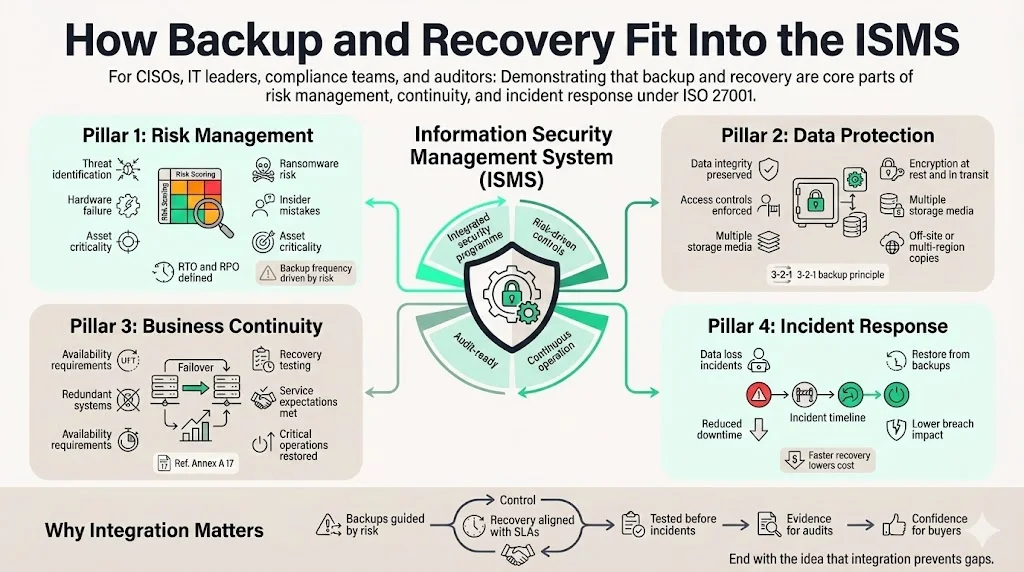
- Risk management. The risk assessment identifies threats — ransomware, hardware failure, insider error — that could cause data loss. Organizations should identify what to back up based on business value and set recovery time (RTO) and recovery point (RPO) targets accordingly.
- Data protection. Backups preserve integrity through accurate copies; encryption and access controls protect confidentiality; geographically distinct, multi-media storage protects availability. The NIST-endorsed 3-2-1 rule — three copies, two media types, one off-site — is the reference model most auditors expect to see reflected in a policy.
- Business continuity. Redundancy ensures a failed system has somewhere to fail over to, and recovery has to be tested, not assumed, to confirm critical operations resume within agreed timeframes.
- Incident response. When data loss occurs, the ability to restore quickly is what limits the blast radius — this is the operational link between backup and the 247-day mean containment time above.
Backup vs. Disaster Recovery
Backup and disaster recovery get used interchangeably, but ISO 27001 treats them as related, distinct disciplines with different scope.
Backup creates point-in-time copies of data so it can be restored if lost. Backups may be full (complete copies), incremental (changes since the last backup of any kind), or differential (changes since the last full backup) — each trades storage cost against recovery speed differently.
Disaster recovery is the broader plan for restoring systems, services, and business processes after a major disruption: infrastructure failover, alternate work sites, communication protocols, and coordinated response, not just data. Annex A 5.30 specifically requires planning and verifying this technical restoration capability.
Data Integrity, Confidentiality, and Availability
A backup program has to uphold the same security triad as everything else in the ISMS:
- Integrity — verified through checksums and restore tests; a corrupted or incomplete backup that "succeeded" on the job log is still a failed control.
- Confidentiality — backups often contain the most sensitive data in the organization, so encryption at rest and in transit, plus restricted access to backup media, is non-negotiable.
- Availability — redundancy across storage locations and media types, per the 3-2-1 rule, so a single failure (a vendor outage, a regional disaster) doesn't take out every copy at once.
Building a Backup and Recovery Program
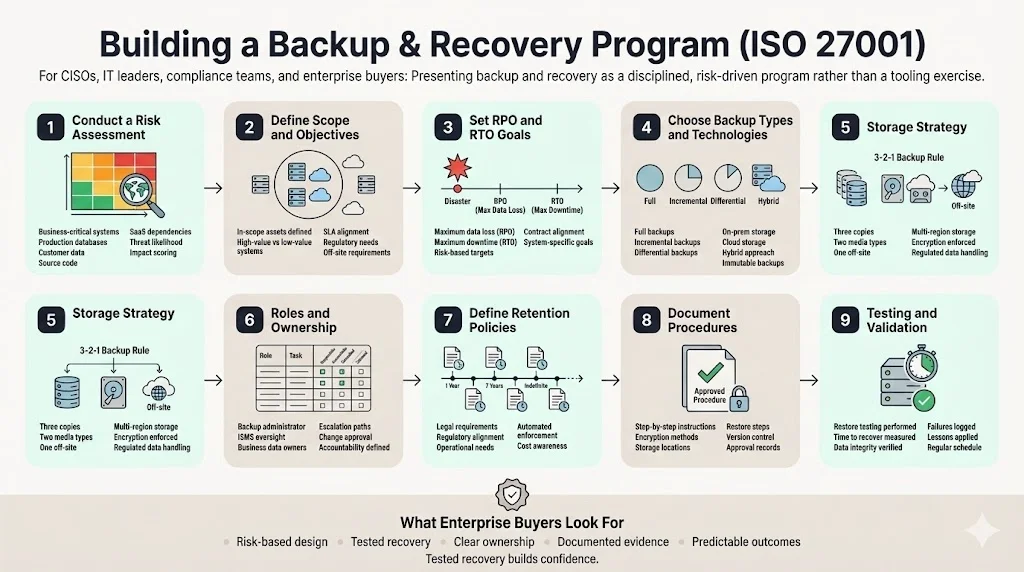
Konfirmity's experience across 6,000+ security audits shows a strong program follows the same disciplined sequence regardless of company size.
1: Conduct a Risk Assessment
A backup program starts with a risk assessment: identify business-critical systems and data — production databases, customer files, source code repositories, SaaS services — and evaluate the impact of losing each one against the likelihood of the threats that could cause it (ransomware, hardware failure, insider error). A structured methodology (ISO 27005 or NIST 800-30) keeps the prioritization defensible rather than subjective.
2: Define Scope and Objectives
Decide which assets the backup program actually covers. High-value, high-uptime systems need continuous or near-real-time backup; less critical systems can run daily or weekly. Scope has to match business use cases and customer SLAs — healthcare organizations, for example, need a documented plan for backing up ePHI to a secure off-site location.
3: Set RPO and RTO Goals
Recovery Point Objective (RPO) defines the maximum age of data you can afford to lose. Recovery Time Objective (RTO) defines how long you can take to restore operations. A payment gateway might need near-zero RPO and RTO; archival data can tolerate a much longer window. Document both and confirm they match your actual contractual commitments — not an aspirational number nobody has tested against.
4: Choose Backup Types and Technologies
Match the backup method to the RPO/RTO target: full backups are simplest to restore but cost the most storage and time; incremental backups minimize storage but lengthen restoration since multiple increments have to be applied; differential backups split the difference. Choose on-premises, cloud, or hybrid storage accordingly, and consider immutable storage for critical systems — it protects backups from modification even if ransomware compromises the source environment.
5: Storage Strategy and the 3-2-1 Rule
Maintain three copies of data, on two different media types, with one copy off-site — the 3-2-1 rule remains the reference model auditors check against. Use multiple geographic locations to survive a regional disaster, and encrypt everything at rest and in transit. For regulated data (ePHI, GDPR personal data), confirm storage providers meet the applicable compliance requirements and have signed the necessary data processing agreements.
6: Roles and Ownership
Assign responsibility explicitly: a backup administrator or DevOps engineer runs the backups and troubleshoots failures; an ISMS manager or security officer verifies the program meets policy and approves changes; business stakeholders own the RPO/RTO decisions and data classification for their systems. Document these roles in the Statement of Applicability, not just in someone's head.
7: Define Retention Policies
Retention has to reflect legal, regulatory, and operational requirements — financial records might need seven years, system logs might need one. Document retention periods per data type and enforce them automatically through the backup tooling rather than manual cleanup.
Tested backups are a security control, not just an IT checkbox.
Share your work email and we'll help you harden your backup and recovery program for audit.
8: Document Procedures
ISO 27001 requires documented, version-controlled, approved procedures — the exact steps for backup creation, storage, and restoration, including file naming, encryption method, off-site transfer, and restoration steps. This documentation, stored in the ISMS alongside other policies with version history and sign-off, is what becomes audit evidence.
9: Testing and Validation
Testing and validation are what separate a real control from a scheduled job: the most common gap Konfirmity finds in audits isn't a missing backup — it's an untested one. Teams schedule jobs and never prove the data actually restores. Run restore drills on a schedule that matches risk: quarterly for high-value systems, at least annually for everything else, and always after a significant system change or incident. Track the time to restore and verify data integrity every time, log failures, and feed the results back into the program.
Best Practices to Strengthen Backup and Recovery
- Automate backups and monitoring. Schedule, verify completion, and alert on failure automatically — a human checking a dashboard once a week is not a control.
- Maintain redundancy. Avoid a single storage vendor or region; keep at least one system disconnected from the business network for emergency use.
- Secure the backup infrastructure itself. MFA on administrative access, least privilege, regular patching, and encryption secrets stored separately from the backups they protect.
- Wire alerts into incident response. A failed backup job should reach the same team that responds to a live incident, not sit in an inbox.
- Update the plan after every material change. A migration, a new region, a new regulatory obligation — all of these should trigger a policy update and a re-test, not wait for the next audit cycle.
- Track backup metrics in management review. Success rate, restore-test success rate, actual restore time versus RTO, and storage utilization all belong in the same continual-improvement loop Clause 10 requires elsewhere in the ISMS.
Common Mistakes and How to Avoid Them
The common mistakes and how to avoid them are consistent across thousands of audits — the same handful of gaps recur:
- Untested backups. Scheduled but never restored, so hidden corruption goes unnoticed until the day it matters. Fix: regular restore drills with logged results.
- Single storage location or vendor. One point of failure for every copy you have. Fix: apply the 3-2-1 rule for real, not on paper.
- Incomplete documentation. Auditors look for policy, procedure, and test logs together — missing any one of the three produces a finding even if the backups themselves are fine.
- Weak encryption or access control. Backups concentrate your most sensitive data in one place; failing to encrypt or restrict access to it can violate HIPAA and GDPR obligations on top of Annex A 8.13.
- Unclear ownership. When nobody explicitly owns the backup program, failures get discovered at restore time, not before.
- Stale evidence. Evidence collected once during readiness and never refreshed doesn't hold up for a SOC 2 Type II observation period or an ISO 27001 surveillance audit — both expect evidence spanning months, not a snapshot.
Audits and Compliance Checks
Auditors reviewing backup and recovery controls check documentation and operational evidence together: a management-approved backup policy, a risk assessment identifying critical data, documented RPO/RTO, and — critically — restore test reports, since Annex A 8.13 explicitly requires regular testing. They will also sample backup job logs to confirm backups ran on schedule and that failures were addressed, not just logged and ignored.
The most common nonconformities: missing test logs (no proof a backup actually works), undocumented procedures, inconsistent backup schedules that don't match the stated RPO/RTO, insufficient storage protection (no encryption, no off-site copy), and unclear ownership. A managed platform reduces this burden by producing evidence automatically — backup job logs, restore-test reports, and versioned policy documents all live in one place instead of being reconstructed by hand before every audit.
Free template
The ISO 27001 Backup & Disaster Recovery Policy Template
A ready-to-adapt policy, an RPO/RTO worksheet, the 3-2-1 storage checklist, and a worked restore-test log showing exactly what auditors expect. Enter your work email and we'll send the PDF.
Disaster Recovery and Business Continuity
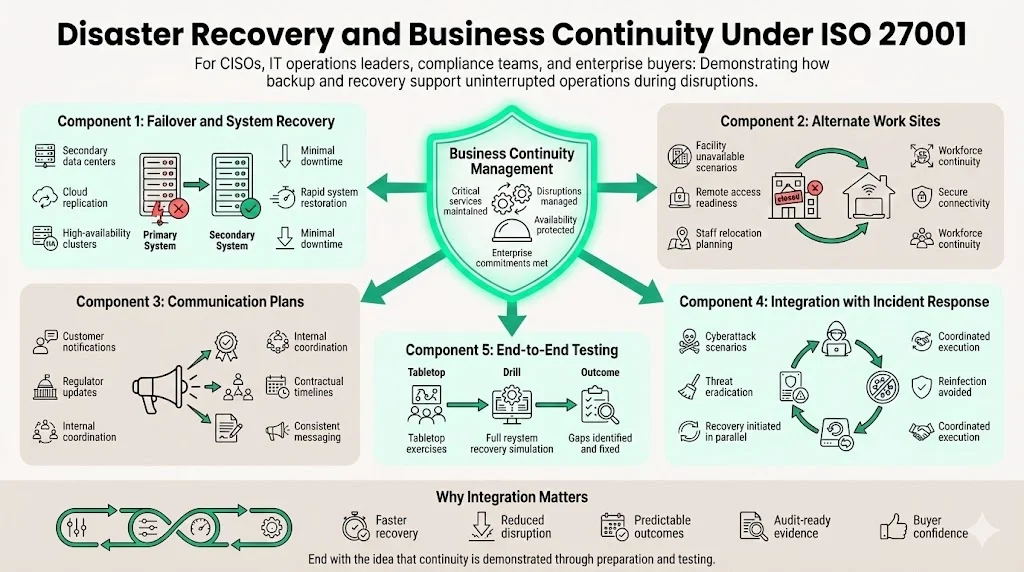
Backup and recovery are cornerstones of a broader business continuity strategy. Annex A 5.29 and 5.30 (replacing the 2013 standard's "Annex A 17" continuity clause) integrate information security continuity into business continuity management, covering:
- Failover options — secondary data centers, cloud replication, and high-availability clusters that restore systems quickly rather than from a cold start.
- Alternate work sites — staff relocation and remote access readiness if a primary facility becomes unavailable.
- Communication plans — how customers, regulators, and internal teams get notified during a major disruption, consistent with legal and contractual obligations.
- Integration with incident response — recovery and threat eradication have to happen in parallel; restoring a system that's still compromised just re-infects it.
- End-to-end testing — tabletop exercises and full recovery drills involving cross-functional teams and third-party providers, not just the infrastructure team in isolation.
For the full ISO 27001 business continuity and disaster recovery plan requirements, see our ISO 27001 business continuity and DR guide.
See if your backups would actually pass a restore test
Book a demo and we'll map your current backup and recovery program against what ISO 27001 auditors and enterprise buyers actually check.
Book a demo
Frequently Asked Questions: ISO 27001 Backup and Recovery
Yes. While ISO 27001 doesn't prescribe specific tools, Annex A 8.13 states that backup copies of information, software, and systems must be maintained and regularly tested. The standard expects a documented policy, implemented backups, and verified recoverability — Annex A 5.29 and 5.30 complement this by requiring information security continuity and technical recovery readiness.
Annex A is the reference list of security controls in ISO 27001:2022. The 2022 revision streamlined it to 93 controls across four themes: organizational, people, physical, and technological. Annex A 8.13, Information Backup, is the specific control covering backup and recovery.
The four common backup types are full backups, which copy all data every time; incremental backups, which copy only data changed since the last backup of any kind; differential backups, which copy data changed since the last full backup; and mirror backups, which keep an exact, continuously updated copy of the source data. Most ISO 27001 backup policies combine full and incremental backups to balance storage cost against recovery speed.
Testing frequency depends on risk and business requirements — there's no single mandated interval. Many enterprises test critical system restores quarterly and perform a full restore annually, and testing should always follow a significant system change or incident, not just run on a fixed calendar.
Backups are copies of data that allow restoration to a specific point in time. Disaster recovery is the broader strategy to restore systems and services after a major disruption — infrastructure failover, alternate work sites, communication plans, and coordinated response. Both are necessary; one without the other leaves a real gap.
Auditors examine documented policies, backup schedules, evidence of backup jobs, and restore test logs, and verify that RPO and RTO objectives are both defined and actually met. For SOC 2 Type II, they sample evidence across the observation period (typically 6–12 months) to confirm consistency; for ISO 27001, they check that Annex A 8.13 and the 5.29/5.30 continuity controls are implemented and operating.
Common failures include untested backups, missing documentation, reliance on a single storage location, lack of encryption, and ambiguous ownership. Auditors also flag inconsistent backup schedules and failure to meet defined RPO/RTO objectives. Fixing these means automating backups, enforcing the 3-2-1 rule, documenting procedures, and assigning clear roles.
ISO doesn't publish the Annex A control list as a free public PDF — the full control text is part of the paid ISO/IEC 27001:2022 standard. Konfirmity's backup and disaster recovery checklist above covers the Annex A 8.13 requirements in a practical, downloadable format.
Conclusion
Backup and recovery extend past certification — done well, they build the trust enterprise customers actually pay for and support resilience across every framework you hold at once. ISO 27001 calls for a risk-based ISMS, and Annex A 8.13, alongside the 2022 standard's 5.29 and 5.30 continuity controls, embeds backup and continuity directly into that system: a documented policy, real RPO/RTO targets, the 3-2-1 rule, and — the step most programs skip — proof the restore actually works. Security controls have to hold up under an attack, not just an audit; a resilient backup and recovery program grounded in the current standard is what gives enterprise buyers confidence you can meet service commitments and restore operations quickly when something goes wrong.