

Most enterprise and healthcare buyers now request security evidence before signing a contract. Procurement questionnaires ask about encryption, how cryptographic keys are stored, and whether access reviews are performed. Without defensible controls and continuous evidence, deals stall even if a team believes it is “audit‑ready” on paper. The American Institute of Certified Public Accountants (AICPA) defines a SOC 2 examination as a report on controls at a service organisation relevant to security, availability, processing integrity, confidentiality or privacy. For companies selling to enterprise clients, SOC 2 Key Management Best Practices are not optional; they underpin trust and reduce risk.
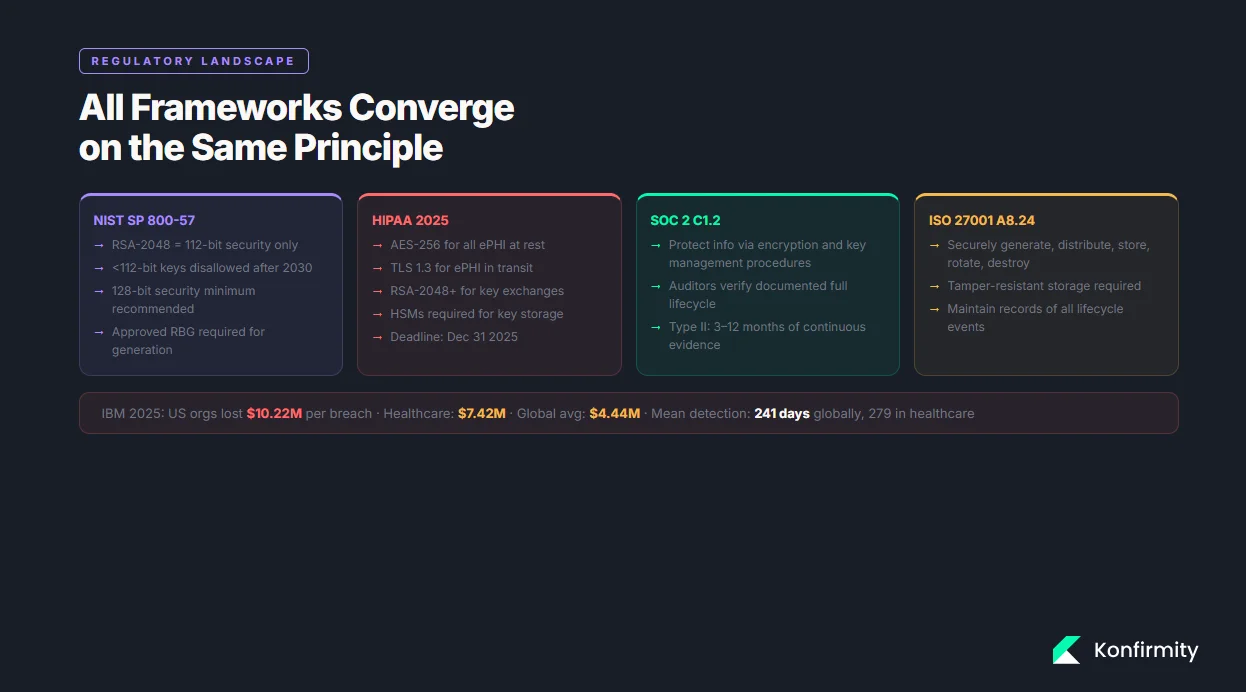
Recent data breach statistics illustrate the stakes: IBM’s 2025 report found that U.S. organisations paid an average of $10.22 million per breach, while the global average was $4.44 million and healthcare incidents still cost $7.42 million. Detection and containment times have improved (241 days globally, 279 days for healthcare), yet regulators and buyers expect stronger evidence. At the same time, encryption requirements are tightening. NIST guidelines require all government TLS servers and clients to support TLS 1.2 and TLS 1.3 by January 1 2024, and HIPAA’s 2025 update mandates AES‑256 encryption for electronic protected health information (ePHI), TLS 1.3 for data in transit and RSA‑2048 or higher for key exchanges by December 31 2025. Strong key management is therefore a technical necessity and a business enabler.
What Is Key Management in SOC 2?
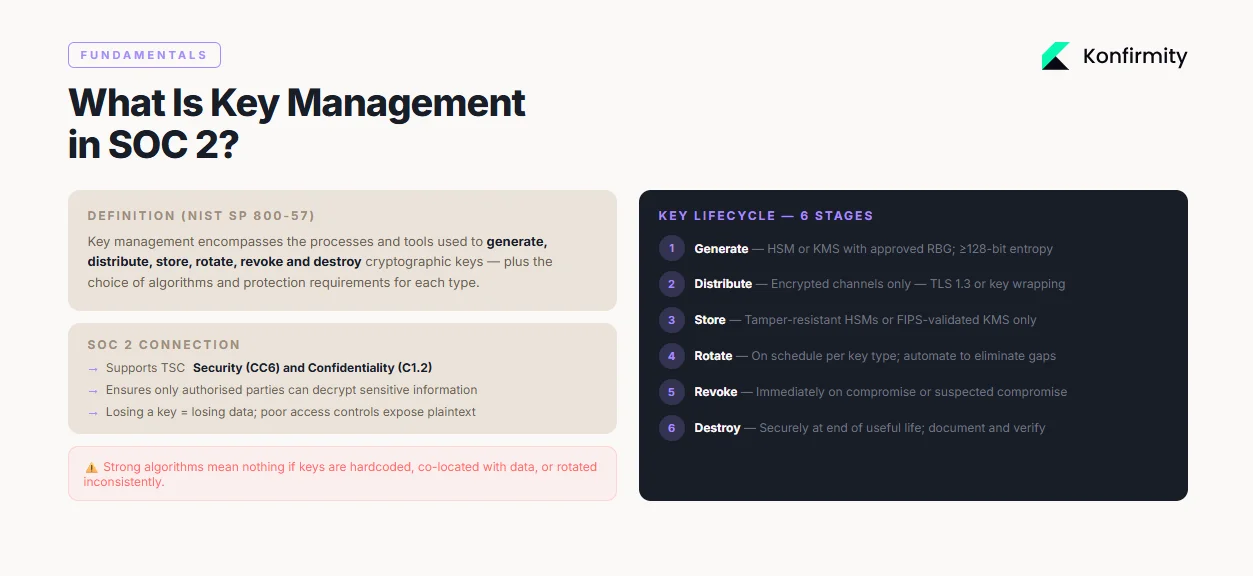
Encryption keys are secret values used by algorithms such as Advanced Encryption Standard (AES) and RSA to transform readable data into unreadable ciphertext and back again. Key management encompasses the processes and tools used to generate, distribute, store, rotate, revoke and destroy those keys. NIST’s Special Publication 800‑57 explains that proper key management includes the choice of algorithms, specification of protection required by each type of key and the functions involved in key management. Under SOC 2, key management supports the Trust Services Criteria for security and confidentiality by ensuring that only authorised parties can decrypt sensitive information. Without sound key management, encryption is fragile: losing a key means losing data, while poor access controls expose plaintext to attackers.
Key Concepts Every Team Needs to Know
-
Cryptographic keys and security strength: NIST notes that a 2048‑bit RSA key provides about 112 bits of security, meaning its strength is limited by the weakest algorithm in the system. To meet current standards, encryption keys should provide at least 128 bits of security; SP 800‑131A indicates that strengths below 112 bits will be disallowed after 2030.
-
Secure key storage: Keys must be protected throughout their lifecycle. ISO 27001 Annex A 8.24 specifies that organisations should generate keys securely, distribute them over trusted channels, store them in tamper‑resistant modules, rotate them periodically, revoke compromised keys, back up keys, and ensure proper destruction.
-
Key distribution: Keys should be transmitted only over encrypted channels. NIST’s TLS guideline requires TLS 1.2 with FIPS‑approved cipher suites and support for TLS 1.3, while HIPAA updates mandate TLS 1.3 for all ePHI transmissions.
-
Key rotation and lifecycle management: Keys must be rotated and retired to limit exposure. Tencent Cloud’s best practices recommend rotating symmetric keys every 90 days and using automated tools to avoid human error. Azure Key Vault advises rotating encryption keys at least every two years and supports policies that rotate keys automatically no more than once every 28 days.
-
Linking to SOC 2 criteria: Confidentiality criterion C1.2 expects organisations to protect information by employing encryption and key management procedures. Auditors verify that keys are generated securely, stored in controlled environments, rotated regularly, revoked when compromised, and destroyed at the end of their useful life.
SOC 2 Compliance and Key Management
How SOC 2 Frames Encryption and Keys
The SOC 2 framework is purposefully flexible. It does not prescribe specific tools, but it does expect service organisations to implement controls that protect sensitive data. The AICPA notes that SOC 2 reports address controls relevant to security, availability, processing integrity, confidentiality and privacy. To satisfy those controls, encryption is often required. However, the strength of encryption depends on the algorithms and key lengths used. NIST explains that a 2048‑bit RSA key only offers 112 bits of security strength, and SP 800‑131A states that keys providing less than 112 bits of strength will be disallowed after 2030. Therefore, organisations should prefer 128‑bit security or higher, using AES‑128, AES‑256 or RSA‑2048+ keys.
Modern regulations reinforce these expectations. The 2025 HIPAA update requires AES‑256 for data at rest, TLS 1.3 for data in transit and RSA‑2048 or higher for key exchanges, with compliance due by December 31 2025. NIST’s TLS guidelines require government systems to support TLS 1.3 by January 1 2024. These standards set a high bar for any organisation handling protected information.
The Compliance Lens
Auditors evaluating SOC 2 and ISO 27001 look for evidence that key management practices are consistent and documented. Evidence may include:
-
Policies and procedures outlining how keys are generated, stored, rotated and destroyed.
-
Access reviews showing that only authorised roles can access key material.
-
System and event logs demonstrating that key usage, rotation and deletion events are recorded and monitored.
-
Change‑management records showing approval for key rotation and revocation. For SOC 2 Type II reports, these controls must operate over an observation period of three to twelve months, and fieldwork often takes one to two months. A control that fails once during the period can jeopardise the report. Strong key management reduces this risk by automating processes and maintaining consistent evidence.
Core Best Practices With Steps
This section translates high‑level requirements into actionable steps. Each practice explains why it matters, what to do, how to implement it and what evidence auditors expect. Together, these practices embody SOC 2 Key Management Best Practices and show how to operate keys safely and efficiently.
1) Cryptographic Key Generation
Why it matters: Weak or poorly generated keys undermine encryption. NIST emphasises that the security strength of a cryptographic system depends on the weakest algorithm; for example, 2048‑bit RSA provides only 112 bits of security. Selecting strong algorithms and high‑entropy key material is therefore essential.
What to do:
-
Use industry‑accepted algorithms: AES‑128 or AES‑256 for symmetric encryption, RSA‑2048 or higher for asymmetric encryption, and elliptic‑curve cryptography (ECC) such as P‑256 or P‑384 where supported.
-
Generate keys using an approved random bit generator (RBG). NIST states that an RBG used to generate an AES‑128 key must support at least 128 bits of entropy.
-
Leverage hardware security modules (HSMs) or cloud key management services (KMS) to generate and store keys.
-
Document key parameters (algorithm, key length, creation time, owner, expiration date).
How to implement:
-
Automate key generation: Use KMS or HSM to generate keys programmatically. For example, AWS KMS supports automated key creation with defined key sizes and usage policies.
-
Integrate with provisioning: When spinning up a new environment, generate new keys via infrastructure‑as‑code.
-
Ensure unique keys: Do not reuse encryption keys across environments or customers.
Evidence auditors expect: Provide logs from the KMS showing key creation events, along with the configuration (algorithm, key size) and approval records. Demonstrate that the RBG used meets NIST requirements.
2) Secure Key Storage and Distribution
Why it matters: Even the strongest key loses its value if stored in plain sight. ISO 27001 emphasises that keys must be stored in tamper‑resistant modules and that distribution should occur over trusted channels. HIPAA’s 2025 update likewise requires secure key management systems such as HSMs.
What to do:
-
Store master keys in HSMs or FIPS‑validated KMS to protect against unauthorised extraction.
-
Use secure vaults (e.g., AWS Secrets Manager, HashiCorp Vault) for API keys and certificates.
-
Distribute keys over encrypted channels using TLS 1.2/1.3 with approved cipher suites.
-
Separate keys from the data they encrypt; never embed keys in code or configuration files.
How to implement:
-
HSM setup: Configure HSM clusters with redundancy. Enforce dual control for key export operations.
-
Vault configuration: Define access policies that restrict secrets to specific roles. Use dynamic secrets with limited lifetimes.
-
Network hardening: Ensure TLS certificates are valid and that both server and client support TLS 1.3. Use mutual TLS for machine‑to‑machine communication.
-
Key wrapping: When transmitting keys between systems, wrap them with another key (Key Encryption Key) stored in an HSM.
Evidence auditors expect: Provide architecture diagrams showing separation of keys and data, configuration files demonstrating TLS 1.3 enforcement, HSM access logs, and distribution logs. If keys are exported, show dual‑control approval records.
3) Role‑Based Access and Access Controls
Why it matters: Restricting who can access encryption keys reduces the risk of insider misuse and credential theft. Access control is a core SOC 2 requirement and underpins incident response and accountability.
What to do:
-
Define roles (e.g., Key Custodian, Security Officer, Developer, Auditor) and assign least‑privilege permissions.
-
Use identity and access management (IAM) platforms that integrate with your KMS to enforce these roles.
-
Require multi‑factor authentication (MFA) for any operation involving key creation, rotation or deletion.
-
Implement separation of duties: no individual should both generate and approve the deletion of keys.
-
Review access permissions regularly (at least quarterly) and remove unused or stale access promptly.
How to implement:
-
RBAC policies: Define policies in your IAM tool that map roles to specific KMS actions (e.g., kms:GenerateDataKey, kms:DisableKey). Use attribute‑based access control (ABAC) for environment‑specific restrictions.
-
Approval workflows: Integrate with ticketing systems so that key rotation or deletion requests require manager approval.
-
Audit trails: Configure your KMS to log all administrative actions. Forward logs to a central SIEM for monitoring.
Evidence auditors expect: Show role definitions, access control lists, and documented approval workflows. Provide access review records and logs of key‑related actions, including who performed them and when.
4) Key Rotation and Lifecycle Management
Why it matters: Over time, encryption keys can become weaker through cryptanalysis, and long‑lived keys increase the window of exposure if compromised. NIST notes that keys with security strength below 112 bits will be disallowed after 2030, and many cloud providers recommend regular rotation. Tencent Cloud suggests rotating symmetric keys every 90 days, automating the process and retaining previous key versions for backward compatibility. Azure Key Vault recommends rotating keys at least every two years and supports automatic rotation policies.
What to do:
-
Define rotation schedules based on key type and risk. For example, rotate data encryption keys (DEKs) every 90 days, key encryption keys (KEKs) annually, and certificates before expiration.
-
Automate rotation using KMS/HSM features.
-
Maintain versioning: keep previous keys to decrypt existing data while new data is encrypted with the new key.
-
Retire and destroy old keys once data encrypted with them has been re‑encrypted or is no longer needed.
-
Document rotation activities and maintain a calendar that shows upcoming rotations.
How to implement:
-
Configure rotation policies: In AWS KMS, enable automatic key rotation (yearly by default). In Azure Key Vault, create a rotation policy with a specified lifetime (e.g., 180 days).
-
Version management: When deploying new keys, update applications to use the latest version. Use a key alias that points to the current key.
-
Testing: Before deploying rotation, test the process in a staging environment. Validate that encrypted data can still be decrypted after rotation.
-
Scheduling: Maintain a calendar (or integrate with your change‑management system) that lists rotation dates and responsible owners.
Evidence auditors expect: Present rotation policies, a rotation calendar with evidence of execution, and logs from the KMS showing key rotation events. Provide records of decommissioned keys and verification that data has been re‑encrypted or destroyed.
5) Policy Enforcement and Documentation
Why it matters: A written policy clarifies responsibilities, standardises procedures and provides evidence to auditors. Without it, practices may vary across teams, leading to inconsistent control execution.
What to do:
-
Draft a key management policy that covers scope, roles and responsibilities, approved algorithms, key generation procedures, storage requirements, distribution methods, rotation schedules, destruction methods and backup considerations.
-
Assign ownership to a designated role (e.g., Key Custodian or CISO).
-
Define a review cadence (e.g., annual or whenever regulations change).
-
Train personnel on the policy and incorporate it into onboarding.
-
Keep policy documents under version control.
How to implement:
-
Use templates: Start with a standard template (see Section 5). Modify it to reflect your environment, frameworks (SOC 2, ISO 27001, HIPAA), and risk appetite.
-
Approval: Have the policy reviewed and approved by executive leadership.
-
Distribution: Publish the policy on the internal knowledge base and require acknowledgement from relevant staff.
-
Monitoring: Link policy enforcement to automated checks. For example, use infrastructure‑as‑code linting to flag resources that do not enforce encryption.
Evidence auditors expect: Provide the approved policy, review logs showing when it was last updated, training records, and proof that the policy is being followed (e.g., code reviews referencing policy sections).
6) Automated Key Management
Why it matters: Manual key management invites errors, delays rotations and complicates evidence collection. Automation reduces human mistakes and ensures consistent execution. In Konfirmity’s experience, automated key management cuts internal effort by 75% compared with manual processes and shortens audit readiness to four or five months instead of nine to twelve months.
What to do:
-
Use cloud key management services (AWS KMS, Azure Key Vault, Google Cloud KMS) that integrate with identity providers, logging systems and monitoring platforms.
-
Automate key creation, rotation and deletion through infrastructure‑as‑code and CI/CD pipelines.
-
Integrate key usage monitoring into SIEM or data‑loss prevention (DLP) systems.
-
Automate evidence collection by exporting logs and policy documents to an audit package.
How to implement:
-
Infrastructure‑as‑code: Define KMS keys, rotation schedules and access policies in Terraform or CloudFormation. Use code reviews to ensure that encryption is enabled for all data stores.
-
CI/CD integration: When deploying new microservices or databases, automatically request a data encryption key from the KMS and inject it into the service environment.
-
Event streaming: Stream KMS logs to a central SIEM. Configure alerts for unusual key usage (e.g., access outside business hours).
-
Evidence automation: Use compliance tooling to compile policy documents, rotation logs, and access reviews into an auditor‑friendly package on demand.
Evidence auditors expect: Provide code repositories showing key definitions and rotation policies, CI/CD logs showing automated deployments, SIEM dashboards capturing key activity, and audit packages that aggregate relevant evidence.
Weak key management is one of the fastest ways to fail a cryptographic control test.
Drop your work email and we'll review your key lifecycle controls before your next audit.
7) Auditing and Monitoring
Why it matters: Continuous monitoring ensures that deviations are detected early and that there is a forensic record if something goes wrong. Auditors rely on logs to verify control effectiveness over the observation period.
What to do:
-
Enable audit logging on all key management systems.
-
Forward logs to a central SIEM or logging platform where they can be correlated with other security events.
-
Implement alert rules for key‑related anomalies (e.g., repeated failed decryption attempts, key usage outside of defined hours, or key deletion without an approval ticket).
-
Periodically review logs and document the reviews.
-
Retain logs for a duration that meets both regulatory requirements and business needs (often at least one year).
How to implement:
-
Configure logging: In AWS KMS, enable CloudTrail logging. In Azure, enable diagnostic settings for Key Vault.
-
Centralise: Use a SIEM (Splunk, Elastic, Sentinel) to collect logs. Set up dashboards showing key creation, usage, rotation and deletion.
-
Automate reviews: Schedule monthly or quarterly reviews. Use dashboards to identify trends. Document the review and any follow‑up actions.
-
Incident integration: Ensure that key management events trigger incident response workflows when necessary.
Evidence auditors expect: Provide SIEM reports showing key management activities, alert configurations, and documented log reviews. Demonstrate how anomalies were investigated and resolved.
Integrating With Broader SOC 2 Controls
Key management does not exist in isolation. It interacts with access control, incident response, data handling policies and vendor risk management. Strong integration ensures that your security programme addresses threats holistically and aligns with multiple frameworks.
1) Tying Key Management to Access Controls, Incident Response and Training
Access controls are the gatekeepers of your key management system. Without strict role definitions, even an impeccable encryption scheme can be undermined. Ensure that access to keys is included in your broader identity governance processes. When keys are suspected of compromise, incident response plans should include steps to revoke and rotate them. Staff training must cover secure handling of keys, awareness of phishing and social engineering, and adherence to approval workflows. Tabletop exercises should simulate key compromise scenarios to test readiness.
2) Data Encryption and Data Handling Policies
Encryption at rest and in transit should be integrated with data classification and handling policies. HIPAA now requires all ePHI to be encrypted, specifying AES‑256 for storage and TLS 1.3 for transmission. GDPR requires “appropriate technical and organisational measures” to protect personal data, and encryption is often cited as a means of compliance. ISO 27001, in Annex A 8.24, calls for securely generating, distributing, storing, rotating and destroying keys, along with maintaining records. Align your data handling policies with these standards to avoid fragmentation. For example, require that all customer data classified as “Confidential” or higher be encrypted using approved algorithms; ensure that your policy references the specific key management procedures described in Section 3; and require documented exceptions approved by the CISO.
3) Vendor and Third‑Party Key Management
Enterprise buyers evaluate not only your security but also that of your supply chain. If your product integrates with third‑party services—such as payment processors, analytics platforms or infrastructure providers—you must ensure that they also follow SOC 2 Key Management Best Practices. This includes verifying that vendors use strong encryption (AES‑128 or better) and robust key management; that they support TLS 1.3; and that they rotate keys on a schedule. In healthcare contexts, Business Associate Agreements (BAAs) should explicitly require compliance with HIPAA’s encryption standards. For global customers, Data Processing Agreements (DPAs) should require adherence to GDPR’s Article 32, which stresses encryption and key confidentiality. Conduct vendor assessments at onboarding and at least annually, requesting evidence of key management policies, third‑party audit reports (SOC 2, ISO 27001, or FedRAMP), and penetration test results.
Templates and Examples
Key Management Policy Template
Below is a suggested outline for a key management policy. This table shows the sections and what each should cover. Use it as a starting point and adapt it to your environment and frameworks.
| Section | Description |
|---|---|
| Purpose and Scope | Identify the systems and data covered by the policy, including customer data, internal secrets and third-party integrations. |
| Roles and Responsibilities | Define roles such as Key Custodian, Security Officer, Developer and Auditor. Clarify who can generate, approve, rotate and destroy keys. |
| Approved Algorithms | List the encryption algorithms and key lengths approved for use (e.g., AES-256, RSA-2048, TLS 1.3). Refer to NIST recommendations and HIPAA requirements. |
| Key Generation | Describe how keys are generated (using HSM/KMS, entropy sources), recorded and approved. |
| Key Storage | Specify storage mechanisms (HSMs, KMS, vaults), physical and logical protections, and separation of keys from data. |
| Key Distribution | Require encrypted channels (TLS 1.3, key wrapping) and dual control for key export. |
| Key Rotation | Define rotation intervals for each key type (DEKs, KEKs, certificates) and the process for versioning and decommissioning. |
| Key Revocation & Destruction | Explain how compromised or deprecated keys are revoked and destroyed, including documentation and verification. |
| Backup & Recovery | Outline procedures for backing up keys in secure, encrypted form and recovering keys in the event of HSM failure. |
| Record Keeping | Describe how logs, approval records and rotation events are documented and retained for audit. |
| Policy Review | Set a schedule for reviewing and updating the policy (e.g., annually or after significant changes in regulations). |
Key Rotation Plan Template
Use a calendar or table to manage key rotation. Below is an example for illustrative purposes.
| Key Type | Owner | Rotation Frequency | Next Rotation | Evidence |
|---|---|---|---|---|
| Data Encryption Key (DEK) – Customer Data | Security Officer | 90 days | 15 May 2026 | KMS rotation logs, approval ticket, test results |
| Key Encryption Key (KEK) | Key Custodian | 12 months | 1 Oct 2026 | HSM rotation report, dual-control approvals |
| TLS Certificate | DevOps Team | 12 months (auto-renew) | 30 Sep 2026 | Certificate renewal log, Certificate Transparency proof |
| Database Master Key | DBA | 6 months | 1 Jul 2026 | Config change record, database service restart logs |
Adjust rotation frequencies based on risk, regulatory requirements and customer commitments. Use this table to plan, track and provide evidence during audits.
Audit Evidence Checklist
-
Policy documents: Approved key management policy, encryption standards, and classification guidelines.
-
Key inventory: A list of all active keys, their types, owners, creation dates, rotation schedules and retirement dates.
-
Access control records: IAM policies, RBAC definitions, access review logs and approval tickets.
-
KMS/HSM logs: Key creation, usage, rotation, export and deletion events.
-
Change‑management records: Tickets and approvals for key rotation and revocation activities.
-
Training records: Evidence that staff have completed key management training and acknowledged the policy.
-
Incident reports: Any key‑related incidents, including compromise response and corrective actions.
-
Vendor evidence: Third‑party audit reports (SOC 2, ISO 27001), security questionnaires and BAAs/DPAs that cover key management.
Step‑by‑Step Implementation Plan
This roadmap outlines how to implement SOC 2 Key Management Best Practices in a way that accelerates enterprise sales and ensures compliance. Adjust the timeline based on your size and complexity.
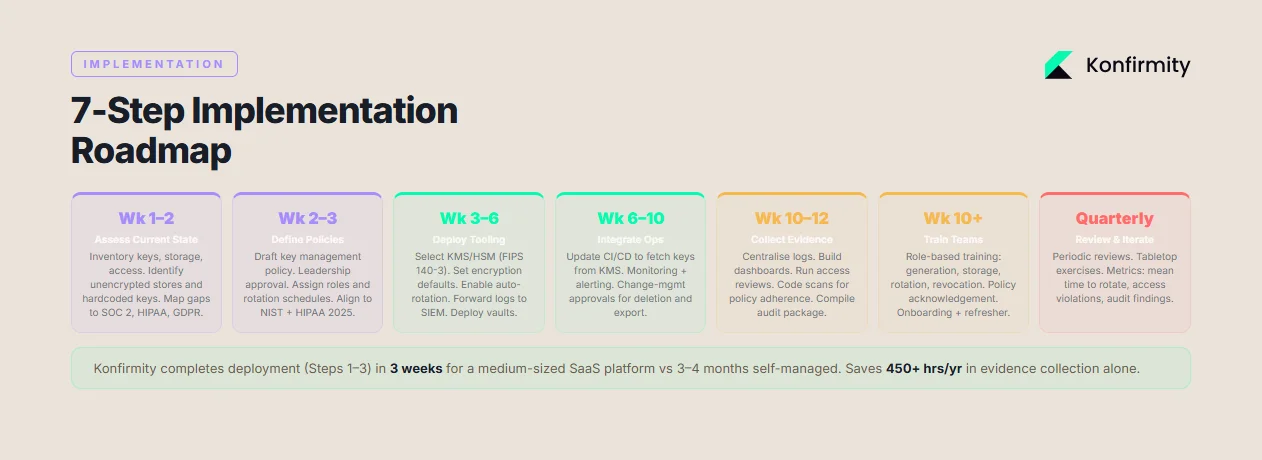
1) Assess Current State (Week 1-2)
Inventory existing encryption keys, storage locations, access controls and rotation schedules. Identify unencrypted data stores, hard‑coded keys, or keys managed outside approved systems. Review current policies and map them against SOC 2, ISO 27001, HIPAA and GDPR requirements. Document gaps and prioritise them based on risk.
2) Define Key Policies (Week 2-3)
Draft or update the key management policy (Section 5.1). Obtain leadership approval and communicate the policy internally. Define roles, assign ownership and set rotation schedules. Align policies with NIST guidelines (e.g., 128 bits of security minimum) and regulatory requirements (e.g., TLS 1.3, AES‑256). Use classification tiers to decide which data must be encrypted and which keys to apply.
3) Deploy Tooling (Week 3-6)
Implement or enhance your key management infrastructure:
-
Choose a KMS/HSM: Select a cloud service (AWS, Azure, GCP) or on‑premises HSM that meets FIPS 140‑3.
-
Set up encryption defaults: Configure databases, object stores and message queues to require encryption with KMS keys.
-
Configure rotation and logging: Enable automatic rotation; forward logs to SIEM.
-
Integrate with identity: Link KMS permissions to your identity provider.
-
Deploy vaults: For application secrets, deploy a vault with dynamic secrets. At Konfirmity, our managed service engineers typically complete this phase within three weeks for a medium‑sized SaaS platform.
4) Integrate Into Operations (Week 6-10)
Update CI/CD pipelines to generate and rotate keys automatically. Modify application code to fetch keys from KMS or vaults rather than storing them in configuration files. Implement monitoring and alerting for key usage anomalies. Ensure that rotation schedules are integrated into change‑management systems and that approvals are required for key deletion or export. Provide training to engineering and operations teams on new processes.
5) Collect Audit Evidence (Week 10-12)
Compile the evidence described in Section 5.3. Ensure logs are centralised and accessible. Create dashboards that illustrate key generation, rotation and access over time. Conduct access reviews and document outcomes. Review policy adherence through code scans and configuration assessments. When using Konfirmity’s managed service, customers typically save more than 450 hours annually because our team handles evidence collection and mapping to SOC 2 controls.
6) Train Teams (Week 10, ongoing)
Deliver role‑based training on key management policies, secure coding practices, and incident response procedures. Use short sessions to cover topics like key generation, storage, rotation and revocation. Require acknowledgment of the policy and track attendance. Provide refresher training during onboarding and whenever policies change.
7) Review and Iterate (Quarterly/Annually)
Conduct periodic reviews of key management practices. Update policies when new regulations (e.g., quantum‑safe algorithms) or frameworks arise. Perform tabletop exercises to test incident response readiness. Solicit feedback from engineering, operations and audit teams to improve processes. Use metrics such as mean time to rotate keys, number of access violations, and audit findings to measure progress.
By following this roadmap, organisations can compress SOC 2 readiness timelines to four or five months and reduce internal effort by roughly 75% compared with self‑managed programmes—based on Konfirmity’s delivery experience across more than 6,000 security audits. At the same time, they build a foundation that satisfies ISO 27001, HIPAA and GDPR, reducing duplication of effort.
Make key rotation something you can prove, not promise
Book a demo and we'll show how Konfirmity tracks your key inventory, rotation schedule and vault access logs, so the cryptographic control tests already have their evidence waiting.
Book a demo
Conclusion
Encryption without disciplined key management is a façade. Buyers and auditors see through it when they ask for evidence. SOC 2’s Trust Services Criteria, ISO 27001 Annex A 8.24 and HIPAA’s 2025 update all converge on the same principle: protect sensitive data through strong keys, secure storage, controlled access, frequent rotation and continuous monitoring. NIST research shows that using weak algorithms or insufficient key lengths leaves systems exposed, while TLS guidelines require modern protocols like TLS 1.3 to safeguard data in transit. HIPAA now mandates AES‑256 at rest and RSA‑2048 or higher for key exchanges. Data breach costs remain steep: U.S. organisations lose an average of $10.22 million per incident and healthcare breaches still cost $7.42 million. The price of poor key management is therefore measured not only in audit findings but also in lost deals, regulatory penalties and reputational damage.
For enterprise‑focused teams, SOC 2 Key Management Best Practices offer more than compliance. They build credibility with buyers, accelerate sales cycles and fortify defences against attackers. By starting with security—carefully designing and operating controls inside your stack—and adopting a managed service approach, you arrive at compliance naturally. Your programme should be human‑led and outcome‑driven: implement controls, monitor them continuously, collect evidence, and respond to incidents. Security that reads well on paper but fails under pressure is a liability. Build the programme once, operate it daily, and let compliance follow.
FAQ
SOC 2 focuses on protecting the confidentiality and security of data. It does not mandate specific tools, but auditors expect to see documented key management practices. These include generating strong keys with approved algorithms, storing keys in secure systems (HSMs or KMS), distributing keys over encrypted channels, rotating keys at defined intervals, revoking compromised keys, and retaining logs of all key‑related actions.
Rotation schedules depend on key type and risk. For symmetric data encryption keys, many organisations rotate every 90 days; asymmetric keys and certificates may rotate annually or biannually. NIST advises that keys with less than 112 bits of security strength should be retired by 2030. Cloud providers like Tencent recommend 90‑day rotations, while Azure Key Vault supports rotating encryption keys at least every two years. The key is to have a documented schedule and to automate rotations to avoid gaps.
No. SOC 2 does not prescribe algorithms, but auditors evaluate whether the chosen algorithms provide adequate protection. NIST publications provide guidance: AES‑128 or AES‑256 for symmetric encryption and RSA‑2048 or ECC for asymmetric encryption. HIPAA’s 2025 update mandates AES‑256 for ePHI and TLS 1.3 for data in transit. Selecting algorithms that meet or exceed these standards is a prudent baseline.
Automation reduces human error, enforces consistent policies and simplifies evidence collection. Cloud KMS and vault services integrate with CI/CD pipelines to generate and rotate keys automatically. They provide centralised logging and access controls, making it easier to demonstrate compliance. Konfirmity’s delivery work shows that automated key management can cut internal effort by roughly 75% and shorten readiness timelines from nine to twelve months down to four or five months, while maintaining a higher degree of control and visibility.
Maintain a clear policy that covers key lifecycle stages; record all key creation, rotation and destruction events; document approval processes and access reviews; and retain logs for the full observation period. For SOC 2 Type II audits, keep evidence showing continuous operation over three to twelve months. Include supporting material such as diagrams, access lists, training records, and third‑party attestations.







