

Most enterprise buyers now demand evidence of operational security controls before they sign a contract. Security questionnaires, business associate agreements (BAAs) and data processing addenda (DPAs) are standard, and deals slow or die when organizations are unable to show continuous evidence. SOC 2 Asset Onboarding and Offboarding controls sit at the heart of this conversation because every account, device, credential and secret your team provisions becomes a potential vector for data loss or operational disruption. Breach reports emphasise the stakes: IBM’s 2025 Cost of a Data Breach report shows the global average breach cost at USD 4.4 million, with 31% of victims experiencing operational disruption and 60% suffering data compromise due to ungoverned machine‑learning tools. Unsanctioned “shadow artificial‑intelligence” pushes costs higher; 20% of organizations affected by such tools saw an extra USD 670 000 per breach. Buyers know that poorly controlled assets and access drive these outcomes, so they scrutinize asset onboarding and offboarding in every SOC 2 audit.
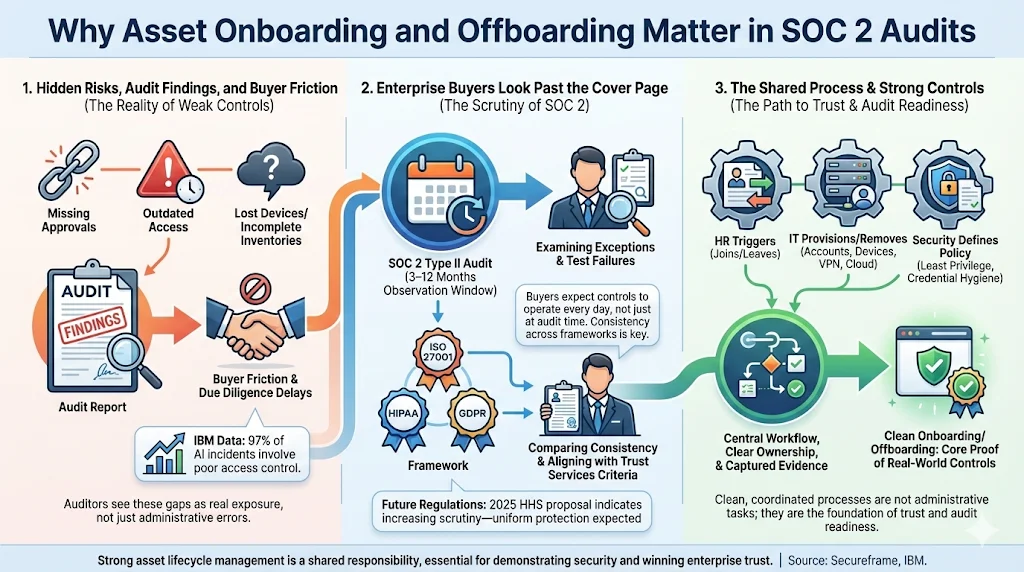
Why Asset Onboarding and Offboarding Matter in SOC 2 Audits
1) Hidden risks create audit findings, buyer friction and business risk
In our work supporting 6 000+ security audits as a team with 25+ years of combined expertise, we continually see teams underestimate the complexity of asset lifecycle management. Weak processes surface as audit exceptions: missing approval records, stale access, incomplete inventories or lost devices. These gaps extend past compliance; they represent real risk. IBM’s data shows that 97% of breaches related to artificial‑intelligence systems lacked proper access controls—a finding that is familiar to any auditor reviewing user provisioning and de‑provisioning. When auditors find evidence gaps, enterprise buyers worry that the controls are paper‑thin, leading to protracted due diligence and delayed revenue.
2) Enterprise clients see behind the SOC 2 marketing
Enterprise procurement teams are sophisticated. They study SOC 2 reports, not just the opinion letter. They look at exceptions, test results and how your controls map to the Trust Services Criteria (TSC). A SOC 2 Type II report covers an observation window of three to twelve months, so they expect continuous evidence, not an “on‑paper” program. If your asset onboarding or offboarding process fails during that window, it becomes a finding. Buyers also compare your SOC 2 with other frameworks (ISO 27001, HIPAA, GDPR) to ensure consistency. For example, the HIPAA Security Rule update proposed by HHS in 2025 mandates multi‑factor authentication and encryption for all systems handling electronic protected health information (ePHI), with estimated first‑year costs of USD 9 billion and annual costs of USD 6 billion. Auditors and buyers alike expect consistent protection across all asset types.
3) HR, IT and security intersect here
Asset lifecycle controls sit at the crossroads of human resources, IT operations and security. Human resources initiates onboarding and offboarding; IT provisions and revokes accounts, devices and VPN access; security defines policies, enforces least privilege and manages credential rotation. When any party misses a step, risk arises. Our managed service coordinates these disciplines through standardized processes and centralized evidence capture, ensuring nothing slips through the cracks.
Understanding Asset Onboarding and Offboarding in SOC 2
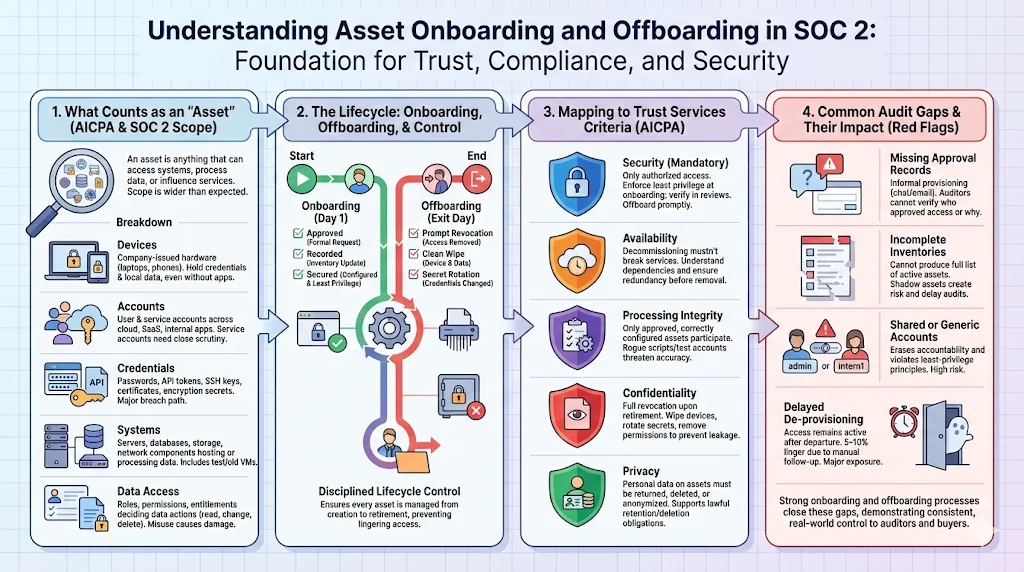
What counts as an “asset” under SOC 2?
The AICPA’s SOC 2 framework revolves around the Trust Services Criteria—security, availability, processing integrity, confidentiality and privacy. Security is the only mandatory category; however, properly controlling assets supports all criteria. An “asset” includes physical devices (laptops, mobile phones), virtual machines, cloud resources, user accounts, service accounts, API tokens, SSH secrets, certificates and any other item that can access data or systems. Data itself is an asset, and so are the credentials used to manipulate it.
Devices, accounts, credentials, systems and data access
-
Devices: Company‑owned laptops, desktops, tablets and phones used by employees and contractors.
-
Accounts: User accounts for cloud services (e.g., AWS, GCP, Azure), internal applications, SaaS tools, email, and corporate identity providers. Service accounts used by applications for machine‑to‑machine communication.
-
Credentials: Passwords, API tokens, encryption secrets, certificates and tokens that grant access. These need stringent protection because compromised credentials are often the root cause of breaches.
-
Systems: Servers, databases, network devices and storage resources that host or process sensitive data.
-
Data access: Permissions, entitlements and roles that determine who (or what) can view, modify or delete data.
A disciplined approach to asset onboarding ensures that each asset is approved, recorded and configured with appropriate security controls from day one. Offboarding ensures that every trace of access is removed when the asset is no longer needed.
How onboarding and offboarding connect to SOC 2 Trust Services Criteria
The Trust Services Criteria require controls over logical and physical access, change management, system operations and risk mitigation. For example:
-
Security: Only authorized individuals should have access to systems and data, and least privilege must be enforced.
-
Availability: Systems must be available to support business objectives, which means decommissioning assets without disrupting operations and ensuring redundant access where necessary.
-
Processing integrity: Systems should perform their functions accurately, which requires that only properly configured assets participate in processing.
-
Confidentiality: Data must be protected from unauthorized disclosure, so offboarding must remove access promptly and thoroughly.
-
Privacy: Personal data should be collected, used and retained appropriately; offboarding ensures personal data on devices is wiped or returned.
Common audit gaps tied to assets and access
Our auditors frequently see recurring issues:
-
Missing approval records: Provisioning happens via informal Slack messages or email threads rather than a documented workflow. Auditors are unable to verify who authorized what.
-
Incomplete inventories: Organizations are unable to produce a list of all active accounts, devices or secrets. Shadow assets (forgotten VMs, leftover test accounts) create risk.
-
Shared or generic accounts: Generic logins (e.g., “intern1”) blur accountability and contravene the principle of least privilege.
-
Delayed de‑provisioning: Access remains weeks after offboarding. In our experience, 5–10% of user accounts remain active long after termination if processes rely on manual follow‑up.
Why Enterprise Buyers Scrutinize These Controls
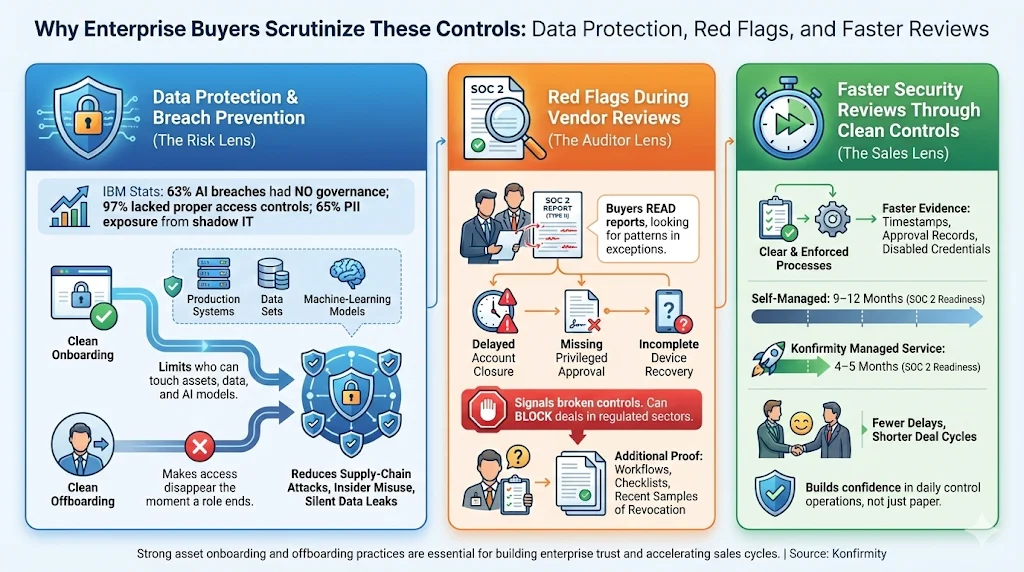
Data protection and breach prevention
Strong SOC 2 Asset Onboarding and Offboarding practices underpin data protection and breach prevention.
Breach data tells a clear story: lack of access control is a primary factor in losses. IBM found that 63% of organizations suffering breaches related to artificial‑intelligence systems had no artificial intelligence governance and 97% lacked proper access controls. Those with Unsanctioned “shadow artificial‑intelligence” tools had 65% of incidents involving customer personally identifiable information (PII) exposure. Clean onboarding ensures that only authorized individuals have access to machine‑learning models, data sets and production systems, reducing the chance of a supply chain attack or data leak.
Red flags during vendor reviews
Enterprise buyers and healthcare providers conduct thorough due‑diligence. They inspect SOC 2 reports, ask for evidence of user provisioning and de‑provisioning, and may even request copies of onboarding and offboarding checklists. If they see findings like “delayed account closure” or “missing approval for privileged roles,” it raises concerns about your ability to protect their data. In regulated industries, this could be disqualifying.
Faster security reviews through clean controls
Organizations with clear, documented asset processes speed up security reviews. With Konfirmity’s managed service, teams typically complete SOC 2 readiness in 4–5 months instead of 9–12 months for self‑managed programs. During procurement, being able to provide evidence of timely offboarding, role‑based access and endpoint encryption reduces the number of follow‑up questions. This can shave weeks from the sales cycle.
Core SOC 2 Principles That Apply to Asset Lifecycle Management
SOC 2 Asset Onboarding and Offboarding draws on core principles such as least privilege, documented procedures and risk assessment.
1) Access control and least privilege
The principle of least privilege dictates that users and systems should have only the access necessary to perform assigned tasks. Implementing role‑based access control (RBAC) and privileged access management ensures that sensitive functions (e.g., production database administration) are limited to a few individuals, reducing the attack surface. Tufin explains that least privilege reduces insider threats, prevents unauthorized lateral movement and simplifies compliance.
2) Security policies and documented procedures
Your organization should maintain formal security policies covering acceptable use, password standards, device management, network segmentation and secure coding. Documented procedures should outline step‑by‑step actions for onboarding and offboarding. Auditors often ask to see these documents and verify that they match actual practice.
3) Risk assessment during role changes and exits
SOC 2 requires regular risk assessment. When an employee’s role changes or they depart, the organization must evaluate associated risks: does the new role require different permissions? Does the departing individual hold privileged access that could be misused? The proposed HIPAA Security Rule update similarly requires workforce termination notices to be delivered promptly and multi‑factor authentication to be enforced.
4) Consistency with enterprise compliance standards
Enterprise buyers may require consistency with other frameworks. ISO 27001:2022 stresses an information security management system (ISMS) with a statement of applicability and risk treatment plan. HIPAA demands administrative, physical and technical safeguards for ePHI. GDPR emphasises data minimization and purpose limitation. Mapping SOC 2 asset controls to these frameworks demonstrates maturity and reduces the need for duplicate audits.
Pre‑Onboarding Foundations
Before any new hire or contractor begins work, SOC 2 Asset Onboarding and Offboarding requires certain foundations to be in place.
Before any new hire or contractor begins work, certain foundations must be in place.
Documented security policies
A solid program starts with policies accessible to all employees:
-
Acceptable use: Define how company devices and accounts may and may not be used. Include encryption requirements, restrictions on personal software and guidelines for remote work.
-
Access approval workflows: Describe who can approve access (e.g., the hiring manager, system owner, CISO) and how approvals are recorded. Use ticketing systems or identity platforms to capture a clear audit trail.
-
Role‑based access definitions: Maintain a matrix mapping job titles to required systems and privilege levels. This supports least privilege by ensuring each role receives only the necessary entitlements.
Asset inventory setup
A centralized inventory is non‑negotiable. It should track:
-
Ownership: Who is responsible for the asset (user or business unit) and when it was assigned.
-
Assignment dates and status: When the asset was issued, when it is due for refresh, and whether it is active, inactive or retired.
-
User and role linkage: Connect each asset to the individual and their role. This ensures that when roles change, associated assets are reviewed.
Without a single source of truth, assets go unmanaged; we have observed many clients with dozens of unused SaaS accounts incurring cost and risk. A modern inventory integrates with identity management, device management and configuration management databases (CMDBs).
Role and risk review
For each new hire or contractor, perform:
-
Role mapping: Determine required systems and privileges based on the role matrix. Avoid over‑granting “just in case.”
-
Risk assessment: Evaluate the sensitivity of data the individual will access. For high‑risk roles (e.g., DevOps engineers with production privileges), implement additional controls such as just‑in‑time access, session recording or heightened monitoring.
-
Approval checkpoints: Require at least two approvals (e.g., manager and security) before provisioning accounts in critical systems.
Get the free Asset Inventory Guide
A complete, auditor-ready asset inventory for ISO 27001 and SOC 2. Drop your work email and we'll send it straight over.
SOC 2 Asset Onboarding: Step‑by‑Step
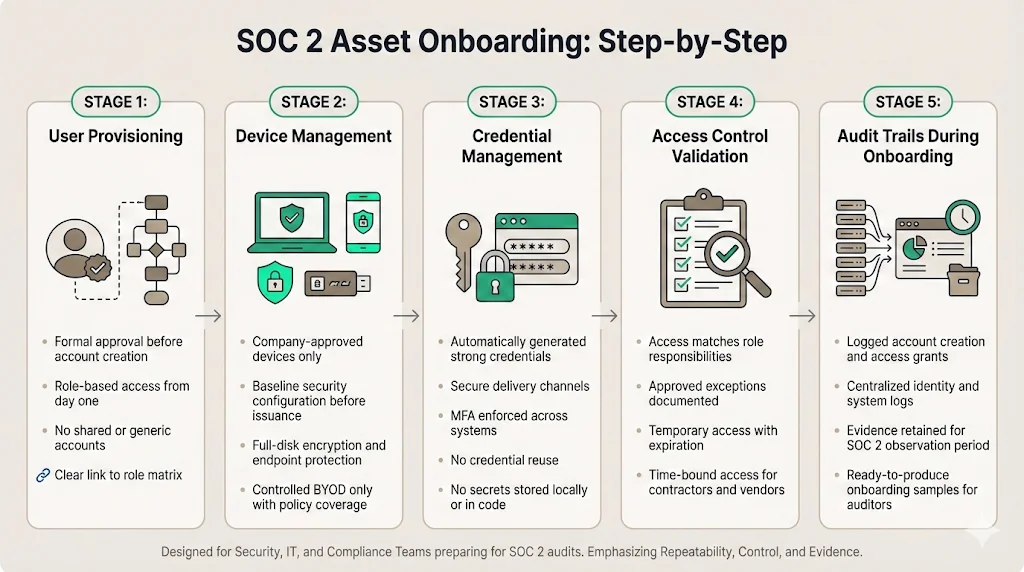
Effective SOC 2 Asset Onboarding and Offboarding begins with a repeatable process.
A clear, repeatable process reduces human error and supports evidence collection.
1) User provisioning
-
Formal approval: Only create user accounts after the role and risk review. Use a ticketing system or identity governance platform to document approval.
-
Role‑based access from day one: Assign entitlements according to the role matrix. Avoid giving broad admin rights to expedite onboarding—this is how privilege creep begins.
-
No shared or generic accounts: Create unique identities for each user. Shared accounts erode accountability and are flagged in audits.
2) Device management
-
Issue company‑approved devices: Provide laptops, phones and hardware tokens that meet baseline security standards (e.g., full‑disk encryption, corporate antivirus, endpoint detection and response). Do not allow personal devices unless covered by a formal bring‑your‑own‑device policy.
-
Baseline configuration: Apply security hardening (e.g., disabling unnecessary services, enforcing strong encryption and remote‑wipe capabilities) before handing over the device.
-
Encryption and endpoint protection: Ensure full‑disk encryption is enabled, anti‑malware is installed and security posture is monitored. HIPAA’s proposed update codifies encryption and multi‑factor authentication as mandatory.
3) Credential management
-
Secure credential creation: Automatically generate strong, unique passwords or secrets. Deliver them via secure channels such as password managers or out‑of‑band communications.
-
Password policies and multi‑factor authentication (MFA): Enforce minimum complexity, rotation schedules and MFA across all systems. Do not allow credential reuse. NIST and the new HIPAA rule emphasise MFA as a baseline control.
-
Avoid local storage of secrets: Use secrets management tools to store API tokens, certificates and tokens. Do not embed secrets in code or share via email.
4) Access control validation
-
Match access to responsibilities: Verify that the account has only the entitlements required for the user’s role. Cross‑reference the role matrix.
-
Document approvals and exceptions: Record who approved the access and any deviations (e.g., temporary admin rights during onboarding). Set expiration dates for temporary privileges.
-
Time‑bound access for contractors: For contractors or vendors, set automatic account expiration aligned with contract end dates.
5) Audit trails during onboarding
-
Log account creation and access grants: Centralize logs from identity providers, IT service management and cloud control planes. These logs should include timestamps, actors and target systems.
-
Retain evidence for SOC 2 testing: Auditors will request samples of onboarding events with supporting approvals. Keep these logs for the duration of the SOC 2 observation window (typically 3–12 months).
-
Common auditor requests: Evidence of approved ticket numbers linked to user provisioning; proof that MFA was enabled; screenshots or export of the identity management system showing assigned roles.
Managing Changes During Employment
Continuous SOC 2 Asset Onboarding and Offboarding also covers updates to roles and privileges during employment.
Change management for role updates
Roles evolve—promotions, project assignments, or changes in responsibility require adjustments to access. Implement change management procedures:
-
Access reviews when roles change: When someone moves from engineering to product management, review and update their entitlements accordingly. Do not allow them to retain outdated privileges (“access creep”).
-
Remove outdated permissions: Immediately revoke access to systems no longer needed. For example, if an engineer rotates off a project, remove them from the associated AWS accounts.
-
Re‑run risk assessments: For sensitive roles, repeat the risk assessment to determine if additional controls (e.g., stronger logging or supervision) are needed.
Ongoing access reviews
-
Periodic recertification: At least quarterly, managers and system owners should review who has access to their systems and confirm whether each privilege is still needed.
-
Manager and system owner sign‑off: Document that both parties have reviewed and signed off. This dual review ensures accountability.
-
Address access creep: Identify permissions that have accumulated over time and remove them. Automated identity governance tools can flag anomalies (e.g., a marketing employee with admin rights).
SOC 2 Asset Offboarding: Step‑by‑Step
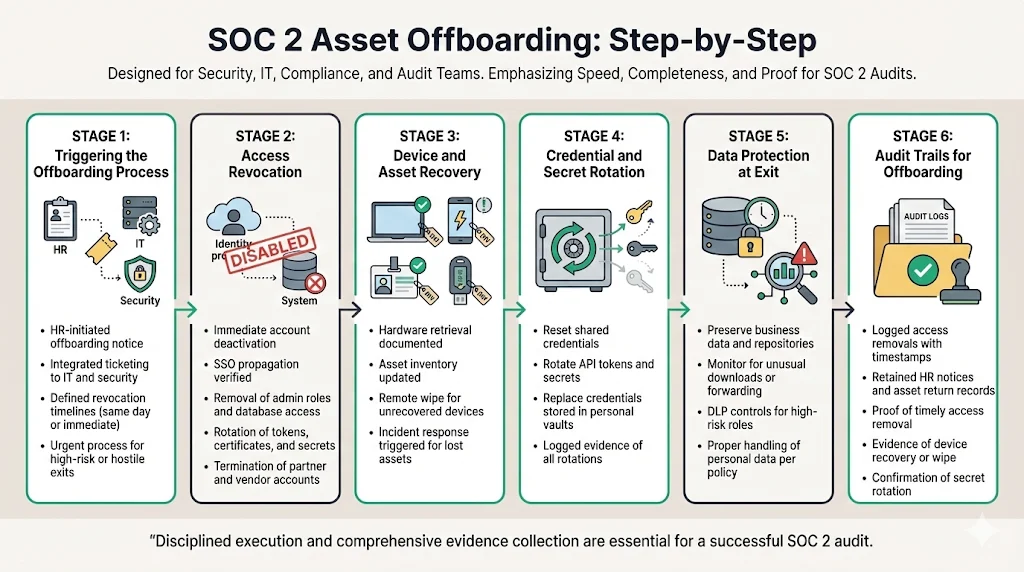
SOC 2 Asset Onboarding and Offboarding ends with disciplined offboarding that removes all traces of access.
When an employee, contractor or vendor departs, offboarding must be swift and thorough to prevent unauthorized access or data exfiltration.
1) Triggering the offboarding process
-
HR‑led notice: Human resources should initiate offboarding immediately upon notice of termination or resignation. Use an integrated ticket system to signal IT and security.
-
Defined timelines: Establish a policy that all access must be revoked within a specific window (e.g., by end of day). High‑risk or involuntary terminations may require immediate action.
-
Urgent offboarding: For high‑risk exits (e.g., employees with privileged access leaving under hostile circumstances), pre‑define an urgent process to cut off access before the individual is notified.
2) Access revocation
-
Disable accounts immediately: Deactivate user and service accounts across identity providers, VPNs, cloud services and internal applications. If using a single sign‑on, ensure that deactivation propagates.
-
Remove access to critical systems: Explicitly revoke database privileges, admin roles and secrets. Check that tokens, certificates and secrets are rotated.
-
Revoke third‑party and vendor access: Terminate accounts on partner systems, vendor portals and contractor tools. This often requires coordination with external administrators.
3) Device and asset recovery
-
Retrieve hardware: Collect laptops, phones, badges, security tokens and any physical access tokens. Document condition and serial numbers.
-
Update asset inventory: Mark devices as returned and ready for redeployment or secure disposal. If an asset is lost or unrecovered, trigger the incident response plan and document actions taken.
-
Secure data wipe: For devices not physically returned, perform remote wipe. Confirm that corporate data, encryption secrets and credentials are erased.
4) Credential and secret rotation
-
Reset shared credentials: If shared passwords (e.g., for backup systems) exist—though we discourage them—reset them immediately after someone leaves.
-
Rotate API tokens and other secrets: Reissue secrets used by applications or vendors that the departing individual had access to, particularly if they were stored in personal vaults.
-
Document actions taken: Log all rotations and replacements to show auditors that secrets were updated.
5) Data protection at exit
-
Preserve business data: Collect and archive work products, repositories and documentation so that knowledge is retained.
-
Prevent data exfiltration: Monitor for unusual downloads or email forwarding. For high‑risk roles, enable DLP (data loss prevention) controls and review logs during the offboarding period.
-
Handle personal data appropriately: Delete or return personal data held on behalf of the departing individual in accordance with privacy policies and GDPR requirements.
6) Audit trails for offboarding
-
Log access removal actions: Record timestamps, systems and actors involved in disabling accounts and revoking privileges.
-
Retain termination evidence: Keep HR notices and acknowledgments of asset return. Auditors may request these documents.
-
What auditors expect: Evidence that all accounts were disabled within the defined policy window, that devices were returned or wiped, and that secrets were rotated.
Incident Response Considerations
Offboarding sometimes fails or is delayed. Organizations must be prepared to respond:
-
Delayed or incomplete offboarding: If IT fails to revoke some access, handle it as an incident. Identify which systems remain exposed, disable the accounts and rotate credentials. Investigate why the offboarding checklist was not followed.
-
Suspicious activity post‑exit: Monitor logs for attempts to authenticate using disabled credentials. If you detect unauthorized access attempts, trigger the incident response plan, preserve evidence and notify affected parties (e.g., under GDPR breach notification requirements).
-
Tying offboarding failures into incident response plans: Document lessons learned and update processes. A root‑cause analysis might reveal a gap in communication between HR and IT or an unpatched identity integration.
Common SOC 2 Findings Related to Asset Onboarding and Offboarding
-
Missing approval records – Onboarding without formal ticket approvals.
-
Incomplete asset inventories – Unable to produce a list of all devices and accounts.
-
Delayed access removal – Accounts remain active days or weeks after departure.
-
Weak coordination between HR and IT – Offboarding triggers are not automated, causing delays.
Best Practices for Scaling These Controls
1) Standardized checklists across HR, IT and security
Develop step‑by‑step checklists for onboarding and offboarding. Embed these checklists in your ticketing and identity systems. For example, require HR to open an offboarding ticket as soon as they process a termination. The ticket should auto‑assign tasks to IT (disable accounts, collect devices) and security (rotate secrets, review logs).
2) Automation opportunities without losing oversight
Automate where possible: use identity governance platforms to provision and de‑provision accounts through APIs; integrate HR systems with identity providers to trigger offboarding; automatically enforce MFA and baseline security settings on devices. However, maintain human review for high‑risk roles. Our managed service uses automation to reduce manual toil but inserts human checks at critical junctures.
3) Keeping documentation audit‑ready year‑round
View evidence collection as a continuous process. Maintain logs of every approval, provisioning event and revocation. Store these logs in an immutable system. Regularly test the completeness and accuracy of your asset inventory and access logs. This ensures that when the SOC 2 auditor arrives or an enterprise buyer asks for proof, you can respond quickly.
Patterns from the Field: Konfirmity’s View
Having supported thousands of audits, we see common patterns that separate high‑performing programs from those that struggle. Teams that succeed:
-
Understand observation windows: A SOC 2 Type II audit with a six‑month observation period is not compressible into two weeks. Evidence must show continuous compliance across the entire period. Organizations that start building controls only at the end of the period end up with findings.
-
Control privilege creep: Without regular access recertification, privileges accumulate. Over time, an engineer might accumulate admin rights across multiple environments. Implementing least privilege and periodic reviews curtails this problem.
-
Integrate vendor risk: Buyers care about how you handle third‑party vendors. Offboarding must extend to vendor accounts. Many teams forget to disable vendor API tokens, leaving a backdoor into production systems.
-
Rely on human‑led managed service: Self‑serve GRC tools provide checklists but leave execution to the client. Our human‑led, managed approach implements controls inside your stack, monitors them year‑round, and manages evidence collection. Clients typically spend 75 hours per year on compliance activities with our service versus 550–600 hours if self‑managed. This frees engineering teams to focus on product development.
How This Strengthens Your SOC 2 Report for Enterprise Sales
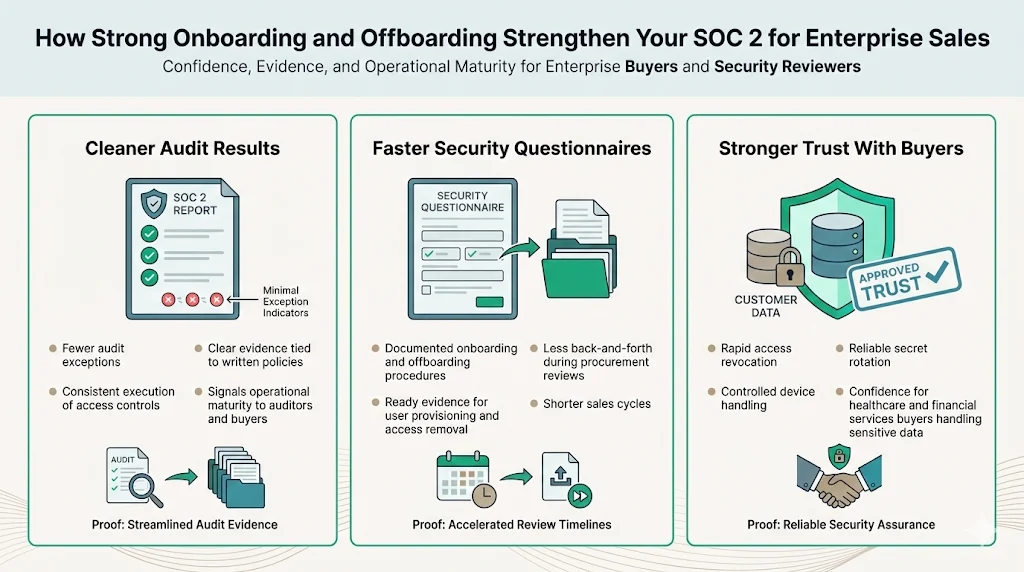
Implementing rigorous onboarding and offboarding controls yields tangible business benefits:
-
Cleaner audit results: Few or no exceptions in your SOC 2 report signal maturity. Auditors can see that you consistently follow your own policies.
-
Faster security questionnaires: When procurement teams ask how you handle user provisioning, you provide documented procedures and evidence. This reduces back‑and‑forth and accelerates contract signing.
-
Stronger trust with buyers: Demonstrating that you can quickly revoke access, manage devices and rotate secrets makes buyers confident that you will protect their data. This is particularly important for healthcare and financial services clients who handle ePHI or personal financial data.
Conclusion
Asset onboarding and offboarding are not administrative tasks to be delegated and forgotten; they are core controls that protect data, support audit readiness and build trust with enterprise buyers. Poorly managed assets lead to breaches, regulatory penalties and lost deals. A disciplined, human‑led process reduces risk, shortens sales cycles and is consistent with frameworks such as SOC 2, ISO 27001, HIPAA and GDPR. When security is embedded into the life cycle of every asset, compliance follows naturally. Start with strong controls, operate them daily, and let the documentation speak for itself.
FAQ: SOC 2 Asset Onboarding and Offboarding
1. What assets fall under SOC 2 scope?
Any device, account, credential, secret or data store that can access or process customer data is considered an asset. This includes laptops, servers, cloud instances, SaaS accounts, API tokens, certificates and data itself.
2. How fast should access be removed during offboarding?
Best practice is to revoke access by the time the employee leaves the organization. High‑risk departures or privileged roles may require access to be revoked immediately before termination is communicated. Policies should define the required timeframe.
3. Do contractors and vendors need the same controls?
Yes. Contractors often work alongside employees and have similar access. Vendor access should be time‑bound and subject to the same onboarding and offboarding procedures. Document all third‑party accounts and ensure they are revoked at contract end.
4. What evidence do auditors usually request?
Auditors will request samples of onboarding and offboarding events, approval records, logs showing when accounts were created or disabled, and proof that MFA and password policies were applied. They may ask for device inventories and secret rotation records.
5. How often should access reviews happen?
Quarterly is common, but some organizations perform monthly reviews, particularly for privileged accounts or regulated data. Reviews should include manager sign‑off and documentation of any changes made.







