

Modern enterprise buyers want evidence that you can keep their data safe and your systems available. When a prospective client hands over a security questionnaire, they are not just looking for a checkbox: they are evaluating whether your organization can recover quickly from an incident without losing confidential information. SOC 2 Backup Testing is the discipline of designing, implementing and proving that your backup strategy actually works. It sits at the intersection of confidentiality, integrity, and availability—the three core trust services criteria that most enterprise buyers care about. Backups protect confidentiality by ensuring sensitive data doesn’t vanish or fall into the wrong hands. They preserve integrity by guaranteeing that recovered data is complete and unchanged. They uphold availability by keeping systems running during disruptions.
Backup testing is more than a theoretical exercise. It connects directly to business continuity, disaster recovery, and audit readiness. A well‑tested backup system allows your team to restore operations within defined recovery time objectives (RTO) and recovery point objectives (RPO) so that customers experience little to no interruption. It provides auditors with evidence that controls are operating throughout the observation period, a prerequisite for a SOC 2 Type II report. Most importantly, it demonstrates to enterprise clients that your security program is not just a paper exercise—it is a set of operational controls that protect their data even under pressure.
This article explains why SOC 2 Backup Testing matters, outlines regulatory requirements, dives into the key concepts you need to know, and gives a step‑by‑step guide to building a program that stands up to auditors and attackers alike. Drawing on 6,000+ security audits and more than 25 years of combined expertise at Konfirmity, we highlight practical patterns and pitfalls we see across SaaS vendors, healthcare providers and regulated service organizations. Sources include AICPA guidance, industry statistics, and frontline experiences to ground each recommendation in evidence.
Why Backup Testing Is Required for SOC 2
SOC 2 and the trust services criteria
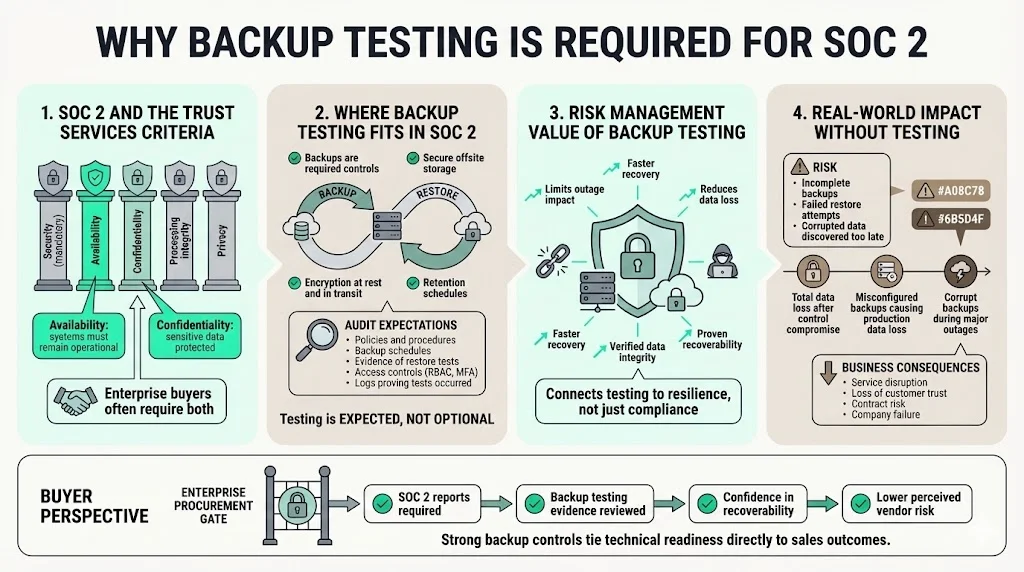
SOC 2 is an attestation framework established by the American Institute of Certified Public Accountants (AICPA) for evaluating controls at service organizations. It focuses on five trust services criteria (TSC): security, availability, processing integrity, confidentiality and privacy. Only security is mandatory; organizations choose which of the other criteria apply to their commitments. Availability means ensuring that systems are operational to meet objectives, while confidentiality focuses on protecting sensitive information from unauthorized disclosure. Processing integrity covers completeness and accuracy of data processing, and privacy addresses the collection and use of personal data.
For many enterprise‑focused vendors, both availability and confidentiality are explicitly in scope because buyers want assurance that services will remain up and that their proprietary data will not be lost or exposed. Under the availability criteria, the AICPA expects organizations to manage capacity, build resilient infrastructure and establish robust backup processes that are tested regularly. Confidentiality controls require restricting access to sensitive information, encrypting data in transit and at rest, and securely disposing of data.
Backup controls within SOC 2
Backups are not a mere nice‑to‑have; they are part of the documented controls that auditors evaluate. The Sikich guidance on trust services criteria lists data backup procedures among the expected controls for availability: organizations should regularly back up critical data, store backups securely offsite and test both backup and restore processes. Linford & Company’s explanation of the availability TSC goes further, noting that entities should test the integrity and completeness of backup data at least annually. The AICPA’s illustrative mapping for availability (subcriteria A1.2 and A1.3) mentions evaluating data backup processes and recovery infrastructure and testing recovery plan procedures to meet objectives.
Including backups in your SOC 2 scope means auditors will ask to see policies, schedules, and evidence of testing. They will expect to examine retention policies, encryption methods, off‑site storage, access controls like role‑based access control (RBAC) and multi‑factor authentication (MFA), and logs proving that tests occurred. When done well, backup controls serve risk management: they reduce the impact of system failures and cyberattacks by ensuring that data can be restored quickly and accurately.
Real impact: what happens without effective backup testing
The absence of rigorous SOC 2 Backup Testing has real consequences. Statistics from the cloud services sector are sobering: a 2024 security analysis found that over 60% of backups are incomplete and nearly half of restore attempts fail when systems are not regularly tested. Without verification, organizations may discover corrupted backups only during a crisis—when it is too late.
Historical failures underscore the risk. In 2014, a malicious actor gained access to Code Spaces’ Amazon EC2 control panel, destroyed their primary data and erased their AWS snapshots and S3 buckets. Because the company had no separate off‑site backups, it was forced to cease operations. GitLab’s 2017 outage shows a subtler failure: misconfigured backups and an untested restore process resulted in the loss of six hours of production data. T‑Mobile’s Sidekick disaster in 2009 likewise involved a catastrophic server failure and corrupt backup, leaving millions without their contacts and messages.
For enterprise vendors, such incidents erode client trust and jeopardize contracts. Buyers increasingly insist on attestation reports and may walk away if they sense that a vendor is one incident away from catastrophic data loss. Effective testing avoids these outcomes by proving that backups are recoverable, complete and secure.
Core Concepts You Need to Know
1) Data integrity and backup testing
Integrity is one of the most misunderstood aspects of backup testing. It is not enough for a backup job to run; you must verify that the restored data is accurate and complete. The Linford availability guidance requires testing the integrity and completeness of backup data at least annually. Many organizations schedule test restorations more frequently—monthly or quarterly—to check for corruption, ensure that file permissions are preserved and validate that the restored system performs correctly.
Integrity tests should compare checksums or hashes of source and recovered data, confirm that metadata such as timestamps and access rights are intact, and validate that applications can read and write to the restored environment. Automated verification tools can detect silent data corruption, but manual review of log files and random sample checks is still necessary for high‑risk data sets.
2) Backup procedures and security controls
Backup testing sits within a broader set of security controls. A comprehensive backup procedure includes:
-
Encryption at rest and in transit – Confidentiality criteria require protecting data from unauthorized access. Encryption keys must be managed separately from the backup data, and any cloud storage provider should support customer‑managed keys.
-
Off‑site copies – Sikich advises storing backups offsite to ensure resilience against physical disasters. This may involve replicating data to another availability zone or geographic region or using a managed backup service with geographic redundancy.
-
RBAC and MFA – Access to backups should be restricted based on least privilege and require multi‑factor authentication. Logs should record who accessed or modified backups.
-
Retention and deletion policies – Auditors expect a documented retention schedule that meets regulatory obligations (for example, HIPAA’s ePHI retention) and business needs. The policies should include secure deletion procedures once data is no longer required.
-
Monitoring and alerting – Backup jobs need real‑time monitoring with alerts for failures. The ISO 27001 backup policy example suggests automatic daily verification of job completion and quarterly full restoration tests, with results documented and shared with security teams.
3) Business continuity vs. disaster recovery
Backup testing often gets conflated with broader resilience plans. Business continuity (BC) and disaster recovery (DR) are complementary but different disciplines. Business continuity focuses on maintaining critical operations during disruptions. It includes procedures for rerouting customer support, reassigning staff and maintaining essential services without interruptions. Disaster recovery concentrates on restoring IT systems and data after an outage. BC keeps operations running; DR brings systems back.
SOC 2 addresses both. Under availability criterion A1.1, organizations must perform capacity planning and maintain system resilience. For DR, subcriteria A1.2 and A1.3 require data backup processes, recovery infrastructure, and testing of recovery procedures. Integration of backup testing into DR plans ensures that restored systems meet defined RTO and RPO targets, aligning with business requirements.
4) Audit readiness through backup evidence
In a SOC 2 Type II examination, auditors look for evidence that controls operated effectively over a defined observation period, typically six to twelve months. Backup testing plays a critical role because it provides continuous evidence. Test logs should include the date, dataset, environment, person executing the test, result (pass/fail), and any corrective actions taken. This evidence demonstrates to auditors that backups are not only configured but actively verified throughout the period.
A common misconception is that a one‑time test before the audit window is enough. In reality, auditors want to see a pattern of regular testing aligned with the frequency of data changes and risk level. For example, a SaaS platform with daily database writes may conduct weekly incremental backup tests and quarterly full restores. These logs should show adherence to defined RPO/RTO targets and highlight any remediation steps. Without such evidence, auditors may issue exceptions or qualify the opinion, which can hurt enterprise sales.
Step‑by‑Step Guide to SOC 2 Backup Testing
Implementing SOC 2 Backup Testing requires a structured approach. The following steps outline a practical path that service organizations can follow.
Step 1: Define backup scope and objectives
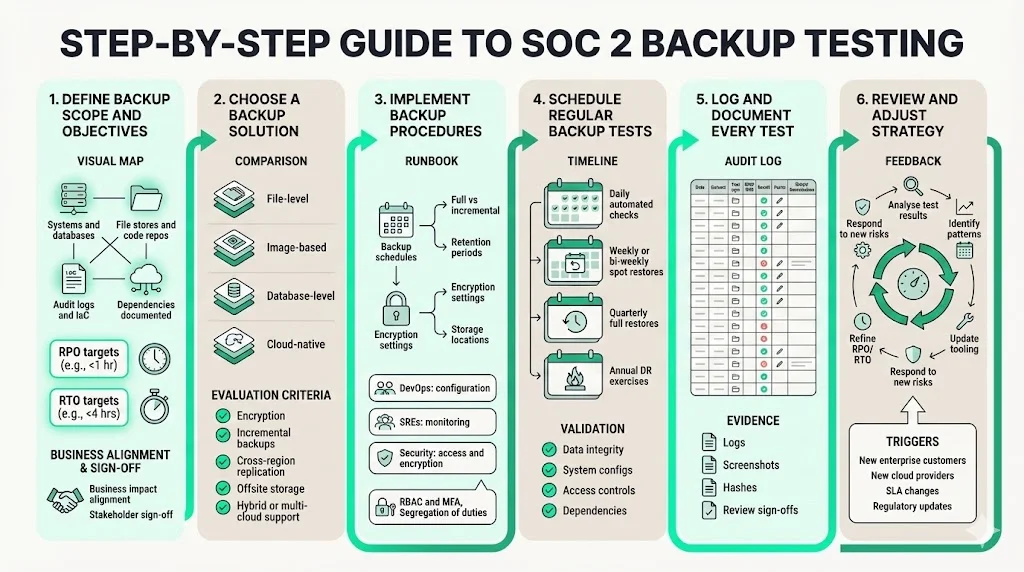
Start by defining what needs to be backed up. Catalogue all systems, databases, file stores, code repositories, configuration management databases (CMDB), and audit logs. Prioritize based on criticality to your services and regulatory obligations. For example, production databases containing customer data, log aggregation systems used for incident response, and critical infrastructure as code (IaC) repositories are typically in scope. Document dependencies—if you back up a database but not the associated application code or encryption keys, restoration may fail.
Next, set recovery point objectives (RPO) and recovery time objectives (RTO). RPO defines the maximum acceptable age of data you can lose; RTO defines how quickly you must restore service. A reference from Kisi explains that RTO covers the entire IT infrastructure and can be costly to attain, while RPO concerns the maximum tolerable data loss. Use business impact assessments to align RPO/RTO with client expectations. For high‑volume SaaS services, you may aim for a 15‑minute RPO and one‑hour RTO; for low‑change systems, daily backups and a 24‑hour RTO may suffice. Document these objectives and communicate them to stakeholders.
Step 2: Choose a backup solution
Select technology that matches your scope and objectives. Options include:
-
File‑level backups – Good for small datasets and unstructured files. Useful for source code, documents and configuration files.
-
Image‑based backups – Capture entire server or virtual machine images, simplifying restore processes. Suitable for monolithic legacy systems but often slower to restore.
-
Database‑level backups – Logical or physical dumps of database tables. Use point‑in‑time recovery (PITR) features to meet tight RPOs.
-
Cloud‑native backups – Managed backup services from cloud providers (AWS Backup, Azure Backup, GCP Cloud Storage) that integrate with infrastructure and support cross‑region replication.
When evaluating solutions, confirm support for encryption, compression, incremental and differential backups, and cross‑region replication. Determine where backups will be stored: on‑premises, offsite in another data center, or in the cloud. Sikich stresses that backups should be stored securely offsite. Multi‑cloud and hybrid strategies can ensure resilience against provider outages.
Step 3: Implement backup procedures
Implementation is more than enabling a tool. Document the schedule, responsibilities, and storage locations. Define which backups are full, incremental or differential. For example, a production database might use daily full backups and 15‑minute transaction log backups to meet a 15‑minute RPO. Include details on encryption settings, retention periods, and deletion processes.
Assign roles clearly. DevOps or infrastructure teams manage backup job configurations. Site reliability engineers (SREs) monitor backup statuses and investigate failures. Security teams verify encryption policies and access controls. The ISO 27001 example suggests dividing responsibilities across teams and documenting them in a runbook. Use RBAC and MFA to restrict access, and require segregation of duties so that no single person can run, modify, and delete backups.
Step 4: Schedule regular backup tests
Testing should be proportional to the rate of change and the criticality of data. A practical cadence might include:
-
Automated daily verification – Tools can check backup job completion and basic integrity.
-
Weekly or bi‑weekly spot restorations – Restore a subset of data (for example, user tables or configuration files) to a staging environment and verify that checksums match.
-
Quarterly full restoration tests – Rebuild a replica of the production environment from backups, validate application functionality, and measure restoration time.
-
Annual DR exercises – Conduct a full disaster recovery simulation to test failover, communication plans and coordination across teams.
The Pun Group advises basing test frequency on risk assessments, mixing incremental and full backup tests, using secure offsite storage and monitoring logs for anomalies. The NIST guidance likewise stresses creating backups regularly, storing them encrypted in secure locations and testing backup and restoration processes periodically. Remember to test not just data but also system configurations, access controls and dependencies.
Step 5: Log and document every test
Auditors will ask for evidence. Build a log that records:
| Test date | Dataset/Environment | Test type | RPO/RTO target | Result | Tester | Comments |
|---|---|---|---|---|---|---|
| 2025-09-15 | Production DB | Full restore | RPO = 15 min, RTO = 1 hr | Pass | SRE Lead | Restored to staging in 45 min; no corruption |
| 2025-09-28 | App configs | Spot check | RPO = 24 hr | Fail | Infra Engineer | Permissions missing; updated script |
| 2025-10-10 | DR exercise | Full environment | RPO = 15 min, RTO = 2 hr | Pass | Security & Ops | Completed failover in 90 min; updated runbook |
Each record should link to logs, screenshots or hash outputs that prove integrity. Document who reviewed the results and what remediation actions were taken. The Pun Group notes that auditors want evidence of test logs, success/failure records and the personnel involved.
Tested backups are security. Untested backups are a liability you haven't discovered yet.
Drop your work email and build backup testing that stands up in SOC 2.
Step 6: Review and adjust your strategy
Backup testing is not static. Use test results to refine frequency, scope and tooling. If weekly spot checks frequently uncover issues, consider increasing verification or changing tools. Review backup retention to ensure it meets regulatory requirements and client contracts. Analyze test results for patterns—are certain databases failing more often? Are restoration times creeping beyond defined RTOs? Use this analysis to iterate on architecture, staffing and processes.
Risk management should drive adjustments. If you onboard a major enterprise customer with strict SLAs, you may need to shorten RPO/RTO and increase test frequency. If you move to a new cloud provider, re‑evaluate encryption and offsite storage requirements.
Examples and Templates
Below are simple templates and scenarios to illustrate effective SOC 2 Backup Testing documentation.
Backup test log example
| Field | Example |
|---|---|
| Test ID | BT-2025-11-001 |
| Date | 11 Nov 2025 |
| Dataset | Customer transaction database |
| Environment | Staging cluster |
| Test type | Full restore |
| RPO/RTO | RPO = 10 min; RTO = 30 min |
| Result | Pass; restored in 25 min; checksums match |
| Tester | DevOps engineer |
| Reviewer | Security manager |
| Follow-up | None |
Backup procedure snippet
- Retention: Backups are stored for 90 days, with monthly archival to a cold storage bucket for 12 months.
- Encryption: All backups are encrypted at rest with AES‑256; keys are managed via an external key management service.
- Offsite storage: Primary backups reside in AWS US‑East 1; secondary copies replicate to AWS US‑West 2.
- Access controls: Only SRE and Security roles can read or restore backups; deletions require dual approval via the change management system.
- Testing: Automatic job verification runs daily. Spot restores occur weekly. A full DR drill occurs semi‑annually. Test results are recorded in the backup test log and reviewed by the CISO.
Failed backup scenario and corrective action
During a quarterly full restoration, the team discovered that the application server failed to start because an environment variable was missing from the backup. The restore was marked as a failure and triggered the incident response process. The root cause analysis identified that the environment configuration file was excluded from the backup job due to an update in the CI/CD pipeline. The team updated the backup configuration, added integration tests to verify environment files, and performed a new test, which passed. Documentation was updated to ensure future pipeline changes include backup job reviews.
Integration With Disaster Recovery Plans
Backup testing does not exist in isolation; it is a pillar of a broader disaster recovery (DR) plan. SOC 2’s availability criteria require organizations to have recovery infrastructure and to test recovery plan procedures. A mature DR plan ties backup procedures to failover mechanisms, communication plans and roles. During DR exercises, teams should practice restoring from backups while simultaneously switching traffic to secondary systems, contacting stakeholders, and coordinating incident response.
Under HIPAA, proposed 2024 updates require covered entities and business associates to be able to restore electronic protected health information (ePHI) within 72 hours of a security incident and to conduct yearly audits. This underscores that backup testing is not only a SOC 2 requirement but also critical for healthcare compliance. Aligning DR exercises with HIPAA, ISO 27001, and GDPR obligations can create efficiencies: one set of tests can produce evidence for multiple frameworks.
When integrated into DR, backup testing supports availability and business continuity. Teams learn to operate under realistic conditions, identifying gaps in runbooks, personnel coverage and tooling. Enterprises that conduct regular DR drills experience shorter restoration times and fewer audit exceptions.
Best Practices and Common Pitfalls
Best practices
-
Automate testing where possible. Use tooling to verify backup job completion, perform checksum comparisons and trigger alerts. Automation reduces human error and ensures consistency.
-
Maintain clear, versioned documentation. Policies, runbooks and test logs should have version histories to show auditors how procedures evolved.
-
Involve security and operations teams. Backup testing spans multiple disciplines. Include DevOps, SRE, security, compliance and business stakeholders. Ensure a single person owns coordination but many participate.
-
Set risk‑aligned cadences. Base test frequency on data change rates and client risk tolerance. High‑risk systems warrant weekly or daily tests; low‑risk systems may suffice with quarterly tests.
-
Test everything, including configurations. Don’t just restore data. Restore configuration files, credentials, and environment variables. Run application functionality tests to ensure the system works end‑to‑end.
-
Use multiple backup types. Combine incremental, differential and full backups to balance storage costs with recovery speed.
-
Monitor for anomalies. Integrate backup metrics into your observability stack. Track failed jobs, slow restore times and unusual data volumes.
Common pitfalls
-
Irregular testing. Organizations may set up backups and forget to test them, leading to silent failures.
-
Missing evidence or unclear documentation. Auditors need logs and proof of testing. Without clear records of who ran tests and what was restored, you may receive audit exceptions.
-
Scope creep or misalignment. Failing to define what is in scope can leave critical systems unprotected. Conversely, including low‑value systems can waste resources. Align the scope with risk assessments.
-
Unsecured backups. Storing backups without encryption or off‑site separation invites breaches. Attackers often target backups; treat them as sensitive assets.
-
Not integrating with DR. A backup is useless if no one knows how to restore under pressure. Tie testing into DR exercises to ensure real‑world readiness.
-
Over‑reliance on self‑serve tools. Automated backup services can help, but they often require manual configuration and oversight. Managed services like Konfirmity provide human‑led support to design, implement and operate backup programs, reducing internal workload and increasing reliability.
Stop discovering a bad backup during an incident
Book a demo and we'll show how Konfirmity schedules restore tests, captures each result as audit evidence, and chases the corrective action when a test fails.
Book a demo
Conclusion
SOC 2 compliance is more than a certification; it is a commitment to operational security that keeps enterprise clients safe. SOC 2 Backup Testing lies at the heart of that commitment. Effective backup programs protect confidentiality, ensure integrity and maintain availability. They reduce the risk of catastrophic data loss by verifying that backups are complete, recoverable and secure. They support business continuity and disaster recovery by meeting defined RPO and RTO targets. They provide auditors with evidence that controls operate consistently throughout the year.
Our experience across 6,000+ security audits shows that organizations that test backups regularly, document results meticulously and integrate testing into DR exercises have fewer audit findings and faster recovery times. In contrast, those that treat backups as an afterthought face longer outages, customer frustration and lost revenue.
Security that looks good on paper but fails under incident pressure is a liability. Enterprise buyers and healthcare regulators know this. To meet their expectations, build a backup program that works in practice: define clear objectives, choose resilient solutions, test often, document everything and adjust based on risk. Start with security and arrive at compliance.
FAQs
Backup testing in SOC 2 is the process of verifying that backups can be restored accurately and within defined RTO/RPO targets. It involves regular restore exercises, integrity checks, and documentation to demonstrate that backup controls are operating effectively.
Test frequency should reflect data change rates and risk. Many organizations perform automated daily verification, weekly or bi‑weekly spot restorations, quarterly full restorations, and annual disaster recovery drills. At a minimum, SOC 2 guidance expects annual testing of backup integrity, but best practice is more frequent.
Auditors want logs that show test dates, datasets, RPO/RTO targets, results, who conducted the test and any remediation actions. Screenshots, hash comparisons and runbook references strengthen evidence. Evidence must span the entire observation period for SOC 2 Type II reports.
Yes. Repeated backup failures or lack of testing can lead auditors to issue exceptions or qualify the SOC 2 opinion. This can delay enterprise sales and require remediation. A documented failure with corrective action shows control maturity and may not materially impact the report.
Records should provide context (what system was tested), objectives (RPO/RTO), results (pass/fail and metrics), personnel involved, and any follow‑up actions. Detailed logs help auditors evaluate control effectiveness and help internal teams learn from past exercises.







