

Most enterprise procurement teams now demand security attestation before signing contracts. A SOC 2 report has become the bare minimum proof of operational security for many buyers. Yet controls rarely fail because of missing paperwork—they fail when real attacks hit. Email remains one of the most common attack vectors and a primary focus for SOC 2 auditors. That’s why Email Security For SOC 2 is about more than adding a spam filter. It means designing and operating robust controls that protect confidential data, prove due diligence during audits, and satisfy demanding enterprise clients.
This guide explains why email security sits at the heart of the SOC 2 framework. We’ll outline the Trust Services Criteria, show how auditors evaluate communication channels, and discuss why email is high risk. We’ll then walk through core controls—encryption, access management, phishing prevention, secure gateways, monitoring, and archiving—and show how to weave them into policies and procedures. Templates and checklists are provided for policy writers and incident response teams. Finally, we discuss technologies that help manage email security at scale, including signature management tools, and share training strategies, metrics, and audit preparation tips. Throughout, we draw on authoritative sources, industry data, and lessons from Konfirmity’s delivery work on more than 6,000 security audits.
What SOC 2 Is and Why Email Matters
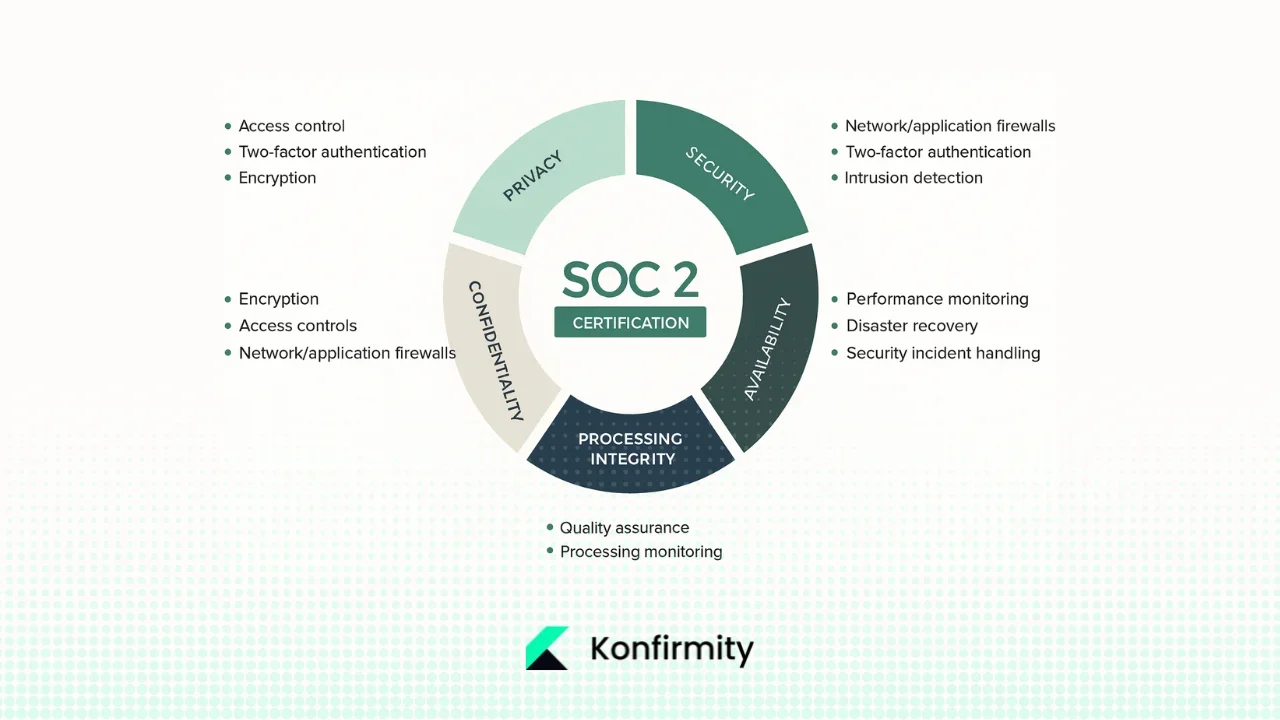
The American Institute of Certified Public Accountants (AICPA) defined systems and Organization Controls (SOC) reports. The Trust Services Criteria include five categories: security, availability, processing integrity, confidentiality, and privacy. Security (also known as the common criteria) is mandatory, while the others are optional based on a service‑provider’s commitments. According to one industry summary of the criteria, the security category focuses on protecting information from vulnerabilities and unauthorized access, while the confidentiality category evaluates how organizations protect confidential information by limiting its access, storage and use. These two categories are most relevant to email because messages often contain sensitive information that requires both protection against unauthorized disclosure and proper handling.
Observation periods and evidence
SOC 2 Type II reports examine the design and operating effectiveness of controls over a period (often 3–5 months or more). Auditors expect to see evidence that email security controls are implemented, monitored, and produce consistent results across the observation period. This observation window is why last‑minute compliance sprints or “compliance manufacturing” often fail; controls must run continuously. Our experience at Konfirmity shows that a well‑designed program typically takes four to five months to reach audit readiness, whereas a self‑managed approach can stretch to nine to twelve months and consume hundreds of hours of engineering and security time.
Why is email part of SOC 2?
Communication channels are addressed in the Trust Services Criteria under the security and confidentiality categories. Email represents a high‑impact vector because it mixes human behavior and technical controls. Audit firms like BARR Advisory point out that phishing was the most common initial attack vector in recent data breaches, accounting for 16% of cyber‑attacks in IBM’s 2025 Cost of a Data Breach report. Phishing breaches cost organizations an average of USD 4.8 million per incident. These numbers underscore why auditors scrutinize email configurations, anti‑phishing defenses, authentication mechanisms, and evidence of continuous monitoring. A weak email control can negate otherwise strong infrastructure.
Why Email Is High‑Risk
Email remains a prime target because it combines open protocols, complex user behavior, and valuable data. Attackers exploit this through phishing, business email compromise (BEC), malware attachments, and credential harvesting.
-
Phishing and AI‑enhanced attacks. BARR Advisory highlights that phishing attacks cost organizations an average of USD 4.8 million per breach and were the most common attack vector. The same report notes that AI is making attacks more sophisticated, with 16% of data breaches involving attackers using AI and 37% of AI‑powered attacks beginning with phishing.
-
Human susceptibility. NIST recommends teaching employees to spot and report phishing and enabling multi‑factor authentication across accounts. Hoxhunt’s 2025 phishing trends report shows how training reduces vulnerability: before training only 34% of users report simulated phishing attacks, but after 12 months of adaptive phishing training the success rate rises to 74 % and eventually to 80 %, while failure rates drop below 2 %. These data illustrate how untrained users can be a liability and why continuous awareness efforts are required.
-
Data leakage and misconfiguration. Emails often carry confidential information—contracts, customer data, intellectual property. Misaddressed emails or weak access controls can lead to data leakage. The Canadian Centre for Cyber Security notes that email technologies were not originally designed with security in mind and that encryption and authentication protocols were added later to mitigate risks. Without robust controls, messages can be intercepted or tampered with.
Given these risks, implementing strong controls around Email Security For SOC 2 is essential for both audit outcomes and real protection.
Core Email Security Controls for SOC 2 Compliance
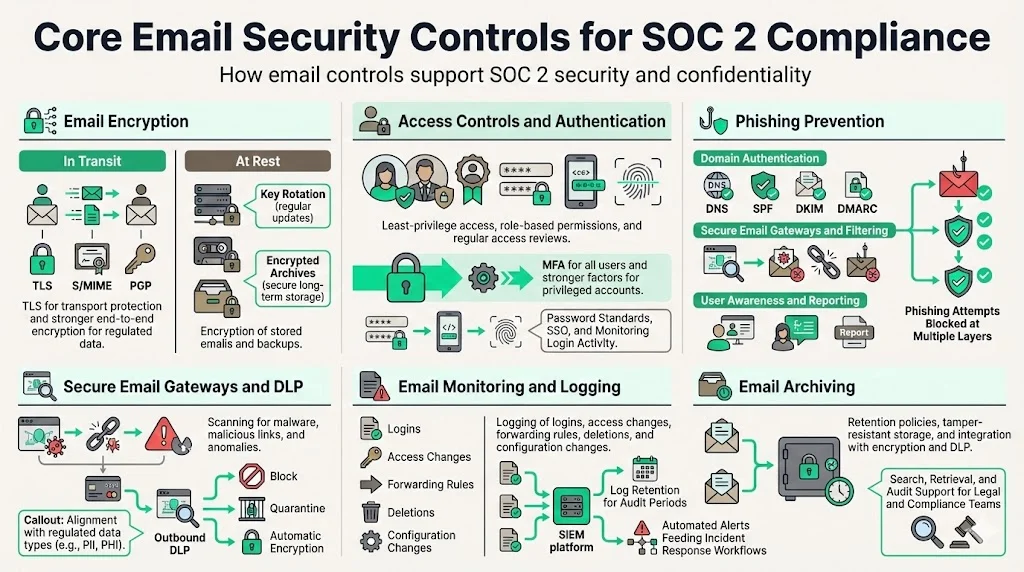
Auditors assess email through the lens of the Trust Services Criteria. Below are core controls organizations should implement and document to satisfy SOC 2 security and confidentiality requirements.
1. Email Encryption
Encryption protects the confidentiality and integrity of email content. There are two aspects: encryption in transit and encryption at rest.
-
In transit. Transport Layer Security (TLS) encrypts email as it travels between servers. However, TLS only protects data during transmission and assumes trust in the service provider. The Canadian Cyber Centre explains that TLS protects the email as it crosses the internet, but providers can access messages once they reach their servers. When working with regulated data, end‑to‑end encryption protocols like S/MIME or PGP provide a stronger control because the email remains encrypted even on the server and can only be read by recipients with the appropriate private key.
-
At rest. Emails stored on servers, backups, or user devices must also be encrypted. HIPAA guidance notes that encryption solutions compliant with NIST SP 800‑11 for data at rest and SP 800‑52 for data in transit contribute towards compliance with recognized security frameworks. Encrypting stored messages ensures that stolen backups or compromised mail servers cannot expose sensitive data. When using web portals or third‑party email services, ensure back‑end storage is encrypted and that Business Associate Agreements (BAAs) or Data Processing Agreements (DPAs) cover the encryption controls.
Implementation guidelines include enforcing TLS for all SMTP connections, requiring S/MIME or PGP for messages containing confidential information, rotating encryption keys regularly, and verifying encryption in backups and archives.
2. Access Controls and User Authentication
Strong access controls reduce the attack surface by ensuring only authorized users can access email accounts and content.
-
Least‑privilege and role‑based access. Grant permissions based on job function. Administrators should have separate accounts for privileged activities. Regular access reviews ensure that unused accounts or unnecessary privileges are revoked. In Konfirmity’s audits, access drift and failure to promptly disable departing employee accounts are frequent findings.
-
Multi‑factor authentication (MFA). MFA is a core requirement for email systems. NIST recommends enabling MFA and, where possible, using phishing‑resistant authentication such as security keys. MFA prevents credential stuffing and reduces the impact of password compromise. For privileged accounts, consider requiring hardware tokens or biometric factors.
-
Credential hygiene. Enforce strong password policies aligned with NIST 800‑63 guidelines, monitor for compromised credentials, and use single sign‑on (SSO) integrations to centralize identity management. Periodically audit login logs for unusual patterns, such as geographic anomalies or mass login attempts.
3. Phishing Prevention
Controls to prevent and detect phishing are critical because phishing is the leading initial attack vector. Effective measures include:
-
Domain authentication protocols. Implement SPF, DKIM, and DMARC. The Canadian Cyber Centre explains that SPF uses DNS to specify which servers are authorized to send email on behalf of a domain and that receiving mail servers check the SPF record to validate legitimacy. DKIM digitally signs messages so recipient servers can verify the sender and message integrity. DMARC builds on SPF and DKIM, allowing domain owners to define policies for handling messages that fail checks; large providers like Google and Yahoo now require both SPF and DKIM to pass for domains with strict DMARC policies.
-
Anti‑phishing gateways and filters. Deploy secure email gateways (SEGs) that scan incoming and outgoing traffic for malware, malicious URLs, and command‑and‑control patterns. Modern SEGs employ machine learning to identify unknown threats. They also integrate with sandboxing technologies that detonate attachments to observe behavior before delivery.
-
User training and reporting channels. Teach users to recognise phishing indicators: suspicious sender addresses, requests for sensitive information, grammatical mistakes, and urgent calls to action. NIST advises that employees should not click on links and should delete suspicious messages or report them to the IT team. Provide a simple reporting mechanism (e.g., a button in the mail client) that forwards the message to security teams. Adaptive training programs like those studied in the Hoxhunt report show how continuous simulations improve reporting rates and reduce failures.
4. Secure Email Gateways and DLP
Secure email gateways inspect all email traffic for threats and enforce data leakage prevention (DLP) rules.
-
Gateway capabilities. Effective gateways filter spam, block known malicious sources, scan attachments, and use heuristics to detect anomalies. They should also integrate with endpoint protection platforms to correlate email threats with host activity. Rippling’s 2025 best practices note that SEGs act as a first line of defence by scanning for malware, phishing attempts, and spam. Gateways can be configured to quarantine suspicious messages for manual review.
-
Outbound DLP. Define policies that inspect outbound messages for sensitive data such as personal identifiers, credit card numbers, or health information. DLP engines can block, quarantine, or automatically encrypt messages based on content. Ensure DLP rules are tailored to your regulated data sets (e.g., ePHI, personal data under GDPR) and integrate with encryption and archiving systems.
5. Email Monitoring and Logging
Continuous monitoring and logging provide evidence for audits and enable rapid detection of anomalies.
-
Activity logging. Log events such as logins, failed authentication attempts, message deletions, forwarding rule changes, and configuration changes. Rippling emphasises that organizations cannot protect what they do not monitor and recommends logging email systems to detect unusual login locations, mass downloads, or irregular sending patterns.
-
Log retention and audit evidence. Retain logs for a period that matches your audit observation window and regulatory requirements. During SOC 2 examinations, auditors may sample logs to confirm that controls operated effectively. Use central log management or security information and event management (SIEM) platforms to aggregate and correlate email events with other security data.
-
Automated alerts. Configure thresholds and alerts to notify the security team of suspicious behavior, such as repeated failed logins or forwarding rule changes. Integrate alerts with incident response workflows to ensure timely investigation.
6. Email Archiving
Archiving preserves email as immutable records for compliance, e‑discovery, and operational continuity.
-
Retention policies. Ascendant Technologies notes that organizations must implement customizable email retention policies to meet legal requirements and efficient data management. The U.S. Federal Rules of Civil Procedure (FRCP) and regulations such as GDPR require retention periods, and some industries mandate perpetual storage for certain records. Retention policies should specify how long messages are preserved and when they are purged.
-
Tamperproof storage. Email archives should store messages in non‑alterable formats with cryptographic integrity. Robust solutions create secure, duplicate storage and support e‑discovery. The Canadian Cyber Centre highlights that using S/MIME enables administrators to enforce message retention and archiving policies and facilitates audits and investigations. Integrate archiving with DLP and encryption controls so that sensitive content remains protected in the archive.
-
Search and retrieval. Effective archiving tools provide advanced search capabilities, metadata indexing, and auditing features. Ensure that both security and legal teams can access archived messages quickly during investigations or legal proceedings.
Integrating Email Security into SOC 2 Policies and Procedures
Designing controls is just the beginning. SOC 2 auditors look for evidence that email security is embedded in policies, procedures, and daily operations.
1. Alignment With Security Policies
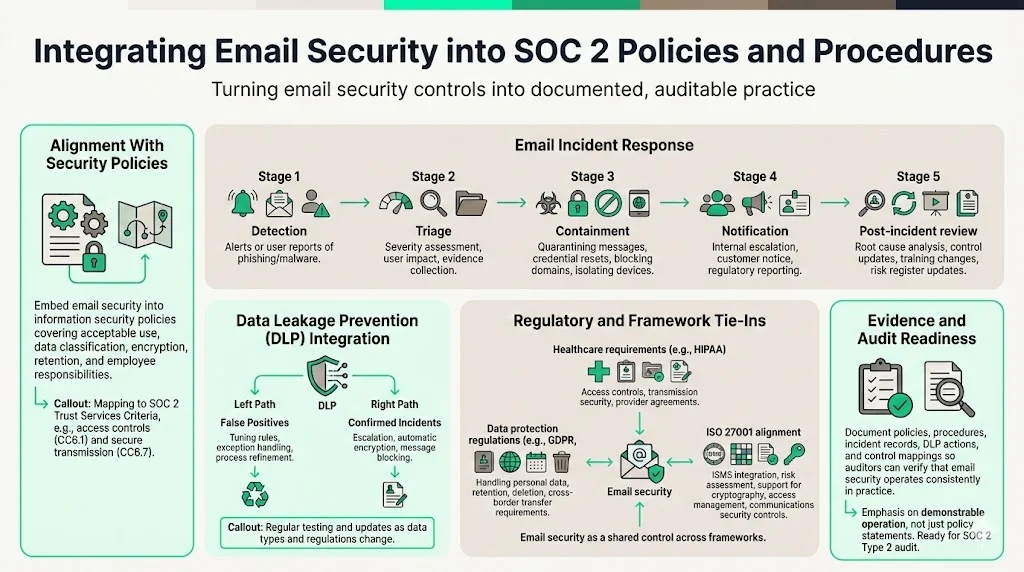
Email security should be part of a broader information security policy. This includes statements about acceptable use, classification of data, encryption requirements, retention guidelines, and employee responsibilities. Policies should map to specific Trust Services Criteria (e.g., CC6.1 for access controls, CC8.2 for transmission controls).
2. Incident Response
Create an email incident playbook detailing how to handle suspicious messages, phishing reports, and confirmed breaches. The playbook should outline detection, triage, containment, eradication, recovery, and communication steps. For example:
-
Detection: Receive a report or alert of a phishing or malware email. Identify whether the message reached multiple recipients.
-
Triage: Assess the severity; determine if any user clicked a link or opened an attachment. Collect evidence such as email headers and logs.
-
Containment: Quarantine the message in mailboxes, reset affected credentials, block malicious domains, and isolate compromised devices.
-
Notification: Notify internal stakeholders (e.g., CISO, legal), affected clients if required, and regulators when applicable.
-
Post‑incident review: Analyze root causes, update controls (e.g., block rules, training content), and record the incident in your risk register.
Email is the most-exploited channel, so treat it like the high-risk control it is.
Drop your work email and harden email security controls into real SOC 2 evidence.
3. Data Leakage Prevention (DLP)
Integrate DLP with your incident response process. When DLP rules trigger, the incident team should review the context. False positives should be tuned; true positives may require escalation, encryption, or blocking. DLP policies should be tested and updated regularly as new data types and regulations emerge.
4. Regulatory Compliance Tie‑Ins
Email security intersects with other frameworks:
-
GDPR and data protection. Confidential information may include personal data. Ensure that email processing complies with data minimization, purpose limitation, and cross‑border transfer requirements. Retention and deletion must align with data subject rights.
-
HIPAA and ePHI. The HIPAA Security Rule includes technical safeguards for access control and transmission security. Implementing encryption solutions compliant with NIST SP 800‑11 and 800‑52 contributes toward compliance. When using third‑party email services, sign BAAs and verify that the provider meets HIPAA and SOC 2 obligations.
-
ISO 27001 and ISMS. The ISO 27001:2022 standard requires organizations to establish an Information Security Management System (ISMS), perform risk assessments, define a Statement of Applicability (SoA), and implement Annex controls. Email security supports Annex A controls such as cryptographic controls, access management, and communications security.
Templates and Practical Tools
Developing policies and procedures can be daunting. Below are outlines for key templates. Adjust them based on your organization’s size, risk profile, and regulatory environment.
Email Security Policy Template
-
Purpose: Define the intent to protect the confidentiality, integrity, and availability of email communications.
-
Scope: Specify systems covered (company email servers, third‑party services, user devices) and applicable data types.
-
Roles and Responsibilities: Assign ownership to the CISO, security team, IT, and end users. Define responsibilities for monitoring, training, incident response, and compliance.
-
Controls: Document encryption requirements, MFA, phishing prevention, SEGs, DLP, logging, and archiving. Include references to standards such as NIST SP 800‑11, SP 800‑52, and HIPAA.
-
Compliance and Auditing: State that controls will be tested periodically through internal audits, and that evidence (logs, reports) will be retained for SOC 2 observation windows. Reference regulatory obligations (GDPR, HIPAA) and cross‑framework mappings.
Incident Response Template for Email Security
-
Incident Detection: Outline triggers such as DLP alerts, SEGs flags, user reports, or SIEM anomalies.
-
Triage Steps: Provide a checklist for verifying whether a breach occurred and the scope of impact.
-
Containment Measures: Include isolating accounts, blocking senders or domains, and resetting passwords.
-
Notification and Reporting: Detail internal notification paths (security team, leadership), external obligations (customers, regulators), and documentation requirements.
-
Post‑Incident Review: Require a root‑cause analysis, control improvements, training updates, and evidence storage.
Access Control Implementation Checklist
-
MFA Status: Confirm MFA is enabled for all email accounts and privileged roles.
-
Least‑Privilege Review: Review group memberships and access permissions; remove unnecessary access.
-
Active Session/Credential Audit: Identify active sessions and tokens; terminate those belonging to former or suspended users. Check for credential reuse across systems.
Email Monitoring and Logging Checklist
-
Log Retention Duration: Define retention periods (e.g., one year or longer depending on regulations and SOC observation periods).
-
Alert Criteria: Specify events that trigger alerts, such as failed logins, forwarding rule changes, large attachment downloads, or abnormal sending volumes.
-
Review Cadence: Schedule regular reviews of logs and alerts (daily or weekly) and conduct quarterly compliance audits. Rippling recommends quarterly audits that examine logs for unusual activities, verify user permissions, and evaluate technical controls.
Tools and Solutions Supporting SOC 2 Email Security
Implementing the above controls manually is challenging. The following technologies help manage email security at scale.
-
Secure gateways and filtering platforms. Tools such as Proofpoint, Cisco Secure Email, and Microsoft Defender for Office 365 scan messages for malware, phishing, and spoofing. They enforce SPF/DKIM/DMARC, block malicious URLs, and integrate with SIEMs. SEGs should support policy-based encryption and DLP.
-
Encryption and key management. Solutions like Virtru, Paubox, or Zix provide end‑to‑end encryption and make key management seamless. Integration with identity providers simplifies user experience.
-
DLP engines and CASBs. Cloud Access Security Brokers (CASBs) inspect email traffic across SaaS applications, enforce DLP policies, and provide visibility into shadow IT. They can block unsanctioned file sharing or transfer of sensitive data via email.
-
Email signature management. Email signatures communicate trust and contain legal notices. SOC 2 auditors often review whether external communications include required disclosures. Signature management platforms like WiseStamp (SOC 2 Type II compliant) and Exclaimer allow centralized control of signatures and ensure consistent legal statements, marketing banners, and confidentiality notices across the enterprise. They also reduce the risk of users editing signatures manually and inadvertently removing legal text. WiseStamp emphasises privacy and offers strong access controls, while Exclaimer focuses on scalability for large enterprises.
When choosing tools, prioritize vendors that provide SOC 2 Type II reports themselves, as this demonstrates they have implemented and maintained their own controls over time.
Training and Awareness for SOC 2 Email Security
Technical controls fail if users are unprepared. Building a culture of security awareness is an ongoing process.
-
Role‑specific training. Generic annual training is no longer sufficient. Adaptive behavior‑focused training programs produce significantly better results. Hoxhunt’s data shows that after a year of consistent phishing simulations, success rates rise from 34 % to 74 % and failure rates drop below 2 %.
-
Frequency and measurement. Conduct frequent simulations (monthly or quarterly) and measure metrics such as click rates, reporting rates, and dwell time (time between message receipt and user report). Use these metrics to identify high‑risk departments and tailor training accordingly.
-
Simulated phishing as a training tool. Simulations should mimic real attacks and evolve over time. Include attachments, urgent messages, and impersonation of trusted brands. When users report or click, provide immediate feedback with explanations. Integrate training results into performance dashboards to demonstrate improvements to auditors and leadership.
Measuring Effectiveness and Preparing for Audits
To prove that email security controls are working, track metrics and prepare documentation well before the auditor arrives.
Email Security Metrics to Track
-
Encryption coverage: Percentage of email traffic encrypted at rest and in transit. Audit logs should show TLS enforcement on all SMTP connections and S/MIME/PGP usage for sensitive messages. Check that backups and archives use encryption.
-
Phishing simulation outcomes: Measure success (reporting) and failure (clicking) rates. BARR and Hoxhunt data illustrate that well‑designed programs reduce failure rates from 11 % to below 2 % and raise success rates to 60 ‑80 %. Track improvement over time and by department.
-
Incident response times: Monitor how quickly the team investigates and contains suspicious emails. Include metrics such as mean time to detection (MTTD) and mean time to response (MTTR). Timely response reduces breach impact and demonstrates operational maturity.
-
Training participation: Track attendance and completion rates for training sessions and simulations. Low engagement may indicate a need for leadership support or different training approaches.
Audit Evidence Preparation
Collect and organize evidence to map to SOC 2 criteria:
-
Policies and procedures: Provide current versions of the email security policy, incident response plan, access control procedures, DLP policies, and training materials.
-
Logs and monitoring reports: Prepare sample logs demonstrating encryption enforcement, access attempts, and DLP triggers. Ensure logs include timestamps, user identifiers, and outcomes.
-
Training records: Maintain records of phishing simulations, training modules, attendance, and performance metrics.
-
Vendor documentation: Collect SOC 2 reports or certifications from email service providers, encryption vendors, and signature management platforms. These third‑party attestations support your vendor risk management program and reassure auditors that your supply chain meets security expectations.
When mapping evidence to Trust Services Criteria, ensure each control maps to a specific criterion and that cross‑framework reuse is documented. For example, encryption controls satisfy CC6.1 (data transmission) and CC6.8 (confidentiality), while training supports CC3.3 (communication) and CC7.3 (risk mitigation).
Harden your most-attacked channel into audit evidence
Book a demo and we'll show how Konfirmity tracks your mail authentication, phishing training and mailbox access reviews, and keeps the evidence an auditor will sample.
Book a demo
Conclusion
Email continues to be one of the riskiest communication channels for modern enterprises. For organizations seeking SOC 2 Type II attestation, neglecting email security can derail audits and jeopardize sales. Email Security For SOC 2 therefore demands a comprehensive approach that combines technical controls, well‑defined policies, continuous monitoring, and human awareness. Encryption protects confidential information at rest and in transit; access controls and MFA reduce the risk of unauthorized access; authentication protocols like SPF, DKIM, and DMARC help block spoofed messages; and secure gateways, logging, and archiving provide visibility and evidence.
Konfirmity’s experience across thousands of audits shows that organizations that start with security and operate controls daily achieve compliance as a natural outcome. Instead of racing to produce evidence just before an audit, build a human‑led program that integrates email security into daily operations, continuously monitors effectiveness, and adapts to evolving threats. Email Security For SOC 2 is not a one‑time task but an ongoing discipline that protects both your business and the trust of your customers.
Frequently Asked Questions (FAQ)
SOC 2 doesn’t prescribe specific technologies, but auditors expect controls that address the security and confidentiality criteria. That includes encryption at rest and in transit, access control, authentication (MFA), anti‑phishing measures, continuous monitoring, and retention policies. Evidence must demonstrate that these controls are designed and operating effectively throughout the observation period.
Encryption protects the confidentiality and integrity of email content. TLS secures transmission, while end‑to‑end encryption (S/MIME or PGP) ensures messages remain unreadable even on servers. Encrypting data at rest and in backups protects against unauthorized access and supports compliance with frameworks like HIPAA.
Yes. Centralized signature management ensures that legal notices and confidentiality statements are consistently applied. It also demonstrates control over external communications. Tools like WiseStamp and Exclaimer offer SOC 2 Type II reports, providing assurance that the vendor’s controls meet audit standards.
Auditors look for phishing risk, weak authentication, lack of encryption, inadequate monitoring, and missing retention policies. They also examine incident response processes, user training programs, and vendor risk management. Phishing remains the most common attack vector and costs organizations USD 4.8 million per breach.
Policies should be reviewed at least annually or whenever there are significant changes in regulations, technology, or threats. Quarterly audits, as recommended by Rippling, help verify that controls remain effective and that user permissions and technical measures are up to date. Continuous monitoring and regular simulations ensure that the program adapts to evolving attack techniques.







