

The assumption that modern infrastructure is exclusively cloud-based is a costly error in the enterprise sales process. While SaaS dominates headlines, critical industries—healthcare, finance, defense, and manufacturing—still rely heavily on on-premises deployments. For vendors selling into these sectors, security compliance is not merely a checkbox; it is the primary barrier to entry.
When you control the physical hardware, the "shared responsibility model" offered by AWS or Azure vanishes. You own the entire stack, from the physical door lock to the application logic. Consequently, enterprise buyers scrutinize on-prem deployments with far greater intensity than their cloud-native counterparts. They demand assurance that your physical data center, network perimeter, and internal processes meet the rigorous standards defined by the American Institute of Certified Public Accountants (AICPA).
This article details exactly how SOC 2 For On-Prem works, why auditors focus heavily on physical security and system ownership, and how to prepare without disrupting your engineering velocity. We will examine the operational realities of securing hardware, the evidence auditors demand, and why a hands-on approach, not software alone, is what keeps on-prem compliance real rather than a pile of manufactured artifacts.
What SOC 2 For On-Prem Really Means
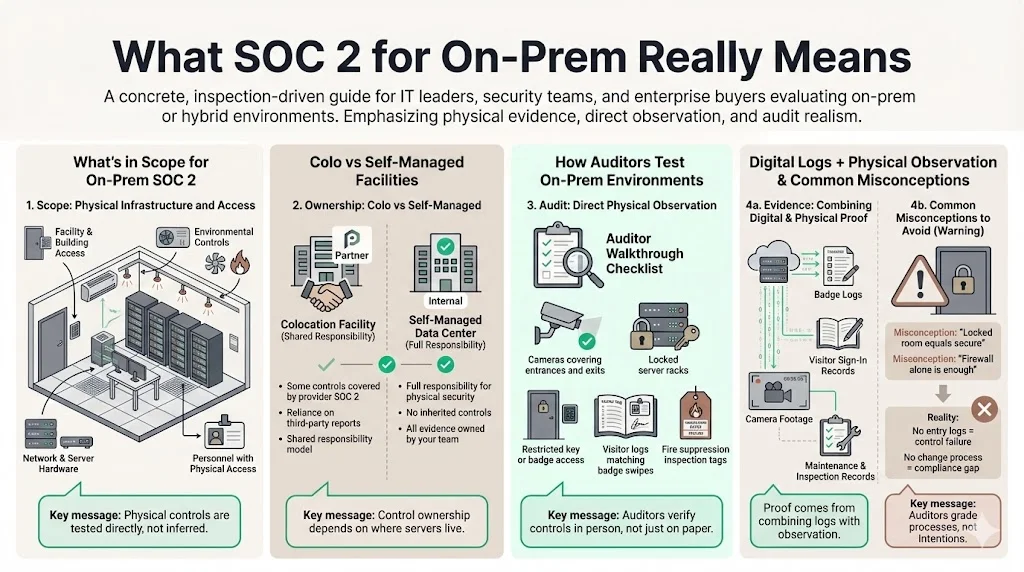
In a SOC 2 For On-Prem context, the audit scope encompasses the physical facility, the environmental controls (power, cooling, fire suppression), the physical network hardware, and the personnel who have access to the building. Unlike a SaaS audit where physical security is a reference to an AWS certificate, on-prem audits require direct testing of your facility’s controls.
If you host your solution in a colocation facility (colo), some controls map to the colo provider's SOC 2 report. However, if you manage your own server room or data center, every control regarding physical access and environmental safety falls directly on your team.
Operational Differences in Audits
Auditors approach on-prem environments differently than SaaS models. In a hosted model, an auditor might verify that a configuration setting in the cloud console restricts access. In an on-prem environment, the auditor may physically walk through the facility to verify that:
- Cameras cover all ingress and egress points.
- Server racks are locked and keys are restricted.
- Visitor logs match badge swipe data.
- Fire suppression systems have valid inspection tags.
The burden of proof shifts from digital logs to a combination of digital evidence and physical observation. This requires a level of coordination between IT, Facilities, and HR that cloud-native startups rarely encounter.
Common Misconceptions
Many enterprises believe that because their servers are behind a firewall in a locked room, they are secure. This is the "castle and moat" fallacy. Auditors do not grade on intent; they grade on documented, repeatable processes. A locked room without a log of who entered and when is a control failure. A firewall without a documented change management process for rule updates is a compliance gap.
Why SOC 2 For On-Prem Matters When Selling to Enterprise Clients
Enterprise procurement teams in 2025 operate under heightened scrutiny. With supply chain attacks and hardware-level vulnerabilities rising, the "trust but verify" mantra has shifted to "verify, then trust."
How Procurement Teams Assess Risk
When a Fortune 500 company evaluates an on-prem vendor, they assess the risk of introducing a foreign device or software package into their ecosystem, or the risk of trusting data to a physical location they cannot control. According to the IBM Cost of a Data Breach Report 2024, the global average cost of a data breach has reached $4.88 million, with breaches involving third-party software often costing significantly more and taking longer to identify.
Teams utilize security questionnaires—often spanning 300 to 500 questions—that ask specific details about physical security, disaster recovery, and hardware lifecycle management. Without a SOC 2 For On-Prem report, your team must answer every question manually, often providing screenshots and policy documents as proof. This creates friction. A SOC 2 Type 2 report serves as the "answer key," allowing you to bypass huge sections of the questionnaire by referencing the auditor's opinion.
Shortening Sales Cycles
We observe a consistent pattern across the 6,000+ security audits we have supported: companies without a SOC 2 report face sales cycles that drag on for 9 to 12 months. The security review process alone can consume 4 months of back-and-forth.
By presenting a clean SOC 2 Type 2 report early in the conversation, you signal maturity. You demonstrate that an independent third party has already validated your physical and logical controls. This can reduce the security review timeline by 50–70%, allowing sales teams to close deals within the fiscal quarter rather than pushing them to the next year.
Signaling Maturity in Risk Management
For on-prem providers, a SOC 2 report proves you understand the complexities of hardware. It shows you have accounted for hard drive failures, power outages, and physical theft. In sectors like healthcare, where the U.S. Department of Health and Human Services (HHS) enforces strict physical safeguards for ePHI, this assurance is often the deciding factor between a pilot program and a rejection.
SOC 2 Trust Services Criteria and On-Prem Environments
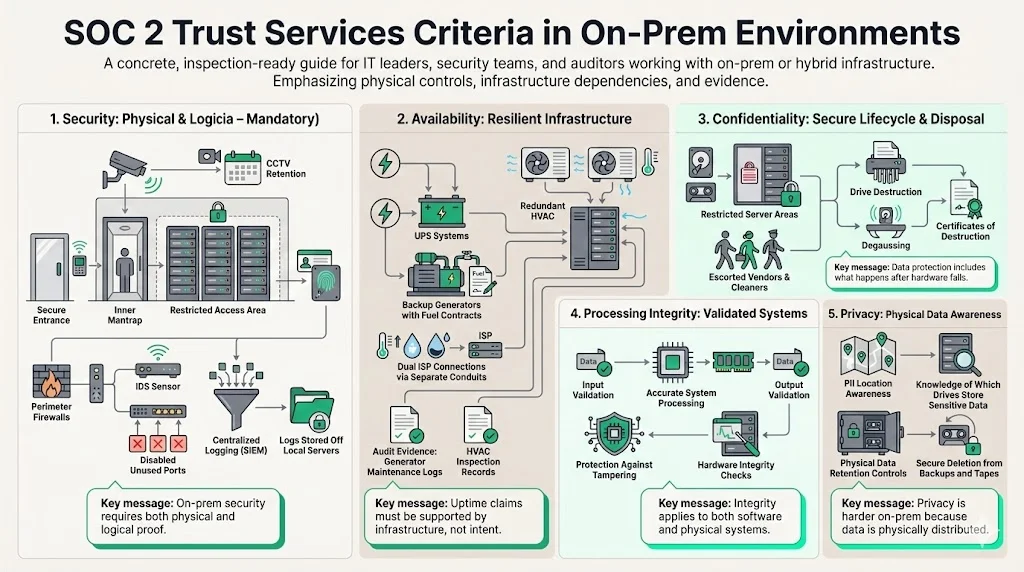
The AICPA defines five Trust Services Criteria (TSC). While the criteria remain the same regardless of deployment model, the application of these criteria changes drastically for SOC 2 For On-Prem.
Security (Common Criteria)
This is the only mandatory criterion. For on-prem, it involves:
- Physical Security: Biometric scanners, badge readers, mantraps, and CCTV retention (typically 90 days).
- Network Security: Perimeter firewalls, intrusion detection systems (IDS), and physical port security (ensuring unused ethernet ports are disabled).
- System Monitoring: Unlike cloud tools that aggregate logs automatically, on-prem teams must configure centralized logging (SIEM) for physical servers, ensuring logs are not stored locally where they can be tampered with.
Availability
In the cloud, availability often means "multi-region redundancy." On-prem, it means:
- Power: Uninterruptible Power Supplies (UPS) and backup generators with fuel contracts.
- Environmental: HVAC systems with redundancy to prevent overheating, and environmental sensors for temperature and humidity.
- Connectivity: Redundant ISP connections entering the building from physically different conduits.
Auditors will ask for maintenance records for generators and AC units. If you claim 99.9% uptime, you must prove the infrastructure can support it during a utility failure.
Confidentiality
This criterion focuses on data protection.
- Media Disposal: How do you handle failed hard drives? You cannot just throw them away. Auditors require certificates of destruction or proof of degaussing/shredding. The NIST Special Publication 800-88 Guidelines for Media Sanitization provide the industry standard here.
- Physical Access: Ensuring only authorized personnel can access areas where confidential data resides. Cleaning crews and maintenance workers must be escorted or vetted.
Processing Integrity
This ensures systems perform as intended without error.
- Input/Output Validation: Ensuring data fed into the on-prem system is validated and that output is accurate.
- Hardware Integrity: verifying that the hardware itself hasn't been tampered with (supply chain security).
Privacy
If your on-prem system stores Personally Identifiable Information (PII), the Privacy criterion applies.
- Data Location: You must know exactly which physical drives store PII.
- Retention: You need physical mechanisms to purge data when a customer requests deletion, which is harder to execute on backup tapes than on cloud storage.
On-prem SOC 2 demands tighter physical and operational controls than cloud.
Drop your work email and we'll assess the on-prem controls your next audit will test.
Core Internal Controls Auditors Expect for On-Prem SOC 2
The gap between a written policy and operational reality is where audits fail. Auditors test for consistency over the observation period (typically 6 to 12 months).
Access Controls
Identity management is complex without a unified cloud directory.
- Provisioning: When a new engineer starts, how are they granted physical access to the server room? Is there a ticket?
- Deprovisioning: When an employee leaves, is their physical key card deactivated immediately? We often see clients disable Active Directory accounts but forget to deactivate the physical badge for days. This is a significant exception in a SOC 2 For On-Prem report.
- Privileged Access: Who has the "root" password or the physical master key? Auditors expect a "break-glass" procedure where use of these credentials is logged and reviewed.
Change Management
In the cloud, Infrastructure-as-Code (IaC) documents changes. On-prem, changes often happen manually.
- Patch Management: You must prove that firmware updates on routers and switches are evaluated and applied.
- Separation of Duties: The person who writes the code should not be the only one with physical access to deploy it to the production server. In smaller teams, this requires creative control design to satisfy auditors.
System Monitoring and Logging
- Centralization: Logs must move off the device. If a server is compromised, the local logs are untrustworthy.
- Physical Logs: Visitor logs (paper or digital) are audit artifacts. They must include name, company, time in, time out, and the name of the escort. Missing "time out" entries are a frequent audit finding.
Physical Security Controls
Auditors will sample your visitor logs. They will ask: "On June 14th, a technician from the HVAC company entered. Show me the ticket approving this work and the sign-out time." If you cannot produce this, you fail the control.
- Environmental Safeguards: Fire suppression (FM-200 or pre-action sprinklers) must be inspected annually. The inspection tag is your evidence.
Risk Management in On-Prem SOC 2 Programs
Risk assessment is the foundation of SOC 2. For on-prem, the risk register looks very different from a SaaS company.
How Auditors Evaluate Risk
Auditors check if your controls actually address the risks you identified. If you list "Fire" as a high risk but have no fire suppression inspection records, your risk management program is deemed ineffective.
Common On-Prem Risks
- Physical Intrusion: Theft of hardware. The Verizon 2024 Data Breach Investigations Report (DBIR) notes that while digital attacks dominate, physical theft and loss of assets (like laptops or drives) remain a persistent vector for data exposure.
- Environmental Disaster: Flood, fire, earthquake.
- Utility Failure: Power or internet outages.
- Supply Chain Failure: Inability to replace failed hardware quickly (e.g., RAID controller failure).
Keeping Documentation Current
A risk assessment is not a one-time event. If you add a new server room or change your ISP, the risk register must be updated. At Konfirmity, we drive this process quarterly. We find that companies trying to manage this via spreadsheets often present outdated risk registers during the audit, leading to uncomfortable questions.
Vendor Management for On-Prem Environments
Even if you own the servers, you rely on vendors.
- Colocation Providers: If you are in a data center, you must obtain their SOC 2 report, review it, and document that their controls (physical security, power) effectively cover your risks. This is called the "CUEC analysis" (Complementary User Entity Controls).
- Support Vendors: The company that shreds your documents, the vendor that maintains the generator, and the ISP are all critical vendors.
- Hardware Vendors: ensuring you have SLAs for hardware replacement (e.g., 4-hour onsite support) is a control for Availability.
Data Protection and Data Integrity in On-Prem Systems
Data integrity ensures that the data on the disk is what the user expects.
Encryption at Rest and in Transit
- At Rest: Full disk encryption (FDE) or database-level encryption is mandatory. Physical theft of a drive should not result in a data breach.
- In Transit: Even within your private LAN, sensitive traffic should be encrypted (TLS 1.2/1.3). The assumption that the internal network is "safe" is outdated.
Backup Integrity
- Restoration Testing: It is not enough to have backups. You must perform restoration tests. For on-prem, this often involves pulling tapes or mounting external drives and spinning up a test instance.
- Offsite Storage: If your primary data center burns down, where are your backups? If they are in the same room, you have no disaster recovery. You must prove backups are replicated to a geographically distinct location (cloud or another physical site).
Audit Readiness for SOC 2 Type 2 (On-Prem Focus)
A SOC 2 Type 1 tests design at a point in time. A Type 2 tests operating effectiveness over a period (usually 12 months).
The Challenge of Type 2
In a Type 2 audit, if you missed a weekly generator test in February, the auditor will find it in October. You cannot fix the past.
- Evidence Collection: You need a system that triggers reminders for manual tasks (fire extinguisher checks, visitor log reviews).
- Observation Period: Consistency is key. A gap of three months in log reviews cannot be explained away.
Reducing Back-and-Forth
The cost of an audit is not just the auditor's fee; it is the internal hours spent finding evidence. Konfirmity's fully-managed service reduces this burden. We maintain the evidence repository year-round. When the auditor asks for "Sample A from March," we already have it. This reduces the internal effort from 550–600 hours (self-managed) to approximately 75 hours per year.
Best Practices for SOC 2 For On-Prem
1) Start with What Exists
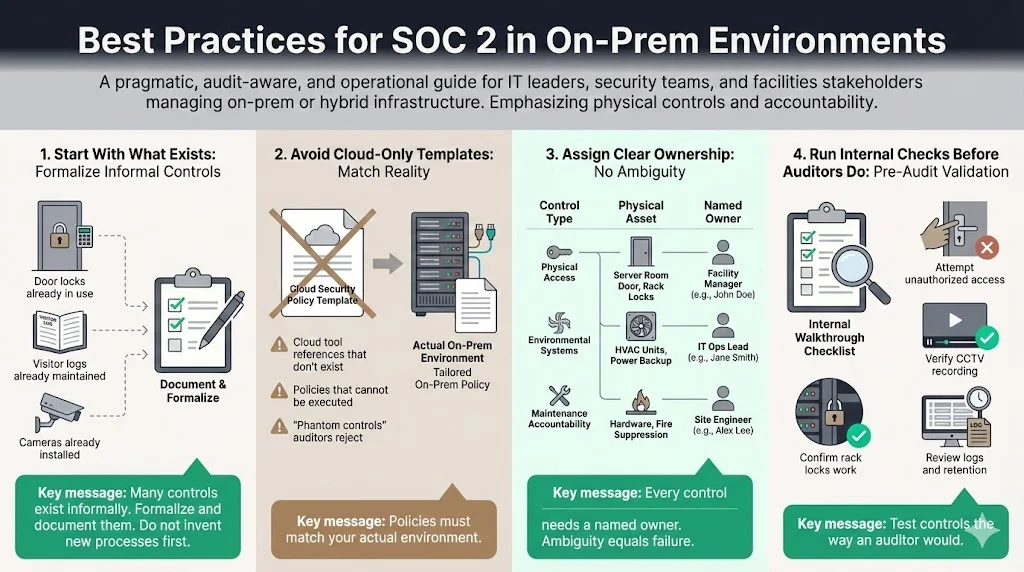
You likely have processes in place that are not documented. You lock the door. You have a visitor log. Start by formalizing these.
2) Avoid Cloud Templates
Do not download a "SaaS SOC 2 Policy" pack. It will reference AWS Inspector and CloudTrail, which you do not have. This creates a "phantom control"—a policy you claim to follow but cannot execute. Auditors frown heavily on this.
3) Assign Clear Ownership
Who owns physical security? Is it the Office Manager or the CTO? Who owns the generator maintenance? Ambiguity leads to control failure.
4) Run Internal Checks
Conduct a "pre-audit" or gap analysis. Walk through your own facility with the eyes of an auditor. Try to open the server rack without a key. Check if the CCTV is actually recording.
Common Mistakes Companies Make with On-Prem SOC 2
1) Over-Documenting Weak Controls
Don't write a 50-page policy for a process you do loosely. Write a 2-page policy that reflects what you actually do, then improve the process over time.
2) Ignoring Physical Security Until Late
We see teams focus entirely on firewall rules and forget that the server room door was propped open for ventilation. Physical security is a binary pass/fail in many auditors' eyes.
3) Treating SOC 2 as a One-Time Task
Compliance is a state of being, not a project. If you stop your controls the day the auditor leaves, you will fail the next year's audit, or worse, suffer a breach in the interim.
Conclusion
SOC 2 For On-Prem is a rigorous test of an organization's operational discipline. For enterprise buyers, it serves as a powerful proxy for trust. It proves that a vendor has the maturity to manage the physical and digital risks inherent in owning infrastructure.
While the path is steeper than for cloud-native companies, the value is significant. A clean report removes the single largest objection in enterprise sales cycles. However, success does not come from last-minute sprints. It comes from building a culture of security where controls are lived, not just documented.
Konfirmity is a security-driven compliance platform, and for on-prem you can add the fully-managed service, because software alone cannot inspect a fire extinguisher or verify a visitor log. With managed delivery, our team implements the controls, monitors the evidence, and manages the audit, allowing you to focus on building your product. Build the program once, operate it daily, and let compliance follow as a natural outcome of good security.
FAQ: SOC 2 For On-Prem
1) Who needs a SOC 2 Type 2?
Companies handling sensitive customer data, vendors selling to enterprise or regulated industries (healthcare, finance), and on-prem providers with long-term customer contracts typically require SOC 2 Type 2.
2) What are the 5 criteria for SOC 2?
The Trust Services Criteria are:
- Security (Mandatory)
- Availability
- Processing Integrity
- Confidentiality
- Privacy
3) What is a SOC level 2?
This is a common misnomer. People usually mean "SOC 2 Type 2." SOC 1 is for financial reporting controls. SOC 2 is for security and operations. SOC 3 is a public summary of a SOC 2 report. Type 2 refers to the audit covering a period of time (observation window), which is what enterprises demand.
4) Is SOC 2 a legal requirement?
No, SOC 2 is not a law like HIPAA or GDPR. It is a voluntary standard. However, it becomes a contractual requirement. Enterprise buyers will often write into the contract that the vendor "must maintain a current SOC 2 Type 2 report," effectively making it mandatory for doing business.







