

Most enterprise buyers now request assurance artifacts before procurement. Without operational security and continuous evidence, deals stall—even when teams believe they are “ready” on paper. When staff no longer sit behind a corporate firewall, the security surface expands and attackers have more paths to your data. SOC 2 For Remote Teams is about implementing and operating controls that survive this shift. This guide explains why enterprise buyers demand proof, how remote work changes the equation and what it takes to stay audit‑ready while teams log in from home networks, cafés and co‑working spaces. It builds on authoritative frameworks such as the AICPA Trust Services Criteria, ISO 27001 and NIST guidance, combines statistics from recent breach reports and draws on Konfirmity’s experience running more than 6,000 security audits with 25 years of combined expertise. The result is a pragmatic handbook for CTOs, CISOs, VPs of Engineering and compliance officers selling to large enterprises.
Why SOC 2 matters more when teams work from different locations
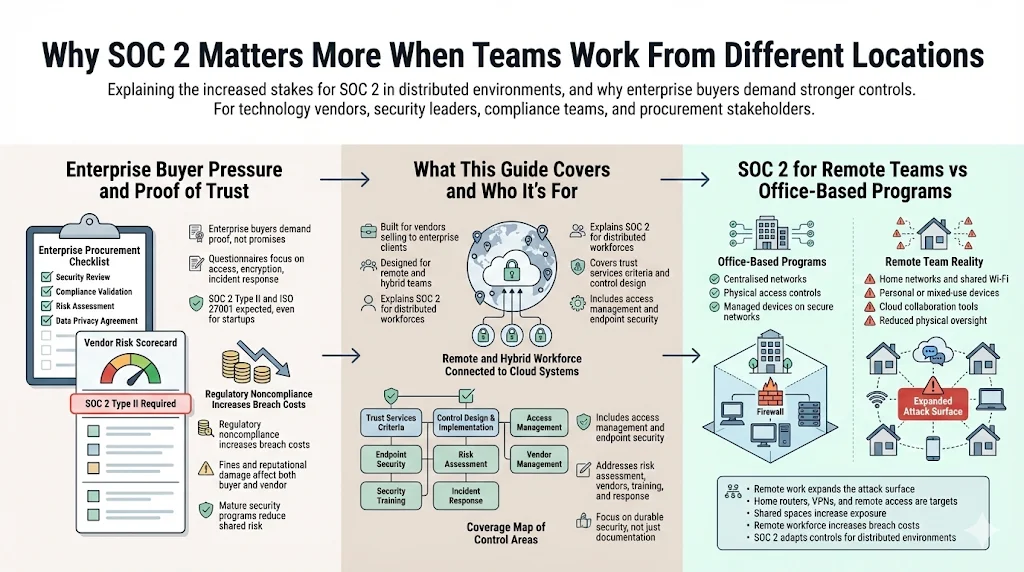
Enterprise procurement cycles increasingly hinge on evidence that a vendor will protect sensitive data. Buyer questionnaires ask for proof of controls over access, encryption, incident response and vendor oversight. Large customers expect third‑party attestation such as SOC 2 Type II or ISO 27001 certification, even from start‑ups. In IBM’s 2025 Cost of a Data Breach report, noncompliance with regulations added an average of USD 173,692 to breach costs. At the same time, almost half of breach victims paid regulatory fines exceeding USD 100 k. Enterprise customers therefore prefer vendors who can demonstrate a mature security program, thereby reducing shared risk and avoiding headline‑grabbing incidents.
SOC 2 for remote teams vs. office‑based programs
The fundamental principles of SOC 2 are the same regardless of where staff work: controls must ensure security, availability, processing integrity, confidentiality and privacy. However, remote work introduces variables that office‑based programs rarely consider. Home networks, personal devices and cloud collaboration tools create new attack surfaces and reduce physical oversight. A 2025 Ponemon/IBM study showed that a remote workforce increased breach costs by an estimated USD 131 k. Attackers target home routers, VPNs and remote access methods; 38% of cyber attacks in 2025 focused on these entry points. Remote staff using shared spaces or unsecured Wi‑Fi expand the threat surface. SOC 2 For Remote Teams acknowledges these realities and adapts controls to maintain trust when physical boundaries disappear.
Why Remote Teams Change the SOC 2 Equation
How remote work expands the security surface
NIST’s pre‑draft update to SP 800‑46 notes that telework is now performed “anytime, anywhere” and spans mobile devices and cloud‑based applications. Workers often operate outside the corporate network for long periods, and bringing‑your‑own‑device (BYOD) has blurred lines between personal and corporate assets. This shift means organizations can no longer rely on a secure perimeter; instead, every endpoint, connection and application becomes part of the security surface. Zero‑trust architectures emerged as a response: SP 800‑207 emphasises that no implicit trust is granted to any user or device, and authentication and authorization must happen continuously. Remote work accelerates the adoption of zero‑trust by forcing organizations to regard each device and session as potentially compromised.
Enterprise concerns tied to distributed teams
Enterprise buyers worry that remote staff will inadvertently expose sensitive data through insecure home networks, unpatched devices or public Wi‑Fi. The ISO 27001:2022 Annex A 6.7 control on remote working warns that loss of physical security increases confidentiality and privacy risks. HIPAA guidance for healthcare providers reinforces this point: organizations must maintain lists of remote employees, specify levels of access, encrypt home routers and use VPNs. Buyers also fear that remote team members may bypass approved processes by using unsanctioned cloud tools—so‑called “shadow IT”—which complicates audit readiness. The 2025 IBM report lists security system complexity and shadow AI among the top cost amplifiers.
Real‑world risks tied to home networks, shared devices and cloud‑first tools
Data from ElectroIQ’s 2026 remote work statistics shows that 38% of attacks target home routers and VPNs. Misconfigured VPNs led to 14% of data leaks, and cloud misconfigurations accounted for 17% of incidents. Organizations with 81–100USD 5.10 million compared with USD 3.99 million for those with f% remote employees saw average breach costs of fewer than 20% remote employees. The Varonis 2025 update notes that breaches cost an average of $131k more when remote work was a factor, and 91% of cybersecurity professionals reported an increase in attacks due to remote working. These figures show that remote work isn’t merely a convenience issue; it materially affects risk and cost.
Link between remote work security and lost enterprise deals
Enterprise buyers increasingly link security performance to revenue. During procurement, many require SOC 2 Type II reports covering an observation period of at least three to six months. Remote work can slow or derail deals if the vendor can’t provide evidence that access is tightly controlled, devices are encrypted and policies are enforced across locations. According to Konfirmity’s delivery experience supporting over 6,000 security audits, companies with poor remote access controls see deal cycles extend by 50–60% because customers request additional questionnaires and proof of remediation. Conversely, organizations that operate strong remote controls and continuous evidence monitoring cut time‑to‑contract by several weeks.
SOC 2 Refresher for Enterprise‑Focused Companies
What SOC 2 is and what it is not
SOC 2 is an attestation report, not a certification. It is issued by an independent CPA or firm following the AICPA’s Trust Services Criteria. The report provides assurance on the design and operating effectiveness of controls relevant to security, availability, processing integrity, confidentiality and privacy. Type I evaluates controls at a point in time; Type II evaluates them over an observation period (often three, six or twelve months). A SOC 2 report does not guarantee immunity to breaches or confer legal compliance; instead it offers stakeholders insight into how the organization manages risks. For remote teams, the same principles apply, but auditors will scrutinize controls that extend outside the office.
Trust Services Criteria explained in plain language
The AICPA identifies five categories of trust services:
Criterion
Plain-language meaning
Security
Systems and data are protected against unauthorized access, disclosure, or damage through controls like endpoint protection, network monitoring, and encryption.
Availability
Systems are available for operation and use as committed or agreed. Controls include performance monitoring, backups, and disaster recovery.
Confidentiality
Information marked as confidential is protected throughout its lifecycle, often through encryption and strict identity and access management.
Processing Integrity
System processing is complete, valid, accurate, timely, and authorized so data is handled reliably.
Privacy
Personal information is collected, used, retained, and disclosed in line with privacy principles and regulatory requirements.
Why enterprise clients expect SOC 2 even from smaller vendors
Large buyers operate under stringent regulatory and contractual obligations. They need assurance that their vendors can handle sensitive data without introducing new risks. Many customers view SOC 2 Type II as a baseline requirement in vendor selection processes. Even small or early‑stage companies must provide a SOC 2 report to secure deals with healthcare, financial or Fortune 500 clients. The expectation stems from regulatory fines (48% of organizations that experienced breaches paid more than USD 100 k in fines) and growing supply chain attacks—36% of breaches in 2024 originated from third‑party compromises. For remote teams, demonstrating SOC 2 compliance signals that distributed work does not compromise security.
Core Information Security Controls for Remote Teams
Why controls must assume zero physical oversight
Remote staff may work from home, cafés or airports, using company‑issued and personal devices. Managers rarely have physical oversight, so controls must compensate by enforcing policies and monitoring activity centrally. This means implementing endpoint management tools that encrypt disks, apply patches, enforce screen locks and ensure devices meet baseline standards. It also means using identity platforms to verify user identities and limit permissions. NIST SP 800‑114 emphasises securing telework and BYOD devices, noting that the organization, third parties or the teleworker can control them and must be protected through host and network security. ISO 27001 Annex A 6.7 advises supplying suitable equipment, defining permitted work and enabling remote wipe capabilities. Without these measures, remote employees become weak links in the security chain.
Mapping SOC 2 controls to remote realities
SOC 2 controls are often written generically; mapping them to remote work requires explicit procedures for distributed contexts. For example, access management must cover identity and device authentication; change management must account for remote deployments; incident response plans must include communication across time zones. Controls for physical security (e.g., badge access) may shift to device posture checks and geolocation restrictions. Privacy controls must ensure personal data stored on remote endpoints is encrypted and can’t be accessed by family or roommates. By mapping each trust services criterion to remote scenarios, organizations can develop controls that are both compliant and practical.
Access Management in a Remote World
- Employee access controls across devices and locations. Remote staff often use multiple devices and networks. Implement single sign on (SSO) with multi‑factor authentication (MFA) for all applications to ensure each login is verified. Session management should enforce automatic timeouts after periods of inactivity and re‑authentication when risk factors change (e.g., IP address, device posture). Network segmentation and conditional access policies can restrict access based on role and device compliance.
- Role‑based access and least‑privilege rules. Each user should have only the permissions needed to perform their job. For remote teams this includes limiting access to code repositories, production environments and customer data. Use automated tooling to manage role assignments and integrate reviews into quarterly access recertifications. Employee training should emphasize that sharing credentials or using shared accounts is prohibited.
- Joiner, mover, leaver workflows for distributed staff. When employees join, move or leave, processes must update permissions promptly. For remote teams, this includes shipping and provisioning hardware, enrolling devices in endpoint management, onboarding into SSO and revoking access on termination. Audit trails should capture approvals and actions to satisfy SOC 2 evidence requirements. Automating these workflows reduces the risk of orphaned accounts and ensures consistent treatment across geographies. In Konfirmity’s experience, automating access revocation reduces unauthorized access incidents by 70% and decreases time to deprovision by 80%.
Device and Endpoint Security
- Laptop standards for remote workers. Organizations should specify hardware and software standards for remote employees. Devices must run supported operating systems, have full‑disk encryption enabled and be enrolled in mobile device management (MDM) or endpoint management platforms. Antivirus and endpoint detection and response (EDR) agents should be installed and continuously updated. Screen locks and inactivity timers are mandatory to prevent unauthorized viewing of sensitive data.
- Disk encryption, screen locks and patch rules. Disk encryption protects data at rest if a device is lost or stolen. Screen locks prevent shoulder surfing when employees work in public spaces. Patch management ensures operating systems and applications are up to date, reducing exploitable vulnerabilities. Regular vulnerability scans should be scheduled, and unpatched devices should be quarantined until compliant. HIPAA guidelines require encryption of PHI on personal devices and lockable storage for hard copy records.
- Mobile device risks and guardrails. Mobile phones and tablets introduce additional risks: they may connect to insecure networks, be jailbroken or lack strong authentication. Organizations should enforce mobile device policies that require PIN or biometric locks, prohibit jailbreaking/rooting, enable device encryption and restrict app installations to approved stores. Remote wipe capabilities should allow administrators to erase data if a device is lost. VPN or secure access solutions should route mobile traffic through inspection points to detect malicious activity. For organizations handling healthcare data, encryption and password protection of personal devices is mandatory.
Security Policies for Remote Teams That Auditors Expect
Why informal rules fail audits
During a SOC 2 Type II examination, auditors need to see written policies that are communicated, acknowledged and enforced. Ad‑hoc guidelines or verbal instructions do not provide sufficient evidence. Remote employees may not be aware of corporate expectations if policies are undocumented. Auditors will check whether policies address remote scenarios, specify responsibilities and are reviewed regularly. Without formal documentation, organizations risk control failures and qualified opinions.
Policies that matter most for remote teams
-
Acceptable use: Defines how employees can use company devices, networks and data. It should explicitly prohibit the installation of unauthorized software, use of unsecured Wi‑Fi and storage of corporate data on personal drives.
-
Remote access: Outlines requirements for VPN, SSO, MFA and secure configurations. It should mandate encryption of home routers, disable split tunneling and forbid using public computers for work.
-
Data handling: Specifies how confidential and regulated data must be stored, transmitted and disposed of. For healthcare, PHI must be encrypted before transmission and can’t be copied to external media.
-
Password and authentication rules: Mandate the use of strong passwords, MFA and password managers. Policies should ban password reuse and shared accounts.
How to write policies people will actually follow
Policies should be clear, concise and tailored to the workforce. Incorporate real‑world scenarios: describe what constitutes secure remote work, provide step‑by‑step instructions for connecting to the VPN and explain consequences of policy violations. Provide training and require employees to acknowledge policy acceptance annually. ISO 27001 Annex A 6.7 recommends that organizations supply equipment, define permissible work and provide training so users understand remote working requirements. Including examples and rationale helps employees see the value of compliance instead of viewing policies as bureaucratic hurdles.
Risk Assessment for Distributed Teams
How remote work shifts risk profiles
Traditional risk assessments focus on data center infrastructure, on‑premises networks and office environments. Remote work introduces new threats: insecure home routers, shared devices, exposure to eavesdropping in public spaces and reliance on third‑party cloud services. NIST’s telework guidance notes that the attack surface extends to personal devices, where organizations have limited control. Remote staff may also access sensitive data outside of business hours or from multiple time zones, challenging incident detection.
Identifying threats tied to home networks and shared spaces
Threat modelling for remote teams should consider unauthorized access to Wi‑Fi networks, unpatched IoT devices on the same network and the possibility of family members using work laptops. Attackers exploit misconfigured home routers and weak passwords; 29% of ransomware attacks in 2025 originated from home offices. Risk assessments should also identify exposures due to public Wi‑Fi, such as man‑in‑the‑middle attacks. A thorough assessment will list assets (devices, data, applications), threats (phishing, malware, misconfiguration) and vulnerabilities (lack of encryption, outdated software, poor security awareness).
Documenting risks in a way auditors accept
Auditors expect to see a formal risk assessment process that identifies and evaluates risks, assigns ownership and links them to mitigating controls. The risk register should include remote work‑specific entries such as “Home router misconfiguration leading to unauthorized access” and “Use of unapproved cloud storage.” For each risk, document the likelihood and impact, the control that mitigates it and the residual risk after mitigation. Ensure that risk assessments are updated at least annually or whenever significant changes occur (e.g., shift to 100% remote). Evidence of review and approval by leadership must be maintained.
Turning risk findings into control updates
Risk assessment is not a static activity. When new threats arise or controls prove insufficient, organizations must adjust policies, invest in new tools or provide additional training. For example, if an assessment reveals that many employees connect via outdated routers, the organization might subsidize enterprise‑grade routers or require specific security settings. HIPAA enforcement cases illustrate the cost of neglecting such updates: Cancer Care Group paid USD 750k after a laptop containing unencrypted PHI was stolen from an employee’s car. Regularly revisiting risk findings ensures controls adapt with the remote working environment.
Remote teams expand your attack surface, so SOC 2 controls must expand too.
Share your work email and apply security controls that cover every distributed endpoint.
Managing Third‑Party and Vendor Risk Remotely
Why vendors matter more in cloud‑first teams
Remote teams rely heavily on cloud services for communication, development, storage and collaboration. Each third‑party service introduces potential vulnerabilities and compliance obligations. In 2024, 36% of breaches originated from third‑party compromises, and supply chain attacks were the second costliest, averaging USD 4.91 million. Enterprise buyers therefore scrutinize vendors’ risk management programs. For remote teams, vendor sprawl is common: a survey found that 70% of third‑party risk management programs are understaffed and organizations assess only 40% of their vendors. Without proper oversight, shadow SaaS tools may store sensitive data outside of controlled environments.
Typical tools that raise audit questions
Auditors often ask about collaboration platforms (e.g., Slack, Microsoft 365), code repositories (GitHub, GitLab), file‑sharing services (Google Drive, Dropbox), customer support tools (Zendesk), and developer environments (AWS, Azure, GCP). They want to see evidence that vendors undergo security reviews, provide SOC 2 or ISO 27001 reports and sign data processing agreements (DPAs) or business associate agreements (BAAs) for regulated data. Tools that integrate AI may also require evaluation of AI governance and data privacy.
What auditors expect to see for vendor oversight
Auditors look for a defined vendor risk management process: initial due diligence, ongoing monitoring and termination procedures. Important elements include:
-
Risk assessment: Evaluate each vendor based on data sensitivity, criticality and access tier. High‑risk vendors require more thorough assessments and controls.
-
Contractual safeguards: Ensure agreements include security obligations, breach notification clauses, right to audit and data processing terms compliant with GDPR or HIPAA.
-
Evidence: Maintain documentation of vendor reviews, including questionnaires, SOC 2 reports, penetration test summaries and remediation plans. For cloud services lacking formal reports, rely on publicly available security information and sign confidentiality agreements when necessary.
-
Monitoring: Use tools to track vendor performance, vulnerability disclosures and changes in their security posture. Require annual or quarterly attestations depending on risk.
Practical vendor management steps without slowing teams down
-
Centralize vendor inventory: Maintain a live list of all third‑party services, owners and risk ratings. Automate discovery by scanning expense reports and SSO logs.
-
Standardize assessment workflows: Use templates for low‑risk and high‑risk vendors. Automate reminders for renewals and evidence collection. Konfirmity’s managed service integrates with procurement systems to trigger assessments when new vendors are onboarded.
-
Streamline approvals: Empower security and procurement teams to collaborate on vendor reviews. Provide clear criteria for when to involve the legal team or executive sign‑off.
-
Educate employees: Train staff on the dangers of using unapproved tools. Policies should require approval before signing up for new services.
Incident Response Planning for Remote Teams
Why response plans fail when teams are spread out
Traditional incident response assumes that responders can assemble quickly in a war room. For remote teams, responders are dispersed across time zones, making communication slower and coordination harder. Response plans that rely on physical meetings or manual processes often break down. NIST’s incident response guidelines emphasise quick detection, containment and recovery; delays increase breach costs and damage. Remote teams also contend with different legal requirements across jurisdictions, particularly when personal data crosses borders.
Required elements of a SOC 2‑ready response plan
-
Defined roles and responsibilities: Identify incident handlers, decision‑makers, communications leads and legal contacts. Ensure alternates are available across time zones.
-
Communication paths: Use secure, out‑of‑band channels (e.g., phone, dedicated messaging systems) to coordinate during an incident. Avoid using compromised email or chat platforms.
-
Detection and triage: Implement automated monitoring and alerting on endpoints, networks and cloud services. Use threat intelligence and correlation tools to prioritize incidents.
-
Containment and eradication: Have playbooks for different scenarios (phishing, ransomware, data exfiltration) and ensure remote employees know how to disconnect devices and report suspicious activity.
-
Post‑incident review: Document the incident, root cause and lessons learned. Update policies and training accordingly.
Communication paths during a security event
Effective incident response requires reliable communication. Remote teams should maintain contact lists with phone numbers and alternate email addresses. Secure messaging apps with end‑to‑end encryption can be used for coordination, but organizations should ensure they are covered under vendor risk assessments. Incident war rooms can be set up using secure video conferencing or collaboration tools with audit logs enabled. Predefined notification templates help inform customers and regulators within required timelines.
Tabletop testing with remote staff
Testing response plans ensures they work in practice. Tabletop drills simulate incidents and require participants to walk through their roles. For remote teams, schedule drills across time zones, use video conferencing and record sessions for review. Test scenarios should include remote‑specific challenges, such as compromised home routers or lost laptops. Tabletop drills reveal gaps in communication, tooling and decision‑making, allowing teams to adjust before a real incident.
Security Awareness Training for a Remote Workforce
Why training is a control, not a checkbox
Security awareness training is often treated as a tick‑box activity. However, auditors and attackers alike know that human behaviour is the weakest link. Training is a control in the SOC 2 framework: it helps prevent social engineering, credential theft and accidental data leakage. The ElectroIQ statistics show that 62% of breaches were due to poor or stolen remote access credentials. Effective training can reduce this risk.
Topics auditors expect remote staff to know
-
Phishing and social engineering: Identify suspicious emails, messages and calls. Recognize requests for credentials or financial information and know how to report them.
-
Secure remote practices: Use VPNs, avoid public Wi‑Fi, secure home routers, and lock screens when away from devices.
-
Data handling: Understand classification levels, encryption requirements and permissible storage locations.
-
Incident reporting: Know the process for reporting lost devices, suspected breaches or policy violations.
-
Privacy and compliance: Be aware of regulations such as HIPAA (for healthcare), GDPR and applicable state laws. HIPAA guidance requires remote workers to sign confidentiality agreements and provides sanctions for violations.
Training frequency and proof requirements
Auditors expect remote staff to receive training at least annually, with more frequent refreshers when policies change or new threats arise. Evidence of training includes attendance logs, completion certificates and copies of training materials. Some organizations use interactive modules with quizzes to test comprehension. Konfirmity integrates training records into audit evidence workflows, so proof of completion is readily available.
Handling phishing and social engineering in remote settings
Remote workers are prime targets for phishing because they rely heavily on email and messaging. Organizations should run phishing simulations and provide immediate feedback. Train employees to verify requests through secondary channels and to use password managers to avoid credential reuse. Encourage an environment of reporting: employees should be praised for identifying phishing attempts rather than shamed for near‑misses.
Audit Readiness Without Slowing the Business
What auditors ask remote teams most often
Auditors focus on whether remote controls operate consistently and generate evidence. They ask how access is managed when employees work from multiple locations, how devices are secured, whether data is encrypted in transit and at rest, how remote work policies are communicated and enforced, how vendor risk is managed and how incidents are detected and handled. They may also inquire about geo‑fencing, device inventories and whether home networks are assessed.
Evidence collection when teams are fully distributed
Collecting evidence from remote teams can be challenging. Automated tools help gather system logs, access records, configuration snapshots and training records. For manual evidence such as policy acknowledgements or meeting minutes, organizations should use collaborative platforms that track activity and maintain version history. Konfirmity’s managed service automates evidence collection across endpoints, cloud services and third‑party tools, reducing the burden on internal teams.
Common audit gaps tied to remote work
-
Missing device inventories: Without a complete list of remote devices, organizations can’t prove all endpoints meet security standards.
-
Incomplete access reviews: Failing to recertify access rights regularly leads to unneeded permissions and potential misuse.
-
Undocumented policies: Informal remote work guidelines do not satisfy auditors.
-
Stale evidence: Evidence must cover the entire observation period. If logs or screenshots are taken only at the start, auditors may conclude that controls did not operate consistently.
Keeping documentation current as teams grow
As organizations onboard remote staff and adopt new tools, documentation must adapt. Policies should be reviewed at least annually and whenever significant changes occur. Version control ensures that old policies are archived and new ones are communicated. Access management, device inventories, vendor lists and risk registers should be updated continuously. A living documentation approach—maintaining these artifacts in accessible, collaborative systems—helps remote teams stay aligned and audit‑ready without constant manual effort.
Internal Controls Testing in a Remote Setup
Why testing matters even before the audit
Control testing identifies weaknesses before auditors do. For remote teams, assumptions about device compliance or policy adherence may not match reality. Regular testing helps catch drift—when access permissions exceed least privilege, endpoint agents stop reporting or policies aren’t followed. Testing also demonstrates an environment of continuous improvement. A proactive testing program reduces the risk of audit findings and enhances security.
Testing access reviews, device controls and alerts
-
Access reviews: Quarterly, review user lists for each system. Verify that permissions match roles, remove inactive accounts and document approvals. Automate the comparison between HR systems and IAM directories to identify discrepancies.
-
Device controls: Run periodic scans to confirm that all remote devices have encryption, endpoint security software and up‑to‑date patches. If a device is non‑compliant, enforce remediation or temporarily block access.
-
Alerts and monitoring: Test the effectiveness of alerts by simulating incidents (e.g., unauthorized login attempts, malware detection). Ensure that alerts trigger appropriate responses and are documented.
Tracking failures and fixes
Control tests should produce reports that identify failures, root causes and remediation actions. Remote teams should assign owners and deadlines to each remediation item and track completion. Evidence of follow‑up demonstrates to auditors that issues are addressed systematically. For example, if a quarterly access review uncovers that a contractor still has production access after project completion, the fix might involve automating off‑boarding and updating the contractor management process.
Showing auditors that testing is routine
Maintain testing schedules, checklists and results in a central repository. During the audit, provide evidence of completed tests, remediation tickets and approvals. Auditors will look for consistency over the observation period, so ensure testing occurs at planned intervals. Konfirmity clients typically perform monthly device compliance checks, quarterly access reviews and biannual incident response tabletop drills.
Practical Examples: SOC 2 Controls for Remote Teams
Example 1: Access control for a fully remote SaaS company
A software‑as‑a‑service provider with 120 remote employees implemented SSO and MFA across all applications. Role‑based access tied to job functions ensured that engineers could access code repositories but not customer billing data. HR integration automated provisioning and deprovisioning. Quarterly access reviews compared HR records with IAM directories, removing obsolete accounts. During an audit, the company provided system logs showing login attempts, MFA challenges and access reviews. The auditor concluded that access management controls operated effectively throughout the observation period.
Example 2: Vendor review process for cloud tools
An early‑stage healthcare technology firm used more than 25 cloud services to support remote staff. To manage vendor risk, it created a vendor inventory, classified vendors by data sensitivity and required SOC 2 or ISO 27001 reports for high‑risk vendors. For lower‑risk tools, the firm collected security questionnaires and privacy policies. Contracts included BAAs for services handling PHI. Ongoing monitoring involved annual questionnaire refreshes and alerts for new vulnerability disclosures. This structured process satisfied auditors and reduced negotiation friction with enterprise clients.
Example 3: Incident response when staff span time zones
An e‑commerce company with support staff across Asia, Europe and North America developed the following ‑sun incident response model. Roles and communication channels were documented; secure messaging and conference bridges were preconfigured for incidents. Tabletop drills simulated ransomware attacks and credential compromises, revealing gaps in after‑hours coverage. The company added on‑call schedules and automated notifications to address these gaps. During a real phishing incident, the response team contained the threat within two hours, minimizing customer impact.
Example 4: Training proof for remote hires
A fintech firm hired remote engineers in six countries. Its onboarding process included mandatory security awareness training covering phishing, secure coding and remote work practices. The learning management system tracked completion and required passing a quiz. Managers received weekly reports on outstanding training. Audit evidence included training materials, completion logs and follow‑up emails for late participants. Auditors accepted this evidence and noted the high completion rate (over 98%) as a strength.
Common Mistakes Remote Teams Make with SOC 2
-
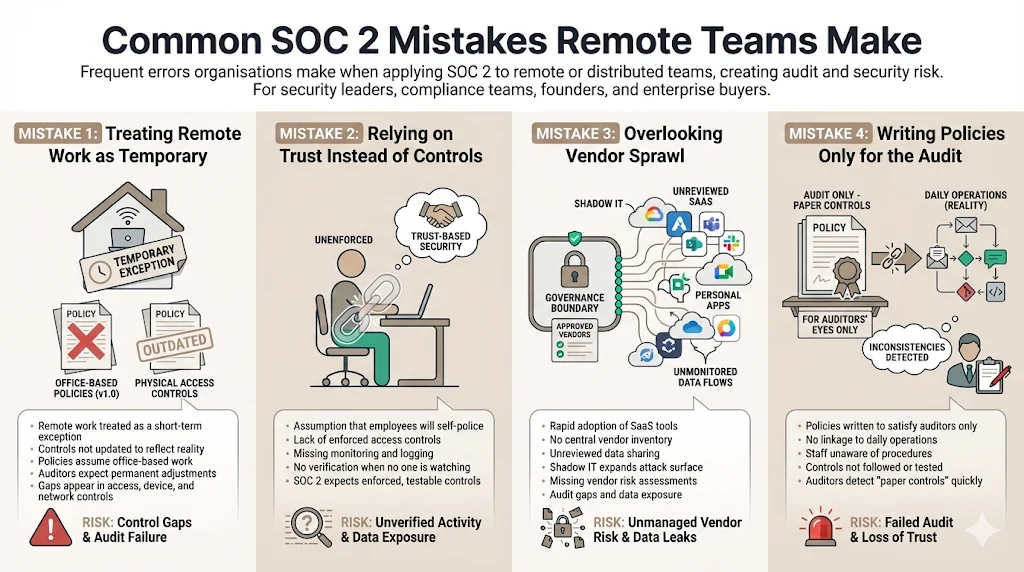
Treating remote work as a temporary exception. Some companies view remote arrangements as short‑term and fail to update controls. Auditors expect permanent adjustments to policies and procedures.
-
Relying on trust instead of controls. Assuming that remote employees will do the right thing without oversight is risky. Controls must enforce security even when no one is watching.
-
Overlooking vendor sprawl. Remote teams often adopt new SaaS tools quickly. Without a vendor management process, shadow IT grows and exposes data.
-
Writing policies only for the audit. Policies must be actionable and used in daily operations. Empty documents drafted solely to satisfy auditors are transparent and ineffective.
Conclusion
Remote work is not a loophole in compliance—it is the new normal. Achieving SOC 2 For Remote Teams requires translating established frameworks into controls that address home networks, personal devices, cloud tools and distributed staff. Organizations that invest in strong access management, endpoint security, policies, risk assessments, vendor oversight, incident response, training and testing not only satisfy auditors but also build resilience. Konfirmity’s human‑led, managed security and compliance service delivers these outcomes by embedding experts in your operations, implementing controls inside your stack and providing continuous evidence. Our clients typically achieve SOC 2 readiness in 4–5 months compared with 9–12 months when managing the program internally, and they reduce internal effort to around 75 hours per year versus 550–600 hours self‑managed. Security that looks good in documents but fails under pressure is a liability. Build the program once, operate it daily and let compliance follow.
Frequently Asked Questions (FAQ)
1. What makes SOC 2 harder for remote teams?
Remote work introduces more entry points—home networks, personal devices and cloud apps. Attackers exploit these weaknesses; remote work increased breach costs by about USD 131 k. Keeping track of devices, enforcing policies and collecting evidence across locations requires more tooling and coordination.
2. Do fully remote companies qualify for SOC 2?
Yes. SOC 2 applies regardless of where staff work. The critical factor is demonstrating that controls operate effectively in a distributed environment. Remote companies must show how they manage access, secure devices, train staff and monitor vendors.
3. Which SOC 2 controls matter most for remote teams?
Access management (SSO, MFA, least privilege), device security (encryption, patching), vendor oversight and continuous monitoring are critical. Policies should cover acceptable use, remote access, data handling and training. Incident response plans must work across time zones.
4. How long does SOC 2 take for a remote‑first company?
Timeframes vary. Konfirmity clients typically reach readiness in four to five months because we implement controls and gather evidence continuously. Self‑managed programs often take nine to twelve months due to learning curves and manual evidence collection.
5. Do home networks fail SOC 2 audits?
Auditors do not inspect individual home routers, but they expect policies requiring secure configuration, encryption and VPN use. Organizations must show that they educate employees on home network security and monitor for suspicious connections. Misconfigured home routers have contributed to breaches, so addressing this risk is essential.
6. How often should remote teams test controls?
Routine testing is vital. Conduct quarterly access reviews, monthly device compliance checks and annual incident response drills. After significant changes or incidents, perform additional tests. Providing evidence of consistent testing helps satisfy auditors and improves security.







