

Most enterprise buyers now request assurance artefacts before procurement. Without operational security and continuous evidence, deals stall—even when teams think they’re “ready” on paper. Mobile devices sit at the centre of this reality. They carry corporate and personal data, provide access to production environments and email, and often travel well beyond the physical perimeter. The American Institute of CPAs (AICPA) Trust Services Criteria notes that processes must exist to protect mobile devices such as laptops, smart‑phones and tablets because they serve as information assets. As more work shifts to phones and tablets, auditors and buyers pay closer attention to how those endpoints are secured.
This article explains why mobile device security is indispensable for SOC 2 audits, how to determine which devices fall into scope, how to assess mobile risks and implement controls, and how robust mobile controls strengthen enterprise trust. The guidance draws on authoritative frameworks such as AICPA’s trust services criteria, NIST SP 800‑124r2, and ISO 27001 Annex A.6, current research, and Konfirmity’s experience managing more than six‑thousand audits over 25 years. You’ll get actionable controls, examples and templates designed to help sales‑led and security‑led teams prepare for the scrutiny of auditors and enterprise clients.
Why mobile device security matters in SOC 2 audits
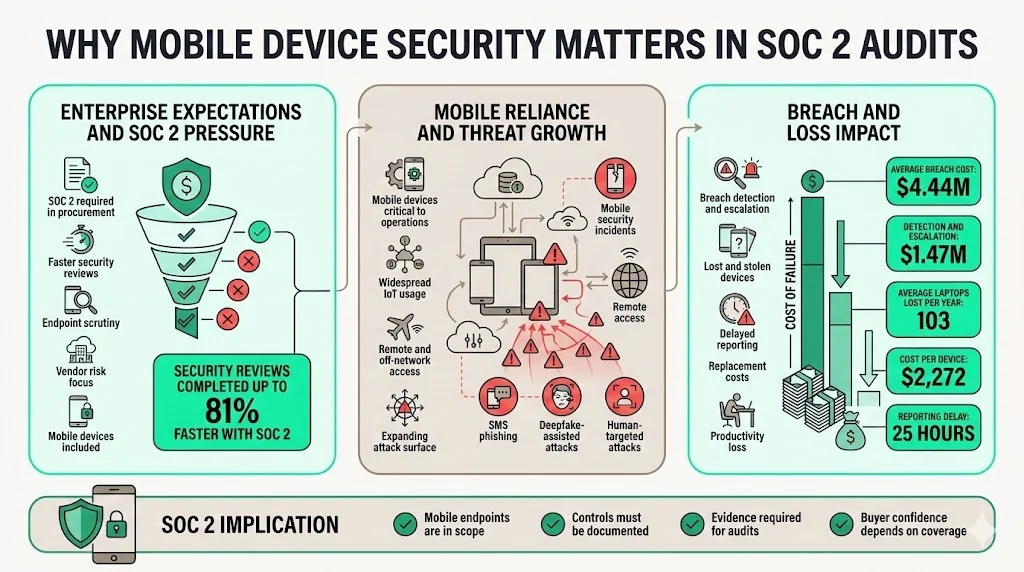
Enterprise procurement teams increasingly require SOC 2 reports and evidence of mobile controls. A 2025 industry study found that 65 percent of organisations report their buyers demand proof of SOC 2 compliance and that companies with a valid SOC 2 complete security reviews up to 81 percent faster. At the same time, vendor risk accounts for roughly 30 percent of data breaches, so customers scrutinise how vendors secure every endpoint—especially those that leave the office.
Mobile reliance and threat volume have both surged. Verizon’s 2024 Mobile Security Index reported that 80 percent of respondents say mobile devices are critical to their operations and 95 percent use Internet‑of‑Things devices, but more than half of critical infrastructure organisations experienced severe mobile security incidents. AI‑assisted attacks such as deepfakes and SMS phishing are expected by 77 percent of respondents to succeed. The human cost of a breach is high: IBM’s 2025 report pegs the global average breach cost at $4.44 million, with detection and escalation costs averaging $1.47 million. Lost and stolen devices contribute to that cost; a study cited by Prey Project estimated that large organisations lose an average of 103 laptops per year, with each device replacement costing $2,272 and employees taking 25 hours on average to report a missing device, which creates ample opportunity for attackers.
Where Mobile Device Security Fits in SOC 2
How mobile devices connect to the Trust Services Criteria
SOC 2 audits evaluate controls against five Trust Services Criteria (TSC): security, availability, processing integrity, confidentiality and privacy. Mobile devices touch all of them. The AICPA’s Trust Services Criteria emphasise that entities must protect information assets—including mobile devices and output components—through logical access controls and maintain processes to protect mobile devices such as laptops, smart‑phones and tablets. Mobile endpoints also support system availability; if a worker’s phone is lost or infected with malware, it can disrupt operational processes and degrade availability.
Common SOC 2 control areas impacted by mobile usage
Security: Controls under CC6 and CC7 require restricting logical access, encrypting data and detecting malware. Mobile devices must enforce strong authentication, protect data in transit and at rest, and provide mechanisms to detect and respond to anomalies. Availability: Mobile devices must remain operational and resilient. Poor configuration or malware can take devices offline, hampering service delivery. Auditors look for evidence of device patching, anti‑malware software and remote support capabilities. Confidentiality: Sensitive customer data must remain confidential. Mobile devices with unencrypted storage or unsecured messaging clients risk exposing data. The Trust Services Criteria specifically include points of focus such as restricting application installations, detecting unauthorized changes, and using antivirus software, all of which apply to mobile endpoints.
Why auditors focus on mobile endpoints more than before
As remote work and BYOD become standard, auditors recognise that laptops and phones often hold the keys to production systems. The NIST guideline for mobile security notes that mobile devices are more likely to be lost or stolen than desktop systems, increasing risk because they often contain sensitive data and support access to enterprise systems. The guideline also warns that malicious apps, untrusted certificates and mobile malware can compromise authentication credentials or capture network traffic. With the average cost per breached record at $160 and healthcare data breaches costing $7.42 million, auditors know that a single compromised smartphone can trigger expensive incident response and regulatory notification. Auditors therefore insist on proof that organisations manage these endpoints through written policies, technical controls and continuous monitoring.
Does SOC 2 Require Mobile Device Security?
Direct vs indirect SOC 2 expectations
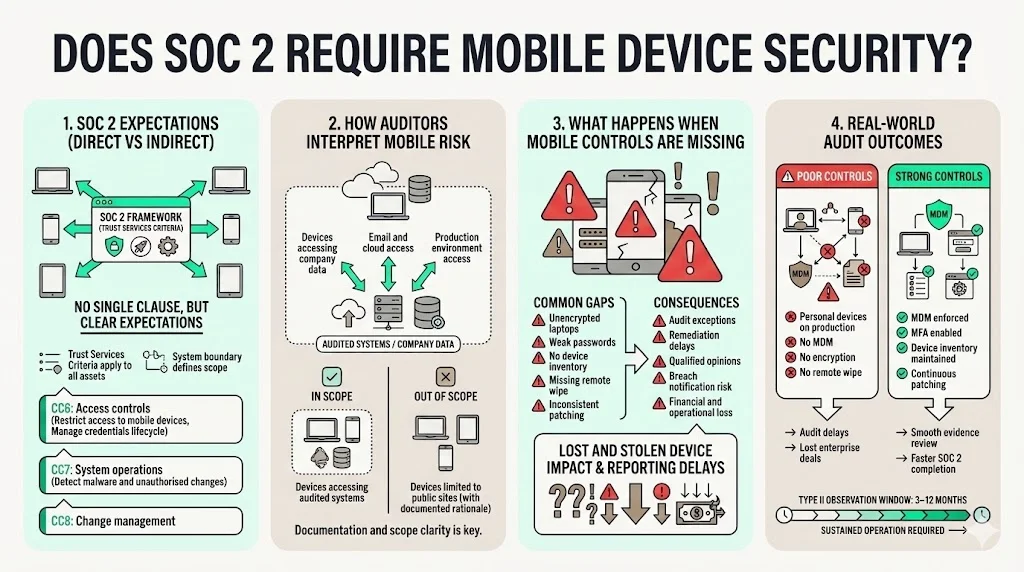
SOC 2 doesn’t contain a dedicated “mobile device” clause. Instead, auditors apply the Trust Services Criteria to all information assets within the system boundary. Several points of focus under CC6 (Access Controls), CC7 (System Operations) and CC8 (Change Management) explicitly reference mobile devices. For example, CC6.1 requires restricting logical access to hardware, data, software, administrative authorities and mobile devices. CC6.2 emphasises controlling access credentials and removing them when users no longer require access. CC6.8 requires controls to prevent or detect malicious software and highlights the use of antivirus software, application installation restrictions and detection of unauthorized changes. These controls collectively form the expectation that mobile endpoints are configured, managed and monitored.
How auditors interpret mobile risk
Auditors treat mobile devices as part of the system if they access company data, email, cloud applications or production environments. The AICPA’s points of focus on protecting mobile devices state that processes must be in place to protect mobile devices. They also expect entities to restrict logical and physical access, use encryption, and manage credentials. Practical interpretation means that any laptop, phone or tablet used by employees, contractors or vendors to access service data falls under scope. Devices that only access public marketing sites or systems outside the audited environment may be out of scope, but the organisation must document that rationale.
What happens when mobile controls are missing
Audit exceptions arise when controls are improperly designed or fail to operate effectively. One industry overview explains that exceptions can reflect misstatements, design deficiencies or operating effectiveness deficiencies; multiple exceptions may lead to a qualified or adverse opinion. In our experience, missing mobile controls often manifest as unencrypted laptops, weak password policies or insufficient inventory tracking. When auditors find such gaps without compensating controls, they note exceptions that prolong the audit or require remediation before the report can be issued. Beyond audit impacts, lost devices can trigger breach notification laws and penalties. The HP Wolf Security study cited by Prey Project estimated that lost and stolen devices cost organisations $8.6 billion globally, and employees take 25 hours on average to report a missing device. Failing to maintain remote wipe or encryption may therefore result in both compliance findings and real‑world losses.
Real‑world audit outcomes tied to mobile gaps
In Konfirmity’s experience across 6,000+ security audits, mobile gaps are a common source of exceptions. We’ve seen audits delayed when an engineering team allowed developers to connect unpatched personal laptops to production networks. In one case, an unencrypted tablet used by a field technician was lost, and the company lacked remote wipe capability; the auditor issued a significant deficiency, which required months of remediation and delayed the company’s SOC 2 report—costing them an enterprise deal. Conversely, organisations that invest in MDM, enforce MFA and maintain a robust device inventory typically breeze through mobile evidence collection. The observation window for a Type II report (three to twelve months) means auditors look at sustained control operation; sporadic patching or ad‑hoc device enrolment cannot be hidden.
What Mobile Devices Fall Under SOC 2 Scope?
Determining scope is fundamental. Documenting it prevents over‑ or under‑scoping and ensures that policies match actual usage.
Company‑owned devices
These include laptops, desktops, phones and tablets issued to employees or contractors. They almost always fall within scope if they access production data or internal systems. Inventory should record make, model, serial number, operating system version, assigned owner, status (active, decommissioned, lost) and last check‑in date.
Personally owned devices (BYOD)
Bring‑your‑own device policies are popular but raise the risk of data leakage. ISO 27001 Annex A.6.2 states that organisations must have a security strategy for teleworking and mobile devices, and that the whole mobile and networking infrastructure should be protected by a secure channel to mitigate risk. The policy must cover restrictions on software installations, patching, malware protection, remote disabling and network connectivity. When employees use personal phones or tablets to access company email or cloud apps, they must enrol in the organisation’s MDM, accept policy terms, and allow remote wipe. Data separation (containerisation) is critical so that personal photos and corporate data remain separate; this also facilitates remote wipe without erasing personal content.
Contractor and temporary access devices
Contractors often bring their own laptops or use temporary devices for project work. The same rules apply: if they access the system, the devices must be enrolled, encrypted and monitored. Temporary devices used for on‑call rotations, intern projects or fieldwork should also be controlled through MDM and documented. Access rights must be removed once the contract ends or the device is returned.
Devices with email, VPN or production access
Any device that connects to corporate email, VPNs, code repositories or production dashboards must be considered in scope. Even if the device is not company‑owned, the presence of VPN credentials or access tokens means it can pivot into core systems. Auditors will ask for proof that these devices meet the same security standards as primary workstations.
How scope decisions should be documented
Create a formal scope document listing each class of device, whether it is in scope, and the rationale. For out‑of‑scope devices, justify the exclusion (e.g., kiosk iPads used solely for marketing brochures). Include network segmentation diagrams, data flow maps and risk assessment results. Review scope quarterly and whenever services or access patterns change. During audits, supply this document along with inventory reports to demonstrate that you’ve considered all device types.
Mobile Device Risk Assessment
Why risk assessment drives control depth
SOC 2 follows a risk‑based approach. The trust services criteria and ISO 27001 both require management to identify and evaluate risks that could prevent the organisation from meeting its objectives. For mobile devices, the risk assessment informs which controls are necessary and how stringent they must be. For example, a company processing healthcare data (protected by HIPAA) may impose stricter encryption and incident response requirements than a marketing agency. Risks may vary by device type (laptops vs. tablets), user role (engineer vs. salesperson) and location (office vs. remote).
Common mobile‑related risks auditors flag
- Lost or stolen devices: NIST notes that mobile devices are more prone to loss or theft than desktops, making them high‑risk carriers of sensitive data. Lost devices without encryption or remote wipe capabilities can expose credentials and data.
- Weak user authentication: Devices may rely on simple passcodes or no screen lock at all. Auditors expect MFA and enforced lock policies to prevent unauthorised access.
- Unencrypted storage: Unencrypted laptops or SD cards can lead to data exposure if lost. NIST recommends strong encryption at rest and secure key management.
- Shadow IT apps: Users may install unvetted apps that contain malware or exfiltrate data. The AICPA’s trust services criteria emphasise restricting application installation and detecting unauthorised changes.
- Phishing and malicious networks: Mobile users connect to public Wi‑Fi, exposing them to eavesdropping. Linford & Company notes that SOC 2 expects entities to protect information during transmission and restrict transmission to authorised networks.
How to document risk acceptance or mitigation
For each identified risk, document its likelihood, potential impact and current control measures. Where the residual risk remains high, outline mitigation plans such as implementing MDM or upgrading encryption. If a risk is accepted (for example, allowing unenrolled devices for temporary access due to low sensitivity), document the rationale and approval by the risk owner. Link each risk to the relevant TSC criterion (e.g., CC6.1 for access control) and mark the date of assessment and next review. Maintaining this log demonstrates due diligence and helps auditors trace control decisions back to risk assessments.
Linking mobile risk to overall SOC 2 risk logs
Don’t maintain separate risk logs for mobile devices and other systems. Integrate mobile risks into your overall risk register or Information Security Management System (ISMS). This ensures that mobile controls are prioritized alongside network, application and vendor risks. It also simplifies cross‑framework mapping—for example, a mobile encryption risk may satisfy both SOC 2 and HIPAA requirements. Regularly update the log as you onboard new device types, adopt new SaaS platforms or change working patterns.
Core Controls for Mobile Device Security For SOC 2
Mobile Device Security For SOC 2 is achieved through a combination of technical controls, policies and monitoring practices. The following sub‑sections outline the controls auditors expect to see.
1) Mobile Device Management (MDM)
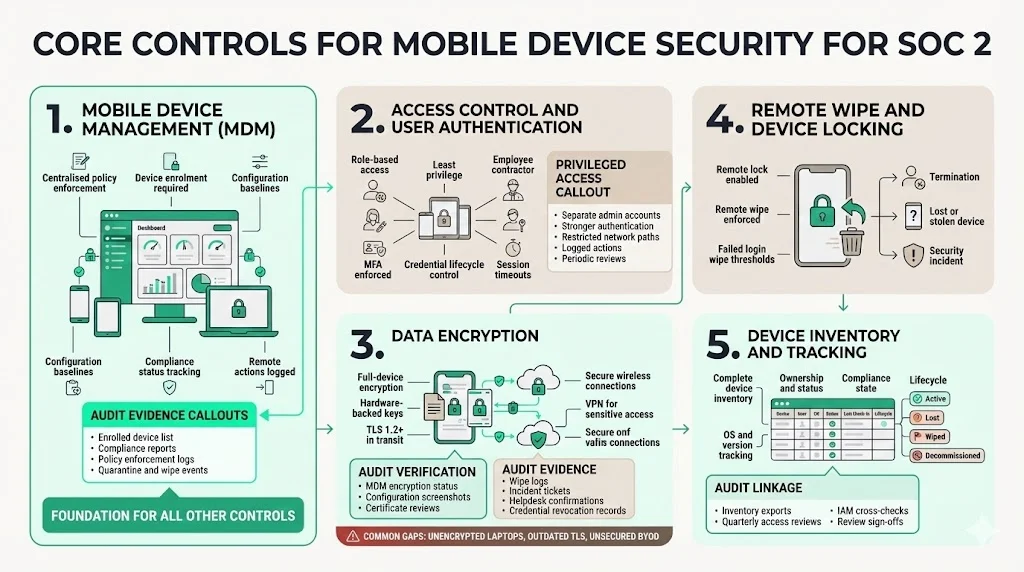
Why MDM is the backbone: NIST SP 800‑124r2 identifies MDM solutions as essential for enforcing security policies, pushing configuration updates, tracking inventory and initiating remote wipe. MDM provides a centralized way to ensure that all devices—corporate or personal—meet minimum security baselines before they can access company resources. Without MDM, it is nearly impossible to maintain an accurate device inventory or apply consistent controls across diverse endpoints.
What auditors expect to see: Auditors expect evidence that all in‑scope devices are enrolled in an MDM platform. This includes a list of active devices, their compliance status, and configuration profiles. They will ask how new devices are onboarded (zero‑touch or manual enrolment), who approves enrolment, and how the organisation ensures devices remain enrolled over time. MDM logs should show policy enforcement actions, such as failed compliance checks, quarantine events, or remote wipe commands.
Typical MDM features tied to compliance:
- Device enrolment: Automatic or user‑initiated enrolment ensures all new devices register before accessing corporate resources.
- Configuration enforcement: Policies enforce password complexity, screen lock, encryption, OS updates and app whitelists.
- Device inventory tracking: MDM maintains a real‑time inventory of all enrolled devices, capturing hardware identifiers, OS versions, owner information and last check‑in. The AICPA criterion CC6.1 emphasises the need to restrict logical access to mobile devices; MDM provides the mechanism to implement that restriction.
2) Access Control and User Authentication
Role‑based access for mobile users: Access should be granted based on roles and least‑privilege principles. The AICPA Trust Services Criteria require organisations to create or modify access to protected information assets based on authorisation and to remove access when no longer required. For mobile devices, this means mapping each role (developer, support engineer, salesperson) to the systems they can access via mobile and enforcing role‑based profiles within MDM.
MFA expectations for mobile access: Multi‑factor authentication (MFA) is standard. NIST recommends combining device passcodes with factors such as one‑time passcodes, biometrics or hardware tokens. MFA reduces the risk of credential theft and is often mandated by customers and regulators. Auditors will verify MFA settings in identity providers (e.g., Okta, Azure AD) and may perform sample tests.
Session timeouts and lock policies: Devices should automatically lock after a short period of inactivity (e.g., five minutes) and require reauthentication. Policies should prevent users from disabling lock screens. MDM can enforce these settings across iOS, Android, Windows and macOS devices.
Handling privileged access on mobile: Administrators should use separate accounts for privileged operations and avoid performing high‑risk tasks on mobile devices when possible. If mobile administration is unavoidable, enforce stronger authentication, restrict network scope (e.g., via bastion host or jump box) and log all actions. Maintain a list of individuals authorised for privileged mobile access and review it regularly.
3) Data Encryption
Encryption at rest on mobile devices: Encrypting device storage protects data if the device is lost. NIST guidelines urge organisations to use full‑device encryption and ensure encryption keys are properly managed. For laptops, enable BitLocker, FileVault or similar solutions. For phones and tablets, ensure hardware‑backed encryption is enabled and cannot be disabled by users. Document encryption configuration in policies and maintain evidence (screen captures, MDM reports) showing encryption status.
Encryption in transit for mobile connections: Data transmitted between mobile devices and corporate services must be encrypted using TLS 1.2 or higher. SOC 2 guidance expects organisations to protect information during transmission and restrict transmission to authorised users. Use VPNs or secure gateways for sensitive traffic. When using wireless networks, implement WPA3 or equivalent encryption and avoid connecting to untrusted public Wi‑Fi. For IoT devices, isolate them on separate networks and monitor their traffic.
How auditors verify encryption claims: Auditors may request system documentation, configuration screenshots or MDM reports. They may also perform technical testing, such as reviewing certificate configurations or verifying disk encryption status on a sample of devices. They will check whether encryption keys are protected and rotated. Provide policy references that require encryption at rest and in transit, and show evidence of compliance over the observation period.
Common gaps teams miss: Failing to enable full‑disk encryption on laptops, leaving removable media unencrypted, using outdated SSL/TLS protocols, or failing to enforce VPN usage when employees connect via public networks. BYOD devices may have encryption turned off by default; MDM should enforce encryption before granting access.
4) Remote Wipe and Device Locking
When remote wipe is required: According to NIST, organisations should enable remote lock and wipe functionality and trigger it when a device is lost, stolen or compromised. Devices should also wipe themselves after a predetermined number of failed authentication attempts. Termination of employment or contract should be another trigger: remove access and wipe corporate data immediately upon offboarding.
Triggers for wipe actions:
- Termination: Offboarding processes should automatically disable accounts and initiate remote wipe or corporate data removal on BYOD devices.
- Device loss: If a user reports a lost or stolen device (ideally within hours, not 25 hours as the HP study found, the administrator should initiate a wipe via MDM and revoke credentials.
- Security incidents: Compromised devices (e.g., infected with malware) should be isolated and wiped to prevent lateral movement.
Evidence auditors often ask for: Audit documentation should include MDM logs showing remote wipe events, proof that devices were locked or wiped after termination and evidence that lost devices were reported and addressed in a timely manner. Provide incident tickets, screenshots of wipe commands and confirmations from the user or helpdesk.
5) Device Inventory and Tracking
Why asset tracking matters for SOC 2: Knowing which devices exist, who owns them and whether they meet compliance requirements is fundamental. The AICPA’s points of focus emphasise managing identification, authentication and physical access. Incomplete inventories lead to audit exceptions because auditors cannot confirm that all endpoints have controls applied.
Required device attributes: Your inventory should track device name, make/model, serial number, operating system, version, user/owner, assigned department or team, device status (active, decommissioned, lost), enrollment date, last check‑in date, compliance status and installed security software.
Ownership and status tracking: When an employee leaves, update the inventory to reflect the device’s status (returned, wiped, lost). Decommissioned devices should be wiped before disposal and then removed from active inventory.
Linking inventory to access reviews: During quarterly or monthly access reviews, cross‑reference the device inventory against identity and access management (IAM) records. Remove or remediate devices that no longer have an associated active user. Provide auditors with an inventory export and evidence of periodic review sign‑offs.
Lock down mobile endpoints before auditors flag them as risks.
Share your work email and turn your MDM controls into SOC 2 audit evidence.
Mobile Device Security Policies
Why written policies matter as much as tools
Technical controls alone are insufficient. Auditors expect written policies approved by management that describe how mobile devices are managed. Policies provide a baseline for enforcement, training and accountability. Without them, controls may be applied inconsistently or not at all. Documented policies also help customers understand your security posture during procurement due diligence.
Required policy elements auditors expect
At minimum, your mobile device policy should cover:
-
Scope and applicability: Define which devices (corporate‑owned, BYOD, contractor) are in scope.
-
Enrollment and configuration: Require MDM enrolment, define configuration baselines and specify how devices are provisioned.
-
Access controls and authentication: Outline password complexity requirements, MFA usage, session timeouts and privileged access restrictions.
-
Data protection: Require encryption at rest and in transit, restrict data storage on external media, and define acceptable cloud storage services.
-
App management: Describe how applications are vetted, installed and updated. Prohibit jailbroken/rooted devices and unauthorised app stores.
-
Incident reporting and response: Set expectations for reporting lost or compromised devices, including timeframes.
-
Remote wipe and offboarding: Explain when and how corporate data will be removed, particularly for BYOD.
-
Monitoring and privacy: Explain what monitoring is performed, such as MDM compliance checks, and how employee privacy is protected.
-
User responsibilities and acknowledgement: Require users to acknowledge the policy, understand consequences for noncompliance and agree to monitoring.
How policies tie to daily practice
Policies should map to actual procedures. For instance, if the policy requires reporting lost devices within 24 hours, ensure the helpdesk triage process captures date/time of report and the MDM system triggers a remote wipe. If BYOD users must consent to remote wipe, your MDM enrolment workflow should collect explicit acknowledgement. Auditors will trace from policy to evidence, so aligning documentation with operational practice reduces the risk of exceptions.
Common policy mistakes that raise audit questions
-
Vague scope: Failing to clearly define which devices or user groups the policy applies to.
-
Unenforced rules: Policies that mandate encryption or MFA but are not enforced by MDM.
-
Lack of user acknowledgement: Not obtaining documented acceptance of the policy from employees and contractors.
-
Outdated references: Policies citing obsolete OS versions or encryption protocols.
-
Unclear BYOD terms: Not specifying whether personal devices can store company data or whether company data can be wiped.
Mobile Device Policy Template Walkthrough
What a strong policy includes
A robust mobile device policy begins with a statement of purpose: to protect company data accessible via mobile devices while enabling productivity. It identifies the audience (employees, contractors, vendors) and clarifies that compliance is mandatory. Next, it outlines acceptable use, security configuration requirements, enforcement, and exceptions.
Acceptable use rules
Define which activities are permitted and prohibited. For example, allow business email, secure messaging and approved productivity apps; prohibit jailbreaking/rooting, file sharing outside approved channels, and storing sensitive data in personal cloud services. Specify whether streaming media, social networking or gaming is permitted on company devices during work hours.
Security configuration requirements
List mandatory settings: full‑disk encryption, screen lock with a minimum complexity, automatic lock after five minutes, biometric or MFA for unlocking, automatic updates enabled, and installation only from approved app stores. For laptops, require endpoint protection software and host‑based firewalls. For phones/tablets, enable device location tracking and remote wipe.
Enforcement and exception handling
State that violations may result in device quarantine, loss of access or disciplinary action. Provide a process for requesting exceptions (e.g., for legacy applications) and ensure that a security owner documents, approves exceptions and periodically re-evaluated.
How to customise templates for enterprise buyers
Customers may ask for policy copies during security reviews. Tailor templates to emphasise how controls map to the TSC and regulatory frameworks relevant to the buyer (e.g., HIPAA, GDPR, ISO 27001). Include cross‑reference tables that show which policy sections address each criterion. Provide a high‑level summary for non‑technical stakeholders and a detailed appendix for technical reviewers. Use plain language to build confidence and avoid marketing language; emphasise that policies are enforced through a human‑led, managed security and compliance program rather than simply being “checked off”.
BYOD Controls and Expectations
Why BYOD increases audit scrutiny
BYOD introduces heterogeneity and reduces direct control over hardware and software. ISO 27001 Annex A.6.2 explicitly states that organisations must have a security strategy for teleworking and mobile devices. The guidance highlights that BYOD can be beneficial but adds substantial risk if controls are not applied. Auditors therefore ask more probing questions about personal device controls, user agreements and separation of personal and corporate data.
Controls that apply to personal devices
-
Device enrolment and configuration: Require BYOD devices to enrol in MDM before accessing corporate resources. Enforce password policies, encryption and OS updates.
-
Data separation and containerisation: Use containerisation or secure workspaces to separate corporate data from personal data. This enables remote wipe of the corporate container without affecting personal content.
-
User consent and monitoring language: Obtain explicit consent from users regarding MDM monitoring, data collection and remote wipe. Explain what data is collected (e.g., device health, installed apps) and what is not (e.g., personal photos).
-
App and network controls: Restrict app installation to approved stores, block jailbroken/rooted devices, and require VPN connections for sensitive access.
-
Periodic compliance checks: Schedule regular compliance checks to verify that BYOD devices remain in compliance and re-enforce policies if devices fall out of compliance.
How to show auditors that BYOD risk is managed
Provide user enrolment records, signed policy acknowledgements and MDM reports for BYOD devices. Document your containerisation technology and include screenshots or logs showing separation of data. Share copies of BYOD training materials and usage guides. During the audit, proactively explain how BYOD devices are treated differently (e.g., corporate container vs. entire device) and demonstrate remote wipe on a test device.
Incident Response for Mobile Devices
How mobile incidents fit into incident response plans
Incident response plans must account for mobile-specific scenarios. NIST SP 800‑124r2 recommends that organisations include remote lock and wipe, device isolation, forensic analysis and notification procedures for lost or compromised devices. Incident response teams should be familiar with MDM controls and have a playbook for mobile incidents.
Examples of mobile‑related incidents
-
A phone containing production SSH keys is stolen at an airport.
-
A malware‑infected Android app exfiltrates customer data.
-
An employee connects to a public Wi‑Fi hotspot that performs a man‑in‑the‑middle attack on the corporate VPN.
-
A contractor’s tablet is jailbroken, bypassing MDM controls and installing unauthorized apps.
Response steps auditors expect
-
Detection: Identify the incident through user reports, endpoint detection alerts or monitoring tools.
-
Containment: Lock or isolate the device via MDM; disable user credentials in IAM.
-
Eradication: Wipe or reimage the device; remove malware; rotate affected credentials.
-
Recovery: Reissue the device with secure configuration; restore business services.
-
Notification: Report the incident to affected stakeholders, regulatory bodies or customers as required by law. Maintain an audit trail of notifications.
-
Post‑incident review: Conduct a root‑cause analysis, update policies or controls and document lessons learned.
Logging, escalation and closure
Every mobile incident should be logged in your incident management system. Log entries should capture event time, reporter, device details, actions taken and closure status. Escalate high‑severity incidents (e.g., involving sensitive data or compromised credentials) to the security team and leadership promptly. After closure, update the risk register and implement corrective actions. Provide auditors with incident logs, response timelines and evidence of post‑incident reviews.
Post‑incident review evidence
Auditors will ask for evidence that you completed post‑incident activities. Provide meeting minutes, root‑cause analysis documents and updated policies or procedures. Document changes to MDM configuration, user training or vendor controls resulting from the incident. Demonstrating continuous improvement helps auditors see that you treat incidents as learning opportunities, not just checkboxes.
Mobile Access Reviews and Audit Evidence
How mobile access is reviewed during audits
During a SOC 2 audit, auditors examine how the organisation reviews mobile access rights and device compliance. They may select a sample of users and request evidence of their device enrolment, assigned roles and last access review. They will ask to see how often reviews are performed (e.g., quarterly) and who signs off on them. Access reviews must include contractors and BYOD users, not just full‑time employees.
What evidence auditors ask for
-
Access lists: An inventory of users with mobile access to each system, including role definitions and associated devices.
-
Review sign‑offs: Documentation showing who reviewed access, what changes were made and when.
-
MDM reports: Exports that show device compliance status, encryption status, last check‑in date and any remediation actions.
-
Review frequency expectations: Many auditors expect quarterly access reviews for high‑risk systems and semi‑annual reviews for lower‑risk ones. Some may require more frequent reviews if the organisation processes regulated data (e.g., ePHI under HIPAA). Provide policies specifying review cadence.
How to reduce audit back‑and‑forth
Prepare a mobile access review package before the audit. Include a cover sheet explaining your process, a summary of the last review’s findings and an appendix with detailed logs. Provide evidence in a format the auditor can easily analyse, such as CSV or PDF exports. Document any exceptions discovered during the review and your remediation actions. Proactive communication reduces follow‑up questions and accelerates the audit.
Regulatory and Enterprise Buyer Expectations
How SOC 2 mobile controls support regulatory compliance
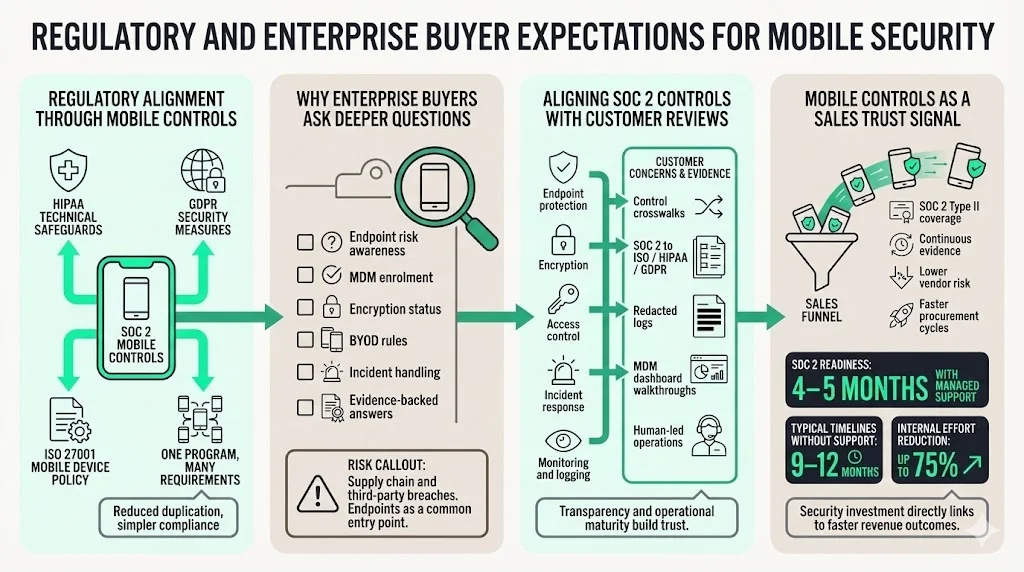
Mobile controls implemented for SOC 2 often align with other frameworks. HIPAA’s Security Rule requires covered entities to implement technical safeguards such as encryption, access controls and audit logs for electronic protected health information (ePHI). GDPR requires data controllers to apply appropriate security measures and maintain records of processing. ISO 27001 Annex A.6.2 mandates a mobile device policy and teleworking security strategy, which overlaps with SOC 2 CC6 controls. By implementing comprehensive mobile controls, organisations can meet multiple requirements with one program. This reduces duplication and simplifies compliance.
Why enterprise clients ask deeper mobile questions
Procurement teams recognise that endpoints are the front line of data protection. They ask about MDM enrolment, encryption, incident response and BYOD policies because they’ve seen how often vendors are compromised via laptops and phones. The rise of supply chain attacks and third‑party breaches—responsible for 30 percent of all data breaches—has made due diligence more rigorous. Clients may also request a copy of your mobile device policy or include specific questions in security questionnaires. Detailed answers backed by evidence can accelerate sales cycles, while vague responses can stall them.
Aligning SOC 2 controls with customer security reviews
Map your mobile controls to the categories your customers care about: endpoint protection, encryption, access control, incident response and monitoring. Provide crosswalks showing how SOC 2 controls also satisfy ISO 27001, HIPAA or GDPR requirements. Offer to walk customers through your MDM dashboard or share redacted logs. Emphasise that your program is human‑led and managed rather than an automated checklist; experienced practitioners handle daily operations, monitor anomalies and respond to incidents.
Using mobile controls as a trust signal in sales
Clearly communicate that you have a robust mobile device security program. Highlight that your SOC 2 Type II report covers mobile controls and that you maintain continuous evidence over the observation period. Provide metrics such as typical SOC 2 readiness in 4–5 months with Konfirmity compared to 9–12 months without managed support and that our clients reduce internal effort by 75 percent due to our outcome‑as‑a‑service approach. When customers see that you invest in mobile security, they perceive lower vendor risk and may shorten the procurement cycle.
Implementation Checklist
Implementing Mobile Device Security For SOC 2 requires coordination across tools, policies and people. Use this checklist as a step‑by‑step rollout plan.
-
Establish scope and ownership: Identify which devices and user groups are in scope. Assign a mobile security owner or team.
-
Perform a risk assessment: Document risks by device type, user role and data sensitivity. Align with TSC criteria.
-
Select and deploy MDM: Choose an MDM platform that supports your device types (iOS, Android, macOS, Windows). Configure baseline policies. Enrol all corporate‑owned devices and require BYOD enrolment.
-
Develop and approve policies: Draft a mobile device policy and BYOD addendum. Obtain executive approval and communicate the policy. Collect user acknowledgements.
-
Implement access controls: Configure IAM integration, enforce MFA, set up role‑based access and define session timeouts.
-
Enable encryption and data protection: Configure full‑disk encryption, enforce TLS 1.2+ for transmissions and implement containerisation for BYOD.
-
Set up monitoring and logging: Configure MDM alerts, endpoint detection and response (EDR) tools and integrate logs with SIEM. Define thresholds for escalation.
-
Prepare incident response: Update your incident response plan to cover mobile scenarios. Train the team on remote wipe, isolation and forensics. Conduct tabletop exercises.
-
Perform pilot and remediation: Roll out policies to a pilot group, collect feedback and refine controls. Fix non‑compliant devices before full deployment.
-
Launch organisation‑wide: Enrol remaining devices, enforce policies and communicate ongoing requirements. Provide training materials.
-
Conduct access reviews and audits: Perform periodic access and device reviews. Generate evidence packets. Address exceptions promptly.
-
Review and update: Adjust controls as new devices, threats or regulatory requirements emerge. Review policies annually and after major incidents.
Common Mistakes That Delay SOC 2 Reports
-
Over‑scoping mobile devices: Including devices that never access service data creates unnecessary workload. Document out‑of‑scope devices with clear justification.
-
Under‑scoping BYOD: Excluding personal devices that access email or cloud apps leaves a gap; auditors will notice.
-
Missing policy enforcement proof: Policies without evidence of enforcement lead to exceptions. Always maintain MDM logs, user acknowledgements and incident records.
-
Weak device inventory records: Incomplete or outdated inventories prevent auditors from verifying control coverage. Keep inventories up to date and reconcile them regularly.
-
Inconsistent access reviews: Skipping or delaying quarterly reviews creates audit gaps. Schedule them and assign accountability.
-
Delayed incident reporting: Employees sometimes fail to report lost devices promptly; this delay increases risk and can lead to findings. Train users to report immediately and track response times.
Bring BYOD phones into scope before your auditor does
Book a demo and we'll show how Konfirmity keeps your device inventory, MDM coverage, encryption and remote-wipe settings current, including the personal phones that reach production.
Book a demo
Conclusion
Mobile devices are no longer auxiliary assets; they are primary gateways to cloud services and customer data. The AICPA Trust Services Criteria explicitly require processes to protect mobile devices, and frameworks such as ISO 27001 and NIST provide detailed guidance for implementing those controls. As the cost of breaches and the prevalence of mobile threats rise, SOC 2 audits now scrutinise laptops, phones and tablets with the same rigor applied to servers and network infrastructure.
For organisations selling to enterprises or handling regulated data, investing in Mobile Device Security For SOC 2 is not optional. It reduces audit risk, protects against costly incidents and signals maturity to customers. The path to compliance starts with a risk assessment, continues with well‑designed controls—MDM, access control, encryption, incident response—and is sustained through policies, training and continuous monitoring. At Konfirmity, our human‑led, managed security and compliance service turns this framework into an operational reality. We design and operate your mobile controls, maintain evidence year‑round and help you pass SOC 2 audits faster. Build controls that stand up to auditors, buyers and attackers alike.
Frequently Asked Questions
While SOC 2 doesn’t have a separate mobile section, the Trust Services Criteria include points of focus that require restricting access to mobile devices, controlling application installations, detecting malware and protecting data. Auditors interpret these requirements as necessitating mobile controls such as MDM, encryption and remote wipe.
Any laptop, phone, tablet or IoT device—whether company‑owned or personal—that accesses service data, email, VPN or production systems is in scope. Devices used solely for marketing or that never connect to sensitive systems may be excluded but must be documented with justification. Contractor and temporary devices follow the same rules.
Maintain a device inventory with attributes such as make, model, serial number, OS, owner, status and last check‑in. Link the inventory to access reviews and update it during onboarding and offboarding. Use MDM to enforce enrollment and collect inventory data.
BYOD devices must enrol in MDM, enforce encryption and screen lock, separate corporate data via containerisation, comply with application restrictions and allow remote wipe. Users must consent to monitoring and policy terms. Regular compliance checks ensure devices remain secure.
Auditors request access lists, review sign‑off records and MDM reports. Reviews should occur quarterly (or more frequently for high‑risk systems). Evidence should show who performed the review, what changes were made and how exceptions were addressed. Preparing these packets in advance reduces back‑and‑forth and accelerates the audit process.







