

Most buyers in the enterprise and healthcare space now demand evidence of operational security before they sign a contract. Questionnaires, security addenda and data‑processing agreements force vendors to show more than a shiny dashboard. Without continuous controls and credible proof, deals stall even when teams think they’re ready on paper. This reality has put a spotlight on multi‑factor authentication (MFA) and its role in SOC 2 Rolling Out MFA programs. Poor credential hygiene remains a major attack vector—Google Cloud’s mid‑2024 threat report observed that weak or no credentials accounted for 47.2% of initial access vectors in cloud breaches. IBM’s 2025 cost‑of‑breach report found that the global average cost of a breach was USD 4.44 million, and costs in the United States surged past USD 10.22 million. These numbers show why strong access controls aren’t just a compliance checkbox but a business imperative.
This article, written from the perspective of a practitioner who has helped implement thousands of compliance programs at Konfirmity, offers a step‑by‑step guide to SOC 2 Rolling Out MFA. We’ll explain how MFA bolsters the SOC 2 Trust Services Criteria, why strong authentication is essential for modern security programs, and how to design a rollout that supports your audit readiness while keeping your team productive. You’ll find practical templates and real‑world examples drawn from more than 6,000 security audits and 25 years of combined hands‑on experience. Throughout, we’ll refer to authoritative standards and current data, so you can make decisions rooted in facts rather than hype.
SOC 2 and the role of access control
SOC 2 is an attestation framework defined by the American Institute of Certified Public Accountants (AICPA). It assesses whether a service organization’s controls meet the Trust Services Criteria: security, availability, processing integrity, confidentiality and privacy. Even though organizations can choose which criteria to include, the Security criterion is mandatory. The Common Criteria 6 series under the Security principle deals specifically with logical and physical access controls. For example, CC6.1 states that an entity must implement logical access security software, infrastructure and architectures over protected information assets. CC6.2 requires registering and authorizing new users and removing credentials when access is no longer authorized. CC6.3 mandates granting, modifying or revoking access based on roles and least‑privilege considerations.
These criteria do not dictate a specific password length or prescribe the exact factors you must use for authentication. Instead, they require strong access controls that can stand up to scrutiny. That opens the door for auditors to expect practices such as MFA, particularly for high‑risk systems. An analysis of CC6.2 points out that strong logical access controls must enforce strict user authentication, employing multi‑factor verification with biometric and token‑based checks, to confirm user identities and continuously capture an evidence chain. In practice, this means auditors will look for evidence that you have effective controls to prevent unauthorized access and that you can show who had access, when and why.
Where passwords fall short
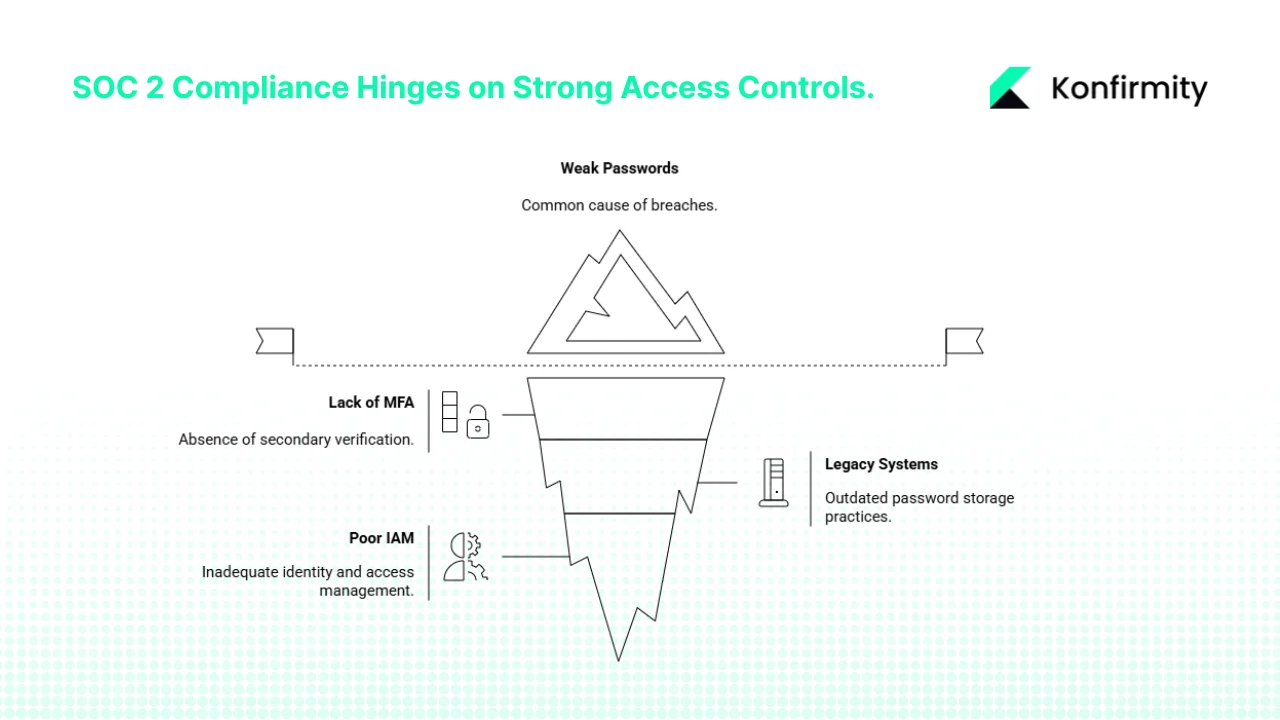
Despite decades of guidance, many organizations still rely on single‑factor logins. Weak or reused passwords remain the common denominator in breaches. Google Cloud’s Threat Horizons H2 2024 report showed that weak or no credentials were behind almost half of the cloud intrusions. Attackers use credential stuffing, phishing and brute‑force attacks to exploit these gaps. Legacy systems that store passwords without proper hashing, or fail to enforce rotation and uniqueness, create a fertile ground for compromise. When credentials are compromised, there is no secondary check to verify the user’s identity. Single‑factor logins also make it hard to gather audit evidence; you may know that a password was used, but you can’t link the login to a specific person or device.
From a SOC 2 perspective, these weaknesses undermine the Security criterion. Without strong access controls, you lack reliable evidence to show that only authorized users accessed protected data. Weak passwords also affect other criteria: a breach can disrupt system availability and expose confidential or private data. The IBM 2025 report stresses that 97% of machine‑learning‑related security breaches involved systems lacking proper access controls. This statistic shows that identity and access management practices have not kept pace with changing threats, and that modern authentication mechanisms are necessary to protect sensitive workloads.
How MFA closes the gaps
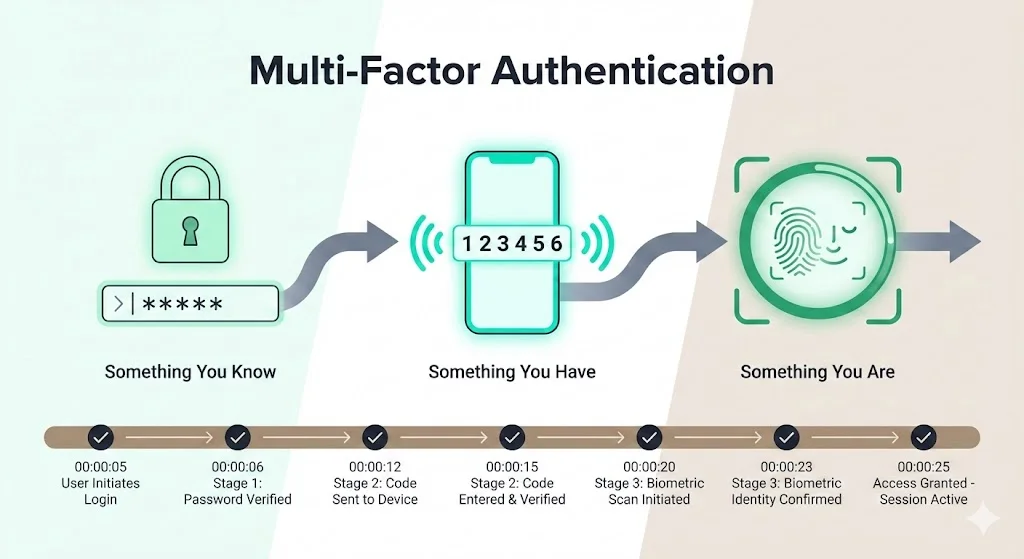
Multi‑factor authentication addresses the shortcomings of password‑only systems by requiring users to present two or more factors from different categories: something they know (such as a password), something they have (a hardware token or time‑based one‑time password on a phone) and something they are (biometrics). By combining these factors, MFA makes it far harder for attackers to gain unauthorized access. Even if a password is leaked, an attacker must compromise the second factor. Many implementations also allow for adaptive checks—step‑up authentication when a login comes from a new device or location, or risk‑based triggers when anomalous behavior is detected.
A guide to CC6.2 points out that streamlined multi‑factor authentication protocols strengthen security by combining biometric scans, token‑based systems and challenge‑response techniques, creating an uninterrupted evidence chain. It also emphasizes that centralized identity integration and ongoing monitoring convert each authentication event into a definitive compliance signal. In other words, MFA not only reduces the likelihood of unauthorized access but also provides the time‑stamped logs that auditors need to confirm that controls were enforced consistently.
Konfirmity’s experience bears this out. Across thousands of engagements, we see that clients who adopt MFA as part of their SOC 2 program experience fewer findings related to access control. MFA also reduces incident response times because identity verification logs let you trace suspicious logins quickly. Moreover, when you integrate MFA with single sign-on (SSO) and automated provisioning, you simplify user management. This is particularly valuable for enterprise SaaS vendors that must onboard and offboard customers and contractors efficiently.
Does SOC 2 require MFA? The detailed answer
A common question from clients is whether SOC 2 mandates MFA. SOC 2 does not explicitly require MFA, but it does require strong access controls. While multi‑factor authentication isn’t explicitly required, it is a best practice and highly suggested to strengthen authentication controls and mitigate unauthorized access risks. Because the Common Criteria’s points of focus describe practices such as multi‑factor verification, many auditors interpret MFA as the expected way to meet the requirements, particularly for privileged accounts, sensitive data stores and remote access.
In practice, whether you need an MFA will depend on your risk assessment. For high‑risk systems—production databases, administrative interfaces or systems containing customer data—the absence of MFA may lead to audit findings. For lower‑risk internal systems, you may be able to justify single‑factor login if you have compensating controls. However, the tide is clearly shifting. As more enterprise customers demand assurance that vendors protect their data, MFA is becoming a de facto requirement for winning deals. From a risk management perspective, the cost of implementing MFA is negligible compared to the potential cost of a breach or a failed audit.
Planning your MFA rollout
Implementing SOC 2 Rolling Out MFA in a busy organization requires careful planning. You need to balance security, compliance and user experience. Based on our experience delivering more than 6,000 security audits, we propose the following phased approach:
1. Define scope and stakeholders
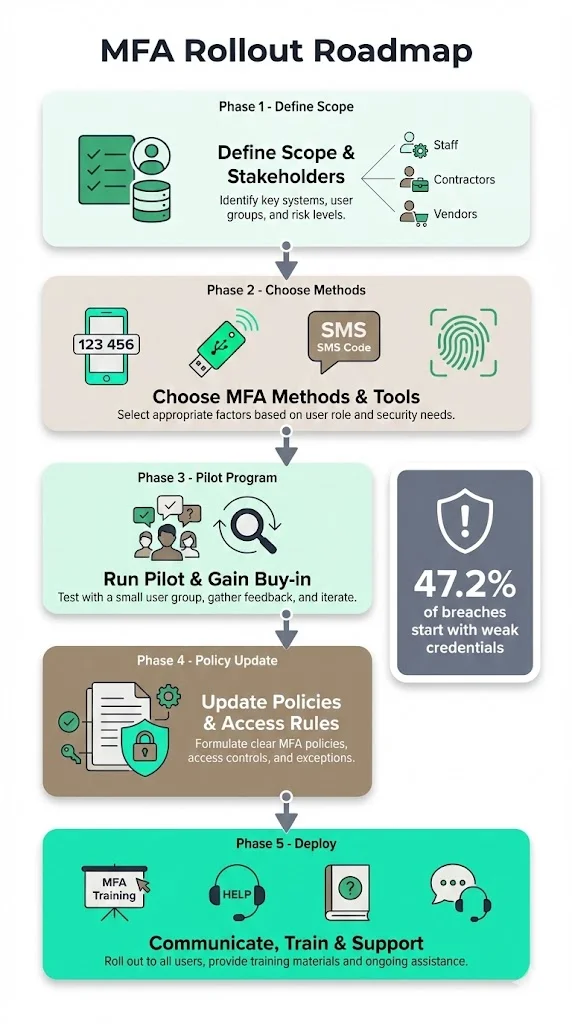
Start by inventorying all systems, applications and user roles. This includes internal staff, contractors, third‑party vendors, privileged accounts and remote workers. Identify which systems handle customer data or control critical processes. Use your risk assessment to determine MFA must cover which roles and systems. For instance, production infrastructure, SaaS applications used by customers and any system with regulated data should be in scope. Lower‑risk internal tools might be deferred or excluded initially.
2. Choose MFA methods and tools
Select authentication methods that balance security and usability. Common options include:
-
Authenticator apps (TOTP) such as Google Authenticator or Microsoft Authenticator. They generate time‑based one‑time codes and are widely supported.
-
Hardware tokens, including FIDO2FIDO2 tokens. These provide strong protection against phishing and can be required for privileged accounts.
-
SMS/OTP, which sends codes via text message. This method is easy to deploy but less secure; use it only for low‑risk accounts or as a backup.
-
Biometrics, such as fingerprint or facial recognition, particularly on managed mobile devices.
For distributed teams or organizations with varied risk profiles, consider adaptive or risk‑based MFA. Modern identity providers can adjust authentication requirements based on device health, location, IP reputation or behavioral anomalies. This prevents overburdening users while still enforcing strong controls when risk is high.
3. Run a pilot and gain buy‑in
Before mandating MFA for everyone, pilot the chosen solution with a small group—typically the IT or engineering team. This mirrors what Konfirmity advises when a business is concerned about adoption friction. The pilot helps surface usability issues, integration gaps and training needs. Collect feedback, document lessons learned and refine your rollout plan. Use this phase to secure executive sponsorship and communicate the benefits of MFA. When users understand that MFA protects their accounts and the company’s reputation, resistance drops significantly.
4. Update security policies and access control rules
Document your MFA requirements in your access control policy. Specify which user roles and systems require MFA, acceptable authentication factors, enforcement mechanisms and exceptions if any. Clarify onboarding and offboarding procedures—new team members must enrol in MFA before receiving access, and departing users must have tokens revoked. Assign responsibilities: who approves access, who manages MFA devices, and how exceptions are granted.
5. Communicate, train and support
Even the best technical control fails without adoption. Develop internal guides with step‑by‑step instructions and screenshots to help users enroll their devices. Offer training sessions to explain why MFA matters—for instance, share the Google Cloud statistic that weak or no credentials accounted for 47.2% of initial access vectors. Provide a support channel (help desk, chat or ticketing system) for troubleshooting. Clear communication reduces frustration and builds a security‑minded mindset.
Step‑by‑step implementation checklist
The following table summarizes the actions for a SOC 2 Rolling Out MFA program. Teams can adapt it by adding points out specific to their environment or mapping it to their preferred project management tools.
Step
Action
Outcome / What it Supports
1
Inventory all systems, applications, user roles and access points.
Identifies where MFA is needed; supports access control, identity verification and credential security.
2
Define the MFA policy—specify which accounts require MFA, permitted methods and how enforcement works.
Creates a documented security policy consistent with risk management and SOC 2 requirements.
3
Select MFA technology/tools (authenticator apps, hardware tokens, SSO with MFA).
Establishes the technical baseline for secure authentication.
4
Pilot the rollout with a small group and test workflows.
Validates that MFA works across systems and surfaces issues early.
5
Communicate the policy and provide training to all users.
Ensures smooth adoption and reduces resistance.
6
Enforce MFA across all in-scope accounts.
Achieves full coverage, improves access control and audit readiness.
7
Monitor and log all MFA events and access attempts.
Builds an evidence chain for audits; enables rapid investigation of anomalies.
8
Review and update the policy periodically (e.g., when new tools are added, roles change or risk assessments are updated).
Keeps the program consistent with evolving risks and maintains compliance.
MFA protects your users first, and your SOC 2 audit second.
Drop your work email and we'll design an MFA rollout that strengthens your security posture.
Real‑world examples and templates
Example 1: MFA policy snippet
Purpose: To ensure that only authorized individuals access Konfirmity’s production systems and client data.
Scope: All team members, contractors and third‑party vendors who access production systems, SaaS platforms or repositories containing customer or regulated data.
Policy: All in‑scope accounts must use MFA. Acceptable second factors include TOTP authenticator apps, FIDO2 hardware tokens or biometric authentication on managed devices. SMS codes may be used only as a backup. Users must enrol a primary and a backup factor during onboarding. Exceptions must be approved by the Chief Information Security Officer (CISO) and documented in the access control register. Offboarding procedures must revoke MFA tokens and accounts on the person’s last day.
Example 2: MFA rollout plan template
-
Inventory systems and accounts (Week 1).
-
Draft MFA policy and obtain executive approval (Weeks 1–2).
-
Select tool (Weeks 2–3). Evaluate vendor integrations and pilot with a technical team.
-
Pilot rollout (Weeks 3–4). Collect feedback and adjust configuration.
-
Training and communication (Week 4). Distribute user guides and schedule training sessions.
-
Organization‑wide rollout (Weeks 4–6). Enforce MFA for all in‑scope accounts.
-
Logging and monitoring (Week 6 onward). Enable centralized logging of authentication events.
-
Policy review (Quarterly). Update based on user feedback, new systems and risk assessments.
Example 3: Sample rollout communication
Subject: Mandatory Multi‑Factor Authentication for Production and SaaS Accounts
Message:
We are strengthening our security controls to protect customer and company data. Starting next Monday, all access to production infrastructure, Git repositories and SaaS applications will require MFA. Please follow the step‑by‑step guide attached to enrol your authenticator app. The process takes about five minutes. If you need assistance, reach out via the #security‑support channel or open a help desk ticket. Thank you for doing your part to keep our data safe.
Example 4: Logging and audit evidence template
Field
Description
Example
User ID
Unique identifier of the person or service account.
Timestamp (UTC)
When the authentication attempt occurred.
2025-12-01 14:35:42
System/Application
System being accessed.
Production Database
Method Used
MFA factors applied (e.g., password + TOTP).
Password + Hardware Token
Status
Success or failure of the authentication.
Success
Exception Reason
If applicable, documented reason for bypass (e.g., service account).
Approved maintenance window
Logs should be written to an immutable store, integrated with your SIEM and retained for the duration required by your data retention policy. Regularly review them to detect anomalies and prepare for audits.
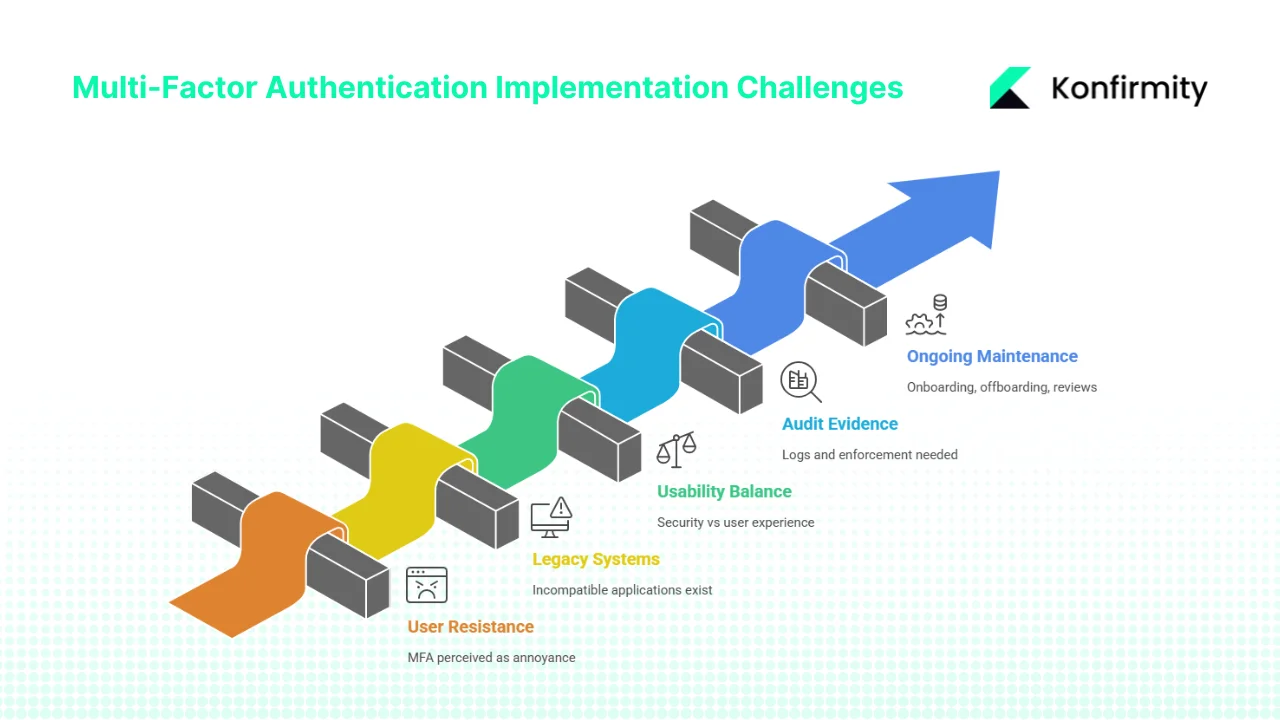
Major challenges and how to overcome them
1) User resistance and adoption friction
Many users perceive MFA as an annoyance. To overcome this, frame MFA as a personal safety measure rather than a compliance requirement. Share statistics—weak or no credentials caused nearly half of cloud intrusions—to illustrate why MFA matters. Use the pilot phase to refine the user experience. Offer push‑based or biometric options that reduce friction. Provide clear instructions and responsive support.
2) Legacy systems or incompatible applications
Not all systems support MFA natively. For older applications, consider compensating controls: place the legacy system behind a VPN that requires MFA, deploy identity‑aware proxies or integrate them into an SSO platform that adds MFA at the login layer. In some cases, you may need to upgrade or replace systems to meet security expectations. Document these decisions and discuss them with your auditor.
3) Balancing security with usability
A one‑size‑fits‑all approach can backfire. Use adaptive MFA to adjust requirements based on context. For example, require a hardware token when accessing from an untrusted network but allow a single factor when inside a secure corporate network. match the frequency of re‑authentication with the risk of the system. For privileged sessions, session timeouts should be shorter.
4) Audit‑ready evidence
SOC 2 auditors will expect you to provide logs and demonstrate that MFA was enforced consistently. Ensure your identity provider or MFA tool logs each authentication attempt with a timestamp, user identifier, system accessed and method. Centralize these logs in your SIEM. During the observation period of a SOC 2 Type II audit, auditors will sample these logs to verify ongoing effectiveness. The CC6.2 guidance emphasizes that every access event should be documented with minimal manual intervention, resulting in an audit window that clearly reflects control activities.
5) Ongoing maintenance
Rolling out MFA is not a one‑time project. New team members, contractors and service accounts need to be onboarded properly. Offboarding must include revoking tokens and removing accounts. Periodically review MFA enrolments to ensure tokens are still valid and associated with the correct user. Update your policy when new systems are adopted or when threats evolve. Conduct regular access reviews and tie them to performance processes to make sure privileges remain appropriate.
Conclusion
For organizations selling to enterprise and healthcare buyers, strong access control is no longer optional. SOC 2 Rolling Out MFA isn’t just about satisfying an auditor; it’s about protecting data, reducing breach risk and enabling sales. The cost of not acting is clear: the average global breach cost is USD 4.44 million, and in the United States it exceeds USD 10 million. Meanwhile, weak or absent credentials continue to be a leading cause of intrusions. By adopting MFA thoughtfully—scoping critical systems, selecting the right tools, piloting, updating policies, training users and logging access—you build a durable foundation for security and compliance. Konfirmity’s approach, grounded in thousands of audits, shows that organizations can achieve SOC 2 readiness in four to five months with under 70 hours of internal effort when supported by a human‑led managed service. In contrast, self‑managed programs often stretch to nine to twelve months and 550+ internal hours.
The main takeaway is that controls must work in reality, not just on paper. When you design your SOC 2 program around sound security practices—like MFA, least privilege, continuous monitoring and regular reviews—compliance follows as a natural consequence. Build the program once, operate it daily and use evidence to prove it. That’s how you earn trust with clients, auditors and your own teams.
Frequently Asked Questions
1) Does SOC 2 require an MFA?
SOC 2 does not name MFA as a mandatory control. However, the framework’s common criteria require strong logical access controls. Guidance from reputable compliance providers points out that MFA isn’t explicitly required, but is highly suggested to strengthen authentication controls and mitigate unauthorized access risks. Most auditors expect MFA for privileged accounts and sensitive systems because it demonstrates effective access control.
2) How should we roll out MFA?
Follow a phased approach: inventory systems, define a policy, choose appropriate MFA methods, pilot with a small group, communicate and train, enforce organization‑wide, log authentication events and review regularly. The checklist above provides a concrete workflow. Adapt it to your environment and risk profile.
3) Does NIST SP 800‑171 require an MFA?
Yes. NIST SP 800‑171, which governs controlled unclassified information for U.S. federal contractors, includes a derived requirement that organizations must “use multifactor authentication for local and network access to privileged accounts and for network access to non‑privileged accounts”. Other related requirements cover password complexity, preventing reuse and replay‑resistant mechanisms.
4) Do security questions count as MFA?
No. Security questions are another knowledge‑based factor (“something you know”), similar to a password. MFA requires at least two different factor types: for example, a password plus a hardware token or a biometric scan. Using two knowledge‑based factors does not meet the definition of MFA.







